
TL;DR
Verdict: CloudTalk is the best IVR software for SMBs and growing sales teams, thanks to its visual call flows, deep CRM integrations, and AI Voice Agents. Larger, multi-channel operations lean toward enterprise contact center IVR software like Genesys, NICE CXone, or Talkdesk.
The 8 best IVR software platforms by use case:
- 01CloudTalk: best IVR software for SMBs aiming to scale
- 02MightyCall: best for ease of use and affordability
- 03Twilio: best for developer flexibility and custom builds
- 04Genesys: best for large, multi-channel contact centers
- 05NICE CXone Mpower: best for regulated, high-volume environments
- 06RingCentral: best for scalable automation with strong integrations
- 07Five9: best for AI features and omnichannel support
- 08Talkdesk: best for enterprise-ready automation and security

Don't make people rage-hang up. Let your IVR do the heavy lifting.

What Is IVR Software?
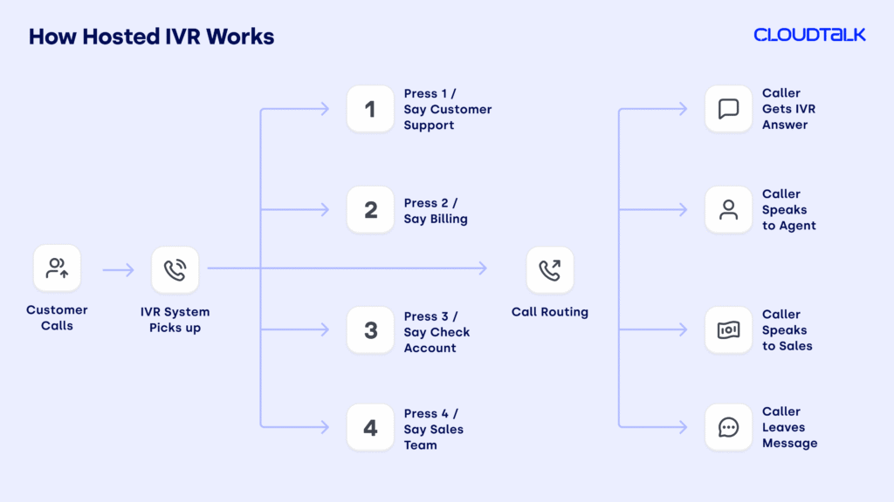
IVR software, short for Interactive Voice Response software, is a system that answers and handles inbound calls automatically, without needing a person to pick up right away.
When someone calls, instead of speaking directly to an agent, they hear a recorded menu of options, like “Press 1 to check your balance, Press 2 to speak with customer support.” The caller then uses their keypad or simply speaks to choose what they need. Modern IVR call software pairs those menus with speech recognition, CRM data, and AI, so callers reach the right place faster and many requests resolve without an agent at all.
Self-service is now the default expectation for most callers, not the exception. The right IVR system meets that expectation by automating call routing, improving response times, and keeping your team focused on the conversations that need a human.
The video below explains more about how IVR works:
What’s the Difference Between IVR and Auto-Attendant?
Both IVR and auto-attendants answer calls, play recorded messages, and route people to the right place without a human on the line. They look similar, but there are important differences.
| Auto-Attendant | IVR | |
|---|---|---|
| Purpose | Routes callers to the right department or person | Automates tasks and helps callers solve requests themselves |
| Interaction | Uses simple “press 1, press 2” menus | Supports voice commands, keypad inputs, and more complex flows |
| Capabilities | Basic call routing | Advanced automation with integrations like CRMs or databases |
| Best for | Simple call handling needs | Reducing agent workload and improving customer self-service |
Auto-Attendant: Fast Routing with Fixed Options
Think of an auto-attendant as a digital receptionist. It offers basic “press 1, press 2” menus based on pre-recorded scripts. It’s ideal for simple setups where you just need to route calls to the right department quickly.
A small accounting firm uses an auto-attendant to direct calls to billing, payroll, or the receptionist without needing an operator.
IVR: Intelligent, Action-Driven, and Integrated
IVR call systems go a step further. They let callers speak instead of pressing buttons, connect with your other tools like a CRM, and handle tasks automatically, such as checking an order or booking an appointment.
An e-commerce company uses IVR to let customers check delivery updates or start a return without speaking to an agent.
How Much Does IVR Software Cost?
IVR pricing varies widely: basic plans start at $15–$30/user/month, while advanced contact center IVR software can exceed $100/user/month.
Leading IVR providers typically bundle routing into their broader cloud communication packages rather than charging for it separately. Here are the three main pricing models you’ll encounter, and what they mean for your budget:
- 01Cloud-based (SaaS):Most common for SMBs, at $15–$100/user/month with minimal setup costs. Best for teams that need scalability and a fast rollout, and the most cost-effective way to adjust workflows and add seats as you grow.
- 02On-premises:High upfront investment ($10K–$50K+) in hardware and software. Suited for enterprises that need full control and deep customization.
- 03CPaaS / usage-based:Some providers charge per minute or per active user hour. Ideal for developers or teams with fluctuating call volume.
Cloud IVR vs On-Premises IVR: Which Fits Your Business?
Cloud IVR (SaaS) runs entirely in the provider's infrastructure. There's no hardware to buy or maintain, it's accessible from any device, and it scales up or down in minutes, billed per user or per month. Best for: SMBs and growing teams that want speed, flexibility, and predictable costs. The main downside is that it needs a reliable internet connection, and your data lives in the cloud.
On-premises IVR means hardware and software installed in your own data center. You get full control over configuration and data, but at a high upfront investment ($10K–$50K+) and with a need for internal IT support. Best for: enterprises with strict data sovereignty requirements or highly regulated industries (government, defense) that can't use cloud infrastructure.
Additional cost factors include:
- Telecom usage fees (call minutes, toll-free numbers)
- AI features (speech recognition, conversational routing)
- CRM and helpdesk integrations
- Multilingual IVR support
- Advanced analytics and reporting
How We Chose the Best IVR Software
To build this guide, we reviewed and compared over 20 leading IVR platforms, drawing on feedback from 2,000+ professionals across customer support, sales, and operations teams on G2, Capterra, and TrustRadius.
When evaluating IVR system software, it’s critical to look beyond basic keypad routing and find platforms that offer intelligent automation and real-time CRM syncing.
The 8 best IVR software providers were selected based on call routing capabilities, ease of setup, CRM and helpdesk integrations, automation and AI features, and compliance, plus how well they performed in real customer service workflows. We only included IVR solutions that deliver real results, with clear notes on which teams, use cases, and call volumes each is best suited for.
Why Trust Our Software Reviews?
Enter your summary contenFor nearly a decade, we’ve helped over 30,000 professionals choose and implement better communication tools. We’ve reviewed 200+ products, analyzed 5,500+ verified reviews from G2 and Capterra, and drawn insights from real user discussions on platforms like Reddit and Quora.
In the past year alone, we’ve published 1,000+ articles, all written and reviewed by humans, for humans, to deliver reliable, data-backed insights you can trust.
Learn how we keep our content integrity and our software review methodology.t here...
Quick Comparison Table of the Best IVR Software
The table below compares all 8 IVR software platforms at a glance. Skip ahead to the in-depth reviews for the full breakdown of each tool.
Best IVR Software for Small Businesses and Call Centers
| IVR Software | Key Features | Best For | G2 Rating | Starting Price |
|---|---|---|---|---|
| CloudTalk | AI Voice Agent, visual Call Flow Designer, 100+ integrations, real-time analytics | SMBs and growing sales/support teams | 4.3/5 | From $25/user/month |
| MightyCall | Multi-level IVR, customizable call routing, call queuing, affordable pricing | Ease of use and affordability | 4.4/5 | From $20/user/month |
| Twilio | Low-code visual builder, AI personalization, international numbers in 100+ countries | Developer flexibility and custom builds | 4.1/5 | From $35/user/month |
| Genesys | Intelligent call routing, omnichannel integration, drag-and-drop flow builder | Large, multi-channel contact centers | 4.4/5 | $75/user/month |
| NICE CXone Mpower | Advanced call routing, speech recognition & conversational AI, CRM integration | Regulated, high-volume environments | 4.3/5 | From $110/user/month |
| RingCentral | Drag-and-drop IVR builder, multi-level menus, 300+ integrations | Scalable automation with strong integrations | 4.1/5 | From $20/user/month |
| Five9 | Visual IVR & mobile optimization, omnichannel support, Intelligent Virtual Agents | AI features and omnichannel support | 4.1/5 | From $119/user/month |
| Talkdesk | Virtual Agent, conversational IVR, AI post-call summaries | Enterprise automation and security | 4.4/5 | From $85/user/month |
IVR Software for Small Business: How to Choose the Right System
Most IVR software was designed for enterprise contact centers with 100+ agents and dedicated IT teams. Small businesses need something different: a system that's fast to set up, easy to manage without technical expertise, and affordable enough to make sense at 10–50 seats. Here's what to look for.
- 01No-code setup:Small teams can't wait for IT configuration. Look for a visual, drag-and-drop call flow designer you can configure yourself in under an hour, no developer, no implementation consultant. CloudTalk's Call Flow Designer and MightyCall's visual builder are both designed for this. Avoid enterprise platforms (Genesys, NICE CXone) that require professional services to implement.
- 02Transparent per-user pricing:Enterprise IVR platforms often don't publish prices. For small businesses, predictable monthly billing is essential: you need to know the all-in cost before you commit. CloudTalk publishes pricing from $25/user/month; MightyCall from $20/user/month. Both offer monthly plans without annual contract lock-in at entry tiers.
- 03CRM integration without middleware:
- 04Growth headroom:Pick a system that scales without a platform migration when you hit 50 or 100 seats. CloudTalk supports up to 500 seats on its standard plans; adding AI Voice Agents, omnichannel messaging, or advanced routing is a plan upgrade, not a replatforming.
The 8 Best IVR Software Solutions for 2026, Reviewed
The market is flooded with IVR solution providers, but the platforms below stand out for reliability, ease of use, and advanced call flow capabilities. The best IVR company depends on your size and needs: CloudTalk is the strongest pick for growing SMBs and sales teams, while enterprise platforms like Genesys or Talkdesk suit massive, multi-channel contact centers.
1. CloudTalk: Best IVR Software for SMBs
What Is CloudTalk?
CloudTalk is an AI-powered, cloud-based IVR platform built for SMBs that want enterprise-grade routing at an SMB-friendly price. Except for the IVR solution, CloudTalk is a fully cloud-based calling platform with an AI voice agent and 24/7 answering service. Trusted by 5,500+ businesses, it pairs advanced AI features, customizable call flows, and real-time analytics in one scalable IVR calling software. It integrates with 100+ tools, offers an open API, supports local numbers in 160+ countries, and runs on 99.999% uptime with multi-language support.
What Is CloudTalk Best For?
SMBs seeking a flexible, scalable, feature-rich IVR system for small business, especially teams that want to improve customer experience, streamline workflows, and support growth without heavy upfront investment or technical complexity.
What Are CloudTalk’s Key Features?
- AI Voice Agent: qualifies leads, confirms meetings, sends reminders, and gathers feedback, operating 24/7 with real-time escalation to human agents when needed.
- Intelligent call routing: routes calls based on customer input, agent skill, location, customer data, and VIP status, so callers reach the right person fast.
- Customizable multi-level menus: build multi-level IVR menus and call flows with complex routing logic, no coding required.
- IVR monitoring and real-time analytics: dashboards and reporting show menu paths, drop-off points, and queue performance as calls happen.
What Are CloudTalk’s Best Integrations?
What Are CloudTalk’s Plans & Pricing?
Flexible Pricing Plans to Scale with You
Compare our plans
What Are CloudTalk's Pros & Cons?
| Pros | Cons |
|---|---|
| Ease of use: intuitive to navigate, with quick adoption and no steep learning curve | Limited offline functionality: relies on a stable internet connection |
| Scalability: add users and expand capabilities as you grow | No video conferencing: a drawback for teams that rely on that channel |
| Cost-effective: budget-friendly versus competitors while offering advanced features |
What Are CloudTalk’s Customers Saying?
G2 reviewers give CloudTalk 4.3/5. Users praise CloudTalk’s IVR for its intuitive interface, easy-to-customize call flows, and smooth CRM integrations with tools like HubSpot and Salesforce.

Test the IVR system live and discover smoother customer journeys
2. MightyCall: Best IVR Call Software for Ease of Use
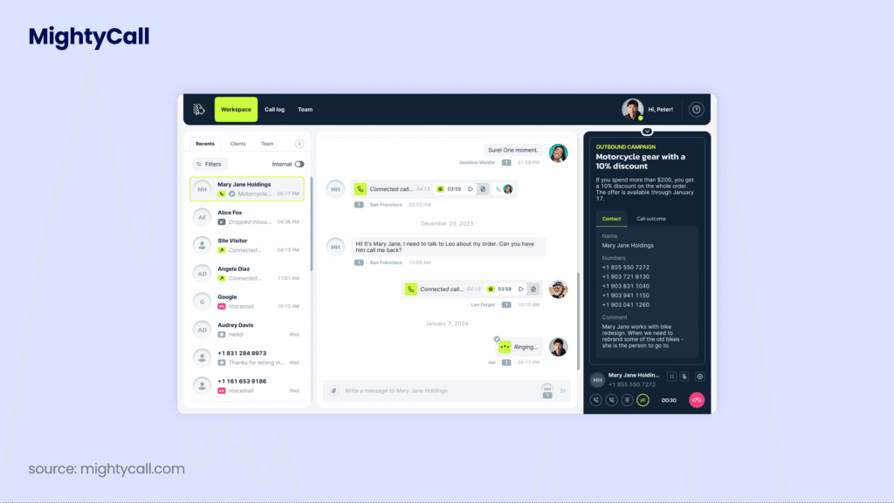
What Is MightyCall?
MightyCall is known for a user-friendly interface and quick setup, making it easy to implement and manage a VoIP IVR system without technical expertise. It offers multi-level IVR, call routing, call recording, and custom greetings on an affordable, scalable, mobile-friendly cloud platform with responsive support.
What Is MightyCall Best For?
SMBs that want effective call management at a competitive price.
What Are MightyCall’s Key Features?
- Multi-level IVR: a visual, drag-and-drop builder for multi-level menus, routing rules, and custom greetings.
- Customizable call routing: route calls by caller type (regular, VIP, block list), time of day, or menu selection.
- Call queueing: advanced queueing to manage high call volumes and reduce wait times.
What Are MightyCall’s Best Integrations?
- HubSpot
- Salesforce
- Zoho CRM
What Are MightyCall’s Plans & Pricing?
MightyCall pricing starts at $20/user/month (billed annually, 3-user minimum) and runs across four plans:
- Core ($20/user/month)
- Pro ($38/user/month)
- Power ($54/user/month)
- Enterprise ($65/user/month)
What Are MightyCall’s Pros & Cons?
| Pros | Cons |
|---|---|
| User-friendly interface | Call issues (missed incoming calls, transfer difficulty) |
| Affordability | System bugs (dial pad occasionally not working) |
| Excellent customer support | Call quality problems (dropped calls) |
What Are MightyCall’s Customers Saying?
G2 reviewers give MightyCall 4.4/5. Users highlight its IVR for easy setup, customization, and the ability to automate call routing and integrate with other business tools.

Recommended Reads
3. Twilio: Best IVR Software for Developer Flexibility
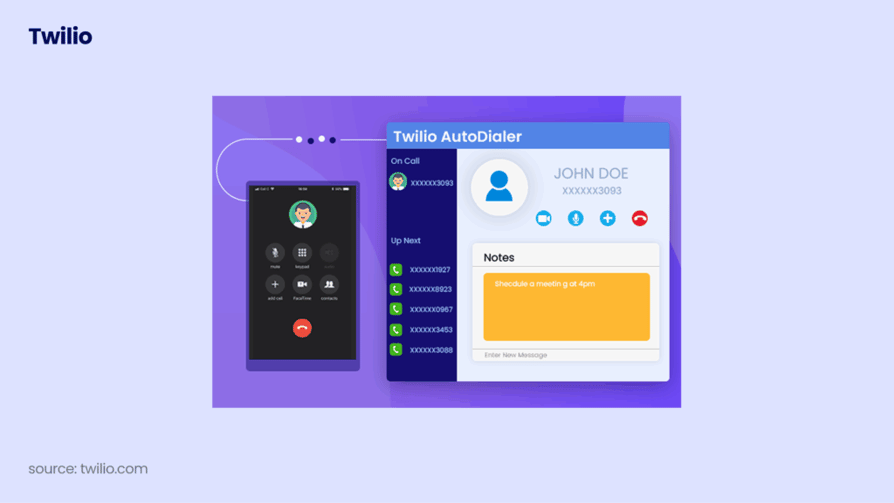
What Is Twilio?
Twilio is a programmable communications platform that stands out for flexibility. Through Twilio Flex and its low-code, drag-and-drop builder, pre-built templates, AI personalization, and omnichannel APIs, teams can build natural, customer-centric IVR experiences, though most customization needs a developer.
What Is Twilio Best For?
Smaller teams benefit from its flexibility, but enterprises with developer resources gain the most from its scalability and AI-driven features.
What Are Twilio’s Key Features?
- Visual, low-code flow builder
- AI and personalization capabilities, including personalized IVR
- International numbers across 100+ countries
What Are Twilio’s Best Integrations?
- Salesforce
- HubSpot
- Zendesk
What Are Twilio’s Plans & Pricing?
Twilio pricing for Flex uses two models: $35 per active user hour, or $150 per named user/month. New accounts get 5,000 free active user hours. Voice, SMS, and phone numbers are billed separately on top of the Flex license.
What Are Twilio’s Pros & Cons?
| Pros | Cons |
|---|---|
| Easy integrations | Customer support (users report slow response times) |
| Reliable APIs and communications | High costs for small or low-usage teams |
| Flexible, programmable platform | Complex setup for advanced configurations |
What Are Twilio’s Customers Saying?
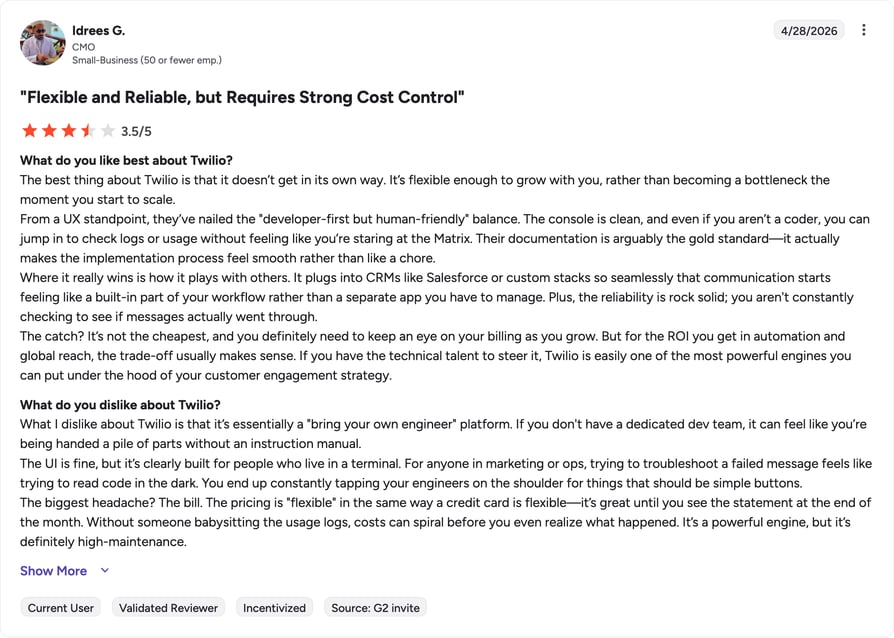
G2 reviewers give Twilio 4.2/5. Users say the IVR is easy to implement, with strong text-to-speech and call routing, but note it can be complex for non-developers and limited for typical business needs without custom coding.
Recommended Reads
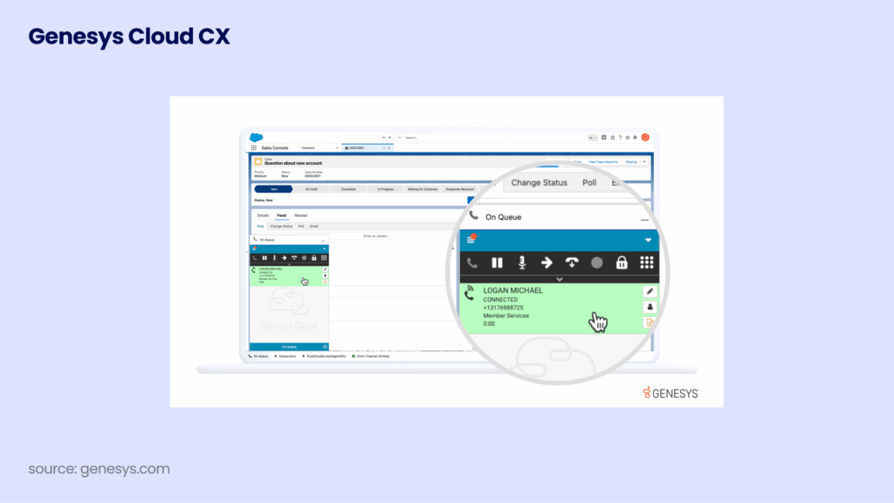
4. Genesys: Best IVR Software for Large Contact Centers
What Is Genesys?
Genesys stands out as an IVR system provider for its AI-powered conversational capabilities, omnichannel integration, flexible cloud-based design, and strong focus on personalization and analytics.
What Is Genesys Best For?
Popular with mid-sized organizations, but best suited for scaling up in large, complex contact centers.
What Are Genesys’s Key Features?
- Intelligent call routing
- Omnichannel integration that connects IVR with chat, web, SMS, and messaging
- Drag-and-drop flow builder
What Are Genesys’s Best Integrations?
- Salesforce
- Microsoft Dynamics
- Zendesk
What Are Genesys’s Plans & Pricing?
Genesys pricing starts at $75/user/month (billed annually) across four Cloud CX tiers:
- Cloud CX 1 ($75/user/month)
- Cloud CX 2 ($115/user/month)
- Cloud CX 3 ($155/user/month)
- Cloud CX 4 ($240/user/month)
Telecom minutes and many CRM integrations are billed separately as add-ons.
What Are Genesys’s Pros & Cons?
| Pros | Cons |
|---|---|
| User-friendly interface | High cost, with add-ons raising the total |
| Regular updates and new features | Reporting tools seen as limited versus competitors |
| Automation and AI | Overkill for small teams with basic needs |
What Are Genesys’s Customers Saying?
G2 reviewers give Genesys 4.3/5. Users appreciate the platform’s flexibility in building and customizing IVR calling systems to meet specific business needs.

Recommended Reads
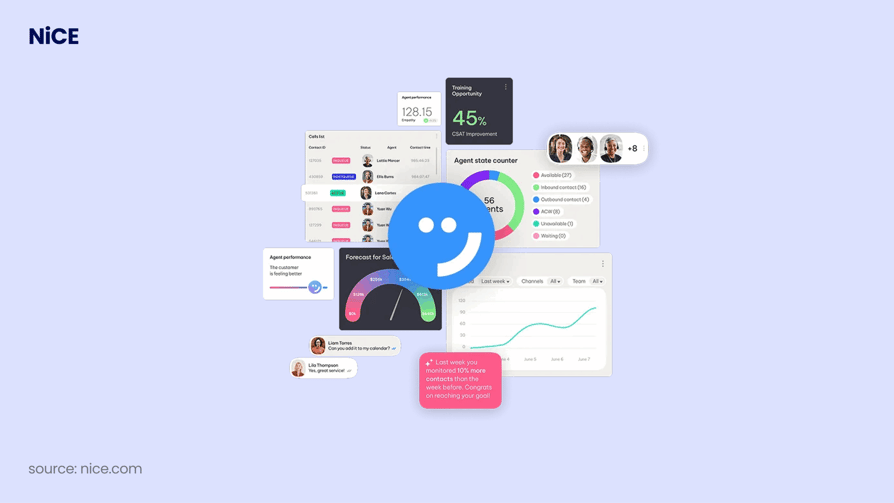
5. NICE CXone Mpower: Best IVR Software for Regulated Environments
What Is NICE CXone Mpower?
NICE stands out with advanced AI and natural language processing for more intuitive interactions. Its unified cloud platform supports voice, chat, and email, scales for businesses of all sizes, and adds operational efficiency through seamless integrations and an intuitive interface.
What Is NICE CXone Mpower Best For?
Call centers operating in complex or highly regulated environments.
What Are NICE CXone Mpower’s Key Features?
- Advanced call routing
- Speech recognition and conversational AI
- CRM and third-party integration
What Are NICE CXone Mpower’s Best Integrations?
- Salesforce
- Microsoft Dynamics 365
- Oracle Service Cloud
What Are NICE CXone Mpower’s Plans & Pricing?
NICE CXone pricing starts at around $110/user/month and scales up through several higher tiers based on channels, AI, and workforce tools.
- Omnichannel Suite: $110/agent/month
- Essential Suite: $135/agent/month
- Core Suite: $169/agent/month
- Complete Suite: $209/agent/month
- Ultimate Suite: $249/agent/month or $0.25 per session
What Are NICE CXone Mpower’s Pros & Cons?
| Pros | Cons |
|---|---|
| Ease of use | Call issues (dropped or unanswered calls) |
| Efficiency and reliability on a stable cloud infrastructure | Technical issues (system freezing, delays) |
| Reliable customer support | Missing features some users expect |
What Are NICE CXone Mpower’s Customers Saying?
G2 reviewers give NICE CXone Mpower 4.3/5. Users highlight its versatility, seamless integration, self-service capabilities, and reliability, but note a steep learning curve in advanced scripting.

Recommended Reads
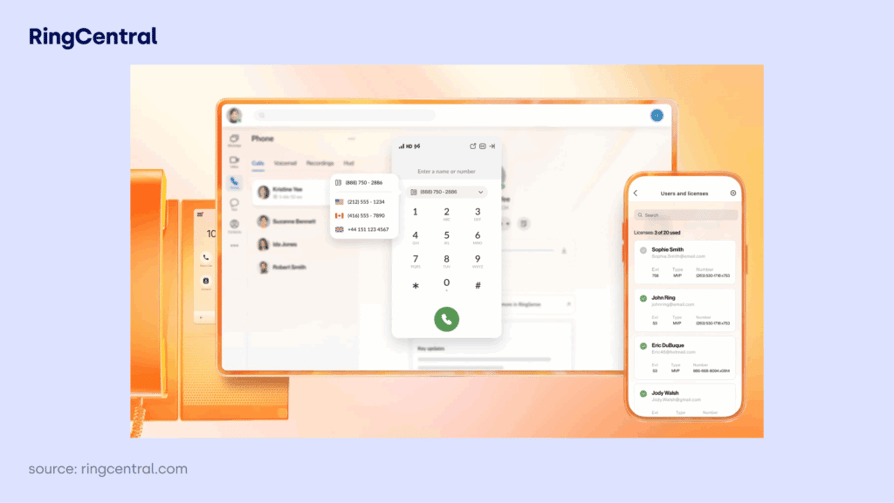
6. RingCentral: Best IVR Software for Scalable Automation
What Is RingCentral?
RingCentral combines advanced, customizable IVR features with ease of use, strong integrations, and enterprise-level scalability, making it a solid choice for businesses that want to automate and enhance customer communication.
What Is RingCentral Best For?
Medium to large organizations and enterprises that expect to scale or need robust automation and integration.
What Are RingCentral’s Key Features?
- Visual drag-and-drop IVR builder
- Customizable multi-level menus
- Flexible call routing
What Are RingCentral’s Best Integrations?
- Salesforce
- Microsoft Dynamics
- Zendesk
What Are RingCentral’s Plans & Pricing?
RingCentral pricing for its RingEX business phone starts at $20/user/month (billed annually):
- Core ($20/user/month)
- Advanced ($25/user/month)
- Ultra ($35/user/month)
- Customer Engagement Bundle (quote-based)
RingCX, the dedicated contact center product, starts at $65/user/month.
What Are RingCentral’s Pros & Cons?
| Pros | Cons |
|---|---|
| Affordable entry pricing | Reliance on add-ons (many features sit behind higher tiers) |
| Collaborative features (file sharing, conferencing) | Missing features (e.g., sales dialers, automation) |
| Integration capabilities (300+ integrations) | Customer support gaps reported by users |
What Are RingCentral’s Customers Saying?
G2 reviewers give RingCentral 4.0/5. Users find the IVR easy to set up and helpful for managing call flows efficiently.

Recommended Reads
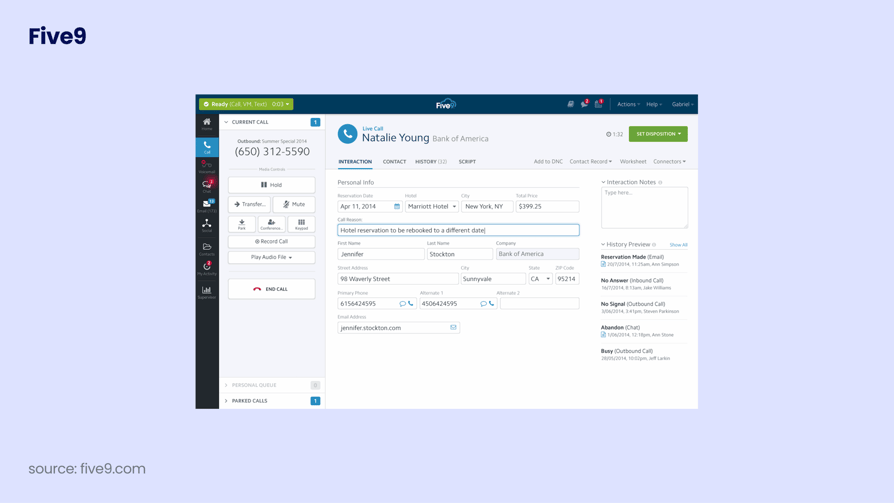
7. Five9: Best IVR Call Center Software for AI & Omnichannel
What Is Five9?
Trusted by over 3,000 clients worldwide, Five9 stands out as IVR call center software for its AI-driven features, visual and mobile-friendly interfaces, deep integrations, and focus on both customer and agent experience.
What Is Five9 Best For?
Medium to large businesses, particularly those that want advanced features like omnichannel communication and workforce management.
What Are Five9’s Key Features?
- Visual IVR and mobile optimization
- Omnichannel support across voice, chat, social media, and email
- Intelligent Virtual Agents (IVA) and AI capabilities
What Are Five9’s Best Integrations?
- Salesforce
- Microsoft Dynamics 365
- Oracle Service Cloud
What Are Five9’s Plans & Pricing?
Five9 pricing starts at $119/user/month.
- Digital: $119/user/month
- Core: $159/user/month
- Plus: Quote-based
- Pro: Quote-based
- Enterprise: Quote-based
What Are Five9’s Pros & Cons?
| Pros | Cons |
|---|---|
| Ease of use | Call issues (some users report call drops) |
| Features (call routing, recording, IVR monitoring) | Missing features or paid add-ons |
| Responsive customer support | Complex setup and learning curve for advanced workflows |
What Are Five9’s Customers Saying?
G2 reviewers give Five9 4.1/5. Many users appreciate the flexibility and ease of customization.

Recommended articles
8. Talkdesk: Best Contact Center IVR Software for Enterprises
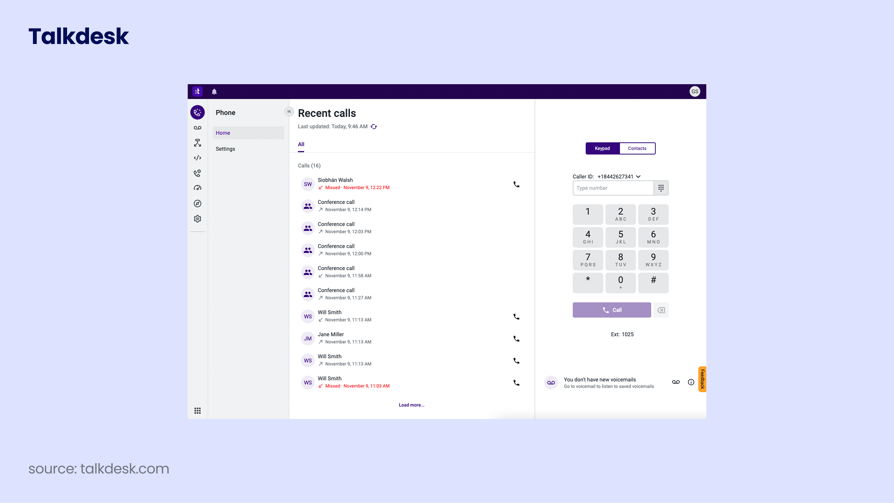
What Is Talkdesk?
Talkdesk is used by over 1,800 companies worldwide and offers a user-friendly IVR design, AI-driven features, and advanced routing for personalized service. It’s ideal for businesses focused on automation, agent support, and data-driven performance.
What Is Talkdesk Best For?
Businesses of all sizes, although the pricing is best suited to larger companies.
What Are Talkdesk’s Key Features?
- Virtual Agent that handles routine queries and collects caller data
- Conversational IVR
- Automatic post-call summaries generated with AI
What Are Talkdesk’s Best Integrations?
- Salesforce
- Zendesk
- Slack
What Are Talkdesk’s Plans & Pricing?
Talkdesk pricing starts at $85/user/month across four plans:
- Digital Essentials ($85/user/month)
- Voice Essentials ($105/user/month)
- Elite ($165/user/month)
- Industry Experience Clouds ($225/user/month)
What Are Talkdesk’s Pros & Cons?
| Pros | Cons |
|---|---|
| Integration capabilities (60+ integrations) | Starting price can be steep for small businesses |
| Enterprise-ready (healthcare, finance, government clouds) | Complex setup |
| Security and compliance (HIPAA and GDPR) | Limited access at lower tiers |
What Are Talkdesk’s Customers Saying?
G2 reviewers give Talkdesk 4.4/5. Many users find it easy to manage and customize IVR flows without coding skills.

Recommended Reads
How Does IVR Software Work?
The IVR system guides callers through pre-recorded menu options. Callers press a number or speak, and CTI (Computer Telephony Integration) technology recognizes their choice and routes the call to the right destination automatically.
For example, a caller can press “3” to instantly hear opening hours, saving time and reducing wait.
Test the IVR system live and discover smoother customer journeys
Key Benefits of IVR Software
Think of IVR as the GPS for your customer calls: it guides each conversation to the right place, no detours. Here’s how it benefits your business:
- 01Cut costs with automation:IVR automates common tasks like answering FAQs, such as business hours or order status, which is far cheaper than handling each with a live agent and reduces operational costs.
- 02Boost satisfaction with instant responses:A positive communication experience starts with your IVR. It delivers quick answers and routes calls right the first time, reducing repeats and transfers.
- 03Increase productivity:IVR handles routine calls on its own, freeing agents for complex tasks, and routes calls correctly from the start to avoid unnecessary transfers.
- 04Provide 24/7 support without extra cost:IVR never sleeps, so businesses can offer round-the-clock service, letting customers find information, make payments, or reach the right department at any hour.
- 05Unlock insights with analytics:Connecting analytics to your IVR reveals customer behavior, including peak call times, popular menu options, and where callers hang up or wait, so you can see what’s working and what needs fixing.
- 06Strengthen your brand:Customize IVR voice, tone, and style to reflect your brand personality, like a warm voice and simple language in your IVR messages.
Outbound IVR Software: What It Is and When You Need It
Most businesses think of IVR as an inbound tool: the system that answers when customers call. But outbound IVR is equally valuable. It initiates calls and delivers automated voice messages to customers or prospects at scale, without requiring an agent on every line.
- Appointment reminders:Healthcare, dental, and service businesses use outbound IVR to call patients and clients ahead of scheduled appointments, reducing no-shows without agent time. The call plays automatically, confirms or cancels the appointment via keypad input, and logs the outcome.
- Payment and renewal notifications:Financial services and subscription businesses use outbound IVR to proactively notify customers of upcoming payments, overdue accounts, or contract renewals, at a fraction of the cost of live agent calls.
- Post-interaction surveys:After a support call closes, outbound IVR can immediately call the customer back with a 2-question satisfaction survey, capturing feedback at the highest-relevance moment, before the interaction fades.
- Lead qualification at scale:Sales teams use outbound IVR to screen large lists of inbound leads with pre-qualification questions before connecting them to a rep, so SDRs only speak with leads who’ve confirmed interest.
Don’t Pick an IVR Without These 6 Features
There are so many IVR features out there it’s enough to make your head spin. Here are the essentials you actually need:
- 01Decide what happens when someone calls with the Call Flow Designer: what options they hear, where each call goes, and in what order.
- 02Connect your IVR with your CRM, payment systems, or help desk. Integrations with Salesforce, HubSpot, Zendesk, or Pipedrive save time and streamline interactions.
- 03Modern IVR should do more than play recordings. Speech recognition and Natural Language Understanding (NLU) let customers speak naturally instead of pressing 1.
- 04Text-to-Speech turns written text into voice, so you don’t have to record every message, and it can respond or route automatically based on what the caller says.
- 05Analytics show how many calls you get, which options people pick, and where they hang up: clear data to tweak and improve service.
- 06Call routing gets every call to the right person or department on the first try, keeping customers happy and your team focused.
How to Choose the Right IVR Software
Picking the right IVR solution provider is like choosing a show on a Friday night: there are so many options you’ll spend more time deciding than watching. To save you the scroll, follow these steps.
1. Assess Your Business Needs
Define what you’re trying to fix or improve. Are you automating FAQs, reducing wait times, or offering multilingual support? Factor in your average call volume and which tools the IVR should connect with, like your CRM, help desk, or payment systems.
2. Identify the Must-Have Features
List the features your IVR can’t live without. At a minimum: smart call routing, call queues, multi-level menus, self-service options, reporting, and CRM integrations.
3. Check Integration Capabilities
Your IVR should work smoothly with the tools your team already uses. If it doesn’t integrate easily with your CRM, helpdesk, or other platforms, it’ll slow you down instead of helping.
4. Prioritize Scalability and Flexibility
Pick a system that grows with your business and can handle more call volume, new locations, or additional languages. Cloud-based solutions are ideal since you can scale up or adjust features without extra hardware.
5. Test Before You Commit
Always try before you buy. Use demos or free trials to see how the IVR performs in real situations. Make sure it’s easy to set up, meets your needs, and gets a thumbs-up from your team before signing off.
Your ideal IVR solution is just one click away
How to Build Your Own IVR System (A Quick Step-by-Step Guide)
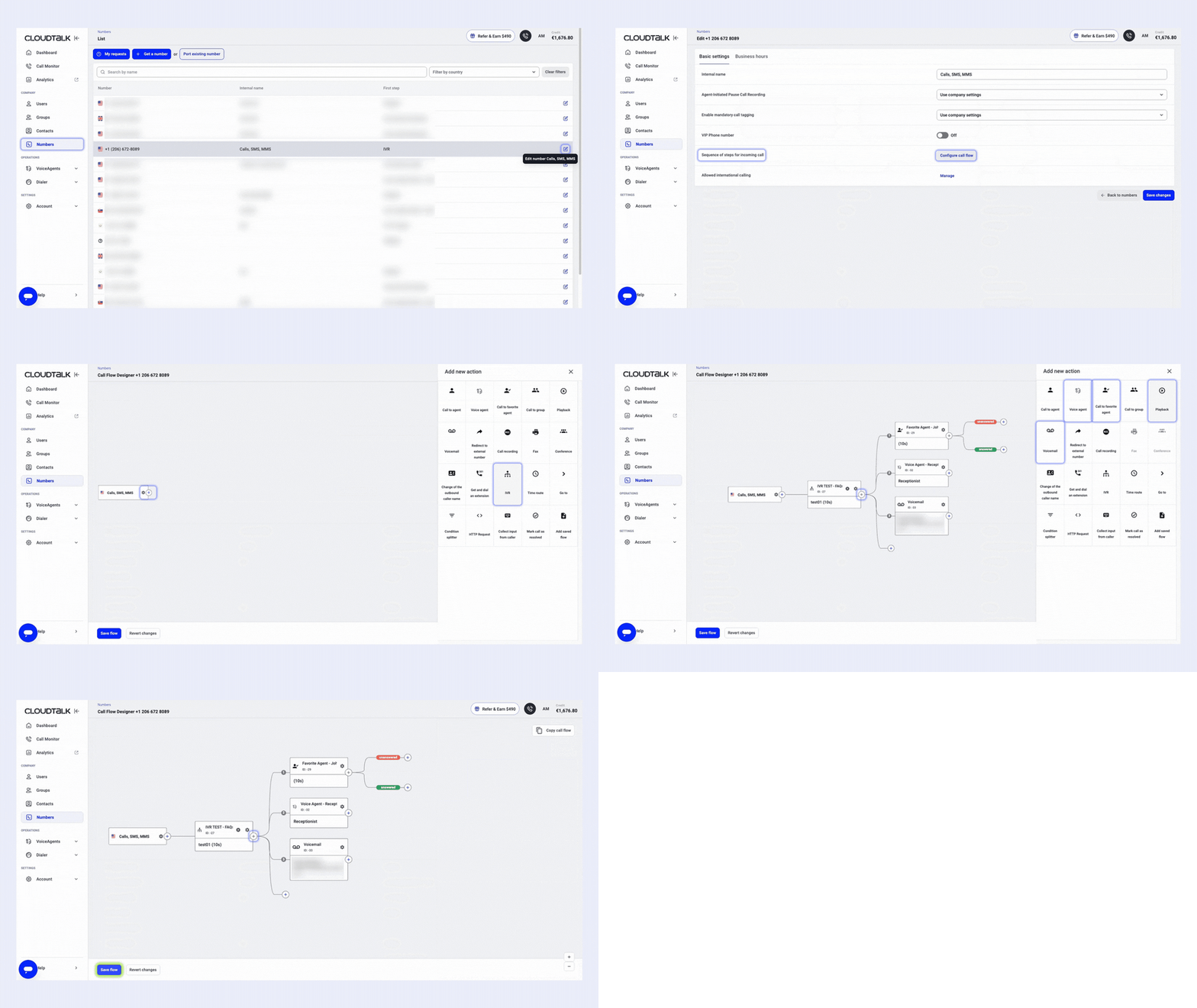
Setting up a cloud-based IVR system no longer requires expensive hardware or telecom engineers. CloudTalk’s drag-and-drop Call Flow Designer makes it simple, and you can get it running in minutes without any dev work.
Here are 5 simple steps to build your own IVR call flow:
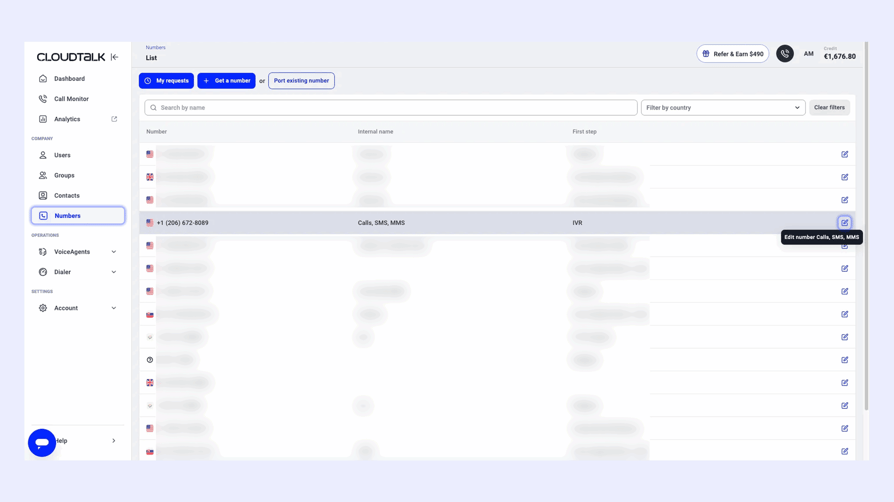
Step 1: Log into your CloudTalk dashboard
Once you’re in, head to the left-hand menu and click Numbers. Select the number you want to assign the IVR to and click the blue pencil icon to configure it.
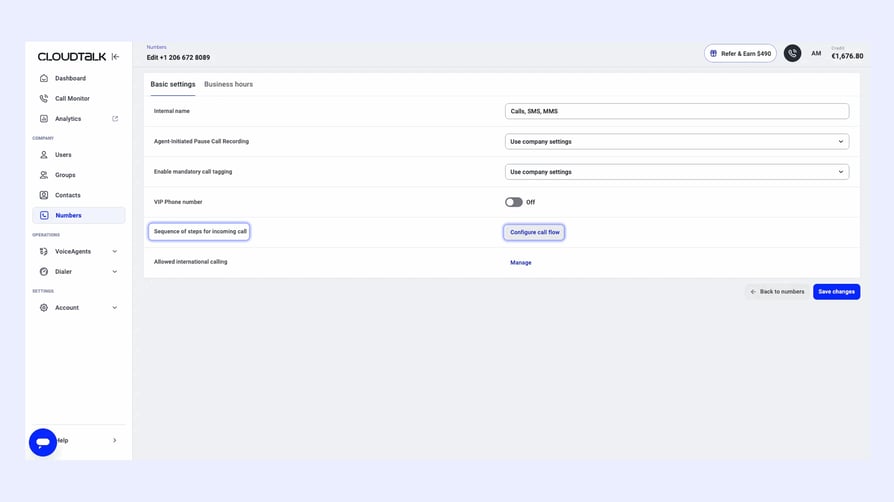
Step 2: Open the Call Flow Designer
Scroll to the Sequence of steps for incoming call section and click Configure call flow. This opens the drag-and-drop editor.
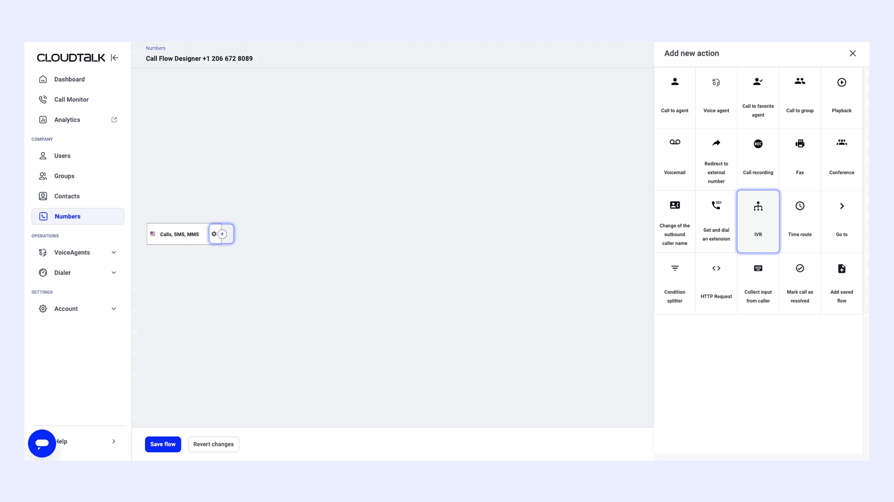
Step 3: Add the IVR step
Click the + icon in the flow and choose IVR. Here you can upload or record your custom audio prompt and set how long the caller waits on this step.
Step 4: Add call routing actions
Once you add IVR to your flow, you can define:
- The actions the caller can trigger: Call to Agent, Voice Agent, Voicemail, Playback, and more (choose as many as you need, just don’t overcomplicate it)
- How much time the caller has to select the next step
- The preferred failover option if the caller doesn’t take action
- The IVR keyboard number the caller presses to trigger each action
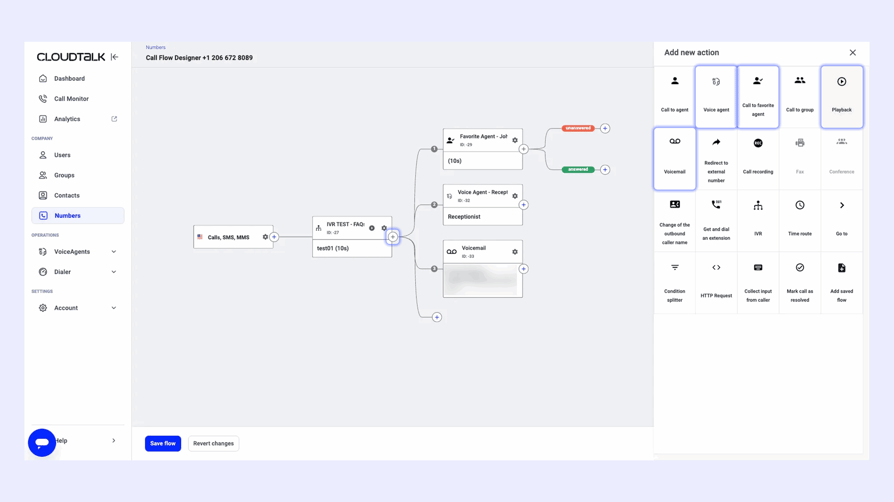
- Call to Group (e.g., Support team)
- Call to favorite agent
- Call to Voice Agent
- Play a message (e.g., “Office is closed”)
- Redirect to Voicemail
Step 5: Save and activate your IVR flow
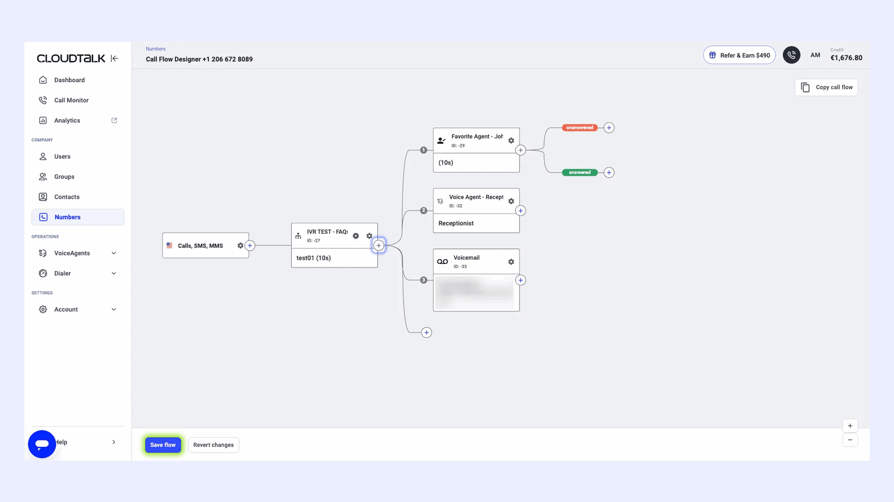
Once your call flow is complete, click Save. The new IVR workflow is now live on your selected number. That’s it: a fully functional IVR system in just a few minutes.
Want to go further? Add business hours, AI Voice Agents, or condition-based routing any time inside the same editor. For a deeper walk-through, check our Call Flow Designer guide.
Try building your first IVR flow for free
5 IVR Mistakes That Hurt CX (And How to Fix Them)
A poorly designed IVR frustrates callers and damages your brand. Here are five common issues to avoid.
- 01Overloading menus:Packing too many options into one menu overwhelms callers and leads to drop-offs.
- 02Complicated or long-winded prompts:Vague or lengthy instructions make customers lose focus, or hang up.
- 03No clear route to a human:Nothing kills trust faster than “IVR jail.” If callers can’t reach an agent easily, they may never call back.
- 04Low-quality or inconsistent audio:Mismatched voices, unclear recordings, or poor audio quality confuse users and read as unprofessional.
- 05No call-backs or follow-up surveys:Failing to offer a call-back or request feedback misses the chance to recover bad experiences or improve future ones.
Best Practices for Setting Up Your IVR Software Like a Pro
Once you’ve selected your IVR software, it’s time to set it up. These best practices help you build an efficient, user-friendly system for both your team and your customers:
- Keep it simple and logical:Avoid overwhelming callers. Keep menus short, logically ordered, and easy to navigate.
- Use clear, friendly prompts:Record messages in a calm, clear voice with no background noise, and keep instructions direct.
- Always offer a live agent option:Not everyone wants to deal with a machine. Give callers a path to a real person.
- Optimize call routing:Make sure calls reach the right agent or department quickly. Set up smart routing and backups for unavailable agents.
- Monitor, test, and adjust:Regularly check performance. Use analytics and team feedback to tweak flows, menus, and usability.
- Allow callback options:Let callers request a callback instead of waiting on hold. It improves satisfaction and reduces agent pressure.
The Future of IVR Software: Smarter, Faster, More Human (2026 Trends)
The clunky “press 1 for sales, press 2 for support” systems are being replaced by intelligent, conversational tools that actually help your customers. In 2026, IVR is getting faster, more human, and deeply connected to the tools your team already uses. Here’s where things are heading:
- 01From menus to conversations:NLP and conversational AI replace button-pressing with natural speech. Agentic IVRs can now act, scheduling, updating, and processing, without agents.
- 02Deep integration and personalization:IVRs connect to CRMs and channels to personalize calls in real time. If escalated, agents get full context, with no repeating of information.
- 03Smarter, seamless security:Voice biometrics and real-time fraud detection authenticate users passively, reducing friction and boosting trust.
- 04Visual and mobile-first experiences:Visual IVRs let users tap through options on smartphones, and SMS and WhatsApp integration add speed and flexibility.
- 05Real-time learning and analytics:AI-driven IVRs analyze sentiment and behavior, learning from every call to improve performance and satisfaction over time.
AI-Powered IVR: What’s New?
IVRs in 2026 understand intent, predict needs, and take action. Thanks to AI, today’s systems handle tasks like booking, account updates, and payments without agent input, all while learning and improving after every interaction.
Why CloudTalk Is the Best IVR Software for Growing Teams
Delivering great service means handling every call quickly, smoothly, and with zero frustration. This guide covered 8 top IVR software platforms to help you choose the right one.
Want a solution that’s easy to use, flexible, and packed with smart features? CloudTalk makes it simple to build custom multi-level IVR call flows, automate routing, and offer fast, frustration-free service, all without technical expertise.
Its cloud-based setup means you can scale effortlessly, manage international numbers in 160+ countries, and integrate with popular tools like HubSpot, Pipedrive, and Zendesk. With AI-powered analytics and skill-based routing, you’ll reduce wait times, cut costs, and deliver a smarter, more personalized customer experience. See the full pricing to find your fit. Still curious what is CloudTalk beyond IVR? Here's the complete picture.
Turn frustration into satisfaction. Say hello to swift service with CloudTalk.
Frequently Asked Questions About IVR Software
IVR software is interactive voice response software that answers incoming calls automatically, plays a menu of options, and routes callers using keypad input or spoken commands. It collects caller data, syncs with your CRM, and resolves routine requests like checking an order status without a live agent. Platforms like CloudTalk's IVR software pair this with AI speech recognition, real-time analytics, and multi-level call flows built for growing teams.
IVR call center software is a specialized IVR system built for high-volume inbound and outbound centers, handling thousands of daily calls with intelligent routing and queue management. It greets callers, verifies identity against a CRM, and sends each call to the right skill group or self-service flow. Enterprise platforms like Five9 and Genesys serve large operations, while CloudTalk's plans cover call center IVR for SMBs starting at $25/user/month.
The best IVR platform depends on your team size and use case. CloudTalk is the top pick for SMBs and growing teams, combining a no-code Call Flow Designer, AI Voice Agents, and CRM sync from $25/user/month. Genesys and NICE CXone Mpower lead for enterprise contact centers, Twilio Flex suits developer-heavy teams, and Bland AI or Nextiva fit AI-first, menu-free conversational IVR.
For small businesses, the strongest options are CloudTalk ($25/user/month Starter plan), MightyCall ($20/user/month), and Dialpad ($25/user/month Pro). CloudTalk is the best all-rounder: a no-code Call Flow Designer, native HubSpot and Pipedrive integration, and AI Voice Agents for 24/7 coverage, all without IT support. Avoid enterprise platforms like Genesys or NICE CXone, which are priced for 100+ seat contact centers.
IVR software cost ranges from $15–$30/user/month for SMB cloud platforms to $100–$240/user/month for enterprise contact center suites. CloudTalk pricing starts at $25/user/month, with IVR available. Enterprise platforms run higher: Genesys from $75/user/month, NICE CXone from $110/user/month, Five9 from $119/user/month. On-premises systems add $10K–$50K+ in upfront hardware costs.
CloudTalk's drag-and-drop Call Flow Designer lets you build multi-level IVR flows without writing a line of code, and most changes take effect in minutes. MightyCall, RingCentral, and Genesys also ship visual builders aimed at non-technical admins. Twilio offers a low-code flow builder too, but it leans more technical and typically needs developer involvement to fully customize its flows.
The strongest native CRM integrations come from CloudTalk (HubSpot, Salesforce, Pipedrive, Zoho, two-way sync on mid-tier plans), RingCentral (Salesforce, Microsoft Dynamics, 300+ integrations), and Five9 (Salesforce, Microsoft Dynamics, Oracle). For omnichannel sync across chat, SMS, and email alongside voice, Genesys and Five9 lead the enterprise tier. The real test: does data sync both ways in real time, or is it a one-way export?
For call deflection, look for an IVR with natural language understanding that resolves routine requests without routing to an agent. CloudTalk's AI Voice Agents handle this for SMBs, qualifying leads and answering FAQs around the clock. Five9, Genesys, and Talkdesk offer comparable virtual agents built for higher call volumes, though they typically require more setup and cost more per seat.
Cloud IVR routes calls by agent skill, language, location, and CRM data from anywhere with an internet connection, with no on-site hardware to manage. Teams can add new numbers, languages, or routing rules in minutes rather than provisioning equipment. CloudTalk supports local numbers in 160+ countries, so distributed and remote teams scale their call routing globally without extra infrastructure.
IVR monitoring software tracks how callers move through your system in real time: which menu options they pick, where they abandon calls, and how long each step takes. This data flags friction points, like a confusing menu option causing high drop-off, so you can fix the flow. CloudTalk's analytics dashboard includes IVR monitoring by default, letting managers adjust routing logic without technical support.
IVR automates call handling with menus, prompts, and routing logic, while VoIP is the underlying technology that carries voice calls over the internet instead of traditional phone lines. VoIP is the infrastructure; IVR is a feature that typically runs on top of it. Most modern cloud phone systems, including CloudTalk, bundle IVR directly into their VoIP platform rather than selling it as a separate product.
Poorly designed IVR frustrates callers with long menus, dead ends, and speech recognition that misfires on accents or background noise. Callers who can't find a fast route to a human agent often hang up and don't call back. The best systems, like CloudTalk's IVR, reduce these drop-offs with short menus, clear prompts, and a reliable agent fallback at every step.
IVR is shifting from rigid button-press menus to conversational, AI-driven systems that understand natural speech and take action on their own, like rescheduling an appointment. Expect deeper CRM integration, voice biometrics for passive authentication, and channels like SMS and WhatsApp layered on top of voice. CloudTalk's AI Voice Agents already reflect this shift, handling full conversations instead of static menus.
Cloud IVR runs entirely in the provider's infrastructure and is accessed over the internet, with no on-site servers or dedicated IT team required. Traditional, on-premises IVR needs physical telephony hardware installed and maintained in your own data center. Cloud IVR deploys in hours instead of weeks, scales instantly, and updates automatically, making it the standard choice for SMBs and mid-market teams today.