
Power Dialer Software
Dial one number at a time from any list, skip the voicemails and busy signals, and keep every outcome logged in your CRM without anyone typing it. That is the whole job of a power dialer.
⭐ 4.4/5 on G2 across 1,702+ reviews
 SOC2 CompliantISO 27001
Power Dialer Software for Outbound Sales Teams
A power dialer is outbound calling software that dials one number at a time from a preloaded list and connects the agent the moment someone answers. It skips busy signals, voicemails, and dead numbers on its own. Unlike a predictive dialer, which dials several numbers at once, a power dialer keeps a live rep on every connection, so there is no pause and no abandoned call.
CloudTalk's power dialer runs from campaigns you build out of any CRM list or CSV, with call scripts and dispositions attached, so a rep clicks once and works the list until it is done.
The Power Dialer that Drives More Calls, More Meetings, More Sales
Reach More Prospects
Cut manual dialing out of your day with the best power dialer software. The queue advances on its own, so reps connect with more prospects, spend less time between calls, and keep cold calling momentum through a whole list.
Book More Meetings
Turn more leads into booked meetings with cold calling automation that keeps your pipeline full. Smart call scripts, CRM integration, and real-time analytics help reps convert leads into qualified sales opportunities faster.
Coach From Every Call, Not a Sample
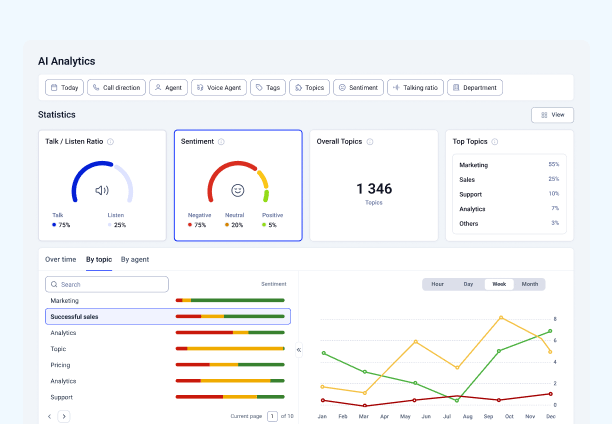
AI power dialer features run on every dialed call: transcription, call summaries, and sentiment scoring. Managers coach from what was actually said instead of from whichever calls they had time to open.
Trusted by 30,000+ sales & support professionals to power more & better conversations
















"The power dialer has been a game-changer for managing our call volume. Since we implemented the feature, about 90% of our agents are using it to automate dialing, saving time."
Ahmed A.
Data Management and Reporting Specialist, Dentakay
Power Dialer
Explore a Better Way to Scale Outreach with Sales Power Dialer Software
Optimize your outbound campaigns with automation and reach more prospects with less effort.
Campaigns and Call Scripts
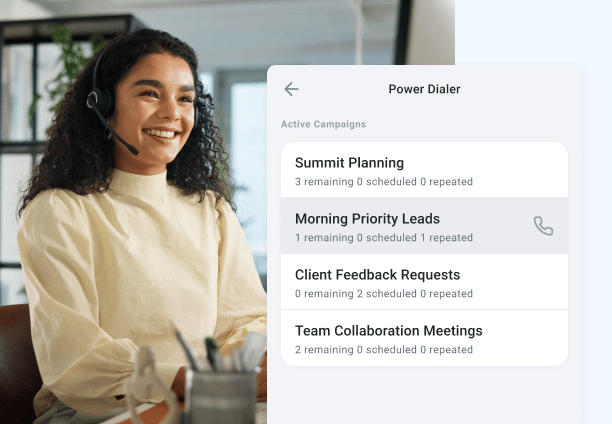
Build a campaign from a CRM list or a CSV, attach a script and the dispositions reps should use, and assign it to a team. Reps see context before the call connects rather than reconstructing it afterwards.
CRM Sync and Click-to-Call
Queues populate from HubSpot, Salesforce, Pipedrive, Zoho and 100+ other tools, and every outcome writes back to the right record. Dispositions land the moment a call ends, so nobody logs anything by hand.
Voicemail Detection and Auto-Skip
The dialer moves past machines, busy signals, and disconnected numbers without the rep doing anything, which is where most of the recovered time actually comes from.
Voicemail drop leaves a pre-recorded message automatically when a call does reach a machine, so reps skip the part where they repeat the same thirty seconds all afternoon.

Local Presence Dialing
With international numbers, you can call from a number your prospect recognises across 160+ countries. Familiar caller ID is one of the few reliable levers on answer rates for cold outbound.
Call Recording and AI Notes
Every campaign call is recorded and summarised, so managers coach from the calls rather than from rep recall.
With call recording, every conversation is logged automatically for agents to reference on the next call, and for managers to use in coaching without sitting through the whole thing.

Real-Time Analytics
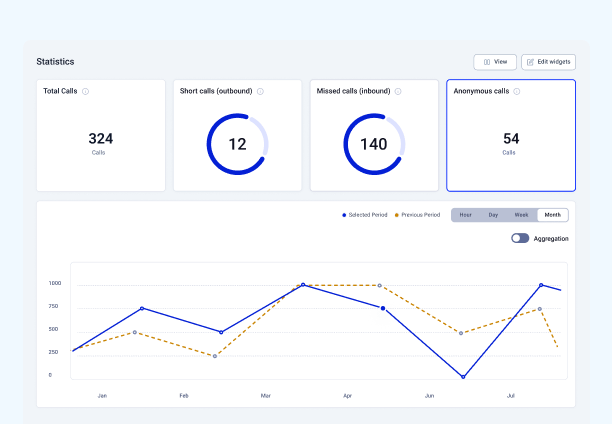
With real-time analytics, get full visibility of connect rates, talk time, and outcomes per rep and per campaign, live rather than at the end of the week.
Benefits of Power Dialer
Dial Smarter and Grow Faster with the Power Dialer
Automate Outreach Campaigns
Save your team from the hassle of hand-dialing every number from your campaign lists with cloud-based power dialer software. It maximizes outbound call volume and reduces idle time, allowing your reps to reach more prospects, faster.
Work Faster and Smarter
Connect the CRM with power dialer integration to import contact lists, manage leads, track interactions, and store call data in one place. Plus, with Call Transcription and Smart Notes, agents can ditch manual note-taking and focus on better conversations.
Bring Cost Down
Handle more calls with fewer resources by automating dialing through a hosted power dialer. Streamlined workflows help cut labor costs while keeping outreach levels high. This is a smart solution for small businesses looking to scale efficiently, using the right sales dialing software.
Run Multi-Country Call Campaigns
Break down borders with CloudTalk's cloud power dialer. Launch multi-country call campaigns with 160+ international numbers, giving your team a local presence no matter where they're dialing. You can scale global sales without complexity.
Features
Other features you might like with the Power Dialer

Call Notes
Create and access notes taken during or after calls, and pick up where you left off in future conversations.
Learn more about Call Notes
Smart Dialer
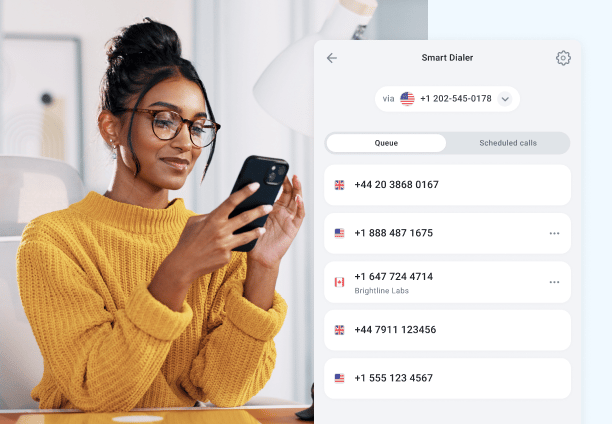
Build one-click call queues from numbers on any website or CRM, for when you want to add contacts on the fly rather than work a fixed list.
Learn more about Smart Dialer
Click-to-Call
Automatically convert phone numbers from the web into a clickable format and call them instantly.
Learn more about Click-to-Call
Campaigns
Create custom campaigns to help agents structure their calls with notes, call scripts, and questionnaires.
Learn more about CampaignsIntegrations
Plug the Power Dialer into everything you use
CRMs, helpdesks, applicant tracking systems and more. Get started instantly with 100+ built-in integrations, or expand further with Zapier, Make or CloudTalk's own workflow automation builder.


Make More Calls in Less Time With a Power Dialer
Outbound works when reps stay in conversations instead of between them. A power dialer removes the searching, the copy-pasting, and the logging, which is most of what sits between one call and the next. With CloudTalk it comes with call recording, AI summaries, CRM sync, and local presence dialing in the same platform, so there is no second tool to buy or connect.

See the Power Dialer in Action
Join over 5,500+ modern companies that already trust CloudTalk to have MORE and BETTER calls.
Power Dialer AI FAQs: The Complete Guide
A power dialer is outbound calling software that automatically dials one number at a time from your contact list and moves each agent straight to the next call, so your team spends more time talking and less time dialing. Below is everything you need to know about how power dialers work, how they compare to other auto dialers, what to look for, and how CloudTalk handles each step.
An outbound power dialer is an automated outbound dialing tool that calls one number at a time from a preloaded contact list, connects an agent to each answered call, then moves on to the next number automatically once the call ends. It removes the manual work of copying, dialing, and redialing numbers, so sales reps and agents spend their time in live conversations instead of between them. Because it dials at a one-to-one ratio (one number per available agent), every person who picks up reaches a real rep, with none of the dropped calls associated with higher-volume dialing methods. A modern cloud-based power dialer has no hardware to install and reps can work a list from anywhere. With CloudTalk, the power dialer runs inside the same dashboard your team already uses and syncs with your CRM, so every call, note, and outcome is logged automatically.
A power dialer works by loading a list of contacts, whether from your CRM, a calling campaign, or an imported file, and dialing them in sequence, one call per agent. When a rep finishes a call, the system immediately dials the next number in the queue, removing the idle gaps between conversations. Since it only ever places one call per available agent, the moment someone answers they are connected to a live person rather than dead air. After each call, agents can log the outcome, add notes, and set follow-ups in a click, and with CloudTalk those actions sync straight back to your CRM and feed into your call recording and reporting.
The main difference between a power dialer and a predictive dialer is the dialing ratio and the risk of dropped calls. A power dialer dials one number at a time per agent, so every answered call reaches a live rep. A predictive dialer dials several numbers at once and uses an algorithm to predict when agents will become free, which maximizes talk time on very large lists but can create abandoned calls when more people answer than there are agents ready to take them. In short, power dialing trades a little raw throughput for a smoother customer experience and simpler compliance, which makes it the better fit for most sales teams, while predictive dialing suits large contact centers working through very high call volumes.
All of these are types of auto dialer, the umbrella term for any software that dials numbers automatically instead of by hand. They differ mainly in how they pace and place calls:
- Auto dialer: the general category. Power, predictive, progressive, and parallel dialers are all auto dialers.
- Power dialer: dials one number at a time per agent and advances the queue automatically. Best for steady, list-based outbound calling.
- Smart dialer: builds one-click call queues from numbers found on any website or CRM, ideal when you want to add contacts to a queue on the fly rather than work a fixed list.
- Progressive dialer: often used interchangeably with power dialer; it dials one number at a time and only when an agent is available.
- Parallel dialer: dials multiple leads at once and connects the agent to whoever answers first, which lifts connect rates on cold lists.
The biggest benefit of a power dialer is more live conversations per shift, because it strips out the manual steps between calls and keeps agents talking. The main advantages are:
- More talk time: agents move from one connected call to the next with no manual dialing or waiting.
- Fewer errors: numbers are dialed from your list automatically, so misdials and skipped contacts disappear.
- Consistent campaign pacing: whole contact lists get worked systematically rather than unevenly by hand.
- Automatic logging: with CRM sync, call outcomes, notes, and recordings are saved against the right contact without extra admin.
- Better reporting: every call feeds into analytics, so managers can track connect rates, talk time, and campaign performance in real time.
A power dialer is best for outbound sales and outbound call center teams that work through defined contact lists and want more conversations without adding headcount. It fits sales development (SDR and BDR) teams, appointment setting, lead follow-up, renewals, collections, and survey or research calls, essentially any workflow with a known list to work and a repeatable goal per call. It is less suited to teams making a small number of highly researched, one-off calls, where a preview approach fits better, or to enterprise contact centers pushing extreme daily volume, where a predictive dialer may earn its added complexity.
Yes, power dialers are legal, and they are generally easier to keep compliant than predictive dialers because they dial one number at a time and connect every answered call to a live agent, which avoids the abandoned calls that regulators scrutinize. Compliance still depends on how you use it, and the rules differ by region.
In the United States, the TCPA governs outbound calling. Honor the National Do Not Call Registry and your own internal suppression list, respect local calling-hour windows, and capture prior express consent where it is required, particularly for calls to mobile numbers.
In the EU and UK, GDPR applies to the contact data you dial. You need a lawful basis for the call, usually legitimate interest for B2B outreach or consent for B2C, and you have to honor a contact’s right to object and right to erasure. Worth noting that recording consent runs on a separate track from dialing rules: a call you are allowed to place is not automatically a call you are allowed to record. Our guide to call recording legality covers that side.
CloudTalk supports compliant outbound calling with suppression lists, calling-hour controls, and per-account retention settings. This is not legal advice, so confirm the regulations for every market you call into.
A good power dialer should do more than just dial. Look for:
- CRM integration so lists, outcomes, and notes sync automatically in both directions.
- One-to-one dialing with automatic queue advancement for a steady flow of connected calls.
- Call recording and call monitoring for coaching and quality assurance.
- Local presence and caller ID options so more of your outbound calls get answered.
- Campaign management, scripts, and dispositions to keep reps consistent and on-message.
- Real-time and historical analytics to track connect rates, talk time, and conversions.
- Workflow automation to trigger follow-up tasks, tags, and messages after each call.
A good power dialer integrates directly with your CRM so contact lists, call outcomes, notes, and recordings sync automatically, and reps can launch a calling campaign straight from CRM records. CloudTalk connects with 100+ tools, including Salesforce, HubSpot, and Pipedrive, so every power-dialed call is logged against the right contact without manual data entry. Queues populate from CRM views, dispositions write back the moment a call ends, and screen pops give reps context before they say hello. You can see the full list on the integrations page.
Setting up a power dialer usually takes four steps:
- Build your list. Import contacts from your CRM, a campaign, or a CSV file.
- Create a campaign. Add scripts, notes, and call dispositions so reps have context on every call.
- Assign your agents. Route the campaign to the reps or teams who will work it.
- Start dialing. Reps click once and the power dialer works through the list automatically, logging each outcome as it goes.
With CloudTalk this all happens in one dashboard, with no hardware to install, so a new campaign can be live in minutes.
Power dialers are usually priced as part of a calling plan rather than billed as a standalone add-on, so the real question is which tier includes one. Across the market, prices run from roughly $20 to over $300 per user per month. CloudTalk includes the power dialer from the Expert plan at $49/user per month billed annually, and you can see the full feature breakdown by tier on the pricing page. Most teams also get a 14-day free trial to test outbound calling before committing.