25 Call Center Features You Need in 2026
15 Best Call Center Features
- 01AI Voice — Resolve routine calls without hiring a single extra agent.
- 02IVR (Interactive Voice Response) — Cut misdirected calls and reduce handle time across the board.
- 03Automatic Call Distribution (ACD) — Higher answer rates, lower abandonment, without adding headcount.
- 04Call Recording — Protect the business in disputes and pass compliance audits without scrambling.
- 05Call Transcription — Slash post-call admin time and keep accurate records automatically.
- 06Real-Time Analytics & Reporting — Spot performance drops and fix them before they hit your SLAs.
- 07Smart Dialer / Power Dialer — Get significantly more outbound conversations out of the same team, same shift.
- 08CRM Integration — Shorter calls, faster resolutions, fewer repeat contacts.
- 09Call Monitoring (Listen / Whisper / Barge) — Ramp new agents faster and stop bad calls before they become bad reviews.
- 10Skill-Based Routing — Increase first-call resolution and reduce the cost of repeat contacts.
- 11Call Queuing — Stop losing revenue to abandoned calls during your busiest hours.
- 12Warm Transfers — Lower handle time and reduce the repeat calls that drain agent capacity.
- 13International Numbers — Enter new markets without a physical office and lift connection rates immediately.
- 14Wallboard (Live Dashboard) — Keep teams on target without managers having to chase stats manually.
- 15Enhanced Security / GDPR Compliance — Avoid fines, protect revenue, and close deals with enterprise clients who require it.
What Are the Most Important Call Center Features and Software in 2026?
The most important call center software features include advanced analytics, AI voice, call recording, conversation intelligence and of course dialers.
This comprehensive list reflects the must-have call center features businesses need to enhance communication, boost efficiency, and deliver exceptional service:
1. AI Voice Agent
Signature Capability
See CloudTalk’s AI Voice Agent in Action!
CeTe is an AI that talks like a human: no breaks, no training, no time off. It makes and answers calls, updates CRMs, books meetings, and loops in a human only when needed.
Press play to hear it. Want a wow moment? Get a free test call and try it live.

An AI voice agent is an automated phone system that uses artificial intelligence to handle customer calls independently — understanding what callers say, responding in natural language, and resolving issues without a human agent picking up. Unlike traditional IVR systems that follow rigid scripts, AI voice agents can handle dynamic, two-way conversations across a wide range of customer requests.
For call centers, that means routine calls — appointment bookings, order status checks, FAQs, account queries — get resolved instantly at any hour, while human agents are freed up for the complex, high-value interactions that actually need them.
Key capabilities and benefits:
- 24/7 availability without staffing costs — AI voice agents handle inbound calls outside business hours, over weekends, and during peak surges without requiring additional headcount or overtime.
- Faster resolution on routine requests — common queries are resolved in seconds rather than queued behind hold times, improving customer satisfaction scores directly.
- Seamless escalation to live agents — when a call exceeds what the AI can handle, it transfers to the right human agent with full context already captured, so customers never have to repeat themselves.
- Consistent performance at scale — unlike human agents, AI voice agents don't have off days, don't need breaks, and handle volume spikes without degradation in quality.
AI voice agents are increasingly a baseline expectation rather than a differentiator — businesses that haven't adopted them are typically absorbing costs and wait times that their competitors aren't. CloudTalk's AI voice agents are built to integrate directly with your existing call center setup, and if you want to see how the ROI stacks up before committing, the AI voice agent ROI calculator gives you a concrete starting point.
“We just copy the agents, update the scripts, and we’re live. No need to hire and train a completely new team from scratch.”
Owner of Circle Gym

2. IVR (Interactive Voice Response)
Stop wasting agent time on calls that could route themselves.
IVR (Interactive Voice Response) is a phone system feature that interacts with callers automatically — presenting menu options, collecting input via voice or keypad, and routing the call to the right destination without a human agent needing to intervene. It's typically the first thing a caller encounters when they dial in, and how well it works sets the tone for everything that follows.
A well-configured IVR doesn't just sort calls — it resolves a meaningful portion of them outright, through self-service options like balance checks, order tracking, or appointment confirmations, before a live agent ever enters the picture.
Key capabilities and benefits:
- Intelligent call routing — callers are directed to the right team or agent based on their input, reducing transfers, reducing frustration, and making sure agents only receive calls they're actually equipped to handle.
- Self-service resolution — routine requests get handled automatically without queuing, cutting inbound call volume and freeing agents to focus on genuinely complex issues.
- Consistent experience at any volume — whether you receive 50 calls or 5,000, the IVR handles the front end without bottlenecks, making it one of the most scalable features in any call center software stack.
- Out-of-hours coverage — callers outside business hours can still access information, leave structured messages, or complete simple tasks rather than hitting a dead end.
IVR is one of the highest-impact call center features for teams dealing with high inbound volume, but it only works as well as it's configured. A confusing menu structure or too many layers creates more frustration than it solves. CloudTalk's IVR system is built to be straightforward to set up, and pairs directly with skill-based routing to make sure every call that passes through it lands in exactly the right place.

3. Automatic Call Distribution (ACD)
Fewer missed calls, faster answers, happier customers.
Automatic Call Distribution (ACD) is a call center system that automatically receives incoming calls and routes them to the most appropriate available agent based on a set of predefined rules. Where IVR handles the caller's initial interaction and collects their input, ACD is the engine working behind the scenes — deciding who picks up and when.
The rules an ACD follows can be as simple as "route to the next available agent" or as sophisticated as priority-based queuing, time-of-day routing, or routing based on a caller's history with the business. The result is a system that distributes call volume intelligently rather than randomly.
Key capabilities and benefits:
- Reduced missed calls and abandonment — calls are distributed evenly and efficiently across available agents, minimising the queue build-up that causes callers to hang up.
- Better agent utilisation — workload is spread across the team rather than piling onto whoever happens to answer first, reducing burnout and keeping performance consistent throughout the day.
- Priority routing for high-value callers — VIP customers or urgent cases can be bumped to the front of the queue or routed directly to senior agents, protecting relationships that matter most to the business.
- Data for continuous improvement — ACD systems log how every call is distributed and handled, giving managers the visibility they need to refine routing rules and staffing levels over time.
ACD is the backbone of any serious inbound call operation — without it, even a well-staffed team will hemorrhage calls during busy periods. It works most effectively when paired with skill-based routing, which adds an extra layer of intelligence by matching callers not just to any available agent, but to the right one. You can explore how CloudTalk handles inbound call routing in more detail if you want to see how these features work together in practice.
”What I like best about CloudTalk is that we use it on a daily basis for both outbound cold calling and customer support. This regular use highlights its reliability and efficiency in our workflow. It seamlessly manages our communication interactions, making it easy to monitor, record, and analyze calls. It ensures that we provide top-notch customer support and optimize our cold calling efforts, all while maintaining an intuitive and user-friendly experience.”
4. Call Recording
Never lose a conversation that matters for compliance or a dispute.
Call recording is a feature that automatically captures and stores audio from inbound and outbound calls, making every conversation retrievable for review at any point after it happens. For most call centers, it runs in the background on every call without agents needing to think about it — the recordings are simply there when you need them.
The use cases are broad: compliance audits, dispute resolution, quality assurance, agent training, and performance coaching all rely on having an accurate record of what was said. In regulated industries like finance, insurance, and healthcare, call recording isn't optional — it's a legal requirement.
Key capabilities and benefits:
- Compliance and legal protection — a complete, timestamped record of every call protects the business in disputes and satisfies regulatory requirements without manual documentation.
- Quality assurance at scale — managers can review calls across the entire team rather than relying on live monitoring, making it possible to identify patterns in agent performance that would otherwise go unnoticed.
- Training material that actually reflects reality — real calls make far more effective training resources than simulations, giving new agents concrete examples of how to handle difficult situations.
- Searchable call history — recordings stored alongside transcripts mean specific conversations can be found quickly by date, agent, phone number, or keyword, without manually scrubbing through audio.
Call recording becomes significantly more powerful when combined with call transcription, which converts audio into searchable text automatically and removes the need to listen back to every recording in full. CloudTalk's call recording software is available across all plans and is built to meet the compliance standards that regulated industries require. Some organizations also connect workflow platforms such as Monday CRM to track follow-up actions and customer-related projects generated from phone conversations.
5. Call Transcription
Cut post-call admin time dramatically without sacrificing accuracy.
Call transcription is the automatic conversion of spoken call audio into written text in real time or immediately after a call ends. Rather than relying on agents to take notes during or after a conversation, the system produces an accurate written record of everything that was said — searchable, shareable, and available instantly.
For call centers handling large volumes, the time savings compound quickly. Supervisors reviewing performance no longer need to listen to full recordings. Agents spend less time on after-call wrap-up. And compliance teams have documentation they can actually search through rather than a folder of audio files.
Key capabilities and benefits:
- Dramatic reduction in after-call work — agents aren't manually summarising conversations after every call, which cuts wrap-up time and lets them move to the next interaction faster.
- Instant, searchable documentation — every conversation becomes a text record that can be searched by keyword, topic, or phrase across thousands of calls simultaneously.
- Better coaching and feedback — supervisors can review exactly what was said in a fraction of the time it would take to listen back, making performance conversations more specific and more frequent.
- Compliance-ready records — written transcripts are easier to store, retrieve, and present as evidence than audio recordings, simplifying audits and dispute resolution considerably.
Transcription works hand in hand with call recording — together they give you both the audio and the text, so nothing slips through the cracks. CloudTalk's speech-to-text capability also feeds directly into AI-powered features like automatic call summaries and topic extraction, which take the value of transcription a step further by surfacing insights without anyone having to read every word.
6. Real-Time Analytics & Reporting
Fix problems while they're happening, not after the damage is done.
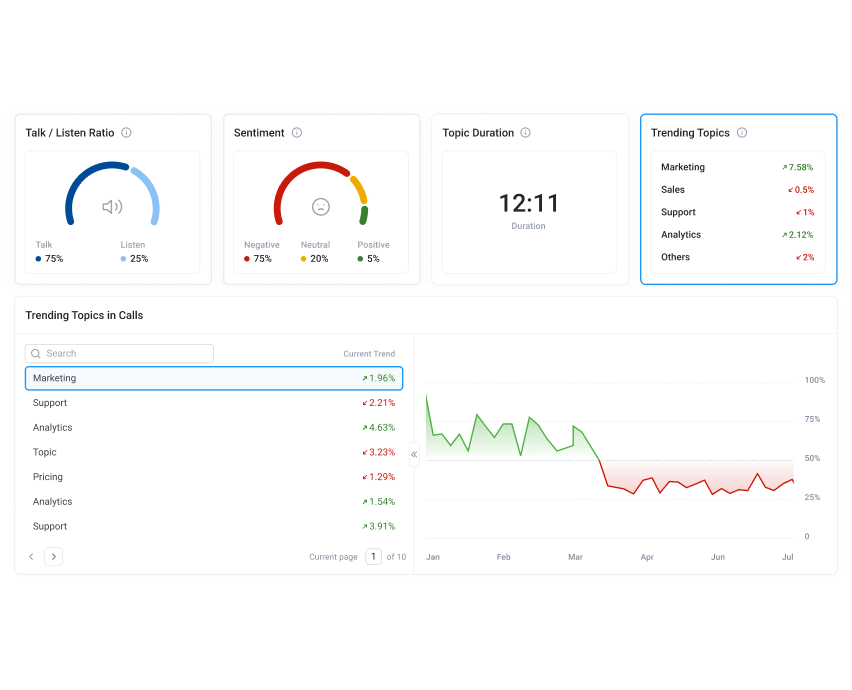
Real-time analytics and reporting is a call center feature that surfaces live performance data — call volumes, wait times, agent availability, queue lengths, handle times, and more — on a single dashboard that updates continuously throughout the day. Rather than reviewing what happened yesterday, managers have a clear picture of what's happening right now and can act on it immediately.
Reporting goes a step further by aggregating that data over time, revealing trends in call patterns, team performance, and customer behaviour that inform staffing decisions, training priorities, and operational improvements on an ongoing basis.
Key capabilities and benefits:
- Immediate visibility into problems — a spike in queue length, a drop in answer rates, or an agent struggling with call volume becomes visible the moment it happens, not hours later when the opportunity to intervene has passed.
- Data-driven staffing decisions — historical reporting shows exactly when call volume peaks and troughs, making it possible to schedule the right number of agents at the right times rather than guessing.
- Agent performance tracking — individual and team metrics give managers an objective basis for coaching conversations, performance reviews, and identifying top performers worth learning from.
- SLA monitoring and accountability — real-time dashboards make it easy to see whether service level targets are being met throughout the day and course-correct before they're missed entirely.
The value of analytics scales with the quality of the data feeding into it. CloudTalk's call center analytics and reporting dashboard gives teams both the live view and the historical depth they need, and pairs naturally with the wallboard feature for teams that want key metrics visible across the floor in real time.
7. Smart Dialer / Power Dialer
Your outbound team talks more and dials less.
A smart dialer or power dialer is an outbound calling feature that automates the dialling process — working through a contact list automatically so agents move from one call to the next without manually entering numbers or switching between tools. The difference between the two is primarily pacing: a power dialer dials one number at a time as each agent becomes available, while a smart dialer adds intelligence on top, filtering out bad numbers, voicemails, and disconnected lines before they waste an agent's time.
For sales teams and outbound call centers, the impact on daily call volume is significant. Time that would otherwise be spent dialling, waiting, and navigating dead ends gets converted into actual conversations.
Key capabilities and benefits:
- More conversations per shift — agents spend their time talking to prospects rather than dialling, waiting, and redialling, which directly increases the number of meaningful outbound interactions per day.
- Fewer wasted calls — smart filtering removes disconnected numbers, voicemails, and numbers unlikely to answer before the call is placed, keeping agents focused on contacts worth pursuing.
- CRM-connected workflows — dialers that sync with your CRM mean call outcomes, notes, and follow-up tasks are logged automatically, reducing the admin burden after each conversation.
- Scalable outbound campaigns — large contact lists that would take days to work through manually can be executed systematically and consistently, with full visibility into progress and outcomes.
CloudTalk offers both a smart dialer and a power dialer depending on your outbound workflow, and for teams running parallel outreach at higher volume, the parallel dialer takes throughput a step further by connecting agents only when a live person answers.

Top-rated. High-performing. Loved by teams.
8. CRM Integration
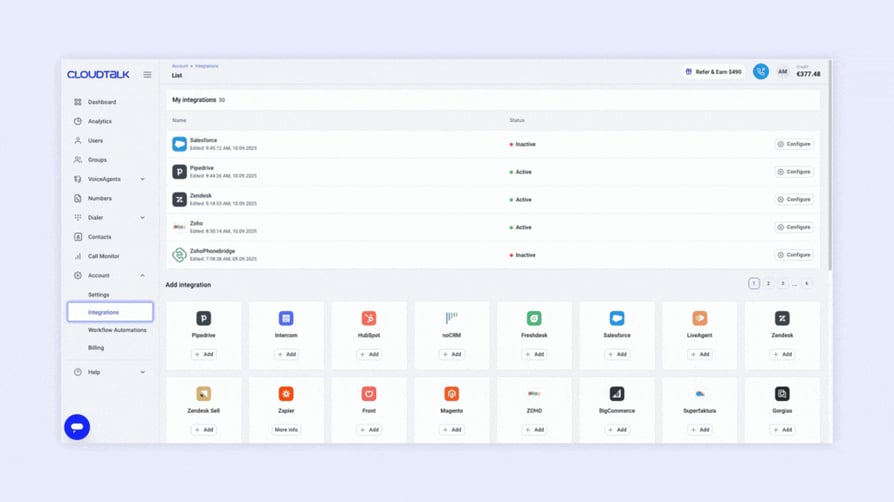
Agents walk into every call already knowing the customer.
CRM integration is the connection between your call center software and your customer relationship management platform — syncing contact data, call history, notes, and activity logs between the two systems automatically. When a call comes in, the agent sees the customer's full history pulled up alongside it. When the call ends, the outcome is logged back to the CRM without the agent having to touch it manually.
The practical effect is that agents stop operating blind. Instead of asking a returning customer to explain their situation from scratch, they already have context — previous interactions, open tickets, purchase history, account status — before they say hello. That changes the quality of the conversation immediately.
Key capabilities and benefits:
- Full customer context on every call — agents see who's calling and what their history looks like the moment the call connects, enabling more personalised, efficient conversations from the first second.
- Automatic call logging — call recordings, notes, duration, and outcomes sync to the CRM automatically after each interaction, eliminating manual data entry and the errors that come with it.
- Shorter handle times — agents who already have context don't need to spend the first two minutes of every call gathering information, which reduces average handle time and improves the customer experience simultaneously.
- A single source of truth — sales, support, and management all work from the same up-to-date customer record, which prevents the miscommunication and dropped handoffs that frustrate both customers and teams.
CloudTalk integrates natively with the most widely used CRM platforms including HubSpot, Salesforce, Pipedrive, and Zoho CRM, with data flowing in both directions so neither system ever falls out of sync. If your team lives inside a CRM, this is the integration that makes your call center software worth having.
9. Call Monitoring (Listen / Whisper / Barge)
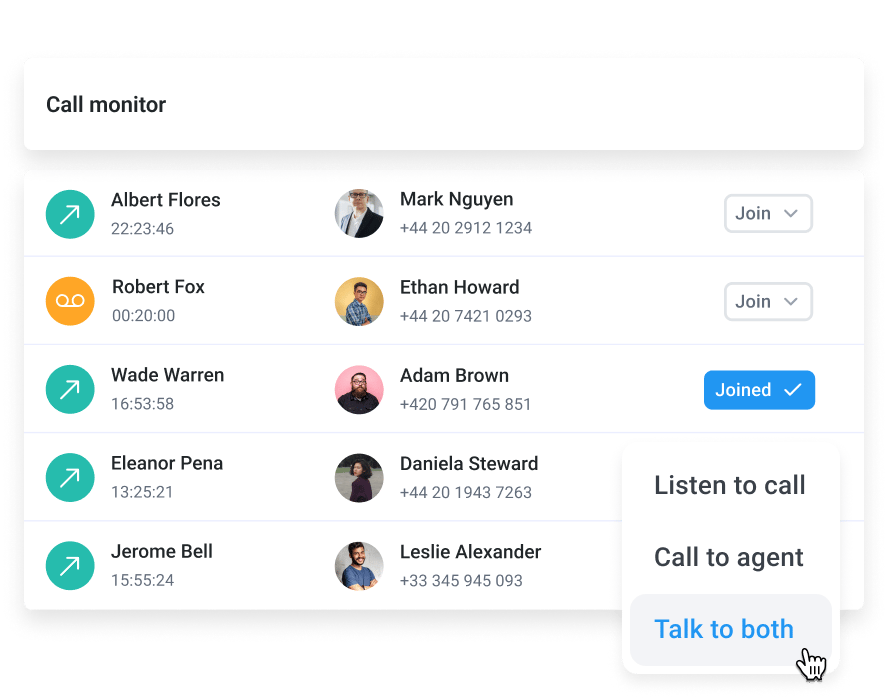
Coach your team in real time without pulling them off the floor.
Call monitoring is a supervisor feature that allows managers to listen in on live calls in three distinct modes: silent listening, where the agent and caller are unaware; whisper coaching, where the supervisor can speak to the agent without the caller hearing; and barge-in, where the supervisor joins the call as a full participant when a situation requires direct intervention.
Together these three modes give supervisors a level of oversight and coaching capability that simply isn't possible when managing a team purely through post-call reviews. Problems get caught in the moment, new agents get real-time guidance, and escalations get handled before they become complaints.
Key capabilities and benefits:
- Real-time coaching without disruption — the whisper function lets supervisors guide agents through difficult calls, objection handling, or unfamiliar situations without the customer knowing support is on the line.
- Faster ramp time for new agents — instead of shadowing calls passively or waiting for weekly feedback sessions, new hires receive immediate, contextual guidance during actual customer interactions, accelerating their development significantly.
- Escalation control — when a call is heading in the wrong direction, supervisors can barge in and take over before it results in a lost customer, a complaint, or a reputational issue.
- Consistent quality without constant reviews — live monitoring gives managers a representative sample of calls as they happen, reducing the volume of recordings they need to review after the fact while maintaining quality standards.
CloudTalk's call monitoring software includes all three modes and is accessible directly from the dashboard, meaning supervisors can move between calls without leaving their seat. It works most effectively alongside call recording and real-time analytics, giving managers both the live view and the historical record they need to run a consistently high-performing team.
10. Skill-Based Routing
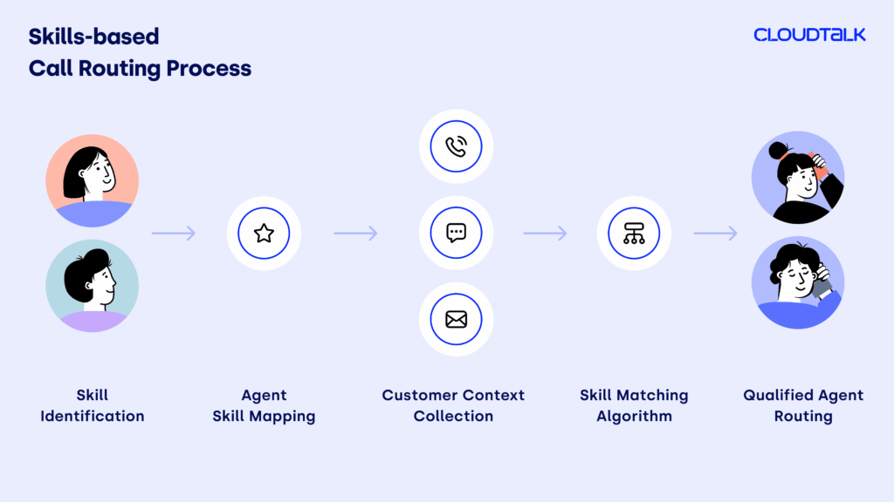
More first-call resolutions, fewer frustrated repeat callers.
Skill-based routing is a call distribution method that matches incoming calls to agents based on their specific capabilities, expertise, or language rather than simply sending the call to whoever is available next. A billing query goes to someone with finance knowledge. A technical issue goes to a specialist. A Spanish-speaking caller gets an agent who can actually help them — without being transferred twice first.
The alternative — routing purely by availability — means callers frequently end up with agents who aren't best placed to help them, leading to transfers, repeat calls, and the kind of frustrating experience that erodes customer loyalty over time.
Key capabilities and benefits:
- Higher first-call resolution rates — callers reach the agent most capable of solving their specific problem on the first attempt, reducing the repeat contacts that drain agent capacity and frustrate customers.
- Better use of specialist knowledge — experienced agents and subject matter experts handle the calls that genuinely require their skills, rather than spending time on queries that a generalist could handle just as well.
- Reduced transfer rates — when routing is matched to agent capability from the start, the need to transfer calls mid-conversation drops significantly, improving both efficiency and the customer experience.
- Scalable as the team grows — skill profiles can be updated and expanded as the team develops, meaning the routing logic stays accurate and useful as headcount and specialisms evolve.
Skill-based routing works best when it's connected to a well-configured IVR system that collects the right information upfront to inform the routing decision. CloudTalk's skill-based routing lets you build routing logic around any combination of agent skills, languages, teams, or experience levels, and can be adjusted in real time as your team and call types change.
11. Call Queuing
Stop losing revenue to abandoned calls during your busiest hours.
Call queuing is a feature that holds incoming calls in an organised waiting line when all agents are busy, rather than returning a busy signal or dropping the call entirely. Callers hear hold music or informational messages while they wait, and are connected to the next available agent in the order they called — or according to priority rules if VIP queuing is configured.
For high-volume call centers, queuing is the difference between a manageable peak period and one where calls simply disappear. Every abandoned call during a busy period is a customer who didn't get served — and in many cases, won't try again.
Key capabilities and benefits:
- No calls lost during peak periods — inbound calls are held and served in order rather than rejected, meaning volume spikes don't automatically translate into missed opportunities or unresolved customer issues.
- Reduced perceived wait times — queue messaging that keeps callers informed — estimated wait times, position in queue, callback options — significantly reduces the frustration of holding and lowers abandonment rates.
- Priority queuing for high-value callers — VIP customers or urgent cases can be elevated in the queue automatically, ensuring the interactions that matter most to the business are never kept waiting behind routine enquiries.
- Callback options that protect revenue — offering callers the option to receive a callback rather than hold gives them control over their time, reducing abandonment without losing the contact entirely.
CloudTalk's call queuing feature includes configurable queue messaging, estimated wait time announcements, and VIP queues for priority callers, giving you the tools to manage inbound volume without the call losses that typically accompany busy periods.
12. Warm Transfers
Customers explain their problem once, not three times.
A warm transfer is a call handoff method where the transferring agent speaks with the receiving agent before passing the caller over, briefing them on the situation, the customer's history, and what's already been discussed. The caller is then connected to a colleague who already knows the context — rather than being dropped into a cold transfer where they have to start from scratch.
The contrast with a cold transfer is stark from the customer's perspective. Being transferred and having to re-explain your problem is one of the most consistently cited sources of customer frustration in call center interactions. Warm transfers eliminate that friction entirely.
Key capabilities and benefits:
- No repeated explanations — the receiving agent is already briefed before the caller arrives, meaning the conversation picks up where it left off rather than starting over from the beginning.
- Faster resolution on complex issues — when context is preserved across a handoff, the receiving agent can get straight to solving the problem rather than spending the first few minutes gathering information the previous agent already had.
- Better customer experience on difficult calls — transfers that involve complaints, escalations, or sensitive issues are handled far more effectively when the receiving agent understands the situation before they say hello.
- Reduced handle time overall — calls that transfer with full context are resolved more quickly than those that don't, which reduces average handle time across the team and improves throughput during busy periods.
Warm transfers become even more effective when agents have access to a real-time customer card that surfaces the caller's full history alongside the live call, giving the receiving agent everything they need at a glance. CloudTalk's transfer features support both warm and cold transfers, with internal call and extension options that make it straightforward to connect the right people quickly.
13. International Numbers
Enter new markets without a physical office and lift connection rates immediately.
International numbers are virtual phone numbers that give a business a local presence in a country or region without requiring a physical office or local infrastructure. A company based in Dublin can display a New York number to US callers, a Berlin number to German callers, and a Singapore number to callers in Southeast Asia — all from the same platform, managed centrally.
The reason this matters for call rates is simple: people are significantly more likely to answer a call from a number they recognise as local. And for inbound operations, a local number removes the barrier of international call charges that would otherwise discourage customers from calling at all.
Key capabilities and benefits:
- Higher answer rates on outbound calls — prospects and customers are far more likely to pick up a call from a familiar local number than an unknown international one, directly improving outbound connection rates.
- Inbound accessibility in new markets — customers in new regions can reach the business at local call rates, removing a practical barrier that would otherwise suppress inbound contact volume.
- Global presence without global infrastructure — entering a new market no longer requires a physical office, local hiring, or a separate phone system — a virtual number establishes presence immediately at a fraction of the cost.
- Centralised management across all markets — all international numbers are managed from a single platform, meaning call routing, analytics, and agent assignment work the same way regardless of which country the number belongs to.
CloudTalk provides virtual numbers in over 160 countries, making it one of the broadest coverages available for businesses with international operations or expansion ambitions. You can explore the full country coverage or go straight to international numbers to see what's available in the markets most relevant to your business.
14. Wallboard (Live Dashboard)
Keep teams on target without managers having to chase stats manually.
A wallboard is a real-time visual display that shows live call center performance metrics — queue lengths, active calls, agent availability, wait times, service levels, and more — on a single screen that updates continuously throughout the day. Traditionally displayed on large screens visible across the call center floor, modern wallboards are equally accessible on individual desktops and remote setups.
The core value is transparency. When every agent and manager can see the same live picture of how the team is performing at any given moment, behaviour adjusts naturally — agents are more aware of queue pressure, managers spend less time chasing updates, and the whole team stays aligned around shared targets without constant intervention.
Key capabilities and benefits:
- Live visibility without manual reporting — key metrics update in real time without anyone having to pull a report, generate a spreadsheet, or ask a colleague for a number, freeing up management time for actual decision-making.
- Natural performance motivation — when agents can see queue lengths, wait times, and service level status in real time, they self-regulate more effectively than when performance data is only reviewed after the fact.
- Faster response to emerging problems — a queue building unexpectedly or a service level slipping below target is visible the moment it happens, giving managers enough time to intervene before it becomes a serious issue.
- Remote team alignment — for distributed or hybrid teams, a shared live dashboard replaces the floor visibility that managers lose when agents aren't in the same room, keeping everyone working from the same picture regardless of location.
CloudTalk's wallboard is fully customisable, meaning teams can choose which metrics are displayed and how they're prioritised based on what actually matters to their operation. It works naturally alongside real-time analytics and reporting for teams that want both the at-a-glance floor view and the deeper data behind it.
15. Enhanced Security & GDPR Compliance
Handle customer data confidently without legal risk keeping you up at night.
Enhanced security and GDPR compliance in a call center context refers to the combination of technical safeguards — encryption, access controls, single sign-on, data residency controls — and regulatory frameworks that govern how customer data is collected, stored, and used during phone interactions. For call centers, which handle significant volumes of personally identifiable information on every call, security isn't a feature that can be treated as an afterthought.
GDPR in particular imposes strict obligations on how customer data is handled, how long it can be retained, and what rights individuals have over it. Non-compliance carries fines of up to 4% of global annual turnover — a figure that focuses attention quickly for businesses operating at scale.
Key capabilities and benefits:
- Protection against costly data breaches — encryption of call recordings, transcripts, and customer data in transit and at rest reduces the risk of a breach that could result in regulatory fines, legal liability, and lasting reputational damage.
- GDPR and regulatory compliance built in — compliant data handling, configurable retention policies, and audit trails mean the business can demonstrate compliance without building manual processes around a platform that wasn't designed for it.
- Enterprise client requirements met — many larger enterprise clients and public sector organisations require proof of security certification and data handling standards before signing a contract, making compliance a commercial necessity as well as a legal one.
- Single sign-on and access controls — role-based permissions and SSO ensure that sensitive call data is only accessible to the people who genuinely need it, reducing internal exposure and simplifying user management as the team scales.
CloudTalk is built to meet the security and compliance requirements that modern call centers operate under, including GDPR, SOC 2, and industry-specific standards. You can review the full details on the security page or explore single sign-on and access control options if data governance is a priority for your team.
CloudTalk: Your Gateway to Advanced Call Center Functionality
Selecting the right call center features is the foundation for delivering exceptional customer experiences, and driving growth. From cutting-edge AI integrations to powerful tools like Smart Dialers and Call Flow Designers, CloudTalk offers a comprehensive solution tailored to businesses of all sizes.
Empower your team with tools that improve productivity, and enhance customer satisfaction. With CloudTalk’s advanced features, your business is ready to tackle challenges head-on while creating meaningful customer connections.
Frequently asked questions
Contact centers manage customer interactions across multiple channels, ensuring efficient communication and support delivery.
Key features include call forwarding, voicemail transcription, and automated greetings, which streamline communication and enhance accessibility.
Pricing varies by provider, with costs depending on features like AI tools, analytics, and scalability. Learn more with CloudTalk’s pricing guide.
Small businesses benefit most from features like IVR, auto-dialers, and real-time monitoring to balance efficiency and affordability.
Call center dialers, such as auto and power dialers, automate outbound calls, saving time and improving agent productivity.
The best system aligns with your business needs, offering scalability, integrations, and tools to enhance operations. Explore CloudTalk for a tailored solution.