
AI Call Summary: Stop Writing Manual Notes After Every Call
Why waste time digging through call recordings? With CloudTalk’s AI call summaries, you capture key details instantly, helping your team follow up faster, personalize conversations, and coach performance with confidence.
 SOC2 CompliantISO 27001
Trusted by 30,000+ sales & support professionals to power more & better conversations
















Eliminate Admin Work With an AI Call Summary
Save Up to 10 Hours Per Week
AI-powered business context call summaries deliver concise, searchable recaps in seconds, giving your agents the context they need, instantly.
Automate Note-Taking
Free your team from manual note-taking. Call Summaries automatically capture decisions, action items, and customer feedback and sync directly into your CRM.
Improve Coaching with Insights
Use AI summarization for call coaching to identify trends, track outcomes, and deliver targeted feedback. Spot issues early and help your team improve continuously.
We’ve helped thousands of global companies
Case studies featuring customers who are building faster.

Global Sales Engine Powered by Connected Conversations
“CloudTalk’s AI transcripts and analytics make it easier to track talk ratios, discovery depth, and regional performance—all without requiring formal training to get started.”

Revolutionizing Revolut’s Efficiency and Saving 40+ Hours
"Thanks to CloudTalk’s reliability, we could improve sales teams’ performance and close more deals than we could have ever imagined."

Increasing productivity for 200 customer support agents
"With CloudTalk's Analytics I now get to see every step of the way. We can find discrepancies and gain a much better understanding of our teams."

Delivering success for Glovo’s customer support team
"CloudTalk improved our team's cost and efficiency. The script feature allows us to lead the calls in a much more systematic way."
Automatic Summaries & Tags
What Are AI Call Summaries?
AI Call Summaries automatically capture key points, decisions, and follow-ups from every customer call. Instead of relying on manual notes, your agents get clean, structured summaries generated in real time or immediately after the call ends.
It allows teams to review conversations faster, improve customer experiences, and optimize internal processes without extra effort.
The result? A clear, actionable aftercall summary without the hassle—ready for follow-ups, reporting, or coaching.
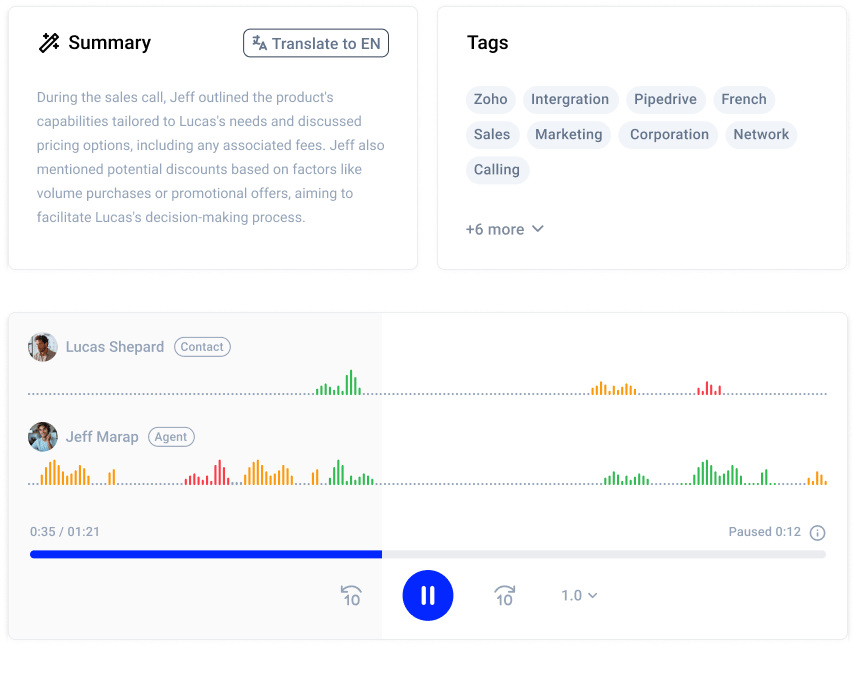

How Do AI Call Summaries Work?
When a call starts, CloudTalk’s AI listens in the background using advanced speech recognition and natural language processing, tracking key moments, decisions, and action points. After the call, it generates a clean, concise summary and applies smart tags based on topics and sentiment.
These summaries sync automatically into your CRM or Analytics dashboard—ready for follow-up, reporting, or coaching.
Benefits of AI Call Summaries
Seize the Rewards of AI Call Summaries
Enhance Customer Experience
Give agents instant access to customer history and decisions, making every interaction smoother and more personalized.
Unlock Powerful Call Insights
Analyze AI call summaries for trends, customer sentiment, and service quality. Use these call insights to optimize processes and decision-making.
Boost Accuracy and Consistency
Automated summaries capture every key point in real time, reducing human error. No more forgotten objections or incomplete notes—just clear, reliable records every time.
Keep Data Secure and Compliant
Enjoy advanced AI features while protecting sensitive customer data. All your AI phone call summaries and notes are encrypted and fully compliant with industry regulations.
Exploring Real-World AI Call Summary Examples
- 01Customer Support & Contact Centers: Automate call summaries and logging to reduce after-call work. Quickly identify customer issues and sentiment for faster, consistent resolutions.
- 02Sales & Marketing: Capture customer needs and next steps in call summaries to speed up follow-ups. Use insights to improve sales behavior, personalize marketing, and update pipelines automatically.
- 03Healthcare: Accurately document patient calls for clinical records and compliance. Reduce admin burden and enable quick access to patient history for better care coordination.
- 04Legal & Compliance: Ensure precise, standardized AI call summaries for audits and regulatory compliance. Quickly review calls and support evidence gathering with searchable, timestamped summaries.


How to Enable CloudTalk’s AI Call Summaries & Tags?
- 01Log in to your CloudTalk dashboard and go to Account > Settings > AI Conversation Intelligence.
- 02Turn on the Notes & Tagging toggle to enable automatic call summaries.
- 03Choose the key details you want the AI to capture.
- 04Add existing call tags to the auto-tagging list.
- 05Click Save Changes.
Features
Other features you might like

Topic Extraction
Track topics discussed during your calls to boost communication strategies.
Learn more about Topic Extraction
Sentiment Analysis
Get immediate feedback on your caller’s mood by following their sentiment shifts.
Learn more about Sentiment Analysis
Call Transcription
Analyze and understand your calls by automatically transcribing them with AI.
Learn more about Call Transcription
Talk/Listen Ratio
Track the Talk/Listen Ratio to provide data-backed feedback and enhance CX.
Learn more about Talk/Listen Ratio
Ready to get started?
Join over 5,500+ modern companies that already trust CloudTalk to have MORE and BETTER calls.
Frequently asked questions
Conduct the call as usual. AI transcribes and highlights key points, topics, decisions, and actions, then auto-generates a summary for quick review.
Choose an AI summarization tool that integrates with your CRM, follow the setup steps, then start using it to auto-generate sales call summaries and boost productivity.
Integrate the VoIP AI with your CRM, customize settings, and choose where summaries are delivered. It then auto-generates summaries for each call.
Run the call normally—AI analyzes, transcribes, and generates a summary with key insights, helping you quickly grasp what was said and plan next steps.
Choose an AI tool compatible with your CRM, integrate it, set preferences, and start auto-generating summaries to save time and boost productivity.
Yes, AI detects positive, negative, or neutral sentiment by analyzing tone and language, helping you understand customer emotions and adjust your approach.
CloudTalk offers automated call summaries with key topic tagging, giving teams instant insights for faster follow-ups, better coaching, and smarter decisions.
Yes. AI can automatically summarize phone calls, capturing key points, decisions, and next steps in seconds.
CloudTalk offers AI call summaries with key topic tagging, helping teams follow up faster and coach smarter.
No, but it must follow local laws. Consent, transparency, and compliance rules vary by country and region.


Hello 👋 My name is Emma. Still have questions?
Can’t find the answer you’re looking for? Please chat to our friendly team.