
What Is the Attio Integration?
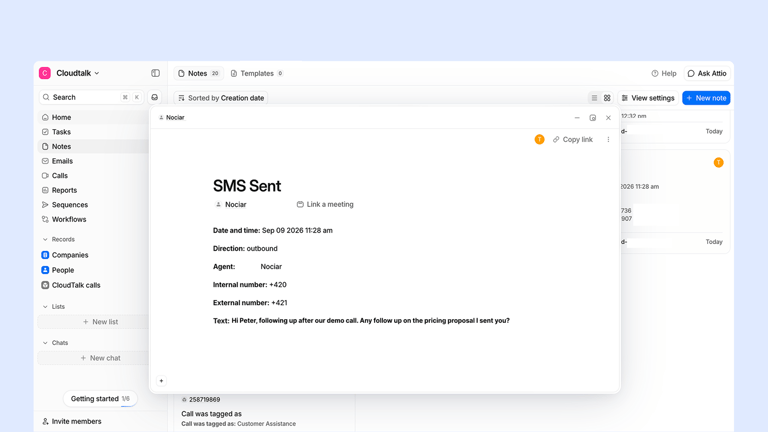
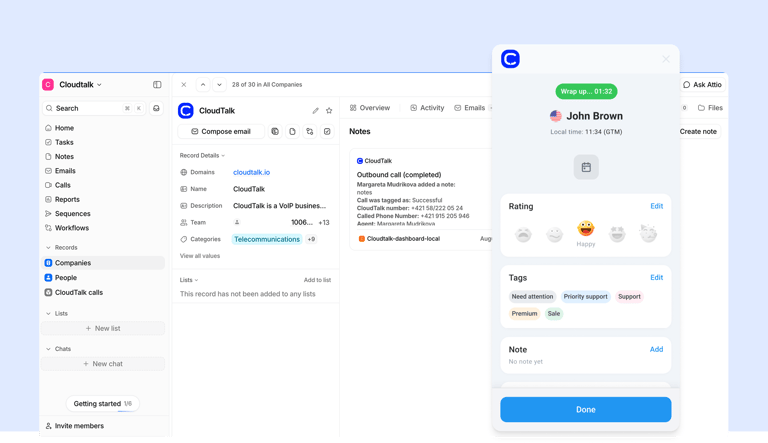
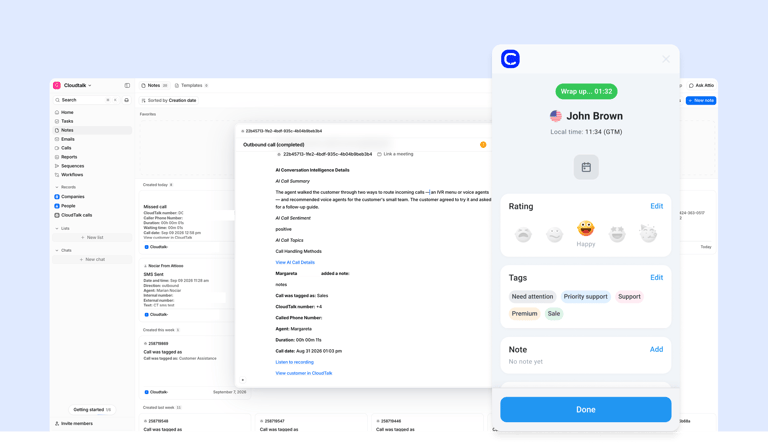
CloudTalk’s Attio integration will connect your phone system directly to your Attio workspace. Once it’s live, every call and text your team makes or receives logs itself straight onto the right Attio record, complete with an AI-generated summary, sentiment, and topic breakdown, so anyone looking at that Person or Company sees the full conversation without opening CloudTalk.
It’s currently in development and not yet available. Join the launch to be first in line when it ships.
How Will the Attio Integration Work With CloudTalk?
Connecting will take one click: sign in with Attio, and CloudTalk links your workspace via OAuth, matching your agents to Attio users automatically by email. From there, you’ll choose how calls land in Attio: as a structured Call record you can filter and report on, or as a simple note on the contact’s timeline with zero setup. Either way, contacts stay in sync both ways on a predefined set of fields, de-duplicated by email.
Benefits of the Attio Integration
- 01Never Chase Down a Call Log Again:Every inbound, outbound, missed, voicemail, transferred, and internal call will log itself straight onto the right Attio record, no manual entry.
- 02See the AI Summary Right on the Record:A summary, sentiment, and topic breakdown will land in the logged call alongside a link to the full transcript, so reps get the gist without replaying the recording.
- 03Pick the Setup That Fits Your Team:Choose a structured Call record you can filter and report on, or a zero-setup note on the contact’s timeline. AI call data shows up the same either way.
- 04Keep Contacts in Sync Both Ways:Attio contacts will flow into CloudTalk for Caller ID, starting with a full import on day one, while CloudTalk contacts push into Attio, de-duplicated by email.
- 05Log Texts Alongside Calls:Inbound and outbound SMS will show up on the record next to your calls.
- 06Connect in One Click:One-click OAuth per Attio workspace, with agents matched to Attio users automatically by email, no manual mapping.
Attio Phone Integration

Attio keeps your pipeline moving, but calls and texts don't make it back to the record on their own. CloudTalk is building the native bridge: every call logged automatically, complete with an AI summary, right where your team already works. Coming soon, join the launch to be first in line.

Use CloudTalk, like these companies







What data will Attio & CloudTalk share?
See how call activity and contact data will flow between your CRM and your phone system once this integration is live. CloudTalk’s Attio integration will keep every interaction visible, updated, and actionable across both platforms.
 CloudTalk
Cloudtalk receives
Attio Receives
TWO-WAY SYNC
AI handles the write-up. Your reps handle the conversation.
CloudTalk’s Attio integration will log every call automatically as a structured record or a note, complete with an AI summary, sentiment, and topic breakdown. No agent stops to write it up, no record goes stale waiting on notes.

Good morning! Thank you for your call. I am CeTe, your AI voice assistant. How can I help you today?
Still on the Fence?
Unsure if CloudTalk is right for you? Let us help make up your mind.
100%
Security
Summaries, transcripts, sentiment, automation, all built into a reliable calling foundation. Let your team focus on having conversations, not catching up.
Explore AI Features5,500+
Happy customers (and counting)
From fast-growing startups to global brands, teams trust CloudTalk to power conversations that drive results.
View Wall of LoveOur reviews
Hear first-hand from our incredible community of customers.

Honestly, what I liked most was how easy it was to just get on a call. No complicated setup, no hunting through menus—you log in, and you're ready to take calls. For a customer service team handling a high volume of interactions every day, that kind of simplicity actually matters a lot."
Small-Business
Customer Service Agent
Honestly, the thing I like most is how easy it is to handle calls. The fact that it integrates with HubSpot has been a huge time-saver; when a customer calls, their info just pops up automatically. That alone makes a big difference when you're dealing with a high volume of calls."
Small-Business
Customer Service Contact
From an IT admin perspective, the user management is incredibly straightforward. Adding agents and assigning numbers is done in one place without technical hassle. HubSpot syncs call logs automatically, saving us manual work, and the cloud-based setup allows our team to connect from anywhere with minimal IT support."
Small-Business
IT Support
Honestly, the HubSpot integration makes my life easiest. When a call comes in, the client’s profile pops up automatically, which is a huge help. Buying local numbers for our international campaigns is also seamless. While the desktop app needs a restart occasionally, the CRM sync and global reach make it our top choice for daily operations."
Mid-Market
Salesperson
CloudTalk has exceeded our expectations. The platform is intuitive, making it easy to onboard our team and integrate with our existing tools. Call quality is crystal clear, and features like smart routing have significantly improved our workflow. What truly stands out is the proactive customer support—they always go the extra mile to ensure a smooth experience."
Mid-Market
Team Lead Manager
What I like most about CloudTalk is how it brings structure and clarity to communication (...). Having a centralized calling platform helps keep everything organized. Features like call recording are particularly useful, as they allow me to revisit discussions and ensure nothing is missed. Overall, CloudTalk improves efficiency while keeping interactions well-documented and easy to track."
Enterprise
Mechanical Design Engineer
Integrations
Get more value from your tools
Connect your tools, connect your teams. With over 100 apps already available in our directory, your favourite tools are just a click away.

Pipedrive
Accelerate your sales cycle by making and logging calls directly within your Pipedrive deal pipelines.
Learn more
HubSpot
Sync calls, contacts, and deal activity automatically between CloudTalk and your HubSpot CRM.
Learn more
Zendesk Sell
Maximize productivity and drive revenue through a simple platform that offers full pipeline visibility.
Learn more
Zoho CRM
Bring the best out of your customer-facing teams with automation, comprehensive analytics, and personalization.
Learn more
noCRM
Focus strictly on closing deals by eliminating manual logging through a streamlined outbound calling integration.
Learn more
MS Dynamics 365
Optimize your enterprise workflows by connecting professional telephony to your Microsoft Dynamics environment.
Learn moreDiscover 99+ Integrations


Attio Integration FAQ
Everything you need to know about this integration.
It’s a native connection that will log every call and text onto the right Attio record automatically, complete with an AI-generated summary, sentiment, and topic breakdown.
Not yet. It’s a committed priority and the technical design is complete, but we can’t share a launch date. Want us to keep you posted the moment there’s news?
Yes. Depending on the setup you choose, either as a note on the contact’s timeline, or, recommended, as a structured Call record linked to that contact, so you can filter and report on your call data.
Yes, the summary, sentiment, and topics will be included in the logged call, so reps see them on the record without opening CloudTalk. They’re part of the call content itself, not separate filterable fields, so you’ll be able to read them but not build Attio views on them yet.
The Custom Call object gives you a dedicated, structured record you can filter, group, and report on in Attio, attributed to the real agent who took the call. It needs a short one-time setup in Attio. Notes mode needs no setup at all, calls land as a note on the contact’s timeline, but call details sit as plain text rather than fields you can build views on.
Not in the first release. Dialing happens in CloudTalk, and the activity flows into Attio. Calling from inside the Attio interface is on our list for a future release, but we can’t promise timing yet.
Not at launch. Calls link to the Person and their Company, not Deals. Deal association is on our list for a future release.
Yes. Connecting triggers an initial import of your existing Attio contact list, then new and edited Attio contacts flow in automatically after that, so Caller ID covers your whole address book, not just people you’ve already talked to.
Pricing hasn’t been finalized since this integration hasn’t shipped yet. We’ll update this answer once a plan tier is confirmed.
Calling from inside Attio, Deal or Opportunity association, AI data as a filterable Attio field, full field-level two-way contact sync, contact deletion or archive sync, WhatsApp or MMS, and a trigger from Attio into CloudTalk’s Outbound Voice Agent. None of these are part of the first release.


Hello 👋 My name is Emma. Still have questions?
Can't find the answer you're looking for? Please chat to our friendly team.