
What Is Microsoft Teams VoIP Integration?
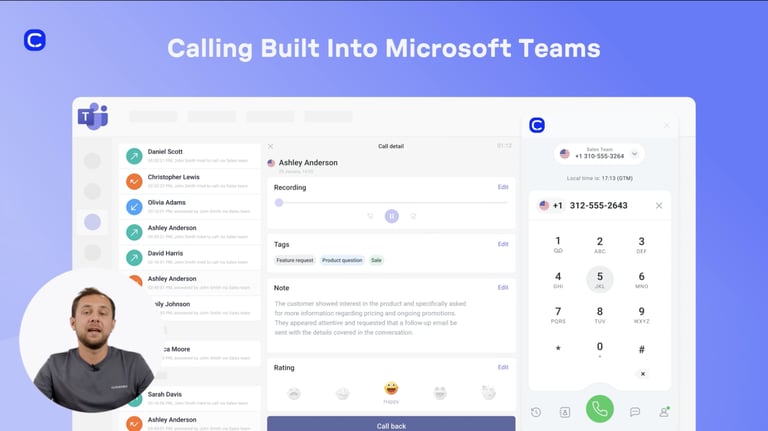
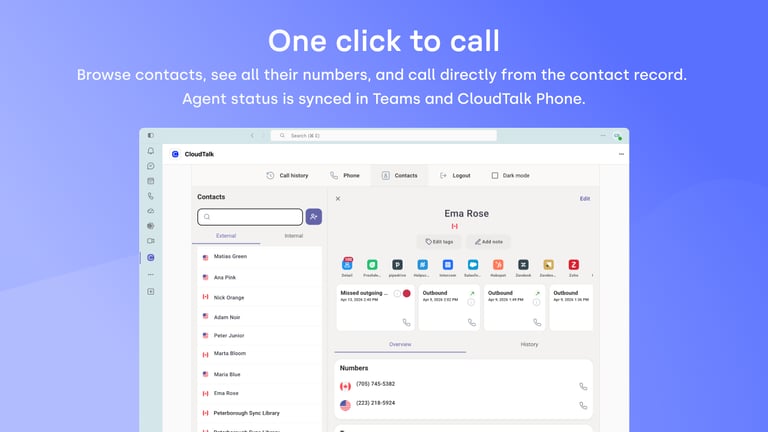
A Microsoft Teams VoIP integration is a software connection that adds professional calling capabilities to your collaboration platform. CloudTalk’s Microsoft Teams phone integration allows you to make and receive calls to landlines and external mobile numbers directly within the Teams interface.
This setup centralizes your communications by bridging internal team chat with an external Microsoft Teams telephony integration.
How Does Microsoft Teams Phone System Integration Work With CloudTalk?
CloudTalk’s Microsoft Teams phone system integration works by embedding a professional softphone dialer directly into the Teams sidebar via a secure API connection. This VoIP integration with Microsoft Teams utilizes Azure SSO for a unified login experience and requires the CloudTalk desktop app to run in the background. Once connected, workflow automation ensures that all call activities, including durations and outcomes, are synced between both platforms in real-time.
Benefits of Microsoft Teams Contact Center Integration
- 01Transform Collaboration into a Contact Center for TeamsElevate your internal chat tool into a fully functional contact center for Teams with enterprise-grade voice features. This setup allows agents to handle high volumes of external support queries using skill-based routing without ever leaving their primary collaboration workspace.
- 02Streamline Outreach with a Microsoft Teams Dialer IntegrationDrive sales velocity by initiating calls to prospects directly from your contact lists with a single click. CloudTalk’s Microsoft Teams integration includes a professional power dialer that automates outbound queues, helping your team reach more customers and call like a local anywhere.
- 03Enhance Visibility with Microsoft Teams Call Center SoftwareKeep track of your entire team's availability and performance with Microsoft Teams call center software insights. Use shared automatic agent status updates to identify staffing gaps and monitor real-time call analytics to ensure your team maintains high service standards.
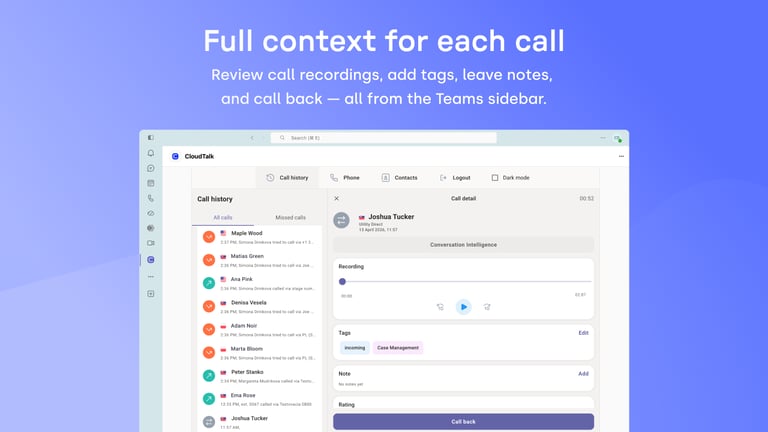
- 04Secure Complete Records with Microsoft VoIP Calling with TeamsEnsure every customer interaction is documented by automatically syncing call recordings and transcripts to your history. This phone system integration with Microsoft Teams eliminates manual data entry, providing a clear audit trail of every conversation for better coaching and compliance.
- 05Maintain Professionalism with Microsoft Teams Branded Caller IDBuild instant trust with your customers by utilizing the best tech services provider for Microsoft Teams branded caller ID. This Microsoft Teams call center integration allows you to show a professional business identity on outbound calls, significantly increasing answer rates and improving your global brand presence.
- 06Centralize Contacts via Microsoft Teams Telephony IntegrationSave hours of administrative work by maintaining a single, accurate record of all your customers across both platforms. This Microsoft Teams VoIP integration synchronizes names, companies, and phone numbers in real-time, ensuring agents always have the latest customer details during every call.
Microsoft Teams Phone System Integration

CloudTalk's Microsoft Teams phone system integration lets your team call out and receive calls on CloudTalk numbers, right inside Teams. Missed calls and call endings can trigger your existing workflows automatically.

Use CloudTalk, like these companies







What data do Microsoft Teams & CloudTalk’s integration Share?
MS Teams CloudTalk
Cloudtalk receives
MS TEAMS Receives
TWO-WAY SYNC
AI handles the logging. Your team handles the closing.
CloudTalk's Microsoft Teams phone system integration turns missed calls and call endings into automatic workflow triggers, right inside Teams. No extra app, no manual follow-up.

Good morning! Thank you for your call. I am CeTe, your AI voice assistant. How can I help you today?
Still on the Fence?
Unsure if CloudTalk is right for you? Let us help make up your mind.
100%
Security
Summaries, transcripts, sentiment, automation, all built into a reliable calling foundation. Let your team focus on having conversations, not catching up.
Explore AI Features4000+
Happy customers (and counting)
From fast-growing startups to global brands, teams trust CloudTalk to power conversations that drive results.
View Wall of LoveOur reviews
Hear first-hand from our incredible community of customers.

Honestly, what I liked most was how easy it was to just get on a call. No complicated setup, no hunting through menus—you log in, and you're ready to take calls. For a customer service team handling a high volume of interactions every day, that kind of simplicity actually matters a lot."
Small-Business
Customer Service Agent
CloudTalk has exceeded our expectations. The platform is intuitive, making it easy to onboard our team and integrate with our existing tools. Call quality is crystal clear, and features like smart routing have significantly improved our workflow. What truly stands out is the proactive customer support—they always go the extra mile to ensure a smooth experience."
Mid-Market
Team Lead Manager
What I like most about CloudTalk is how it brings structure and clarity to communication (...). Having a centralized calling platform helps keep everything organized. Features like call recording are particularly useful, as they allow me to revisit discussions and ensure nothing is missed. Overall, CloudTalk improves efficiency while keeping interactions well-documented and easy to track."
Enterprise
Mechanical Design Engineer
I like that CloudTalk helps in keeping in contact with our international customers between the USA and Finland, making long-distance communication easier. It's great that CloudTalk integrates with my CRM, which is beneficial for our workflow. The initial setup process of CloudTalk was easy, which I appreciated."
Small-Business
Sales Representative
We’ve been using CloudTalk with a small team, and it’s the best solution we found that integrates directly with my CRM. Calls are automatically logged, and the overall setup is very straightforward. The interface is clean, and it works great with Spanish numbers. We did thorough research before deciding on CloudTalk, and it fits our specific use case perfectly."
Small-Business
Product Owner
CloudTalk is a game changer for business communications. Its reliability is unmatched (...). The standout integration with my CRM is particularly impressive, automatically logging calls and leveraging AI tools to create transcriptions and summaries. This automation streamlines our workflow and ensures no essential details slip through the cracks. CloudTalk’s user-friendly interface and crystal-clear call quality all contribute to superior customer interactions."
Mid-Market
Business Development Manager
Integrations
Get more value from your tools
Connect your tools, connect your teams. With over 100 apps already available in our directory, your favourite tools are just a click away.

Pipedrive
Accelerate your sales cycle by making and logging calls directly within your Pipedrive deal pipelines.
Learn more
Salesforce
Empower your sales and support teams with a seamless 2-way data sync between your phone system and Salesforce CRM.
Learn more
Zendesk Sell
Maximize productivity and drive revenue through a simple platform that offers full pipeline visibility.
Learn more
Zoho CRM
Bring the best out of your customer-facing teams with automation, comprehensive analytics, and personalization.
Learn more
noCRM
Focus strictly on closing deals by eliminating manual logging through a streamlined outbound calling integration.
Learn more
MS Dynamics 365
Optimize your enterprise workflows by connecting professional telephony to your Microsoft Dynamics environment.
Learn moreDiscover 99+ Integrations


Microsoft Teams VoIP Integration FAQ
Everything you need to know about this integration.
Key features of CloudTalk’s Microsoft Teams integration include:
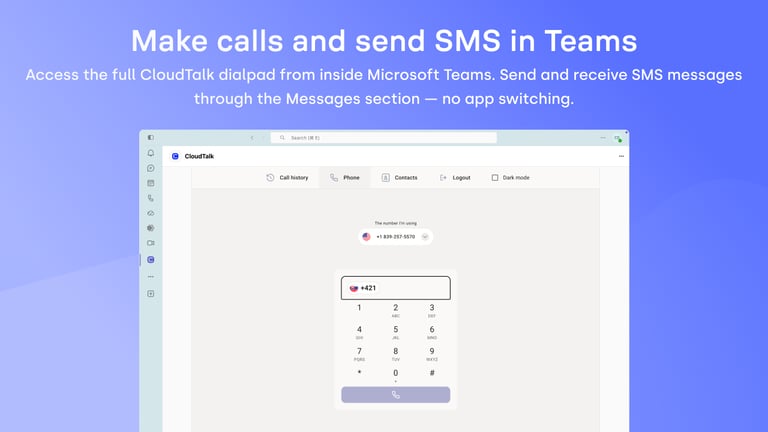
- Integrated Softphone: A native Microsoft Teams dialer integration that lives in your sidebar.
- 2-Way Sync: Real-time synchronization of contacts, call history, and statuses.
- Global Reach: Access to 160+ international, local, and toll-free numbers.
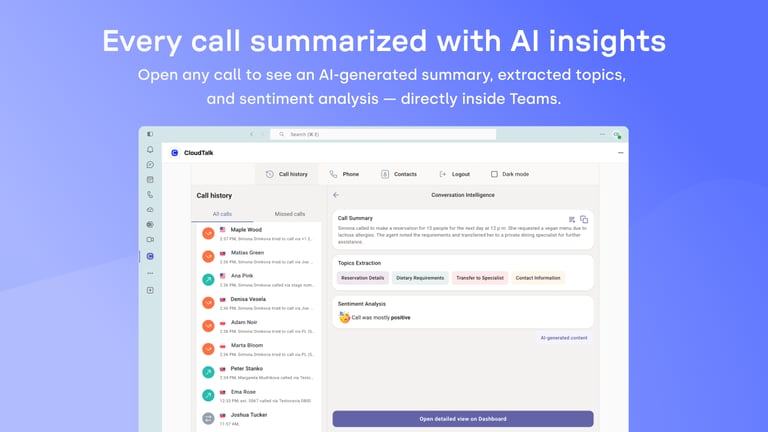
- AI Insights: Automated call recording and transcripts synced directly to your workspace.
Yes, you can use Microsoft Teams as a VoIP provider. By utilizing a Microsoft Teams VoIP integration, you can make and receive high-quality voice calls over the internet rather than traditional phone lines.
Yes, Teams phone integration supports calling landlines and mobile numbers. While Teams handles internal calls natively, you need a Microsoft Teams telephony integration like CloudTalk to connect to the public switched telephone network (PSTN).
The total cost typically includes your Microsoft 365 license and a Microsoft Teams phone system integration subscription. CloudTalk offers various plans, with integration starting at the Essential tier.
Teams provides the interface, but it relies on VoIP technology to function. Rather than replacing VoIP, a Microsoft Teams VoIP integration combines collaboration tools with internet-based calling for a unified experience.
Microsoft Teams does not have a native, full-featured call center. However, you can create a Teams call center by integrating third-party Microsoft Teams call center software like CloudTalk.
Not natively. To build a Contact Center for Microsoft Teams, businesses use integrations that add advanced features like skill-based routing and real-time call analytics.
Here is how:
- Visit the Microsoft App Marketplace and add CloudTalk.
- Set up Azure SSO in your CloudTalk Dashboard to enable secure login.
- Ensure the CloudTalk Desktop App is running in the background.
- Access the dialer via the CloudTalk icon in the Teams sidebar.
CloudTalk is widely considered the best Microsoft Teams VoIP integration because it offers a seamless 2-way data sync and is the best tech services provider for Microsoft Teams branded caller ID.
A Microsoft Teams calling integration works by connecting your phone system to Teams via secure APIs. It embeds a Microsoft Teams dialer integration into your workspace, allowing calls to trigger pop-up notifications and automatic data logging.
Microsoft Teams has a basic interface, but a dedicated Microsoft Teams dialer integration from CloudTalk provides more advanced features like click-to-call and automated callback.
Yes, with a Microsoft Teams phone system integration , you can replace traditional hardware. This allows agents to handle all business telephony within their existing collaboration tool.
Telephony features are available through a Microsoft Teams telephony integration. This enables your team to use CloudTalk's 160+ international numbers directly within the Teams environment.


Hello 👋 My name is Emma. Still have questions?
Can't find the answer you're looking for? Please chat to our friendly team.