Lindy AI Pricing & Plans: Full Guide for 2026
Summary of Lindy AI Pricing Plans
| Plan | Price | Best For |
| Plus | $49.99/month | Individuals and solopreneurs who want help automating inbox, calendar and meetings |
| Pro | $99.99/month | Small Teams running multiple AI workflows across sales, support & ops |
| Max | $199.99/month | Growing teams that need AI automation to run as a core part of their daily operations |
| Enterprise | Custom | Orgs needing SSO, SCIM, audit logs & dedicated onboarding |
In a Nutshell
Lindy AI offers four pricing plans: Plus ($49.99/mo), Pro ($99.99/mo), Max ($199.99/mo), and Enterprise (custom); each built around the same core AI assistant features but with increasing usage capacity.
Every paid plan comes with a 7-day free trial so you can test before you commit. The higher the plan, the more automation volume you get; Pro gives you 3x the usage of Plus, and Max gives you 7x more than Pro.


What Pricing Plans Does Lindy AI Offer?
Lindy AI costs $49.99/month for the Plus plan, $99.99/month for Pro, and $199.99/month for Max. Enterprise pricing is available on request. All plans come with a 7-day free trial; there is no permanent free tier. If you need serious voice calling or outbound sales automation, you'll want to read carefully before committing.
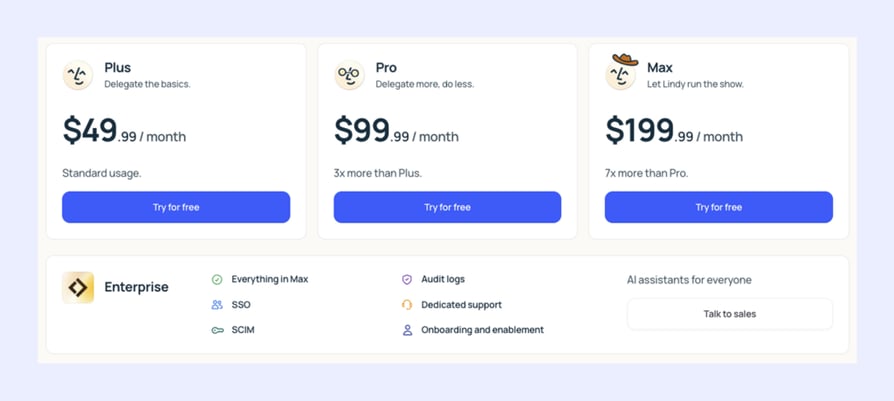
Lindy AI structures its pricing around how much automation volume you need. There are three paid plans: Plus, Pro, and Max, plus an Enterprise tier for organizations that need security controls and dedicated support.
All plans include the same core feature set: inbox management, meeting recording, calendar automation, and iMessage access to your AI assistant. What changes as you move up is how much you can actually do with it each month.
There's no permanent free tier. Instead, Lindy offers a 7-day free trial with full access to Plus features, giving you just enough runway to test your most important workflows before committing.
What Do Real Users Say About Lindy AI Pricing?
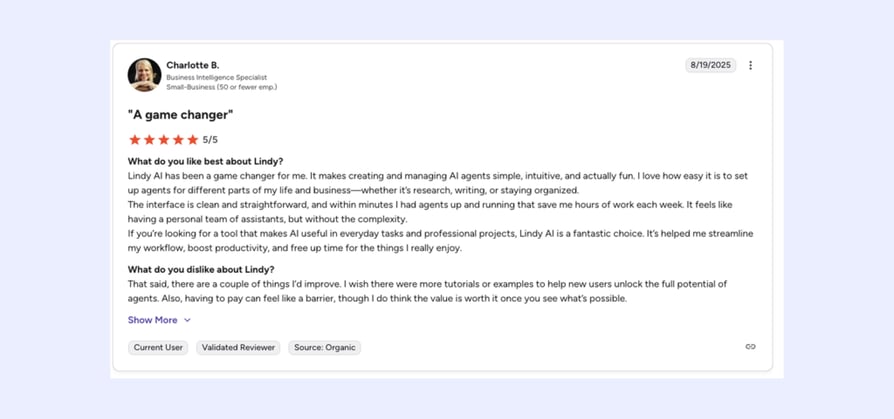
G2 reviewers tend to focus on the upside, and when Lindy works, it genuinely impresses. Charlotte B., a Business Intelligence Specialist at a small business, calls it "a game changer," praising how quickly she had workflows up and running. Her one gripe? The paywall, though she admits the value justifies it once you see what's possible.
Trustpilot tells a different story. The recurring theme isn't the product itself, it's the pricing model and what happens when things go wrong. Users flag unexpected charges after signing up for a "free" trial, a cancellation process that requires booking a call with no self-serve option, and credits burning through faster than advertised. For a tool positioned as a productivity simplifier, the billing experience feels anything but.
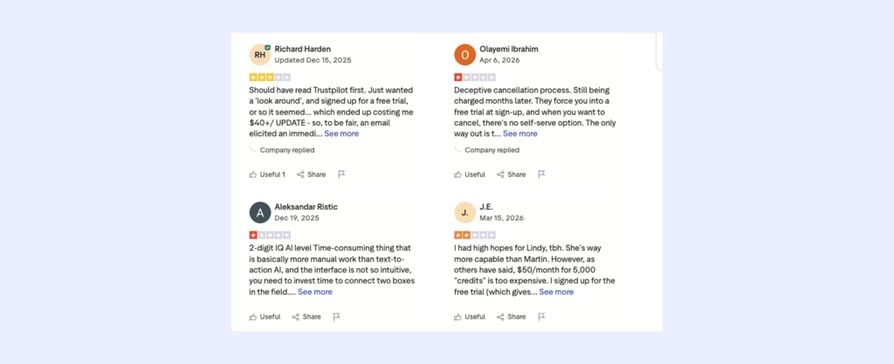
The takeaway: Lindy AI has real fans, but the credit system and cancellation friction are legitimate concerns worth knowing about before you commit.
What Is Lindy AI's Plus Plan?
The Plus plan is Lindy's entry-level paid tier, designed for individuals who want to hand off the daily grind of inbox management, meeting prep, and calendar coordination to an AI assistant. At $49.99/month, it's not cheap for a solo tool, but it covers the full core feature set that Lindy is built around.
If you're also evaluating call scheduling software as part of your productivity stack, it's worth comparing what each tool actually covers before committing.
What's included in Lindy AI's Plus Plan?
- iMessage and SMS access to your AI assistant, 24/7
- Automatic inbox management and email drafting in your voice
- Meeting recording, notes, and follow-ups
- Meeting scheduling and calendar prep
- Hundreds of app integrations, including Gmail, Outlook, Google Calendar, Slack, and Notion
- Style learning over time, so responses get more accurate the longer you use it
- Help center and community support
- Standard usage volume (based on Lindy's credit system)
Lindy AI's Plus Plan: Who is it best for?
Lindy AI's Plus Plan is best for solopreneurs, freelancers, and individual contributors who spend too much time on email and scheduling, and want an AI assistant that works in the background without requiring technical setup.
What you need to know about Lindy AI's Plus Plan:
The 7-day free trial gives you full access to Plus features, so you can stress-test it before paying. Just make sure you monitor credit usage during the trial, as several users report burning through allowances faster than expected on even basic workflows.
What Is Lindy AI's Pro Plan?
Lindy AI's Pro Plan doubles down on volume. At $99.99/month, you get three times the usage capacity of Plus, making it the right step up for founders and small teams who need Lindy running across more workflows simultaneously, whether that's lead follow-up, CRM updates, or multi-step research tasks. Teams focused on automated voice agents for lead generation should note that Lindy's lead-related capabilities are primarily text-based, not voice-native.
What's included in Lindy AI's Pro Plan?
- Everything in Plus
- 3x the usage volume of Plus
- Capacity for more complex, multi-step AI workflows running concurrently
- Suitable for teams connecting Lindy across sales, support, and operations tools
Lindy AI's Pro Plan: Who is it best for?
Lindy AI's Pro Plan is best for small teams and founders who have already validated Lindy on Plus and need more headroom to run it across multiple workflows without hitting usage limits mid-month.
What you need to know about Lindy AI's Pro Plan:
The jump from $49.99 to $99.99 is significant. Before upgrading, it's worth auditing your Plus usage to confirm you're consistently hitting the ceiling, rather than upgrading speculatively.
What Is Lindy AI's Max Plan?
Max is Lindy's highest self-serve tier, priced at $199.99/month and offering seven times the usage volume of Pro. That's a meaningful amount of workflow automation capacity, suited to teams that want Lindy embedded across their entire operation rather than handling a handful of tasks.
What's included in Lindy AI's Max Plan?
- Everything in Pro
- 7x the usage volume of Pro
- Capacity for high-frequency, always-on automation across multiple team workflows
- Priority positioning before Enterprise
Lindy AI's Max Plan: Who is it best for?
Lindy AI's Max Plan is best for growing teams that need AI automation running continuously across sales outreach, support routing, meeting management, and internal ops, without the overhead of a custom Enterprise contract.
What you need to know about Lindy AI's Max Plan:
At $199.99/month, Max is a serious investment. If your team needs this level of volume, it's also worth getting a quote from Enterprise, since dedicated onboarding and SSO may be available for a comparable or negotiated price.
What Is Lindy AI's Enterprise Plan?
Enterprise is Lindy's custom tier for organizations that need more than automation volume; they need security controls, compliance coverage, and hands-on support. Pricing is not public and requires contacting the sales team. For organizations also evaluating AI voice agents as part of a broader customer communication strategy, Enterprise is the only Lindy tier where custom integrations are available on request.
What's included in Lindy AI's Enterprise Plan?:
- Everything in Max
- SSO (Single Sign-On)
- SCIM provisioning
- Audit logs
- Dedicated support team
- Onboarding and enablement sessions
- AI assistants for everyone across the organization
- Custom integrations available on request
Lindy AI's Enterprise Plan: Who is it best for?
Mid-size to large organizations in regulated industries, or any team where IT, security, and compliance teams need visibility and control over how the AI assistant operates.
What Are Lindy AI's Additional Costs?
The base Lindy AI cost looks simple enough at first glance: pick a plan, pay monthly, get to work. But Lindy's credit-based model means your actual lindy ai billing can look very different from the plan price by the time the month is out. Here's what to watch for.
| Additional Cost | Amount | Notes |
|---|---|---|
| Extra credits | $10 per 1,000 credits | Purchased on top of your plan when you hit your monthly limit |
| Phone numbers | $10/month per number | Required for any voice or calling functionality |
| Voice calls | From $0.19/minute | Charged separately from your credit allowance |
| International calls | Higher per-minute rates | Varies by country, not published publicly |
| Custom onboarding | ~$1,500 one-time fee | Optional "white glove" setup service for businesses needing tailored workflows |
| Enterprise add-ons | Custom pricing | SSO, SCIM, audit logs, dedicated support |
Lindy AI Pricing Credits: The Hidden Variable
The biggest additional cost most users don't anticipate is lindy ai pricing credits running out faster than expected. Unlike flat-rate tools, Lindy charges credits per action, and the rate varies significantly depending on what your workflows are doing.
- Simple actions, such as sending a message or creating a calendar event, use roughly 1 credit each
- Complex actions, such as email parsing, web research, or multi-step lead workflows, can use 5 to 10+ credits per execution
- Voice calls burn through credits considerably faster than text-based tasks
The practical implication: a workflow that looks affordable in isolation can deplete your monthly allowance quickly when it runs repeatedly throughout the month. Several Trustpilot reviewers flagged this specifically, with one reporting nearly 5,500 credits consumed by just four basic recurring tasks.
Lindy AI Voice Agent Pricing: What Calling Actually Costs
If lindy ai voice agent pricing is part of your evaluation, this is where costs can climb steeply. Voice calls are billed separately from your credit allowance at $0.19/minute as a starting rate, and each phone number costs an additional $10/month. For teams running high volumes of AI calling, these per-minute charges add up fast, and Lindy's generalist architecture means you're paying a premium for voice functionality that purpose-built voice platforms include as a core feature.
Does Lindy AI Have a Free Plan?
There is no permanent free tier. Lindy offers a 7-day free trial with full access to Plus features, but once that expires you'll need to be on a paid plan to continue. This is worth factoring into your evaluation timeline.
What Will Lindy AI Actually Cost?
Lindy ai pricing per month looks deceptively simple on the surface: pick a plan, pay the flat fee, get to work. But once you factor in credits, phone numbers, voice calls, and the reality of how quickly automation volume scales, your actual lindy ai subscription cost can look very different from what the pricing page suggests.
Here are four realistic scenarios to show what you'll actually pay.
Scenario 1: Solo Founder, Plus Plan, Text-Only Workflows
Profile: A solopreneur using Lindy to manage inbox triage, meeting scheduling, and daily briefings. No voice calls, no phone numbers, straightforward text-based automation.
| Cost Item | Monthly Cost |
|---|---|
| Plus plan | $49.99 |
| Phone number | $0 (not needed) |
| Extra credits | $0 (light usage) |
| Voice calls | $0 |
| Total | $49.99/mo |
Verdict: This is the best-case scenario for Lindy. Light, predictable, and genuinely useful. The Plus plan works well here as long as your workflows stay simple and don't run frequently enough to burn through your credit allowance.
Scenario 2: Small Sales Team, Pro Plan, With Voice Calling
Profile: A 3-person sales team using Lindy for lead follow-up emails, CRM updates, meeting prep, and occasional AI cold calling. Each rep makes roughly 50 outbound calls per month averaging 5 minutes each.
| Cost Item | Monthly Cost |
|---|---|
| Pro plan | $99.99 |
| 3 phone numbers | $30 (3 × $10) |
| Voice calls (750 mins × $0.19) | $142.50 |
| Extra credits (estimated overage) | $20 |
| Total | ~$292/mo |
Verdict: The base plan looks reasonable, but voice calling triples the real cost. For teams where lindy ai calling is a core use case, the per-minute model makes costs hard to predict and control month to month.
Scenario 3: Growing Ops Team, Max Plan, High-Volume Automation
Profile: A 5-person operations team running Lindy across sales outreach, support routing, internal task automation, and meeting management. Heavy multi-step workflows running daily across the full team.
| Cost Item | Monthly Cost |
|---|---|
| Max plan | $199.99 |
| 5 phone numbers | $50 (5 × $10) |
| Voice calls (1,500 mins × $0.19) | $285 |
| Extra credits (complex workflows) | $50 |
| Total | ~$585/mo |
Verdict: At this scale, lindy ai pricing 2026 starts to feel heavy relative to what you get. The Max plan provides significant automation volume, but the per-minute voice costs and credit overages make this a difficult budget to pin down. Teams at this level should also request an Enterprise quote for comparison before committing.
Scenario 4: Enterprise Team, Custom Plan, Full Deployment
Profile: A 20-person team across sales, support, and operations needing SSO, audit logs, SCIM provisioning, dedicated onboarding, and high-volume automation running 24/7.
| Cost Item | Monthly Cost |
|---|---|
| Enterprise plan | Custom (contact sales) |
| Phone numbers | Custom |
| Voice calls | Custom rates |
| Onboarding fee (one-time) | ~$1,500 |
| Total | Custom, likely $1,000+/mo |
Verdict: Enterprise pricing is opaque by design. The one-time onboarding fee of approximately $1,500 is an additional barrier that doesn't appear anywhere on the main pricing page, and is worth factoring into your total first-year lindy ai cost calculation.
The Bottom Line on Real Costs
The gap between Lindy's advertised plan price and what you'll actually pay grows significantly the moment you add voice calling, multiple phone numbers, or complex high-frequency workflows. For text-based automation with light usage, the Plus plan is genuinely good value. For anything beyond that, budget conservatively and monitor credit consumption from day one.
Which Alternatives Are Better and Cheaper Than Lindy AI?
Lindy AI does a lot of things reasonably well. But for teams evaluating lindy ai comparison against other tools, the credit-based model, limited voice capabilities, and opaque billing make it worth looking at what else is on the market. Here are four alternatives that offer better value depending on your use case.
CloudTalk: Best for Teams That Need AI-Powered Calling, Not Just Inbox Automation
What is CloudTalk?
CloudTalk is an AI-powered business phone system built for sales and support teams that live and die by the phone.
Where Lindy focuses on inbox and calendar automation via text, CloudTalk handles inbound and outbound calling at scale, with AI conversation intelligence, real-time analytics, and 160+ country coverage baked in. If AI calling is a core part of your workflow, CloudTalk is purpose-built for it in a way Lindy simply isn't.
Why CloudTalk is Better than Lindy AI
The difference comes down to what your team actually does all day. Lindy AI features pricing reflects a generalist AI assistant, designed for one person managing emails and meetings. CloudTalk is built for teams handling hundreds of calls a day, with features Lindy either doesn't offer or charges per-minute for:
- Flat-rate pricing with no credit limits or per-minute voice surprises
- AI call summaries, transcripts, sentiment analysis, and topic extraction included
- Power dialer, parallel dialer, and smart dialer for outbound sales teams
- Skills-based routing, IVR, and call flow designer for inbound support
- Native integrations with HubSpot, Salesforce, Pipedrive, Zendesk, and 100+ more
- 160+ country coverage with local numbers
- 14-day free trial, no credit card required
For teams where AI voice agents are a strategic priority rather than an afterthought, CloudTalk is the stronger, more scalable choice.
What is CloudTalk's Pricing?
- Starter: $25/user/month
- Essential: $29/user/month
- Expert: $49/user/month
- AI Voice Agents: $99/200 minutes
- 14-day free trial included, no credit card required
”CloudTalk has made it incredibly easy to manage and track all my sales and customer calls in one place. I love how seamlessly it integrates with CRMs like HubSpot and Apollo. The call quality is reliable, and features like call recording and analytics make it easy to review performance and improve conversations.”

“We just copy the agents, update the scripts, and we’re live. No need to hire and train a completely new team from scratch.”
Owner of Circle Gym

Bottom line: If your team relies on phone calls to generate or close revenue, Lindy's text-first approach isn't enough. CloudTalk gives you a complete, AI-powered calling infrastructure at a predictable monthly cost, with no credits burning in the background.
Zapier: Best for Non-Technical Teams Automating Simple App-to-App Workflows
What is Zapier?
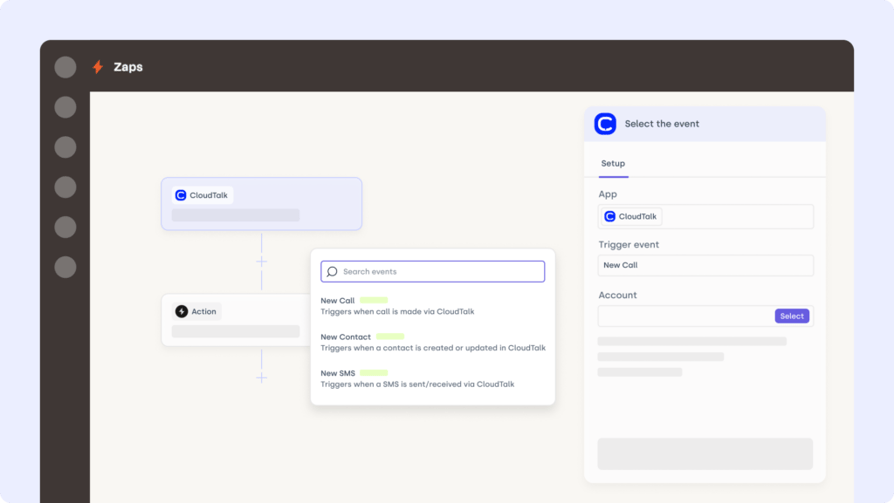
Zapier is the world's most popular workflow automation platform, connecting 7,000+ apps through simple "if this, then that" logic. It doesn't use AI agents the way Lindy does; instead, it follows rigid trigger-action rules. What it lacks in intelligence it makes up for in breadth and ease of use. For non-technical teams that need reliable, simple automations between their existing tools, Zapier is often the fastest path to value.
Why Zapier is Better than Lindy AI
Zapier wins on predictability and integration coverage. Where Lindy's credit model makes monthly costs hard to forecast, Zapier's task-based pricing is straightforward: you know exactly how many automations you get per month and what you'll pay. For sales automation use cases that don't require contextual AI reasoning, Zapier's 7,000+ integrations and proven reliability make it the lower-risk choice.
- Permanent free plan available (100 tasks/month)
- Simple setup, no technical background required
- 7,000+ app integrations, the largest library of any automation tool
- Predictable task-based pricing, no credit system surprises
- Tables, Forms, and Zapier MCP now bundled into all plans
What is Zapier's Pricing?
- Free: $0/month, 100 tasks/month
- Starter: $19.99/month (annual) or $29.99/month (monthly), 750 tasks
- Professional: $73.50/month (annual), 2,000 tasks
- Team: $103.50/month (annual), 2,000 tasks with shared workspace
- Enterprise: Custom pricing
Worth knowing: Zapier counts each action step in a workflow as a separate task, so complex multi-step automations burn through your allowance faster than you'd expect. At scale, Zapier can be 3-5x more expensive than alternatives like n8n.
n8n: Best for Technical Teams That Want Maximum Flexibility at Minimum Cost
What is n8n?
n8n is an open-source workflow automation tool that gives technical teams complete control over their automations, either self-hosted for free or via managed cloud plans. Unlike Lindy's natural language approach, n8n requires more technical setup, but rewards that investment with execution-based pricing that is significantly cheaper at scale, especially for complex, multi-step workflows.
Why n8n is Better than Lindy AI
For developer-led teams and technical ops functions, n8n's lindy ai agent platform pricing comparison is compelling. While Lindy charges per credit for every action an AI agent takes, n8n charges per workflow execution, regardless of how many steps that workflow contains. A 10-step workflow costs 1 execution in n8n versus 10 tasks in Zapier or the equivalent credit burn in Lindy. For workflow automation for small business at scale, this model is significantly more cost-efficient.
- Free self-hosted Community Edition with unlimited executions
- Execution-based pricing that rewards complexity rather than penalizing it
- 400+ integrations with full code access when needed
- Visual workflow builder plus code editor for advanced logic
- Active open-source community with 8,300+ workflow templates
What is n8n's Pricing?
- Community Edition (self-hosted): Free, unlimited executions
- Starter (Cloud): €24/month, 2,500 executions
- Pro (Cloud): €60/month, 10,000 executions
- Business (Cloud): €800/month, 40,000 executions
- Enterprise: Custom pricing
- 14-day free trial on cloud plans
Worth knowing: Self-hosting is free but requires DevOps capability and infrastructure costs of $5-20/month. The Cloud Starter plan's 2,500 execution limit can run out faster than expected if you're running polling-based workflows.
HubSpot: Best for Sales and Marketing Teams That Need CRM-Native Automation
What is HubSpot?
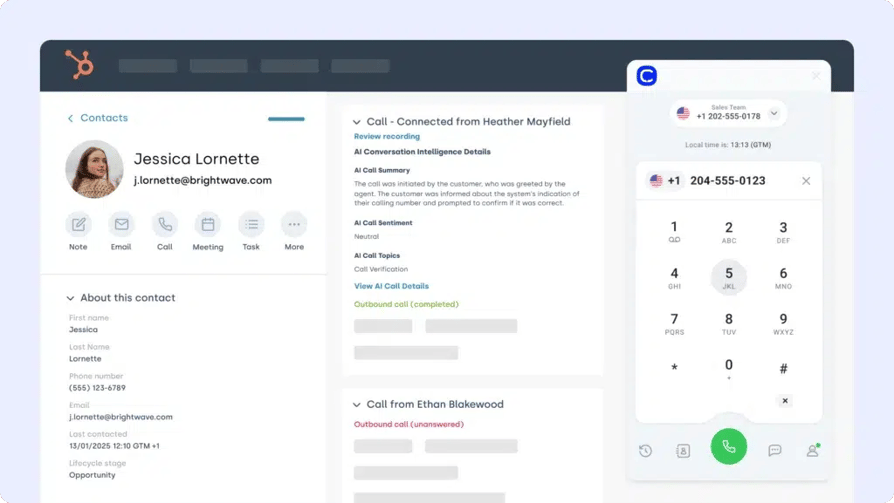
HubSpot is one of the most comprehensive CRM and marketing automation platforms available, combining contact management, email marketing, sales pipelines, customer service tools, and workflow automation in a single ecosystem. Unlike Lindy, which sits outside your CRM as an AI assistant layer, HubSpot is the system of record itself, making automation deeply native to your sales and marketing data.
Why HubSpot is Better than Lindy AI
If your team's core pain point is CRM-driven automation, such as lead nurturing sequences, deal stage triggers, or contact lifecycle management, HubSpot solves it more completely than Lindy. Lindy can connect to CRMs via integrations, but HubSpot's automation is built directly around your contact and deal data. For teams that need AI customer service automation tied to real customer records, HubSpot's depth is hard to match.
- Free CRM forever with up to 2 users
- Native workflow automation with 300+ workflows on Professional
- AI-powered email, content, and deal automation
- Deep integration with sales pipelines, contact timelines, and deal stages
- Strong ecosystem of 1,000+ native integrations
- GDPR and enterprise compliance built in
What is HubSpot's Pricing?
- Free: $0, up to 2 users, basic CRM features
- Starter: From $20/seat/month (annual), removes HubSpot branding, basic automation
- Professional: From $890/month (annual), full workflow automation, 3 core seats included, $1,500-$3,000 one-time onboarding fee
- Enterprise: From $3,600/month (annual), 5 core seats, $6,000+ onboarding fee
Worth knowing: HubSpot's free plan is genuinely useful, but the jump from Starter to Professional is steep. Professional requires an annual commitment and a mandatory onboarding fee that doesn't appear in the headline price. Most businesses negotiate 10-35% off list price, so treat the published figures as a starting point.
What Are Lindy AI's Best Features?
Understanding lindy ai agent platform features pricing means understanding what you're actually paying for. Lindy's core value proposition isn't breadth, it's depth in a very specific set of tasks.
Here are the four features that genuinely stand out, along with an honest take on where each one could be better.
Inbox Management and Email Drafting
Lindy's strongest feature, and the one most users cite first, is its ability to manage email at a genuinely useful level. It doesn't just filter or label; it reads context, prioritizes by urgency, and drafts replies that actually sound like you over time.
The more you use it and correct its drafts, the more accurate it gets. Users consistently report saving two to four hours a day on email alone once the system is properly calibrated.
Where it could be better: The learning curve in the early weeks is real. Lindy needs consistent feedback to develop your voice, and the initial drafts can feel generic until it has enough data to work with. For teams handling high-volume AI customer service at scale, the single-user focus of the Plus plan is also a limitation.
Meeting Recording, Notes, and Follow-Ups
Lindy connects to Zoom and Google Meet to automatically record meetings, generate notes, extract action items, and draft follow-up emails, all without manual input.
For professionals going from call to call, this feature alone can reclaim significant time from post-meeting admin. The Zoom and Google Meet integrations work reliably, and the action item extraction is accurate enough for internal use without heavy editing.
Where it could be better: Transcription accuracy drops noticeably with strong accents, fast speech, or industry-specific terminology. As part of Lindy's overall lindy ai assistant pricing value proposition, this is a strong inclusion, but it should not be used for client-facing documentation without a human review first.
Calendar and Scheduling Automation
Scheduling is one of Lindy's cleanest use cases. It checks availability across time zones, handles back-and-forth on meeting requests, sends booking confirmations, and syncs everything to your calendar automatically.
For anyone who spends meaningful time coordinating meetings, this is a legitimate time-saver that works reliably across iOS and Android via iMessage and SMS.
If you're also evaluating dedicated call scheduling software, it's worth noting that Lindy's scheduling is optimized for meetings and calendar management, not for high-volume call routing or queue management.
Where it could be better: Lindy's scheduling works best for individual professionals. For teams needing shared availability management, round-robin booking, or complex routing logic, dedicated scheduling tools or AI voice agents are a more complete solution.
No-Code AI Workflow Builder
Lindy's workflow builder lets non-technical users create multi-step AI automations using plain English. You describe what you want an AI workflow to do, and Lindy builds it, connecting across 400+ native integrations and thousands more via Pipedream.
This is the feature that makes Lindy genuinely accessible to non-developers, and it's what separates it from tools like n8n that require technical setup. For teams evaluating lindy ai automation features pricing as part of a broader no-code stack, the builder is legitimately strong for text and data-based workflows.
Where it could be better: Voice and calling workflows are a weak point. Lindy's builder can trigger phone calls, but the per-minute billing and lack of purpose-built voice infrastructure mean it's not a substitute for dedicated AI voice agents for lead generation or inbound call handling. For anything beyond basic outbound calling, you'll feel the limitations of a generalist platform.
What Are the Pros and Cons of Lindy AI?
| Pros | Cons |
|---|---|
| No-code setup — Up and running in 60 seconds, no technical skills needed | Unpredictable billing — Credit model makes monthly costs hard to forecast |
| Inbox management — Voice-matched email drafting that improves over time | Weak voice capabilities — Calls billed at $0.19/min, not built for high volume |
| Integrations — 400+ native apps plus thousands more via Pipedream | Limited team features — SSO, SCIM, and audit logs locked behind Enterprise |
| Security & compliance — GDPR, SOC 2, HIPAA, and PIPEDA compliant | Transcription accuracy — Drops with accents, jargon, or fast speech |
| Meeting automation — Auto recording, notes, and action items from Zoom and Meet | Support gaps — No live chat on Plus or Pro; cancellation requires a call |
Is Lindy AI the Right Fit for Your Team?
Lindy AI is a genuinely impressive tool for a specific type of user: the individual professional who is drowning in email, back-to-back meetings, and calendar chaos. If that's you, the Plus plan at $49.99/month can realistically pay for itself in time saved within the first week.
But "the right fit" depends heavily on what your team actually does all day.
Lindy makes sense if:
- You're a solopreneur, founder, or executive assistant managing one person's inbox and calendar
- Your workflows are primarily text-based, such as email, meeting notes, and scheduling
- You want a no-code AI assistant that works through iMessage without requiring technical setup
- You're comfortable monitoring credit usage and adjusting workflows to stay within your monthly allowance
Lindy is probably not the right fit if:
- Your team relies on phone calls to generate or close revenue
- You need predictable, flat-rate pricing without a credit system
- You're running a sales or support team that handles high volumes of inbound or outbound calls
- You need enterprise-grade team features without paying custom Enterprise pricing
- Billing transparency and easy cancellation are non-negotiable for your business
For teams where AI voice agents and phone-based automation are central to how you work, Lindy's text-first architecture is a fundamental mismatch. The per-minute call billing, credit unpredictability, and lack of purpose-built voice infrastructure mean you'll quickly hit the ceiling of what Lindy can do, and pay more than expected getting there.
If calling is core to your business, CloudTalk gives you a complete AI-powered calling platform with flat-rate pricing, real-time analytics, and 160+ country coverage, built specifically for sales and support teams that live on the phone.
FAQs: Lindy AI Pricing
Lindy AI is a no-code AI assistant platform that automates inbox management, meeting scheduling, calendar coordination and workflow automation. Connect your email, calendar, and apps, then interact with Lindy via iMessage or SMS to delegate tasks.
Lindy handles email triage and drafting, meeting recording and notes, calendar scheduling, lead follow-up, CRM updates, and multi-step workflow automation across 400+ integrated apps. It can also make and receive phone calls via AI voice agents, though these are billed separately per minute.Lindy handles email triage and drafting, meeting recording and notes, calendar scheduling, lead follow-up, CRM updates, and multi-step workflow automation across 400+ integrated apps. It can also make and receive phone calls via AI voice agents, though these are billed separately per minute.
Lindy and CloudTalk solve different problems. Lindy is a text-first AI assistant focused on inbox, calendar, and meeting automation for individuals and small teams. CloudTalk is a purpose-built AI calling platform designed for sales and support teams handling high volumes of inbound and outbound calls. If phone communication is central to how your team generates revenue, CloudTalk is the stronger, more scalable choice, with flat-rate pricing, no credit limits, and AI conversation intelligence built in.
Lindy offers a 7-day free trial with full access to Plus features, including inbox management, meeting scheduling, and iMessage access to your AI assistant. There is no permanent free plan, so once the trial ends you'll need a paid subscription to continue.
Lindy offers a 7-day free trial with full access to Plus features, including inbox management, meeting scheduling, and iMessage access to your AI assistant. There is no permanent free plan, so once the trial ends you'll need a paid subscription to continue.
Lindy AI is best for individual professionals and small teams who want to automate email, meeting prep, calendar management, and routine follow-ups without any technical setup. It's particularly strong for founders, executive assistants, and solopreneurs who spend several hours a day on inbox and scheduling tasks and want to reclaim that time through AI automation.