RingCentral HubSpot Integration vs CloudTalk: Full Comparison for 2026
RingCentral HubSpot Integration vs CloudTalk: TL;DR
Both RingCentral and CloudTalk integrate with HubSpot — but they serve very different teams. RingCentral is a full UCaaS platform (voice, video, SMS, fax) now with a native HubSpot embed, but it's built for larger organisations and comes with higher pricing and steeper setup complexity. CloudTalk is purpose-built for HubSpot-first sales and support teams: faster to connect, deeper in CRM automation, more transparent in pricing, and backed by broader international coverage. Here's what this guide covers:
- 01How the RingCentral HubSpot Integration Actually Works — Setup steps, features, and known limitations
- 02How CloudTalk's HubSpot Integration Works — Setup, automation, and what makes it different
- 03Full Feature Comparison Table — Side-by-side across setup, AI, dialing, pricing, and more
- 04Pricing Comparison — What you actually pay on each platform
- 05G2 Reviews & Real User Feedback — What verified users say about each integration
- 06Who Should Choose Each Platform — Clear guidance on which fits your team
- 07Customer Stories: Switching from RingCentral to CloudTalk — Real results from real HubSpot teams
RingCentral HubSpot Integration vs CloudTalk: Quick Comparison
RingCentral HubSpot Integration vs CloudTalk: At a Glance
| Category | RingCentral (RingEX) | CloudTalk |
|---|---|---|
| HubSpot Integration Type | Native embed (RingEX SDK, updated 2025) | Native — no browser extension or plugin needed |
| Setup Time | Hours to days; admin configuration required | Minutes — one-click connection, no IT needed |
| Auto Call Logging | Yes — desktop; mobile logging is limited | Yes — all calls, SMS, notes, recordings, and AI summaries |
| AI Features | AI call summaries (RingSense, add-on) | AI smart notes, call scoring, sentiment analysis, topics extraction — included |
| Dialing Modes | Click-to-call only | Click-to-call, Power Dialer, Parallel Dialer, Smart Dialer, Preview Dialer |
| International Numbers | 100+ countries | 160+ countries |
| Starting Price | From $30/user/month (Core) | From $25/user/month |
| G2 Rating | 4.3/5 (2,965 reviews) | 4.4/5 (1,624 reviews) |
Why Your HubSpot Integration Choice Matters More Than You Think
When your phone system and CRM work together seamlessly, every call becomes a source of insight. A strong HubSpot integration means instant contact pop-ups, auto-logged call activity, AI-generated notes, and a 360° view of every customer — without any rep touching a keyboard.
When the integration underperforms, the ripple effects are immediate: reps waste minutes per call switching between tools, recordings go missing, data quality drops, forecasts suffer, and managers lose visibility into pipeline momentum. Teams revert to manual workarounds and adoption collapses.
Both RingCentral and CloudTalk offer HubSpot integration, but the depth of that integration — and what it costs — differs significantly. This guide gives you the honest comparison you need to make the right call for your team.

Connect CloudTalk to HubSpot in Minutes

How the RingCentral HubSpot Integration Works
RingCentral significantly updated its HubSpot integration in 2025, moving from a Chrome extension model to a genuinely native experience built with HubSpot's SDKs. The updated RingEX for HubSpot embeds directly into the CRM's interface, meaning reps can make and receive calls, access their RingCentral inbox, and view contact records without leaving HubSpot.
How to Set Up the RingCentral HubSpot Integration
- 01Navigate to the HubSpot Marketplace or RingCentral App Gallery and search for RingEX for HubSpot
- 02Install the integration and authenticate with both your RingCentral and HubSpot admin credentials
- 03Configure Activity Sync rules — specify which call events log automatically to HubSpot records
- 04Set up screen pop preferences so contact records surface on incoming calls
- 05Test with a live call to verify logging, recording sync, and contact association are working correctly
What the RingCentral HubSpot Integration Does Well
- Native embed in HubSpot: The 2025 update removed the Chrome extension dependency, giving a more stable and consistent experience for desktop users.
- Activity Sync across devices: Calls made via browser or the RingCentral desktop app now log automatically to HubSpot, reducing manual entry for office-based teams.
- SMS logging to HubSpot: Text messages are logged in real time and can link to up to three HubSpot records — contacts, companies, deals, or tickets.
- HubSpot Workflow triggers: Call events and SMS activity can trigger HubSpot Workflow automations for follow-up tasks or sequences.
- Broad communication suite: For teams that also need video conferencing, team messaging, and events in the same platform, RingCentral covers more ground than a dedicated call center tool.
Where the RingCentral HubSpot Integration Still Falls Short
The 2025 update meaningfully improved RingCentral's HubSpot experience — but limitations remain that matter for sales-heavy teams. Mobile call logging is still a known gap: calls received on a mobile device outside the RingCentral app don't auto-log to HubSpot, which is a real problem for field sales reps and teams with high mobile call volumes. The HubSpot Community confirms this is an ongoing limitation with no automated workaround currently available.
Beyond that, RingCentral is fundamentally a UCaaS platform — its primary design is around voice, video, fax, and messaging for the whole organisation. HubSpot integration is one feature in a much larger product. That means more complexity, more admin overhead, and a higher price point than a purpose-built HubSpot calling solution. Teams that live entirely in HubSpot for sales and support often find RingCentral overbuilt for their needs.
- Mobile auto-logging is limited: Calls forwarded to mobile devices outside the RingCentral app don't log to HubSpot — reps must manually enter them or miss the record entirely.
- AI features cost extra: RingSense AI (call summaries, transcription, coaching) is an add-on, not included in standard plans. This adds meaningful cost for teams that want AI-assisted workflows.
- No advanced dialing modes: RingCentral's HubSpot integration supports click-to-call. It doesn't include a Power Dialer, Parallel Dialer, or Smart Dialer — critical tools for outbound sales teams working prospect lists from HubSpot.
- Setup requires admin time: Configuring Activity Sync rules, screen pop behaviour, and workflow triggers correctly takes hours, not minutes. Organisations with complex HubSpot setups often need IT involvement.
- Enterprise-first pricing: RingCentral's plans start at $30/user/month and increase quickly once AI features, advanced integrations, and additional channels are added. For HubSpot-centric SMBs, this is often more than they need to pay.
How CloudTalk's HubSpot Integration Works
CloudTalk's HubSpot integration is natively built — not bolted on. There are no browser extensions, no plug-ins, and no manual sync steps. The connection is established via API, and once live, every call, SMS, voicemail, AI note, recording, and outcome is automatically written to the correct HubSpot Contact, Deal, or Ticket record in real time. Reps never leave HubSpot. Managers get clean, complete data. Automation runs on accurate inputs.
How to Set Up the CloudTalk HubSpot Integration
- 01Log into CloudTalk and navigate to Settings → Integrations → HubSpot
- 02Click Connect and authenticate with your HubSpot admin account — no IT required
- 03CloudTalk automatically maps contacts, deals, and activity fields — review and confirm the defaults
- 04Enable AI features (smart notes, call scoring, transcription) from the AI settings panel
- 05Start dialing directly from HubSpot contact and deal records — calls log automatically from the first call
What CloudTalk's HubSpot Integration Includes
- Click-to-call from any HubSpot record: Dial contacts directly from Contact, Deal, Company, or Ticket records without switching tabs or opening a separate app.
- Auto-logging of all activity: Every inbound and outbound call, SMS, voicemail, note, and recording is automatically written to the correct HubSpot record — including calls made from mobile.
- AI Smart Notes synced to HubSpot: CloudTalk AI generates a call summary, key takeaways, and action items after every call and pushes them directly to the HubSpot contact timeline — eliminating post-call admin.
- HubSpot-triggered Power Dialer campaigns: Build a HubSpot list, push it to CloudTalk's Power Dialer, and let reps auto-dial sequentially while all outcomes sync back automatically.
- Parallel Dialer for HubSpot lists: Use CloudTalk's Parallel Dialer to call up to 10 HubSpot contacts simultaneously — connect only when someone picks up.
- Real-time customer card: When a call connects, reps see the HubSpot contact's full history — previous calls, deals, notes, and lifecycle stage — without switching windows.
- Contact owner routing: Incoming calls from HubSpot contacts are automatically routed to the assigned contact owner — preserving relationship continuity at scale.
- Bidirectional contact sync: New contacts created in either platform sync automatically — no duplicate entry, no manual imports.
RingCentral vs CloudTalk: Full HubSpot Feature Comparison
RingCentral HubSpot Integration vs CloudTalk: Full Feature Breakdown
| Feature | RingCentral (RingEX) | CloudTalk |
|---|---|---|
| Integration Architecture | Native SDK embed (2025 update) | Native API integration |
| Setup Time | Hours — admin config, sync rules required | Minutes — one-click, self-serve |
| IT Required for Setup | Often yes — complex orgs need admin support | No — any HubSpot admin can connect |
| Click-to-Call from HubSpot | ✅ Yes | ✅ Yes |
| Auto Call Logging | ✅ Desktop; ⚠️ Limited on mobile | ✅ All devices — desktop, mobile, browser |
| SMS Logging to HubSpot | ✅ Yes — real-time | ✅ Yes — real-time |
| Call Recording in HubSpot | ✅ Yes | ✅ Yes |
| AI Call Summaries | ⚠️ RingSense add-on (extra cost) | ✅ Included — auto-synced to HubSpot |
| AI Call Scoring | ⚠️ Add-on only | ✅ Included |
| Sentiment Analysis | ⚠️ Add-on only | ✅ Included |
| Call Transcription | ⚠️ Add-on only | ✅ Included |
| Power Dialer for HubSpot Lists | ❌ Not available | ✅ Included from Essential plan |
| Parallel Dialer | ❌ Not available | ✅ Up to 10 simultaneous lines |
| Contact Owner Routing | ❌ Not available | ✅ Included |
| HubSpot Workflow Triggers | ✅ Yes | ✅ Yes |
| International Numbers | 100+ countries | 160+ countries |
| Mobile Call Auto-Logging | ⚠️ Limited — only via RC app | ✅ Full — all mobile calls log automatically |
| Voicemail Drop | ✅ Yes | ✅ Yes |
RingCentral vs CloudTalk: Pricing Comparison for HubSpot Teams
Pricing is where the gap between these two platforms becomes most visible for HubSpot-centric sales and support teams.
RingCentral Pricing
RingCentral's plans start at $20/user/month (Core, billed annually) but most HubSpot users will need the Advanced plan at $25/user/month to access CRM integrations. AI features (RingSense) are a separate add-on. See our full RingCentral pricing breakdown for a detailed look at what's included at each tier and where hidden costs appear.
CloudTalk Pricing
CloudTalk's plans start at $25/user/month (Starter, billed annually), with HubSpot integration available from the Essential plan at $29/user/month. AI features — including smart notes, call scoring, sentiment analysis, and transcription — are included in higher plans rather than sold separately. See the full CloudTalk pricing page for current plan details.
RingCentral vs CloudTalk: Pricing Summary
| RingCentral | CloudTalk | |
|---|---|---|
| Entry Plan | $20/user/month (Core — limited integrations) | $25/user/month (Starter) |
| HubSpot Integration Included From | Advanced plan ($25/user/month) | Essential plan ($29/user/month) |
| AI Features | RingSense add-on — extra cost | Included from higher plans |
| Power Dialer | Not available | Included in Expert plan |
| Free Trial | 14-day free trial | 14-day free trial |
G2 Reviews: What Real Users Say About Each HubSpot Integration
RingCentral (RingEX) G2 Reviews
G2 reviewers give RingEX 4.3/5 from 2,965 verified reviews.
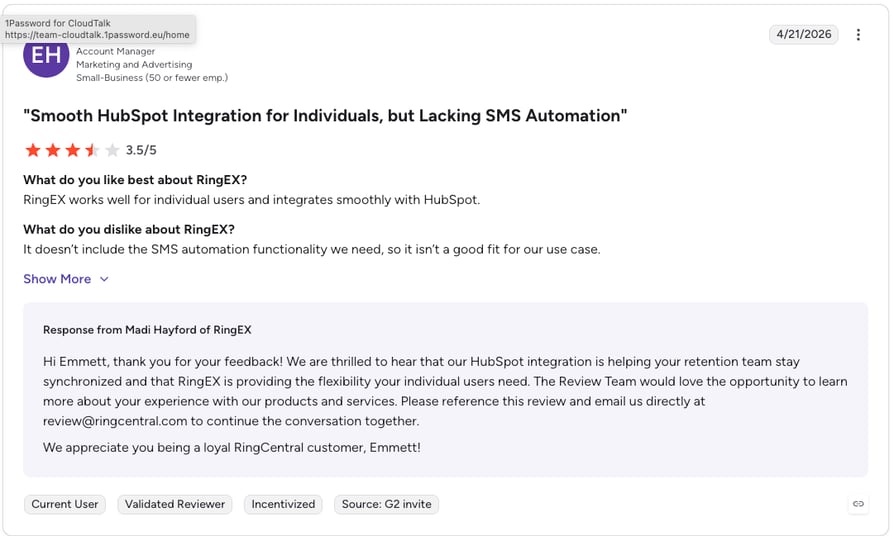
Users consistently praise RingCentral for its reliability, broad feature set, and call quality. The most common complaints centre on customer support responsiveness, admin complexity, and — specifically relevant to HubSpot users — the difficulty of configuring integrations correctly without IT support. Several reviewers note that the admin portal is complex to navigate, and that onboarding for new users has a steeper learning curve than expected for a platform at this price point.
RingCentral (RingEX): G2 Pros and Cons
| Pros | Cons |
|---|---|
| Reliable call quality and uptime | Complex admin portal — high learning curve |
| Broad communications suite (voice, video, SMS, fax) | Customer support can be slow and hard to reach |
| 2025 HubSpot native embed is a significant improvement | Mobile call logging to HubSpot is still limited |
| Strong G2 market presence across all business sizes | AI features (RingSense) cost extra |
CloudTalk G2 Reviews
G2 reviewers give CloudTalk 4.4/5 from 1,624 verified reviews.
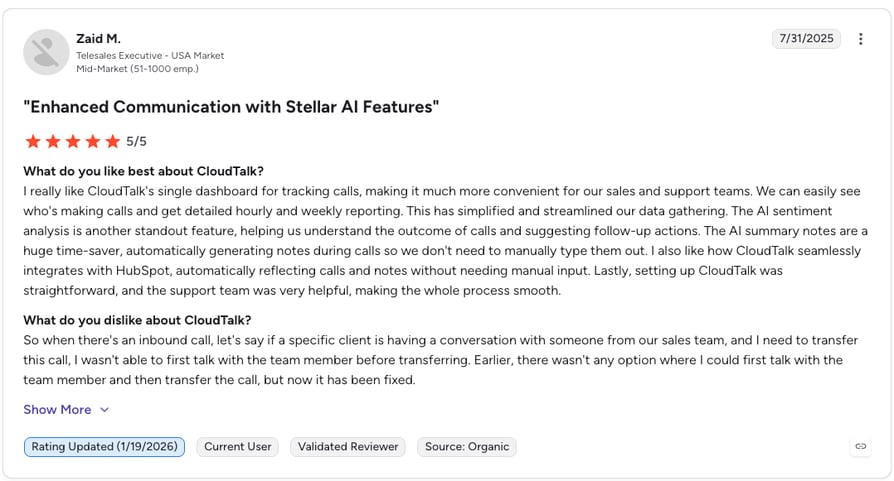
CloudTalk's reviews highlight the HubSpot integration specifically and frequently. One verified reviewer noted: "What I value most about CloudTalk is the ease of tracking calls directly from the CRM (HubSpot). Before, we used to waste time searching for recordings or manually noting what was discussed — now the entire recording is logged in the client's contact." Users also call out the Power Dialer and analytics dashboards as standout features, with several noting measurable increases in pickup rates and call volume after switching.
CloudTalk: G2 Pros and Cons
| Pros | Cons |
|---|---|
| Deep, seamless HubSpot integration — highlighted by users specifically | Smaller review base than RingCentral |
| Power Dialer and AI features included — no add-ons needed | Initial setup documentation could be clearer for some users |
| Fast setup — no IT required | Video conferencing not included (CloudTalk is calling-first) |
| Strong customer support responsiveness highlighted across reviews |
RingCentral vs CloudTalk for HubSpot: Who Should Choose Each?
Choose RingCentral if:
- Your organisation needs a single platform for voice, video, fax, team messaging, and HubSpot calling — and you want to consolidate vendors
- You are an enterprise with 200+ users and have dedicated IT and Salesforce/HubSpot admin resources to manage the configuration
- Your team does not rely heavily on outbound dialing from HubSpot lists and is primarily handling inbound calls and internal communication
- You are already deeply embedded in the RingCentral ecosystem and switching costs outweigh the integration limitations
Choose CloudTalk if:
- Your team lives in HubSpot for sales or support and you want every call, note, and recording to just appear in the right place — automatically
- You run outbound sales prospecting from HubSpot and need a Power Dialer or Parallel Dialer that works natively with your contact lists
- You want AI call summaries, scoring, and sentiment analysis included in your plan — not as expensive add-ons
- You are an SMB or mid-market team and need a fast, transparent setup without IT involvement or long implementation timelines
- You call internationally and need local numbers in 160+ countries — more than RingCentral's 100+ country coverage
- Your reps work on mobile as well as desktop, and you need all calls — wherever they are made — to log to HubSpot automatically
Customer Stories: Teams That Switched from RingCentral to CloudTalk for HubSpot
My Mortgage Finder — From Fragmented Calls to Full HubSpot Visibility
UK-based My Mortgage Finder helps clients with adverse credit secure financing. Their old system — including RingCentral — couldn't scale with their growth or deliver the HubSpot integration their team needed. Every coaching conversation required a supervisor to physically sit next to the agent with a call splitter. There was no way to review calls in HubSpot, no AI insights, and no way to run outbound campaigns from their CRM data.
After switching to CloudTalk, they gained a Power Dialer that runs directly off their HubSpot contact lists, AI analytics that surface coaching opportunities automatically, and full call recording synced to every HubSpot contact record. "Before, I had to sit next to an agent with a splitter. Now, I just click a button from my desk and listen live. CloudTalk gave us back control."
Catch Creation — Scaling HubSpot Call Volume Without Breaking the Integration
E-commerce incubator Catch Creation manages multiple consumer brands, with call volume surges reaching up to 6,000 daily interactions during peak seasons. Their previous setup — built on tools including RingCentral — created bottlenecks: rigid contracts, no flexibility to scale seasonally, and a HubSpot sync that couldn't keep up with volume. Data quality suffered, and managers had no reliable visibility into what was happening in the pipeline.
After switching to CloudTalk, they gained the scalability they needed — handling peak load without dropped calls or sync failures — plus 4+ years of uninterrupted reliability. "CloudTalk was the only provider that offered the flexibility we needed, and at pricing that made sense for our size and growth."
M4U Holdings — Choosing CloudTalk After Evaluating RingCentral, Aircall, and Dialpad
M4U Holdings faced dropped calls, fragmented HubSpot data, and no analytics visibility with their existing setup. They ran a structured evaluation comparing Aircall, Dialpad, and RingCentral before selecting CloudTalk for three specific reasons: call reliability, API flexibility for their custom HubSpot workflows, and native bidirectional data sync. "Before, I had to sit next to an agent with a splitter. Now I just click a button from my desk and listen live. CloudTalk gave us back control."
See Why HubSpot Teams Choose CloudTalk Over RingCentral
RingCentral HubSpot Integration vs CloudTalk: Frequently Asked Questions
Yes. RingCentral (RingEX) integrates with HubSpot through a native embed updated in 2025, moving away from the previous Chrome extension model. The integration supports click-to-call, automatic call logging (on desktop), SMS logging, screen pops, and HubSpot Workflow triggers. Mobile call auto-logging remains limited — calls received outside the RingCentral app don't log automatically to HubSpot. AI features like call summaries and transcription require the RingSense add-on at additional cost.
To set up the RingCentral HubSpot integration: (1) Go to the HubSpot Marketplace or RingCentral App Gallery and install RingEX for HubSpot; (2) Authenticate with both your RingCentral and HubSpot admin credentials; (3) Configure Activity Sync rules to specify which call events log to HubSpot; (4) Set up screen pop preferences; (5) Test with a live call. For complex HubSpot or RingCentral configurations — multiple queues, IVR flows, or custom properties — IT admin support is typically required to complete the setup correctly.
For HubSpot-first sales and support teams, CloudTalk is generally the stronger choice. It connects in minutes without IT, auto-logs calls from all devices (including mobile), includes AI features in the plan rather than as add-ons, and offers Power Dialer and Parallel Dialer modes that work natively with HubSpot contact lists. RingCentral is a better fit for larger organisations that need a unified platform for voice, video, fax, and messaging across the whole company — not just HubSpot calling for a sales or support team.
RingCentral can auto-log calls to HubSpot for desktop users via its Activity Sync feature, but mobile auto-logging is limited. Calls received on a mobile device that are not handled within the RingCentral mobile app will not automatically log to HubSpot — reps must enter them manually or accept the gap in CRM data. CloudTalk logs all calls automatically regardless of device, making it the more reliable option for teams with mobile-heavy workflows.
Yes — CloudTalk's Power Dialer and Parallel Dialer both work natively with HubSpot. You can build a contact list in HubSpot, push it directly to the CloudTalk dialer, and have all outcomes, recordings, and AI notes automatically written back to each HubSpot record. RingCentral does not offer a Power Dialer or Parallel Dialer — making CloudTalk the recommended choice for any sales team doing high-volume outbound from HubSpot.
The RingCentral HubSpot integration requires at minimum the Advanced plan, which starts at $25/user/month (billed annually). AI features — call summaries, transcription, and coaching — require the RingSense add-on at additional cost. For a full breakdown of what's included at each tier, see our RingCentral pricing guide. CloudTalk includes HubSpot integration from $29/user/month, with AI features bundled into higher plans rather than sold separately.
For most sales and support teams, CloudTalk is the best HubSpot phone integration in 2026 — combining fastest setup, the deepest automation, native Power and Parallel Dialing, AI features included in-plan, and full mobile call logging. For large enterprises needing unified communications across the whole organisation, RingCentral is a strong alternative. For a full comparison of the top HubSpot phone integrations, see our guide to the best HubSpot phone integrations.