10 Best Nooks Alternatives & Competitors for AI Dialing in 2026
TL;DR: The 10 Best Nooks Alternatives
Nooks runs 2 to 5 parallel lines and publishes no pricing. Those two facts, both traceable to Nooks' own documentation and pricing page, are why most teams start shopping. Four of the alternatives below run more lines, and six of them publish a rate you can read without booking a call.
Here is the full lineup:
- 01CloudTalk: Best for global outbound teams that also take inbound calls;
- 02Orum: Best for enterprise SDR floors that want the closest Nooks match
- 03Kixie: Best for teams whose real problem is getting answered;
- 04JustCall: Best for teams that want a dialer plus a full phone system
- 05Klenty: Best for sequencing and parallel dialing from one vendor
- 06Trellus: Cheapest real parallel dialing, as an overlay
- 07PhoneBurner: Best for US and Canada teams that want zero connect delay
- 08Salesloft: Best for eplacing the whole revenue motion, not the dialer
- 09Outreach: Best for enterprise sequencing on Salesforce
- 10Smartlead: Best for email-first teams where deliverability is the bottleneck
Bottom line: Nooks is a well-liked product with a real ceiling. If your bottleneck is lines per hour, international coverage, inbound calls or simply knowing what you pay, one of the ten below fixes it. Jump to the full comparison table or read the parallel dialer breakdown first.
Two numbers to hold in your head
Nooks runs 2 to 5 parallel lines, with Turbo Dialing averaging about 6. That is from Nooks' own support documentation, and it is below what Orum, Kixie, JustCall and Klenty advertise. And Nooks publishes no price at all. Third-party estimates for the same product range from roughly $780 to $5,000 per user per year, a fourfold spread we break down below.
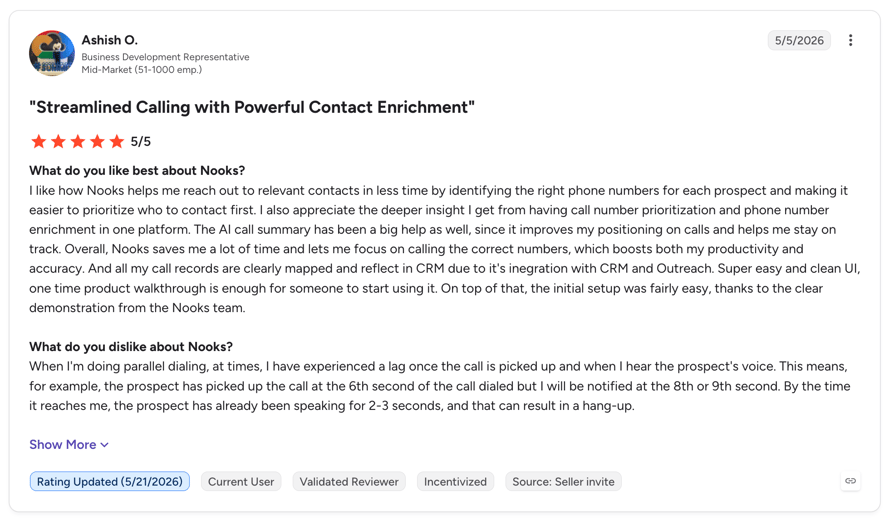
You bought Nooks to fix connect rates. Instead your reps are describing a five-second pause after every pickup, the occasional call that connects to two prospects at once, and activity that does not always land in Salesforce the way the dashboard says it did. Meanwhile your renewal is annual, your quote came from a salesperson rather than a pricing page, and nobody outside the room can tell you whether you are paying a fair rate.
You are not imagining it, and you are not alone. Every one of those complaints is quoted verbatim below from a verified G2 or TrustRadius review, with a name and a date attached. We tested and researched 10 AI sales dialers against the specific things Nooks users say go wrong, and this guide shows which ones fix which problem.
See a Parallel Dialer With a Price You Can Read
Why Are Teams Searching for a Nooks Alternative?
Nooks is a genuinely well-liked product. It holds 4.8 out of 5 across 1,693 G2 reviews, which is the highest rating of any tool in this guide. So the reason teams shop for alternatives is not that Nooks is bad.
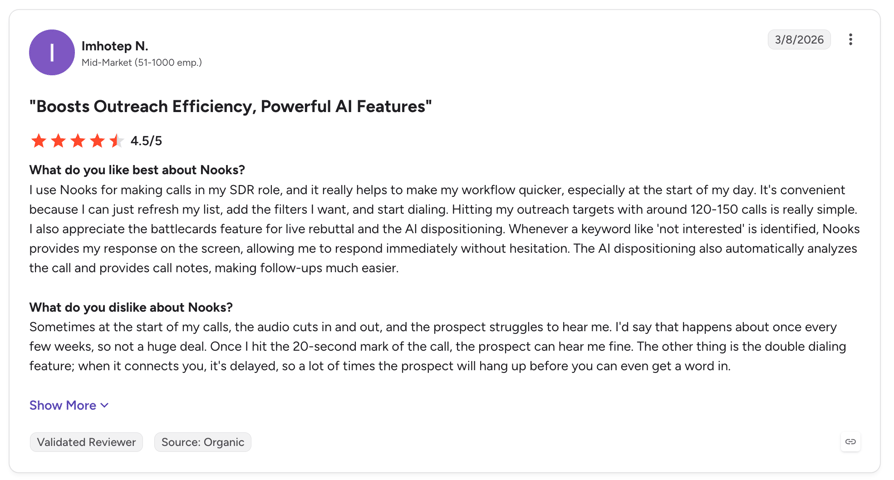
It is that a specific set of limits show up once you are past the pilot: the line ceiling, the connect pause, CRM sync fidelity, US-only spam protection, and a price nobody will put in writing. Read enough Nooks AI reviews and the same five themes surface regardless of team size.
Worth knowing before you read the complaints below. Nooks has essentially no detractor reviews on G2. The lowest-rated review we could surface across the entire corpus was a single 3.5 star. Almost every criticism quoted here sits inside a five-star review, in the "what do you dislike" field. That makes it more credible, not less: these are happy customers telling you what still annoys them. (verified G2 reviews)
What Are the Main Cons of Nooks, Based on Real User Reviews?
5 Main Cons of Nooks: Based on Real User Reviews
- The parallel dialer tops out at 5 linesNooks' own support docs specify Power Dialing at 1 line, Parallel Dialing at "2 to 5 (fixed, your choice)", and Turbo Dialing averaging about 6. Orum, Kixie, JustCall and Klenty all advertise up to 10. If your bottleneck is dials per hour, the ceiling is the product.
- The connect pause is audible to prospectsA G2 reviewer: "The 5 sec pause after the call has been picked up, difficult to manage." Another reports the dialer "connected me to two people at once." A third says "the smart presence feature tends to give me a low pickup rate compared to standard dialing."
- CRM sync is not always accurateDaniel Zacks, RevOps Architect at Justt, on TrustRadius in December 2025: "the salesforce integration could use work." A BDR adds that prospects transferred from Salesloft "don't appear in Nooks all the time." There is a documented architectural reason for this, covered below.
- Spam protection covers US carriers onlyNooks runs on Twilio, which reaches 100+ countries. But its published spam remediation registers with First Orion, Hiya and TNS and runs daily checks "across all major U.S. carriers." No equivalent UK or EU carrier coverage is documented, and Nooks publishes no country list for number provisioning.
- There is no published priceThe Nooks pricing page contains no figure, no plan name and no seat minimum. G2 buyer data rates its perceived cost at $$$$$, the top band. Third-party estimates disagree by a factor of four. You cannot benchmark your quote against anything.
Why Does Nooks Activity Sometimes Miss Your CRM?
This is the most useful thing in this guide, and it comes from Nooks' own documentation rather than a review. Nooks explains that if you run Salesloft or Outreach, completed call tasks flow Nooks into the sales engagement platform, and only then into Salesforce. Custom fields travel the other way, Salesforce into the SEP into Nooks.
Nooks is not writing directly to Salesforce. It routes through your sequencer as an intermediary, and a direct Nooks-to-Salesforce integration exists only as a separate beta. That extra hop is the mechanism behind the whole cluster of sync complaints above. It is not a bug, it is the architecture.
Is Nooks Numbers a Phone Number Provisioning Product?
No, and this is a common misunderstanding. Nooks Numbers is a waterfall phone number enrichment product that pulls mobile numbers from Apollo, Cognism, Datagma, Forager, Prospeo, Wiza, People Data Labs and ZoomInfo on a credit basis. (Nooks Numbers user guide)
It finds numbers to call. It does not give you local numbers to call from. If you are searching for Nooks number provisioning in the UK or anywhere outside the US, that is the gap you have run into, and it is why international number coverage is a real differentiator among the alternatives below.
Does Parallel Dialing Get Your Numbers Flagged as Spam?
Nooks answers this itself: "Nooks can automatically rotate your phone number after 60 calls with it, to minimize the chance of getting flagged as spam." (Nooks support)
A vendor that ships automatic rotation every 60 calls, plus warming, testing and registration with three separate call-analytics providers, is telling you plainly that high-volume parallel dialing degrades number reputation. There is also a trade-off worth knowing: Turbo and Adaptive dialing cannot run on a Branded number. You get maximum dial volume or branded caller ID, not both.
What Is the Best Alternative to Nooks?
CloudTalk is the best Nooks alternative for sales teams that dial internationally and also take inbound calls. Unlike Nooks, CloudTalk publishes every rate starting at $25/user/month, provisions local numbers in 160+ countries rather than enriching them, runs no seat minimum on its entry plans, and puts your parallel dialer, your inbound routing and your CRM sync on one platform instead of three.
The distinction that matters: Nooks is an outbound layer that sits on top of your existing stack and writes to your CRM through your sequencer. CloudTalk is the calling platform itself, so the dialer, the inbound queue, the call flow and the CRM logging are the same system.
Why Do Users Consider CloudTalk the Best Nooks Alternative?
5 Main Pros of CloudTalk: Based on Real User Reviews
- Local numbers in 160+ countries, provisioned not enrichedNooks Numbers finds mobile numbers to call. CloudTalk gives you local numbers to call from in 160+ countries, which is what actually lifts pickup rates outside the US.
- Published pricing with no seat minimumPlans start at $25/user/month on Starter with a single seat. Nooks publishes nothing, and third-party estimates for it range from roughly $780 to $5,000 per user per year.
- Outbound and inbound on one platformNooks is outbound only. CloudTalk runs your dialers and your inbound queues through the same call flow designer, so you are not paying for a phone system alongside a dialer.
- Native CRM writing, not routed through a sequencerCloudTalk writes directly to HubSpot, Salesforce, Pipedrive and 100+ other tools. There is no intermediary hop, which is the documented cause of the Nooks sync complaints above.
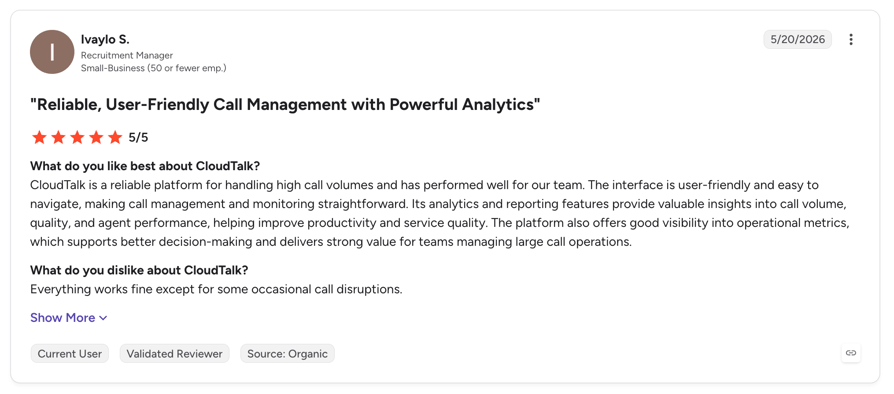
- Rated 4.4/5 on G2 from 1,852 verified reviewsA large, established review base across sales and support teams, with recording, transcription and conversation intelligence included in the platform rather than sold as a separate coaching product.
Try the Dialer Without the Annual Commitment
How We Selected These Nooks Alternatives
We started from what Nooks users actually complain about, not from a feature matrix. Every tool in this guide was assessed against the five specific bottlenecks quoted above, and every rating and price is traced to a primary source.
Our Selection Criteria and Testing Methodology
Every tool was scored against the same eight checks, weighted toward the things Nooks users say break down in practice rather than toward feature counts.
- Parallel dialing capability: how many lines the platform actually runs, taken from vendor documentation rather than marketing. Where a tool does not do parallel dialing, we say so plainly instead of hiding it.
- Pricing transparency: published rate card versus quote-only. Four of the ten tools here publish nothing, and we have marked each one.
- Review base depth: G2, Capterra and TrustRadius counts, with a minimum bar of real volume. Where a rating rests on a thin sample, we flag it rather than presenting 4.8 from 18 reviews as comparable to 4.8 from 1,693.
- International coverage: published country counts for number provisioning, since this is where Nooks is weakest and the alternatives differ most.
- CRM integration depth: whether the tool writes natively to Salesforce, HubSpot and Pipedrive, or routes through an intermediary.
- Contract and commitment terms: seat minimums, annual lock-in, free trial availability.
- Migration effort from Nooks: whether the tool replaces Nooks, sits alongside it, or requires you to change your sequencer too.
Quick Comparison: Top Nooks Alternatives at a Glance in 2026
Six columns, ten tools, one screen. Free trial is the column most buyers skip and then regret: four of these ten will not let you test on your own lists before you sign. If you are still deciding between dialer types, our parallel dialer vs predictive dialer breakdown explains which model fits which motion.
Top Nooks alternatives compared on price, rating, fit and trial access
| Tool | Starting price | G2 rating | Best for | Free trial | Key differentiator |
|---|---|---|---|---|---|
| CloudTalk (Editor's Pick) | $25/user/mo | 4.4/5 (1,852) | Global teams running outbound and inbound together | Yes, 14 days | Only tool here that provisions numbers in 160+ countries and handles inbound |
| Orum | Quote only | 4.6 (1,097) | Enterprise SDR floors wanting a virtual sales floor | No | Closest like-for-like Nooks swap, up to 10 lines |
| Kixie | Quote only | 4.8 (866) | Teams whose problem is answer rate, not dial rate | Yes, 7 days | ConnectionBoost: number reputation and local presence built in |
| JustCall | $29/user/mo | 4.3 (2,393) | Teams wanting a dialer plus a full phone system | Yes, 14 days | Multi-channel: voice, SMS and WhatsApp on one number |
| Klenty | $70/user/mo + $45 dialer | 4.6 (390) | Sequencing and dialing from a single vendor | Yes, 14 days | Action AI writes post-call follow-ups automatically |
| Trellus | $99.99/user/mo | 4.8 (18, thin) | Cheapest real parallel dialing, as an overlay | Yes, free tier | Rides on top of your existing sequencer, no migration |
| PhoneBurner | $140/user/mo | 4.7 (289) | US and Canada teams that want zero connect delay | Yes, 14 days | No connect pause at all, because it never parallel dials |
| Salesloft | Quote only | 4.5 (4,287) | Replacing the whole revenue motion | No | Deep forecasting and deal management, not a dialer play |
| Outreach | Quote only | 4.3 (3,574) | Enterprise sequencing on Salesforce | No | The deepest Salesforce object model of any tool here |
| Smartlead | $39/mo, not per seat | 4.5 (421) | Email-first teams where deliverability is the bottleneck | Yes, 14 days | Unlimited mailboxes and warmup, priced per workspace |
Reading the table honestly
Four of these ten publish no price, and three of those four also refuse a trial. That combination, quote-only plus no trial, is the same thing teams are leaving Nooks over, so check it before you shortlist. And treat the Trellus 4.8 with care: it rests on 18 reviews, against 1,852 for CloudTalk and 4,287 for Salesloft.
How Much Does Nooks Actually Cost Per User?
Nooks publishes no pricing. Its pricing page contains no dollar figure, no plan name and no seat minimum. The only sentence on it is an invitation to request a quote. That is why searches for Nooks AI pricing and Nooks dialer pricing return a wall of third-party guesses rather than a rate card.
That absence is why third-party estimates have filled the vacuum, and why they disagree so badly. There are two irreconcilable camps.
What third-party sources report for Nooks pricing
| Source | Reported cost | Basis |
|---|---|---|
| Vendr (procurement data) | Average contract $30,105/year, range $7,668 to $151,794 | 57 analysed purchases. The single most defensible datapoint here, because it is observed contract value rather than an estimate. |
| MarketBetter | ~$4,000 to $5,000 per user per year | Editorial estimate, no methodology published |
| OutboundSalesPro | ~$5,000 per user per year | Editorial estimate. Cites both camps in one article without reconciling them. |
| SalesHive | $5,000 per user annually | Editorial estimate |
| Trellus (a competitor) | $4,000 to $5,000 per user annually | Adds its own caveat that any exact cost "should be treated as unofficial unless it comes directly from a Nooks quote" |
| G2 buyer data | Perceived cost $$$$$ (top band), average discount 15%, ROI 6 months | Aggregated from verified buyers. Not a price, but a reliable signal of where Nooks sits in the band. |
How to read that spread
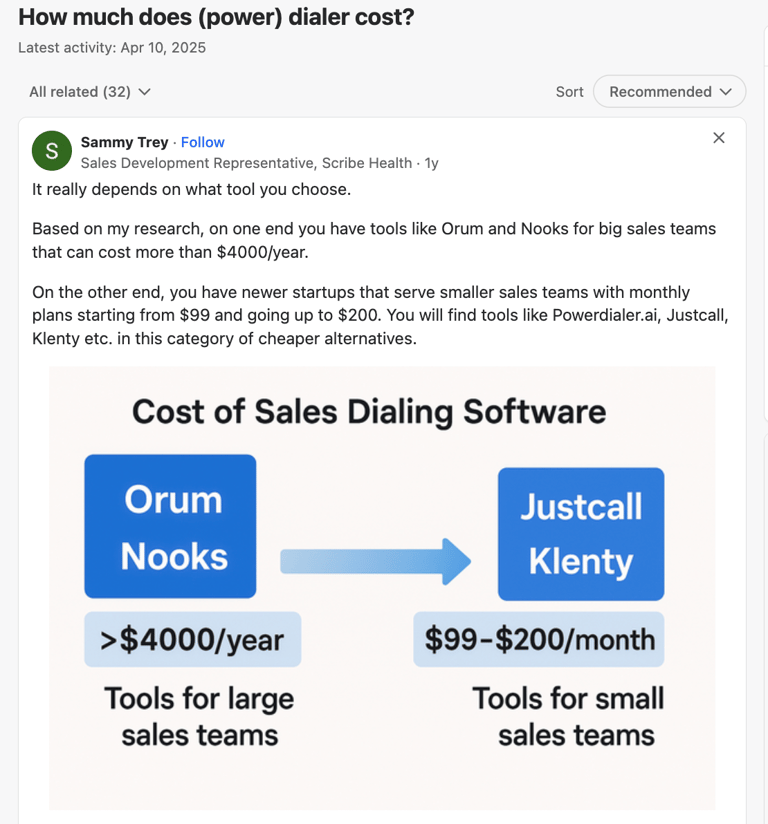
Vendr's observed average of $30,105 per contract across 57 purchases is hard to reconcile with a $5,000 per-seat list price for any team above about six seats. The honest conclusion is that nobody outside Nooks knows the rate card, and the editorial estimates circulating at $4,000 to $5,000 per user trace to no methodology. Ask for the quote, then benchmark it against the alternatives below that do publish. And note the 15% average discount: your first number is not the final one.
On contract terms: every source describes annual, quote-based deals with no self-serve or month-to-month option. We could not find a single first-hand account of a customer unable to exit a Nooks contract, so we are not going to imply one exists. What is verifiable is simply that no monthly plan is published.

Every CloudTalk rate is published. Compare it against your Nooks quote in about a minute.

The 10 Best Nooks Alternatives and Competitors for 2026
These are the Nooks sales dialer alternatives that survived the criteria above. Each entry below follows the same structure: what it is, why it beats Nooks for its audience, real pros and cons from verified reviews, published pricing where it exists, and a head-to-head table against Nooks.
1. CloudTalk: Best Nooks Alternative for Global Outbound and Inbound Teams
What Is CloudTalk?
CloudTalk is an AI-powered calling platform for sales and support teams, used by 5,500+ businesses. It combines Power, Smart, Preview and Parallel dialers with inbound routing, local numbers in 160+ countries and native CRM writing, on one platform rather than as a layer over your existing stack.
Why Is CloudTalk a Strong Nooks Alternative?
- Published pricing from $25/user/month with no seat minimum on Starter, against Nooks' quote-only model and reported 5-seat minimum
- Local numbers in 160+ countries, provisioned rather than enriched. Nooks Numbers finds numbers to call, not numbers to call from
- Outbound and inbound on one system. Nooks is outbound only, so you still need a phone system alongside it
- Native CRM writing to HubSpot, Salesforce, Pipedrive and 100+ tools, with no sequencer sitting in the middle of the data flow
- Month-to-month plans and a 14-day free trial, against annual quote-based contracts
What Are CloudTalk's Key Features?
- Parallel Dialer: calls up to 5 numbers at once with voicemail detection, connecting reps only when a human answers
- Power and Smart Dialers: automated sequential dialing and one-click queues built from your CRM or a web page
- Visual Call Flow Designer: drag-and-drop routing for inbound, which Nooks does not offer at all
- Conversation Intelligence: transcripts, call summaries, sentiment analysis and coaching insights
- AI Voice Agents: automate inbound answering and outbound workflows entirely
- 100+ native integrations including HubSpot, Salesforce, Pipedrive, Zoho and Zendesk
What Are the Pros and Cons of CloudTalk?
| Pros | Cons |
|---|---|
| Published pricing: every tier visible, no sales call needed to benchmark | No native video calling: requires an integration like Zoom |
| 160+ country number coverage, the widest in this guide | Parallel dialer runs 5 lines, matching Nooks rather than beating Orum or Kixie at 10 |
| Inbound and outbound on one platform, so no second phone system | No virtual salesfloor in the Nooks sense, though call monitoring and whisper coaching are included |
| Native CRM writing with no sequencer intermediary | Fully cloud-based, with no support for on-premise PBX hardware |
| 4.4/5 on G2 from 1,852 reviews, plus 14-day trial and no seat minimum |
What Are CloudTalk's Plans and Pricing?
CloudTalk pricing starts at $25/user/month billed annually:
Flexible Pricing Plans to Scale with You
Compare our plans
How Do G2 Users Rate CloudTalk?
CloudTalk holds 4.4/5 on G2 from 1,852 verified reviews.
CloudTalk vs. Nooks: Which Is Better for AI Calling?
Four categories decide it. If you are weighing CloudTalk against Nooks on a shortlist, these are the lines that move the decision.
CloudTalk vs Nooks
| Category | CloudTalk | Nooks | Winner |
|---|---|---|---|
| Starting price | $25/user/mo, published | Quote only, no published figure | CloudTalk |
| Parallel lines | Up to 5 | 2 to 5, Turbo averages 6 | Tie |
| Number provisioning | 160+ countries | Enrichment only, no published country list | CloudTalk |
| Inbound calling | Full IVR, queues, call flow designer | Outbound only | CloudTalk |
| CRM writing | Native, direct | Routed via Salesloft or Outreach into Salesforce | CloudTalk |
| Seat minimum | 1 on Starter and Essential | Reported 5+, unconfirmed | CloudTalk |
| Virtual salesfloor | Call monitoring and whisper coaching | Dedicated Virtual Salesfloor | Nooks |
| G2 rating | 4.4/5 (1,852) | 4.8 (1,693) | Nooks |
Stop Guessing What a Dialer Costs
2. Orum: Best for Enterprise SDR Floors That Want the Closest Nooks Match
What Is Orum?
Orum is the closest thing to a like-for-like Nooks replacement. It pairs a 10-line parallel dialer with its own virtual salesfloor and an AI coaching suite, and it is deliberately SEP-agnostic, sitting alongside Outreach, Salesloft or Apollo rather than replacing them.
Why Is Orum a Strong Nooks Alternative?
- 10 parallel lines against Nooks' 5, which is the single biggest throughput difference in this guide
- Calling to 160+ countries and regions, where Nooks publishes no country list at all
- Its own virtual salesfloor, so you do not lose the shadowing and live coaching that made Nooks appealing
- AI Coaching Suite with scorecards, coaching portals and AI roleplay
What Are Orum's Key Features?
- 10-line parallel dialing with automatic screener and voicemail detection
- Voice detection across 20+ languages
- Virtual Salesfloor for shared dialing sessions and manager intervention
- AI Scorecards, Coaching Portals and AI Roleplay
- Native Salesforce, HubSpot, Outreach, Salesloft, Gong Engage and Apollo integrations
What Are the Pros and Cons of Orum?
| Pros | Cons |
|---|---|
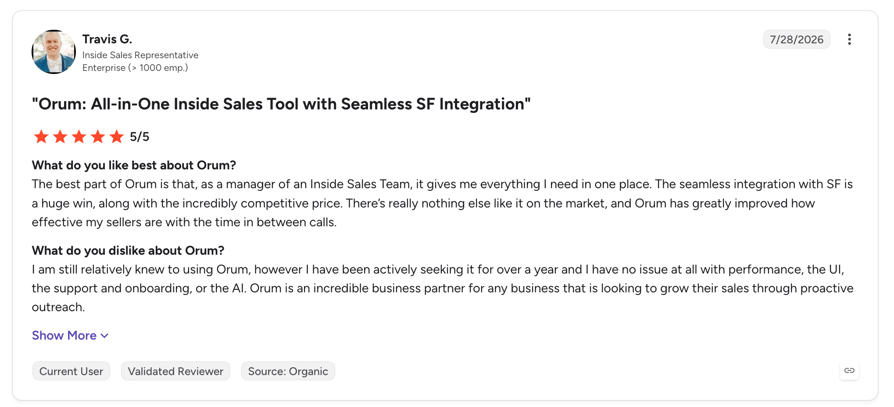
| Zak B., SDR: "The power dialer is genuinely hands-free and fast" | 9-seat minimum, which rules out most small teams outright |
| 160+ country coverage, the widest of any dedicated dialer here | Eric S., Carrier Sales Rep: "Significant delay when being connected to a call", the same complaint as Nooks |
| Adarsh S., Manager: praises "Speed and Efficiency (Parallel Dialing)" | Mike R., SDR: "Enriched numbers are very wrong", sometimes returning home numbers |
What Are Orum's Plans and Pricing?
Quote only. Orum publishes no figures. The only plan name shown is Ascend, with an Ascend Limited add-on for part-time dialers, and a minimum of 9 seats. The free trial is capped at 500 dials.
Third-party benchmark, not vendor-confirmed: Vendr reports a median annual contract of $21,300 across 90 purchases, ranging $5,400 to $71,370.
How Do G2 Users Rate Orum?
Orum holds 4.6 on G2 from roughly 1,097 reviews, against 4.8 from 1,693 for Nooks. Nooks vs Orum is the most searched comparison in this category, and on the review evidence it is close: Orum wins on lines and coverage, Nooks wins on rating and coaching depth.
Orum vs. Nooks: Which Is Better for AI Calling?
Four categories decide it. If you are weighing Orum against Nooks on a shortlist, these are the lines that move the decision.
Orum vs Nooks
| Category | Orum | Nooks | Winner |
|---|---|---|---|
| Parallel lines | Up to 10 | 2 to 5, Turbo averages 6 | Orum |
| International coverage | 160+ countries | No published country list | Orum |
| Seat minimum | 9 seats | Reported 5+ | Nooks |
| Published pricing | No | No | Tie, neither publishes |
| G2 rating | 4.6 (1,097) | 4.8 (1,693) | Nooks |
3. Kixie: Best for Teams Whose Real Problem Is Getting Answered
What Is Kixie?
Kixie pairs a 10-line power dialer with AI Human Voice Detection and, unusually, a deliberate focus on deliverability. Its ConnectionBoost feature bundles local presence, number reputation monitoring and progressive caller ID, so the problem it solves is getting picked up rather than simply dialing faster.
Why Is Kixie a Strong Nooks Alternative?
- PowerDialer runs 1, 4 or 10 lines, double Nooks' ceiling
- AI Human Voice Detection connects reps only on live human answers, which directly targets the double-connect complaint Nooks reviewers raise
- Numbers in 65+ countries, against no published country list from Nooks
- Number reputation monitoring and spam remediation built in, not just automatic rotation
What Are Kixie's Key Features?
- PowerDialer 1 / 4 / 10: pick your line count per campaign
- AI Human Voice Detection: dial 10 at once, connect only to humans
- ConnectionBoost: local presence plus caller ID reputation management
- Two-way SMS with automation
- Native HubSpot, Salesforce, Pipedrive, Zoho and HighLevel
- DNC compliance add-on
What Are the Pros and Cons of Kixie?
| Pros | Cons |
|---|---|
| Highest G2 rating at real volume in this guide: 4.8 from 866 reviews | Pricing is now quote-gated. Third-party sources disagree by roughly 2.5x, so do not budget from them |
| An Account Executive reports "Connection Boost with Local Presence alone 10X'ed our connection rate" | A Sales rep in insurance, May 2026: "first call prospects' call screener usually flags Kixie's number as spam" |
| A Senior SDR: "really easy to integrate with other CRMs like HubSpot" | A co-owner reports an assigned rep "completely unresponsive" and support reserved for paid users during the trial |
What Are Kixie's Plans and Pricing?
Quote only as of 2026. Kixie's pricing page names three plans with no figures attached:
- Professional Plan: price not published
- Single-Line PowerDialer: price not published
- Multi-Line PowerDialer: price not published
- Enterprise: custom
- 7-day free trial, no credit card. Unlimited US and Canada minutes on all plans
- Third-party estimates range from roughly $35 to $215 per user per month depending on source. Treat all of them as unverified.
How Do G2 Users Rate Kixie?
Kixie holds 4.8 on G2 from 866 reviews, plus 4.6 on Capterra from 295. That is the strongest rating-to-volume combination of any alternative here.
Kixie vs. Nooks: Which Is Better for AI Calling?
Four categories decide it. If you are weighing Kixie against Nooks on a shortlist, these are the lines that move the decision.
Kixie vs Nooks
| Category | Kixie | Nooks | Winner |
|---|---|---|---|
| Parallel lines | Up to 10 | 2 to 5, Turbo averages 6 | Kixie |
| Live-answer filtering | AI Human Voice Detection | AI answering machine detection | Tie |
| International numbers | 65+ countries | No published list | Kixie |
| Published pricing | No, recently gated | No | Tie, neither publishes |
| G2 rating | 4.8 (866) | 4.8 (1,693) | Tie |
4. JustCall: Best for Teams That Want a Dialer Plus a Full Phone System
What Is JustCall?
JustCall wraps a 10-line AI Dialer inside a complete business phone system with SMS, IVR and inbound routing. It replaces Nooks and your phone provider at the same time, and unlike Nooks it publishes its core plan pricing.
Why Is JustCall a Strong Nooks Alternative?
- AI Dialer runs up to 10 numbers at once with answering machine screening
- Published pricing from $29/user/month, where Nooks publishes nothing
- SMS and MMS campaigns, which Nooks does not offer at all
- Inbound calling, IVR and routing included, so it is not outbound-only
- Numbers in 70+ countries
What Are JustCall's Key Features?
- AI Dialer: dials up to 10 numbers at once, screens voicemails and dead numbers
- SMS and MMS campaigns with automation
- Inbound IVR and call routing
- AI Voice Agents as a paid add-on
- 70+ native integrations including Salesforce, HubSpot, Pipedrive, Zoho, Outreach and Salesloft
- Numbers in 70+ countries
What Are the Pros and Cons of JustCall?
| Pros | Cons |
|---|---|
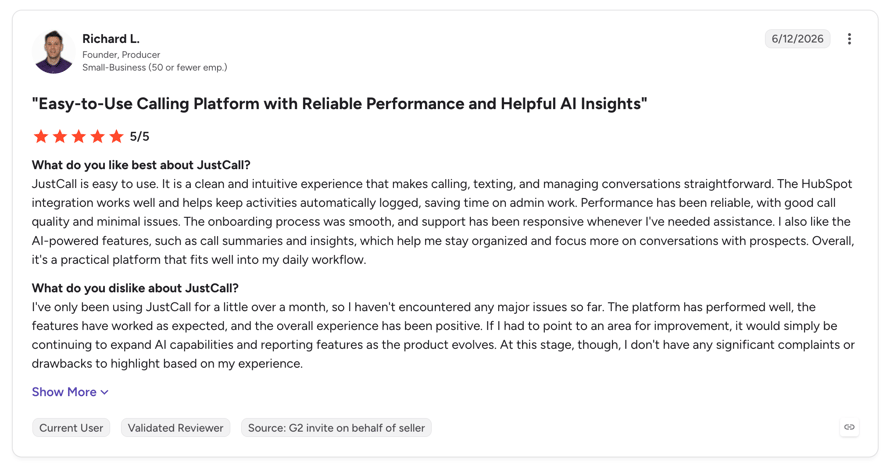
| Paul W., Owner: praises the HubSpot integration, automatic call recording and mobile app | Ankit K., April 2026: "calls drop, don't connect properly" |
| Soumyajit B., Product Analyst: "seamless integration with CRMs" with automatic logging and fast international setup | Nikolai U., Head of Sales: "They upgraded my plan to a higher tier. No consent" |
| 2,393 G2 reviews, the second-largest verified base among dedicated dialers here | The SalesPro tier that carries multi-line dialing is quote-only, so the published $29 does not buy you the parallel dialer |
What Are JustCall's Plans and Pricing?
AI Communication Suite pricing is published, billed annually, minimum 2 seats:
- Team: $29/user/month
- Pro: $49/user/month
- Pro Plus: $89/user/month
- Business: custom, minimum 10 seats
- Sales Suite (SalesPro): quote only, minimum 2 licences. This is the tier with multi-line dialing
- AI Voice Agent add-on: $0.99/min pay as you go, or $99/month for 100 minutes
- 14-day free trial
How Do G2 Users Rate JustCall?
JustCall holds 4.3 on G2 from 2,393 reviews. The rating is the joint lowest here, but the sample is one of the largest.
JustCall vs. Nooks: Which Is Better for AI Calling?
Four categories decide it. If you are weighing JustCall against Nooks on a shortlist, these are the lines that move the decision.
JustCall vs Nooks
| Category | JustCall | Nooks | Winner |
|---|---|---|---|
| Parallel lines | Up to 10 | 2 to 5, Turbo averages 6 | JustCall |
| Entry pricing | $29/user/mo published | Quote only | JustCall |
| Dialer tier pricing | Quote only (SalesPro) | Quote only | Tie |
| SMS campaigns | Yes, native | No | JustCall |
| Inbound calling | Yes, full IVR | Outbound only | JustCall |
| G2 rating | 4.3 (2,393) | 4.8 (1,693) | Nooks |
5. Klenty: Best for Sequencing and Parallel Dialing From One Vendor
What Is Klenty?
Klenty is a multichannel sequencer with the parallel dialer sold as a transparent $45 add-on. That makes it the only tool in this guide that replaces both Nooks and your Outreach or Salesloft contract, at a price you can read before you call anyone.
Why Is Klenty a Strong Nooks Alternative?
- 2 to 10 parallel lines at 150 to 350 dials per hour
- Published pricing for the dialer itself: $45/user/month as an add-on. No other true parallel dialer here publishes its dialer rate
- Auto-removes voicemails and IVR, distinguishing humans, screeners and phone trees
- Replaces the sequencer too, so you are not paying Nooks plus Outreach
What Are Klenty's Key Features?
- Parallel Dialer: 2 to 10 lines with IVR and voicemail auto-removal
- Multichannel cadences: email, LinkedIn, SMS and calls in one sequence
- Region-specific dialers: US, Global and India
- Native bidirectional CRM sync with Salesforce, HubSpot, Pipedrive, Zoho and Microsoft Dynamics
- Call coaching and conversation intelligence on the Plus tier
What Are the Pros and Cons of Klenty?
| Pros | Cons |
|---|---|
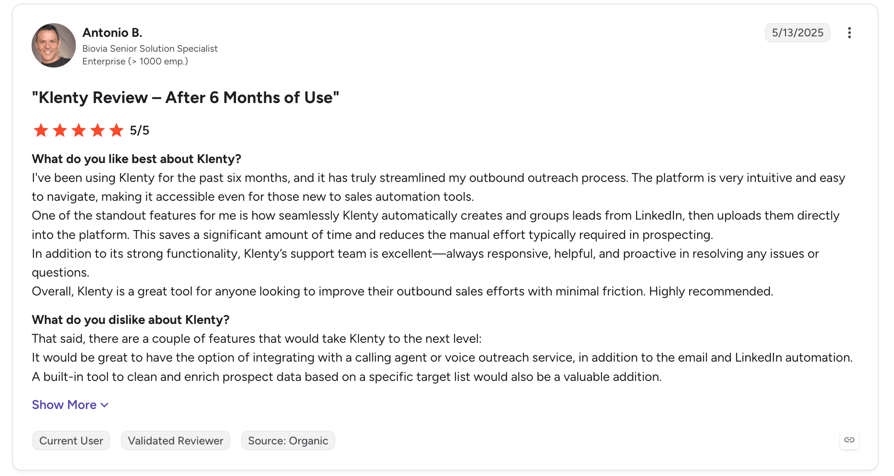
| Zina P., Commercial Manager, July 2026: it "makes it simple to automate and scale my outreach" | A reviewer in April 2025 found the platform "unreliable and laggy, which disrupted my outreach campaigns" |
| Tyler W.: support answers "so fast, sometimes within just a few minutes" | No Outreach or Salesloft integration, because Klenty competes with them. Migration is all-or-nothing |
| The most transparent pricing of any genuine parallel dialer here | 390 G2 reviews, a smaller base than Orum, JustCall or Nooks |
What Are Klenty's Plans and Pricing?
Published, billed annually:
- Starter: $50/month, 15,000 contacts and 75,000 emails
- Growth: $70/user/month, includes 200 calling minutes
- Plus: $99/user/month, includes 1,000 calling minutes
- Parallel and Power Dialer add-on: $45/user/month
- 14-day free trial, no credit card. Cancel anytime, no cancellation fees
How Do G2 Users Rate Klenty?
Klenty holds 4.6 on G2 from 390 reviews. A modest but credible base.
Klenty vs. Nooks: Which Is Better for AI Calling?
Four categories decide it. If you are weighing Klenty against Nooks on a shortlist, these are the lines that move the decision.
Klenty vs Nooks
| Category | Klenty | Nooks | Winner |
|---|---|---|---|
| Parallel lines | 2 to 10 | 2 to 5, Turbo averages 6 | Klenty |
| Dialer pricing | $45/user/mo, published | Quote only | Klenty |
| Replaces your sequencer | Yes | No, works alongside it | Klenty |
| Works with Outreach or Salesloft | No, competes with them | Yes, native | Nooks |
| G2 rating | 4.6 (390) | 4.8 (1,693) | Nooks |
6. Trellus: Best Budget Parallel Dialer, as an Overlay
What Is Trellus?
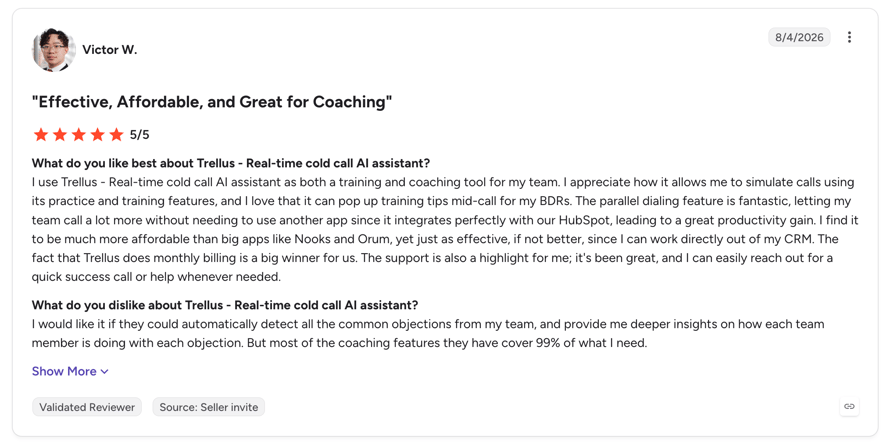
Trellus is an overlay rather than a replacement. It bolts parallel dialing and live in-call AI coaching onto the Outreach, Salesloft, Apollo or HubSpot you already pay for, without a migration, at roughly a tenth of an enterprise dialer contract.
Why Is Trellus a Strong Nooks Alternative?
- Published pricing from $99.99/user/month, where Nooks publishes nothing
- No rip-and-replace: it runs in the browser over your existing stack
- Real-time adaptive coaching with objection scenarios and custom talk tracks during the call
- 5 to 8 extra phone numbers with spam remediation included in the plan
What Are Trellus's Key Features?
- Up to 5 parallel lines with automatic voice drops
- Browser overlay architecture, no migration required
- Live adaptive coaching with prebuilt objection handling
- Unlimited AI practice and roleplay calls on the Parallel plan
- Works on Google Sheets and Clay lists, not just CRM records
What Are the Pros and Cons of Trellus?
| Pros | Cons |
|---|---|
| Cheapest genuine parallel dialing in this guide at a published rate | Only 18 G2 reviews. A 4.8 from 18 is not comparable to a 4.8 from 1,693, and we would not treat it as evidence |
| Zero migration cost: keep your sequencer, add dialing on top | No published international coverage at all |
| Spam remediation and additional numbers included rather than sold separately | The annual pricing on its own page appears inconsistent, showing an identical figure for two differently-priced tiers. Verify live before budgeting |
What Are Trellus's Plans and Pricing?
Published, monthly billing:
- Power: $99.99/user/month
- Parallel: $149.99/user/month
- Business: custom
- No seat minimum published. Trial length not stated
- Note: the annual toggle on Trellus' pricing page currently displays the same figure for both paid tiers, which looks like a rendering fault. Confirm the annual rate directly.
How Do G2 Users Rate Trellus?
Trellus holds 4.8 on G2 from just 18 reviews, and 8 out of 10 on TrustRadius from 3 ratings. We are flagging the sample size rather than presenting the score as comparable.
Trellus vs. Nooks: Which Is Better for AI Calling?
Four categories decide it. If you are weighing Trellus against Nooks on a shortlist, these are the lines that move the decision.
Trellus vs Nooks
| Category | Trellus | Nooks | Winner |
|---|---|---|---|
| Parallel lines | Up to 5 | 2 to 5, Turbo averages 6 | Tie |
| Published pricing | Yes, from $99.99 | No | Trellus |
| Migration effort | None, browser overlay | Full platform adoption | Trellus |
| Review base | 18 reviews | 1,693 reviews | Nooks |
| International coverage | Not published | Not published | Tie, neither publishes |
7. PhoneBurner: Best for US and Canada Teams That Want Zero Connect Delay
What Is PhoneBurner?
PhoneBurner deliberately does the opposite of Nooks. It is single-line power dialing at up to 80 dials an hour with no answer-side pause at all, which directly targets the complaint Nooks and Orum reviewers raise most often. It also publishes its full rate card and requires no contract.
Why Is PhoneBurner a Strong Nooks Alternative?
- Connections are delay-free, eliminating the five-second pause Nooks reviewers describe
- Full published pricing with monthly and annual rates side by side
- No contracts, no seat minimums, no setup fees
- No abandoned calls and no parallel-dialing compliance exposure, because it never dials more than one line
What Are PhoneBurner's Key Features?
- Single-line power dialing at up to 80 dials per hour
- One-click voicemail drop on every plan
- Call transcription and AI note-taker on Premium
- 1,000 outbound SMS per month on Premium
- Unlimited call recording storage on Premium
- Native Salesforce, HubSpot, Zoho, Close, GoHighLevel, monday.com and SugarCRM
What Are the Pros and Cons of PhoneBurner?
| Pros | Cons |
|---|---|
| Best pricing transparency in this guide: monthly and annual rates published, no contract, no minimum | It is not a parallel dialer. If your goal is dials per hour, this is a step down from Nooks, not up |
| A loan officer in January 2026 reports "flawless call quality" | United States and Canada only. PhoneBurner is more geographically limited than Nooks, not less |
| Zero connect delay, which is the specific thing parallel dialing costs you | An owner in November 2025 notes the "dashboard appears somewhat outdated overall" |
What Are PhoneBurner's Plans and Pricing?
Fully published, per user per month, annual and monthly:
- Standard: $140 annual, $165 monthly
- Professional: $165 annual, $195 monthly
- Premium: $183 annual, $215 monthly
- No contracts, no seat minimums, no setup or consultation fees. 15% discount for annual commitment
- Free trial, no credit card required
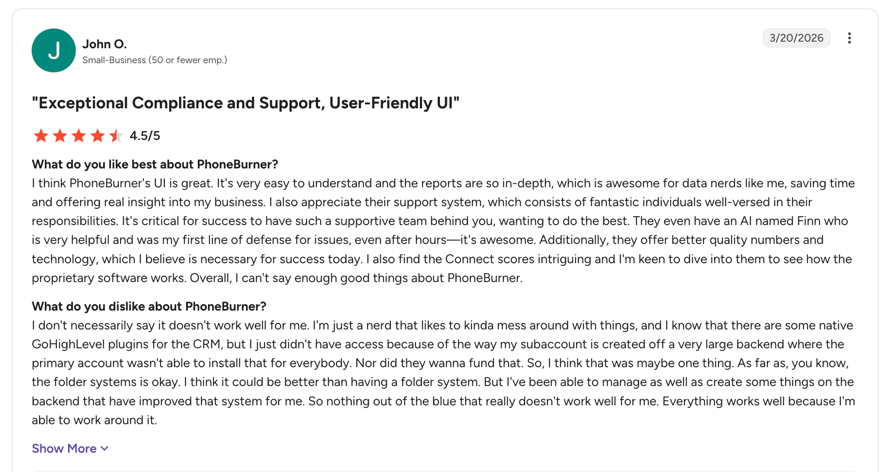
How Do G2 Users Rate PhoneBurner?
PhoneBurner holds 4.7 on G2 from 289 reviews. A smaller base than the leaders, but a long track record and a high rating.
PhoneBurner vs. Nooks: Which Is Better for AI Calling?
Four categories decide it. If you are weighing PhoneBurner against Nooks on a shortlist, these are the lines that move the decision.
PhoneBurner vs Nooks
| Category | PhoneBurner | Nooks | Winner |
|---|---|---|---|
| Parallel lines | None, single line only | 2 to 5, Turbo averages 6 | Nooks |
| Connect delay | None | Reviewers report a 5-second pause | PhoneBurner |
| Published pricing | Yes, monthly and annual | No | PhoneBurner |
| Contract | Month to month, no minimum | Annual, quote based | PhoneBurner |
| Geography | US and Canada only | Twilio network, 100+ countries | Nooks |
8. Salesloft: Best for Replacing the Whole Revenue Motion, Not the Dialer
What Is Salesloft?
Salesloft is the system of record for the entire revenue motion: cadences, conversation intelligence, deals and forecasting. You buy it to run the funnel, not to raise dials per hour. Its Live Call Studio is the nearest thing here to the Nooks salesfloor.
Why Is Salesloft a Strong Nooks Alternative?
- Live Call Studio gives managers listen, whisper, join and raise-hand controls, which is the closest analogue to the Nooks Virtual Salesfloor
- The largest verified review base in this guide at 4,287 G2 reviews
- Flat-rate unlimited talk and text across the US, Canada, Caribbean and Europe
- Deals, Forecast and Conversations are included, so it replaces several tools rather than adding one
What Are Salesloft's Key Features?
- Cadence and Rhythm: AI-prioritised action queue
- Conversations: conversation intelligence and call recording
- Deals and Forecast: pipeline management and forecasting
- Live Call Studio: manager listen, whisper and join
- LocalDial local presence and pre-recorded voicemail drop
- Deep native Salesforce integration with custom field mapping
What Are the Pros and Cons of Salesloft?
| Pros | Cons |
|---|---|
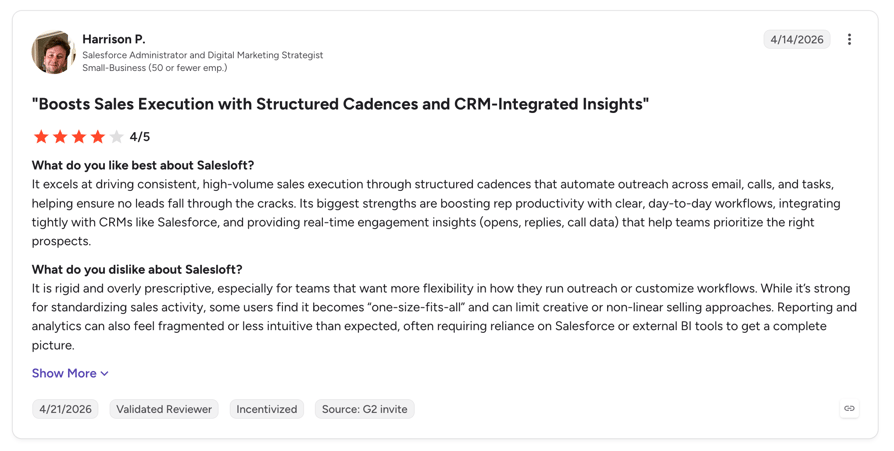
| A Director of Sales Development: "Everything is streamlined in one place, saving hours weekly" | No parallel or multi-line dialing. Salesloft's own marketplace lists third-party parallel dialers, which tells you what is missing |
| A Senior AE: "Integrations into Gmail and Salesforce are cleaner" | A Sales Account Manager: "Calling features can be glitchy or unreliable" |
| 4,287 G2 reviews plus 973 on TrustRadius, the deepest evidence base of any tool here | Quote only. No plan names, no prices, no seat minimums, no trial published |
What Are Salesloft's Plans and Pricing?
Quote only. Salesloft publishes no plan names or prices. G2 buyer data gives the only usable signal:
- Perceived cost: $$$$$ (top band)
- Average discount: 12%
- Average ROI: 10 months
- Implementation: roughly 1 month
- No free trial published
How Do G2 Users Rate Salesloft?
Salesloft holds 4.5 on G2 from 4,287 reviews, 4.3 on Capterra from 232, and 7.6 out of 10 on TrustRadius from 973.
Salesloft vs. Nooks: Which Is Better for AI Calling?
Four categories decide it. If you are weighing Salesloft against Nooks on a shortlist, these are the lines that move the decision.
Salesloft vs Nooks
| Category | Salesloft | Nooks | Winner |
|---|---|---|---|
| Parallel dialing | None | 2 to 5, Turbo averages 6 | Nooks |
| Salesfloor equivalent | Live Call Studio | Virtual Salesfloor | Tie |
| Sequencing and forecasting | Full platform | AI Sequencing, newer | Salesloft |
| Published pricing | No | No | Tie, neither publishes |
| Review base | 4,287 | 1,693 | Salesloft |
9. Outreach: Best for Enterprise Sequencing on Salesforce
What Is Outreach?
Outreach is the enterprise sales execution platform with the deepest Salesforce sync in the category. Like Salesloft, it is what you buy when the problem is orchestration rather than connect rate, and its own reviewers are candid that dialing is not its strength.
Why Is Outreach a Strong Nooks Alternative?
- Deepest bidirectional Salesforce sync of any tool in this guide
- Multi-channel sequencing at enterprise scale across email, phone, LinkedIn and tasks
- 3,574 verified G2 reviews, more than double Nooks
- Stated no platform fees, with seat-based plus AI-credit consumption pricing
What Are Outreach's Key Features?
- Multi-channel sequences at enterprise scale
- Deep bidirectional Salesforce sync
- Amplify tiers priced on AI credits: Essentials 10,000, Core 25,000, Plus 50,000, Pro 100,000
- Pipeline and deal management with forecasting
- Local Presence with the number changing on every call
- Managed services included at the Pro tier
What Are the Pros and Cons of Outreach?
| Pros | Cons |
|---|---|
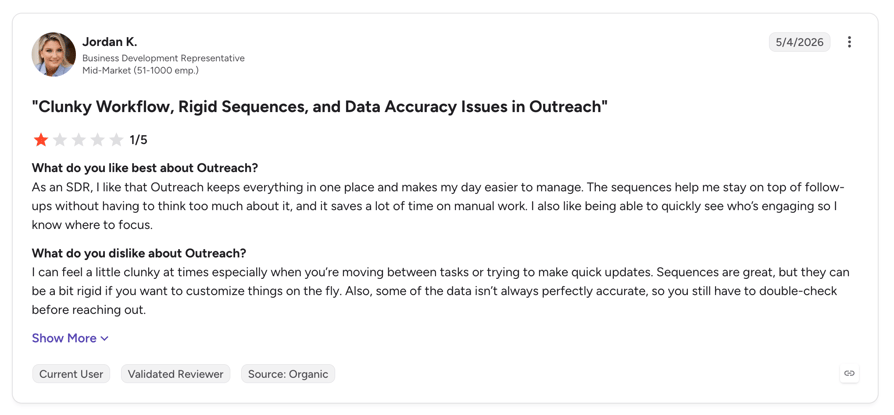
| Ana G., Activations Specialist, April 2026: it "updates fast from Salesforce, so there's no wasting time" | No parallel dialing. A Mid-Market reviewer in April 2026: "dialing capabilities are limited". Another says reps must "call prospects one by one" |
| Silvina F., BDR: strong on "sales sequences and multi-channel cadences" | Shohan M., Regional Sales Manager: a "steeper learning curve than simpler tools", needing "weeks of training" |
| Stated per-user pricing with no platform fees, unusual at this tier | Quote only. Plan names are published but no prices |
What Are Outreach's Plans and Pricing?
Quote only. Outreach names its packages but publishes no figures. Pricing combines per-seat with consumption-based AI credits:
- Amplify Essentials: 10,000 AI credits
- Amplify Core: 25,000 AI credits
- Amplify Plus: 50,000 AI credits, marked most popular
- Amplify Pro: 100,000 AI credits, managed services included
- Stated: per user pricing, no platform fees. Extra credit packs purchasable
- No seat minimum, contract terms or free trial published
How Do G2 Users Rate Outreach?
Outreach holds 4.3 on G2 from 3,574 reviews. Note that outreach.io now redirects to outreach.ai, so older links need updating.
Outreach vs. Nooks: Which Is Better for AI Calling?
Four categories decide it. If you are weighing Outreach against Nooks on a shortlist, these are the lines that move the decision.
Outreach vs Nooks
| Category | Outreach | Nooks | Winner |
|---|---|---|---|
| Parallel dialing | None, reviewers confirm | 2 to 5, Turbo averages 6 | Nooks |
| Salesforce sync | Deepest in category, direct | Routed via the sequencer | Outreach |
| Sequencing | Enterprise-grade | AI Sequencing, newer | Outreach |
| Published pricing | Plan names only | Nothing | Outreach |
| Review base | 3,574 | 1,693 | Outreach |
10. Smartlead: Best for Email-First Teams Where Deliverability Is the Bottleneck
What Is Smartlead?
Smartlead is the outlier in this guide, and we are being upfront about that. It is cold email infrastructure with unlimited mailboxes and warmup at flat, non-per-seat pricing. Its SmartDialer is a power dialer that calls one number at a time, so it does not replace parallel dialing. Include it on your shortlist only if your real bottleneck is email deliverability rather than dials per hour.
Why Is Smartlead a Strong Nooks Alternative?
- Flat pricing that does not scale with headcount, starting at $39/month for the whole workspace rather than per seat
- Unlimited email accounts and free unlimited warmup on every tier
- Best pricing transparency of any tool in this guide
- Extensive API and MCP server, repeatedly praised in recent reviews
What Are Smartlead's Key Features?
- Unlimited email accounts with free warmup on all plans
- Master unified inbox across hundreds of mailboxes
- SmartDialer: single-line power dialing with prospect context attached
- Private sending infrastructure on the Unlimited tiers
- Native HubSpot, Salesforce and Pipedrive
- US local numbers from $1/month
What Are the Pros and Cons of Smartlead?
| Pros | Cons |
|---|---|
| Arne S., CEO, July 2026: automatic volume distribution across accounts and a unified inbox that consolidates replies | No parallel dialing. Smartlead's own page states the dialer "dials one number at a time" and explicitly contrasts itself with parallel dialers |
| Mike P., Owner: "Best bang for your buck" | No virtual salesfloor and no live coaching |
| Flat workspace pricing, so a growing team does not multiply the bill | A marketing user in July 2026 reports "Frequent IP blacklisting; slow support responses" |
What Are Smartlead's Plans and Pricing?
Fully published, flat workspace pricing rather than per seat:
- Base: $39/month, or $32.50 billed annually
- Pro: $94/month, or $78.30 annually
- Unlimited Smart: $174/month, or $144.50 annually
- Unlimited Prime: $379/month, or $314.60 annually
- SmartDialer add-on: from $9/month in credits. US local numbers from $1/month per number
- 17% discount on annual billing. Free trial, no credit card
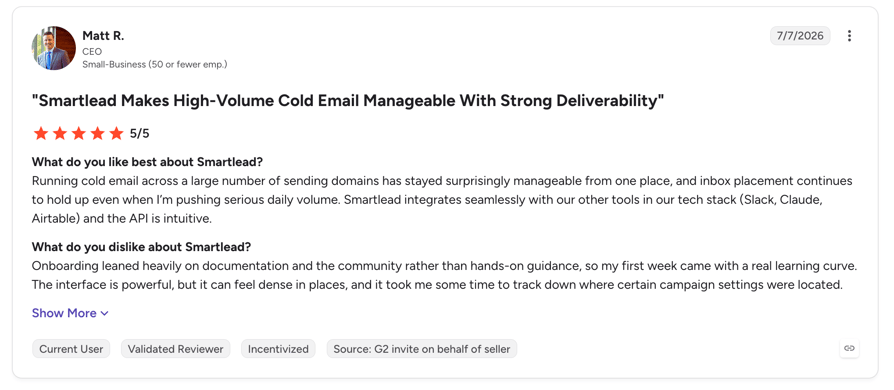
How Do G2 Users Rate Smartlead?
Smartlead holds 4.5 on G2 from 421 reviews, though the base skews heavily toward small business and agencies.
Smartlead vs. Nooks: Which Is Better for AI Calling?
Four categories decide it. If you are weighing Smartlead against Nooks on a shortlist, these are the lines that move the decision.
Smartlead vs Nooks
| Category | Smartlead | Nooks | Winner |
|---|---|---|---|
| Parallel dialing | None, single line only | 2 to 5, Turbo averages 6 | Nooks |
| Email infrastructure | Unlimited mailboxes and warmup | Email in AI Sequencing only | Smartlead |
| Pricing model | Flat, not per seat | Quote only, per seat | Smartlead |
| Virtual salesfloor | None | Yes | Nooks |
| G2 rating | 4.5 (421) | 4.8 (1,693) | Nooks |
Other Nooks Competitors Worth Knowing About
Four more tools come up regularly in Nooks comparisons, and the searches are specific: Aircall vs Nooks, 8x8 vs Nooks, FrontSpin vs Nooks and Rocketphone vs Nooks. None made the ranked list as an AI dialer alternative, and here is the honest reason for each. If you are earlier in the process and still working out which dialer type you need, start with what a dialer actually is and how auto dialer setup works.
Also compared against Nooks
| Tool | What it is | Why it is not in the ranked ten |
|---|---|---|
| Aircall | Cloud business phone and call centre platform with a Power Dialer on Professional and above. G2 4.4 from 1,648 reviews. Listed from $30/user/month with a 3-licence minimum. | No parallel dialing. A solid phone system, but it does not solve the throughput problem people buy Nooks for. See our Aircall alternatives guide. |
| FrontSpin | Enterprise sales communication and power dialer platform, long used by outbound SDR teams. | Acquired by TitanX in an eight-figure deal announced February 2026. It continues as a standalone business with no interruption for existing customers, but platform unification is planned, which is a real consideration on a multi-year contract. |
| 8x8 | Enterprise UCaaS and CCaaS suite covering phone, video and contact centre. G2 4.2 from 936 reviews for 8x8 Work. | Wrong category and fully quote-only. No published parallel or power dialer for outbound SDR workflows. |
| Rocketphone | Salesforce-native voice and conversation intelligence app with real-time in-call AI advice. | A G2 review base of exactly one review. No published pricing. Not enough evidence to rank it. |
What Are Real Users Saying About Nooks Alternatives?
We looked beyond our own testing at what practitioners say on the platforms where they compare these tools. Here is what the evidence actually supports, and where it does not exist.
What Are People Asking About Nooks Pricing on Reddit?
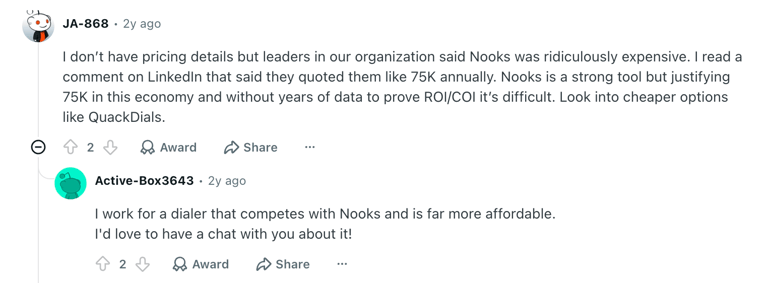
The most searched Nooks question is what it costs, and that tells you something on its own. "Nooks pricing reddit" is a real, recurring search. People are not looking for a review. They are looking for another buyer to tell them what they paid, because the vendor will not publish a number.
That is the whole dynamic. When a company publishes its rate card, nobody searches for peer-disclosed pricing. When it does not, a secondary market of estimates fills the gap, and in this case those estimates disagree by a factor of four.
The three things buyers consistently want to know before a Nooks call:
- What per-seat rate did you actually get? The published third-party range runs from roughly $780 to $5,000 per user per year. Vendr's observed average contract across 57 purchases was $30,105.
- Is there a seat minimum? Multiple sources report a 5-seat floor. Nooks does not confirm it.
- Can you get out? Every source describes annual quote-based deals with no month-to-month option. We could not find a single first-hand account of someone unable to exit, so we are not going to imply one exists.
What Are Quora Users Asking About Nooks Alternatives?
The recurring themes in Quora threads comparing AI dialers cluster around four evaluation criteria, and they map closely to the gaps documented above.
- Line count is the first filter. Buyers comparing parallel dialers ask how many lines each tool runs before they ask anything else. Nooks at 2 to 5 sits below Orum, Kixie, JustCall and Klenty at up to 10.
- International coverage is the second. Teams calling outside the US ask which tools provision local numbers where they sell. This is where the Nooks Numbers confusion surfaces most often.
- CRM sync fidelity decides shortlists. Buyers want to know whether activity lands correctly in Salesforce or HubSpot without manual reconciliation.
- Pricing transparency is a proxy for trust. Tools that publish a rate card get shortlisted faster than tools that require a sales call to produce a number.
Read the review distribution, not just the score
Nooks holds 4.8 from 1,693 reviews on G2 and has essentially no detractors. The lowest-rated review we could surface across the whole corpus was one at 3.5 stars. Every criticism quoted above sits inside a four or five star review. That is worth understanding when you compare it against a 4.3 with 3,574 reviews: the scores are measuring slightly different things.
See Where Your Dialer Actually Loses Time
CloudTalk Features vs Nooks Features for AI Calling
The full head-to-head, across every category that decides an AI dialing purchase.
CloudTalk vs Nooks: full feature comparison
| Category | CloudTalk | Nooks | Winner |
|---|---|---|---|
| Starting price | $25/user/month, published | No published price | CloudTalk |
| Minimum seats | 1 on Starter and Essential | Reported 5+, unconfirmed | CloudTalk |
| Contract | Month to month available | Annual, quote based | CloudTalk |
| Parallel dialing | Up to 5 lines | 2 to 5, Turbo averages 6 | Tie |
| Other dialers | Power, Smart and Preview | Power dialing | CloudTalk |
| Inbound calling | Full IVR, queues, ring groups | None, outbound only | CloudTalk |
| Call flow designer | Visual drag and drop | Not offered | CloudTalk |
| Number provisioning | Local numbers in 160+ countries | Enrichment only, no country list published | CloudTalk |
| Spam and number health | Carrier-level, CloudTalk owns the telephony layer | Auto-rotation every 60 calls, US carriers only | CloudTalk |
| Branded caller ID with max dialing | Available together | Mutually exclusive with Turbo and Adaptive | CloudTalk |
| Conversation intelligence | Transcripts, summaries, sentiment | AI Call Insights and coaching | Tie |
| AI voice agents | Inbound and outbound agents | Not offered | CloudTalk |
| Virtual salesfloor | Call monitoring and whisper coaching | Dedicated Virtual Salesfloor | Nooks |
| AI roleplay and coaching | Call scoring and coaching insights | AI Training Bots and Coaching Lab | Nooks |
| CRM integrations | 100+ native, direct write | Salesforce, HubSpot, Outreach, Salesloft, Gong, Apollo. Routed via SEP | CloudTalk |
| Multichannel sequencing | Workflow automation and SMS | AI Sequencing with email and LinkedIn | Nooks |
| Free trial | 14 days, no credit card | Available, length not published | CloudTalk |
| G2 rating | 4.4/5 (1,852) | 4.8 (1,693) | Nooks |
The honest summary: Nooks wins on the salesfloor, the AI coaching depth and its G2 rating. CloudTalk wins on price transparency, international coverage, inbound calling and CRM writing. If your team only dials out and lives in a virtual salesfloor, Nooks is a good product. If you also answer the phone, sell outside the US, or need to know what you are paying before a sales call, the comparison is not close.
Published pricing. 160+ countries. Inbound and outbound on one platform. 14 days free.
How Do You Choose the Right Nooks Alternative for Your Team?
Six questions decide this, and each one eliminates tools. Work through them in order and the shortlist narrows to two or three.
1. Is Your Bottleneck Dials Per Hour, or Connect Quality?
These pull in opposite directions and you cannot optimise both. More parallel lines means more dials and a longer pause on pickup. Fewer lines means clean connects and lower volume.
If dials per hour is the constraint: the parallel dialer alternative you want is Orum, Kixie, JustCall or Klenty, all at up to 10 lines against Nooks 5. If your reps are losing conversations to the pause: PhoneBurner is single-line with no connect delay at all, and that is the entire point of it. Our parallel dialer comparison goes deeper on the trade-off.
2. Do You Sell Outside the United States?
This eliminates more tools than anything else. Nooks runs on Twilio's 100+ country network, but its published spam remediation covers US carriers only, and it provisions no numbers itself.
If you dial internationally: CloudTalk at 160+ countries, Orum at 160+, JustCall at 70+ or Kixie at 65+. Rule out PhoneBurner immediately, which is United States and Canada only, and therefore more limited than Nooks rather than less.
3. Do You Also Need to Answer Inbound Calls?
Nooks is outbound only. So are Orum and Trellus. If your team takes calls as well as making them, an outbound-only tool means buying a second phone system alongside it.
Tools that do both: CloudTalk and JustCall. Everything else is a dialing layer that needs a phone system underneath it, and that second bill belongs in your comparison.
4. Are You Replacing Your Sequencer, or Keeping It?
This determines migration scope more than any feature does.
- Keeping Outreach or Salesloft? Orum, Trellus and Nooks itself all sit alongside them. Klenty does not integrate with either, because it competes with them.
- Want to consolidate? Klenty replaces both the sequencer and the dialer at a published price. Salesloft and Outreach replace the sequencer but give you no parallel dialing.
- Want the smallest possible change? Trellus is a browser overlay. You keep everything and add dialing on top.
5. Can You Live With Quote-Only Pricing?
Four of the ten tools here publish nothing: Orum, Kixie, Salesloft and Outreach, alongside Nooks. If procurement needs a benchmark before a sales call, that rules them out at the first gate.
Fully published: CloudTalk, PhoneBurner, Klenty, Smartlead and Trellus. JustCall publishes its core plans but gates the dialer tier.
6. How Much Review Evidence Do You Need?
Rating alone is misleading. Trellus and Kixie both show 4.8, but one rests on 18 reviews and the other on 866.
Deepest evidence bases: Salesloft (4,287), Outreach (3,574), JustCall (2,393), CloudTalk (1,852), Nooks (1,693), Orum (1,097). Thin enough to flag: Trellus at 18.
7. Do You Actually Need the Virtual Sales Floor?
This is the question most shortlists skip. The virtual sales floor, the shared room where reps dial together and managers listen in, is the feature Nooks is known for and the one buyers assume they are paying for. Ask your reps whether they use it daily or whether it was a demo highlight nobody opened after week three.
If the floor is genuinely central, and this is common on remote SDR teams that dial in blocks, Orum is the closest match among Nooks virtual sales floor competitors, and Nooks itself is hard to beat. If it is not, you are paying a premium for a room nobody sits in, and the cheaper published-price tools become the obvious move. Smaller teams especially: the best alternatives to Nooks for startups tend to be the ones with no seat minimum and a real trial, which is CloudTalk, Trellus or Smartlead depending on whether your motion is calls or email.
Which Nooks Alternative Matches Your Team?
Nooks alternative recommendation matrix
| If your team is... | Your main constraint | Best fit | Runner-up |
|---|---|---|---|
| Selling internationally, inbound and outbound | Coverage and a second phone system | CloudTalk | JustCall |
| An enterprise SDR floor of 9+ seats | Dials per hour, want the closest Nooks match | Orum | Kixie |
| Struggling to get answered at all | Connect rate and number reputation | Kixie | CloudTalk |
| Under 5 seats and budget-constrained | Cost and seat minimums | CloudTalk | Trellus |
| Committed to Outreach or Salesloft | Migration effort | Trellus | Orum |
| Wanting one vendor for sequencing and dialing | Tool sprawl | Klenty | JustCall |
| US or Canada only, quality over volume | The connect pause | PhoneBurner | CloudTalk |
| Replacing the whole revenue motion | Orchestration, not dialing | Salesloft | Outreach |
| Email-first with a deliverability problem | Inbox placement | Smartlead | Klenty |
Not Sure Which One Fits? Bring Us Your Numbers
Ready to Try the Best Nooks Alternative?
Nooks is a good product with the highest G2 rating in this guide. If your team dials out all day from the US, lives in a virtual salesfloor and has a budget that absorbs a quote-only annual contract, it will probably serve you well.
The three reasons teams leave are consistent, and none of them is about quality:
- The line ceiling. 2 to 5 parallel lines, with Turbo averaging 6, against up to 10 elsewhere
- The geography. No published number provisioning and US-only spam protection, which caps international outbound
- The pricing. No published rate, no way to benchmark a quote, and third-party estimates that disagree fourfold
CloudTalk answers all three: a published rate from $25/user/month with no seat minimum, local numbers in 160+ countries, and inbound plus outbound on the same platform so you are not buying a phone system twice.
Test it on your own lists for 14 days before you decide anything.
Switch to a Dialer You Can Price Before You Call Sales
Frequently Asked Questions About Nooks Alternatives
The questions buyers ask most often when comparing Nooks against other AI dialers.
Nooks publishes no pricing. Its pricing page contains no figure, no plan name and no seat minimum.
Third-party estimates split into two camps that disagree by roughly 4x: Vendr's procurement data reports an average contract of $30,105 per year across 57 analysed purchases (range $7,668 to $151,794), while several editorial sites claim $4,000 to $5,000 per user per year with no published methodology. G2 buyer data rates Nooks' perceived cost at $$$$$, the top band, with an average discount of 15%. Ask for the quote, then benchmark it against alternatives that publish.
Because the criticism lives inside five-star reviews. Nooks holds 4.8 from 1,693 reviews and has almost no detractors, but the "what do you dislike" fields of otherwise-perfect reviews contain consistent complaints.
The three that recur: a five-second pause after pickup, the dialer occasionally connecting a rep to two prospects at once, and the smart presence feature reportedly lowering pickup rates compared with standard dialing. These are parallel-dialing artifacts, not product defects, and they affect every parallel dialer to some degree.
Yes, and Nooks says so itself. Its support documentation states that Nooks "can automatically rotate your phone number after 60 calls with it, to minimize the chance of getting flagged as spam."
It also registers business information with First Orion, Hiya and TNS and runs daily reputation checks, but only across US carriers. There is a further trade-off: Turbo and Adaptive dialing cannot run on a Branded number, so you choose maximum dial volume or branded caller ID, not both.
Every available source describes annual, quote-based contracts with no month-to-month option published. A free trial is available, per Capterra.
We could not find a single first-hand account of a customer being unable to exit a Nooks contract, so we are not going to imply one exists. What is verifiable is only that Nooks publishes no self-serve or monthly plan. If contract flexibility matters, PhoneBurner and CloudTalk both offer month-to-month.
CloudTalk is the strongest all-round pick, at $25/user/month published with no seat minimum, plus inbound calling and 160+ country coverage that Nooks does not offer.
Other fully published options:
- PhoneBurner: $140 to $183/user/month, monthly and annual rates both shown, no contract
- Klenty: $70 to $99/user/month plus a $45 dialer add-on, the only true parallel dialer that publishes its dialer rate
- Trellus: from $99.99/user/month
- Smartlead: from $39/month flat, not per seat
Neither publishes pricing, so on transparency it is a tie at zero.
On reviews, Nooks leads on rating (4.8 vs 4.6) and volume (1,693 vs roughly 1,097). On capability, Orum leads on parallel lines (up to 10 vs 2 to 5) and international coverage (160+ countries vs no published list). The deciding factor is usually the seat minimum: Orum requires 9 seats, which rules out most small teams. Vendr reports Orum's median contract at $21,300 a year against Nooks' $30,105 average, though neither figure is vendor-confirmed.
Yes, and that is precisely the case where it wins. The Virtual Salesfloor is Nooks' strongest differentiator, so if your team does not run shared dialing sessions, you are paying for a feature you will not use.
CloudTalk gives you parallel dialing up to 5 lines, plus call recording, monitoring and whisper coaching for managers, local numbers in 160+ countries, full inbound routing, and native CRM writing, from $25/user/month with no seat minimum.
Four of them, all at up to 10 lines:
- Orum: 10 lines, 160+ countries, 9-seat minimum, quote only
- Kixie: PowerDialer 1, 4 or 10 lines with AI Human Voice Detection, 65+ countries
- JustCall: AI Dialer up to 10 numbers at once, though the tier carrying it is quote-only
- Klenty: 2 to 10 lines at 150 to 350 dials per hour, with the dialer priced openly at $45/user/month
Nooks runs 2 to 5 fixed lines, with Turbo Dialing averaging about 6.
No, neither does. Salesloft's Dialer and Messenger offers local presence, voicemail drop and Live Call Studio, but no multi-line dialing. Its own marketplace lists third-party parallel dialers, which tells you what is missing.
Outreach is the same, and its reviewers say so directly: one Mid-Market reviewer in April 2026 noted that "dialing capabilities are limited", and another said reps must "call prospects one by one." Both are platforms you buy to replace your sequencing motion, not to raise connect rates.
No. Nooks Numbers is a waterfall phone number enrichment product, not number provisioning. It pulls mobile numbers for your prospects from Apollo, Cognism, Datagma, Forager, Prospeo, Wiza, People Data Labs and ZoomInfo, on a credit basis.
It finds numbers to call. It does not give you local numbers to call from. If you need local presence in the UK or anywhere outside the US, you need a platform that provisions numbers, such as CloudTalk (160+ countries), Orum (160+) or JustCall (70+).