How to Automate Appointment Scheduling With AI: Steps & Best Tools
TL;DR:
AI appointment scheduling is the use of AI to book customer appointments for you: it talks to the customer by phone, chat or text, checks your live calendar, books a free slot and sends a confirmation, at any hour.
You can set it up in six steps:
- 01Map your appointment types and rules so the AI has something to follow.
- 02Choose a platform for your main channel, usually a voice agent if customers call.
- 03
- 04Define the booking conversation, including the handoff to a person.
- 05Automate confirmations and reminders that make rescheduling easy.
- 06
A caller rings at 7:40 p.m., hears an after-hours voicemail and books with the clinic down the road. Another calls during the lunch rush, gets put on hold and hangs up. The result? Another empty slot on tomorrow's calendar and two missed booking opportunities.
AI appointment scheduling closes that gap. It answers calls, checks real-time availability and books appointments while customers are still on the line.
In this guide, you'll learn how to set it up in six steps, handle cancellations and double bookings, choose the right type of tool and measure its ROI.


What Is AI Appointment Scheduling?
AI appointment scheduling is the use of artificial intelligence to handle the process of booking, changing and confirming appointments. Instead of making customers navigate a booking page or wait for a staff member to answer the phone, an AI agent can handle the conversation, check your calendar for available times and book the appointment directly. It can also manage changes and confirmations, even outside office hours.
A booking link works differently. It displays available time slots on a webpage and lets customers choose one themselves. There's no conversation, so if they have a question, need help finding a suitable time or prefer to call, the link can't help them.
Is an AI Appointment Setter the Same as an AI Booking Assistant?
No, an AI appointment setter and an AI booking assistant work in opposite directions, even though the terms get swapped a lot.
An AI appointment setter usually works outbound for a sales team: it calls leads, qualifies them and books a meeting with a rep. An AI booking assistant works inbound: it answers customers who already want a service and books them into your calendar.
What Kinds of AI Scheduling Tools Are There?
"Scheduling" covers three different products, which is why so many "best AI scheduling" lists mix meeting tools with booking tools:
| Type | How it works | Who handles the booking | Best for |
|---|---|---|---|
| AI scheduling assistant | Organizes your calendar, schedules meetings and protects focus time | You or your team | Internal meetings |
| Online booking software with AI features | Shows available slots on a booking page for customers to select | The customer | Self-service online bookings |
| Conversational AI booking agent | Talks to customers, checks availability and books appointments through voice, chat or text | The AI agent | Phone and message-based bookings |
This article focuses on the second and third types: tools that help customers book appointments. An AI scheduling assistant such as Reclaim is different because it manages your team's calendar rather than booking appointments with customers.
How Does AI Appointment Scheduling Work?
Whether a customer calls, opens a website chat or sends a text, an AI appointment scheduler follows a simple process to turn their request into a confirmed booking:
- 01First contact: Starts the conversationThe AI agent picks up the customer's call or responds to their chat or text message. It starts the booking conversation immediately, without requiring a staff member to step in.
- 02Intent: Understands what the customer needsThe agent identifies the purpose of the appointment and gathers any missing details. For example, if someone asks for a cleaning next week, it might clarify which type of cleaning they need, their preferred day and their contact details.
- 03Availability: Finds suitable time slotsThe agent checks the connected calendar in real time to see which slots are free. It also follows the business's booking rules, such as appointment duration, working hours, buffer times and staff availability.
- 04Offer: Suggests available timesThe agent offers a few suitable options based on the customer's preferences and calendar availability. It can also account for the customer's time zone and ask which slot works best.
- 05Booking: Saves the appointmentOnce the customer chooses a time, the agent creates the appointment in the connected calendar or scheduling system. It adds the relevant details, such as the customer's name, phone number, service and any custom fields required.
- 06Confirmation: Confirms the bookingThe agent lets the customer know the appointment is confirmed and can send a follow-up by text, email or calendar invite, depending on the available integrations. The team can also see the new appointment in the connected calendar.
How to Automate Appointment Scheduling Using AI: A 6-Step Setup
Setting up AI appointment scheduling software involves more than connecting a calendar. You need to define what customers can book, when appointments are available and how the AI should handle requests. Here are six steps to get your scheduling process up and running:
Step 1: Define your appointment types and booking rules
Before setting up the AI, document what customers can book, who can take each appointment and which rules the agent must follow.
Use this checklist to get everything ready:
Appointment details
- List your services and how long each appointment takes.
- Specify which staff members offer each service and at which locations.
- Note what information customers need to provide.
- Include any prerequisites, such as intake forms or deposits.
Booking rules
- Set opening hours and staff availability for each location.
- Define how far in advance customers can book and any same-day restrictions.
- Set buffer times between appointments.
- Document cancellation, rescheduling and late-arrival policies.
First rollout
- Choose one appointment type and one channel to automate first.
- Start where customers struggle most to reach your team. For many appointment-based businesses, that means missed and after-hours calls.
A clinic might start by automating new patient consultations. It would tell the AI that these appointments last 30 minutes, can be handled by Dr. Patel or Dr. Moreno, and require the patient's name, phone number and insurance details. It would also set the clinic's opening hours, available slots and cancellation policy.
Once the AI can book these appointments correctly, the clinic can add follow-ups, other doctors and more booking channels.
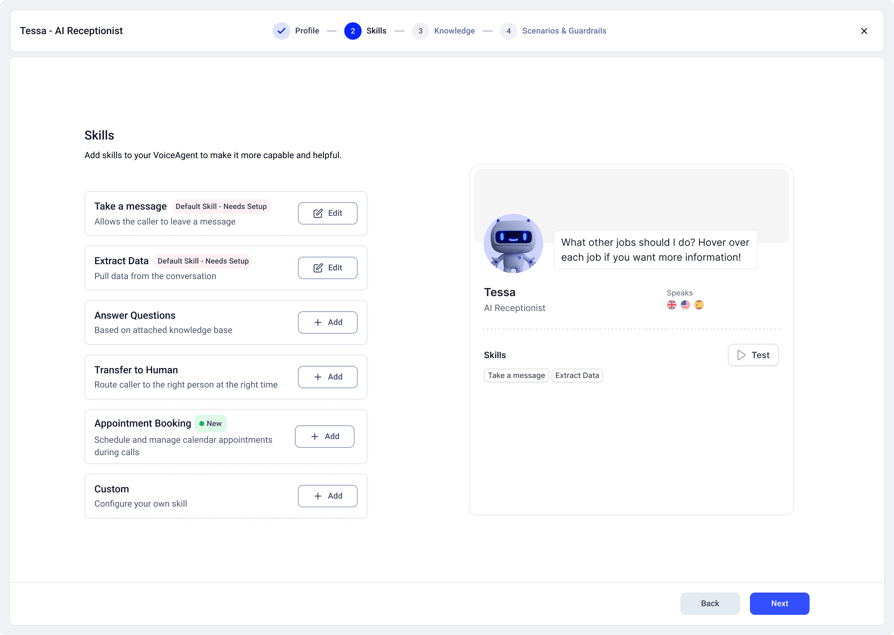
Step 2: Choose an AI scheduling platform that fits your channel
Once you know where most booking requests come from, choose a platform that can handle them. A tool designed for website bookings won't solve the problem if most customers call your business.
Use this checklist to compare your options:
- Phone calls:Does it include a voice agent or AI receptionist that can answer calls and book appointments during the conversation?
- Website bookings:Does it offer an online booking page or chatbot that can help customers find and book available slots?
- CRM-driven bookings:Can it connect to your CRM or use its built-in scheduling features?
- Calendar integration:Does it sync with the calendar your team already uses?
- Setup and maintenance:Can your team configure and manage it without relying on constant technical support?
If most patients book by phone, a booking page alone won't be enough. The clinic needs an AI voice agent that can answer incoming calls, check the dentists' availability and book appointments without transferring every caller to reception.
Step 3: Connect your calendar, CRM and business information
Once you've chosen a platform, connect the systems the AI needs to check availability, answer customer questions and keep booking records up to date.
Use this checklist to get everything connected:
Calendar
- Connect the calendar your team already uses, such as Google Calendar or Microsoft Outlook.
- Make sure the AI can check availability in real time before offering a slot.
- Confirm that new bookings are added to the calendar immediately.
- Set working hours, buffers and blocked times in your calendar.
Business information
- Add your services, prices, opening hours and locations.
- Include preparation instructions, required customer details and booking policies.
- Assign someone to review and update this information regularly.
CRM and customer records
- Connect your CRM so bookings can create or update customer records.
- Decide which details to save, such as contact information, appointment type and booking status.
- Check that the information passes correctly between systems.
A prospect calls to ask about a product. The AI checks the sales rep's availability in Google Calendar, books a product demo and sends the prospect's contact details and meeting information to HubSpot, creating a new contact or updating an existing one.
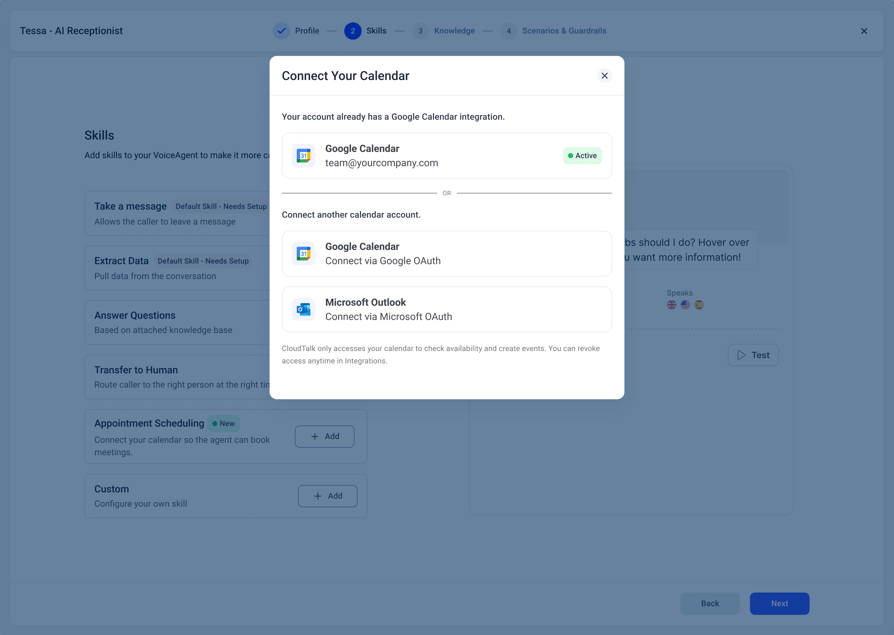
The agent checks that calendar for free slots during the call and adds each new booking to it.
Step 4: Define how the AI handles booking conversations
Now decide how the AI should interact with callers: what it says, what information it collects, which rules it follows and when it needs to involve a person.
Use this checklist to define the conversation:
Greeting and tone
- Write a short greeting that clearly identifies the agent as AI.
- Explain what it can help with, such as booking appointments or answering basic questions.
- Keep the tone consistent with how your team normally speaks to customers.
Booking questions
- Decide what starts the booking flow, such as an incoming call, chat message or form submission.
- List the information the AI needs before booking, such as the service, preferred date, name and phone number.
- Keep questions to a minimum. Only ask for details needed to complete the booking.
Rules and decisions
- Set fixed rules for working hours, appointment durations, buffers, staff availability and cancellation policies.
- Define what the AI can interpret or answer, such as vague time preferences or questions about your services.
- Make clear which situations are outside its scope and should never be handled by guesswork.
Human handoff
- Define when the AI should transfer a caller, such as complaints, urgent requests or questions it can't answer.
- Always allow callers to ask for a human.
- Decide what happens if nobody is available, such as taking a message or arranging a callback.
A prospective buyer calls to arrange a property viewing. The AI asks which property they're interested in and when they'd like to visit. It checks the agent's availability and follows the agency's viewing rules. If the caller wants to negotiate an offer or ask a question that requires the agent's expertise, the AI transfers the call to a human.
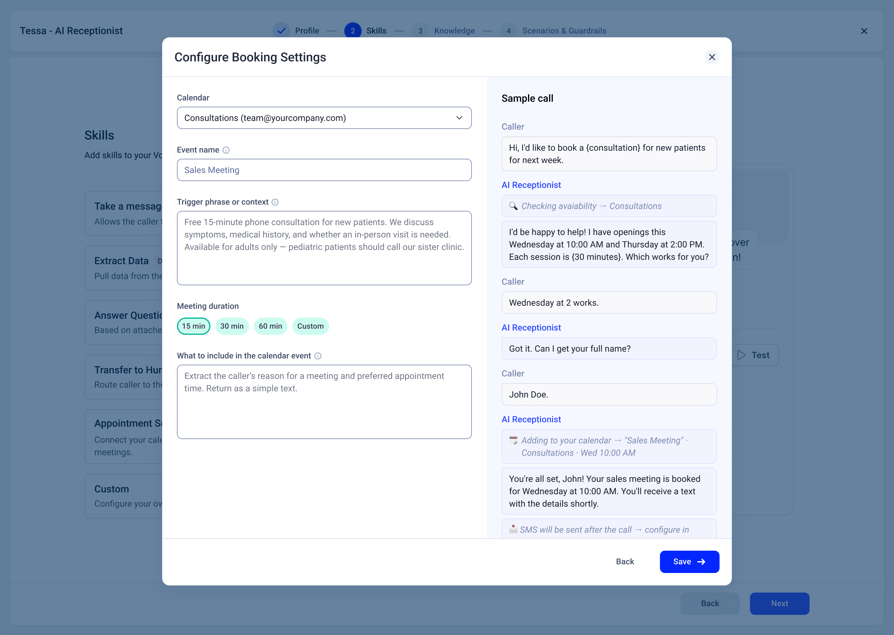
Step 5: Automate confirmations, reminders and follow-ups
A booking isn't complete until the customer knows when it is and can easily make changes if needed. Automating confirmations and reminders helps reduce no-shows and keeps everyone informed. Before launch, test the full sequence, from the initial confirmation to a rescheduled appointment, to make sure customers receive the right information at each stage.
Use this checklist to automate post-booking communication:
Booking confirmations
- Send a confirmation as soon as the appointment is booked, by SMS, email or calendar invite.
- Include the date, time, location or meeting link, and any details the customer needs to prepare.
Reminders
- Decide when to send reminders, such as one or two days before the appointment.
- Test different timings and track no-show rates to see what works best.
- Include a clear next step, such as confirming attendance or rescheduling.
Changes and follow-ups
- Make it easy for customers to reschedule or cancel, ideally with a direct link.
- Decide whether to send follow-ups when customers need to complete a form, make a payment or provide additional information.
Someone books an introductory call to discuss a training course. They immediately receive a confirmation with the date, time and meeting link. A reminder arrives the day before, with an option to reschedule if their plans have changed.
Avoid including sensitive patient information in standard SMS or WhatsApp reminders. Keep messages limited to practical details, such as the appointment date and time, and use a communication channel that meets your applicable privacy requirements.
Step 6: Test, launch and monitor your AI booking system
Before going live, make sure the AI can handle common booking requests and unexpected situations. Once it's running, keep checking how it performs and fix issues as they come up.
Use this checklist before and after launch:
Test the booking flow
- Test a straightforward booking and check that the correct slot and duration are saved and the confirmation arrives.
- Try rescheduling and canceling to make sure customers are directed to the right option.
- Test a fully booked day to see whether the AI offers alternative times.
- Try vague requests like "sometime next week" to check that the AI asks follow-up questions instead of guessing.
- Test noisy calls, different accents and requests to speak to a person.
Launch gradually
- Start with one phone line or channel, such as after-hours calls.
- Check that bookings are recorded correctly before expanding to more channels or call types.
- Assign someone to monitor performance and handle issues during the first week.
Monitor and improve
- Review bookings, failed attempts, handoffs and no-shows every week.
- Listen to or read a sample of conversations. Reviewing around 10 a week can help uncover issues that dashboards might miss.
- Compare results with your pre-launch metrics to see whether the AI is improving the booking process.
A plumbing company starts by letting its AI handle after-hours calls for service visits. Before launch, the team tests routine bookings, fully booked days, vague requests and calls that need a human. During the first week, they check that visits are added to the right technician's calendar and review conversations where the AI couldn't complete a booking. Once the process runs smoothly, they expand to daytime calls.
Who Benefits From AI Appointment Scheduling?
AI appointment scheduling is particularly useful for businesses that rely on booked appointments but struggle to answer every call or manage requests efficiently. Here's how it helps across different industries:
| Business type | Typical booking challenge | What AI appointment scheduling improves |
|---|---|---|
| Medical and dental practices | High call volumes at opening time leave patients waiting or unable to get through. | Answers routine booking calls, schedules appointments and frees reception staff to focus on patients at the practice. |
| Salons and spas | Staff can't answer calls while attending to clients. | Books appointments without interrupting ongoing treatments and captures requests after hours. |
| Home and field services | Technicians miss booking requests while working on-site. | Lets customers schedule visits without waiting for a technician to become available. |
| Fitness studios and gyms | Trial requests come in after hours, when nobody is at the desk. | Captures trial bookings outside business hours and follows up with prospective members. |
| Professional services | Consultation bookings get delayed by back-and-forth emails and calls. | Checks availability and books consultations without lengthy exchanges. |
| Schools and training providers | Enrollment periods bring more inquiries than the team can handle. | Handles appointment requests at scale and gives prospective students more ways to book. |
You may not need it if you only handle a handful of appointments each week or if every booking requires a custom quote before a time can be agreed. It's also worth fixing your calendar management first. If availability isn't kept up to date, an AI tool can create double bookings instead of preventing them.
Best AI Appointment Scheduling Software: 7 Tools by Type
Not every scheduling tool works the same way. Some automate bookings through phone calls, others through websites, chat or calendar integrations. We’ve grouped seven options by type to help you find the best AI platforms for scheduling appointments for your business.
| Tool | Type | Best for | Pricing (paid plans) | Free option |
|---|---|---|---|---|
| CloudTalk AI Receptionist | Voice agent | Businesses where bookings arrive by phone | $99 (200 min); Phone plans from $25/mo | 14-day trial with 50 AI Voice Agent minutes |
| Calendly | Booking page with AI email assistant (beta) | Meetings booked by link | From $10/seat/month, billed yearly | Free plan (1 event type) |
| Acuity Scheduling | Booking page with AI chatbot | Small businesses that book online | From $16/month, billed annually | 7-day free trial |
| Cal.com | Booking page with AI agent (Cal.ai) | Teams that want an open-source, flexible setup | Teams from $12/user/month | Free for individuals and 14-day free trial |
| Reclaim | AI scheduling assistant for your own calendar | Internal meetings and focus time | From $10/seat/month, billed yearly | Free Lite plan |
| Synthflow | Enterprise voice agent platform | High call volumes with custom builds | Annual enterprise agreement; contact sales | No free plan or trial |
| GoHighLevel | CRM with Conversation AI and Voice AI | Agencies and marketing-led businesses | From $97/month, plus add-ons and usage | 14-day free trial |
How to Choose AI Scheduling Software: What to Check Before You Commit
Once you know which type of tool you need, compare the features that determine whether it can handle your bookings reliably. Start with these seven areas:
| Criterion | What to check |
|---|---|
| Booking channels | Does it cover the channels where customers book, such as phone, website, chat or messaging? |
| Calendar and CRM integrations | Does it support your existing systems, offer two-way calendar sync and update customer records? |
| Booking rules and handoff | Can you configure appointment durations, buffers and staff availability? Can it transfer calls or take messages when needed? |
| Languages | Does it support the languages your customers actually speak? |
| Reminders and reporting | Can it send reminders and rescheduling links? Can you track bookings, handoffs and failed attempts? |
| Security and privacy | How does it handle customer data? Does it offer access controls, audit logs and the agreements your industry requires? |
| Setup and total cost | Who configures and maintains the tool? What will you pay for the subscription, usage and add-ons? |
What Should Different Industries Look For?
Beyond the basics, some industries have specific scheduling requirements. Use these checklists to see what matters most in your business.
Healthcare and Telemedicine
AI patient appointment scheduling involves strict privacy and data protection requirements. Before choosing a tool, check that it supports:
- A signed Business Associate Agreement (BAA) with the vendor
- Collection of only the minimum necessary patient information
- Encryption, access controls and audit logs
- Clear data retention and deletion policies
- Reminders that don't include sensitive patient information
Small Businesses
With limited budgets and staff, small businesses should focus on automating the booking tasks that take the most time or cause missed appointments:
- A simple setup that doesn't require dedicated IT support
- Affordable pricing that matches your booking volume
- Integration with the calendar you already use
- Automated handling of calls outside business hours or when staff are busy
- Easy access to bookings, missed calls and follow-ups
Larger Organizations
Businesses operating across multiple teams or locations need more control over scheduling, user access and reporting. Check for:
- Centralized management across locations
- Role-based access and single sign-on (SSO)
- Audit logs and data residency options
- CRM synchronization with platforms such as Salesforce
- Location-specific booking rules, working hours and staff availability
- Reporting that compares performance across teams and sites
How Should AI Handle Cancellations, Rescheduling and Booking Issues?
Booking an appointment is only part of the process. Customers may change their plans, request a different time or run into problems while booking. Your AI scheduling tool should know what to do in each situation without creating confusion or promising something it can't deliver.
What Should Happen When a Booking Changes?
Cancellations and rescheduling requests shouldn't leave customers guessing or create extra work for your team. Define how the AI should handle each situation, from releasing a canceled slot to finding a new appointment time.
| Situation | How the AI should handle it |
|---|---|
| Customer wants to cancel | Follow the cancellation policy, confirm the cancellation and release the slot. If appropriate, offer to book another time. |
| Customer wants to reschedule | Check availability for the new time, confirm the replacement booking and release the original slot. |
| Requested slot is no longer available | Check availability again before confirming and offer two or three alternative times. |
| Customer requests a time outside working hours | Explain the available booking hours and suggest the next suitable slots. |
| Customer disputes a cancellation policy | Explain the policy clearly and transfer the conversation to a person if the customer needs further help. |
What If the AI Can't Complete the Booking?
Not every request will go smoothly. The AI should be able to recover from common issues without guessing or leaving the customer stuck.
| Problem | What the AI should do |
|---|---|
| It can't understand the customer's details | Ask again and repeat the information back to confirm it. |
| The calendar doesn't respond | Don't claim the appointment is booked. Offer a callback, transfer the customer or provide another booking option. |
| The requested appointment conflicts with another booking | Check availability again and suggest alternative times. |
| The request is outside the AI's capabilities | Transfer the customer to a person or take a message. |
Never confirm a booking, cancellation, or change until the calendar reflects it.
Metrics to Track After You Automate Scheduling
Judge AI scheduling on numbers, starting before you go live:
| Metric | Definition |
|---|---|
| Booking conversion | Bookings made divided by booking requests received |
| After-hours bookings | Share of bookings made outside opening hours |
| Time to book | Average time from first contact to confirmed booking |
| No-show rate | Booked appointments where the customer didn't arrive, divided by all booked appointments |
| Reschedule and cancellation rate | Changed or canceled appointments divided by all booked appointments |
| Calendar utilization | Booked hours divided by available hours |
| Handoff rate and reasons | Share of conversations transferred to a person, grouped by reason |
| Customer satisfaction | Post-booking rating or short survey score |
How Do You Measure AI Appointment Scheduling Results?
Follow these steps:
- 01Record a baseline for two to four weeks before launch.
- 02Change one thing at a time, such as reminder timing or the greeting, so you know what moved the number.
- 03Compare over several weeks to smooth out holidays and slow periods.
- 04Review conversations weekly, because handoff reasons and failed bookings tell you which rule to fix next.
How Do You Calculate the ROI?
Compare the value of recovered bookings and staff time saved against the total cost of the tool.
To estimate it:
- 01Calculate recovered revenue:Multiply the number of bookings recovered from previously missed calls by your conversion rate and average appointment value.
- 02Estimate time saved:Calculate how many staff hours the AI saves on routine booking calls and what that time is worth.
- 03Subtract the costs:Include the subscription, usage fees, setup and ongoing maintenance.
Real-World Example: How Circle Gym Increased Trial Bookings with AI
For example, our customer Circle Gym increased trial bookings from 4 to 10 per day and saved more than 20 hours of staff time per week after adopting CloudTalk. These are the kinds of results to track when assessing whether the investment pays off.
Start With One Appointment Type and One Channel
You don't need to automate every appointment at once. Start with the appointment type and booking channel where you're losing the most time or opportunities. Set your booking rules, connect your calendar and define when the AI should confirm, offer alternatives or hand the conversation to a person.
Test it with real booking scenarios, including cancellations, reschedules and unavailable time slots. Then review the results, fix what isn't working and expand to the next appointment type or channel. Once the first workflow runs smoothly, you'll have a solid foundation to build on.
If missed calls are where you're losing bookings, CloudTalk's AI Voice Agent can help you handle appointment requests and keep more conversations moving, even when your team is busy.
Take Off Your Team’s Plate.
Frequently Asked Questions
The best AI for scheduling depends on how your customers book. If they mostly call, choose one of the AI voice agents that book during the call, such as CloudTalk's AI Receptionist. If they book online, a booking page like Calendly, Acuity Scheduling or Cal.com may be enough. See the tools section for a full comparison.
Yes, there are free AI schedule makers, such as Calendly's free plan, Cal.com for individuals and Reclaim Lite. They're booking pages or calendar assistants, though, so if you need an AI call answering service, expect a paid plan or a trial.
Most small businesses pay $50–$200 a month for an AI voice agent, though AI minutes, seats and add-ons change the price. CloudTalk's AI Receptionist starts at $99 a month for 200 minutes, with your first 50 minutes free. See AI Voice Agent pricing for current plans.
Yes, AI can answer phone calls and book appointments during the call, confirming only once the booking exists. Outbound voice agents can also make calls, for example, to remind customers about an upcoming visit.
Some AI tools reschedule and cancel; many only book. CloudTalk's agent books, and customers change plans through the links in their confirmation or a custom Tool tied to your booking API. Ask vendors to show what their AI voice agent can do live.
AI won't replace schedulers and receptionists outright. It takes the routine booking calls, which helps most when high call volumes swamp the desk, while people handle complaints, exceptions and the customers in front of them.
AI appointment scheduling is HIPAA compliant only if the vendor and setup meet HIPAA call center requirements. Our security controls and policies comply with HIPAA, and CloudTalk can sign a Business Associate Agreement (BAA) with customers.
The difference is direction. A setter makes outbound calls to leads, qualifies them and fills a sales rep's calendar. A booking assistant handles inbound requests from customers who already want a service, like a patient calling a clinic.
Several tools offer free plans, including Calendly, Cal.com and Reclaim. However, these provide booking pages or personal assistants, not agents that answer customer calls. Voice agents typically cost more, with pricing based on seats, conversation minutes, messages and add-ons. Estimate your monthly call volume before comparing plans.