9 Best AI Receptionists for Small Businesses in 2026 (Tested and Compared)
TL;DR
I spent a week analyzing 20+ AI receptionists for small business and picked the 9 best by r comparing their features and pricing, analyzing G2 reviews and discussions, and looking at the call-handling challenges small teams share with our sales team.
Here are the top 5 AI receptionists for small businesses:
- 01CloudTalk: Best for AI and a full phone system in one
- 02Smith.ai: Best for AI with human backup
- 03Goodcall: Best for local service businesses that want unlimited minutes
- 04Rosie: Best for solo owners and trades
- 05My AI Front Desk: Best for simple inbound coverage with text follow-up
Small businesses often tell us they want an AI receptionist for one simple reason: to handle more calls without hiring extra staff. Missed calls after hours or when the team is busy are among their biggest frustrations.
The problem is familiar. You're helping a customer, out on a job or already on another call when the phone rings. Meanwhile, callers keep asking about prices, opening hours and parking, and your business line still rings on your personal mobile.
An AI receptionist can help answer those calls, but only if it sounds natural, gives accurate information and knows when to transfer a caller to a real person. In this guide, we compare the 9 best AI receptionists for small businesses, covering features, pricing, pros and cons, and the types of teams each tool suits best.

Stop sending callers to voicemail

AI Receptionists for Small Business: Comparison Table
Here's how all 9 AI receptionists for small business compare on price, booking, transfers and reviews. Click any name to jump to its review.
Best AI Receptionists for Small Business: Comparison Table
| Provider | Best for | Starting price | Free trial or minutes | Books appointments | CRM integrations | G2 rating |
|---|---|---|---|---|---|---|
| CloudTalk | AI plus a full phone system | $99/month (200 min) | 50 free AI minutes + 14-day phone trial | Yes | HubSpot, Salesforce, Pipedrive, Zoho + 100+ | 4.4/5 |
| Smith.ai | AI with human backup | Free (25 calls), then $150/month (75 calls) | Free plan, 25 calls/month | Yes (Calendly and more) | Clio, Zapier and native integrations | 4.8/5 |
| Goodcall | Unlimited minutes for local services | $79/month (100 unique callers) | Free demo agent | Yes | Via Zapier, API and MCP tools | 3.5/5 |
| Rosie | Solo owners and trades | $41/month (250 min) | 7-day free trial | Booking links from $49; calendar booking from $149 | Via Zapier | No G2 reviews |
| My AI Front Desk | Inbound coverage with text follow-up | $79/month (200 min) | 7-day free trial | Yes | Built-in CRM and calendar, Zapier | 4.8/5 |
| Upfirst | Low call volumes | $20/month (30 calls) | 14-day free trial, no card | Yes (Google, Outlook, Calendly, Acuity, Clio) | Zapier, Make, Clio | 4.9/5 |
| Aircall | Teams already on Aircall | $49/min | 50 free AI minutes/month + 100 at sign-up | Yes | HubSpot, Salesforce, Zendesk + 250+ | 4.4/5 |
| RingCentral | Businesses already on RingCentral | $49/month (100 min) standalone | 14-day free trial | Yes | 600+; HubSpot, Zendesk and more | 4.3/5 |
| Retell AI | Building your own agent | Pay as you go, $0.07 to $0.31/min | $10 free credits | Yes , once you build it | HubSpot, Salesforce, Zoho, Make | 4.8/5 |
What Is an AI Receptionist for Small Business?
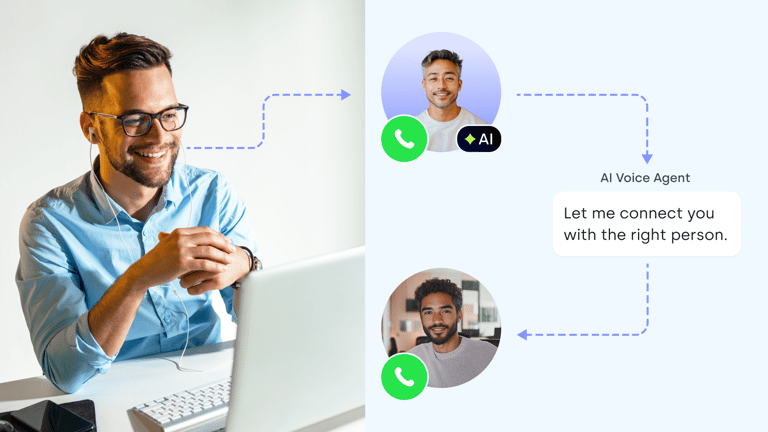
An AI receptionist for small business is an AI voice agent that answers your business calls from your own information, captures caller details, books or routes the call and hands off to a person when needed. It works around the clock, or only when your team can't pick up.
Think of it as the front desk you never got around to hiring — one that never takes a lunch break. CloudTalk AI receptionist, for example, sits inside your phone system and picks up when your staff are busy or gone for the day.
How Does an AI Receptionist Work?
Every AI receptionist follows the same basic flow, whichever vendor you pick:
- 01A call arrives: directly, after a set number of rings, or after hours, depending on the rules you set.
- 02The AI greets the caller in your business's name, in a voice you choose.
- 03It answers from your knowledge base: your website, price list, FAQs and policy documents.
- 04It collects the details: name, number, the service they want and anything else you ask for.
- 05It acts: books the appointment, transfers the call to a person with a summary, or takes a message.
- 06It logs the call and alerts your team, usually by SMS, email or a note in your CRM.
AI Receptionist vs. Voicemail, Answering Service and Human Receptionist
Not every business needs the same level of call coverage. Some just need a way to capture missed calls, while others need someone to answer questions, book appointments or handle urgent requests around the clock. Here’s how voicemail, answering services, AI receptionists and human receptionists compare:
| Option | Cost model | Hours | What it can do | Best for |
|---|---|---|---|---|
| Voicemail | Included in most phone plans | 24/7, but nobody answers | Records a message | Callers willing to wait for a callback |
| Answering service | Per call or per minute | 24/7 on most plans | Takes messages, screens, books with a script | Calls that need a human voice but not your team |
| AI receptionist | Monthly plan by minutes, calls or unique callers | 24/7 | Answers FAQs, books, transfers, logs every call | After hours, overflow and repeat questions |
| Human receptionist | Salary and benefits | Business hours | Judgment, empathy, in-person visitors | Sensitive, complex or emotional calls |
See how they compare on cost, coverage and caller experience in our AI Receptionist vs Human Receptionist guide.
How I Chose the Best AI Receptionists for Small Business
I analyzed 30+ auto attendant phone systems, read G2 reviews, and looked at recurring challenges our sales team hears from small businesses about answering and routing calls. Then I scored each system against six criteria:
- Natural voice: how it handles interruptions, remembers names and copes with off-script questions.
- Answers from your own information: whether it learns from your website, documents and price lists.
- A plan for when it can't help: transfers to a person or group, messages and SMS alerts.
- Fit with your calendar, CRM and number: booking, call logging and keeping your existing number.
- Pricing that matches your call volume: minutes, calls or callers, plus what overage costs.
- Setup without a tech team: self-serve setup, trial minutes and help when you need it.
Top 9 AI Receptionists for Small Business in 2026
This guide compares auto attendant phone systems for small businesses that need to route calls efficiently without adding extra work for their team. We evaluate every tool against the same six criteria to help you find the right fit.
1. CloudTalk: Best AI Receptionist for Small Businesses That Want AI and a Full Phone System in One
What Is CloudTalk?
CloudTalk is a cloud phone system with a built-in AI Receptionist that answers calls when your team can't, around the clock or as overflow. It combines business numbers, call routing, CRM integrations and coverage in 160+ countries, with AI built directly into the call flow.
The AI Receptionist handles incoming calls, while AI Specialists run defined workflows from start to finish. Your AI and staff share the same numbers, call history and integrations, so nothing lives in a separate tool.
What Are CloudTalk's Key AI Receptionist Features?
- Knowledge base integration: Train the AI Receptionist on PDFs, documents, text and website pages to answer questions using your actual prices, services and policies.
- Caller data capture and call transfers: Collect caller details, take messages and transfer calls to the right person or team with a call summary, so agents have the context they need before answering.
- Appointment scheduling: Check availability and book appointments during the call, making it easier for customers to secure a time that works for them, even outside business hours.
- Flexible call handling: Customize call routing in the Call Flow Designer to trigger the AI Receptionist on every call, after a set number of rings or outside business hours. Handle multiple calls simultaneously without putting callers on hold.
- 70+ languages with voice selection: Pick the voice that fits your brand and serve callers in their own language.
- Records and reports: Recordings, transcripts, summaries and sentiment for every AI call, logged to HubSpot and other integrations, with webhooks for anything custom.
What Is CloudTalk Missing?
- Plans include a set number of minutes, so teams with lengthy calls may find per-call pricing more predictable.
- Field-level CRM mapping and custom workflows may require webhooks or CloudTalk’s sales-led AI Specialist plan.
- Solo users may not need the full range of collaboration and call-routing capabilities.
Who Is CloudTalk Best For?
SMBs that miss calls while their team is busy or after hours and want AI call handling built into the same phone system their staff use. It’s a good fit for salons, home services, healthcare practices, real estate, travel and professional services that need to handle more calls without adding extra front-desk workload.
How Much Does CloudTalk Cost?
CloudTalk's AI Receptionist pricing starts free with 50 minutes, then $99 per month for 200 minutes. See the full AI Voice Agent pricing breakdown.
| Plan | Price | Minutes or calls included | Overage | Key inclusions |
|---|---|---|---|---|
| Free | $0 | 50 minutes | n/a | Test the AI on real calls |
| AI Receptionist 200 | $99/month | 200 minutes | $0.50/min | 24/7 inbound, knowledge base, transfers, booking, SMS follow-up |
| AI Receptionist 500 | $199/month | 500 minutes | $0.50/min | Everything above |
| AI Receptionist 1,000 | $299/month | 1,000 minutes | $0.50/min | Everything above |
| AI Receptionist 2,500 | $699/month | 2,500 minutes | $0.50/min | Everything above |
What Do Customers Say About CloudTalk?
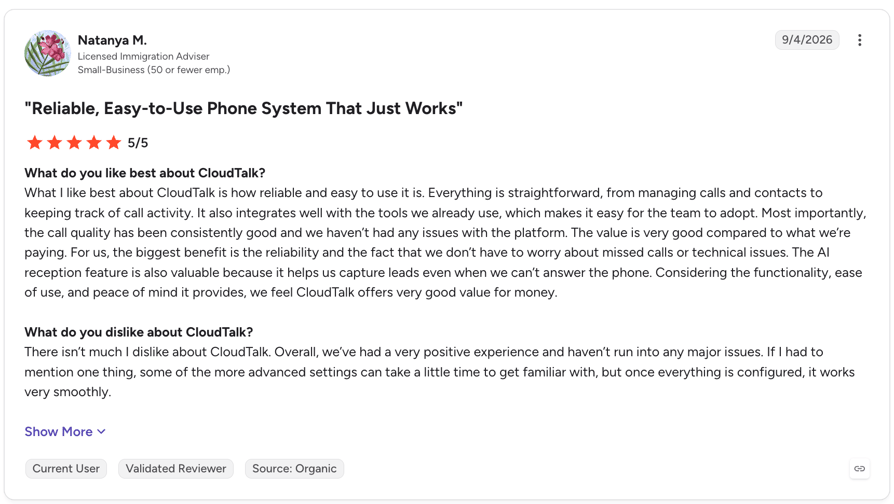
Customers highlight reliability, ease of use, and call quality, as well as the value of having integrations and telephony built into the same platform. AI users particularly praise its fast, natural-sounding conversations, multilingual capabilities, and ability to capture leads when teams can’t answer.
G2 Rating: 4.4/5 (1939+ reviews)
CloudTalk Pros and Cons From G2
| Pros | Cons |
|---|---|
| Call quality: one of the most-praised themes across G2 reviews | Internet stability: Call quality can vary depending on the stability of your internet connection |
| Easy integrations: reviewers highlight quick CRM and helpdesk connections | Custom integrations: More tailored workflows may require some additional setup |
| Easy to use: Intuitive interface and quick onboarding for new agents | Advanced settings: Getting familiar with the full range of features may take some initial onboarding |
2. Smith.ai: Best AI Receptionist for Small Businesses That Want AI With Human Backup
What Is Smith.ai?
Smith.ai is an AI-first receptionist with a network of live, North America-based receptionists behind it. It suits small firms that can't afford a fumbled call, especially in legal and professional services.
What Are Smith.ai's Key AI Receptionist Features?
- Human backup on demand: The AI takes every call first, and complex calls transfer to a live receptionist any time for $3 per escalation, so a hard call never dead-ends.
- Quality Studio: Test and simulate calls before you go live. Every plan includes as many test calls as real ones, plus twice as many simulated calls.
- AI scheduling: Books appointments through Calendly and other calendars while the caller is still on the line.
- Spam filtering: Blocks calls from 20 million+ known spammers before they count against your quota.
- Recording, transcripts and summaries: Included on every AI plan, the free one too.
What Is Smith.ai Missing?
- Every call over your bundle costs more than an in-plan call ($1.67 to $3.00), and plan changes only apply from the next month.
- Call transfers to live agents incur additional charges, and teams might have limited control over when the AI triggers a transfer sometimes.
- The AI is best suited to routine questions, so requests involving multiple steps or complex decisions may require a handoff to a human agent.
Who Is Smith.ai Best For?
Law firms, accountants and professional services that take a few calls a day and lose real money when one goes wrong. If you want AI efficiency but refuse to bet every call on it, Smith.ai is the safest middle ground on this list.
How Much Does Smith.ai Cost?
Smith.ai pricing starts at $0 per month for 25 calls, then $150 per month for 75 calls on Pro.
| Plan | Price | Minutes or calls included | Overage | Key inclusions |
|---|---|---|---|---|
| Free | $0 | 25 calls | $3.00/call | 24/7 AI answering, recording, scheduling, integrations |
| Pro | From $150/month | 75 calls ($2.00/call) | $2.50/call | Dedicated onboarding, live phone, email and chat support |
| Enterprise | From $500/month | 300 to 1,000+ calls | $2.17 to custom | Full-service setup, custom AI prompting, success manager |
What Do Customers Say About Smith.ai?
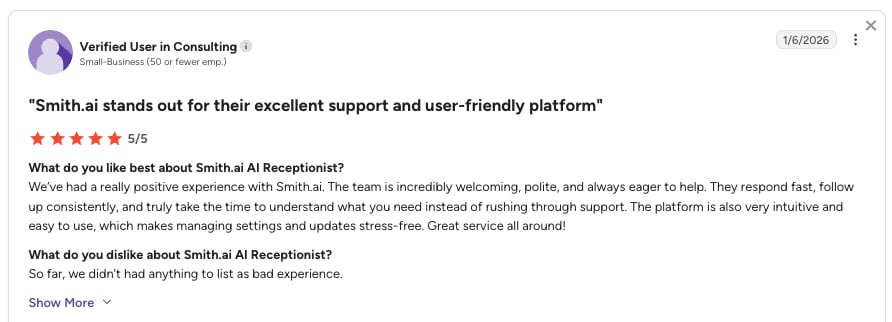
Smith.ai earns strong marks for responsive customer support and easy onboarding, but mention unexpected overage charges from spam calls, live-agent escalations, or higher-than-expected volume.
G2 rating: 4.8/5 out of 35+ verified user reviews.
Smith.ai Pros and Cons From G2
| Pros | Cons |
|---|---|
| Human safety net: live receptionists take over when the AI reaches its limit | Higher per-call costs: May be more expensive than other options, especially for businesses handling a high volume of calls |
| Responsive support: Users praise the support team's responsiveness and willingness to refine call scripts | Occasional call handling issues: Some users report missed transfers or calls handled differently than expected |
| CRM and scheduling integrations: Connects with tools such as Clio | Spam filtering can be too strict: Legitimate callers may occasionally be blocked |
Recommended Reads
3. Goodcall: Best AI Receptionist for Local Service Businesses on a Budget
What Is Goodcall?
Goodcall is an AI phone agent for local businesses, priced per unique customer each month instead of per minute. It suits shops where calls run long and the same people call back.
What Are Goodcall's Key AI Receptionist Features?
- Unlimited call minutes: Handle calls of any length without per-minute charges or overage fees.
- Unique-caller billing: Pay per unique phone number each month, regardless of how many times it calls. Spam and wrong numbers are excluded.
- Local number and call forwarding: Get a local business number with any plan or forward calls from your existing number.
- Natural-language agent editing: Describe the changes you want in plain English, and Goodcall's AI assistant, Gabi, updates your agent without manual form configuration.
- Calendar and workflow integrations: Connect Google Calendar, HighLevel and Zapier, or use APIs and MCP servers to link external tools.
What Is Goodcall Missing?
- Goodcall has just one G2 review, so you rely on the free demo agent to judge quality.
- The Starter plan includes just one logic flow and seven days of call history.
- Custom API integrations are available only on the Enterprise plan.
Who Is Goodcall Best For?
Home services, repair shops and local businesses that book work by phone, take longer calls and get a lot of repeat callers. Per-customer billing rewards exactly that pattern.
How Much Does Goodcall Cost?
Goodcall pricing starts at $79 per month for 100 unique customers, with unlimited minutes.
| Plan | Price | Unique customers included | Overage | Key inclusions |
|---|---|---|---|---|
| Starter | $79/month | 100 (about 150 calls) | $0.79 per customer | 5 workers, 1 external tool, 1 team member, 30-day history |
| Growth | $129/month | 500 (about 750 calls) | $0.26 per customer | 10 workers, 5 external tools, 5 team members, 90-day history |
| Scale | $299/month | 2,000 (about 3,000 calls) | $0.15 per customer | 20 workers, 15 external tools, 10 team members, unlimited history |
| Enterprise | Custom | 2,000+ | Volume pricing | Onboarding and an SLA |
What Do Customers Say About Goodcall?
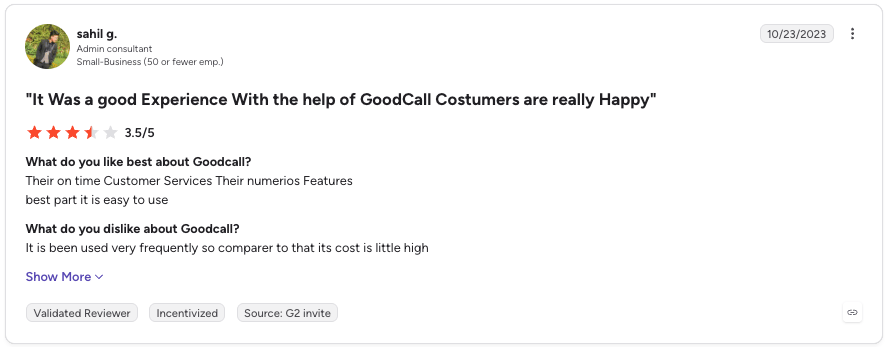
Goodcall only has one review on G2, where the user praises its responsive support and ease of use, though found it expensive for frequent use. No reviews are published on Capterra or Trustpilot.
G2 rating: 3.5/5 based on 1 review.
4. Rosie: Best AI Receptionist for Solo Owners and Trades
What Is Rosie?
Rosie is an AI answering service built for small businesses, especially home services and trades. It trains itself from your Google Business profile and website, and Rosie website says 2,000+ small businesses use it.
What Are Rosie's Key AI Receptionist Features?
- Business information sync: Pulls your hours, services, and business details from your Google profile and website to speed up setup.
- English and Spanish on every call: No add-on fee for bilingual callers.
- Warm transfers (Scale and up): Rosie briefs your team before connecting the caller, and Growth adds waterfall transfers that try several numbers until someone answers.
- Mobile apps: Native iOS and Android apps put call summaries, transcripts and recordings in your pocket.
- Spam detection and website chat: Included free on every plan.
What Is Rosie Missing?
- The $49 plan sends booking links by text but can't book into your calendar or transfer calls; you need Scale at $149.
- Go over your minutes and Rosie moves you up to the next plan, so a busy month turns $49 into $149.
- Rosie has no reviews on G2, Capterra or Trustpilot yet.
Who Is Rosie Best For?
Solo tradespeople and small home-services crews who mainly need the phone answered, messages taken and a booking link sent while they're on a job.
How Much Does Rosie Cost?
Rosie pricing starts at $41 per month for 250 minutes, billed anually. Annual billing gives you two months free, and every plan starts with a 7-day free trial.
| Plan | Price | Minutes or calls included | Overage | Key inclusions |
|---|---|---|---|---|
| Professional | $41/month | 250 minutes | Auto-upgrade to next plan | Message taking (2 scenarios), booking links by text, spam detection, web chat |
| Scale | $124/month | 1,000 minutes | Auto-upgrade to next plan | Calendar booking, warm and live transfers, in-call texts |
| Growth | $249/month | 2,000 minutes | Custom quote above | Waterfall transfers, custom training docs, white-glove onboarding |
What Do Customers Say About Rosie?
Rosie doesn't have a G2 rating yet, and no reviews show up on Capterra or Trustpilot either. Its Shopify app shows a 5.0 rating from four reviews. Shopify users praise Rosie for handling 90%+ of calls, answering order and product questions, and reducing customer service costs.
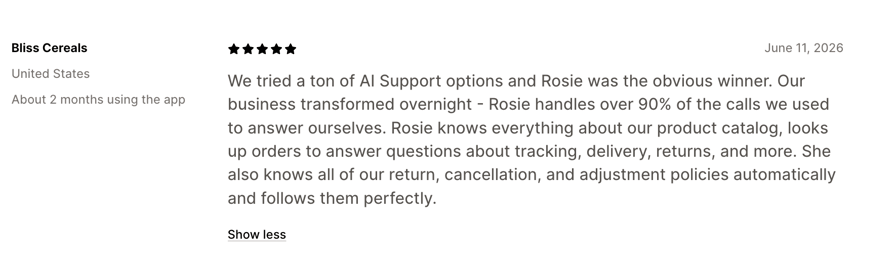
Rosie Pros and Cons From Shopify
| Pros | Cons |
|---|---|
| Product knowledge: Uses product catalog details and store policies to answer customer questions. | Limited review sample: The Shopify App Store listing has only four reviews, so there’s limited feedback to assess overall reliability. |
| Cost savings: Reduces customer service costs compared with manual handling or pricier alternatives. | |
| Quick setup: One reviewer reported needing only a few minor adjustments before Rosie was ready to handle incoming calls. |
Recommended Reads
5. My AI Front Desk: Best AI Receptionist for Simple Inbound Coverage With Text Follow-Up
What Is My AI Front Desk?
My AI Front Desk (now branded Frontdesk) is an AI receptionist bundled with web chat, two-way SMS, email drafts and a built-in CRM. It suits solo shops that want calls and texts handled from one plan.
What Are My AI Front Desk's Key AI Receptionist Features?
- Website-scan setup: The AI learns your business by scanning your website, so you answer calls within minutes.
- Text follow-up: 400 texts a month on the main plan let the AI send links and confirmations after every call.
- Built-in CRM: Caller details land in a CRM that updates itself from conversations, with no separate tool to buy.
- Call handling and appointment scheduling: Answers FAQs, filters spam, books appointments and transfers calls to your team.
- Unlimited follow-up workflows: Automate text and email sequences based on lead activity.
What Is My AI Front Desk Missing?
- Supports up to 20 knowledge base pages on the main plan.
- No WhatsApp support, since it's focused on voice and SMS.
- Outbound calls are capped at 20 per day on the main plan.
Who Is My AI Front Desk Best For?
Solo operators and small offices that mainly need messages taken, slots booked and a text sent afterwards, and like having SMS, chat and a CRM in one bill.
How Much Does My AI Front Desk Cost?
My AI Front Desk pricing starts at $99 per month for 200 voice minutes, or $79 per month billed annually. Every plan starts with a 7-day free trial.
| Plan | Price | Minutes or calls included | Overage | Key inclusions |
|---|---|---|---|---|
| Business-in-a-Box | $99/month ($79 annually) | 200 voice minutes, 400 texts, 100 chats | $0.25/min | AI receptionist, SMS, web chat, email drafts, built-in CRM, 20 outbound calls/day |
| Enterprise | Custom | Custom | Custom | Volume rates and custom setup |
What Do Customers Say About My AI Front Desk?
Users highlighted easy setup, a reliable 24/7 AI receptionist, and lead capture, but noted limited customization and integrations, occasional robotic responses, a learning curve for advanced workflows, and pricing concerns at higher call volumes.
G2 Rating: 4.8/5 (15+ reviews).
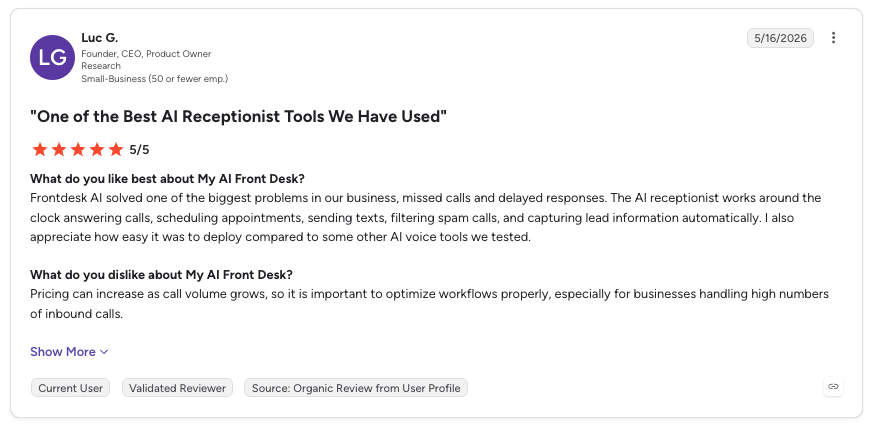
My AI Front Desk Pros and Cons From G2
| Pros | Cons |
|---|---|
| 24/7 call handling: Answers calls around the clock and helps businesses capture more leads. | Setup complexity: Initial setup and writing instructions can be time-consuming. |
| Natural-sounding voice: Reviewers praise the realistic voice and fast response times. | Limited customization: More advanced call flows and integrations may require external tools. |
| Automated call handling: Answers FAQs, schedules appointments, filters spam and routes urgent calls. | Integration gaps: Some reviewers want deeper integrations with scheduling tools. |
6. Upfirst: Best AI Receptionist for Low-Volume Small Businesses
What Is Upfirst?
Upfirst is an AI answering service for small businesses that bills per call, not per minute. Calls under 15 seconds and spam don't count, helping businesses make the most of their included minutes.
What Are Upfirst's Key AI Receptionist Features?
- Per-call billing: A 30-second call and a 12-minute call cost the same, so long conversations never punish you.
- Warm transfer on every plan: The AI briefs your team member before connecting, then tries the next person if nobody answers.
- Native calendar booking: Books into Google Calendar, Outlook, Acuity, Calendly or Clio while the caller is still on the line.
- Multilingual support: Supports more than 35 languages, helping businesses assist customers in their language.
- Instant summaries: Call summaries, transcripts and recordings by SMS and email after every call.
What Is Upfirst Missing?
- Each AI agent for another business or location costs $9.95/month.
- No outbound calls for reminders or callbacks.
- Custom integrations are only included from the Pro plan ($159.95/month).
Who Is Upfirst Best For?
Solo practitioners and single-location businesses taking a call or two a day: tradespeople, small clinics, law practices, salons.
How Much Does Upfirst Cost?
Upfirst pricing starts at $20 per month for 30 calls (billed annually) or $24.95 per month (billed monthly). Every plan starts with a 14-day free trial with no card.
| Plan | Price | Minutes or calls included | Overage | Key inclusions |
|---|---|---|---|---|
| Starter | $20/month | 30 calls | $1.50/call | Warm transfers, calendar booking, multilingual answering, spam blocking |
| Premium | $48/month | 90 calls | $1.00/call | Everything in Starter |
| Pro | $128/month | 300 calls | $0.75/call | White-glove onboarding, custom integrations, priority support |
| Scale | $240/month | 600 calls | $0.70/call | Everything in Pro |
What Do Customers Say About Upfirst?
Users praise its natural-sounding voice, useful features and responsive customer support. Common drawbacks include time-consuming setup and training, and occasional interruptions or awkward pauses during calls.
G2 rating: 4.9/5 based on 26+ reviews.
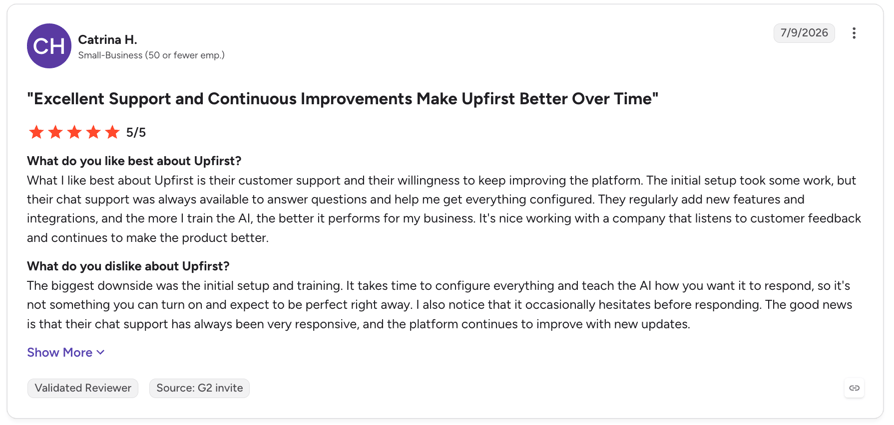
Upfirst Pros and Cons From G2
| Pros | Cons |
|---|---|
| Natural-sounding voice: Handles calls 24/7 with realistic conversations and effective spam filtering. | Setup and training: Requires time to configure the agent and organize its knowledge base. |
| Useful call management: Supports call transfers, appointment scheduling, texting and multilingual answering. | Occasional call issues: Reviewers report awkward pauses, interruptions and background noise. |
| Responsive customer support: Reviewers praise the helpful team and ongoing product improvements. | Limited account flexibility: Some users want support for multiple phone numbers or accounts. |
7. Aircall: Best AI Receptionist for Teams Already on Aircall
What Is Aircall?
Aircall is a cloud phone system for sales and support teams that sells AI Voice Agents with or without its phone system. It fits small teams already running their calls on Aircall.
What Are Aircall's Key AI Receptionist Features?
- Aircall integration: Integrates with existing Aircall numbers and call flows without additional phone setup.
- Live transfer with context: Hands callers to your team based on intent, with the conversation passed along.
- Booking links by SMS: Sends booking links or forms by text in the middle of the call.
- Knowledge from your helpdesk: Reads answers straight from Zendesk, Salesforce or Document360.
- Intake questions and CRM logging: Collects the details you specify and logs AI calls in HubSpot.
What Is Aircall Missing?
- AI Actions can run before the greeting, but only for inbound AI Voice Agents.
- The AI agent cannot pull answers directly from uploaded PDFs, or Word docs as a knowledge source.
- AI Actions integrations are available only for Shopify, HubSpot, Salesforce, and Zendesk.
Who Is Aircall Best For?
Small teams of three or more already on Aircall who want AI answering inside the same platform and are comfortable paying for AI by the minute.
How Much Does Aircall Cost?
Aircall's pricing for its AI Voice Agent starts at $0.49/min, with prepaid bundles from $175/month (500 minutes included).
| Plan | Price | Minutes or calls included | Overage | Key inclusions |
|---|---|---|---|---|
| Pay as you go | $0.49/min (to 2,500 min), $0.39/min after | Usage-based | n/a | 50 free AI minutes/month + 100 at sign-up |
| 500-minute bundle | $175/month | 500 minutes | Pay-as-you-go rate | Same features |
| 2,500-minute bundle | $725/month | 2,500 minutes | Pay-as-you-go rate | Same features |
| Custom bundle | Custom | 10,000+ minutes | Custom | Volume pricing |
What Do Customers Say About Aircall?
Aircall reviews highlight its intuitive interface, CRM and helpdesk integrations, and call recording features. Some users report connection issues, inconsistent call quality, and occasional glitches that can affect everyday calling workflows.
G2 rating: 4.4/5 based on 1,673+ reviews.
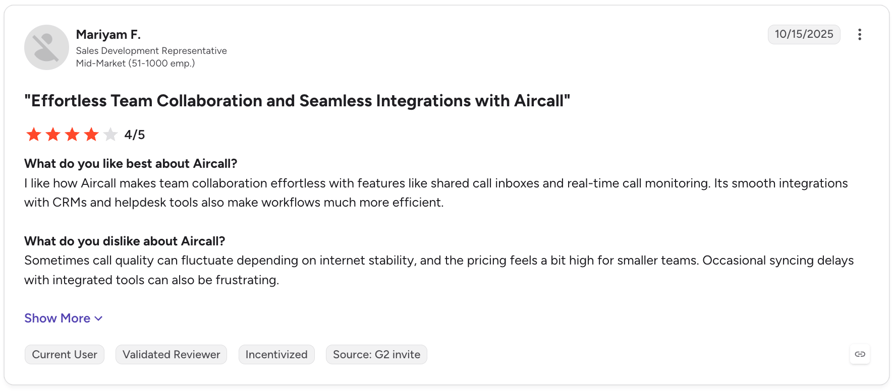
Aircall Pros and Cons on G2
| Pros | Cons |
|---|---|
| Ease of use: An intuitive interface makes it easier for teams to get started and manage calls. | Call quality: Some users report dropped calls, connection issues, and inconsistent audio. |
| CRM integrations: Connecting calls with CRM and helpdesk tools helps teams streamline workflows and reduce manual data entry. | Reliability: Occasional glitches and call-handling issues can disrupt workflows. |
| Call management: Call recording and related features help teams track conversations and follow up. | Extra costs: Some users point to add-on fees and pricing as drawbacks. |
Recommended Reads
8. RingCentral: Best AI Receptionist for Businesses Already on RingCentral
What Is RingCentral?
RingCentral AI Receptionist (AIR) is a voice-first AI agent for small and mid-sized businesses. It works as an add-on to RingCentral's RingEX phone system, or standalone on any phone line through SIP or call forwarding.
What Are RingCentral's Key AI Receptionist Features?
- Existing number compatibility: Use AIR with your current business number without switching providers.
- Calls and texts: Answers inbound calls and texts 24/7 and sends follow-up details by SMS.
- Real-time booking: Checks calendar availability and books appointments during the call.
- Transfers with a summary: Passes complex calls to your team with the full conversation.
- 10+ languages: Detects and switches languages mid-call.
What Is RingCentral Missing?
- Includes just 100 minutes per month, with additional usage billed at $0.50 per minute.
- Supports major European languages but lacks broader coverage for many Asian and Middle Eastern languages.
- Configuring advanced call flows, such as activating AI only when agents are unavailable, can be complicated.
Who Is RingCentral Best For?
Businesses already on RingCentral, or low-volume businesses that want AI on their current line, with under 100 minutes of AI calls a month.
How Much Does RingCentral Cost?
RingCentral pricing for its AI Receptionist starts at $49 per month for 100 minutes standalone, or $39 per month as a RingEX add-on. Both options come with a 14-day free trial.
| Plan | Price | Minutes or calls included | Overage | Key inclusions |
|---|---|---|---|---|
| AIR standalone | $49/month | 100 minutes | $0.50/min | Works with any phone system |
| AIR + RingEX Core | $39/month + RingEX from $20/user/month (annual) | 100 minutes | $0.50/min | AI plus RingCentral's full phone system |
What Do Customers Say About RingCentral AI Receptionist?
Customers praise its easy setup, natural-sounding conversations, and 24/7 call handling, while common complaints include usage-based pricing and unexpected overage costs.
G2 rating: 4.3/5 based on 37+ reviews.
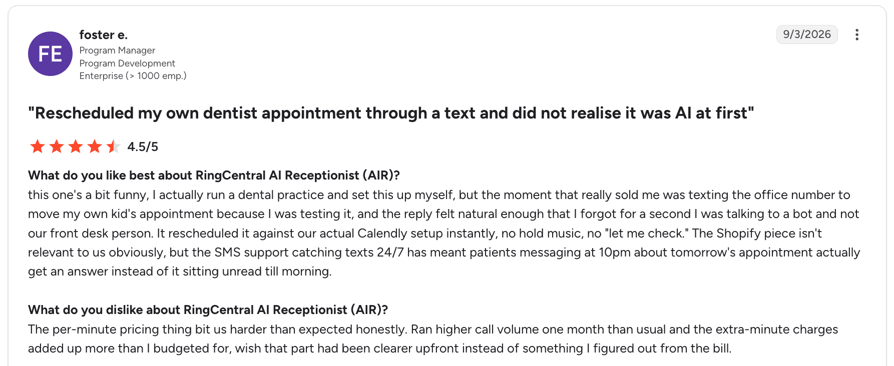
RingCentral AIR Pros and Cons From G2
| Pros | Cons |
|---|---|
| Easy to use: Reviewers praise its straightforward setup and simple management. | High usage costs: The 100-minute allowance can run out quickly, and overage fees can make costs unpredictable. |
| Efficient call handling: Automates routine questions, routes callers and helps reduce missed calls. | Struggles with complex requests: Unusual questions can lead to misunderstandings, repetitive responses or transfers. |
| Useful appointment booking: Integrates with calendars and sends SMS confirmations and follow-ups. | Limited customization: Some users want more control over workflows and call handling. |
Recommended Reads
9. Retell AI: Best AI Receptionist for Tech-Savvy Owners Who Want to Build Their Own Agent
What Is Retell AI?
Retell AI is a voice agent platform with a visual builder and an API, so you design exactly how your AI receptionist talks, books and transfers. It suits tech-comfortable owners, and the agencies that build for small businesses, who want full control and are happy to do the setup.
What Are Retell AI's Key AI Receptionist Features?
- Visual call-flow builder: Map out greetings, questions, transfers and SMS steps without coding everything from scratch.
- Booking through your calendar: Connects to Cal.com, Calendly and Google Workspace, so callers book while they're still on the line.
- Handoff with a briefing: Transfers calls to a person along with an AI-generated summary of the conversation.
- Test before you go live: Simulate calls and review post-call analysis to fix answers before a customer hears them.
- Wide integrations: HubSpot, Salesforce, Zoho CRM, GoHighLevel, Zapier, Make and n8n.
What Is Retell AI Missing?
- Retell offers more control over voices and prompts, but setting up agents takes time that busy business owners may not have.
- The headline price covers only the voice layer. Your chosen LLM, voice, and telephony and add-ons increase the total cost.
- Focuses on voice calls, with basic chat but no native WhatsApp or social messaging support.
Who Is Retell AI Best For?
Owners who enjoy tinkering, or who already work with an agency or developer, and want a custom AI receptionist with call logic no off-the-shelf tool offers. If you just want the phone answered by Monday, pick a ready-made tool above.
How Much Does Retell AI Cost?
Retell AI pricing starts at $0.07 per minute on pay-as-you-go, rising to $0.31 per minute depending on the voice, LLM and telephony you choose.
| Plan | Price | Minutes or calls included | Overage | Key inclusions |
|---|---|---|---|---|
| Pay as you go | $0.07 to $0.31/min (voice infrastructure $0.055/min + LLM, voice and telephony) | Pay per minute | n/a | $10 free credits, 20 free concurrent calls, Pre-built Agent Templates |
| Enterprise | Custom | Custom | Custom | Volume pricing, HIPAA and BAA, 24/7 support, 50+ concurrency |
What Do Customers Say About Retell AI?
Retell AI customers highlight that they can go from idea to a working voice agent quickly, thanks to an intuitive interface and clear workflow builder, but note the platform struggles with highly complex or dynamic conversational logic compared to more developer-first tools.
G2 rating: 4.8/5 based on 2,639+ reviews.
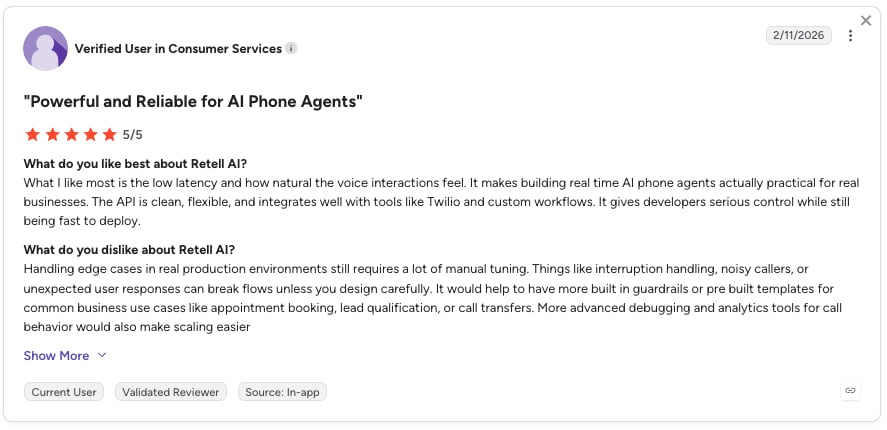
Retell AI Pros and Cons From G2
| Pros | Cons |
|---|---|
| Easy to use: Reviewers praise the intuitive interface and straightforward setup | Costs can add up: Call usage and testing can become expensive as volume grows. |
| Natural-sounding voices: Users highlight realistic conversations and low latency. | Learning curve: Advanced workflows and prompt tuning require time and testing. |
| Flexible integrations: Connects with APIs and tools to automate calls and business workflows. | Missing features: Some users want more phone number options, testing tools and workflow features. |
Give your small business room to grow
Why Do Small Businesses Switch to an AI Receptionist?
Small businesses switch to an AI receptionist for one reason above all: handling more calls without adding staff. Here's what that looked like in the conversations we reviewed:
- Missed calls cost bookings: Businesses can miss anything from a few calls a day to 200+ in five weeks. An AI receptionist helps answer calls even when the team is busy with appointments.
- After-hours callers give up: "Please email us" messages and voicemail lost weekend and evening leads. With AI after hours, those callers book or leave full details.
- Staff stuck on the same questions: Prices, hours, payments and directions ate whole afternoons. The AI answers those from your knowledge base, so your team gets that time back.
- Re-typing details after every call: Staff copied caller info into the CRM or booking tool by hand. The AI captures it and logs it for them.
- No idea why people call: Owners had no view of call reasons or peak times. Transcripts and summaries show the patterns within weeks.
How Do You Choose the Right AI Receptionist for Your Small Business?
The right AI receptionist should handle real customer calls, fit your existing workflow and stay within budget. Use these seven criteria to compare providers during a free trial before committing.
1. Test How It Handles Real Conversations
- Test interruptions: Cut the agent off mid-sentence and see how it responds.
- Check its memory: Share your name, then refer to it later in the conversation.
- Try an unexpected question: Ask something outside its usual script to see how it handles unfamiliar requests.
- Test different conditions: Simulate background noise and different accents if relevant to your callers.
2. Train It on Your Business Information
- Upload your content: Add website pages, FAQs, PDFs and price lists to its knowledge base.
- Verify common answers: Ask five questions customers frequently ask and compare the responses with your actual policies.
- Test its limits: Ask a question it can't answer and check whether it admits the gap or makes something up.
- Check content access: Find out whether it can read login-protected pages or needs that information pasted manually.
Accurate answers depend on how well the agent understands your services, prices and policies.
3. Plan What Happens When It Can't Help
- Test call transfers: Make sure callers reach the right person or department.
- Set up message-taking: Check whether the agent collects contact details and the reason for the call when nobody answers.
- Enable follow-up alerts: Confirm your team receives notifications when a caller needs help.
- Test after-hours coverage: Verify what happens when your team is unavailable.
A reliable AI receptionist should know when to involve your team instead of leaving callers without an answer.
4. Connect Your Calendar, CRM and Business Number
- Verify calendar actions: Test appointment booking, rescheduling and cancellations in your existing calendar.
- Check CRM logging: Confirm that calls and caller details appear in the right records.
- Confirm number compatibility: Ask whether your current business number and carrier are supported.
- Compare connection options: Find out whether call forwarding works or you'll need to port your number.
The right integrations reduce manual work and help your team keep customer information up to date.
5. Calculate the Full Monthly Cost
- Estimate your usage: Calculate monthly call volume and average call duration.
- Understand the pricing model: Check whether you're charged by minute, call or unique caller.
- Add potential extras: Include overage fees, additional numbers and paid integrations.
- Read the fine print: Confirm what “unlimited” includes, especially live transfers and industry-specific features.
The advertised starting price may not include all the minutes, integrations or features your business needs.
6. Check Compliance and Data Handling
- Review applicable rules: Confirm your obligations under GDPR if you operate in the EU.
- Ask about healthcare requirements: If you handle protected health information in the US, check whether the vendor will sign a Business Associate Agreement (BAA) for your use case.
- Verify recording consent: Find out how callers are informed about recordings and how consent is handled.
- Review data policies: Check where recordings and transcripts are stored, who can access them and how long they're retained.
Make sure the provider supports your industry's requirements before recording calls or collecting customer information.
7. Test the Setup Before Going Live
- Confirm trial access: Make sure you have enough minutes and access to the integrations you need.
- Run real-world scenarios: Test common questions, bookings, transfers, missed calls and after-hours requests.
- Fix and retest issues: Adjust incorrect answers or failed actions, then repeat the tests.
- Prepare your team: Make sure everyone knows how to handle messages, escalations and follow-ups.
A quick setup doesn't guarantee reliable performance. Test the complete workflow before letting the agent handle customer calls independently.
How Much Does an AI Receptionist Cost for a Small Business?
An AI receptionist for a small business costs about $50 to $200 a month on average. The total depends on how many calls you receive, how long they last and how each provider charges for usage.
Most providers use one of four pricing models:
- Monthly minute bundles: Pay for a set number of minutes, with extra charges if you exceed the allowance. Examples include CloudTalk, Rosie, My AI Front Desk and RingCentral.
- Per-call pricing: Pay for a set number of calls, regardless of how long each one lasts. Smith.ai and Upfirst use this model.
- Per-caller pricing: Pay based on the number of unique callers, often with unlimited minutes within that limit. Goodcall is one example.
- Pay-as-you-go: Pay for the minutes you use without committing to a monthly bundle. Synthflow and Aircall offer usage-based options.
What Are the Limits of an AI Receptionist?
An AI receptionist can handle many routine calls, but it won't be the right fit for every situation. Keep these limitations in mind before choosing a provider:
- It can give incomplete answers: If the information isn't in its knowledge base, it may not answer correctly. Test common questions and update its information when gaps appear.
- It can't handle every conversation: Sensitive complaints or complex requests may require human judgment. Make sure callers can reach a person when needed.
- Call quality can vary: Accents, background noise and language support affect how well an agent understands callers. Test it in conditions similar to your business.
- Costs can increase with usage: More calls mean more minutes on usage-based plans, and outbound calls or extra features may cost more.
- Compliance is still your responsibility: Call recording, consent and data protection rules still apply when AI handles calls.
The Takeaway:
These limitations don't mean an AI receptionist isn't worth using. They show why choosing the right tool and testing it before launch matters.
Which AI Receptionist Setup Fits Your Business?
Pick your setup by how your business runs, not by your industry. Here are our top picks for each setup:
- After hours and weekends only: The AI takes over the moment you close, the lowest-risk way to start. Top pick: CloudTalk, with business-hours rules in the Call Flow Designer. On a tight budget, Upfirst.
- Overflow when your team is busy: The AI picks up after a set number of rings, so nobody hits voicemail. Top pick: CloudTalk. Already on another phone system? RingCentral or Aircall.
- Every call, with transfers to your team: The AI answers first and hands sales or urgent calls to a person, like an AI voice agent for customer service. Top pick: Smith.ai if you want live receptionists as backup, CloudTalk if your own team takes the handoff.
- Booking-first businesses: Calendar booking and SMS confirmations come first. Top pick: CloudTalk for teams that need AI call handling alongside their business phone system, while Upfirst suits a single, low-volume line.
- A fully custom agent: You design every branch of the call yourself. Top pick: Retell AI, if you have the time or a developer.
Ready to stop missing calls? Explore CloudTalk’s AI Receptionist and see how it can answer calls, capture customer requests and help your team stay on top of follow-ups.
Answer the calls you're missing
Frequently Asked Questions
The best AI receptionist for small business depends on your setup. CloudTalk is best if you want AI and a full phone system in one, Smith.ai if you want human backup, Goodcall for unlimited minutes, Rosie for solo trades and Upfirst for low call volumes. Compare all nine in the comparison table above.
An AI receptionist for a small business costs about $50 to $200 a month on average. Estimate calls × average call length (about 2 to 3 minutes) to size your plan. CloudTalk starts with 50 free minutes, then $99 per month for 200 minutes.
Some will, some won't. Modern voices handle interruptions and context well, and many businesses tell callers up front that an AI assistant is answering. Test it with your own team first: call in, interrupt it and ask off-script questions before real customers hear it.
Yes, most tools on this list book appointments. Check which calendar it supports, whether it sends SMS confirmations and how it follows your booking rules, such as never quoting prices over the phone. Some plans only send a booking link, so confirm that in the trial.
Usually, yes. You either port your number to the provider or forward calls to the AI's number. Some mobile numbers can't be ported, so call forwarding is the fallback. Many buyers prefer forwarding anyway because it's quick to undo.
A good AI receptionist transfers the call to a person or group with a summary, takes a message or sends your team an SMS alert. Set this up before going live, and review unanswered questions each week so you can add them to the knowledge base.
It depends on the vendor and how you use it. HIPAA compliance requires the vendor to sign a Business Associate Agreement (BAA) for your use case and to handle health data properly. Ask every vendor for a BAA in writing, and check which plan includes it.
Yes. Business-hours rules send calls to your team during opening hours and to the AI after hours, on weekends or after a set number of rings. It's the most common way small businesses start, because those calls went to voicemail anyway.
An AI receptionist costs less, works 24/7 and answers the same way every time. A human answering service brings judgment and empathy to complex calls. Many businesses combine both. Compare options in our AI Receptionist vs Human Receptionist guide.
Basic setup takes minutes when the AI learns from your website. Plan a few days to test real questions, refine answers and set transfer rules before you route every call to it. Start with after-hours calls, then widen coverage once you trust it.