TL;DR: What Do CloudTalk's AI Voice Agents Do?
- 01Answer FAQs from your own website and documents, not from the open internet.
- 02Book appointments live in Google Calendar or Microsoft Outlook during the call.
- 03Route based on what the caller says and transfer to a person if necessary.
- 04Operate 24/7 if needed, or only after hours and in case of an overflow.
Imagine a common scenario: A caller rings at 7 pm with a question about your prices and wants to book, but no one answers. The call lands in voicemail.
The short answer:
An AI voice agent that answers questions, books appointments and routes calls handles all three on a single call. It answers from your business information, books a slot in your calendar during the call and hands anything else to your team.
Patching together an answering service, a booking link, and an IVR menu gives you three tools that don't talk to each other.
The CloudTalk AI Receptionist does all three inside the CloudTalk phone system.
See one call answered, booked, and routed
What a System That Answers Questions, Books Appointments, and Routes Calls Does
A system that answers questions, books appointments and routes calls is one AI voice agent on your phone line that handles the whole call. In CloudTalk, that agent runs on the same phone system as your team.
- For support teams, that means:Routine questions get answered, and callers get booked in without waiting in a queue
- For sales teams:It means every inbound lead gets qualified and put on a rep's calendar, even when everyone is already on a call.
One Call, Three Jobs: Answering, Booking, and Human Transfer in One Workflow
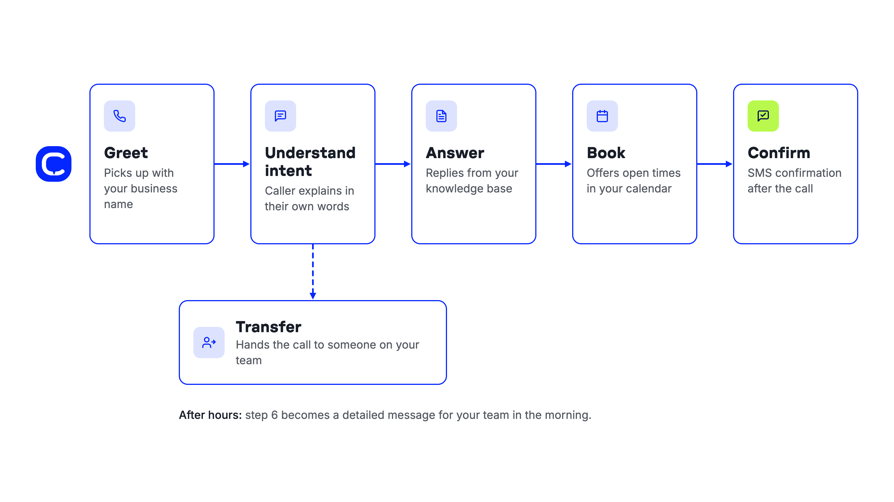
Appointment booking and human transfer in one workflow means the caller never has to hang up and try another channel:
- 01Greet.The agent picks up the call with your business name.
- 02Understand intent.The caller explains their needs in their own words, e.g., "I'd like to book an appointment, and is there parking?"
- 03Answer.The agent replies based on the knowledge from your internal documents and guidelines.
- 04Book.It checks your connected calendar, offers open times, and confirms one.
- 05Confirm.After the call, the caller gets an SMS confirmation, as long as your number can send SMS.
- 06Or transfer.If the caller needs a person, the agent transfers the call to someone on your team.
Why Customer Support and Appointment Scheduling Belong in One System
Most booking calls start as a question.
If you split support and scheduling across separate tools, problems show up fast:
- Bookings sit in more than one place, and someone reconciles them by hand.
- Booked meetings get passed to the right salesperson manually.
- Callers are told to "use the link," and plenty of them don't.
- Voicemails arrive with no name, no number, and no reason for the call.
Does this sound familiar? The problems can arise, especially because:
- A receptionist works only for set hours
- An answering service can't book
- An IVR menu routes callers without answering their questions
- A booking link only helps callers who already know what they want
In Salesforce's 2025 State of Service report2, service teams estimated that AI handles 30% of cases today and expect that share to reach 50% by 2027.
CloudTalk's solution:
CloudTalk's AI Voice Agents run inside the same phone system as your team, on the same numbers and routing. AI and human calls show up in the same app and analytics.
How an AI Voice Agent Answers Common Questions and Basic Inquiries
CloudTalk's AI Receptionist takes inbound customer service calls without a human agent and answers common questions from the information you provide. When the caller needs more, it books an appointment or transfers the call.
Like a virtual receptionist, it's an AI receptionist that books appointments and answers FAQs on the same call.
The AI Receptionist can answer questions and queries regarding:
- Opening hours, holiday closures, location and parking
- Services, prices and what each appointment includes
- How to book, plus cancellation and no-show policies
- Deposits, payment methods and accepted insurance
- What to bring and how to prepare for the visit
- Which team to contact for sales, support or billing
- Product features, plans and simple troubleshooting steps
CloudTalk's solution:
With AI call answering, CloudTalk's AI Receptionist handles these questions, so your team doesn't repeat them all day.
Where the Answers Come From
The agent answers only from the information you give it. Your website pages, internal documents and guidelines work as its knowledge base.
If it doesn't know the answer, it hands the call to your team.
Our recommendation
- Keep the knowledge base focused, with one clear answer per topic.
- In CloudTalk, you upload a PDF or your company info, and the AI Receptionist answers FAQs from it.
- Call summaries then show which questions come up most, so you can fill any potential gaps.
Questions It Should Hand to Your Team
Some questions need a person, and a good agent says so instead of guessing:
- Anything that needs expert judgment, such as a diagnosis, legal advice, or a technical fix.
- Complaints and refund disputes.
- Price negotiations and special deals.
- Account-specific questions your knowledge base can't cover.
In such cases, the agent says it'll connect the caller with someone, then transfers the call or takes a message.
Can an AI Voice Agent Book Directly Into My Calendar During the Call?
Yes. With Google Calendar or Microsoft Outlook connected, CloudTalk's AI Voice Agent can book directly into your calendar during the call:
- It checks free slots
- Offers times
- And creates the event while the caller is still on the line
How Live Booking Works While the Caller Is on the Line
Here's how CloudTalk's AI Receptionist books an appointment in six steps:
- 01The caller asks to book.
- 02The agent checks the connected calendar for free slots.
- 03It offers open times and states your time zone.
- 04The caller picks one, and the agent reads the full date and time back.
- 05It creates the event with a title, the caller's name and number, the reason for the visit, any custom fields, and the location.
- 06The caller gets an SMS confirmation after the call (this needs an SMS-capable number).
For a detailed setup, read:
Booking Into Google Calendar, Outlook and Other Booking Systems
Google Calendar and Microsoft Outlook work out of the box.
Each agent books into one calendar, and that calendar sets the rules for every booking:
- Working hours
- Buffers
- Blocked time
All three are set there, not in CloudTalk.
Many of those tools have a limited API or none at all. If yours is one of them, two patterns work well:
- 01Sync the booking tool with Google Calendar or Outlook, and let the agent book there.
- 02Let the agent pre-book and capture the details, then have your team confirm in your own system.
Can AI Voice Agents Handle Rescheduling Requests Mid-Call Without Transferring to a Human?
Partly:
1. The caller can book a new time on the call. Changes to an existing booking, such as moving or cancelling it, go to your team.
2. The agent transfers the call or captures the change request, and someone on your team updates the original booking.
Say so in the agent's booking script, so callers know what to expect.
Handling Complex Appointment Booking Workflows
Several staff, chairs, or rooms need a plan before you go live.
For example: A dental clinic with four chairs sharing one calendar would see double bookings within days.
In such cases, you have three options:
- 01One calendar per agent or service line, so each agent books only into the schedule it owns.
- 02AI pre-booking with human confirmation, which many multi-chair clinics prefer.
- 03A custom integration with your booking system through CloudTalk's AI Specialist.
Book appointments while the caller is on the line
How AI Voice Agents Route Calls and Make Smart Call Transfers
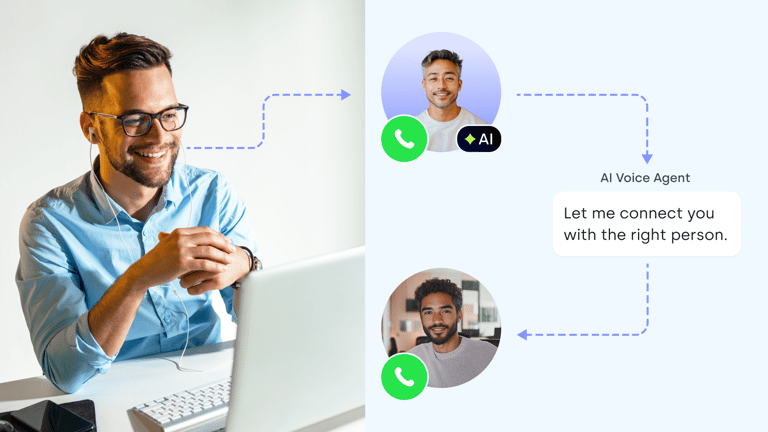
CloudTalk's AI voice agents route calls by what the caller says. When a human is needed, they make smart call transfers to a person or team on your side.
Reliability comes first:
A caller stuck with an AI that freezes or hangs up rarely calls back, so test the transfer path before anything else.
Routing by What the Caller Says, Not by Menu Options
Instead of pressing 1 to 9, the caller says, "I need to change my booking." The agent then sends them where they need to go.
That's the main difference between an old phone menu and an AI IVR.
In CloudTalk, the AI sits inside the Call Flow Designer, so transfers happen on the same phone system your team already uses.
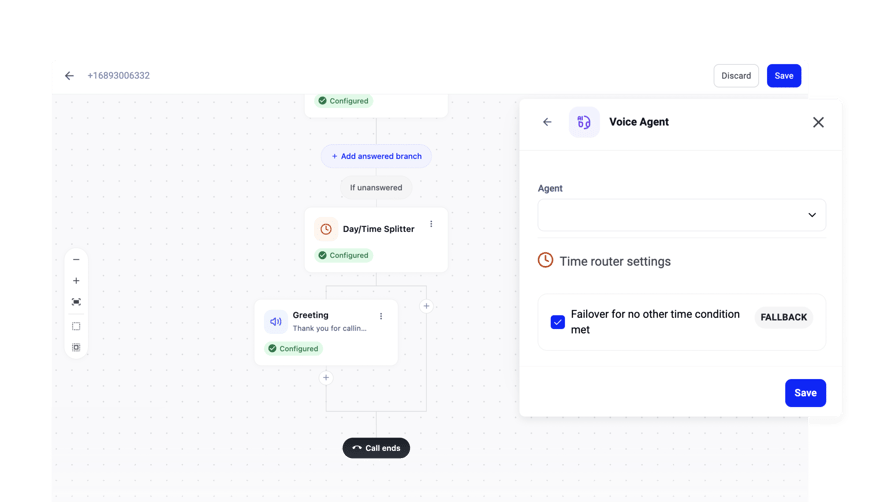
See how routing in CloudTalk works in this short interactive demo:
Which Calls Should Always Go to a Person
Decide these rules before launch, not after the first complaint:
- Urgent issues, like a burst pipe or a same-day medical concern.
- VIP or high-value callers, sent straight to a specific team member or your sales group.
- Payments and anything involving card details.
- Complex or multi-person bookings.
- Complaints.
- Anything the AI can't answer from its knowledge base.
What Your Team Sees When a Call Is Transferred
- The person who picks up can see who's calling
- Depending on your setup, the caller's details and the call summary the AI captured can be passed along too
Your colleague gets the context without asking the caller to repeat everything. Transfers go to internal agents or groups on your CloudTalk account.
How Voice AI Integrates With a CRM to Qualify Leads and Book Appointments
Voice AI integrates with a CRM to qualify leads and book appointments by:
- Asking your qualifying questions on the call
- Booking qualified leads into the right rep's calendar
- Sending the outcome to your CRM after the call
It's the sales-team version of the same three jobs.
Listen to How CloudTalk's AI Voice Agents Handle Lead Calls















Scheduling Demos on Your Reps' Google Calendars Once a Lead Qualifies
Voice AI can qualify leads and book demos into your CRM in one call. Qualify first, then book. The agent asks about:
- Need
- Timing
- Budget
- Fit
After that, the agent offers slots from the rep's connected Google Calendar or Outlook only once the lead meets your criteria.
Each agent books into one calendar, so plan one agent per rep or team calendar.
B2B teams judge AI booking by demos where the prospect shows up, and most start with a narrow test, such as one lead source.
Syncing Call Outcomes to Your Sales Pipeline
After the call, CloudTalk's AI agent writes back what happened:
- The outcome
- A summary
- Extracted fields such as interest level and best time to call
How the data reaches your CRM depends on the type of AI Voice Agent:
| Agent type | How data reaches your CRM |
|---|---|
| AI Receptionist | Sends captured data out by webhook, which you can point to your CRM or automation tool. |
| AI Specialist | Direct CRM sync with HubSpot, Salesforce, Pipedrive, and Zoho is part of the AI Specialist, and outbound calls can be triggered from HubSpot, Zapier, Make or your own systems via API. |
Can an AI Platform Update CRM Records Without Human Intervention During Calls?
After the call, yes. During the call, not as a standard feature.
Writing results back once the call ends is standard. Looking up live CRM data mid-call, for example to check an account's status, isn't standard. It needs a custom integration that CloudTalk's team builds for your setup.
Can AI Call Leads Back and Book Meetings Without Human Intervention?
Yes. CloudTalk has 2 types of AI Voice Agents, and the AI Specialist can do just that. Our guide to AI outbound calling goes deeper on the outbound side.
AI Receptionist:
- Answers inbound calls
- Handles FAQ queries
- Books appointments
- Sends an SMS confirmation
- Transfers callers to your team when a person is needed.
AI Specialist:
- Runs custom workflows built with CloudTalk's team, including outbound calls
- Calls new leads as soon as they fill in a form or hit a CRM stage
- Handles reminder and confirmation calls and rebooks no-shows.
- Syncs directly with HubSpot, Salesforce, Pipedrive, and Zoho
- Qualifies leads and books meetings
- You can trigger calls from HubSpot, Zapier, Make, or your own systems via API.
Calling New Leads Fast and Booking Showings or Demos
A lead who fills in a form at 9 pm is probably comparing you with other businesses.
Calling while intent is fresh books more real estate showings, home services estimates, and B2B demos than an email the next morning. CloudTalk's AI Specialist handles this AI lead follow-up for you.
The call also has to get answered.
Here's an example of one of CloudTalk's successful customer stories:
Now the AI just says: 'What time works for you?' It's so simple, but it works. People reply, the AI locks it in, and we're done.
Owner of Circle Gym

Appointment Reminders, Confirmations and Rebooking No-Shows
The AI Specialist handles the calls nobody on your team wants to make:
- Confirmations
- Reminder calls before the appointment
- Calls to no-shows to book a new time
No-shows are a growing cost in healthcare. An August 2026 MGMA Stat poll4 found that 32% of medical groups saw no-show rates rise compared with 2025.
AI Voice Agents That Answer Calls 24/7 and Book Appointments Automatically
CloudTalk's AI voice agent answers calls 24/7 and books appointments automatically, so all three jobs keep running when nobody's free. It also captures the details of anything that needs a person tomorrow.
Handling Calls After 6 pm When the Office Is Closed
Swapping voicemail for a real conversation helps both you and the caller. Compare the best AI voice agents for after-hours call handling.
- After 6 pm, the agent answers, qualifies the caller, books the next open slot, and leaves your team a clear summary instead of "Hi, please call me back."
- It also asks how the caller heard about you, which shows which ads drive calls.
- Monday's voicemail backlog becomes a list of booked appointments.
AI on After-Hours and Overflow, Your Team During Peak Hours
It doesn't mean AI has to handle every single call. Many businesses keep staff on the phones during business hours and send calls to the agent only after hours, or when every line is busy.
Because the agent sits in the Call Flow Designer, you choose when it answers:
- 01Always
- 02After-hours
- 03On overflow
The agent handles unlimited simultaneous calls, so a Monday morning rush of high call volume doesn't end in a busy signal.
It also speaks 70+ languages with auto-detection, which helps when callers don't speak English.
Cover every call, even after hours
What Buyers Ask Before They Switch
These are the questions buyers raise most often with the CloudTalk team, limits included.
"Will It Sound Natural to My Callers?"
It can, and you control a lot of it. CloudTalk's AI voice agents use natural, configurable voices. You pick the voice and accent, then tune pace and pronunciation, for example slowing down when reading back phone numbers or email addresses.
Test it with your own callers' accents before you go live, and judge delays and tone on your own line, not in a polished demo.

"How Does Accuracy Compare Between AI and Live Answering Agents for Booking Appointments?"
For routine booking, AI is more consistent than a busy person: it doesn't forget to ask a question, and it only books free slots.
People still handle nuance better, like an anxious patient or a family booking three appointments at once. So split the work, and if cost is part of the decision, our AI receptionist vs human receptionist comparison looks at both sides.
| Part of the call | AI voice agent | Your team |
|---|---|---|
| Common questions from your knowledge base | Yes | Only when the AI can't answer |
| New bookings into free slots | Yes | Exceptions and multi-person bookings |
| Changes to an existing booking | Captures the request | Updates the booking |
| Complaints, urgent issues and VIP callers | Transfers the call | Yes |
| Payments and card details | No | Yes |
"Can It Handle 500+ Calls per Day and Integrate With My Calendar?"
Yes. The agent handles unlimited simultaneous calls and books into a connected Google Calendar or Outlook.
To size your minutes, multiply daily calls by average call length: at 500 calls a day and three minutes each, that's 1,500 minutes a day.
"Can It Take Payments and Handle Transactions During the Call?"
No, not as a standard feature.
Use the AI for scheduling, reminders, and outbound payment reminder calls through the AI Specialist.
But have your staff handle payment capture. If a caller wants to pay on the spot, the agent transfers them to your team.
"Is There a Budget-Friendly Option for Small Businesses?"
Yes. The AI Receptionist starts with 50 free minutes to any CloudTalk plan, so you can test it on real calls before you commit.
To estimate monthly minutes, multiply calls per day by average call length and by the days you're open.
The AI voice agent pricing page and the AI voice agent ROI calculator turn that into a cost.
How to Set Up a Voice AI Agent That Books Appointments via Phone Using Your CRM
To set up a voice AI agent that books appointments via phone using your CRM, pick the right CloudTalk tier, connect your calendar, and test on a small slice of calls.
AI Receptionist or AI Specialist: No-Code Setup vs. Custom Workflows
| AI Receptionist | AI Specialist | |
|---|---|---|
| Best for | Answering, FAQs, routing and calendar booking | CRM-triggered outbound, custom booking systems, API workflows |
| Setup | No-code, done by your team | Custom workflows built with CloudTalk solutions consultants |
| Calendars | Google Calendar and Microsoft Outlook | Custom booking systems through APIs and webhooks |
| CRM data | Sent out by webhook | Direct sync with HubSpot, Salesforce, Pipedrive and Zoho |
Best Practices for Teaching an AI Voice Agent to Book Appointments Over the Phone
- Keep your calendar accurate.Working hours, buffers, and blocked time live there, and the agent books against whatever the calendar says.
- Set the event details.Decide the event name, length, and the fields the agent should capture.
- Confirm before booking.Have the agent repeat the full date, time, and time zone to the caller.
- Keep the knowledge base short.One clear answer per topic beats a 40-page handbook.
- Write transfer rules.List the calls that always go to a person and who should take them.
- Test after hours first.Start on evening calls, then review real call summaries every week.
How Long Does It Take to Train a Voice Bot to Book Appointments?
For a salon or a similar business, AI Receptionist setup takes under an hour.
In the case of an AI Specialist, the implementation process usually takes 1 to 2 weeks with CloudTalk's team.
Checklist for Evaluating AI Voice Agents for Automated Appointment Scheduling
Use this checklist when you choose between voice bot vendors for appointment reminders and call routing:
- Native calendar booking during the call, and which calendars it supports.
- Transfer to your own team, and what the person picking up sees.
- What the agent writes to your CRM, and whether that happens during or after the call.
- Voice and language quality in the languages your callers speak.
- Simultaneous call capacity at your busiest hour.
- Analytics and call summaries for AI and human calls side by side.
- Setup time for the first live agent.
- Pricing model, minimum commitment and how voicemail minutes are billed on outbound calls.
- How you can test on real calls before you commit.
For a side-by-side look at vendors, see our comparison:
Put Answering, Booking and Routing on One Line
The calls you're missing today are questions, bookings, and callers who need a person. An AI voice agent that answers questions, books appointments, and routes calls handles all of them on the number you already have.
The quickest way to judge it is on your own line:
Set up the AI receptionist with 50 free minutes and test it on real calls from your customers.
Ready to stop sending callers to voicemail?
Sources:
- BrightLocal
- Salesforce
- Hiya
- MGMA (Medical Group Management Association)
Frequently Asked Questions
Yes. It captures the caller's name, number, reason for calling and any custom fields, writes them into the calendar event, and sends them on after the call, which is how AI voice agents for lead qualification hand leads to sales.
CloudTalk's AI Receptionist books during the call, then sends an editable SMS confirmation with the appointment details. It needs an SMS-capable number, and the text should never include health or other sensitive data.
Pick scheduling built into the phone system. The CloudTalk AI Receptionist is an AI call answering service inside CloudTalk: same numbers, same routing, same analytics, and you can test it on real calls first.
CloudTalk covers voice and SMS: the no-code AI Receptionist books on the call and texts a confirmation. It doesn't run website chat, but for a phone-first AI virtual receptionist for small business, that covers most bookings.
Yes, but it shouldn't book on a guess. A well set up conversational virtual receptionist offers concrete free slots, states your time zone and reads the full date and time back before booking.
The agent keeps answering calls, so you avoid missed calls, but booking pauses until an admin reconnects the calendar under Account > Integrations. Check the connection in your weekly call review.
Put an AI receptionist that answers around the clock on your line. It answers from your knowledge base, books into your calendar, and transfers or takes a message when your team is needed.