Automated Lead Follow-Up: How to Follow Up on Sales Leads With AI (2026)
TL;DR:
To automate follow-up on sales leads, use software, workflows, and AI that respond to every new lead at once and keep following up until the lead replies.
Set it up in six steps:
- Centralize your leads:Send every lead source to one CRM or automation platform.
- Define triggers:Decide which events start a follow-up, and how fast.
- Build a multi-channel sequence:Mix email, SMS, WhatsApp, and calls with clear timing.
- Add AI:Let it draft messages, answer replies, and make calls.
- Set stop rules and a handoff:Stop the sequence when a lead replies and route them to a rep.
- Pilot and refine:Test on one lead source, then widen.
No lead waits, and your reps only join warm conversations. On the phone, an AI voice agent can call a new lead back within seconds of the form fill.
Without automated lead follow-up, a new lead fills in your form and then waits. Your reps are in meetings, the lead moves on to the next vendor, and a week later nobody can say who was contacted, or when.
Speed alone won't fix it. You also need a sequence that keeps going when the lead doesn't answer, and stops the moment they do.
This guide shows sales and marketing ops leads, and founders who still run sales, how to follow up on sales leads automatically:
- The triggers that start a follow-up
- A timed sequence across email, SMS, WhatsApp, and calls
- Where AI helps, including AI phone calls
- Stop rules, the handoff to reps, and the metrics to track


Automated Lead Follow-Up Explained: What It Is and How the System Works
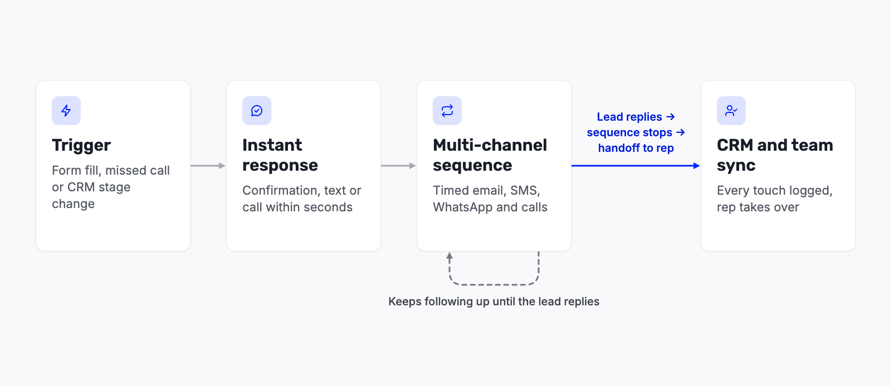
Automated lead follow-up is the use of software, workflows, and AI to respond to new inquiries at once, sync the lead data to your CRM, and keep following up across channels until the lead replies or a rule stops it.
An automated lead follow up system has four stages:
- 1. Trigger:A new form, a missed call, or a change in your CRM starts the process.
- 2. Instant response:The lead gets a confirmation, a text, or a call within seconds or minutes.
- 3. Multi-channel sequence:Timed messages and calls continue until the lead replies.
- 4. CRM and team sync:Every touch and reply is logged, and a rep takes over when the lead is ready.
Follow-Up vs Qualification vs Nurturing
Three processes get mixed up here, and each has a different job:
| Process | What it does | Timeframe |
|---|---|---|
| Lead follow-up | Reaches the lead and keeps trying until they reply | Minutes to weeks |
| Lead qualification | Asks questions and decides whether the lead fits | One or two conversations |
| Lead nurturing | Educates leads who aren't ready to buy yet | Months |
Follow-up starts the conversation, qualification decides what happens next, and nurturing keeps the leads who aren't ready.
What You Need Before You Start
You don't need an enterprise stack. The minimum setup is three things:
- 01A lead source, such as a form, an ad, a chat, or a phone number
- 02A way to reach the lead: email, text, or a call
- 03One place to record what happened, usually a CRM
Why Fast Follow-Up Wins Deals: Speed to Lead and the Cost of Waiting
Speed to lead is the time between a lead's first inquiry and your first real contact. The shorter it is, the more of your leads you actually talk to.
Here's what happens to a lead who waits: interest cools, a competitor calls first, and by the time a rep dials, they're chasing a cold record instead of a warm one.
Manual vs Automated Lead Follow-Up
| Manual follow-up | Automated follow-up | |
|---|---|---|
| First contact | When a rep gets to it, often hours later | Seconds to minutes after the trigger |
| Consistency | Depends on who owns the lead and how busy they are | The same sequence for every lead |
| After hours | Leads wait until the next working day | Follow-up keeps running at night and at weekends |
| Rep time | Spent on reminders, dialing, and logging | Spent on leads who replied |
| Tracking | Scattered across inboxes and notes | Every touch logged in the CRM |
| Personalization | High, but only for the leads a rep has time for | Based on lead data, with people writing the high-value messages |
Follow-up rarely fails because of a bad message. It fails because a reminder was missed, a rep was out, or nobody owned the lead.
How to Automate Follow-Up on Sales Leads: A 6-Step Setup
Follow-up automation works as one connected process: one place for leads, clear triggers, a sequence, AI where it helps, rules that stop it, and a review routine.
Start with one lead source and one sequence, prove it works, then add more.
Step 1: Centralize Your Leads in One CRM or Automation Platform
The trigger, the messages, and the outcome all need the same lead record. If they live in different tools, two systems message the same person, and nobody sees the full picture.
List every place leads arrive:
- Web forms and landing pages
- Paid ads and lead forms
- Live chat and chatbots
- Inbound and missed calls
- Event and webinar lists
Then connect them to one system. Your CRM, such as HubSpot, Salesforce, Pipedrive, or Zoho CRM, holds the record. Workflow platforms such as Zapier, Make, or Pabbly Connect fill the gaps between tools that don't connect directly.
Checklist
- Every source writes to the same lead record.
- Duplicates are merged.
- Each lead has an owner.
- The source of each lead is stored.
- Consent is recorded with the lead.
Common mistake:
- Leads split across tools, so two systems message the same person.
Easy fix:
- Give one system ownership of the sequence and sync everything else to it.
Step 2: Define the Triggers That Start a Follow-Up
A trigger is the event that starts a sequence. These are the common ones:
| Trigger | What fires it | First action | Owner |
|---|---|---|---|
| New form submission | A lead fills in a contact or demo form | Instant confirmation, then a call | Rep or AI agent |
| Missed inbound call | A lead calls and nobody answers | A text, then a callback | Whoever owns the number |
| Tag or field change | Marketing marks a lead as sales-ready | A personal email from the rep | Assigned rep |
| Pipeline stage change | A deal moves to a new stage, such as Proposal sent | A stage-specific reminder | Deal owner |
| Lead goes quiet | No reply or activity for a set number of days | A re-engagement message | Marketing or rep |
Not every trigger deserves the same speed. A demo request or a pricing-page visit should start a fast, direct sequence with a call; a newsletter sign-up can start a slower email series.
Checklist
- Each trigger has a first action and an owner.
- High-intent triggers start a faster sequence.
- Quiet leads have their own trigger.
Common mistake:
- Running one sequence for every lead.
Easy fix:
- Build at least two sequences: a fast one for high-intent leads and a slower one for everyone else.
Step 3: Build a Multi-Channel Sequence With Clear Timing
Each channel does a different job. Pick the mix based on how your leads prefer to talk, not on what's easiest to automate:
| Channel | Best for | Watch out for |
|---|---|---|
| Detailed information, documents, and longer nurture | Low open rates and spam filters | |
| SMS | Short confirmations, reminders, and time slots | Consent rules and message length |
| Leads who already message you there | Opt-in and template rules | |
| Phone call | High-intent leads and complex questions | Consent and calling-hour rules |
| LinkedIn task | B2B leads with a known contact person | Manual effort; it can't be fully automated |
CloudTalk covers the phone and messaging side:
- Calls
- Can also send a follow-up text after a call, for example when a rep tags the call as a lead
- Write each message once, with one purpose and one next step, and let the sequence reuse it. A reminder that asks for one thing gets a clearer answer than one that asks for three.
- Space the touches so the sequence doesn't feel like spam, and switch channels when one gets no reply. There's no proven best number of touches, so test the timing with your own audience.
Checklist
- Each message has one purpose and one next step.
- The channel changes when there's no reply.
- The timing is tested, not copied.
Common mistake:
- Sending the same message on every channel at once.
Easy fix:
- Vary the channel and the content, and leave space between touches.
Step 4: Add AI to Personalize Messages and Answer Replies
AI does three jobs in lead follow-up:
- Drafting:It writes and personalizes messages from lead data, such as the page the lead visited or the product they asked about.
- Replying:It answers questions by chat or text and asks qualifying questions.
- Calling:It places or answers calls with a voice agent, as shown below.
Decide what the AI may not promise, such as prices, discounts, or delivery dates, when it hands over to a person, and how it tells the lead it's AI.
Checklist
- AI only uses lead fields you trust.
- The guardrails are written down.
- Someone reviews a sample of AI messages every week.
Common mistake:
- Sending AI drafts without anyone reading them.
Easy fix:
- Review a sample every week, and fix the prompt, not just the message.
Step 5: Set Stop Rules, Routing, and a Handoff to Your Reps
A sequence needs to know when to stop. By default, it should pause or exit the moment a lead:
- Replies on any channel
- Books a meeting
- Converts
- Asks you to stop
Some replies shouldn't end it. An out-of-office message only delays the next touch, and a "not now" moves the lead to a slower sequence instead of closing it.
When a lead replies, route them to the right rep with the full context: the messages, the call notes, and what they asked for. Create a task with a response-time rule, so the handoff doesn't become the new bottleneck.
Leads who finish the sequence without replying, or who say they're not ready, move to long-term nurture. For enterprise deals with several stakeholders, add follow-up tasks per contact and per deal stage instead of one sequence for the whole account.
Checklist
- A reply on any channel stops the sequence.
- Every routed lead has an owner and a response-time rule.
- Leads without a reply move to nurture.
Common mistake:
- The sequence keeps messaging after the lead replied.
Easy fix:
- Make a reply the default stop rule, and sync replies from every channel.
Step 6: Pilot It, Then Monitor and Refine
Run the sequence with one team or one lead source first. Check the first results by hand, then widen. Review these every week:
- Replies and booked meetings
- Bounces, failed texts, and opt-outs
- Leads stuck without an owner
- Time to first contact
Test one change at a time, such as the subject line, the first message, the timing, or the channel, and compare it with the old version.
Checklist
- The pilot covers one source and one sequence.
- Opt-outs and bounces are checked weekly.
- Each change is tested on its own.
Common mistake:
- Launching across every lead source on day one.
Easy fix:
- Pilot on one source, fix what breaks, then add the next one.
Lead Follow-Up Sequence Examples and Message Templates
Use these as a starting point and rewrite them with your own offer and tone. Copied word for word, templates sound like everyone else's.
Example 1: Demo Request From a Web Form
| Step | Timing | Channel | Goal |
|---|---|---|---|
| 1 | Immediately | Confirm the request and say what happens next | |
| 2 | Within 5 minutes | Phone call | Talk while interest is high and book the demo |
| 3 | Same day, if no answer | SMS | Offer two time slots in one line |
| 4 | Day 2 | Phone call | Second attempt |
| 5 | Day 4 | Share one useful resource and ask for a time | |
| 6 | Day 7 | Breakup message |
Example 2: Missed Inbound Call
| Step | Timing | Channel | Goal |
|---|---|---|---|
| 1 | Within a minute | SMS | Say sorry you missed them and offer a callback |
| 2 | Within 15 minutes | Phone call | Call back |
| 3 | Next working morning | Phone call | Second attempt |
| 4 | Day 3 | SMS | A last offer to talk, with a booking link |
Example 3: Dormant Lead Re-Engagement
| Step | Timing | Channel | Goal |
|---|---|---|---|
| 1 | Day 1 | Share something new, such as a feature, a price change, or a case study | |
| 2 | Day 3 | Phone call | Ask whether the need is still there |
| 3 | Day 7 | Breakup message |
The Three Messages Every Sequence Needs
Every lead follow-up template comes down to three message types:
- 01Initial:It confirms what the lead asked for and gives one next step. Example: "Hi Anna, thanks for requesting a demo. I can walk you through it on Thursday at 10:00 or Friday at 14:00. Which works better?"
- 02Reminder:It adds something new instead of repeating the first message. Example: "Hi Anna, here's a 2-minute video of the feature you asked about. Happy to show it live this week."
- 03Breakup:It closes the loop politely and leaves the door open. Example: "Hi Anna, I haven't heard back, so I'll stop following up for now. If the timing changes, just reply to this email."
How to Follow Up Professionally
A professional follow-up is short, specific, and easy to answer:
- Open with the reason, such as "Following up on your demo request from Tuesday."
- Give one clear next step, such as a time or a yes-or-no question.
- Close with an easy exit, such as "If now isn't a good time, just let me know."
Openers like "just checking in" or "circling back" give the lead nothing new. Every follow-up should add information or make the next step easier.
How to Follow Up on Leads by Phone With an AI Voice Agent
Most guides stop at email and SMS, yet a call is the fastest way to reach a lead while their interest is high.
With CloudTalk's AI Specialist, an outbound AI voice agent, AI lead follow-up works like this:
- 01A trigger fires the call.A form fill, a missed inbound call, or a stage change in HubSpot, Salesforce, Pipedrive, or Zoho starts it.
- 02The agent calls within seconds.It opens with the lead's name and what they asked about.
- 03It keeps trying.If the lead doesn't answer, it follows up on the schedule you set, until they respond or you stop it.
- 04It qualifies, books, or transfers.It asks your questions, books the meeting, or transfers a ready lead to a rep with the transcript and the details it collected.
- 05It writes the result back.If nobody is free to take the transfer, it captures the request and writes it back to your CRM.
See how AI voice agents can handle your calls















Voice Follow-Up vs Email and SMS Sequences
They do different jobs. A call wins on speed and on reaching a lead while interest is high.
Email and SMS win on cheap repetition and on sharing links and documents.
Can an AI agent take over the first call from your SDRs? This video looks at what it handles and where people still win:
Real Results From CloudTalk Customers
"If we’re not hitting voicemail, the AI becomes extremely powerful. We were at about R31 per conversion, which is very good for us."
Finance Director, MadRent

"We went from 5% conversion with links to double-digit bookings just by letting the AI ask, ‘What time works for you?’"
Owner, Circle Gym

"Last year, we recruited four people to just call hot leads. This year, we haven’t recruited any of those four. The voice agent is doing all that."
Head of Systems and Processes, Oxford Royale Academy

How to Set It Up
- 1. Connect your lead source.Pick the trigger: a form fill, a missed call, or a CRM stage change.
- 2. Build the agent.Name it, choose one of 70+ languages, and pick a voice that fits your team.
- 3. Assign skills.Decide what it does on the call: qualify, book, capture details, or transfer.
- 4. Set the rules.Agree on the follow-up schedule and the escalation path with the onboarding team.
- 5. Test it.Let it call your own phone before a real lead hears it.
See how to build an agent in this short video:
Honest Limits
- It covers phone follow-up only. Your email sequences stay in the tools you already use.
- Outbound calls to leads are more regulated than answering your own line, so consent and disclosure rules apply (see compliance).
- The AI Specialist is a sales-led add-on with a minimum term, so it suits teams with steady lead volume.
- It follows the rules you set. It qualifies and books; your reps close the deal.
Best AI Tools for Automating Sales Follow-Ups: Types and How to Choose
There's no single best AI for automating sales follow-ups, because each tool type does a different job. Choose by the job, not by a ranking:
| Tool type | What it does | Examples | Pick it when |
|---|---|---|---|
| CRM workflows | Triggers emails, tasks, and field updates inside the CRM | HubSpot, Pipedrive, Salesforce, monday CRM | You want follow-up where your reps already work |
| All-in-one platforms | Combine a CRM, texting, and AI chat in one tool | GoHighLevel, Keap | You're a small team or an agency |
| Email sequencing | Runs multi-step email sequences with reply detection | Mixmax, Reply.io, Smartlead | Email is your main channel |
| Workflow connectors | Move leads and events between apps | Zapier, Make, Pabbly Connect | Your tools don't connect natively |
| AI voice agents | Call leads, qualify them, and book meetings | CloudTalk, Bland AI, Retell AI | Leads need a fast call, not another email |
| AI sales agents | Research leads and write outreach | Artisan | You want AI to run top-of-funnel outreach |
Before you buy lead follow-up software, check it against six criteria:
- Lead sources:Does it connect to where your leads arrive?
- CRM sync:Does it read and write to your CRM in both directions?
- Channels:Does it cover the channels you need: email, SMS, WhatsApp, or phone?
- AI control:Can you set what the AI may say and when it hands over?
- Stop rules:Does a reply on any channel stop the sequence?
- Compliance and cost:Does it handle consent, opt-outs, and quiet hours, and what does it cost at your volume?
For Small Teams and Solo Founders
Start with your CRM's built-in automation, one workflow connector, and one sequence.
Use free tiers, and add AI only where a task repeats every day.
For Larger Teams
Add routing rules, control over who can edit sequences, follow-up tasks per stakeholder, reporting by team, and a security review of every tool that touches lead data.
When you compare CRMs such as HubSpot, Salesforce, and Pipedrive, check the depth of native automation, the integrations, and the price per seat.
Why Follow-Up Automation Fails, and How to Stay Compliant (TCPA, CAN-SPAM, GDPR)
The mistakes in each step are about setup. These problems cut across the whole system:
| Problem | Fix |
|---|---|
| Nobody owns replies | Name an owner for every routed lead and set a response-time rule. |
| Dirty data | Merge duplicates and check phone numbers and emails before a lead enters a sequence. |
| Too many touches | Cap the number of touches and end the sequence after a set number of days. |
| Nobody reviews results | Put a weekly review in someone's calendar. |
| Stale sequences | Update the messages when your offer, pricing, or product changes. |
Compliance Checklist
- Calls and texts in the US:The TCPA requires consent for calls that use an artificial or prerecorded voice, and in February 2024 the FCC ruled that AI-generated voices count as artificial. Get consent before an AI agent calls a lead.
- Email in the US:Under CAN-SPAM, every marketing email needs a working opt-out, and you must honor it within 10 business days.
- The EU and UK:Under the GDPR, you need a lawful basis to contact a lead, and you must respect their data rights, including deletion.
- Quiet hours:Don't call or text leads late at night in their time zone.
- Opt-outs:When a lead opts out on one channel, stop the whole sequence.
- AI disclosure:Tell people when AI is calling or messaging them.
Store when and how each lead gave consent, and keep a record of every opt-out.
How to Measure Lead Follow-Up
Track a few numbers before and after you automate:
| Metric | What it tells you |
|---|---|
| Time to first contact | How fast a new lead hears from you |
| Contact rate | The share of leads you actually reach |
| Reply rate | Whether your messages are worth answering |
| Booked meetings | Whether follow-up turns into pipeline |
| Opt-out and bounce rate | Whether you contact too often or with bad data |
| Cost per conversion | What each converted lead costs you |
Measure one lead source for a few weeks before you automate it, then compare.
ROI Calculator
Your Results
Build It Once, Then Let It Run
- Put every lead in one system, define the triggers, and give high-intent leads a faster sequence.
- Mix channels, give each message one purpose, and stop the sequence when a lead replies.
- Use AI to draft, reply, and call, with guardrails and a weekly review.
- Get consent, honor opt-outs at once, and tell people when AI is involved.
Time to first contact. If it drops to minutes, most other numbers follow.
Frequently Asked Questions
For a new inbound lead, wait as little as possible: minutes if you can, and an hour at the latest. After the first contact, space the touches a day or two apart, then wider. There's no proven best number of touches, so end the sequence with a breakup message and move the lead to nurture. If your reps make the calls themselves, a power dialer helps them get through the list faster.
Not if it uses real lead data and sounds like your team. A fast, relevant message beats a slow handwritten one, and a person can still write the messages for your biggest deals. A voice agent can say it's AI and still hold a natural conversation, and you can hear one on the AI voice agent page.
Send a breakup message, then move the lead to long-term nurture and contact them again only when you have something new to say. Expect less from old lists than from fresh leads: MadRent found that old leads cost about three times as much per conversion as fresh ones. With AI voice agents, you can still run a re-engagement call campaign without tying up your reps.
Yes. Automated sequences and AI agents run around the clock, so a lead who fills in a form at midnight hears from you right away. Respect quiet hours for calls and texts in the lead's time zone. For inbound calls outside working hours, an AI receptionist answers and captures the lead's details.
Many CRMs include basic workflows, and workflow connectors have free tiers. Email sequencing tools usually charge per user. AI voice agents charge for minutes: CloudTalk's AI Specialist starts at $349 a month for 1,000 minutes, with a minimum term. See AI voice agent pricing for the details.