TL;DR:
AI lead qualification uses AI to enrich, question, score, and route every new lead in seconds, so your reps only talk to leads worth their time. To automate lead qualification with AI, set it up in five steps:
- 01Define your ICP and rules:Write down who qualifies, what to ask, and how to score it.
- 02Capture and enrich every lead:Send every source into one flow and fill in the missing data.
- 03Deploy an AI agent:Let it ask the qualifying questions by chat, text, or phone.
- 04Score, route, and book:Turn the answers into a tier, an owner, and a meeting.
- 05Review and calibrate:Check transcripts and outcomes every week and adjust the rules.
AI lead qualification fixes a math problem most sales teams have: new leads arrive faster than reps can read them. The hot ones wait in a queue, the long tail never gets a call, and by the time someone picks up the phone, the lead has gone cold or bought elsewhere.
Automated lead qualification closes that gap without adding headcount. We tested it on ourselves:
"We didn’t need the agent to convert. We just needed it to ask the right questions – the ones a BDR would ask in a discovery call and surface the leads worth pursuing."
Chief Marketing Officer, CloudTalk

This guide shows you how to set up the same flow, step by step.


What Is AI Lead Qualification, and How Is It Different From Lead Scoring?
AI lead qualification uses AI to enrich, question, score, and route new prospects automatically, so people only handle the leads that fit your ideal customer profile and are ready to buy.
AI-powered lead qualification is often confused with lead scoring, and the difference matters when you pick a tool.
| Term | Definition |
|---|---|
| AI lead scoring | Ranks a list: it looks at the data you already have and gives each lead a number. |
| AI lead qualification | Goes further and talks to the prospect, asking the questions your data can't answer and confirming whether the interest is real. |
So how does AI assist in lead qualification? It takes over four jobs a rep would otherwise do by hand:
- Enrich:It adds company and contact data, such as industry, size, and role, to every new lead.
- Engage:It starts a conversation by chat, text, email, or phone and asks your qualifying questions.
- Score:It compares the data and the answers with your ideal customer profile.
- Route:It hands the lead to the right rep, books a meeting, or moves it to nurture.
The five steps below set up these four jobs in order, plus the review routine that keeps them accurate.
MQL, SQL, and PQL: The Stages AI Moves Leads Through
Most teams sort leads into stages, and AI qualification exists to move them from one stage to the next faster. HubSpot defines them like this:
| Stage | What it means | What AI does at this stage |
|---|---|---|
| MQL (marketing qualified lead) | Engaged with your marketing content and shows interest, but isn't ready for a sales pitch yet | Asks the questions that confirm or rule out sales readiness |
| SQL (sales qualified lead) | Vetted and ready for a direct conversation with sales | Books the meeting and hands the rep the answers |
| PQL (product qualified lead) | Used your product and took actions that signal a strong chance of becoming a customer | Reaches out while the trial is still active |
Why Sales Teams Automate Lead Qualification
- Speed:The first contact happens in seconds or minutes, not hours.
- Consistency:Every lead gets the same questions and the same rules, whoever is on shift.
- Capacity:Every lead gets covered, including the long tail and anything that arrives at night.
- Rep focus:Reps stop collecting basic data and spend their time on leads that are ready.
How to Automate Lead Qualification Using AI: A 5-Step Process
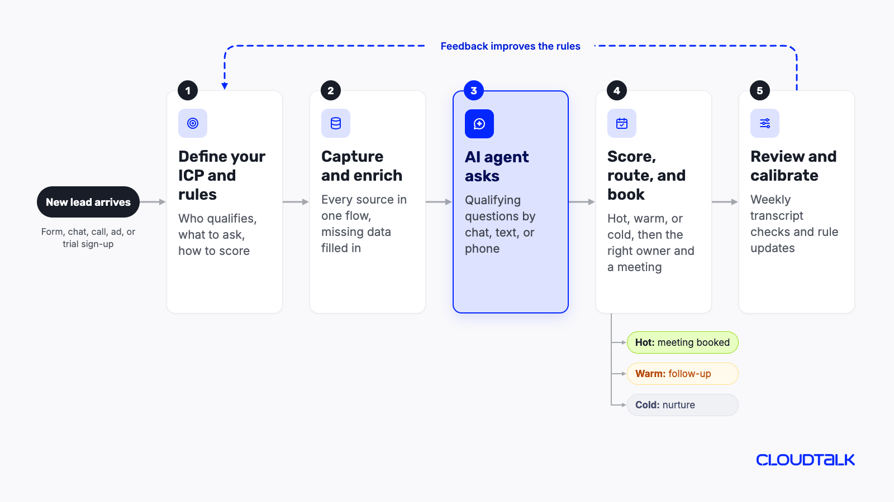
Automated lead qualification using AI works as one connected flow:
- 01A lead arrives
- 02Gets enriched
- 03Answers a few questions
- 04Gets a score
- 05Lands with the right person
Then you review the results and tune the rules.
Each of the AI lead qualification process steps below covers what the step is for, what to do, what to prepare, an example, and the mistake that trips teams up most.
If you're wondering how to qualify sales leads with AI without a big project, start small:
- Pick one lead source, one agent, and one KPI. Widen the setup once that first flow works.
Step 1: Define Your Ideal Customer Profile, Framework, and Scoring Rules
This step comes first because AI can only qualify against rules a person has written down. Unclear criteria produce unclear leads, and no model fixes that later.
Write Down Your Ideal Customer Profile
Your ideal customer profile (ICP) describes the companies and people most likely to buy and stay. Use the fields your team already tracks:
- Firmographics:Industry, company size, revenue, and region.
- Contact:Job title, seniority, and department.
- Tech stack:The CRM and tools the lead already uses.
- Product and intent signals (B2B SaaS):Trial activity, features used, and research on topics you sell into.
- Behavior:Visits to pricing and demo pages, email engagement, content downloads, and sign-ups.
Pick a Qualification Framework
A framework decides which questions your AI agent asks. These three cover most sales cycles:
| Framework | What it checks | Fits best |
|---|---|---|
| BANT | Budget, Authority, Need, Timeline. Developed at IBM. | Short, transactional sales where budget and timing decide most deals |
| CHAMP | Challenges, Authority, Money, Prioritization | Sales that start from the prospect's problem rather than their budget |
| MEDDIC | Metrics, Economic buyer, Decision criteria, Decision process, Identify pain, Champion. Developed at PTC in the 1990s. | Complex B2B deals with several stakeholders and long cycles |
Set Fit and Intent Scores
1. A fit score measures who the lead is (company size, role, region).
2. An intent score measures what the lead does (pricing page visits, demo requests, email clicks).
A lead that fits but shows no intent needs nurturing; a lead with intent but a poor fit may not be worth a rep's time. HubSpot's lead scoring tool works the same way, with separate fit, engagement, and combined scores.
- Weights and thresholds:Give each criterion points and decide the total that makes a lead sales-ready.
- Negative signals:Subtract points for a free email domain, a country you don't serve, or a competitor's domain.
- Score decay:Reduce points as signals age, so a pricing page visit from six months ago doesn't count like one from yesterday.
Copy This One-Page Qualification Rulebook
Map each criterion to one question the AI agent asks, the points it earns, and the answer that counts as qualified. Here's an example for a B2B software team using BANT:
| Criterion | Question to ask | Points | Qualified if |
|---|---|---|---|
| Need | "What made you reach out to us today?" | 30 | Names a problem your product solves |
| Timeline | "When do you want a solution in place?" | 25 | Within the next 3 months |
| Authority | "Who else is involved in choosing a tool like this?" | 20 | Decision-maker, or can bring one to the next call |
| Budget | "Have you set aside budget for this, or is it still open?" | 15 | Budget exists or is being planned |
| Fit | "How many people on your team would use it?" | 10 | At or above your minimum deal size |
| Negative signal | None, checked from data | −20 | Free email domain, unsupported country, or competitor |
Common mistake:
- Criteria that sales never agreed to.
Easy fix:
- Have the sales lead sign off on the rulebook before any automation goes live.
Step 2: Capture and Enrich Every Inbound Lead in Real Time
The goal here is simple: every lead, from every source, enters the same flow automatically and arrives with the data the AI needs to qualify it.
Connect Every Lead Source
List where your leads come from, then make each source create a lead record in your CRM:
- Website forms and demo requests
- Website chat
- Ad lead forms, such as Facebook Lead Ads
- Inbound calls
- Event and webinar lists
- Trial sign-ups
Enrich the Lead Before Anyone Contacts It
Forms rarely capture everything. Lead enrichment connects your CRM to data providers that add firmographics, technographics, and verified contact details.
Many teams use waterfall enrichment: the tool queries several data providers in a fixed order and keeps the first confident result for each field, as Clay's guide explains.
Enrichment tools are covered in the tools section below.
Filter Out Bad Data
Good lead qualification automation also knows what to skip. Before you spend a call or a message on a lead, filter out:
- Free or disposable email domains, if you only sell to businesses
- Bots and spam submissions
- Duplicates of leads already in the CRM
- Companies that can't buy, such as students, competitors, or countries you don't serve
Then check that the company is real, with a working website and a matching domain.
Checklist: Map Your CRM Data
Your AI flow talks to the CRM through its API and webhooks, which let one system send data to another the moment something happens. Agree on these points before you connect anything:
- Fields:Which fields the flow reads, and which ones it writes back.
- Duplicates:How records are matched and merged.
- Owner:How the lead owner is assigned.
- Attribution:Where lead source and campaign are kept.
- Consent:Which field stores whether the lead agreed to calls and texts.
- Trigger:Which event starts the next step, such as "lead created" or "form submitted".
Here's how call data and contacts sync between CloudTalk and HubSpot:
Common mistake:
- Running AI on dirty or incomplete form data.
Easy fix:
- Make key fields required, validate emails and phone numbers on the form, and enrich every lead before the agent contacts it.
Step 3: Deploy an AI Agent to Ask the Qualifying Questions
This is where a static form turns into a conversation. An AI agent for lead qualification contacts the lead shortly after it arrives and asks the discovery questions from your rulebook, then records the answers in your CRM.
Choose the Channel
Pick the channel by where your leads arrive and how fast you need to reach them:
| Channel | When it fits | Speed | What to watch |
|---|---|---|---|
| Web chat | Leads already on your website, such as pricing page visitors | Instant, while they're on the page | Gone the moment they close the tab |
| SMS | Mobile-first audiences and short questions | Minutes | Consent rules for texts; keep it to one or two questions |
| Markets where WhatsApp is the default channel | Minutes | Template approval and opt-in rules | |
| Low-urgency leads and long B2B cycles | Hours | Low reply rates and easy to ignore | |
| Voice | High-intent leads, demo requests, and leads with a phone number | Seconds to minutes | Consent and AI disclosure for calls; lead may not pick up |
What the AI Agent Does in the Conversation
Good AI agents for lead qualification follow the same pattern, whatever the channel. They:
- 01Open the conversation and say it's an AI assistant
- 02Ask the qualifying questions from your rulebook, in a natural order
- 03Answer common questions from a knowledge base you give it
- 04Handle a few simple objections, such as "I'm just researching"
- 05Book a meeting or hand the lead to a person
- 06Log the answers and a summary in your CRM
Set the Guardrails
AI lead qualification automation needs limits that you write before launch, not after the first awkward call:
- Never say:Price promises, discounts, legal claims, or anything about contracts.
- Hand off:Complaints, existing customers, and any question outside the script.
- Disclose:That the lead is talking to AI, in the first sentence.
- Store data:Only what the rulebook needs, in the CRM, with consent recorded.
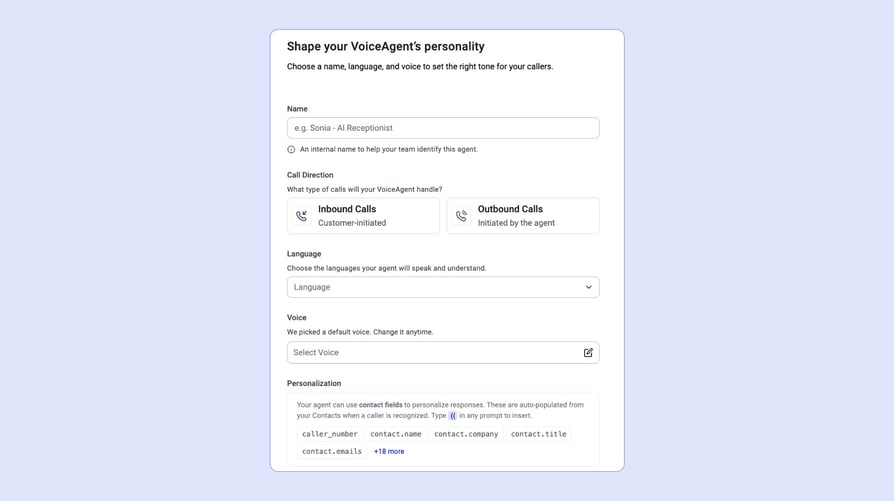
You write the greeting, including the AI disclosure, and choose the agent's languages in its setup.
Reach the Lead Fast, and Plan for No Answer
Speed matters more than any other setting.
That's why the AI should contact the lead as soon as the record is created.
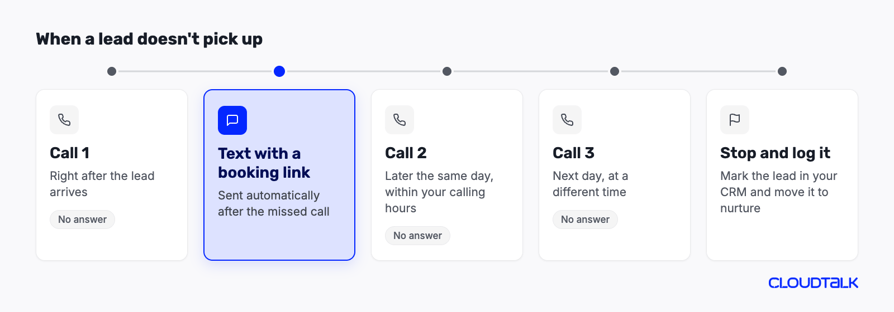
Many leads won't answer the first time. Decide in advance how many attempts to make, how far apart, and in which hours, then fall back to another channel, such as a text.
Recommended articles
- See how AI lead follow-up works with your CRM.
A CloudTalk voice agent can also text the lead through a Send SMS scenario action, for example, with a booking link.
Here's what a simple no-answer plan can look like:
How to Qualify Leads by Phone With an AI Voice Agent: The CloudTalk Example
Our sales team received thousands of leads a month, more than the BDRs could call, so reps focused on the clearly qualified top tier. The rest, often missing key data or showing low intent, sat untouched.
Because CloudTalk's AI voice agents connect to HubSpot, the setup was light: basic logic, a short script, and a contact list pulled from the CRM. The first agent was live in days. Its job was discovery only, and it asked three basic questions:
- 01What brought you to CloudTalk?
- 02Where do you need to call from?
- 03How many users?
If the lead was interested, the agent connected them to a rep or booked a follow-up. If not, it marked the lead and moved on. The results went straight into HubSpot, with zero work from the sales team.
See how AI voice agents can handle your calls















Leads once dismissed for selecting "1–2 seats" on a form were revealing much larger potential on the phone. Form data had been undervaluing them, and a three-minute conversation fixed that.
Voice is the right channel when leads leave a phone number, when they're worth a real conversation, and when speed decides who wins the deal.
Watch the full setup, results included, in our lead qualification playbook session:
Common mistake:
- Letting the agent sell.
Easy fix:
- Keep the agent's job to discovery and handoff, and leave pricing and negotiation to your reps.
Step 4: Score the Lead, Route It, and Book the Meeting
Now the answers become a decision: who gets this lead, and what happens next.
Choose How You Score
| Scoring method | How it works | What it needs |
|---|---|---|
| Rule-based | Points and thresholds from your rulebook | Nothing but agreed rules; easy to explain |
| Predictive | A model trained on your past won and lost deals | Enough history and clean outcome data in the CRM |
| Conversation-based | AI scores what the lead said on the call or in the chat | An agent that extracts each answer into a field |
- 01Start with rules and add prediction once you have enough history.
- 02Whatever you use, make sure a rep can see why a lead got its score.
Turn Scores Into Tiers and Routing Rules
Combine fit, intent, and the conversation answers into three tiers with clear thresholds, then give each tier an action and an owner:
| Tier | Rule | Action | Owner |
|---|---|---|---|
| Hot | Meets the SQL threshold and wants to talk | Book a meeting or transfer live; alert the rep | Account executive by territory or round-robin |
| Warm | Fits, but timing or need isn't confirmed | Follow-up sequence and a retry call | SDR team |
| Cold | Low fit or no current need | Move to nurture | Marketing |
| Disqualified | Can't buy, or asked not to be contacted | Mark with a reason and stop outreach | Nobody; record only |
Route hot leads by territory, product, and rep capacity, and add a response-time rule. In CloudTalk's own workflow, described in the webinar, leads needing three or more seats trigger an SDR alert with a follow-up within 30 minutes, while smaller leads are invited to start a free trial.
See how call routing works in CloudTalk in this short interactive demo:
Automate the Next Actions
- Assign:
- Alert:Notify the rep in Slack, Teams, or email with the summary.
- Book:Put the meeting straight on the rep's calendar with AI appointment booking.
- Follow up:Add warm leads to a sequence.
- Nurture:Move cold leads to marketing campaigns.
- Close out:Mark disqualified leads with a reason, so you can report on them.
1. The voice agent's appointment booking skill books into Google Calendar, Microsoft Outlook, Calendly, or Cal.com during the call.
2. The answers it collects are exported to your CRM, including HubSpot, Salesforce, Pipedrive, and Zoho, as part of the call record, or sent by webhook.
Can an AI appointment setter take over meeting booking from your SDRs? Watch our take:
Hand Off With Full Context
The rep should never ask the same questions twice. Every handoff needs:
- A short summary of the conversation
- The answer to each qualifying question
- The score, and why the lead got it
- A link to the recording or transcript
- The suggested next step
When a CloudTalk voice agent transfers a call to a rep or a group, the rep sees a context card with the caller's name, an AI-generated summary, and the fields you chose.
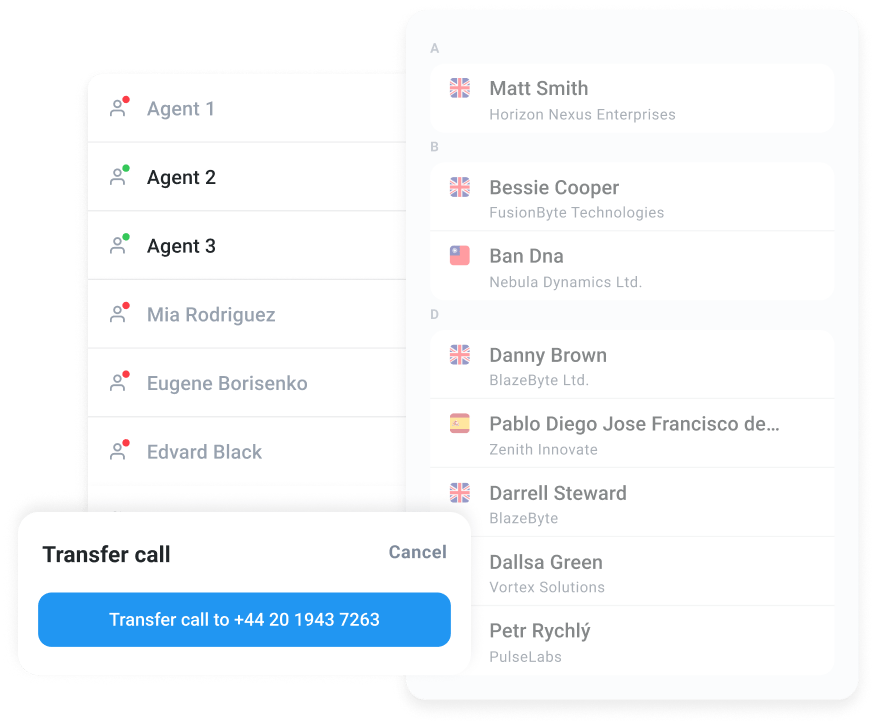
Common mistake:
- Dropping a hot lead into a queue.
Easy fix:
- Set a response-time rule with an alert, and track how often reps meet it.
Step 5: Review Conversations and Calibrate Your Scoring
An AI agent drifts the moment your market, product, or offer changes, so qualification is never "set up once". Build a weekly routine:
- Read a sample of transcripts:Ten to twenty a week is enough to spot odd answers and confused leads.
- Check false positives:Leads the AI qualified that sales rejected.
- Check false negatives:Leads the AI rejected that later bought or came back.
- Compare tiers:Look at the lead-to-opportunity rate for each tier and each response time.
Then calibrate. Reword questions leads misunderstand, adjust weights and thresholds, retire criteria that don't predict anything, and check that score decay still matches your sales cycle.
Ask reps to record why they rejected a lead, and feed closed-won and closed-lost results back into the rules.
AI call scoring helps here: it evaluates every call against a scorecard, so you can see which conversations led to real opportunities.
See what Conversation Intelligence adds to every call:
Common mistake:
- Set and forget.
Easy fix:
- Put the weekly review in someone's calendar, and log every rule change.
AI vs Manual Lead Qualification: What Actually Changes and Where Humans Still Lead
AI-driven lead qualification doesn't replace your team. It changes who does which part of the work. Here's how the three approaches compare:
| Manual | Rule-based automation | AI-driven | |
|---|---|---|---|
| Speed | Hours to days | Instant for routing, but no conversation | Seconds to minutes, including the conversation |
| Consistency | Depends on the rep and the day | Same rules every time | Same questions and rules every time |
| Cost per lead | Highest; rep time on every lead | Low | Low, priced per minute or per conversation |
| Handling nuance | Best | None; fixed rules only | Good on clear answers; escalates unclear ones |
| Setup effort | Training and scripts | Workflow building in the CRM | Rules, prompts, integration, and testing |
What AI Does Better, and What People Still Do Better
| Where AI wins | Where people win |
|---|---|
| Instant response | Complex or strategic accounts |
| The same rules for every lead | Negotiations |
| Coverage at any hour | Judgment in unusual situations |
| Data entry nobody enjoys | Building the relationship that closes the deal |
Here's what AI voice agents still can't do, and why it matters before you automate:
1. AI handles first contact and qualification.
2. People take the hot leads and the edge cases, and sales feedback improves the AI every week.
How to Choose AI Lead Qualification Software: Tool Types and Selection Criteria
AI lead qualification tools fall into four types, and most teams combine two or three. Start from the job you need done, then pick the type:
| Type | What it does | Examples | Pick it when |
|---|---|---|---|
| Data and enrichment | Adds company and contact data, often through waterfall enrichment | Clay, ZoomInfo, Apollo.io | Your leads arrive with missing fields |
| CRM-native scoring and agents | Scores leads and runs AI agents inside your CRM | HubSpot (lead scoring, Breeze agents), Salesforce (Einstein Lead Scoring, Agentforce) | You want scoring where your reps already work |
| Conversational agents | Talks to the lead by phone or chat and collects the answers | Voice: CloudTalk, Bland AI, Retell AI, ElevenLabs. Chat: Qualified (Piper) | You need the conversation, not just the score |
| Automation and LLM builders | Lets you build your own agent and workflow | Make (AI Agents), n8n (AI Agent node) | You have technical people and want full control |
CRM-native AI and conversational platforms solve different problems:
- CRM tools score and route the data you have.
- Conversational agents go out and get the data you don't have, by asking.
If most of your leads arrive with half-empty records, you'll likely need both.
Ready-Made Agent or Your Own Build?
You can launch a ready-made agent or build your own flow with a language model and an automation tool such as Make or n8n. The trade-off looks like this:
| Ready-made agent | Your own build | |
|---|---|---|
| Launch time | Days to a couple of weeks | Weeks, depending on your team |
| Control | Configurable within the platform | Full control over logic and prompts |
| Upkeep | The vendor maintains voice, telephony, and integrations | You own prompts, testing, monitoring, and fixes |
| You need | Your rulebook and a CRM connection | A developer or automation specialist, an LLM account, and telephony or chat infrastructure |
What to Check Before You Pick a Tool
- Channel coverage:Does it reach leads where they arrive: chat, text, or phone?
- CRM sync:Does it connect natively to your CRM, and which data lands where?
- Control:Can you edit the questions, logic, and guardrails yourself?
- Data:Is enrichment included, or do you need a separate tool?
- Handoff:Can it transfer a live conversation or book a meeting with full context?
- Compliance:Does it support AI disclosure, consent records, and call recording notices?
- Analytics:Do you get transcripts, summaries, and outcome reports?
- Setup time:How long until the first agent goes live, and who builds it?
- Total cost:Platform fee, minutes or seats, add-ons, and setup.
Its AI lead qualification software runs on phone calls: AI voice agents call new leads, ask your questions in 70+ languages, book meetings, and transfer hot leads to a rep. Enrichment and predictive scoring come from your CRM or a data tool, not from CloudTalk.
Flexible Pricing Plans to Scale with You
Compare our plans
For a broader look at how AI voice agent pricing works across vendors, watch this breakdown:
Challenges of AI Lead Qualification Automation and How to Avoid Them
Each step above ends with its most common mistake. The challenges below cut across the whole flow: the law, your data, and who owns the system.
Consent, Call Recording, and AI Disclosure
Rules for AI calls and texts are stricter than for emails, and they differ by country.
- United States:The FCC ruled in February 2024 that AI-generated voices count as "artificial" voices under the TCPA. Calls using them need the called party's prior express consent, and prior express written consent for telemarketing. State rules add more.
- European Union:Under the GDPR, you need a lawful basis to process lead data, and people can object to direct marketing at any time. Since 2 August 2026, Article 50 of the EU AI Act requires that people are told when they're interacting with an AI system.
- Recording notices:Tell the lead the call is recorded where the law requires it. Our guide on call recording laws covers the rules by region.
- Consent records:Store consent, its source, and its date in the CRM, and check it before every call or text.
You write the AI disclosure, company name, recording notice, and opt-out into the agent's greeting.
Data Privacy and Bias in Lead Scoring
- Data minimization:Collect only the data your rulebook uses.
- Retention:Decide how long you keep recordings and transcripts, then delete them on schedule.
- Access:Limit who can see transcripts, especially if leads share personal details.
- No proxies:Don't score on signals that stand in for protected traits, such as names, postcodes, or accents.
- Segment reviews:Compare qualification rates across regions and segments to spot unfair patterns.
- Explainable logic:Keep scoring rules readable and auditable, so you can show why any lead was rejected.
Over-Automating Key Accounts
A target account that gets a bot instead of a person can lose interest fast. Flag your named accounts, enterprise leads, and referrals in the CRM, and route them straight to a rep.
Governance and Ownership for Larger Teams
As more teams use the system, someone has to own it.
Key Metrics to Track for AI Lead Qualification
Track these KPIs to see whether automated lead qualification with AI is working, and where it isn't:
| KPI | Formula | What it tells you |
|---|---|---|
| Speed to first contact | Time of first contact attempt − time lead was created | Whether your flow reaches leads while they're still interested |
| Contact rate | Leads reached ÷ leads attempted | Whether your channel and timing work |
| Qualification rate | Leads qualified ÷ leads reached | Whether your rules are too strict or too loose |
| Sales acceptance rate | AI-qualified leads accepted by sales ÷ AI-qualified leads | Whether sales trusts the AI's judgment |
| Lead-to-opportunity rate | Opportunities ÷ qualified leads | Whether qualified leads turn into real deals |
| Meetings booked per 100 leads | Meetings booked ÷ leads × 100 | The output reps feel day to day |
| Cost per qualified lead | Total cost of the flow ÷ qualified leads | Whether the setup pays for itself |
| Rep time saved | Conversations handled by AI × average manual qualification time | How much capacity you freed up |
How to Prove the AI Is Working
Run a lift test instead of trusting the dashboard:
- 01Take a baseline:Record your current numbers for a few weeks before launch.
- 02Split the leads:Route a share of new leads through the AI flow and keep the rest with your human team as a comparison group.
- 03Change one thing at a time:When you test a new question, order, channel, or first message, send part of the leads to each version.
- 04Compare:Look at conversion, speed, cost, and rep feedback for both groups.
- 05Run long enough:Give each test at least a full sales cycle, and run both groups at the same time, so seasonal swings don't get credited to the AI.
What to Report, and How Often
Review speed to first contact, contact rate, and sales acceptance rate every week, because they show problems early. Review lead-to-opportunity rate and cost per qualified lead monthly with sales and marketing leadership, since they need more time to settle.
See CloudTalk's Analytics in this quick demo:
CloudTalk Analytics shows:
- How your calls and agents perform
- Agent and group reports track call volumes and talk times
- The call log keeps the details of every call
- You can also filter reports by call tag, such as "Interested", or report on missed calls.
- Voice agent calls appear in Analytics under the agent's name, next to your team's calls.
How to State ROI
Divide the value of the pipeline the AI created by the cost of running it. In CloudTalk's own experiment, that was €12.8K in SQL value against an estimated €750 campaign cost, about 17 times the investment.
Start With One Lead Source and One Agent
- AI lead qualification works when people write the rules and AI does the repetitive work.
- Define your ICP, framework, and scoring rules, and get sales to sign off.
- Send every lead into one flow and enrich it.
- Let an AI agent ask the questions, then score, route, book the meeting automatically, and review the results every week.
Choose your tools by the channel your leads use and the CRM your reps live in, and set up consent and AI disclosure before the first call.
Frequently Asked Questions
Ask one short question per criterion in your framework: what made them reach out (need), when they want a solution (timeline), who else decides (authority), and whether budget exists. Add one fit question, such as team size. Three to five questions is enough; CloudTalk's own qualification agent asked three.
No, but it changes the role. AI takes over first contact, data collection, and the long tail SDRs never reach. SDRs then spend their time on hot leads, follow-up calls, and accounts that need judgment. Most teams use the freed time to work more leads, not to cut the team. See how outbound AI voice agents fit in.
It's as accurate as your rules and data. Measure it by the share of AI-qualified leads that sales accepts, and by how many rejected leads later buy. If acceptance drops, reread transcripts before changing thresholds. Call scoring makes that review faster.
You decide. Set the number of attempts, the gap between them, and the hours you call in your CRM workflow, then fall back to a text or email. Stop after a few tries, so the lead doesn't feel chased. Read how AI lead follow-up handles it.
Yes. For inbound, an AI agent answers calls or chats and qualifies people while they're still on the line. For outbound, it calls new form leads, trial sign-ups, or old lists. Inbound callers can be qualified by an AI receptionist, and outbound leads by an AI voice agent.
Start with one lead source and your CRM's built-in scoring, then add a conversational agent where leads wait longest. If your leads call you, CloudTalk's AI Receptionist starts at $99 per month for 200 minutes, with 50 free minutes to test it. Measure one KPI before adding more.
A simple rule-based flow in your CRM can run within a day. A conversational agent takes longer, because you write the rulebook, connect the CRM, and test calls. CloudTalk's own first agent was live in days, and most teams go live with CloudTalk's AI lead qualification in one to two weeks.
Divide the total cost of the flow (platform, minutes, enrichment, and setup) by the leads it qualifies. In CloudTalk's experiment, about €750 covered 997 conversations, roughly €0.75 per conversation. Compare it with what a rep's time costs per qualified lead. See AI voice agent pricing for current add-on prices.