Smith.ai Review: Our TL;DR Verdict
| Field | Verdict |
|---|---|
| One-Line Verdict | Smith.ai is a virtual receptionist service sold in three tracks, AI-first, Hybrid and Human-first, that answers, screens, qualifies and books calls 24/7, built most obviously for law firms and professional services. |
| Overall Rating | We rate Smith.ai 3.8 out of 5: very good at the hard part (humans handling sensitive intake), frustrating at the boring part (working out what you'll actually pay). |
| Best For | Law firms and professional services |
| Not Good For | High-volume or global teams |
| Starting Price | AI Receptionist: $0 (Free), then $150/mo. Virtual Receptionist (human): $300/mo for 30 calls. Hybrid: quote only. Billed per call, add-ons extra. |
| Free Tier? | Yes. The AI Receptionist has a Free plan with 25 calls a month. Most published reviews miss this. |
| Setup Time | Guided onboarding, with your script and intake flow built for you. Later script changes go through Smith.ai's support team, not a self-serve editor. |
| Standout Pro | A trained human on every Virtual Receptionist call, which matters when the caller is a distressed potential client. |
| Standout Con | A 15-item per-call add-on menu that can push a real bill well past the plan price. |
| User Sentiment | Most of what ranks for "Smith.ai reviews" is written by contractors, not customers, so read the customer-side reviews and weigh the mid-range ones. |
| CloudTalk Verdict | Choose CloudTalk's AI Voice Agent when call volume is climbing, coverage crosses borders, and you want a usage-based price you can forecast instead of a per-call bill you have to reconstruct. |
Smith.ai is a trusted receptionist service that combines AI receptionists and human receptionists. If you're considering Smith.ai, then you need to know two things: is the cost worth it as you scale, and what is the best solution for your business: Human + AI receptionists, or a scalable AI voice agent?
In this Smith.ai review, we'll dive into the details of Smith.ai. Learn about the pros/cons of AI vs human receptionist platforms, Smith.ai's features, pricing, integrations, real user feedback, limitations, and the best Smith.ai alternatives.
See What the Same Calls Look Like Without a Per-Call Meter
Smith.ai Scorecard: Our Honest Ratings
We give Smith.ai 3.8/5 stars based on ease of setup, call quality, pricing, features, integrations and support.
Smith.ai Scorecard
| Dimension | Rating /5 | Why |
|---|---|---|
| Ease of setup | 3.5 | Onboarding is guided and someone writes your script with you. Once you're live, changes route through support, so a Friday-afternoon tweak isn't a Friday-afternoon tweak. |
| Call quality & experience | 4.5 | The Human-first plan has humans answering every call. For emotionally loaded intake, that's still the best experience money buys. |
| Pricing clarity | 3.5 | Plan prices on two of the three tracks are published and clear. The 15 per-call add-ons, the 3 monthly add-ons, and a Hybrid track with no rate card are where your real bill gets decided. |
| Features & capabilities | 4.0 | Answering, screening, qualification, intake, booking and CRM logging across three tracks, all running 24/7. |
| Integrations | 4.0 | Unusually deep on legal CRMs, thinner and more Zapier-dependent everywhere else, and only your first CRM connection is included. |
| Support & reputation | 3.5 | Month-to-month billing and a 30-day money-back guarantee are real signals of confidence. |
Smith.ai overall rating: 3.8/5. Best for low-to-mid-volume professional-services firms where one new client is worth far more than a month of receptionist fees. The pricing-clarity score is the one to sit with: our breakdown of what a virtual receptionist costs shows how far a headline plan price can sit from a real invoice across this whole category, not just at Smith.ai.
Read how we keep our content integrity and our software review methodology.
What Is Smith.ai?
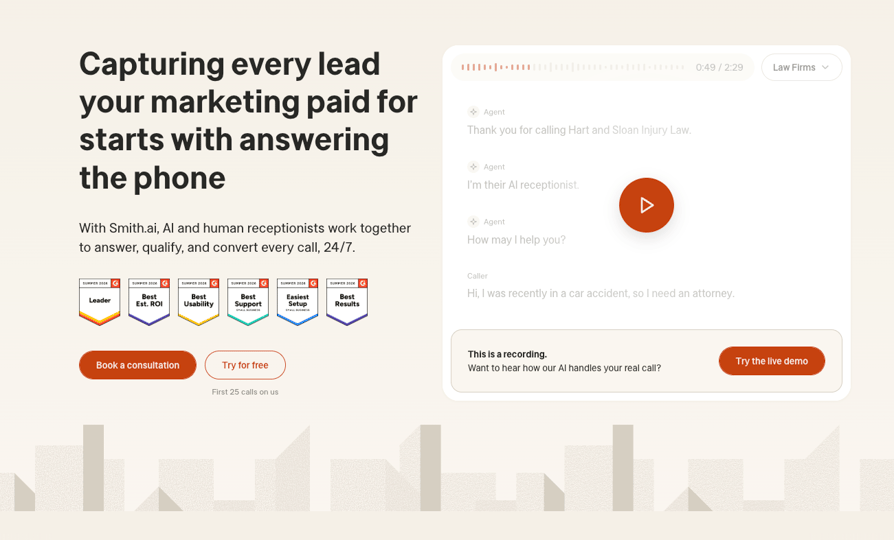
Smith.ai is a round-the-clock answering service that pairs artificial intelligence with live agents. They offer three models: AI-first, Human-first, and Hybrid.
The AI Receptionist means all calls are answered and handled purely by an AI voice agent. The human-first model means that a live human receptionist answers the phone and resolves the call each time. The hybrid model has AI answering and handling the call if it can, and if not, passing it off to a live agent.
Regardless of which track you choose, all three cover the essential front-desk duties:
- 24/7 Call Handling: Answering inbound calls day or night while filtering out spam and pushy sales reps.
- Lead Qualification & Intake: Gathering key details from callers and walking new clients through your onboarding intake.
- Scheduling & CRM Sync: Booking appointments directly onto your calendar and logging call details right into your CRM.
What really sets Smith.ai apart is how it positions itself. Instead of pitching software you have to set up and manage yourself, they sell a fully hands-off, done-for-you service. That practical focus shines through in their client base, which leans heavily toward law firms. You can see this influence in everything from their deep, custom integration with Clio to their per-call billing structure.
When it comes to connectivity, they market over 7,000 integrations, though it’s worth noting that bulk comes from Zapier rather than custom-built, native software connections. Where they offer real peace of mind is in their straightforward commercial terms: everything is month-to-month with no long-term contracts, backed by a 30-day money-back guarantee (up to $1,000, excluding overages).
Who Smith.ai Is Best Suited For
Smith.ai fits law firms and professional-services businesses that need human judgment on sensitive intake calls. When a caller is describing a car accident or a custody dispute, a receptionist who can hear distress and respond to it is worth paying for. It’s one of a handful of names that comes up whenever anyone shortlists the best virtual receptionist for law firms, and that reputation is earned.
It also fits low-to-mid-volume businesses, roughly 30 to 150 calls a month, that already run a CRM and have a high value per call. Per-call pricing rewards that exact profile: few calls, each one worth a lot.
How Does Smith.ai Work?
Smith.ai works takes calls made to your business number. The service runs in three steps:
- Forwarding: you point your business number at Smith.ai.
- Answering: a receptionist (human, AI, or both) picks up using a script built with you during onboarding, and handles the call to whatever depth your add-ons cover.
- Logging: the receptionist pushes the outcome into your calendar and CRM.
Smith.ai AI Receptionist vs Hybrid vs Virtual Receptionist: What’s the Difference?
The AI Receptionist answers with AI first. It screens, qualifies, records and transcribes, books, and can escalate to a live agent. It’s cheaper per call and it has a free tier, which puts it in the same bracket as a software AI receptionist rather than a staffed service.
The Virtual Receptionist puts a trained human on every call. It costs several times more, and it’s the reason most law firms buy Smith.ai in the first place.
Hybrid sits between the two. The AI answers every call, then hands off the call types you nominate to a live agent mid-call, with the intake context already captured so the caller never repeats themselves. It is the track Smith.ai points higher-volume buyers toward, and the only one without a published price.
One wrinkle: Salesforce’s 2024 State of the AI Connected Customer research, based on a survey of more than 15,000 consumers, found that 72% of customers want to know when they’re talking to an AI agent2. If you run the AI Receptionist on a first-contact line, decide up front how it introduces itself.
Setup, Scripts & Escalation
Onboarding includes building your call script and intake flow with Smith.ai’s team, which helps if you’ve never written one. The catch comes afterwards: script changes typically go through support rather than a self-serve editor, so tuning your qualifying questions isn’t something you do between meetings.
Escalation deserves a careful reading, because a common claim is that AI calls get bumped to expensive humans without your say-so. Smith.ai’s own AI Receptionist page says that when the AI initiates an escalation, there’s no fee. Live-agent involvement that you choose to enable is a per-call add-on, and Smith.ai doesn’t publish that rate. Ask before you sign.
Integrations & CRM Logging
Receptionists log calls, book appointments and sync data into your systems. The depth is real on legal CRMs: Clio, MyCase, PracticePanther and Rocket Matter each have their own connection guide in Smith.ai’s docs.
Note the pricing link most reviews skip. Your first CRM integration is included on Virtual Receptionist plans, and every additional one costs $0.50 per call. Run a practice-management system alongside a marketing CRM and that’s a line item, not a checkbox. It’s the opposite of how CRM integrations usually work on a phone system, where connecting a second tool doesn’t change what a call costs.
What Are the Key Features of Smith.ai?
Smith.ai’s key features cluster into six capabilities. For each one below: what it is, what it means for you, and where to be careful. All pricing is taken from Smith.ai’s published Virtual Receptionist plans.
24/7 Human + AI Call Answering (Core Strength)
Every call gets answered with your custom greeting, around the clock. On the Virtual Receptionist plans that is live-staffed by North America-based agents, and Smith.ai charges the same whether a call comes in at 2pm or 2am.
For a firm whose competitors send after-hours callers to voicemail, that alone can justify the subscription. Sensitive intake gets handled by a person who can read the room, which matters when the caller has just been in an accident or served with papers.
The caution is what human coverage costs. The Starter plan is $300 a month for 30 calls, with overage at $11.50 per call after that, so a busy month is an expensive month. Smith.ai’s AI-first tier is cheaper per call precisely because no human picks up. If overnight coverage is the whole reason you are shopping, compare how the after-hours virtual receptionist services in this category price that same coverage.
Lead Qualification & Client Intake
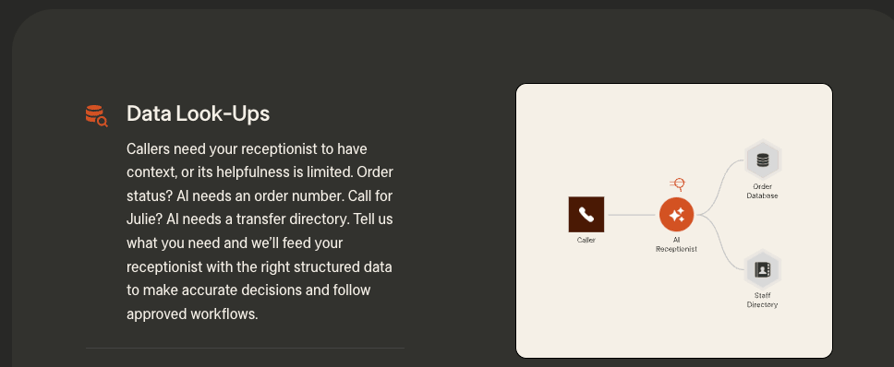
Receptionists work through your qualifying questions and capture the answers as structured intake rather than a free-text message. Lead screening, qualification and new client intake are all included at no extra charge on Virtual Receptionist plans, which covers five short-answer questions such as a case number or a property address.
That means a qualified lead reaches you already sorted, with the details your matter intake actually needs, instead of a callback request you have to chase.
The caution is depth. Five questions is the free version. Extended intake adds six more at $1.50 per call, further questions beyond that run $0.25 each, and third-party intake (entering caller details into an outside form) is $1.00 per call. Hold that against what AI virtual receptionists for lead qualification include by default.
Appointment Booking & Calendar/CRM Sync
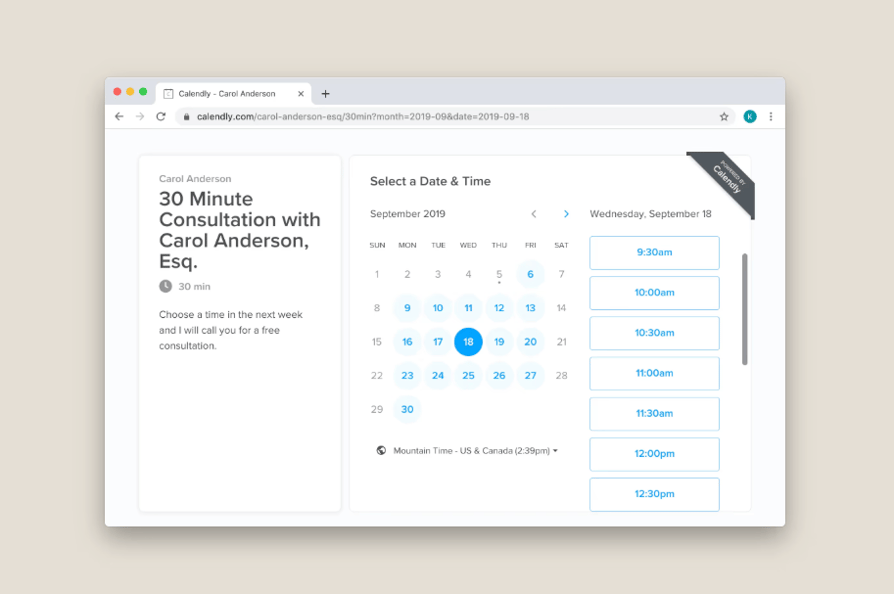
Receptionists book straight into your calendar, with support for Calendly, Acuity and others. Your first CRM integration is included, and call details are pushed to it automatically.
A qualified caller becomes a booked consultation inside the same call, which removes the callback step where most inbound leads quietly go cold.
The caution is that the most valuable thing a receptionist does for a law firm is also the box that costs extra. Booking is $1.50 per call, custom calendaring (multiple calendars or complex rules) is $1.00 per call, and every CRM beyond the first is $0.50 per call. We weigh this heavily when comparing AI virtual receptionists for appointment scheduling.
Spam & Sales-Call Blocking
Screening is included on every plan, and Smith.ai states that wrong numbers and unsolicited sales calls are not charged against your quota, provided the lines you forward to them pass Caller ID.
On a 30-call plan that condition is worth reading twice, because it is the difference between robodialers eating a third of your allowance and never seeing them at all.
The caution is not spam, it is the genuine calls. Screening protects your quota from junk, but nothing protects it from a good month of real enquiries, and overage is billed at $11.50 per call on the entry plan. Check the Caller ID requirement against how your existing numbers are forwarded before you count on it.
Integrations (Legal-CRM Depth)
Your first CRM connection is free, with named support for Clio, HubSpot and Salesforce among others, plus Zapier for everything outside the direct list. Call details, summaries and intake answers route into the record automatically.
For a firm running Clio, that means the intake your receptionist captured is already attached to the right matter before you open your laptop, rather than sitting in an email someone has to re-key.
The caution is that the depth is legal-specific by design. If you are not a law firm, much of what makes Smith.ai’s integration story strong is depth you will not use, and each CRM past the first adds $0.50 per call.
Bilingual (English/Spanish) & Outbound Options
A dedicated Spanish line routes every incoming call to a fluent bilingual agent for $1.00 per call. Outbound is available too, with business caller ID at $10.00 a month so recipients see your number, and inbound call tracking numbers at $5.00 a month for attributing marketing campaigns.
For a practice serving Spanish-speaking clients, that is a real receptionist speaking real Spanish, not a translation layer, and it is the single most common language pair US firms actually need.
The caution is the ceiling. Two languages is where it stops, and the agent pool is North America-based, so the service is built around US callers and US business hours conventions. If your inbound comes from Berlin or São Paulo, a bilingual virtual receptionist is as far as this model stretches.
Smith.ai Pricing Breakdown: How Much Does Smith.ai Cost?
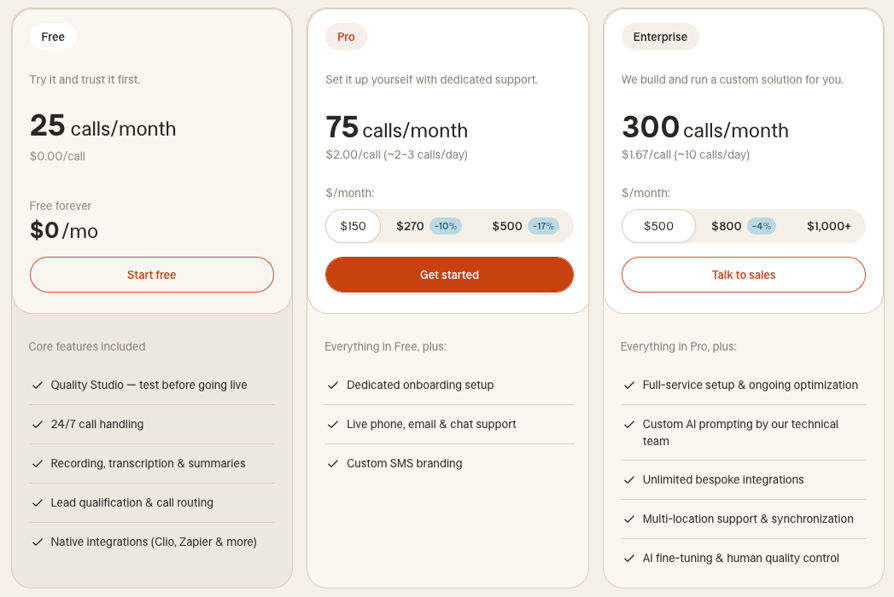
Smith.ai costs $0 to $500 a month for the AI Receptionist and $300 to $2,100 a month for the human Virtual Receptionist, billed per call rather than per minute. The third track, Hybrid, carries no published price at all. The plan price buys a bucket of calls; the add-on menu decides what those calls are allowed to do. Everything below was verified on Smith.ai’s own pricing, AI Receptionist and Hybrid pages on 10 August 2026.
AI Receptionist Plans
Smith.ai AI Receptionist Plans
| Plan | Monthly price | Calls included | In-plan rate per call | Overage rate per call |
|---|---|---|---|---|
| Free | $0 | 25 | Included | $3.00 |
| Pro | From $150 | 75, 150 or 300 | $2.00, $1.80 or $1.67 | $2.50, $2.30 or $2.17 |
| Enterprise | $500, $800 or $1,000+ | 300, 500 or 1,000+ | $1.67, $1.60 or custom | $2.17, $2.10 or custom |
No setup fees, and no contract on the free plan. If you’ve read a Smith.ai review quoting a $95 Starter or an $800 Pro tier, it’s out of date; the tiers above are what’s live, and our standalone Smith.ai pricing page tracks them as they change.
Virtual Receptionist (Human) Plans
Smith.ai Virtual Receptionist Plans
| Plan | Calls included | Monthly price | Overage | Free transfer destinations |
|---|---|---|---|---|
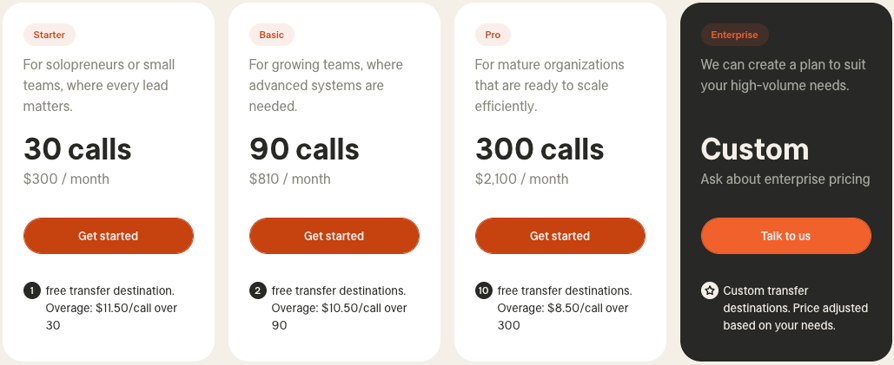
| Starter | 30 | $300 | $11.50/call | 1 |
| Basic | 90 | $810 | $10.50/call | 2 |
| Pro | 300 | $2,100 | $8.50/call | 10 |
| Enterprise | Custom | Ask about enterprise pricing | Not published | Custom |
Included free on every plan: lead screening, qualification and intake, new client intake, a dedicated phone number, 24/7 live staffing, and your first CRM integration. Subscribing for 12 months takes 10% off.
Hybrid Plans: The Third Track With No Published Price
Smith.ai sells three tracks, not two. The pricing page only toggles between AI-first and Human-first, so the third is easy to miss: Hybrid sits between them in the main navigation, with the AI answering every call and live agents taking over the ones that need a person.
The split isn’t left to chance. At onboarding, Smith.ai sets what it calls a recipe: a defined split between AI and live agents based on the call types you actually receive. You configure the routing rules by time of day, caller type, call intent or escalation trigger, and Smith.ai expects most clients to adjust them in the first 30 days. Its own figures put roughly 75% of AI-first calls as fully resolvable by AI, with about 25% needing human involvement.
Then comes the part that decides your budget. Smith.ai publishes no rate card for Hybrid: no tiers, no included-call counts, no overage rate. The only route in is booking a consultation. What it does publish is a comparison: human-only answering runs $8 to $10 per call, and Hybrid is pitched at half that.
The Three Ways Smith.ai Answers Your Calls
| Track | How calls get answered | Published price? |
|---|---|---|
| AI-first (AI Receptionist) | AI answers, and escalates to a live agent when the AI initiates it | Yes: $0, $150 and $500 a month |
| Hybrid | AI answers every call; live agents take the call types you route to them | No: consultation only |
| Human-first (Virtual Receptionist) | A trained human answers every call | Yes: $300, $810 and $2,100 a month |
Half of $8 to $10 lands near $4 to $5 a call, which would sit between the AI Receptionist’s $1.67 to $3.00 and the $8.50 to $11.50 overages on the human plans. Treat that as a positioning claim rather than a rate card. You can’t model a monthly bill from it, and whether the 15-item per-call add-on menu applies on top isn’t stated anywhere public. Pin down both in the consultation, before anyone quotes you a number.
What Does Smith.ai Really Cost Once the Add-Ons Stack?
Almost nobody publishes this part. Fifteen separate per-call add-ons sit behind the Virtual Receptionist plans, plus three monthly ones.
Smith.ai Per-Call Add-Ons
| Per-call add-on | Price |
|---|---|
| Book appointments | $1.50/call |
| Complex call routing | $1.50/call |
| Extended intake | $1.50/call |
| Dedicated Spanish line | $1.00/call |
| Accept payments | $1.00/call |
| Third-party intake | $1.00/call |
| Custom calendaring | $1.00/call |
| Additional CRM integrations (beyond the first) | $0.50/call |
| SMS/Slack notifications | $0.50/call |
| Microsoft Teams notifications | $0.50/call |
| Text & email follow-up | $0.50/call |
| Conflict checks | $0.50/call |
| Accept collect calls | $0.50/call |
| Call recording & transcription | $0.25/call |
| Custom extended intake | $0.25/question |
Smith.ai Monthly Add-Ons
| Monthly add-on | Price |
|---|---|
| Additional transfer destinations | $15.00/mo |
| Business caller ID for outbound | $10.00/mo |
| Inbound call tracking numbers | $5.00/mo |
Two things follow. Per-call billing is generous on long calls, since a 12-minute intake costs the same as a 90-second one, which beats per-minute rivals for firms doing deep intake. And it punishes high volumes of short calls, because every "is Susan there?" costs a full call.
A worked example. A small firm handling 120 calls a month on the Basic plan, which includes 90. This models Smith.ai’s published rates; it isn’t a quoted bill:
- Base plan: $810
- Overage, 30 calls at $10.50: $315
- Appointment booking on 60 of those calls at $1.50: $90
- A second CRM integration across all 120 calls at $0.50: $60
- Call recording and transcription across all 120 calls at $0.25: $30
That’s $1,305 against an $810 headline, roughly 61% above sticker, or about $10.88 per call answered. Nothing exotic got switched on; booking, a second CRM and call recording are table stakes. Build your own version of this table on your actual volume before you sign, and run the same exercise against category-wide answering service pricing so you know whether the number is normal.
Is Smith.ai Free? Trial & Guarantee Details
Yes, partly. The AI Receptionist has a free plan covering 25 calls a month, with no setup fee and no contract. That’s the cheapest way to hear how Smith.ai handles your callers, and it’s the fact most Smith.ai reviews get wrong.
The human Virtual Receptionist has no free tier, but it carries a 30-day money-back guarantee: a full refund if you request it within the first two weeks, capped at $1,000, overage charges excluded. With month-to-month billing on top, that’s a low-risk trial.
What Do Real Users Say About Smith.ai Pricing?
Customer reviews on price, with the screenshots behind them, are further down this page. Before that, here is what Smith.ai’s pricing structure predicts, so you have something concrete to test those reviews against.
Two camps fall out of per-call billing. Firms running long, substantive intake calls come out ahead, because a 15-minute conversation costs the same as a 30-second one and a per-minute competitor would bill the difference. Firms running lots of short calls come out behind, because volume is the only thing the meter counts. Teams hit the same trap when they start answering high call volume with a service priced per interaction.
Raise escalation with sales directly. Smith.ai’s documentation says AI-initiated escalation carries no fee, while customer-enabled live-agent involvement is a per-call add-on at an unpublished rate. If a bill surprises you, check that line item first.
See the Same Intake Calls on a Minute Meter
Smith.ai Review on 6 Must-Have Business Requirements
Six requirements decide most answering-service shortlists. Smith.ai is strongest on call quality and legal integrations, and weakest on scale and language coverage.
How Good Is Smith.ai’s Call Quality?
On the Virtual Receptionist plans, a trained human answers, and that’s the product’s strongest card. A receptionist hears that a caller is upset, slows down, and still captures the intake fields you need. No AI does that as well yet.
How Easy Is Smith.ai to Set Up and Use?
Onboarding is done for you, which suits a firm with no operations person. The trade-off is control: the loop between "our qualifying question is wrong" and "our qualifying question is fixed" runs on someone else’s queue.
Does Smith.ai Scale With Call Volume?
Smith.ai’s economics work between roughly 30 and 150 calls a month. Below that, the Starter plan’s 30 included calls at $300 sets a $10 floor per call. Above it, overages of $8.50 to $11.50 plus stacked add-ons put you where a full-time hire starts penciling out. Growth is the scenario this model handles worst, and it’s the point at which most teams start pricing an AI voice agent for high call volume instead.
Hybrid is Smith.ai’s own answer to that ceiling: send the routine calls to AI and pay live-agent rates only on the ones that need a person. That is the right shape for the problem. You just can’t price it without booking a consultation first.
What Languages Does Smith.ai Support?
English and Spanish, and that’s the list, with the dedicated Spanish line at $1.00 per call. Fine for a US firm serving a bilingual community, a hard stop for anyone taking calls across Europe or Asia.
How Well Does Smith.ai Integrate With Your Stack?
Legal CRM coverage is the best reason to pick Smith.ai over a generic answering service. Outside legal it thins into Zapier, and the $0.50-per-call charge for CRM connections beyond the first penalizes anyone running more than one system.
What Is Smith.ai’s Customer Support and Reputation Like?
Month-to-month terms, a published guarantee and a documented escalation policy point to a company that expects to keep customers rather than trap them.
Which Integrations Does Smith.ai Offer?
Smith.ai Integrations by Category
| Category | Named integrations |
|---|---|
| Legal CRM | Clio, MyCase, PracticePanther, Rocket Matter, Filevine, Lawmatics |
| General CRM | HubSpot, Salesforce |
| Field service | ServiceTitan |
| Automation | Zapier (the source of the advertised 7,000+ figure) |
| Channels | Voice, chat, SMS |
Smith.ai Real User Reviews: What Customers Actually Say
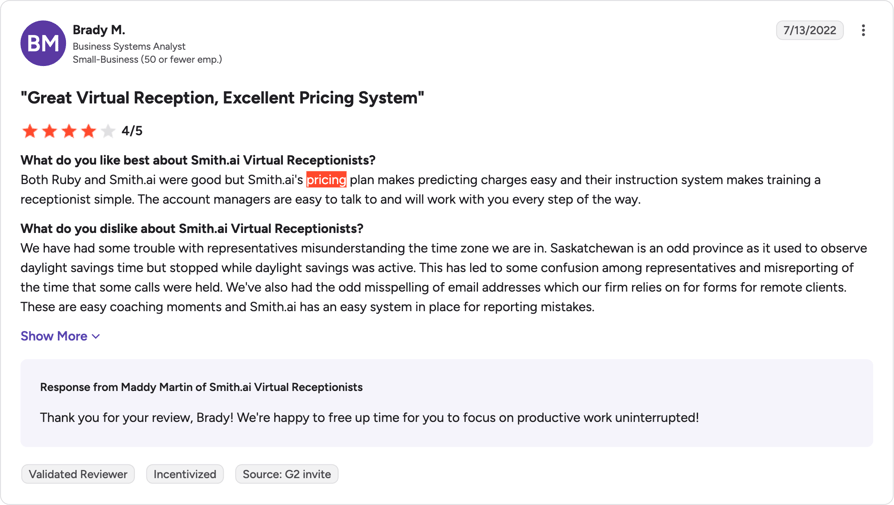
Smith.ai reviews are widely positive with an average rating of 4.9/5 stars on G2, out of 73 reviews.
Honestly, when it comes to their human receptionist service, customers seem to be happy (see reviews below table); in fact, most reviews are about the human-led team, not the AI receptionists.
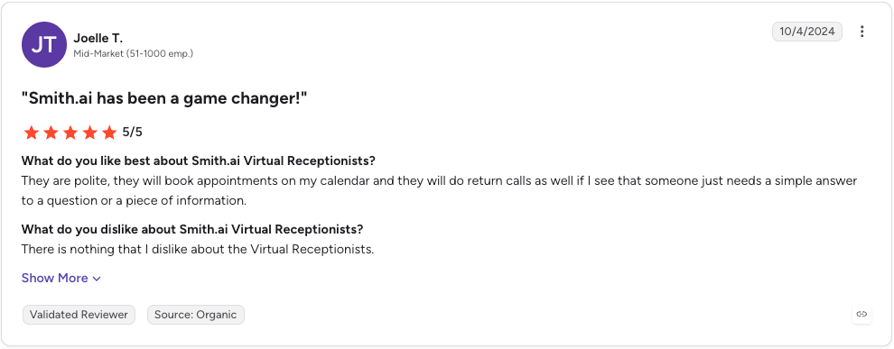
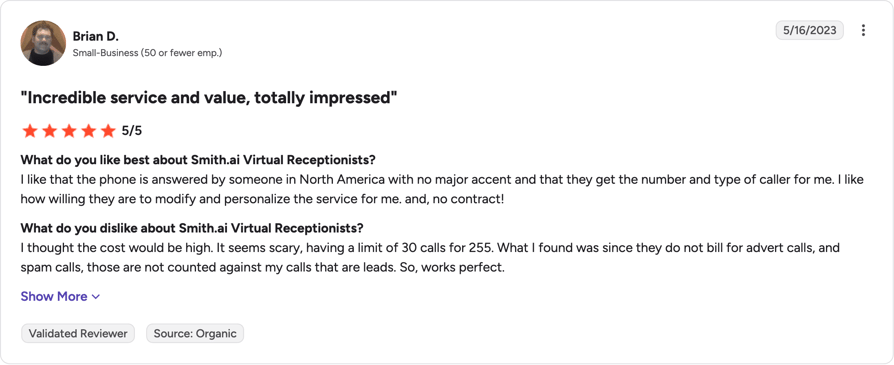
For example, one thing customers highlight is that receptionists are polite and efficient:
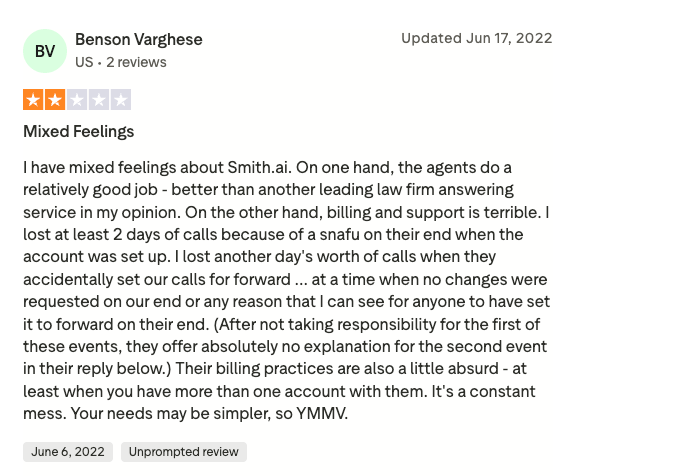
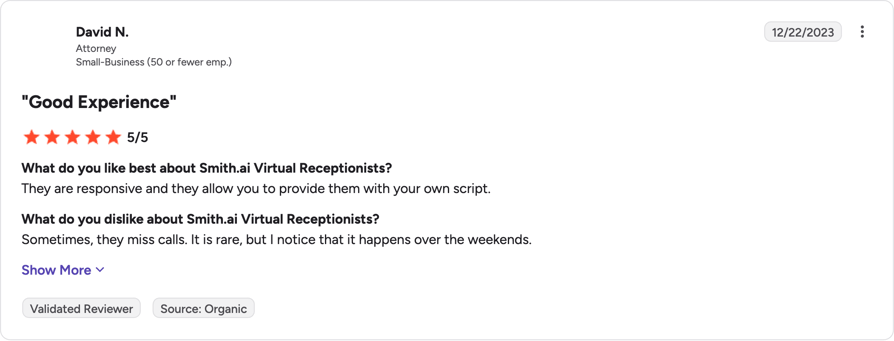
That being said, with real humans come real human error. Some reviewers report call routing not being configured correctly, or human agents not answering on the weekends, (although rare).
And on price, most customers agree that it’s fair. One reviewer says they were put off at first by the limit of 30 calls for $255 on the human-first plan (pricing has since risen to $300 for 30), until they realized Smith.ai doesn’t bill for advertising or spam calls.
However, pricing is objectively high compared to other receptionist platforms, so as we will reiterate throughout this article, Smith.ai is not for teams who want to scale, nor for teams dealing with a high call volume. Services are meant for small companies who want a bespoke answering service, whether AI or human. Unless you're an enterprise operation with money to spend, and can afford $1,000+/month if you plan on taking over 34 calls per day.
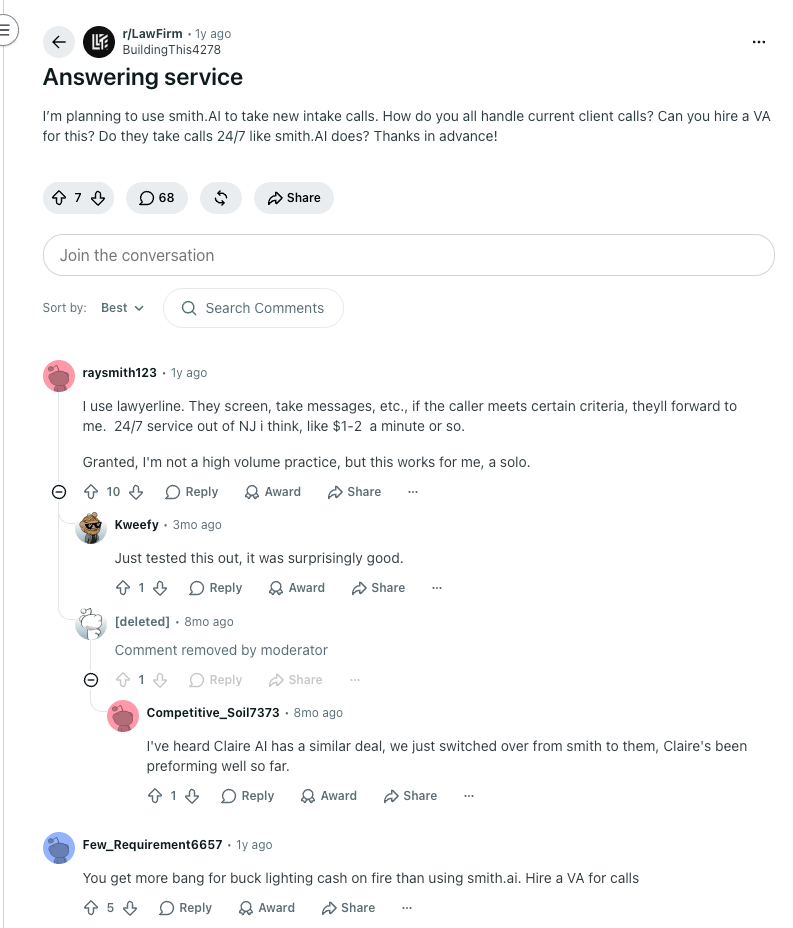
What Smith.ai Reviews on Reddit and Quora Actually Cover
Is Smith.ai Legit? Reputation & Trust
Yes, Smith.ai is legitimate. It is an established answering service that says it has handled more than 20 million calls over ten-plus years, it has transparent pricing, documented CRM integrations and real legal-tech credibility, and its commercial terms favor the buyer: month-to-month billing, no long-term contract, and a 30-day money-back guarantee capped at $1,000. It shows up in the same evaluations as dedicated legal call center software, not on the fringes of the market.
The review base backs that up rather than contradicting it. Ratings are strong on the platforms where buyers actually leave feedback, and Smith.ai replies to reviews publicly on both G2 and Trustpilot, including the critical ones.
Where Smith.ai Stands on Third-Party Platforms
| Platform | What it shows |
|---|---|
| G2 | 4.9/5 across 73 reviews on the Virtual Receptionists profile. The AI Receptionist is listed separately. |
| Trustpilot | 4.4/5 across roughly 340 reviews, rated Excellent. This is where the sharper complaints concentrate. |
| Better Business Bureau | Not BBB accredited. A profile exists with customer complaints filed against it. |
So why does "is Smith.ai legit" get searched at all? Mostly because of what ranks for it. A large share of that traffic lands on job-seeker content asking whether the remote receptionist role is a real job, which tells you nothing about whether the service works for your firm. Not being BBB accredited is a weak signal in the same way: accreditation is a paid membership a business opts into, so plenty of legitimate companies skip it.
The criticisms worth your attention are narrower and more specific. Three come up repeatedly across review platforms: bills that run above the plan price once add-ons stack, calls escalating to live agents in ways customers say they didn’t authorize, and the friction of routing every script change through support. A BBB complaint also alleges that a change to how Smith.ai defines a billable call left a customer paying for waves of silent spam calls that had previously been filtered out for free. Smith.ai’s own materials don’t address that scenario publicly, and it’s worth asking about directly if screening is part of why you’re buying.
None of those are accidents; they follow from a per-call pricing model with a long add-on menu, which is exactly why the answering service pricing question is worth working through on your own call volume before you sign. All three are answerable in a sales conversation. Ask what counts as a billable call, who can trigger a live-agent escalation and at what rate, and how long a script change takes.
Smith.ai BBB
Smith.ai is not accredited by the Better Business Bureau, and in fact has a rating of F due to having two complaints filed against them, and not responding to those complaints.
Who Should (and Should NOT) Use Smith.ai
Smith.ai suits low-to-mid-volume professional-services firms with a high value per call, and works badly for high-volume, budget-sensitive or non-US teams.
Best Fit: Buyer Profiles Where Smith.ai Shines
- Small and mid-sized law firmsHigh value per matter, emotionally loaded intake calls, and a Clio or MyCase instance already running. Smith.ai was built for this buyer.
- Solo practitioners and consultantsOne person can’t be in a client meeting and on the phone, and forty calls a month at $300 is cheap next to one lost engagement.
- Medical and dental practicesReceptionists are HIPAA-trained and sign NDAs, booking is available as an add-on, and patients calling about care usually want a person. A virtual receptionist for healthcare gets judged on empathy as much as on uptime.
- Home services and contractorsJobs go to whoever answers first, crews on site can’t, and screening out sales calls is worth real money here.
- Firms replacing an in-house receptionistA full-time front-desk hire costs multiples of the Pro plan and goes home at five.
Poor Fit: When You Should Look Elsewhere
- High-volume teamsPast roughly 150 calls a month, per-call economics turn against you fast, and the job stops being call answering and starts being call deflection.
- Global or multilingual businessesTwo languages, US-centric operations. If your callers are in Germany or Japan, this isn’t your service.
- Teams that want to control their own scriptsRouting every change through support works for a stable intake flow and hurts if you’re iterating weekly.
- Budget-sensitive SMBs with variable volumeA bill that moves with call count is hard to plan around when call count is unpredictable.
Smith.ai: Industry Fit
Smith.ai Fit by Industry
| Industry | Fit | Why |
|---|---|---|
| Law firms | Strong | Deepest CRM support, human intake, high value per call |
| Medical & dental | Weak | Smith.AI receptionists are not HIPAA-compliant |
| Home services & contractors | Good | Speed to answer wins jobs; spam screening included |
| Real estate & professional services | Good | Moderate volume, high value per lead |
| High-volume call centers | Weak | Per-call cost balloons; no volume economics |
| Global / multilingual businesses | Weak | Two languages, US-centric service |
| Teams wanting self-serve AI control | Weak | Script changes go through support |
Important Considerations Before Committing to Smith.ai
Most answering service reviews compare the same four baseline metrics: price per call, hours of coverage, integrations, and whether the receptionists are onshore. That information is useful, but it fails to answer the core operational question: will this system actually hold up in your day-to-day business?
Here are five common operational issues that come up after a few months, and the specific questions you should ask Smith.ai during your sales call.
1. Somebody answering is not the same as somebody capturing
The standard pitch for any virtual receptionist service is that voicemail is where leads go to die. That premise is sound, but simply getting a human (or AI) to pick up the line doesn't solve the problem. The goal isn't an answered call; it's a structured record your team can act on the next morning.
A message delivered as an unformatted email at 9:00 PM—with a caller’s name spelled phonetically and vague notes about what they wanted—is just expensive voicemail. The issue is hard to catch early: you just miss out on follow-ups without realizing it.
- Ask Smith.ai: What does the call log output look like, field by field? Is it free-text typed by a receptionist, or structured data mapped to specific CRM fields? Can you mandate required fields for every call, and what happens when a caller refuses to provide one?
2. Bad screening costs more than no screening
Bad screening is even worse than no screening—it filters out leads you actually want. They make real-time judgment calls about which callers matter based on a script written by someone who has never worked in your business.
If you update your offerings—like expanding into commercial work—make sure your screening scripts are updated immediately so legitimate leads aren't turned away.
Smith.ai’s human receptionists excel at handling nuance, but they operate within a shared agent pool. Nuance requires context, and context is precisely what a shared service model struggles to scale.
- Ask Smith.ai: How much of your intake script can be customized, who maintains it, and how fast can updates be deployed when your offer changes? What is the standard protocol when a caller raises an edge case the script didn't anticipate?
3. The true switching cost isn't the phone number—it’s the retyping
Businesses evaluate answering services on call handling, then spend the next year buried in manual data entry. If call summaries don't land directly in your CRM, someone on your team is copying and pasting them—and that someone is usually a sales rep who should be closing deals.
The happiest teams using any call handling setup (whether human or voice AI) are those where the interaction records itself: summary attached to the correct contact record, recording linked, zero rep intervention. Churn happens when teams run two parallel systems and reconcile them by hand.
Watch out for the duplicate record trap during demos: some integrations log one record when a call connects and a second when the summary generates. Suddenly, your helpdesk has two tickets for a single call, and your reporting metrics are corrupted.
- Ask Smith.ai: Does the integration write directly to your CRM natively or rely on a third-party middleware wrapper? Does it create one unified record per call or split them? How does it handle inbound calls from numbers that aren't existing contacts?
4. Both humans and AI fail silently—only one leaves a clear audit trail
The standard critique of AI voice agents is that when they fail, they fail invisibly. A bot that misinterprets a routing rule on Tuesday will cheerfully keep misinterpreting it until someone audits the log.
However, human answering services fail silently, too. A receptionist who mishears a caller's requirements or drops a message creates the exact same business outcome: a lead lost forever. The core differentiator isn't raw human reliability vs. machine error; it's auditability.
The fundamental question for either model is how easily you can investigate what actually happened. Full, searchable call recordings and transcripts provide a radically different level of accountability compared to a high-level message summary.
- Ask Smith.ai: Do you receive full recordings and transcripts for every call, or just written summaries? How long are raw audio files retained, and are transcripts fully searchable? When a lead drops through the cracks, what exact diagnostic data can you pull?
5. The pricing model dictates incentives—and it rarely favors you
Per-call pricing sounds fair until you analyze your inbound call mix. Wrong numbers, spam, status checks from existing customers, and disconnected callers calling back three times all count as billable events. You end up paying per-call rates for interactions with zero potential return.
Per-minute pricing introduces the opposite incentive: it penalizes high-value calls. A qualified prospect explaining a complex, high-ticket problem naturally requires a longer conversation.
Before committing, determine what you pay when nothing happens. If your team answers 80% of inbound volume and only needs coverage for overflow or after-hours calls, paying a high fixed base for unused volume creates massive unit-cost inefficiency.
- Ask Smith.ai: How are spam, robocalls, and wrong numbers categorized and billed? What happens to unused call allocations at month-end, and what is the effective cost per call at your actual expected volume rather than the ideal plan tier?
Where Smith.ai Genuinely Wins
A balanced review must highlight where a product excels. Human receptionists remain superior for high-stakes, unpredictable interactions: de-escalating upset callers, navigating ambiguous requests, or identifying when to break the script to save a deal. If your inbound call volume is low, your sales cycles are complex, and the financial cost of a single mishandled call is steep, paying for human-led intake is a rational, high-ROI decision.
The math changes, however, as call volume scales, as operational hours expand to 24/7 coverage, or as multi-channel routing becomes mandatory. When per-call human economics start straining your operational margin, the conversation naturally pivots from outsourcing front-line answering to taking full structural control of your business phone system and call routing engine.
Security, Compliance & Data Privacy of Smith.ai
Can you trust Smith.ai to protect your clients' and customers' data?
What Compliance and Certifications Does Smith.ai Have?
- HIPAA: Smith.ai is not HIPAA-compliant, meaning they can't handle calls that contain protected health information (PHI). However, they can offer receptionists for clinics as long as no PHI is involved, including answering FAQs, taking messages, and transferring calls.
- GDPR: Smith.ai has claimed GDPR compliance since the regulation landed in May 2018. It calls itself a data processor and you the data controller, which is the polite way of saying most of the exposure is yours. The published measures are operational: AWS infrastructure, SSL encryption, receptionists under NDA who won't ask for anything your script doesn't call for, and a commitment that lead data is never sold to third-party resellers.
- Two gaps matter if your callers are in the EU. There's no EU data residency, and Smith.ai doesn't say what mechanism covers the transfer. The GDPR page hasn't been updated since 2021, before the EU-US Data Privacy Framework existed. Not disqualifying, but your compliance officer will be sending an email rather than reading a page.tatus from any public source on its own properties.
Who at Smith.ai Can Access Your Call Data?
Smith.ai states on its own site that its receptionists sign a non-disclosure agreement (NDA), receive confidentiality training, and are instructed not to request information beyond what your script specifies. Access to captured call data through internal tools is restricted to a trained subset of personnel. Because humans hear your calls, those controls matter more here than they would with pure software.
What Are the Pros and Cons of Smith.ai?
Smith.ai’s biggest pro is a trained human on every Virtual Receptionist call; its biggest con is an add-on menu that decides your real bill. Weigh both before you compare it with an AI call answering service, which trades the human touch for volume and price predictability.
Smith.ai Pros
- Trained human receptionists on every Virtual Receptionist callHard to beat for sensitive intake.
- Established, documented serviceReal legal-tech credibility.
- Deep legal CRM integrationsClio, MyCase, PracticePanther and Rocket Matter.
- Lead screening, qualification and intake includedOn every plan.
- Month-to-month billing and a 30-day money-back guaranteePlus a free AI Receptionist tier.
- A middle track for mixed call volumeHybrid sends routine calls to AI and pays live-agent rates only on the rest.
Smith.ai Cons
- Add-on and overage creepA 15-item per-call menu decides your real bill.
- Escalation to live agents is a per-call add-onAt an unpublished rate.
- Per-call pricing gets expensive fastAbove roughly 150 calls a month.
- No self-serve script editorEvery change is a support request.
- English and Spanish onlyBuilt around US callers.
- Hybrid ships without a rate cardThe third track is quote-only, so you cannot compare it before a sales call.
The Best 4 Smith.ai Alternatives in 2026
The four strongest Smith.ai alternatives are CloudTalk, Ruby, Synthflow and Retell AI. Each takes a different route around Smith.ai’s volume ceiling, language limits and add-on menu. Because Smith.ai is a staffed service rather than pure software, the list mixes service-style and platform-style options; our longer roundup of Smith.ai alternatives covers ten.
Smith.ai Alternatives Compared
| Capability | CloudTalk | Ruby | Synthflow | Retell AI |
|---|---|---|---|---|
| Best for | Growing sales and support teams that need AI calling plus a real phone system | Firms that want human receptionists with per-minute billing | SMBs wanting a no-code AI receptionist | Developers building custom AI voice agents |
| Model | Cloud phone system with AI Voice Agent add-on | Human virtual receptionists, 24/7 | AI voice agent platform | AI voice agent platform, usage-based |
| Pricing model | Per user per month, plus a usage-based AI Voice Agent add-on from $99/month for 200 minutes | Per minute, billed in 60-second increments rounded up | Usage-based, from $0.07/minute | |
| Per-call add-on creep | No per-call add-on menu | No add-on menu; minutes are the meter | Not applicable | Not applicable |
| Scales to high volume | Yes | Costs rise linearly with minutes | Yes | Yes |
| Human on every call | No (AI plus your own agents) | Yes | No | No |
| Languages | 60+ languages and accents on the AI Voice Agent | English and Spanish | ||
| Integrations | 100+ native integrations, plus API, webhooks and Zapier | API-first; build what you need | ||
| No-code friendliness | High: non-technical users can build an agent in under 10 minutes | Highest: nothing to build | High | Low: developer-oriented |
| Best fit vs Smith.ai | Volume and international coverage without per-call surprises | Same human model, different meter | Cheaper AI-only answering, no humans in the loop | Maximum control if you have engineers |
Why CloudTalk’s AI Voice Agent Is Worth Considering
Smith.ai gives you people. CloudTalk gives you a phone system with an AI Voice Agent on top and a bill that tracks minutes instead of incidents. Which one wins depends almost entirely on your call volume and where your callers are.















Smith.ai vs CloudTalk: Feature & Capability Comparison
Smith.ai vs CloudTalk
| Capability | Smith.ai | CloudTalk |
|---|---|---|
| Model | Human and AI receptionist service across three tracks: AI-first, Hybrid and Human-first | Cloud phone system with AI Voice Agent add-on |
| Pricing model | Per call, plus per-call add-ons | Per user per month, plus a usage-based AI Voice Agent add-on |
| Entry price | $0 AI Receptionist free tier; $300/mo for 30 human-answered calls | $25/user/month on Starter |
| Real cost transparency | Plan price plus 15 per-call and 3 monthly add-ons | Plan price plus named add-ons; AI Voice Agent from $99/month for 200 minutes |
| Scalability at volume | Overages of $8.50 to $11.50/call above plan | Usage-based minutes with volume discounts at scale |
| Human on every call | Yes, on Virtual Receptionist plans | No; AI handles calls and routes to your team |
| Inbound and outbound autonomy | Inbound-focused; outbound is limited | Both: the AI Voice Agent answers inbound calls and runs outbound qualification and reminders |
| Languages | English and Spanish | 60+ languages and accents |
| Integrations | Deep legal CRM support; Zapier beyond that | 100+ native integrations plus API and webhooks |
| Compliance | HIPAA-trained agents, NDAs, GDPR commitment; SOC 2 not published | SOC 2 Type 1 and Type 2, GDPR, HIPAA compliant |
| Setup and self-serve control | Guided onboarding; script changes via support | Self-service configuration; you build and edit agents yourself |
| Country coverage | US-centric | Numbers in 160+ countries |
CloudTalk’s AI Voice Agent and AI Conversation Intelligence are add-ons, not features bundled into a subscription plan.
Smith.ai vs CloudTalk: Pricing & Scalability Compared
Run the 120-call example again. On Smith.ai’s Basic plan with booking, a second CRM and call recording switched on, that month models out at roughly $1,305, and volume is the thing that moves the number.
CloudTalk prices the AI Voice Agent on minutes used, starting at $99 a month for 200 minutes with volume discounts at scale, on top of a platform plan from $25 per user per month. Your first 50 minutes are free in your first month. The practical difference is forecasting: you budget against talk time you can measure rather than an incident count multiplied by whichever add-ons fired.
Salesforce’s 2025 State of Service report found 79% of service leaders consider investing in AI agents essential to meeting current business demands1. Whether your intake calls are ready for that is a separate question, worth answering deliberately.
Where Does CloudTalk Fit Better Than Smith.ai?
When volume is growing, per-call billing punishes the success you’re working toward and usage-based minutes don’t. When your callers aren’t all in the US, CloudTalk offers numbers in 160+ countries and an AI Voice Agent supporting 60+ languages and accents, against Smith.ai’s English and Spanish.
Control is the other difference. CloudTalk’s Self-Service Configuration lets a non-technical user build an agent in under 10 minutes: you define an identity, pick a language and voice, attach skills, and upload reference content as the agent’s knowledge base. You don’t file a support ticket to change any of it. The same agent qualifies inbound leads within seconds of a form submission and runs reminder campaigns, which a receptionist service doesn’t do at all. That combination is what we look for when ranking AI voice agents for lead qualification. On compliance, CloudTalk is SOC 2 Type 1 and Type 2 compliant, GDPR compliant, and HIPAA compliant, published rather than inferred.
Customer story: CloudTalk’s own AI prequalification agent unlocked 17x ROI on long-tail leads.
To be fair to Smith.ai: none of this replaces a person picking up at 11pm who can read what kind of call it is and handle it accordingly. If that’s the call that matters most in your business, the human model is still the right answer.
Related reading
- AI voice agents for law firms
- AI voice agent for after-hours call handling
- Best AI phone systems for businesses
Final Verdict: Is Smith.ai Worth It?
Smith.ai is worth it for a specific shape of business and expensive for everyone else. The service is real, the humans are good, the guarantee is honest, and the pricing page tells you less than you need to know.
Who Smith.ai Is a Good Fit For
- Law firms and professional services that need human judgment on high-stakes, sensitive intake
- Businesses running roughly 30 to 150 calls a month with high value per call
- Teams already on Clio, MyCase, PracticePanther or Rocket Matter
- Buyers who want done-for-you setup and will price in the add-ons before signing
Who Should Avoid Smith.ai
- High-volume teams, where per-call cost and overages compound
- Teams that want predictable, scalable AI pricing
- Non-US or multilingual businesses
- Teams that want self-serve control over scripts and call flows
Do two things before you commit. Start on the free AI Receptionist tier and listen to how it handles your callers, then build the add-on math on your own call volume; the AI voice agent ROI calculator does the same job for the AI side of the comparison. The plan price is the beginning of that number rather than the end of it.
Put Your Own Intake Flow in Front of an AI Voice Agent
Sources
Frequently Asked Questions
Direct answers to the questions buyers ask most when weighing Smith.ai.
Smith.ai is used to answer, screen and qualify inbound business calls 24/7, book appointments and log the results in a CRM. It works like a done-for-you conversational virtual receptionist rather than software you configure yourself. Law firms mostly use it for new-client intake.
Smith.ai is worth it if you take roughly 30 to 150 calls a month and one new client covers the fee. Below that, the $300 Starter plan sets a $10 floor per call; above it, overages and add-ons compound quickly. An AI virtual receptionist for small business usually costs less once volume climbs.
Yes, Smith.ai is a legitimate, established company with month-to-month billing and a 30-day money-back guarantee capped at $1,000. Most of what ranks for "Smith.ai reviews" is written by contractors, not customers, so the real question is whether you’d get the usual benefits of a virtual receptionist at your call volume.
Smith.ai costs $300 to $2,100 a month for human Virtual Receptionist plans, $0 to $500 for the AI Receptionist, and quote-only for Hybrid. Add-ons decide the real number: booking is $1.50 per call, extra CRM connections $0.50. Our 120-call model landed near $1,305 against an $810 plan, unlike usage-based AI voice agent pricing, which moves with talk time.
The AI Receptionist answers with AI on every call, Hybrid answers with AI and hands the calls you nominate to a live agent, and the Virtual Receptionist puts a trained human on every call. The AI product is cheapest per call and has a free 25-call plan, behaving much like an AI voice agent running a receptionist script rather than a person on a headset.
Smith.ai publishes no rate card for Hybrid: no tiers, no included-call counts and no overage rate, so the only way to get a number is to book a consultation. The one published figure is comparative, with Smith.ai putting human-only answering at $8 to $10 per call and Hybrid at half that. For a price you can read before you talk to sales, compare AI voice agent pricing.
Yes, Smith.ai integrates with Clio, MyCase, PracticePanther and Rocket Matter, each with its own setup guide. Only your first CRM connection is included; further ones cost $0.50 per call, and MyCase needs an email to support before it connects, friction you don’t get from a virtual receptionist for law firms built on your own phone system.
No, high volume is where Smith.ai gets expensive. Every answered call is billed, and overages run $8.50 to $11.50 on human plans, so a 30-second question costs what a 15-minute intake does. Past roughly 150 calls a month, an AI voice agent for business call handling prices minutes instead of incidents.
The best Smith.ai alternatives are CloudTalk for scalable AI calling inside a phone system, Ruby for human receptionists billed per minute, Synthflow for no-code AI answering and Retell AI for developer-built agents. The choice comes down to volume and whether you need a person or an AI phone answering service.
Smith.ai sells receptionists by the call; CloudTalk sells a phone system with a usage-based AI Voice Agent add-on from $99 a month for 200 minutes. Smith.ai wins on human judgment during sensitive intake. CloudTalk wins on volume, 60+ languages and forecastable cost, the same criteria we use to rank the best AI voice agents.