Rosie AI Review 2026: Simple & Affordable, but Is It Worth It?
TL;DR:
Rosie AI's answering service is low-cost and easy to use, but its limited integrations and languages make it best suited to solo operators and small businesses with predictable call flows.
Key takeaways from this Rosie AI review:
- Rating: No reviews are available on G2, Capterra, or Trustpilot
- Pricing: $49/month for 250 minutes, $149/month for 1,000 minutes, or $299/month for 2,000 minutes
- Best for: Solo operators and small businesses replacing voicemail with 24/7 AI call answering
- Strengths: Easy setup, English and Spanish support, call summaries, appointment booking, and call transfers
- Limitations: No native CRM integrations, only two languages, no outbound calling, and no published overage rate
- Conversation depth: Best for FAQs and simple, predictable scenarios
Bottom line:
Rosie AI receptionist is a good choice for small businesses that want a straightforward and budget-friendly voicemail replacement.
For growing teams that need deeper conversations, deep CRM integrations, more languages, or outbound calling, CloudTalk is a more scalable option.
Rosie AI at a Glance
| Field | Verdict |
|---|---|
| One-line verdict | A deliberately simple and affordable AI answering service that replaces voicemail for solo operators. Its ceiling is no first-party CRM connectors and support only in two languages. |
| Overall rating | 3.4/5 across the five dimensions, scorable from Rosie's published documentation and pricing. |
| Best for | Solo operators still sending missed calls to voicemail |
| Not good for | Multi-location teams, CRM-first workflows, callers who speak neither English nor Spanish |
| Starting price | $49/month for Professional, capped at 250 minutes |
| Free tier? | No free tier. A 7-day free trial, cancel anytime. |
| Setup time | Minutes. Rosie trains itself from your Google Business Profile and website, then you forward your number. |
| Standout pro | Effortless, near-instant setup that trains itself directly from your business website and Google Business Profile. |
| Standout con | Integration runs through Zapier rather than native CRM connectors. |
| User sentiment | No verified rating was available, so this page publishes none. |
| Our verdict | Choose CloudTalk's AI Voice Agent once you need conversations beyond pre-configured scenarios, native CRM write-back, more than two languages, or outbound calling. |
Rosie AI promises an accesible way to stop missing calls: 24/7 AI answering, caller information capture, appointment booking, and call summaries—all starting at $49/month.
But is Rosie AI the right solution for your business?
This review gives you the full picture: Rosie AI pricing, key features, strengths, limitations, and the best alternatives to consider as your business grows.
Outgrowing simple AI answering?
Rosie AI Scorecard: Our Honest Ratings
We scored Rosie AI based on its published product information and pricing. We use the same criteria across our AI voice agent reviews to keep our ratings consistent and comparable.
Rosie AI Scorecard
| Dimension | Rating | Why |
|---|---|---|
| Ease of setup | 5/5 | Trains itself from your Google Business Profile and website, then you forward your number. Nothing here is easier. |
| Call quality & conversation depth | 3/5 | FAQ and scenario-based, capped at 2 message-taking scenarios on Professional, 5 on Scale, unlimited on Growth. |
| Pricing clarity | 4/5 | Three published tiers with named minute allowances. Loses a point because the rate beyond your minutes isn't published. |
| Features & capabilities | 3.5/5 | Answering, caller capture, FAQs, summaries with transcripts, calendar booking from Scale, warm and waterfall transfers. No outbound calling described. |
| Integrations | 3/5 | Zapier on every plan reaches thousands of apps, but with no first-party CRM connectors you own every automation you build. |
| Support & reputation | 2.5/5 | Limited third-party reviews or verified support data, despite strong customer scale. |
Rosie AI overall rating: 3.4/5 across the five documented dimensions, which puts it where it aims: a strong buy for a solo operator replacing voicemail, a poor one for anybody running more than one workflow.
What Is Rosie AI?
Rosie AI is an AI phone answering service sold under both the Rosie AI and Hey Rosie names. It answers calls forwarded from your business number when you can't, greets callers, identifies why they're calling, captures their details, answers the FAQs you've configured, and sends you a text summary afterward.
The product is deliberately positioned around simplicity and accessibility: good enough to replace voicemail, but simple enough for anyone to set up and use. That focus shapes what Rosie does best. Its core jobs are:
- Answer calls 24/7: Handles multiple calls at once, so callers don't hit voicemail or a busy signal.
- Capture caller details: Collects the caller's name, number, and reason for calling.
- Handle FAQs: Answers common questions you've configured in advance, reducing unnecessary callbacks.
- Summarize every call: Sends you a written summary, transcript, and recording so you can quickly decide who needs a follow-up.
How Does Rosie AI Work?
Rosie AI works in three steps: it learns from your public business information, you forward your existing business number to it, and it starts answering calls 24/7.
- Auto-training: Rosie uses information from your Google Business Profile and website to learn about your business.
- Call forwarding: You forward your calls to Rosie and keep the number your customers know.
- Answer and report: Rosie answers calls based on the information and scenarios you've configured, then sends you a summary with the transcript and recording.
Setup via Call Forwarding
Rosie says its auto-training takes “minutes, not months.” Once it has learned from your business information, the main setup step is call forwarding from your existing business number.
FAQ-Based Conversation Handling
Rosie uses an FAQ and scenario-based approach rather than open-ended conversations. You configure the questions it should answer and the scenarios where it should collect a message or caller details.
The number of custom message-taking scenarios depends on your plan:
- Professional: 2 scenarios
- Scale: 5 scenarios
- Growth: Unlimited scenarios
Where Does Rosie AI Send Your Call Data?
After each call, Rosie sends you a text summary with the caller's details, reason for calling, and other relevant information. Transcripts and recordings are also included on every plan.
You can send this data to other tools through Zapier, which is available on every plan. For example, you can create workflows that send caller information to a CRM or booking tool.
What Are the Key Features of Rosie AI?
Beyond its core call-answering capabilities, Rosie AI includes features such as custom business training, appointment booking, call transfers, and simultaneous call handling. These extras make it more than a basic voicemail replacement, although some come with plan or integration limitations.
Custom Business Training
Rosie builds its knowledge of your business from your website and Google Business Profile, so you don't have to manually provide every basic detail. You can also add custom training materials from the Growth plan ($299/month), such as spreadsheets with detailed pricing, service information, or other business-specific data.
This is useful when your website doesn't contain everything Rosie needs to answer customer questions accurately. However, the quality of its responses still depends on the information you provide. If your source material is incomplete or outdated, Rosie may give limited answers or fall back to taking a message.
Appointment Booking
Rosie can help turn inbound calls into booked appointments rather than simply collecting a callback request. The experience depends on the plan: Professional can text callers a booking link, while Scale and above can book directly into the connected calendar during the call.
For businesses that rely on appointments, direct booking removes an extra step between the phone call and the scheduled meeting. However, you'll need at least the Scale plan if you want Rosie to complete the booking during the conversation.
Call Transfers
Rosie can escalate calls to your team when a caller needs human assistance. Scale includes live and warm transfers, while Growth adds waterfall transfers that work through a list of contacts until someone answers.
This gives businesses more control over what happens when an AI conversation needs to become a human one. The main limitation is that Professional doesn't include live transfers, so businesses that frequently need to hand callers over will need a higher-tier plan.
Simultaneous Call Handling
Rosie can handle multiple calls at the same time, including calls across multiple locations. This means a sudden increase in call volume doesn't automatically leave customers listening to a busy signal or waiting for someone to become available.
For small teams, this can provide useful coverage during busy periods without adding another person to the phone. However, handling more calls simultaneously doesn't make Rosie better at complex conversations; its strength is managing multiple straightforward inbound requests at once.
Spam and Robocall Screening
Rosie includes spam and robocall screening, helping filter unwanted calls before they take up your team's time. This can be particularly useful for businesses that publish their phone number widely and receive a steady stream of unsolicited calls.
Spam screening is included from the Professional plan upward, so even entry-level users can keep unwanted calls from taking up their team's time.
Zapier Integration
Every Rosie plan includes Zapier, giving you a way to connect call data with other 1,000+ business tools. For example, you can create a workflow that sends a new caller's details to a CRM, adds an appointment request to another system, or triggers a follow-up task.
This makes Rosie more flexible than a standalone answering service, especially if your existing tools already connect through Zapier. However, Zapier is a workaround rather than a native CRM integration: you'll need to create and maintain the workflows yourself, and Rosie doesn't provide two-way CRM syncing.
Rosie AI Pricing: What Does It Really Cost?
Rosie AI receptionist pricing starts at $49/month and goes up to $299/month. All plans use the same AI answering service, with higher tiers adding more minutes and advanced features.
Rosie AI Pricing
| Plan | Price | Minutes/month | What you get on top |
|---|---|---|---|
| Professional | $49/month | 250 | 2 custom message-taking scenarios, appointment links by text, spam detection, website chat widget |
| Scale (most popular) | $149/month | 1,000 | 5 scenarios, direct calendar booking, warm transfers, live transfers, in-call texting to callers |
| Growth | $299/month | 2,000 | Unlimited scenarios, waterfall transfers, custom agent training, white-glove onboarding, priority support |
All plans include:
- 24/7 AI call answering
- Automatic business training and custom FAQs
- Multiple-call handling
- English and Spanish support
- Call summaries, transcripts, and recordings
- Email and text notifications
- Zapier integration
The main difference between plans is call volume and access to advanced features. Professional is capped at 250 minutes per month, while Scale and Growth increase that allowance to 1,000 and 2,000 minutes.
There are also a couple of extra costs to consider. Rosie doesn't publish an overage rate, so check what happens if you exceed your monthly allowance. The Website Texting add-on costs $50/month for 25 conversations, with additional conversations charged at $1 each.
Rosie AI doesn't offer a free plan, but you can try it free for 7 days. There's no setup fee or contract term.
Read our detailed Rosie AI pricing guide.
Who Should (and Should NOT) Use Rosie AI
Rosie AI is best suited to small, low-complexity businesses that need reliable inbound call answering without much setup. It becomes a weaker fit as you add locations, teams, languages, CRM requirements, or outbound calling.
| Rosie AI Is a Good Fit For... | Rosie AI May Not Be the Best Fit For... |
|---|---|
| Solo operators and tradespeople who need to capture calls while they're busy working | Multi-location or multi-department businesses that need different call handling by team, location, or service |
| Consultants, attorneys, and other small businesses with predictable inbound calls | CRM-first teams that need native integrations, two-way syncing, or automatic call logging |
| Businesses serving English and Spanish speakers | Businesses needing more than two languages |
| Small businesses testing AI answering with a low-cost 7-day trial | Businesses that need outbound calling or automated campaigns |
| Stable, low-volume operations where simple inbound call handling is enough | Businesses with regulated workflows that require documented compliance before using AI with customer data |


What Are the Pros and Cons of Rosie AI?
Rosie AI stands out for easy setup, clear pricing, and affordable bilingual support. Its main limitations include limited integrations and no outbound calling.
Rosie AI Pros
- Zero-configuration setupIt trains itself from your Google Business Profile and website.
- Immediate improvement over voicemailEvery missed call turns into a name, a number and a reason you can act on.
- English and Spanish on every callOn every plan, including the $49 tier, which is unusual at this price.
- Clear, published pricingMinute allowances are named at each tier, so the headline cost is easy to budget.
- Real transfer logicWarm and live transfers on Scale, waterfall transfers on Growth.
- A written record of every callOn every plan, including the recording, so you can triage callbacks.
Rosie AI Cons
- No first-party CRM connectorsEverything routes through Zapier, which you build and maintain.
- Nothing beyond English and SpanishA third language means a different tool.
- Overage rate isn't publishedThe cost past your minute allowance is the one line you can't model in advance.
- Entry plan is limitedNo live transfer on Professional, and only 2 configured scenarios.
- Inbound only as describedOutbound follow-up needs another tool.
What Do Real Rosie AI Users Say?
Rosie AI has very little third-party review coverage so far. There are no reviews for the phone answering service on G2, Capterra, or Trustpilot. If you come across a Rosie AI profile on G2, check the website carefully—it refers to a different company, askrosie.ai, not the AI answering service reviewed here.
The clearest user feedback comes from the iPhone App Store, where Rosie AI currently has a 4.1/5 rating from 9 ratings. Users highlight that it works well for after-hours call handling and appreciate that it can be more affordable than a traditional call center.
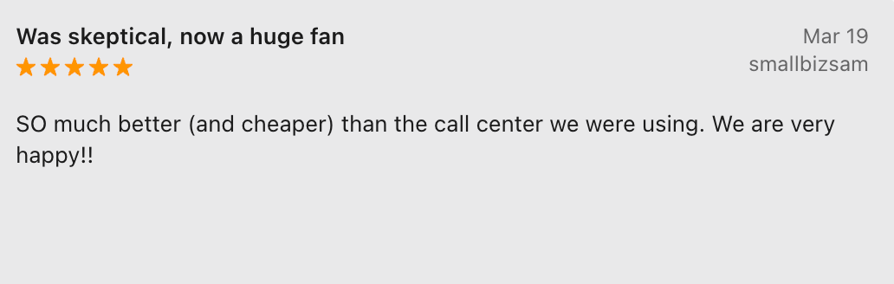
With such a small review sample, these ratings are a useful signal but not enough to draw broad conclusions about customer satisfaction.
The Best 4 Rosie AI Alternatives in 2026
Most people looking for a Rosie AI alternative want more flexibility without giving up simplicity, or a more capable phone system that can scale with their business. CloudTalk is better suited to teams that need deeper integrations, routing, and outbound calling. Smith.ai and Upfirst are worth considering if you want a different AI answering approach. Here are the top Rosie AI alternatives compared:
Rosie AI Alternatives Compared
| Capability | CloudTalk | Smith.ai | GoodCall | Upfirst |
|---|---|---|---|---|
| Best for | Growing teams needing AI calling on a full business phone system | Businesses wanting AI + human receptionist support | Simple AI answering with usage-based pricing | Small businesses wanting a simple AI receptionist |
| Starting price | From $99/mo (200 min) | Free (25 calls); $150/mo (75+ calls) | $66/agent/mo | From $24.95/month (30 calls) |
| G2 rating | 4.4/5/5 | 4.8/5 | 3.5/5 | 4.9/5 |
| Setup | Self-service agent setup in under 10 minutes | Guided setup | No-code setup | Simple setup |
| Conversation depth | Free-flowing conversations with intent understanding and knowledge-base grounding | AI receptionist with human escalation | Logic flows and configurable call handling | AI receptionist for common inbound requests |
| CRM integrations | 100+ native integrations with two-way sync | Integrations available depending on plan | Zapier and other integrations | Integrations available depending on plan |
| Language support | 70+ languages and accents | English and Spanish | English-first platform with limited multilingual capabilities | 35+ languages |
| Inbound / outbound | Both | Outbound options only for human agents | Primarily inbound | Primarily inbound |
| Pricing model | Bundled plans with minutes included | Monthly plans based on call volume and service level | Plans per agent based on unique customers | Monthly plans based on call volume |
| Best alternative to Rosie when... | You need more scalability, integrations, or outbound calling | You want AI with access to human receptionists | You prefer agent-based AI answering | You want simple and affordable AI answering |
Why CloudTalk AI Receptionist Is Worth Considering
Rosie AI is an easy and low-cost option for inbound calls. CloudTalk AI Receptionist is built for businesses that need more—from deeper CRM integrations and multilingual support to advanced call handling and outbound calling. Here’s how they compare:
Rosie AI vs CloudTalk: How Do the Features Compare?
Rosie AI vs CloudTalk
| Capability | Rosie AI | CloudTalk |
|---|---|---|
| Conversation depth | FAQ and scenario-based: 2 scenarios on Professional, 5 on Scale, unlimited on Growth | Free-flowing two-way conversation. Understands intent, asks follow-up questions, pulls answers from a knowledge base, acts in connected systems, and escalates to a human only when needed |
| CRM integration | Zapier on every plan, no first-party connectors | 100+ native integrations with two-way sync of contacts, calls, recordings and AI summaries |
| Language support | English and Spanish on every plan | 70+ languages and accents on the AI Voice Agent |
| Inbound and outbound | Positions itself as an inbound answering service | Both. Inbound & outbound calls, including scheduling, qualification, routing, and follow-ups |
| Appointment scheduling | Appointment links by text on Professional, direct calendar booking on Scale and Growth | Appointment scheduling templates with calendar/CRM integrations and outbound reminders |
| Setup simplicity | Auto-trains from your Google Business Profile and website. Effectively zero configuration | Self-service configuration lets a non-technical user build an agent in under 10 minutes |
| Pricing model | Flat tier with a hard minute cap: $49/250 min, $149/1,000 min, $299/2,000 min. Overage rate not published. 7-day trial | AI Receptionist from $99/month for 200 minutes. 14-day free trial with 50 free AI minutes included |
| Compliance documentation | Baseline security and data-handling | SOC 2 Type 1 and Type 2, GDPR compliant, HIPAA compliant with BAA support, plus STIR/SHAKEN |
Rosie AI vs CloudTalk: When Should You Switch?
The signals are specific:
- You're repairing Zaps to keep caller data flowing into your CRM
- Callers keep asking questions your scenarios don't cover, so the agent takes a message instead of resolving the call
- You need a third language on the line
- You've added a location or service line that needs different intake questions
- You want the agent to call people, not only answer them
Final Verdict: Is Rosie AI Worth It?
Rosie AI is worth considering if your priority is simple, affordable inbound call answering. It’s easy to set up, supports English and Spanish, and covers the basics without requiring much technical work.
The trade-off is flexibility. Two languages, no native CRM integrations, and no outbound calling make Rosie better suited to straightforward, stable operations than growing businesses with more complex workflows.
If you need a more complete phone system that can scale with your business, CloudTalk’s AI Voice Agent offers deeper CRM integrations, 70+ languages and accents, advanced call routing, and inbound and outbound calling—all within the same phone system.
Still relying on a setup where calls can slip through the cracks? It might be time to rethink how your business handles them.
Need more than a voicemail replacement?
Frequently Asked Questions about Rosie AI
Direct answers to the questions buyers ask most when evaluating Rosie AI.
Rosie AI is an AI phone answering service, sold at heyrosie.com, that answers calls forwarded from your business number, captures the caller's details, answers questions you configured in advance and texts you a summary.
Answering and dispatch services rarely publish an hourly rate. Most bill per minute, per call or in monthly minute bundles, so an hourly figure only exists after you divide a bill by the time your calls actually took.
Rosie AI costs $49/month for Professional with 250 minutes, $149/month for Scale with 1,000 minutes and $299/month for Growth with 2,000 minutes. Website Texting adds $50/month for 25 conversations. The rate past your allowance isn't published, so a seasonal spike is the one line you can't model in advance.
Rosie AI is worth it for a small business that currently sends missed calls to voicemail and takes a predictable set of calls in English or Spanish. It stops being worth it the moment you need different call handling per location or service line, which is the job of a phone answering system for a small business built on a phone system.
Rosie AI does both, but your tier decides how. Professional plan texts callers a booking link; Scale at $149/month books directly onto your calendar and adds warm and live transfers; Growth at $299/month adds waterfall transfers that walk down a list until somebody picks up.
Rosie AI integrates through Zapier, which ships on every plan and reaches thousands of apps, so it can create a CRM contact or fire a workflow after a call. What it doesn't have is a first-party CRM connector, so nothing syncs back into Rosie, the call never appears on the contact record, and your CRM won't pop the caller's details on screen. You build and maintain each automation yourself, which is the practical difference from native call center integrations.
Rosie AI handles the questions and scenarios you configured and takes a message when a caller steps outside them, capped at 2 message-taking scenarios on Professional, 5 on Scale and unlimited on Growth. That's a deliberate design choice, not a defect, and it's why setup takes minutes. If your callers ask multi-part or unscripted questions, you want a conversational virtual receptionist that asks follow-ups and pulls answers from a knowledge base.
CloudTalk is a good alternative once Rosie's single, flat configuration stops matching how you take calls. It adds free-flowing conversations, 100+ native integrations with two-way sync from the Essential plan, 70+ languages and outbound calling.