10 Best Voicemail Drop Software for Sales Teams in 2026
TL;DR:
Sales reps spend up to 15% of their dialing time listening to greetings and repeating the same message. Voicemail drop software eliminates that: one click leaves a perfect pre-recorded message and moves the rep to the next call. Here are the top picks for 2026:
- 01CloudTalk — best overall for sales teams that want voicemail drop inside a full calling platform (from $19/user/month, 4.4/5 on G2)
- 02Slybroadcast — best standalone ringless voicemail for bulk campaigns
- 03Drop Cowboy — best pay-per-drop pricing for small businesses
- 04VoiceDrop.ai — best AI voice cloning and personalization
- 05Kixie — best voicemail drop inside a multi-line power dialer
- 06PhoneBurner — best for high-velocity US outbound teams
- 07Klenty — best voicemail drop within a sales engagement sequence
- 08JustCall — best budget all-in-one calling with drops
- 09Ringover — best for European teams needing multichannel outreach
- 10Dialpad — best AI transcription and analytics alongside drops
In this guide, you'll find a side-by-side comparison table, detailed reviews with pros, cons, and real user feedback, a buyer's checklist, the legal rules around ringless voicemail, and quick answers to the most-asked questions.
Every unanswered call forces a choice: hang up and lose the touchpoint, or spend 30–60 seconds leaving a voicemail manually. Multiply that across 80–100 daily dials per rep, and your team burns hours a week talking to machines. Voicemail drop software solves this by dropping a pre-recorded message the moment a voicemail greeting is detected — no waiting, no repetition, no message fatigue by call #47.
We tested and compared the best voicemail drop software for businesses in 2026 — from standalone ringless services to full sales calling platforms — so you can pick the right tool for your team size, budget, and compliance needs.
Your Reps Shouldn't Talk to Machines
What Is the Best Voicemail Drop Software for Businesses in 2026?
CloudTalk is the best voicemail drop software for businesses in 2026. It combines one-click voicemail drop with a complete AI business calling platform — power and smart dialers, local numbers in 160+ countries, and 100+ CRM integrations — starting at $19/user/month with a 14-day free trial.
CloudTalk holds a 4.4/5 rating on G2 across 1,800+ reviews, with users consistently praising call quality and ease of use. And because drops happen inside a live dialing workflow (a real call is placed first), it's the compliance-safer approach compared to standalone ringless blasting.
That said, if you need bulk automated voice message campaigns without live dialing, a dedicated ringless tool like Slybroadcast or Drop Cowboy may fit better — we cover both below, along with when to use each. If you're wondering what is the best voicemail drop software for your specific team profile, jump to the recommendation section in the conclusion.
Our Methodology: How We Chose the Best Voicemail Drop Software for Businesses in 2026
We didn't rank these tools on marketing claims. Each platform was evaluated against the same criteria:
- Hands-on testing of voicemail drop workflows — recording, one-click drops, and automated drops triggered by answering machine detection
- Analysis of 6,000+ verified reviews from G2, Capterra, and Trustpilot across the 10 tools
- Pricing transparency — advertised rate vs. all-in cost with per-drop fees, add-ons, and minimums
- Dialer integration — whether drops work inside power/parallel dialing or only as standalone blasts
- CRM sync depth (HubSpot, Salesforce, Pipedrive) and campaign analytics
- Compliance tooling — TCPA safeguards, DNC scrubbing, opt-out management, and consent handling
- Voice quality and delivery rates reported by real users
Why Trust Our Software Reviews?
CloudTalk's content team has reviewed 200+ communication tools and analyzed thousands of verified user reviews. Every claim in this guide traces back to public review data, vendor documentation, or our own testing — never to opinion alone. Read our full software review methodology to see exactly how we test.
Comparison Table: 10 Best Voicemail Drop Software for Businesses (Based on Real Reviews & Ratings)
Skim this first — the detailed reviews below expand on every row.
| Software | Best for | Key features for sales teams | Starting price | G2 rating |
|---|---|---|---|---|
| CloudTalk | SMB & mid-market sales teams | One-click drops in power/smart dialer, AMD, 160+ country numbers, AI transcripts | $19/user/mo | 4.4/5 |
| Slybroadcast | Bulk ringless campaigns | Mass ringless delivery, scheduling, A/B testing, campaign analytics | ~$10/mo (100 drops) | 4.3/5 |
| Drop Cowboy | Small businesses & real estate | Pay-per-drop RVM + SMS, voice cloning, Zapier | ~$0.05/drop | 4.5/5 |
| VoiceDrop.ai | AI-personalized outreach | AI voice cloning, dynamic personalization, API | ~$95/mo (1,000 drops) | 4.6/5 (few reviews) |
| Kixie | CRM-connected power dialing | One-click drops in multi-line PowerDialer, local presence, auto-SMS follow-up | $35/user/mo + usage | 4.7/5 |
| PhoneBurner | High-velocity US outbound | Instant beep-free drops, 1-second AMD, workflow automation | $140/user/mo (annual) | 4.7/5 |
| Klenty | Sequence-based sales engagement | Drops inside parallel dialer, cadences, email+call sequences | $50/user/mo | 4.6/5 |
| JustCall | Budget all-in-one calling | Drops in power/predictive dialer, SMS workflows, 100+ integrations | $29/user/mo | 4.3/5 |
| Ringover | European multichannel teams | Voicemail drop, WhatsApp/SMS, local EU numbers | $21/user/mo (annual) | 4.6/5 |
| Dialpad | AI analytics-first teams | Drops + real-time AI transcription, coaching, Ai analytics | $15/user/mo (annual) | 4.4/5 |
Best Voicemail Drop Software for Businesses: Top 10 Picks
Now for the real dive-in. We'll go through 10 providers, their pros and cons, as well as real user reviews from the G2 platform.
1. CloudTalk — Best Voicemail Drop Software Inside a Complete Sales Calling Platform
CloudTalk is an AI-powered business calling platform trusted by 5,500+ sales and support teams. Its voicemail drop feature lets reps leave a perfect pre-recorded message with one click the instant answering machine detection spots a greeting — then instantly move to the next dial. Unlike standalone drop tools, CloudTalk wraps drops in a full phone system: power and smart dialers, IVR, analytics, and 100+ CRM integrations.
Key Features of CloudTalk:
Key Features
- One-click voicemail drop: Pre-record multiple messages and drop the right one per campaign without listening to a single beep.
- Answering machine detection: AI distinguishes humans from greetings so drops land accurately.
- Power & Smart Dialers: Automated queues that pair naturally with drops for maximum dials per hour.
- AI conversation intelligence: Transcripts, summaries, and sentiment reveal which sales voicemail scripts earn callbacks.
- Global numbers in 160+ countries: Local presence that lifts answer and callback rates abroad.
- Voicemail-to-email & transcription: Inbound voicemail features keep your own missed calls actionable too.
- 100+ CRM integrations: HubSpot, Salesforce, Pipedrive with two-way activity sync.
CloudTalk Pros and Cons
| Pros | Cons |
|---|---|
| Compliance-Safer Workflow: Drops are built into live dialing, so a real call attempt always comes first. | No Ringless Mass-Blast Mode: By design, drops follow a real call attempt — bulk RVM senders need a dedicated tool. |
| Transparent Pricing: Clear tiers, a 14-day free trial, and AI features bundled affordably. | Plan Placement: Voicemail drop sits on the Essential plan and up, not the entry tier. |
Who Is CloudTalk Best For?
SMB and mid-market sales teams making 50+ outbound dials per rep per day who want voicemail drops, dialers, CRM sync, and AI analytics in one platform instead of stitching together a dialer plus a separate drop tool.
How Much Does CloudTalk Cost?
Plans start at $25/user/month, with Essential at $29/user/month (billed annually) unlocking voicemail drop, smart dialers, and workflow automation. AI conversation intelligence is available from $9/user/month. A 14-day free trial requires no credit card.
Review Snapshot: What Are Real Users Saying About CloudTalk?
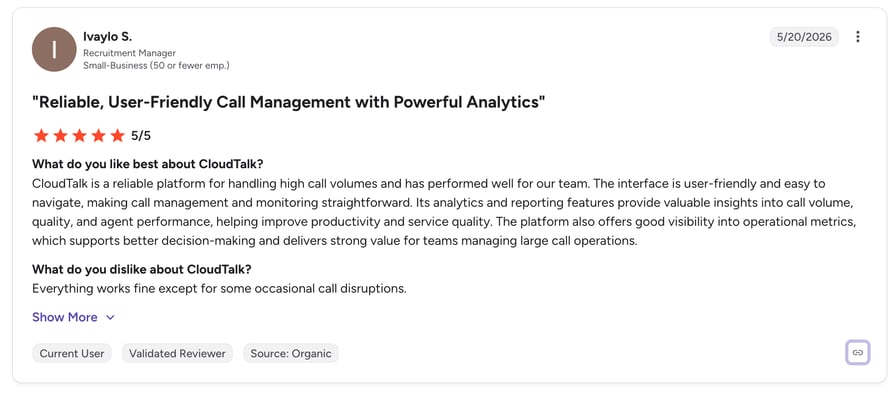
CloudTalk holds a 4.4/5 rating on G2 from 1,800+ reviews — one of the largest verified review bases in the business calling category. Users consistently highlight three themes: reps save 2–4 minutes per unanswered call with one-click drops, call quality stays clear across international dialing, and CRM sync eliminates manual logging. Critical reviews occasionally mention the learning curve of advanced routing features.
When to Use CloudTalk & When Not to Use It
Use CloudTalk when… you run structured outbound campaigns and want drops, dialing, and analytics unified; you sell internationally and need local numbers in 160+ countries; you want AI insight into which voicemail scripts actually generate callbacks.
Don't use CloudTalk when… you only need to blast thousands of ringless voicemails with no live calling — a dedicated RVM tool like Slybroadcast is cheaper for that single job.
2. Slybroadcast — Best Standalone Ringless Voicemail for Bulk Campaigns
Slybroadcast is one of the original ringless voicemail platforms, used by 3+ million senders to deliver pre-recorded messages straight to voicemail inboxes across US and Canadian mobiles and landlines — without the phone ringing. It's a pure-play drop tool: no dialer, no phone system.
Key Features of Slybroadcast:
Key Features
- Bulk ringless voicemail delivery with high reported success rates (95%+ across major carriers)
- Campaign scheduling, A/B testing of messages, and real-time delivery reports
- Text-to-speech and personalized audio recording via web or mobile app
- DNC scrubbing and opt-out management for compliance
- API and Zapier integrations to trigger drops from your CRM
Slybroadcast Pros and Cons
| Pros | Cons |
|---|---|
| Fast Launch: Dead-simple to get a bulk campaign live in minutes, with a mobile app for on-the-go management. | Costs Stack at Volume: Pay-per-drop pricing adds up quickly on large lists. |
| Compliance Tooling Included: DNC scrubbing and opt-out management come built in. | US/Canada Only: No live-calling capability, and ringless delivery carries TCPA consent requirements you must manage carefully. |
Who Is Slybroadcast Best For?
Marketing teams, real estate agents, and service businesses sending appointment reminders or promotional automated voice message campaigns to opted-in lists.
How Much Does Slybroadcast Cost?
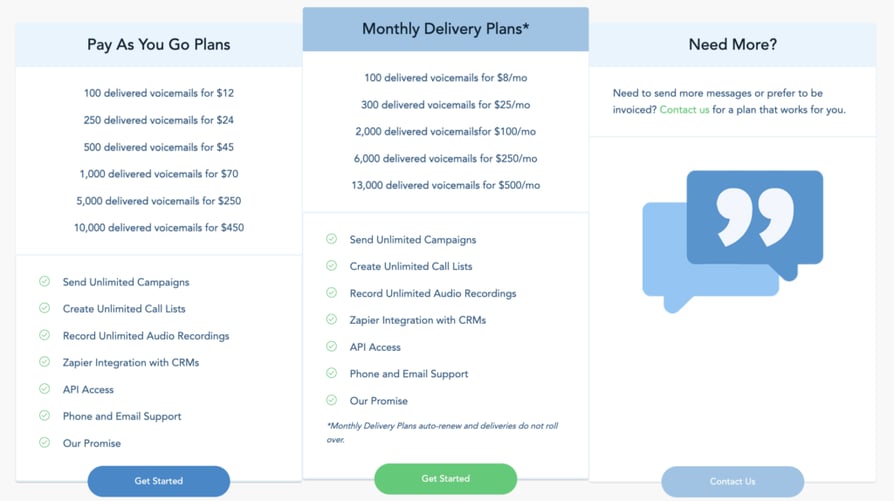
Pay-as-you-go from roughly $10/month for 100 messages, with volume packages that lower the per-drop rate; custom pricing for enterprise volumes.
Review Snapshot: What Are Real Users Saying About Slybroadcast?
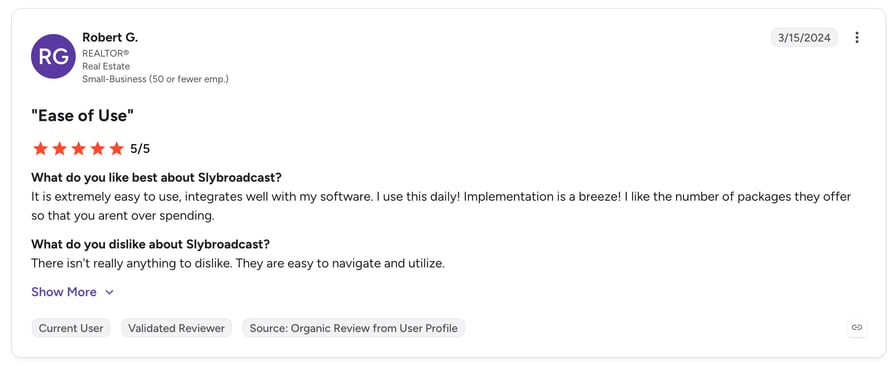
Slybroadcast sits around 5/5 on G2 from a modest review base (~1 review so far). Users praise the speed of launching bulk campaigns and the campaign analytics; the recurring caution in reviews is managing consent lists properly and per-drop costs at scale.
When to Use Slybroadcast & When Not to Use It
Use Slybroadcast when… you have an opted-in contact list and want to reach thousands of voicemail inboxes without staffing a calling team.
Don't use Slybroadcast when… your reps need drops during live dialing sessions, or you're contacting cold lists — ringless blasts to non-consenting recipients invite TCPA exposure.
3. Drop Cowboy — Best Pay-Per-Drop Pricing for Small Businesses
Drop Cowboy is a ringless voicemail and SMS platform built for small businesses and real estate teams. It focuses on affordability and simplicity: upload contacts, record (or clone) a voice message, and send — paying only per successful drop.
Key Features of Drop Cowboy:
Key Features
- Ringless voicemail drops from ~$0.05 per successful delivery
- Combined RVM + SMS campaigns from one dashboard
- AI voice cloning and text-to-speech for personalized drops
- Zapier and CRM integrations for triggered campaigns
- Delivery confirmation reporting
Drop Cowboy Pros and Cons
| Pros | Cons |
|---|---|
| Lowest Per-Drop Prices: Among the cheapest in the category, with no monthly minimums on entry plans. | No Dialer or Phone System: Purely a drop/SMS tool — sales teams outgrow it quickly. |
| Easy Learning Curve: SMS follow-up lives in the same tool for simple two-touch campaigns. | Light Analytics: Reporting trails sales-platform rivals, and consent compliance is fully on you. |
Who Is Drop Cowboy Best For?
Solo operators, small agencies, and real estate professionals running occasional campaigns who want to pay only for what they send. Pair it with proven real estate voicemail scripts for best results.
How Much Does Drop Cowboy Cost?
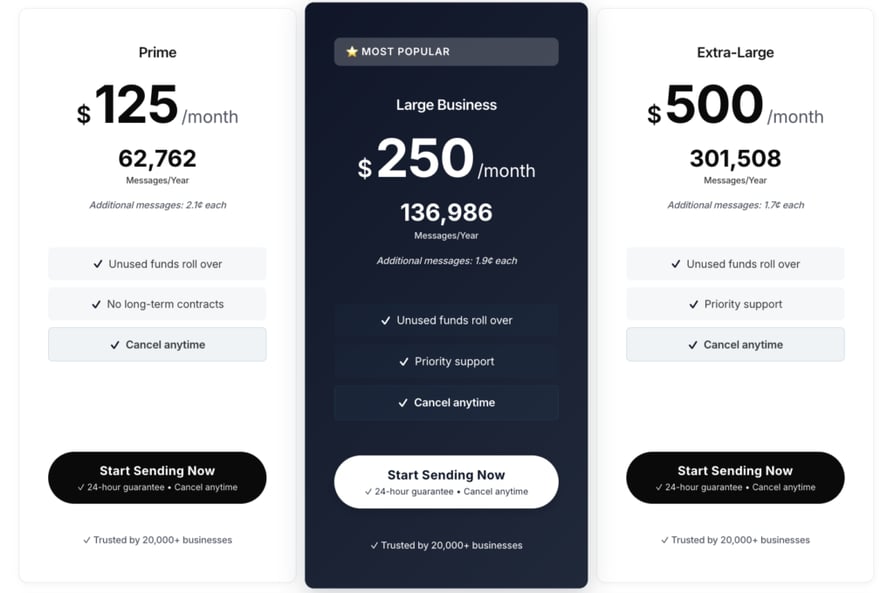
Pay-per-drop from about $0.02 per delivered message, with volume discounts; SMS credits priced separately.
Review Snapshot: What Are Real Users Saying About Drop Cowboy?
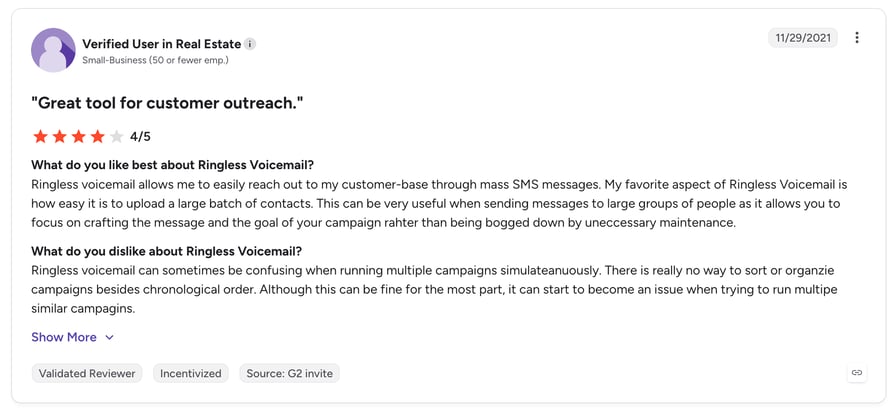
Drop Cowboy holds approximately 4.5/5 on G2 from a small but positive review base. Reviewers like the price-to-simplicity ratio and voice cloning; complaints center on occasional delivery delays and basic reporting.
When to Use Drop Cowboy & When Not to Use It
Use Drop Cowboy when… you're budget-conscious, send in bursts, and want RVM plus SMS without a subscription commitment.
Don't use Drop Cowboy when… you need team features, live dialing, or deep CRM reporting — sales teams outgrow it quickly.
4. VoiceDrop.ai — Best AI Personalization for Voicemail Campaigns
VoiceDrop.ai is an AI-first ringless voicemail platform whose signature feature is voice cloning: record your voice once, and the system generates unlimited personalized messages — inserting each prospect's name, company, or property address in your own voice.
Key Features of VoiceDrop.ai:
Key Features
- AI voice cloning with dynamic field personalization at scale
- Ringless delivery with real-time analytics and delivery confirmations
- Drag-and-drop campaign scheduler and script builder
- Robust API for CRM-triggered drops
- Compliance controls including opt-out handling
VoiceDrop.ai Pros and Cons
| Pros | Cons |
|---|---|
| Personalization at Scale: Voice-cloned, field-personalized drops that generic blasts can't match. | Higher Entry Price: Costs more than pay-per-drop rivals for occasional senders. |
| Modern Platform: Strong analytics, clean interface, and API flexibility. | Young Company: Small review base, and still a standalone tool with no dialer. |
Who Is VoiceDrop.ai Best For?
Growth teams and agencies running high-volume outreach where a personalized automated voice message meaningfully lifts callback rates.
How Much Does VoiceDrop.ai Cost?
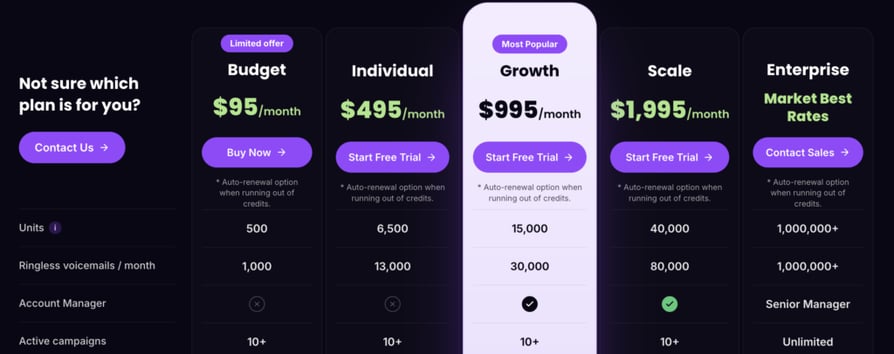
Plans start around $95/month including 1,000 drops, scaling with volume.
When to Use VoiceDrop.ai & When Not to Use It
Use VoiceDrop.ai when… personalization is your differentiator and you send 1,000+ drops monthly.
Don't use VoiceDrop.ai when… you send occasionally (Drop Cowboy is cheaper) or need drops inside live sales dialing (CloudTalk or Kixie fit better).
5. Kixie — Best Voicemail Drop Inside a Multi-Line Power Dialer
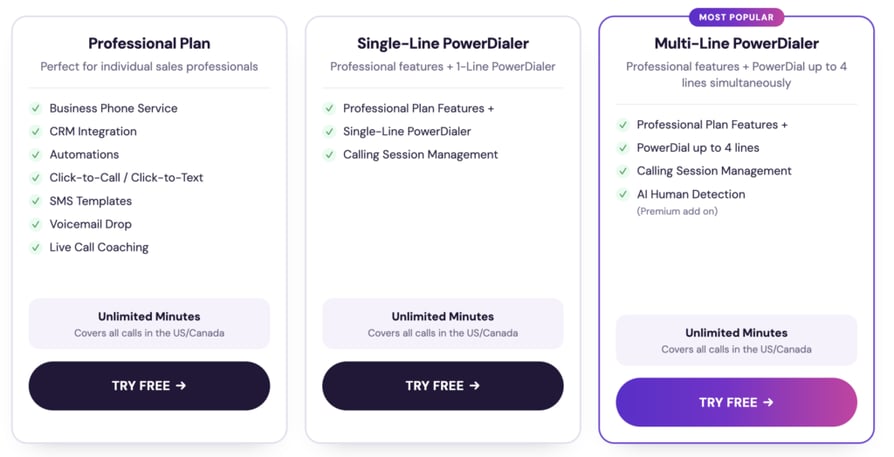
Kixie is a sales engagement platform whose PowerCall dialer includes one-click voicemail drops. When answering machine detection identifies a greeting, reps (or automation) drop a pre-recorded message and the dialer keeps working the list.
Key Features of Kixie:
Key Features
- One-click drops within the PowerDialer — multi-line dialing up to 10 lines on the Outbound PowerCall tier
- AI answering machine detection for automated drops (paid add-on)
- Automatic SMS follow-up immediately after a drop
- Local presence dialing and spam-risk number monitoring
- Native integrations with 25+ CRMs including HubSpot and Salesforce
Kixie Pros and Cons
| Pros | Cons |
|---|---|
| Connect-Rate Tooling: Drops plus instant SMS in one motion, with strong local presence features. | Usage Fees Add Up: Per-minute charges and add-ons (AI voice detection, multi-line) stack on top of seat prices. |
| Deep CRM Automation: Excellent HubSpot/Salesforce workflows, backed by a 4.7/5 G2 rating. | Platform Commitment: Full functionality requires adopting Kixie as your phone system; multi-line dialing is top-tier only. |
Who Is Kixie Best For?
US-focused outbound teams on HubSpot or Salesforce that want drops embedded in aggressive power dialing.
How Much Does Kixie Cost?
From $35/user/month (Integrated) and $65/user/month (Professional) to $95/user/month (Outbound PowerCall, which unlocks multi-line dialing) — all billed quarterly, plus calling-minute usage; custom enterprise tiers. A 7-day free trial is available.
Review Snapshot: What Are Real Users Saying About Kixie?
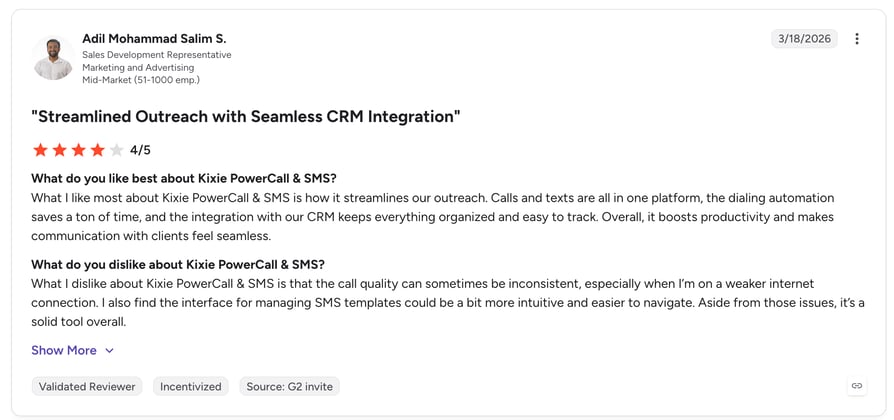
Kixie rates 4.7/5 on G2 from 800+ reviews. Users report significant lifts in daily conversations and love the drop-then-text workflow; criticism focuses on billing complexity and occasional call-quality hiccups at max line counts.
When to Use Kixie & When Not to Use It
Use Kixie when… your team lives in the CRM and dials multi-line all day.
Don't use Kixie when… you need international coverage or predictable flat pricing — usage fees make budgeting harder.
6. PhoneBurner — Best for High-Velocity US Outbound Teams
PhoneBurner is a power dialer built for speed: it detects voicemail in about one second and drops your message instantly — no waiting for the beep — letting reps push through 60–80 contacts per hour with zero post-call lag.
Key Features of PhoneBurner:
Key Features
- Instant, beep-free voicemail drops during power dialing
- Industry-leading answering machine detection speed (~1 second)
- Built-in email and SMS follow-up automation
- Local presence, branded caller ID, and spam remediation
- Native CRM plus Salesforce/HubSpot integrations
PhoneBurner Pros and Cons
| Pros | Cons |
|---|---|
| Fastest Drop Workflow: ~1-second detection and beep-free drops we couldn't beat elsewhere. | Premium Pricing: From $140/user/month billed annually — steep for low-volume teams. |
| No Per-Minute Fees: Unlimited dialing at a flat seat price, with strong deliverability tooling. | Single-Channel, US-Centric: Voice-only focus with no native WhatsApp; SMS is Premium-tier only. |
Who Is PhoneBurner Best For?
Dedicated US outbound teams — insurance, mortgage, logistics — where rep talk-time per hour is the KPI that matters.
How Much Does PhoneBurner Cost?
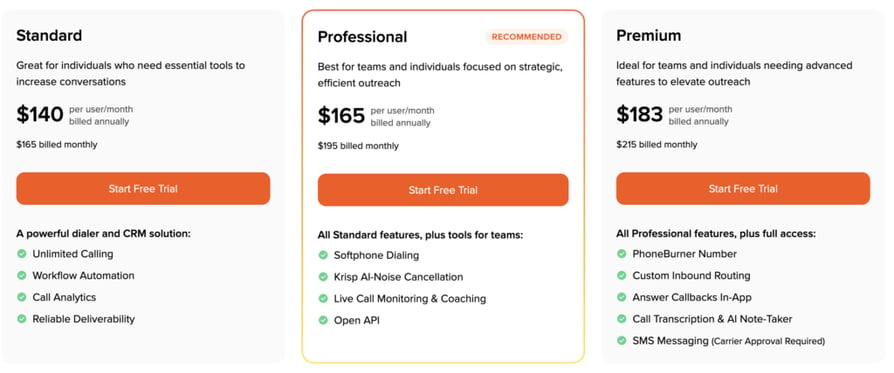
From $140/user/month billed annually for Standard (unlimited dialing included), with Professional at $165 and Premium at $183 adding advanced automation, longer recording retention, and SMS. Monthly billing runs $165–$215. Free trial available.
Review Snapshot: What Are Real Users Saying About PhoneBurner?
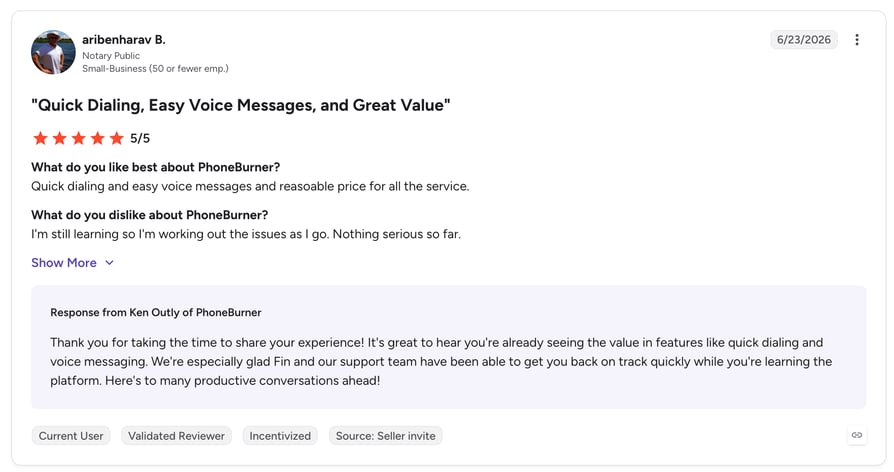
PhoneBurner rates 4.7/5 on G2 across 1,300+ reviews. Reviewers consistently cite 2–4x more conversations per hour; the main gripes are price and the platform's single-channel focus.
When to Use PhoneBurner & When Not to Use It
Use PhoneBurner when… maximum dials-per-hour is the goal and budget allows premium per-seat pricing.
Don't use PhoneBurner when… you're international, multichannel, or cost-sensitive.
7. Klenty — Best Voicemail Drop Within Sales Sequences
Klenty is a sales engagement platform where calls — and voicemail drops — live inside multichannel cadences. Its Parallel and Power Dialer modes include AI voicemail detection and pre-recorded drops, then automatically advance prospects to the next email or LinkedIn step.
Key Features of Klenty:
Key Features
- Voicemail drops in Parallel Dialer (up to 5 simultaneous lines)
- AI-powered voicemail detection
- Multichannel sequences: call, email, LinkedIn, SMS, WhatsApp
- CRM-native workflows for HubSpot, Salesforce, Pipedrive, Zoho
- Call recording, dispositions, and coaching analytics
Klenty Pros and Cons
| Pros | Cons |
|---|---|
| Cadence-Native Drops: Voicemails fit naturally into full sequences and trigger the next touch automatically. | Tier Gating: Dialer and calling features require the Growth plan or higher, and some dialer capabilities are add-ons. |
| Parallel Dialing Value: Strong price-to-power ratio with a 4.6/5 G2 rating and transparent pricing. | Thinner Phone System: Routing and IVR depth trail dedicated calling platforms; some reviews mention CRM sync lags. |
Who Is Klenty Best For?
SDR teams running structured multichannel sequences who want calling and drops as one step among many.
How Much Does Klenty Cost?
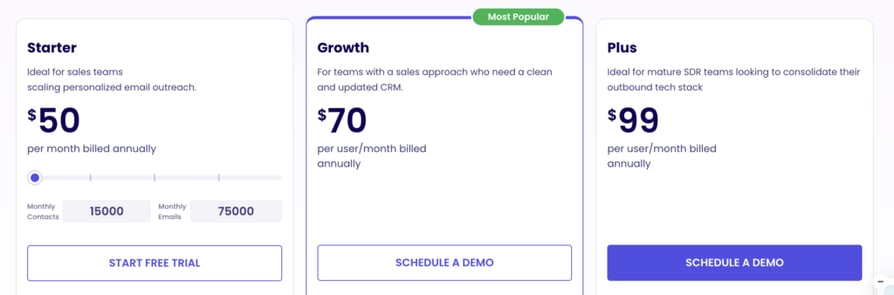
Sales engagement plans from $50/user/month billed annually (Startup, email-focused); multichannel outreach with the dialer starts on Growth at $70/user/month, with Pro at around $100/user/month adding AI credits and advanced coaching. Free trial available.
Review Snapshot: What Are Real Users Saying About Klenty?
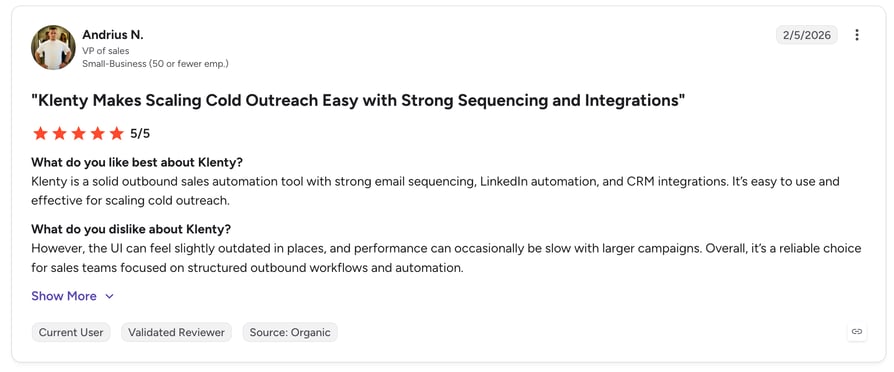
Klenty rates 4.6/5 on G2 from 400+ reviews. Users praise cadence automation and the parallel dialer's price-to-power ratio; critical notes mention occasional sync lags with CRMs.
When to Use Klenty & When Not to Use It
Use Klenty when… voicemail drops should trigger follow-up emails automatically inside a sequence.
Don't use Klenty when… you need a full business phone system with inbound routing and global numbers.
8. JustCall — Best Budget All-in-One Calling With Drops
JustCall is a cloud phone system for SMBs that bundles voicemail drop into its Power and Predictive dialers. AMD can auto-drop messages on unanswered calls, and SMS workflows fire follow-ups — all at an accessible per-seat price.
Key Features of JustCall:
Key Features
- One-click and AMD-triggered automatic voicemail drops
- Power, predictive, and dynamic dialers
- SMS/MMS automation and WhatsApp integration
- 100+ integrations including HubSpot, Pipedrive, Salesforce
- AI coaching, transcriptions, and sentiment on higher tiers
JustCall Pros and Cons
| Pros | Cons |
|---|---|
| Feature-per-Dollar: Multiple stored voicemail recordings per campaign and a broad integration catalog at SMB prices. | Mixed Call-Quality Reviews: Occasional audio issues surface in its 4.3/5 G2 rating. |
| Quick Setup: Calling, texting, and drops live in one tool from day one. | Dialers Gated Higher: Sales dialer features require the Pro plan; support responsiveness is a recurring complaint. |
Who Is JustCall Best For?
Budget-conscious SMB teams that want calling, texting, and voicemail drops in one tool without enterprise pricing.
How Much Does JustCall Cost?
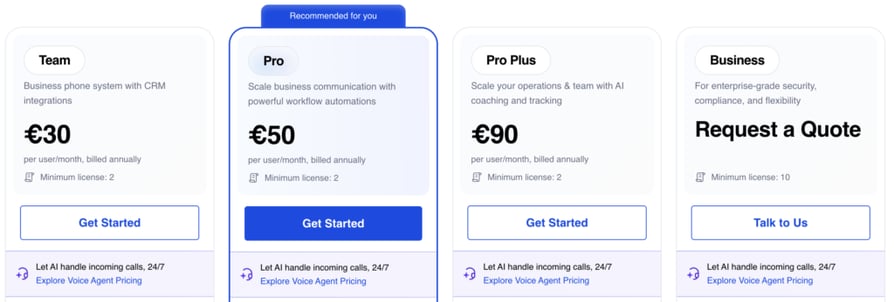
From $29/user/month (Team, annual billing, 2-user minimum); the Pro plan with the power dialer and Salesforce CTI runs $49/user/month, and Pro Plus with AI coaching is $89/user/month. Free trial available.
Review Snapshot: What Are Real Users Saying About JustCall?
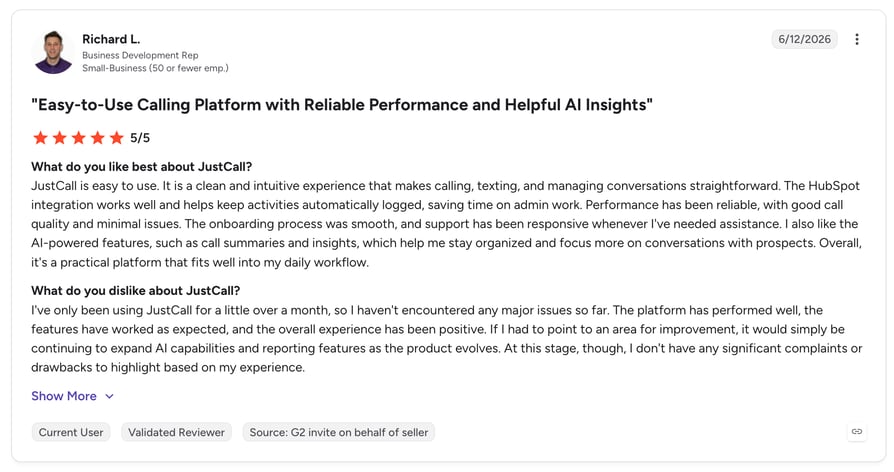
JustCall rates 4.3/5 on G2 from 2,000+ reviews. Positive reviews emphasize value and breadth; negative ones cite occasional audio issues and slow support — worth piloting before committing a large team.
When to Use JustCall & When Not to Use It
Use JustCall when… you want the cheapest credible all-in-one with automated drops.
Don't use JustCall when… call quality is mission-critical for enterprise deals — test head-to-head first.
9. Ringover — Best for European Teams Needing Multichannel Outreach
Ringover is a European cloud calling platform with voicemail drop built into its outbound tooling. It pairs local numbers across Europe with WhatsApp and SMS channels, making it a natural pick for EMEA-based sales teams.
Key Features of Ringover:
Key Features
- Pre-recorded voicemail drops in the dialer (higher tiers/add-ons)
- Local numbers across 65+ countries with strong EU coverage
- WhatsApp, SMS, and video in one workspace
- CRM integrations (HubSpot, Salesforce, Pipedrive, Sellsy)
- Call analytics, dual listening, and coaching tools
Ringover Pros and Cons
| Pros | Cons |
|---|---|
| GDPR-First Infrastructure: European hosting plus unlimited calling bundles to many destinations. | US-Style Dialing Trails Rivals: High-velocity features lag Kixie/PhoneBurner; dialer and campaigns need higher tiers or add-ons. |
| Clean UX: Simple, multichannel workspace backed by a 4.6/5 G2 rating. | Smaller Integration Catalog: Fewer native connections than JustCall; occasional mobile app bugs reported. |
Who Is Ringover Best For?
European SMBs and multilingual teams prospecting across EU markets who need compliant, multichannel outreach.
How Much Does Ringover Cost?
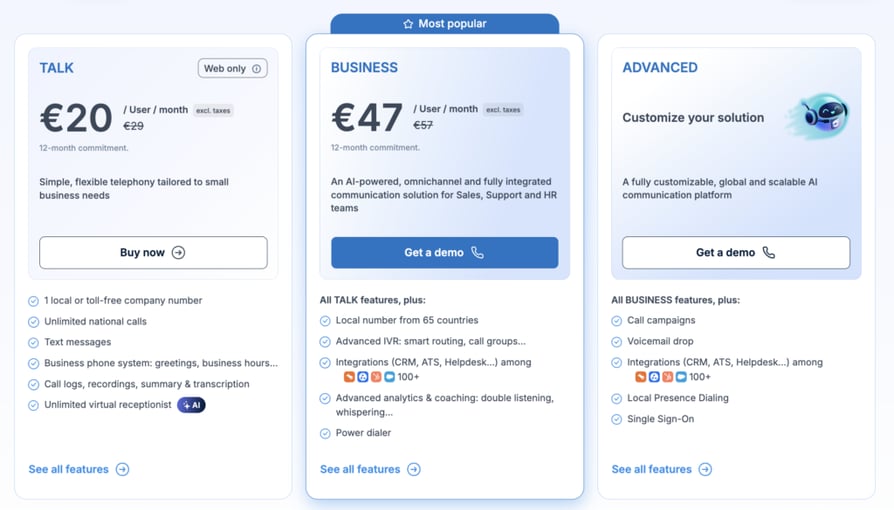
From $21/user/month billed annually for Smart ($29 on monthly billing), with Business at $44 and Advanced at $54 adding coaching and campaign tooling; power dialer and campaign features may require the Advanced tier or paid add-ons. Free trial available.
Review Snapshot: What Are Real Users Saying About Ringover?
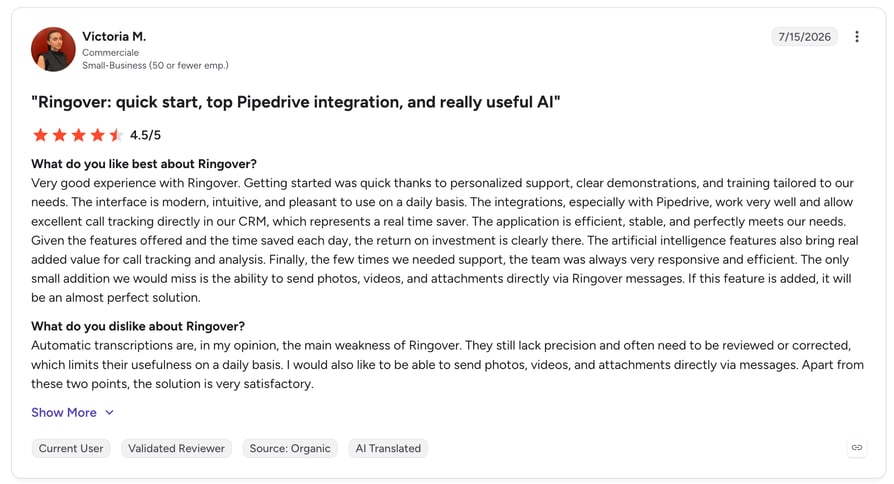
Ringover rates 4.6/5 on G2 from 250+ reviews. Users highlight unlimited international bundles and simplicity; criticisms include occasional mobile app bugs and add-on costs that stack up.
When to Use Ringover & When Not to Use It
Use Ringover when… your pipeline is European and WhatsApp is a core channel.
Don't use Ringover when… your motion is US high-volume power dialing.
10. Dialpad — Best AI Transcription and Analytics Alongside Drops
Dialpad is an AI-native communications platform where voicemail drop sits next to its real strength: Dialpad Ai transcribes every call live, surfaces coaching moments, and analyzes what messaging works. Drops are available, though auto-drop via AMD is not.
Key Features of Dialpad:
Key Features
- Pre-recorded voicemail drop in the sales dialer
- Real-time AI transcription and live coaching cards
- Ai CSAT, sentiment, and keyword analytics
- Salesforce, HubSpot, and Google Workspace integrations
- Global voice infrastructure with 100% uptime SLA on top tier
Dialpad Pros and Cons
| Pros | Cons |
|---|---|
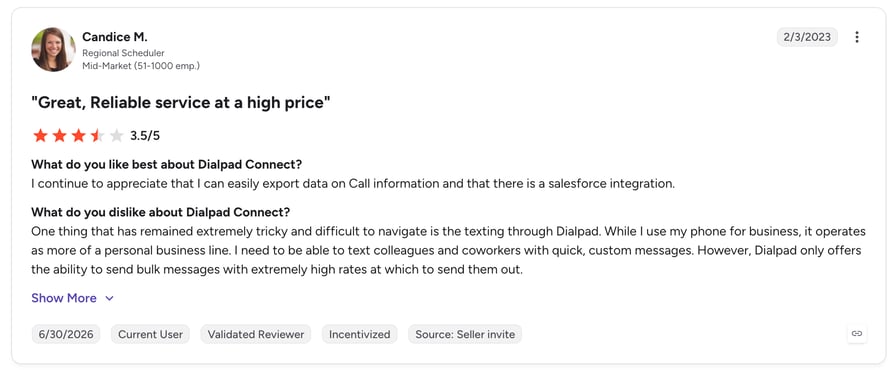
| Best-in-Class AI Transcription: Live transcripts, coaching cards, and visual voicemail built in. | No AMD Auto-Drop: Reps click manually on every unanswered call, slowing high-volume campaigns. |
| Polished UX and Ecosystem: Clean apps with strong Google Workspace and Salesforce ties. | Drops Are Secondary: Sales dialer features require the separate Dialpad Sell product. |
Who Is Dialpad Best For?
Teams that prioritize conversation intelligence and coaching, where voicemail drops are a convenience rather than the core workflow.
How Much Does Dialpad Cost?
Dialpad Connect (voice) from $15/user/month billed annually ($27 on monthly billing); the outbound sales dialer lives in Dialpad Sell, from $39/user/month billed annually. Free trial available.
Review Snapshot: What Are Real Users Saying About Dialpad?
Dialpad rates 4.4/5 on G2 from 2,000+ reviews. Reviewers rave about transcription accuracy and meeting AI; outbound-focused users note the dialer is less aggressive than dedicated power dialers.
When to Use Dialpad & When Not to Use It
Use Dialpad when… AI analytics on every conversation matters more than raw dial volume.
Don't use Dialpad when… you need automated drops on high-volume campaigns — the manual-only workflow slows reps down.

One click. One perfect voicemail. On to the next dial. See how much time your team wins back with CloudTalk — free for 14 days, no credit card needed.

How to Choose the Right Voicemail Drop Software for Your Sales Team?
Ten credible options is nine too many for a shortlist. Use these five filters to narrow fast — they're the criteria that actually separate the leading voicemail drop software for sales from tools you'll replace in six months.
1. Integrated Dialer vs. Standalone Ringless Tool
Decide first whether drops should happen during live dialing (CloudTalk, Kixie, PhoneBurner) or as standalone ringless blasts (Slybroadcast, Drop Cowboy). Dialer-integrated drops follow a real call attempt — the approach regulators treat most favorably — while ringless blasting is faster for bulk sends but demands airtight consent. If your reps also make calls that need to go straight to voicemail intentionally, integrated platforms handle both motions.
2. Compliance Safeguards
Ask every vendor how they handle consent, DNC scrubbing, opt-outs, and calling-hours restrictions. In the US, the FCC ruled in 2022 that ringless voicemails are "calls" under the TCPA — meaning prior consent rules apply, with violations running $500–$1,500 per message. If you're asking is ringless voicemail legal, the short answer: yes with proper consent, expensive without it.
3. Answering Machine Detection Quality
Drop accuracy lives and dies on answering machine detection. Weak AMD drops messages on live humans (awkward) or misses greetings entirely (wasted touch). Test detection speed too — PhoneBurner detects in ~1 second; slower tools burn rep time on every call.
4. CRM Sync and Follow-Up Automation
A drop should log automatically to the contact record and trigger the next step — an SMS, an email, a task. Tools like Kixie (drop-then-text) and Klenty (drop inside cadences) turn a single voicemail into a coordinated sequence.
5. Analytics That Prove Callbacks
The only metric that matters is callbacks per hundred drops. Prioritize platforms that report delivery, listen-through, and callback attribution — and pair them with tested scripts. Need a starting point? Generate one with CloudTalk's free voicemail greeting generator, or adapt industry templates like medical office voicemail greetings.
Key Features to Look For in Voicemail Drop Software
- One-click and AMD-triggered automatic drops with multiple stored recordings per campaign
- Built-in compliance tools: DNC scrubbing, consent tracking, opt-out management, calling-hours rules
- Native CRM integrations with two-way activity logging
- Automated follow-up workflows (SMS/email) triggered by a drop
- Delivery and callback analytics to A/B test messages
Not Sure Which Fits Your Team? Let's Map It Out Together.
Quick Answers: What People Ask Most About Voicemail Drop Software
What is voicemail drop software?
Voicemail drop software lets sales reps leave a pre-recorded message in a prospect's voicemail inbox with one click, instead of repeating the same message manually on every unanswered call. Integrated versions work inside a dialer using answering machine detection; ringless versions deliver messages to voicemail servers without ringing the phone at all.
Are voicemail drops illegal?
No — voicemail drops are legal when done correctly. Drops left after a real call attempt follow standard outbound calling rules. Ringless voicemail is stricter: the FCC classifies it as a "call" under the TCPA, so you need prior consent, must honor Do-Not-Call lists, and must provide opt-outs. Violations can cost $500–$1,500 per message.
What are the types of voicemail drop software?
There are two main types. Dialer-integrated drops (CloudTalk, Kixie, PhoneBurner) trigger during live calling sessions when a greeting is detected. Standalone ringless voicemail tools (Slybroadcast, Drop Cowboy) deliver bulk messages directly to voicemail servers without any live dialing. Sales teams usually want the first; marketers with opted-in lists use the second.
How does voicemail drop software improve efficiency?
A manual voicemail takes 30–60 seconds per unanswered call; a drop takes one click. Across 80–100 daily dials where roughly three-quarters go unanswered, that recovers 45–90 minutes per rep per day — while keeping every message crisp and on-script instead of degrading by call #47.
What People Say on Reddit & Quora About the Best Voicemail Drop Software for Businesses
Community discussions add texture the vendor pages won't. Across r/sales, r/realestateinvesting, and Quora threads on voice mail services, the same themes repeat:
- Compliance anxiety dominates. The most-upvoted comments in ringless voicemail threads warn about TCPA lawsuits and recommend dialer-integrated drops (or scrubbed, opted-in lists) over cold blasting.
- Callback rates are modest but worthwhile. Practitioners typically report 3–10% callback rates on well-scripted drops — low per message, but meaningful when the marginal cost per drop is near zero.
- Script quality beats tool choice. Experienced sellers consistently argue that a tight 20–30 second message with a clear reason to call back outperforms any platform switch.
- All-in-one wins for teams. Solo users defend cheap per-drop tools, but team leads consistently recommend platforms where drops, dialing, and CRM logging live together — CloudTalk, Kixie, and PhoneBurner come up most often.
Stop Repeating Yourself on Every Call. Let Your Reps Drop a Perfect Voicemail in One Click — Try CloudTalk Free for 14 Days.
Top Voicemail Drop Software for Businesses by G2 Reviews & Ratings
Based on G2 reviews and ratings, CloudTalk is the top voicemail drop software with 1,800+ reviews and a 4.4/5 rating — the largest verified review base among comparable calling platforms with built-in drops.
| Platform | G2 reviews | G2 rating | Summary from G2 reviews |
|---|---|---|---|
| CloudTalk | 1,800+ | 4.4/5 | Praised for call quality, one-click drops, and CRM sync |
| Slybroadcast | ~90 | 4.3/5 | Reliable bulk RVM; watch per-drop costs at scale |
| Drop Cowboy | <50 | 4.5/5 | Affordable pay-per-drop; light reporting |
| VoiceDrop.ai | <50 | 4.6/5 | Impressive AI cloning; small review sample |
| Kixie | 800+ | 4.7/5 | Strong CRM workflows; billing complexity noted |
| PhoneBurner | 1,300+ | 4.7/5 | Fastest drops; premium per-seat price |
| Klenty | 400+ | 4.6/5 | Strong cadences; dialer gated to higher tiers |
| JustCall | 2,000+ | 4.3/5 | Great value; occasional audio and support gaps |
| Ringover | 250+ | 4.6/5 | Great EU coverage; lighter US dialing features |
| Dialpad | 2,000+ | 4.4/5 | Best-in-class AI transcription; no AMD auto-drop |
Conclusion: The Best Voicemail Drop Software for Every Business Size
The best voicemail drop software for sales teams 2026 isn't one-size-fits-all: the right pick depends on whether you're blasting opted-in lists, powering through dial sessions, or coaching a growing team. Here's the verdict by business size — and if you want to understand the underlying tech first, our explainer on what visual voicemail is covers how modern voicemail actually works.
For Solopreneurs and Micro-Businesses
Drop Cowboy (pay-per-drop from ~$0.05) or Slybroadcast (from ~$10/month) deliver bulk drops with no per-seat commitment. Keep lists opted-in and scripts short.
For SMB and Mid-Market Sales Teams
CloudTalk is the strongest overall pick: one-click drops inside power dialing, 160+ country coverage, AI analytics, and CRM sync from $19/user/month — with a 14-day free trial to prove it on your own call list. JustCall is the budget alternative; Klenty fits sequence-driven SDR teams.
For High-Volume Enterprise Outbound
PhoneBurner (fastest drops, unlimited dialing) and Kixie (multi-line + CRM automation) lead for US-centric velocity; Ringover leads for European operations; Dialpad wins where AI conversation analytics drive coaching.
Whichever route you take, the best voicemail drop software 2026 has to earn its keep in callbacks — so trial before you commit, and A/B test your scripts from week one.
Ready to Win Back an Hour Per Rep, Every Day? Try CloudTalk free for 14 days.

Frequently asked questions
CloudTalk is the best voicemail drop service for most businesses in 2026, combining one-click drops, AMD, power dialers, and CRM sync from $19/user/month with a 4.4/5 G2 rating.
No — ringless voicemail is legal in the US with proper consent. The FCC classifies it as a "call" under the TCPA, so prior consent, DNC scrubbing, and opt-outs are required. Violations run $500–$1,500 per message. See our voicemail guide.
Voicemail drops replace 30–60 seconds of manual message-leaving with one click, recovering 45–90 minutes per rep per day. Reps stay in dialing flow and message quality stays consistent — see how Power Dialer pairs with drops.
Yes. CloudTalk offers 100+ native CRM integrations with two-way sync that logs each drop automatically. Standalone ringless tools typically connect via Zapier or API instead of native CRM connectors.
Yes. Most platforms store multiple pre-recorded messages per campaign. Keep each message 20–30 seconds with one clear callback reason, and A/B test at least two variants — start with our sales voicemail scripts.
Voicemail drop leaves a pre-recorded message after a live call goes unanswered. Ringless voicemail delivers directly to the inbox without ringing the phone. Dialer-integrated drops (see CloudTalk's approach) are compliance-safer.
Pricing ranges from ~$0.05 per drop (Drop Cowboy) to $140+/user/month (PhoneBurner). Dialer-integrated platforms with drops start around $19–$35/user/month — see CloudTalk pricing for a transparent tier breakdown.