The headline Dialpad price only covers the Connect phone system: most calling, messaging, and AI features sit on higher tiers or paid add-ons, which is why the real Dialpad cost usually lands well above the advertised figure.
Dialpad Pricing in a Nutshell
Dialpad splits its pricing across four separate products. Here is the quick view of the Dialpad plans and where each one starts:
- 01Dialpad Connect (phone system): Standard $15, Pro $25, Enterprise custom (per user/month, billed annually).
- 02Dialpad Support (contact center): Essentials $80, Advanced $115, Premium $150 per user/month.
- 03Dialpad Sell (outbound sales): Essentials $39, Advanced $95, Premium $150 per user/month.
- 04Dialpad AI Agents: conversation-based pricing, quote only.
| Product | Starting price | Best for | Key features |
|---|---|---|---|
| Dialpad Connect | From $27/user/mo | Small to mid-sized teams needing a business phone system | Unlimited US/CA calling, SMS/MMS, voicemail transcription, AI call summaries, video meetings, CRM integrations (Pro and up) |
| Dialpad Support | From $95/user/mo | Customer support teams running inbound or omnichannel operations | Omnichannel routing, AI agent assist, real-time sentiment analysis, AI Scorecards, AI CSAT, workflow automation |
| Dialpad Sell | From $49/user/mo | Outbound sales teams needing dialers and AI coaching | Power dialer, local presence, AI Live Coach Cards, voicemail drop, Salesforce and HubSpot integrations |
| Dialpad AI Agents | Custom quote | Businesses automating inbound calls with virtual agents | 24/7 AI voice agents, natural conversation handling, call routing, CRM data capture, custom workflows |

Predictable pricing, no add-on maze.

What Are the Dialpad Connect Pricing Plans?
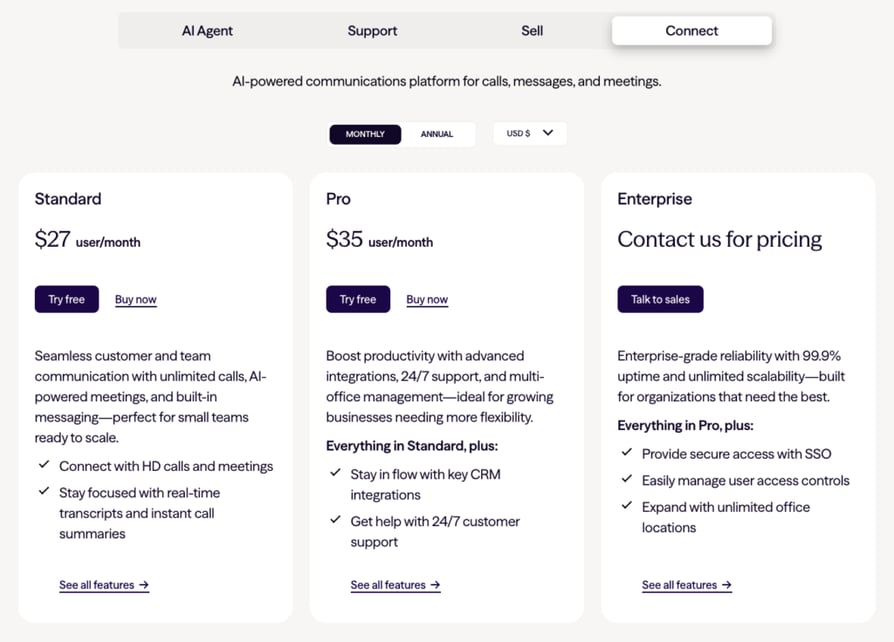
Dialpad Connect offers three plans: Standard ($15/user/mo), Pro ($25/user/mo), and Enterprise (custom quote). Only Standard and Pro have public pricing. Enterprise hides its price behind a quote and requires a 100-user minimum, and the platform leans heavily on paid add-ons that obscure the real total cost. These rates apply to annual billing: paying monthly pushes Standard to $27 and Pro to $35 per user.
| Feature | Standard | Pro | Enterprise |
|---|---|---|---|
| Annual pricing | $15 user/mo | $25 user/mo | Custom quote |
| Monthly pricing | $27 user/mo | $35 user/mo | Custom quote |
| User minimum | 1 | 3 | 100 |
| Unlimited US/CA calling | Yes | Yes | Yes |
| Additional numbers | No | Yes | Yes |
| Domestic SMS/MMS | Yes | Yes | Yes |
| International SMS | No | Yes | Yes |
| CRM integrations | No | Yes | Yes |
| 24/7 phone support | No | Yes | Priority |
| Ring groups | 3 max | 25 max | Unlimited |
| Single Sign-On (SSO) | No | No | Yes |
| Office locations | 1 | Up to 10 | Unlimited |
| Uptime SLA | No | No | 99.9% |
What Does the Dialpad Standard Plan Offer?
Dialpad's Standard plan starts at $15 per user per month (or $27 for monthly billing) and serves as an entry-level option for businesses seeking streamlined internal and external communication without advanced contact center features. It carries a 1-user minimum, so a solo operator or a two-person team can start without buying empty seats.
What Are the Dialpad Standard Plan Key Features?
- Unlimited calls within your country, the US, and Canada.
- Local SMS and MMS capabilities.
- AI-powered call and voicemail transcriptions.
- Integrations with Google Workspace and Microsoft 365.
What Is Missing From This Tier?
- Automated Call Distribution (ACD).
- Call Queuing.
- International SMS, CRM integrations, and a hard cap of 3 ring groups.
Who Is the Dialpad Standard Plan Best For?
Well suited for micro and small businesses looking for a platform that combines calling, messaging, and video, as long as they do not need CRM sync or contact-center routing yet.
What Does the Dialpad Pro Plan Offer?
Dialpad's Pro plan, priced at $25 per user per month (or $35 if billed monthly), builds on Standard with features tailored for growing businesses. In the common Dialpad Standard vs Pro decision, Pro is where most teams land, because it is the tier that unlocks CRM integrations and international messaging. Note the catch: Pro carries a 3-user minimum.
What Are the Dialpad Connect Pro Key Features?
- Global SMS capabilities.
- Multiple phone numbers per account.
- CRM integrations (Salesforce, Zendesk, HubSpot, Zoho, and more).
- 24/7 live agent support.
What Is Missing From This Tier?
- Single Sign-On (SSO) and priority routing.
- A Power Dialer (only available inside the separate Dialpad Sell product).
- A 99.9% uptime SLA (reserved for Enterprise).
Who Is the Dialpad Pro Plan Best For?
Designed for organizations expanding across multiple locations or managing larger teams that need CRM sync, international texting, and round-the-clock support.
What Does the Dialpad Enterprise Plan Offer?
Dialpad's Enterprise plan is crafted for global organizations that need advanced communication features, with Dialpad Enterprise pricing available only by contacting sales. It offers a 99.9% uptime guarantee for critical operations. The number to keep in mind here is the 100-user minimum, which effectively locks smaller teams out of the tier no matter how much they are willing to pay.
What Key Features Does the Dialpad Enterprise Plan Offer?
- Single Sign-On (SSO).
- Unlimited office locations and unlimited ring groups.
- Priority live agent support and a 99.9% uptime SLA.
Who Is the Dialpad Enterprise Plan Best For?
Best suited for large businesses with 100+ users and multiple office locations that need reliable communication tools without geographic limitations.
What Other Plans Does Dialpad Offer?
Besides Dialpad Connect, there are three other products. They are sold separately, so if you need both a business phone system and a contact center, you pay for both.
- Dialpad Support: built for inbound and omnichannel customer service teams. It comes in three tiers, and this is where Dialpad contact center pricing really lives. Price: Essentials $80/user/mo, Advanced $115/user/mo, Premium $150/user/mo, plus per-minute charges of $0.01 inbound and $0.02 outbound on top of the seat.
- Dialpad Sell: Dialpad's outbound sales platform, built for teams that need a dialer plus AI coaching. It also comes in three tiers. Price: Essentials $39/user/mo, Advanced $95/user/mo, Premium $150/user/mo (annual billing).
- Dialpad AI Agents: autonomous voice and text agents that handle interactions end to end, without a human in the loop. Price: conversation-based, quote only.
Does Dialpad Come With Add-Ons?
Many handy features are locked behind add-ons, and this is where the real Dialpad cost tends to climb. Some of the most common ones include:
- Additional local numbers: from $5/number/month.
- Additional international or toll-free numbers: from $15/number/month.
- Conference room line: from $15/number/month.
- Meetings for larger groups or 45+ minutes: from $15/user/month.
- Global Unlimited Calling: an office-wide add-on that includes 1,500 international minutes per office per month, after which calls are billed through Calling Credits.
- Internet fax, Platinum Support, Dialpad Business Intelligence, and AI CSAT: priced per request.
Are There Any Hidden Fees With Dialpad?
A few costs are not obvious from the pricing page. Dialpad charges a mandatory annual administrative fee per user (published accounts put it around $4 to $5 per user) covering regulatory filings and reporting. SMS is capped at roughly 250 messages per account, with $0.008 overages beyond that.
International calling is metered per minute once the Global Unlimited Calling allowance runs out, and monthly billing runs 40% to 80% higher than annual. Toll-free numbers cannot send or receive SMS, so Dialpad silently falls back to a local number, which catches some teams off guard.
Tired of decoding add-on invoices?
What Do Real Users Say About Dialpad Pricing on Reddit and G2?
Plan tables tell you the list price. Reviews tell you what the bill actually feels like once the add-ons and fees land. Here is what buyers report on Reddit, G2, and Trustpilot about Dialpad's pricing and value for money.
Dialpad Pricing Review on Reddit
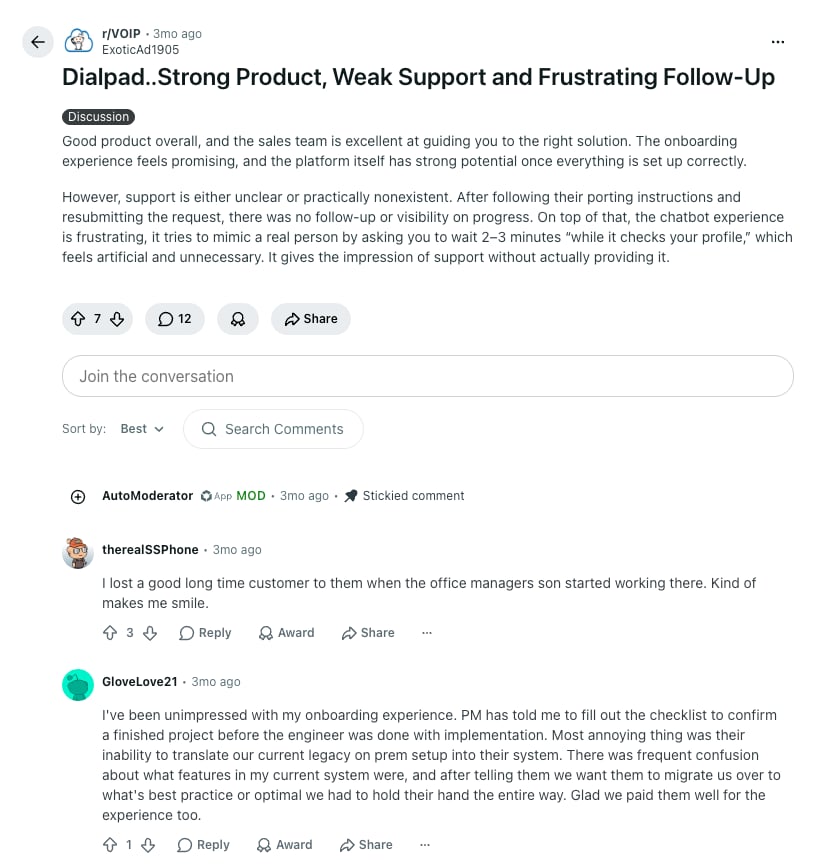
On Reddit's VoIP and sysadmin communities, the recurring theme is not the sticker price but the surprise on the invoice. Threads flag unexpected charges tied to add-ons and usage caps, and one widely quoted user went as far as calling Dialpad the "Spirit Airlines of the VoIP world," (thread now removed) rating support a 1 out of 10 and describing it as mostly AI that repeats knowledge-base articles.
However, true to the fickleness of Reddit reviewers, the same threads note a real upside, though: several users rate the mobile app around 9 out of 10 for texting and day-to-day calling.
The consensus is that the $15 entry price is fair for basic use with yearly payment, but the true cost climbs quickly once a team needs CRM sync, international calling, or contact-center features. You can browse the discussions on the r/VOIP community.
Dialpad Pricing Review on G2 and Trustpilot
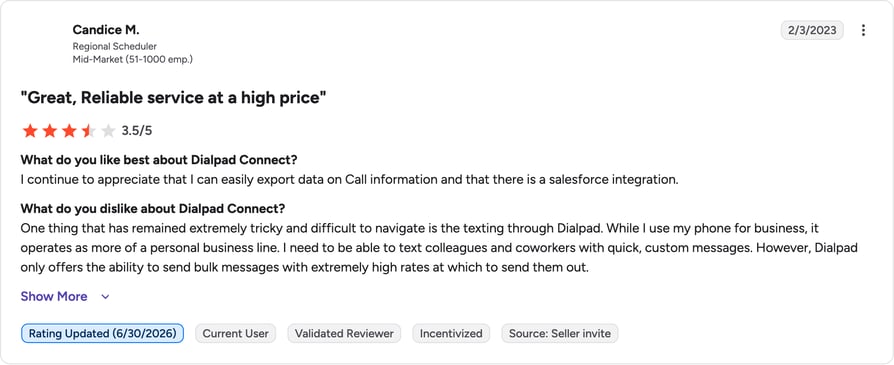
Dialpad Connect holds a solid 4.4 out of 5 on G2 across roughly 4,700 reviews, with heavy praise for AI transcription, call recording, and an intuitive interface. On pricing specifically, sentiment splits. A cluster of reviewers flag Dialpad as expensive once taxes and regulatory costs are added, and billing complaints are the loudest note: one G2 reviewer reported being charged more than double what they needed after the vendor failed to downgrade unused licenses, while another described paying well over the originally contracted rate.
Trustpilot echoes the pattern, with users citing slow connection times and support inconsistency alongside genuine praise for named agents. The takeaway for budgeting: the product quality is real, but license management and add-on creep are where teams overspend.
How Much Does Dialpad Cost per Month?
Dialpad pricing is per user per month, and the number you pay depends heavily on billing frequency. Annual billing is the advertised rate; choosing monthly adds a meaningful premium on every plan. Here is the Dialpad cost per month and per user across the Connect phone-system tiers, plus the specialized products, so you can budget the real Dialpad pricing per user per month.
| Plan | Annual (per user/mo) | Monthly (per user/mo) | Per-user pricing |
|---|---|---|---|
| Connect Standard | $15 | $27 | Yes (1-user min) |
| Connect Pro | $25 | $35 | Yes (3-user min) |
| Connect Enterprise | Custom quote | Custom quote | Yes (100-user min) |
| Support Essentials | $80 | Higher (contact sales) | Yes + per-minute fees |
| Support Advanced | $115 | Higher (contact sales) | Yes + per-minute fees |
| Support Premium | $150 | Higher (contact sales) | Yes + per-minute fees |
| Sell Essentials | $39 | $49 | Yes |
| Sell Advanced | $95 | $110 | Yes |
| Sell Premium | $150 | $170 | Yes |
The short version: the lowest realistic Dialpad monthly cost for a functioning small-business phone system is $15 per user on annual billing, but most teams that need CRM sync land on Pro at $25, and any team running a real contact center starts at $80 per user on Dialpad Support before usage fees.
Dialpad AI Voice Agent Pricing
Dialpad's AI story has two layers, and they are priced very differently. The first layer is Dialpad AI features baked into the Connect plans (this is why the Standard plan punches above its price): real-time call and voicemail transcription, AI call summaries or Recaps, and sentiment cues come included from $15 per user per month, with no separate AI add-on for those basics. So yes, there are Dialpad AI features in the Standard plan.
The second layer is Dialpad AI Agents, the autonomous virtual agents that answer and handle calls without a human. These sit on conversation-based pricing with no public per-conversation rate: you contact sales for a quote. That makes Dialpad AI voice pricing hard to forecast, because there is no published per-user or per-minute figure and no monthly ceiling once usage scales. A
dvanced AI analytics such as AI CSAT and AI Scorecards live on the higher-priced Dialpad Support tiers rather than in Connect, so an "AI-first" contact-center setup realistically starts at $80 per user per month plus AI Agent conversation costs on top.
By contrast, CloudTalk prices its AI Voice Agent and AI Receptionist as a transparent, published product tier rather than a quote-only line item, which makes AI cost far easier to plan around.
Dialpad Pricing for Call Recording and Transcription
One of the most searched Dialpad questions is what you pay for its signature feature: call recording paired with AI transcription. The good news for buyers is that this is one of the few areas Dialpad does not nickel-and-dime.
Call recording and real-time AI transcription are included on every Connect plan, starting at $15 per user per month, and they carry over into Support and Sell as well. Reviewers consistently cite transcription and recording as the features that justify the price.
Where the cost creeps in is around recording and transcription at scale. Extended recording storage, advanced or historical analytics on top of transcripts, and AI CSAT scoring move you toward the Support tiers ($80 and up).
International recording is also affected by metered per-minute international calling once the Global Unlimited allowance is spent. In other words, the recording itself is free on the base plan, but reporting on it and keeping it long term is what pushes the real price up.
What a Real Dialpad Pricing Bill Actually Looks Like
List prices rarely match the invoice. Below are four realistic scenarios showing what teams of different sizes actually pay for Dialpad once minimums, product splits, and common add-ons are factored in.
Scenario 1: The Tiny Team That Needs a CRM (2 Agents, Connect Pro)
The setup: A two-person sales or support desk that needs HubSpot or Salesforce sync and a second local number.
- The Pro trap: CRM integrations do not exist on Standard, so the moment this team wants call logging in their CRM, they are forced onto Pro. Pro carries a 3-user minimum, so two humans must pay for three seats.
- The quiet add-on: a mandatory administrative fee (roughly $4.50 per user) lands on every seat, and a second local number adds $5.
| Line item | Unit cost | Quantity | Subtotal |
|---|---|---|---|
| Connect Pro licenses (3-seat minimum) | $25.00 / seat | 3 | $75.00 |
| Administrative fee | ~$4.50 / seat | 3 | $13.50 |
| Extra local number | $5.00 / month | 1 | $5.00 |
| Monthly bill subtotal | ~$93.50 / month |
Real cost per active user: about $46.75/month, versus the $25 headline, because two people are paying for a three-seat Pro minimum plus fees.
Scenario 2: The Scaling Sales Team (20 Reps, Dialpad Sell)
The setup: A growing outbound SDR team that needs a power dialer, AI coaching, and native Salesforce calling.
- The product split: the power dialer lives in Dialpad Sell, not Connect, so this is a separate product purchase. To make calls inside Salesforce without a separate add-on, the team needs Sell Advanced at $95 per user per month.
- The extras: a handful of local presence numbers and the per-user administrative fee stack on top.
| Line item | Unit cost | Quantity | Subtotal |
|---|---|---|---|
| Sell Advanced licenses | $95.00 / seat | 20 | $1,900.00 |
| Administrative fee | ~$4.50 / seat | 20 | $90.00 |
| Extra local presence numbers | $5.00 / month | 6 | $30.00 |
| Monthly bill subtotal | $2,020.00 / month |
Real cost per active user: about $101/month. The $15 Connect entry price is nowhere in sight once you need a real outbound dialer.
Scenario 3: The Omnichannel Contact Center (50 Agents, Dialpad Support)
The setup: A mid-market support division handling high inbound volume across phone, SMS, and digital channels.
- The separate-product reality: contact-center routing is Dialpad Support, a distinct product from Connect. Advanced runs $115 per user per month.
- The metered risk: Support plans add per-minute charges ($0.01 inbound, $0.02 outbound) on top of the seat, so a busy month adds a variable line to the invoice.
| Line item | Unit cost | Quantity | Subtotal |
|---|---|---|---|
| Support Advanced licenses | $115.00 / seat | 50 | $5,750.00 |
| Administrative fee | ~$4.50 / seat | 50 | $225.00 |
| Per-minute inbound/outbound usage | $0.01 / $0.02 per min | Est. avg | $400.00 |
| Monthly bill subtotal | ~$6,375.00 / month |
Real cost per active user: about $127.50/month before any international overage or AI Agent conversation fees.
Scenario 4: The Enterprise Minimum Trap (60 Users, Enterprise Needs)
The setup: A 60-person company that needs SSO, unlimited ring groups, and a 99.9% uptime SLA.
- The 100-user floor: SSO and priority routing only exist on Connect Enterprise, which carries a hard 100-user minimum. A 60-person team must either pay for 100 seats or go without enterprise security features.
- The ghost seats: at an estimated $40 per seat, that is 40 empty licenses baked into the contract.
| Line item | Unit cost | Quantity | Subtotal |
|---|---|---|---|
| Enterprise licenses (forced 100-seat minimum) | Est. $40.00 / seat | 100 | $4,000.00 |
| Administrative fee | ~$4.50 / seat | 100 | $450.00 |
| Monthly bill subtotal | ~$4,450.00 / month |
Real cost per active user: about $74.17/month, calculated across the 60 actual employees who are quietly subsidizing 40 empty seats.
No seat minimums. No ghost licenses.
How Competitive Is Dialpad Pricing vs Similar Vendors?
Dialpad's $15 entry price is one of the lowest on the market, but the comparison changes once you weigh what is included. Here is how Dialpad pricing stacks up against CloudTalk, Aircall, and RingCentral.
| Aspect | CloudTalk | Dialpad | Aircall | RingCentral |
|---|---|---|---|---|
| Starting price (annual) | $25/user/mo | $15/user/mo | $30/license/mo | $20/user/mo |
| User minimum | 1 user | 1 (Standard) / 3 (Pro) | 3 licenses | 1 user |
| International numbers | 160+ countries | 70+ countries | 100+ countries | 40+ countries |
| CRM integrations | From Essential ($29/user/mo) | From Pro ($25/user/mo) | From Essentials ($30/license/mo) | From Advanced ($25/user/mo) |
| Advanced analytics | From Essential ($29/user/mo) | From Support ($80/user/mo) | From Professional ($50/license/mo) | From Ultra ($35/user/mo) |
| Contact center product | Included tiers, no separate product | Separate: Dialpad Support from $80/user/mo | Add-ons on higher tiers | Separate: RingCX from $65/user/mo |
CloudTalk: Best for Teams That Want AI Calling Without the Add-on Math
CloudTalk is an AI-powered business phone system built for sales and support teams. Where Dialpad splits its phone system (Connect), contact center (Support), and outbound sales (Sell) into three separate products and gates CRM integrations behind the Pro tier, CloudTalk puts calling, conversation intelligence, sentiment analysis, and a power dialer on one flat per-user plan in the tiers that carry them, plus local numbers in 160+ countries.
- Starter: $25/user/month
- Essential: $29/user/month
- Expert: $49/user/month
- Custom: tailored pricing for larger teams
- 14-day free trial, no credit card required
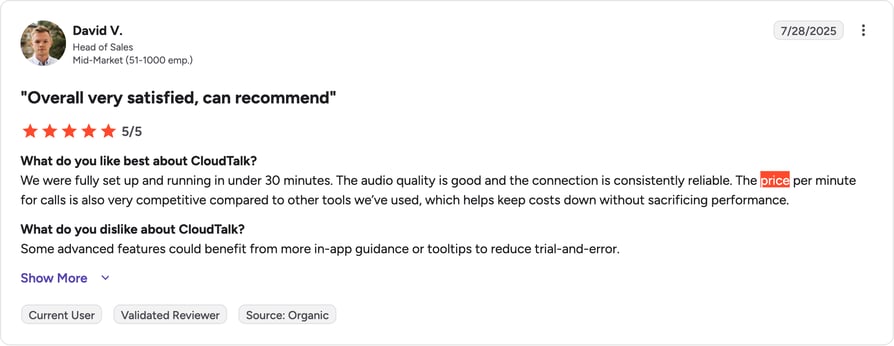
The practical difference between CloudTalk and Dialpad is predictability: because AI intelligence and dialing are part of the plan rather than a stack of per-seat add-ons and separate products, the price you're quoted is close to the price you pay. There is no 100-user Enterprise minimum, no per-minute contact-center metering, and no mandatory administrative fee, which are the exact line items Dialpad users flag on Reddit and G2.
"We just copy the agents, update the scripts, and we're live. No need to hire and train a completely new team from scratch."
Owner of Circle Gym

Here's what real G2 reviewers are saying about CloudTalk's price:
Aircall: Best for Teams Wanting a Simple Setup
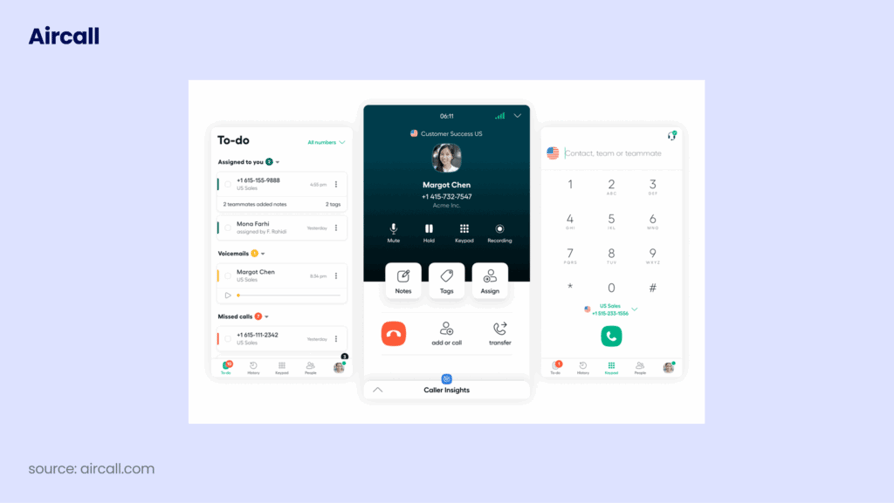
Aircall is a close comparison for teams weighing Dialpad, starting from $30/license/month billed annually with a strict three-license minimum. It is straightforward to set up and integrates with 100+ apps, but its per-license model and paid add-ons can climb quickly. The full breakdown is in our Aircall pricing guide.
RingCentral: Best for Unified Communications at Scale

RingCentral starts from $20/user/month (Core, billed annually) and reaches deep into unified communications with voice, video, and messaging. CRM integrations arrive on the Advanced tier ($25), SMS is tightly capped on lower plans, and its contact center (RingCX) is a separate product from $65/user/month. See our RingCentral pricing guide for the details.
The pattern is clear. Dialpad wins on the lowest sticker price and on AI features included at the base tier. CloudTalk wins on transparency and reach: CRM integrations and analytics arrive earlier and cheaper, there is no separate contact-center product to buy, and local numbers span 160+ countries versus Dialpad's 70+. CloudTalk starts at $25 per user per month, a touch above Dialpad's $15, but the included feature set means the real bill rarely climbs the way Dialpad's does once add-ons stack up.
(CloudTalk's Lite plan at $19 exists for NAM and LATAM only, so Starter is the like-for-like starting point for most buyers.) Aircall and RingCentral sit in between, with Aircall's 3-license minimum and RingCentral's tight SMS caps as their own gotchas.
Why pay for ghost seats and add-ons you never use?
FAQs: Dialpad Pricing
Dialpad does not have a permanently free plan. It offers a 14-day free trial on the Standard and Pro tiers, with no credit card required, so you can test the platform before committing to a paid subscription.
Dialpad Connect starts at $15 per user per month (Standard) on annual billing, rising to $25 for Pro and a custom quote for Enterprise. Monthly billing raises those to $27 and $35. The contact-center product, Dialpad Support, starts at $80 per user per month, and Dialpad Sell starts at $39.
Standard ($15) covers core calling, local SMS, and AI transcription for small teams. Pro ($25) adds CRM integrations, international SMS, multiple numbers, and 24/7 support, with a 3-user minimum. Enterprise (custom quote) adds SSO, unlimited ring groups and office locations, priority support, and a 99.9% uptime SLA, but requires a 100-user minimum.
Yes. The Standard plan includes core Dialpad AI features such as real-time call and voicemail transcription and AI call summaries at no extra cost. However, autonomous Dialpad AI Agents and advanced AI analytics like AI CSAT and AI Scorecards are not part of Standard, and sit on the AI Agents product or the higher Support tiers.
Dialpad contact center pricing runs through Dialpad Support, a separate product from Connect. It has three tiers: Essentials at $80, Advanced at $115, and Premium at $150 per user per month. On top of the seat license, Support plans add per-minute charges of $0.01 for inbound and $0.02 for outbound calls.
Dialpad includes domestic SMS and MMS within the US and Canada, but there is a per-account cap of around 250 messages, after which overages are billed at roughly $0.008 per message. International SMS requires the Pro plan or higher, and Dialpad does not offer unlimited local and long-distance calling worldwide: domestic US and Canada calling is unlimited, while international calling is metered per minute beyond the Global Unlimited Calling allowance.
Dialpad starts lower at $15 per user per month versus CloudTalk's $25, but CloudTalk includes CRM integrations and analytics at earlier tiers, has no separate contact-center product to buy, and offers local numbers in 160+ countries compared to Dialpad's 70+. For teams that need those features, CloudTalk's all-in pricing is often the lower real cost.