Best 8 VoIP Solutions for Salesforce Integration in 2026
TL;DR
Only have a minute? Here are the top 8 VoIP solutions for salesforce integration and who they suit best:
- 01CloudTalk: best for SMB and mid-market sales teams that need native Salesforce CTI with AI call sync.
- 02Dialpad: best for sales teams that want live AI transcription and coaching inside Salesforce.
- 03RingCentral: best for enterprises that need a full unified communications suite alongside Salesforce.
- 04Aircall: best for fast-paced sales orgs that prioritize quick setup and advanced call routing.
- 05Nextiva: best for teams that prefer flexible Salesforce connectivity via Zapier or API.
- 06Vonage: best for global, developer-heavy teams building custom Salesforce calling workflows.
- 07Zoom Phone: best for Zoom-native organizations that need simple Salesforce call logging.
- 08OpenPhone: best for startups and small remote teams that need affordable Salesforce call sync.
Salesforce is the default hub for managing customer relationships - but even the best CRM is only as effective as the phone systems that integrate with Salesforce alongside it. If your team is still logging calls manually or switching tabs to follow up on leads, you're not getting the full value out of your stack.
That's where a strong VoIP Salesforce integration comes in. The right Salesforce VoIP setup brings calling, contact data, and activity tracking into a single workflow - cutting busywork and helping reps respond faster. For sales orgs juggling hundreds of conversations each week, this isn't just convenient; it's essential.
VoIP also reduces overhead. Businesses that switch from legacy phone systems save up to 50% on communication costs - not to mention the hours recovered by automating repetitive tasks.
Of course, not all best voice providers for Salesforce integration are created equal. Some tools offer deep syncing with real-time data and reporting, while others just check the "integration" box. Choosing the right platform comes down to what your team actually needs to move faster and stay aligned.
Key Takeaways:
- Switching between tools slows reps down - Salesforce VoIP integration centralizes workflows
- VoIP-CRM syncing reduces manual input and helps teams focus on selling, not admin work
- Real-time call data in Salesforce supports better follow-ups and faster decision-making
- Deep integrations enable automation, call tagging, and smarter pipeline visibility
- Choosing the right VoIP tool impacts efficiency, visibility, and team performance

Bring all your sales tools into one place with CloudTalk’s Salesforce VoIP integration.

The 8 Best Salesforce VoIP Integrations
Connecting your VoIP system with Salesforce is one of the simplest ways to streamline your team's workflow, keep data aligned, and save hours each week. But the depth and quality of Salesforce telephony VoIP integration can vary widely between providers.
Below, you'll find an in-depth review of each of the eight best voice providers for Salesforce integration - covering features, pros and cons, pricing, and who each one is best suited for.
| Provider | Best For | Starting Price | Salesforce Integration | Notable Features |
|---|---|---|---|---|
| CloudTalk | Sales/support teams in SMBs | $25/user/month | Native CTI (Essential plan+) | Smart dialer, real-time CRM sync |
| Dialpad | AI-powered productivity | $15/month | Native (AI Pro plan+) | Voice intelligence, auto-logging |
| RingCentral | Mid-market to enterprise | $20/month | Native (AppExchange) | Admin controls, softphone integration |
| Aircall | Fast-paced sales orgs | $30/month | Native (Professional+) | Click-to-dial, queueing, workflows |
| Nextiva | Teams needing flexibility | $20/month | Via Zapier/API | Voicemail to email, team chat |
| Vonage | Global and distributed teams | Custom | AppExchange + API | Custom workflows, programmable voic |
| Zoom Phone | Zoom-native orgs | $13/month | Native (Power Pack) | Voicemail transcription, call routing |
| OpenPhone | Startups and remote teams | $19/month | Native (Business+) | Shared inbox, basic CRM sync |
1. CloudTalk - Best VoIP for Salesforce Integration Overall
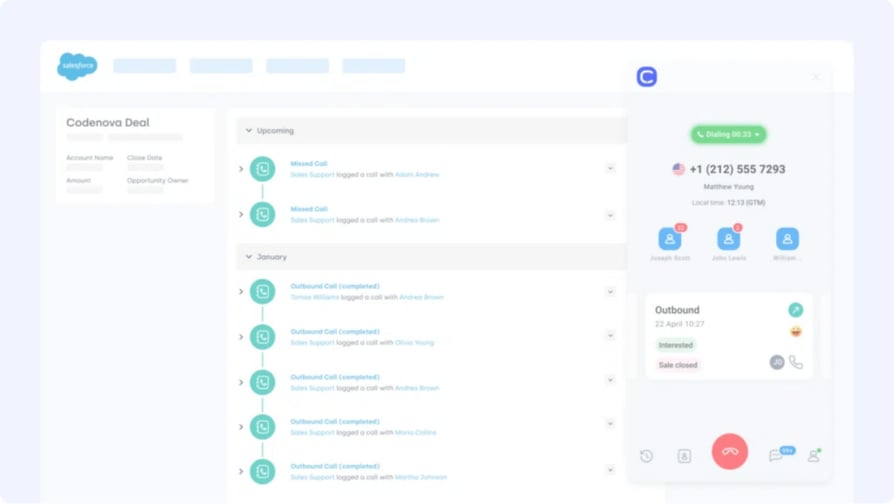
CloudTalk is a cloud-based phone system and an AI voice agent platform tailored for sales and customer support teams, offering one of the most advanced VoIP integrations with Salesforce on the market. Designed to simplify workflows and cut down on repetitive tasks, CloudTalk syncs call data, notes, and AI-generated insights directly into Salesforce - making it easier for teams to stay aligned and productive.
Best For: SMB Salesforce users looking for a deeply integrated VoIP system that reduces manual work, improves call productivity, and delivers actionable sales insights with every call.
What Are CloudTalk's Key Features?
- AI-Powered Call Transcription: Automatically converts sales calls into text for easy review and analysis.
- Automatic Call Summary and Tags: AI extracts key points and tags conversations for seamless post-call processing.
- Sentiment Analysis: Identifies customer emotions in real-time, guiding sales reps to adjust their approach.
- Topic Extraction: Detects recurring discussion themes to help sales teams refine their pitch.
- CRM and Helpdesk Integration: Syncs transcripts and call data directly with sales and support platforms.
- Click-to-Call and Smart Dialing: Launches calls directly from Salesforce with one click
Cloudtalk
PROS
- Boosts efficiency by reducing manual call logging.
- Native Salesforce integration with deep customization options.
- Provides actionable insights through AI-driven analytics.
CONS
- Some advanced AI features are limited to premium plans.
- Requires stable internet for real-time transcription
What Are CloudTalk Plans and Pricing?
CloudTalk offers flexible plans tailored to business needs. With each of its plans offering more value than its competitors:
- Starter: $25/user/mo
- Essential: $29/user/mo
- Expert: $49/user/mo
- Custom: Pricing available upon request
What Are G2 Users Rating CloudTalk?
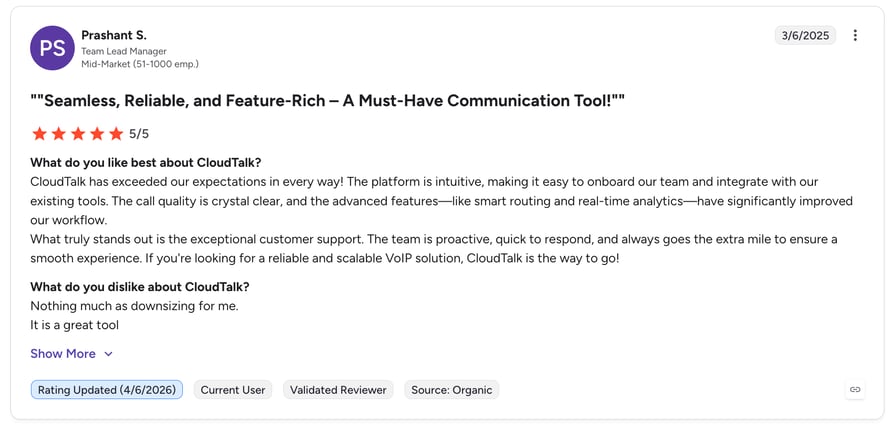
CloudTalk is rated 4.4/5 by 1,700+ verified users on G2.
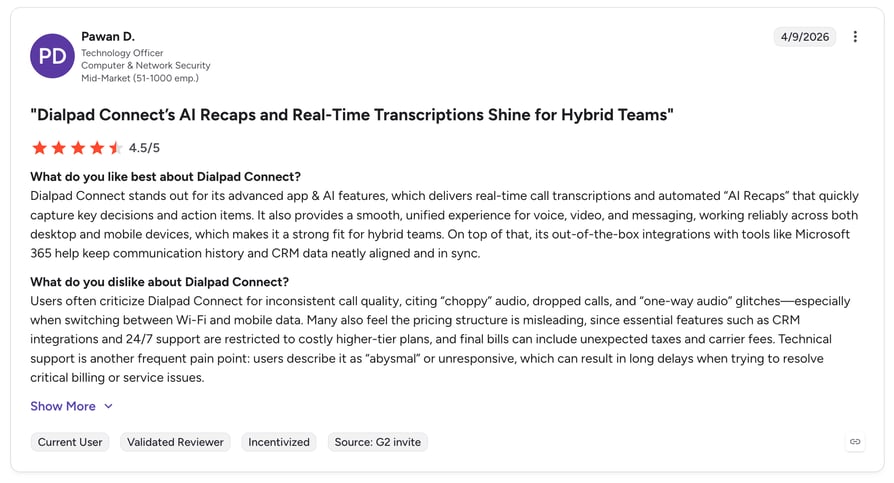
2. Dialpad - Best for AI-Native Salesforce Teams
Dialpad is a modern business phone system that brings AI-powered communication to sales and support teams. Its Salesforce telephony VoIP integration allows users to automatically log calls, track activity, and access live transcripts without leaving the CRM - making it easier to keep records clean and reps focused.
Best For: Sales and support teams using Salesforce that want real-time call intelligence, automatic CRM syncing, and in-call coaching to drive productivity and performance.
What Are Dialpad's Key Features?
- Salesforce Integration: Automatic call logging, notes, and recordings directly linked to contact records
- Call Highlights and Action Items: Auto-generated post-call summaries and follow-ups
- Click-to-Dial and Embedded App: Make calls directly from Salesforce and see context in one view
dialpad
PROS
- AI features enhance live coaching and post-call productivity
- Native Salesforce integration with embedded softphone and auto-logging
- Useful for fast-growing sales teams that rely on real-time feedback.
CONS
- Some advanced analytics and integrations require higher-tier plans
- Real-time features can be overwhelming without proper setup
- Best suited for Google Workspace or Microsoft 365 environments
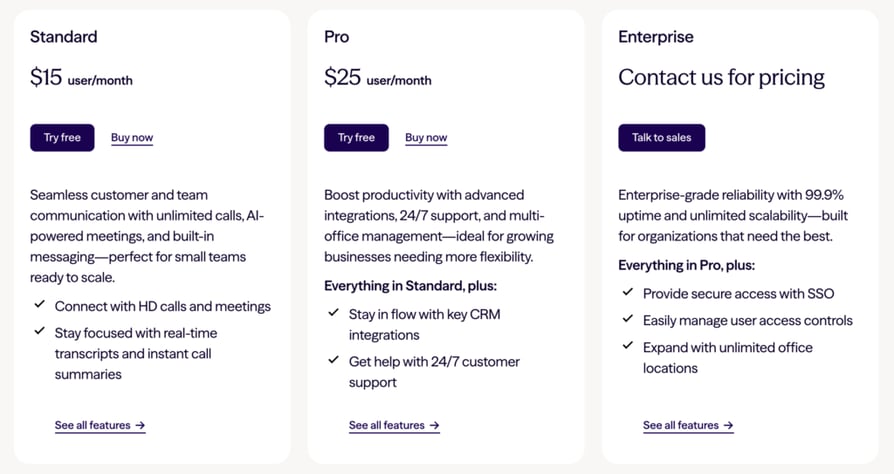
What Are Dialpad's Plans and Pricing?
Dialpad offers tiered plans based on company size and features:
- AI Starter: From $15/user/month
- AI Pro: From $25/user/month (includes Salesforce integration)
- AI Enterprise: Custom pricing for advanced needs
What Are G2 Users Rating Dialpad?
Dialpad is rated 4.4/5 by 4,100+ users on G2.
3. RingCentral - Best for Enterprise Salesforce VoIP Call Center Needs
RingCentral is a well-established business communication platform that offers voice, video, messaging, and fax. Its VoIP integration is built to support busy sales and service teams by embedding call functionality directly into the CRM environment - a solid pick for larger Salesforce VoIP call center deployments.
Best For: Organizations using Salesforce that need a flexible VoIP platform with built-in CRM calling tools, voicemail, and multi-channel communication features.
What Are RingCentral's Key Features?
- Salesforce Embedded App: Call directly from within Salesforce with real-time screen pop-ups
- Voicemail and Call Routing: Manage inbound flows and message handling across teams
- Custom Workflows: Use Salesforce fields and triggers to build call-related automations
ringcentral
PROS
- Seamless call handling within Salesforce via AppExchange
- Broad communication suite beyond just voice (video, messaging)
- Suitable for teams with complex call routing and administrative needs
CONS
- Advanced features like custom integrations may require premium plans
- Initial setup in Salesforce may be more technical for smaller teams
- Interface can feel complex for teams focused solely on calling
What Are RingCentral's Plans and Pricing?
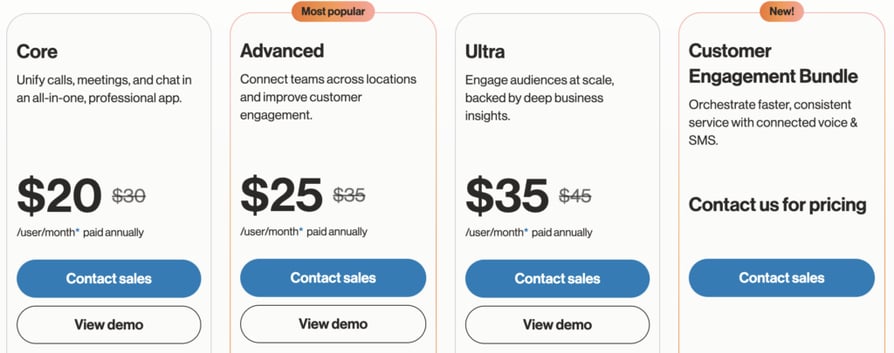
RingCentral offers three business plans with VoIP and Salesforce integration capabilities:
- Core: From $20/user/month
- Advanced: From $25/user/month
- Ultra: From $35/user/month (includes advanced analytics and full feature access)
Wht Are G2 Users rating RingCentral?
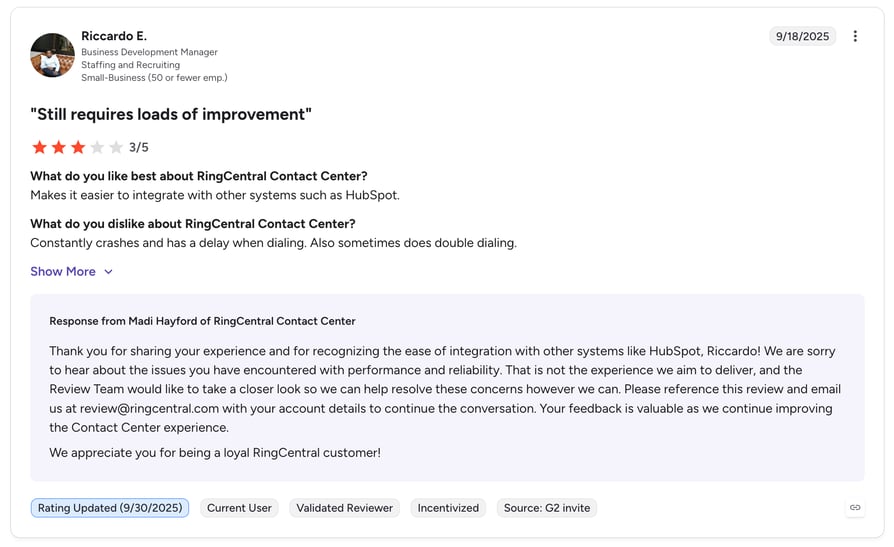
RingCentral is rated 4.1/5 by 200+ users on G2.
Recommended Reads
4. Aircall - Best for Routing-Heavy Sales Teams
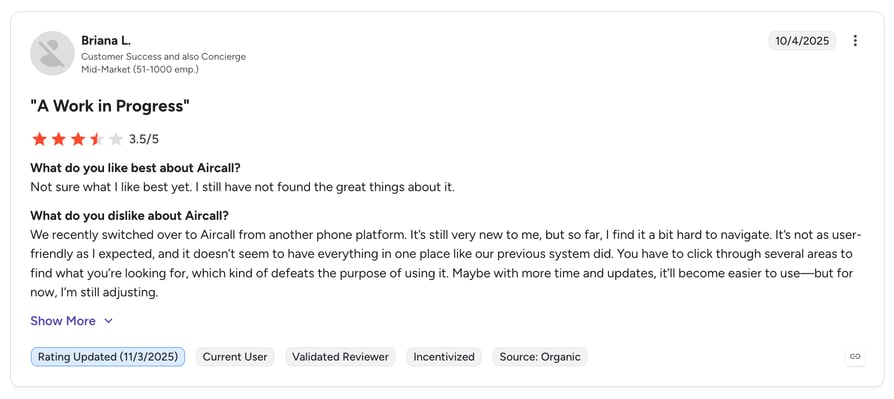
Aircall is a cloud-based phone system built for modern sales and support teams. Its native Salesforce integration syncs call activity and contact data into the CRM, making it a fit for fast-moving teams that need real-time visibility - though Salesforce integration is locked to its Professional plan.
Best For: Salesforce users looking for a flexible VoIP platform with quick setup, intuitive call management, and strong routing capabilities.
What Are Aircall's Key Features?
- Salesforce Native Integration: Syncs call activity, recordings, and notes directly to Salesforce
- Call Tagging and Notes: Add context to calls for better follow-up and reporting
- Smart Call Routing: Route calls based on rep availability, language, or skill set
aircall
PROS
- Native Salesforce integration with real-time data sync
- Clean, user-friendly interface that’s easy to onboard
- Supports advanced routing and workflow automation
CONS
- Salesforce integration only available on Professional plan and above
- Limited reporting compared to some enterprise tools
- May require third-party apps for deeper analytics
What Are Aircall's Plans and Pricing?
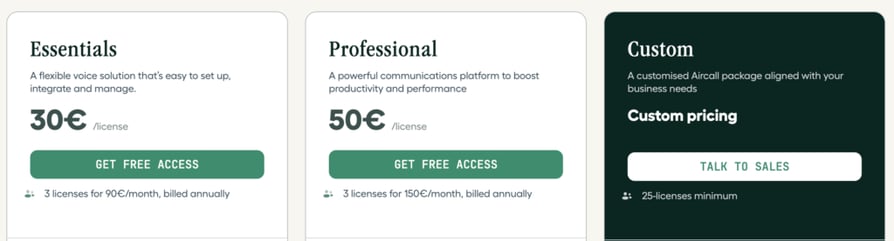
Aircall offers two business plans with Salesforce integration available on the higher tier:
- Essentials: From $30/user/month
- Professional: From $50/user/month (includes Salesforce integration
What Are G2 Users Saying About Aircall?
Aircall is rated 4.4/5 by 1,500+ verified users on g2.
Recommended Reads
5. Nextiva - Best for Salesforce VoIP via Zapier/API
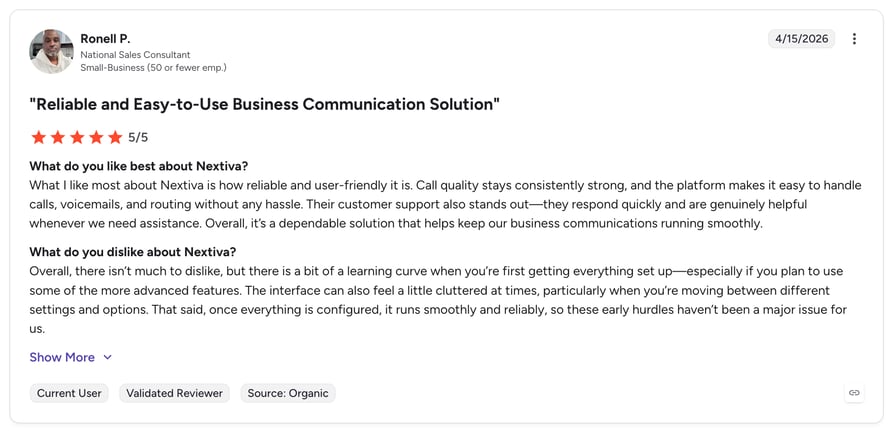
Nextiva is a unified communications platform offering VoIP, messaging, video, and collaboration. Its VoIP Salesforce integration is available through API or third-party connectors like Zapier, giving teams flexibility to sync call data even without a native plug-in.
Best For: Teams looking for a reliable VoIP provider with basic Salesforce connectivity via Zapier or API, especially if call stability and support are top priorities.
What Are Nextiva's Key Features?
- Salesforce Integration (via API/Zapier): Sync call activity and contacts using automation tools
- Voicemail-to-Email and SMS: Access messages across channels and devices
- Auto Attendant and Call Routing: Direct calls based on input or business hours
- Team Collaboration Tools: Built-in messaging and task management features
nextiva
PROS
- Simple interface that’s easy to roll out across teams
- Strong uptime and reputation for customer service
- Good option for businesses already using Zapier or API-based workflows
CONS
- No native Salesforce integration — requires third-party setup
- Limited real-time features compared to AI-powered systems
- Advanced call analytics and CRM features available only on higher plans
What Are Nextiva's Plans and Pricing?
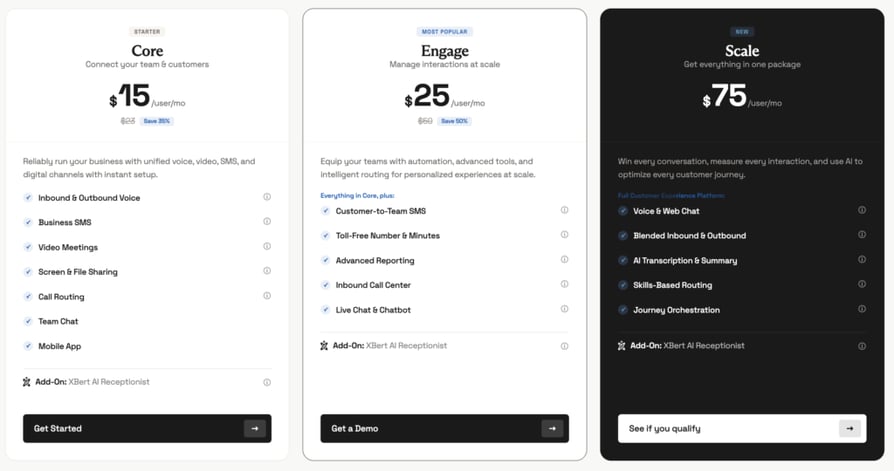
Nextiva offers three VoIP plans with Salesforce connectivity available through external integrations:
- Essential: From $18.95/user/month
- Professional: From $22.95/user/month
- Enterprise: From $32.95/user/month (includes CRM and integrations access
What Are G2 Users Rating Nextiva?
Nextiva is rated 4.5/5 by 2,500+ verified users on G2.
6. Vonage - Best for Custom, API-Driven Salesforce Workflows
Vonage is a cloud communications provider with a flexible, API-driven approach to voice, messaging, and video. Its Salesforce integration is available through the Vonage for Salesforce App on AppExchange, enabling teams to handle calls, log activity, and trigger custom workflows — all from within the CRM.
Best For: Salesforce users who need flexible, API-driven VoIP functionality and have technical support to build custom workflows and scalable calling infrastructure.
What Are Vonage's Key Features?
- Vonage for Salesforce App: Call, receive, and log calls directly from Salesforce
- Automatic Call Logging: Log calls, outcomes, and notes in Salesforce with minimal manual input
- Custom API Workflows: Build tailored voice experiences using Vonage’s communications APIs
- Call Recording and Monitoring: Record calls and monitor quality across teams
vonage
PROS
- Deep integration available through AppExchange with programmable flexibility
- Ideal for teams that want to build custom calling workflows in SalesforceScalable infrastructure for global or multi-site operations
CONS
- Requires technical setup for full customization
- Pricing not fully transparent; requires contact with sales for full quotes
- Some CRM features may need support to configure properly
What Are Vonage's Plans and Pricing?
Vonage pricing varies based on business size, features, and customization needs.
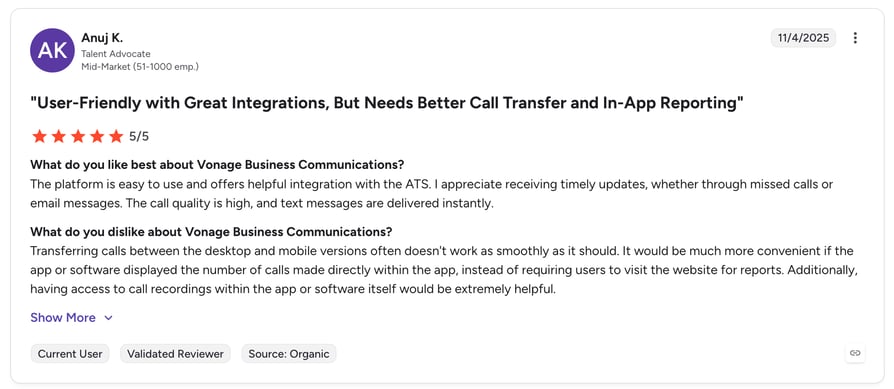
What Are G2 Users Rating Vonage?
Vonage is rated 4.3/5 by 500 verified users on G2.
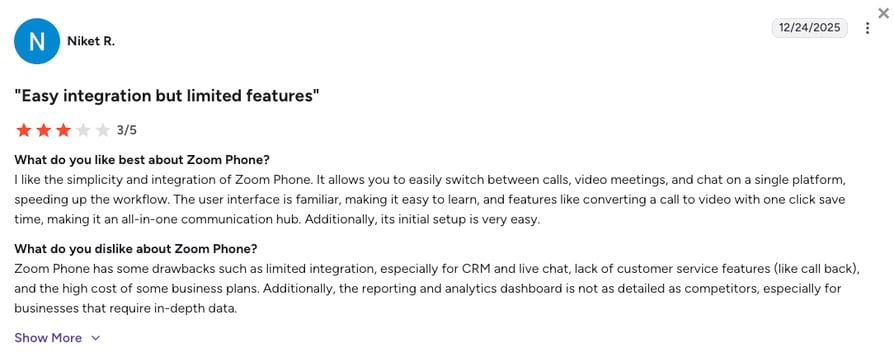
7. Zoom Phone - Best for Zoom-Native Salesforce Teams
Zoom Phone is Zoom's cloud telephony system, built for teams that already rely on Zoom Meetings. With Salesforce integration via AppExchange, users can call from Salesforce, log activity automatically, and centralize contact records.
Best For: Salesforce users who already rely on Zoom for meetings and want a simple, reliable VoIP solution with integrated call logging and basic CRM sync.
What Are Zoom Phone's Key Features?
- Salesforce App Integration: Initiate and receive calls from within Salesforce
- Auto Logging: Automatically log call duration, time stamps, and contact details
- Voicemail Transcription: Turn voice messages into text for easier triage
- Call Routing and Queues: Direct calls based on logic like time of day or availability
zoom phone
PROS
- Reliable call quality and simple user experience
- Integrates Salesforce call activity into one streamlined workflow
CONS
- Limited advanced CRM features compared to VoIP-first platforms
- Requires Zoom Phone Power Pack for full Salesforce functionality
- Best suited for teams already using Zoom — less ideal as a standalone VoIP
What Are Zoom Phone's Plans and Pricing:
Zoom Phone pricing is structured around calling needs and features:
- US & Canada Metered: From $10/user/month
- US & Canada Unlimited: From $15/user/month
- Global Select: Custom pricing for international coverage
What Are Users on G2 Rating Zoom Phone?
Zoom Phone is rated 4.6/5 by 2,600+ verified users on G2.
8. Quo (Formerly OpenPhone) - Best for Startups Using Salesforce
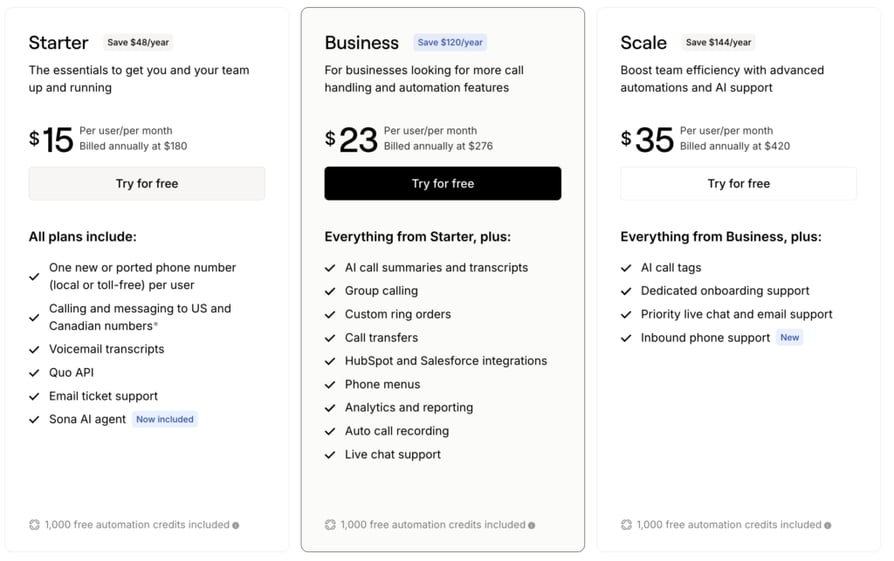
OpenPhone (now Quo) is a modern VoIP solution built for startups, small businesses, and remote teams. It offers a straightforward Salesforce integration that supports basic call logging and data sync, helping teams centralize conversations without overcomplicating workflows.
Best For: Small businesses and startups using Salesforce that need a simple, modern VoIP solution with essential CRM sync features.
What Are OpenPhone's Key Features?
- Salesforce Integration (Native): Log calls and notes automatically into Salesforce
- Shared Inboxes: Collaborate on calls and messages across your team
- Business Hours and Routing: Customize call availability and forwarding rules
- Voicemail Transcription: Convert voicemails into text for quicker responses
open phone
PROS
- Clean, minimal interface ideal for smaller teams
- Quick Salesforce setup with auto-logging functionality
- Affordable entry-level pricing for startups and growing businesses
CONS
- Lighter Salesforce integration than VoIP-first platforms
- Limited reporting and analytics compared to more robust tools
- Fewer advanced routing and automation features
How to Pick the Best VoIP for Salesforce Integration
Choosing a VoIP provider for your Salesforce setup isn't just about features - it's about fit. The right VoIP integration with Salesforce can save hours each week, improve team performance, and unlock data you're probably missing today. Here are the key factors to consider.
Match Your Use Case
Start with your team’s priorities. Do you need fast outbound dialing for sales? Or seamless inbound routing for support? Pick a VoIP system that fits your team’s workflow — not the other way around.
Check Integration Depth
Look beyond the "Salesforce compatible" badge. The best voice providers for Salesforce integration offer real-time bidirectional sync, click-to-call, auto-logging, and full visibility inside the CRM. Some let you trigger workflows and auto-tag calls based on Salesforce data.
Understand The True Cost
Don’t just compare headline prices — factor in seats, feature tiers, add-ons, and usage limits. Salesforce integrations may only be included on higher-tier plans, so make sure you're seeing the full picture.
Prioritize Security and Compliance
Sales teams handle sensitive customer data daily. Ensure your VoIP provider supports secure call handling, encryption, and compliance with industry standards like GDPR or HIPAA (if applicable).
Evaluate Support and Onboarding
Reliable support matters — especially during implementation. Look for vendors that offer onboarding assistance, responsive customer service, and Salesforce-specific resources or documentation.
Consider Real-Time Capabilities
Some teams need live transcription, call coaching, or real-time analytics. Others just need clean call logs and recordings. Knowing what level of immediacy you need will help you choose a system that won’t over- or under-deliver.
CloudTalk: The Best VoIP Integration With Salesforce in 2026
A disconnected tech stack slows your team down. Without a seamless Salesforce VoIP integration, reps waste time logging calls manually, switching tabs, and missing key insights that could have closed the deal.
While RingCentral and Aircall provide solid native integrations, CloudTalk is the best VoIP integration with Salesforce in 2026 for teams that want depth without the enterprise price tag. The focus in 2026 has shifted toward tools that don't just log calls, but provide specific insights - Sentiment Analysis, AI Call Scoring, and Smart Notes - that drive immediate agent coaching and pipeline visibility inside Salesforce.
CloudTalk helps you skip the hassle: automatic call logging, real-time CRM syncing, smart dialing, and AI-powered insights - all in one place, starting at $25/user/month.
Frequently asked questions
CloudTalk is the best VoIP integration with Salesforce in 2026, combining native CTI, AI call summaries, and bidirectional CRM sync. RingCentral and Aircall suit larger enterprises but gate key features behind higher tiers.
No - Salesforce has no built-in VoIP. You'll need a third-party VoIP integration with Salesforce via the AppExchange or Sales Cloud IVR API to enable click-to-call, auto-logging, and IVR inside the CRM.
CloudTalk and Dialpad lead for automatic transcription sync to Salesforce. CloudTalk's Smart Notes extracts action items, sentiment, and topics that map to custom Salesforce fields - making zero-touch CRM hygiene possible.
Compare four things: transcription accuracy on a real call in your accent, sync latency to Salesforce, the plan tier required to unlock it, and whether AI summaries are bundled or charged as costly add-ons.