Ooma vs RingCentral 2026: Which One Is Better?
TL;DR: Ooma vs RingCentral
Ooma and RingCentral both offer cloud calling, but for different buyers:
Ooma keeps things simple and cheap for small teams,
RingCentral packs in more and scales further at a higher price.
- Choose Ooma for simple, affordable calling:$19.95 to $29.95 per user/month, unlimited calls across the US, Canada, Mexico, and Puerto Rico.
- Choose RingCentral for depth:Video, webinars to 10,000 attendees, toll-free pools, 300+ integrations, from $20 per user/month billed annually.
- Watch the gates:Ooma locks recording, video, and SMS behind Pro tiers and charges a $29.95 activation fee;
RingCentral meters toll-free minutes and texts and sells AI as add-ons. - A third option: CloudTalkCloudTalk includes call recording, visual call flow builder, and more on every plan,
numbers in 160+ countries, and pricing from 25$ per user/month with no fees.
Introduction
Both platforms handle business calling well; neither is a wrong answer.
The RingCentral vs Ooma Office question comes down to a trade:
- Ooma leans simpler and cheaper for basic needs
- RingCentral builds far more into the box for growing teams
This Ooma vs RingCentral comparison shows where each earns its price.
- Ooma’s strength is low monthly cost for dependable calling:Every plan includes unlimited calls across the US, Canada, Mexico, and Puerto Rico, and reviews consistently praise its fast setup, a favorite trait among remote teams. On G2, 100% of its reviewers are small businesses.
- RingCentral’s strength is the opposite:A comprehensive feature set from the start. Video is built in, webinars scale to 10,000 attendees, native fax is included, toll-free pools run from 100 to 10,000 minutes, and the marketplace covers 300+ apps. Past roughly 100 users, it is clearly the more scalable of the two.
In short:
1. A five-person law office that needs calls answered fits Ooma;
2. A 60-person team running webinars, a CRM, and a support queue fits RingCentral.

See both sides of the trade-off,
then choose CloudTalk.

Ooma vs. RingCentral: Core Strengths of Each Platform
Both are established VoIP providers, and most Ooma business vs RingCentral debates end the same way:
They trade off differently on price, depth, and scale.
The tables below frame those strengths as parallels, not a scoreboard.
Where Ooma Shines
| Strength | Why it matters |
|---|---|
| Lower monthly cost | $19.95 to $29.95 per user/month, month to month, no contracts, no per-line minimums. |
| Fast, simple setup | A 9.1/10 G2 setup score, with reviews describing going live without IT help. |
| Unlimited North America calling | US, Canada, Mexico, and Puerto Rico calls are unlimited on every plan. |
| Digital fax on all plans | Virtual fax is included even on Essentials, useful for offices that still fax daily. |
| Highly rated support | G2 support score of 9.0/10, a full point ahead of RingCentral’s 8.1. |
Where RingCentral Shines
| Strength | Why it matters |
|---|---|
| Video and webinars at scale | Meetings are built in; RingCentral Webinar hosts up to 10,000 attendees with polls and Q&A. |
| Generous toll-free pools | 100, 1,000, or 10,000 pooled minutes monthly, against Ooma’s flat 500 incoming. |
| A 300+ app marketplace | Salesforce, HubSpot, Zendesk, Microsoft 365, Google Workspace, and hundreds more. |
| Published reliability record | A 99.999% uptime SLA, met for 20 consecutive quarters per its Trust Center. |
| Room to scale | Multi-site management, SSO, and admin depth fit teams past roughly 100 users. |
At a Glance: Ooma vs. RingCentral, Key Differences
Use this RingCentral vs Ooma table to spot what matters for your use case, then jump to the section with the detail behind each row.
| Dimension | Ooma | RingCentral | Best suited for |
|---|---|---|---|
| Entry price | $19.95/user/month, monthly only | $20/user/month annual ($30 monthly) | Ooma for the lowest bill; RingCentral if committing annually |
| One-time activation fee | $29.95 | None | Fee-averse teams: RingCentral |
| Video conferencing | None on Essentials; 25 on Pro, 100 on Pro Plus | Built in from Core; up to 200 participants, webinars to 10,000 | Video-heavy teams: RingCentral |
| Native fax | Digital fax on all plans | Digital fax included; unlimited from Advanced | Even; both fax |
| Toll-free minutes | One number plus 500 incoming minutes/month | 100 / 1,000 / 10,000 pooled minutes by tier | High inbound volume: RingCentral |
| Recording and transcription | Recording from Pro; transcription on Pro Plus | On demand on Core; automatic from Advanced; AI transcription included | Compliance teams: RingCentral, or a provider including both everywhere |
| International calling | Unlimited US/CA/MX/PR; elsewhere per minute or add-ons | Unlimited US/CA; international per minute or add-ons | Even; check your destinations |
| Integrations | 18+; CRM sync on Pro Plus only | 300+; CRM integrations from Advanced | Integration-heavy stacks: RingCentral |
| HIPAA / SSO | HIPAA Mode on Pro Plus; SSO not advertised | HIPAA with BAA; SSO included | Regulated industries: RingCentral |
Ooma Features vs. RingCentral Features
Feature lists hide as much as they show, so the honest Ooma Office vs RingCentral picture needs what each does well and where each falls short.
Ooma Features
Ooma is a straightforward, budget-friendly system built for simplicity: the essentials of business calling with minimal setup, exactly what its small-business audience buys it for.
| What Ooma Does Well | Where Ooma Falls Short |
|---|---|
| Fast auto-attendant setup. The virtual receptionist ships on every plan, and reviewers describe configuring it in minutes. | Essentials skips modern basics. No desktop app, SMS, recording, or video on the entry plan; all start at Pro. |
| Unlimited North America calling. US, Canada, Mexico, and Puerto Rico calls are unlimited even at $19.95. | Metered where it matters. 500 incoming toll-free minutes, 5,000 outbound minutes, and 250 to 1,000 account-wide texts per month. |
| Fax and a toll-free number included. Every plan ships both at no extra cost. | Thin integrations until the top tier. CRM sync requires Pro Plus at $29.95. |
| Clear, contract-free pricing. Three tiers, month to month, published add-on prices. | No SSO, HIPAA only at the top. SSO is not advertised; HIPAA Mode is Pro Plus only. |
RingCentral Features
RingCentral’s RingEX is the comprehensive option: phone, video, messaging, fax, and AI in one platform, built for organizations that will actually use the breadth.
| What RingCentral Does Well | Where RingCentral Falls Short |
|---|---|
| Webinars to 10,000 attendees. RingCentral Webinar adds registration, polls, and Q&A on top of built-in meetings. | Higher entry price. Core is $30 per user/month unless you commit annually at $20. |
| Native digital fax. Built in, with unlimited faxing from Advanced. | Unpublished line items. Invoices carry compliance and E911 fees whose amounts RingCentral does not publish. |
| Toll-free that scales. 100 to 10,000 pooled minutes, with SMS caps of 25 to 200 per user. | AI sold separately. The AI Receptionist is a $39/month add-on on every tier; see our RingCentral AI Receptionist review for what it covers. |
| Deep integrations. Salesforce, HubSpot, Zendesk, Microsoft 365, 300+ marketplace apps, open APIs. | More configuration surface. G2 logs 44 complex-process mentions; small teams pay a learning-curve tax. |
Feature-by-Feature Comparison
The table below compares Ooma vs RingCentral features line by line, with CloudTalk as a third reference point.
Ooma vs RingCentral vs CloudTalk: Features
| Feature | Ooma | RingCentral | CloudTalk |
|---|---|---|---|
| Video / webinars | 25 to 100 participants, Pro and up | Meetings from Core; webinars to 10,000 | Voice-first; pairs with your meeting stack |
| Toll-free minutes | 500 incoming/month | 100 to 10,000 pooled by tier | Toll-free numbers with transparent rates |
| Call recording | From Pro ($24.95) | On demand on Core; automatic from Advanced | Included on every plan, even Starter |
| AI transcription | Pro Plus only | Included; more in upper tiers | Separate add-on |
| International calling | Unlimited US/CA/MX/PR | Unlimited US/CA; add-ons beyond | Numbers in 160+ countries |
| Integrations | 18+; CRM on Pro Plus | 300+; CRM from Advanced | 100+ popular app integrations |
| HIPAA | HIPAA Mode on Pro Plus | HIPAA with BAA | HIPAA-ready tooling |
Ooma vs. RingCentral: AI Voice Agents
Both platforms now sell AI voice agents as add-ons.
- Ooma launched its Ooma AI suite in May 2026
- RingCentral sells its AI Receptionist on every tier
- CloudTalk builds AI Voice Agents into the same platform that runs your human team, covering outbound calls as well as inbound
Ooma vs RingCentral vs CloudTalk: AI Voice Agents
| AI capability | Ooma | RingCentral | CloudTalk |
|---|---|---|---|
| What’s on offer | AI Answering Service and AI Receptionist, add-ons to any plan | AI Receptionist, a $39/month add-on on any tier | AI Voice Agents for inbound and outbound calls |
| Add-on pricing | Answering Service from $14.99/account/month with 40 minutes included; AI Receptionist custom-quoted | $39/month | Separate agent plans with monthly minute allowances |
| What it handles | Missed and after-hours calls; the Receptionist answers every call, routes, and books appointments | Answers, routes, and takes messages around the clock | Qualifies leads, books, answers FAQs, and escalates to a human mid-call |
| Outbound calling | No; both tools answer inbound calls | No; inbound receptionist | Yes; follow-ups, reminders, and surveys |
See CloudTalk and RingCentral AI voice agents side by side:
What’s Included vs. What Costs Extra: Ooma vs. RingCentral
Ooma’s lower headline price is real, but incomplete. There is a one-time $29.95 activation fee, and features many Ooma competitors treat as standard, recording, video, and texting, only arrive on Pro tiers.
RingCentral flips the equation: more included by default at a higher starting price, then metered toll-free and SMS caps and unpublished compliance and E911 line items on every invoice. The table shows where each bill grows.
| Cost item | Ooma | RingCentral | CloudTalk |
|---|---|---|---|
| One-time activation fee | $29.95 | None | None |
| Call recording | Pro tier and up | Automatic from Advanced | Every plan |
| Video meetings | Pro tier and up | All plans | Not bundled; voice-first |
| Toll-free allowance | 500 incoming minutes/month | 100 to 10,000 by tier, then overage | Transparent rates, no surprise overage tiers |
| Fax | Included on all plans | Included; unlimited from Advanced | Not included; voice-first |
| Pricing transparency | Published for plans and add-ons | Plan prices published; some fees are not | All rates on the pricing page |
Ooma Pricing vs. RingCentral Pricing
Sticker prices first, gates second:
The only honest way to read Ooma vs RingCentral pricing, since both gate meaningful features behind upper tiers.
Ooma Pricing
Ooma Office has three self-serve plans, month-to-month with no contracts, plus a custom Enterprise tier; our Ooma pricing guide unpacks every add-on:
- Essentials, $19.95 per user/month:Unlimited US/CA/MX/PR calling, virtual receptionist, mobile app, and fax, but no desktop app, SMS, recording, or video.
- Pro, $24.95 per user/month:Adds the desktop app, recording, 25-participant video, and 250 monthly texts account-wide.
- Pro Plus, $29.95 per user/month:Adds 100-participant video, AI transcription, CRM integrations, call queuing, HIPAA Mode, and 1,000 texts.
RingCentral Pricing
RingEX runs three tiers, roughly a third cheaper on annual billing; the full bill, fees included, is in our RingCentral pricing breakdown:
- Core, $20 annual / $30 monthly:Unlimited US/CA calling, video, IVR, on-demand recording, 100 toll-free minutes, 25 texts per user.
- Advanced, $25 annual / $35 monthly:Adds automatic recording, CRM integrations, multi-site management, 1,000 toll-free minutes, 100 texts.
- Ultra, $35 annual / $45 monthly:Adds RingCentral Webinar, unlimited storage, device analytics, 10,000 toll-free minutes, 200 texts.
Pricing Compared Line by Line
Ooma vs RingCentral vs CloudTalk: Pricing
| Pricing dimension | Ooma | RingCentral | CloudTalk |
|---|---|---|---|
| Entry price | $19.95 per user/month | $20 per user/month annual, $30 monthly | From 25 per user/month |
| One-time fees | $29.95 activation | None | None |
| Included at entry | Calling, receptionist, fax; no desktop app, SMS, recording, video | Calling, video, IVR, on-demand recording; tight caps | Calling, recording, number porting, local numbers in 160+ countries |
| Annual vs monthly | Monthly only | About a third off annually | Monthly or discounted annual |
| Free trial | 30 days | 14 days | 14 days, no credit card |
Pay for what you use, not for the tier it’s hidden in.
Ooma Integrations vs. RingCentral Integrations
Both platforms offer integrations, but the difference is visible.
Ooma Integrations
- Ooma’s integration set is deliberately narrow:18+ prebuilt connections including Salesforce, HubSpot, Zoho, Pipedrive, Dynamics 365, QuickBooks, Zendesk, and a Zapier integration added in October 2025 for no-code automation.
RingCentral Integrations
- RingCentral runs one of the largest marketplaces in business communications:300+ prebuilt apps covering Salesforce, HubSpot, Zendesk, Microsoft 365, Teams, Google Workspace, and Slack, plus open APIs.
Integration Capability Compared
Ooma vs RingCentral vs CloudTalk: Integrations
| Integration capability | Ooma | RingCentral | CloudTalk |
|---|---|---|---|
| Total native integrations | 18+ | 300+ | 100+ |
| CRM sync | Pro Plus only (Salesforce, HubSpot, Zoho) | From Advanced (Salesforce, HubSpot, Zendesk) | From Essential, including HubSpot, Salesforce, Pipedrive |
| Microsoft 365 / Google Workspace | Google and Microsoft from Pro | Native, incl. Teams embedded calling | Native calendar and workspace links |
| Developer / API access | Zapier for no-code automation | Open APIs and a developer platform | Open API and webhooks |
Security & Compliance: Ooma vs. RingCentral
CloudTalk takes security very seriously. To learn more, visit our Security page.
Ooma Security & Compliance
- Encryption: calls between Ooma devices are encrypted.
- HIPAA: only with upgrades; HIPAA Mode, including a BAA, is a Pro Plus and Enterprise feature.
- SSO: single sign-on is not advertised on Ooma Office plans.
- Certifications: no publicly posted SOC 2 report, which matters to regulated buyers.
RingCentral Security & Compliance
- Encryption: TLS and SRTP on calls, end-to-end encryption on video.
- Certifications: SOC 2, ISO 27001, HITRUST, PCI DSS, and GDPR, on a public Trust Center.
- HIPAA: supported with a signed BAA.
- SSO and uptime: SSO included, backed by a published 99.999% SLA.
Security & Compliance Compared
| Security & compliance | Ooma | RingCentral |
|---|---|---|
| Encryption | Encrypted Ooma-to-Ooma calls | TLS/SRTP calls, E2E encrypted video |
| HIPAA | Pro Plus and Enterprise only | Supported, with BAA |
| SSO / SAML | Not advertised | Included |
| GDPR | Privacy program; no GDPR certification published | GDPR compliant |
| SOC 2 | Not publicly posted | SOC 2, plus ISO 27001 and HITRUST |
The CloudTalk Angle:
For regulated industries: CloudTalk covers GDPR, SOC 2 Type II, and HIPAA-ready tooling across plans, whatever tier you buy.
Usability & Reliability: Ooma vs. RingCentral
Both Ooma and RingCentral are mostly reliable based on user reviews and experience. Here's the comparison:
Ooma Usability & Reliability
- Setup is the headline: a 9.1/10 G2 setup score, with reviews describing fast, IT-free deployment.
- A remote-team favorite: reviewers highlight the mobile app; 100% of its G2 reviewers are small businesses.
- Call quality holds up: phone calls score 9.2/10 on G2, with HD voice standard.
RingCentral Usability & Reliability
- More surface to configure: a real learning curve, with 44 G2 mentions of complex processes and an 8.2/10 setup score.
- AI noise suppression: background noise is filtered, and ease of use scores 8.6/10.
- Documented reliability: a 99.999% SLA on core services, met for 20 consecutive quarters.
Ooma vs RingCentral: Usability & Reliability (G2 scores)
| Dimension | Ooma | RingCentral |
|---|---|---|
| Ease of setup (G2) | 9.1 / 10 | 8.2 / 10 |
| Ease of use (G2) | 9.0 / 10 | 8.6 / 10 |
| Phone call quality (G2) | 9.2 / 10 | 9.1 / 10 |
| Quality of support (G2) | 9.0 / 10 | 8.1 / 10 |
| Scalability | Built for small teams; 100% small-business reviewer base | 58% small business, 35% mid-market, 7% enterprise reviewers |
The CloudTalk Angle:
The two trade simplicity against depth. CloudTalk sits between them with 4.4/5 rating out of 1,702+ reviews on G2.
Ooma Reviews vs. RingCentral Reviews on G2 & Trustpilot
G2 and Capterra are the most used peer review platforms for B2B software, so that is where this Ooma vs RingCentral reviews section pulls its numbers.
The short version: Ooma rates higher from a much smaller base; RingCentral draws on roughly eleven times more reviews.
Ooma vs RingCentral: Ratings
| Review dimension | Ooma Office | RingCentral (RingEX) |
|---|---|---|
| G2 overall rating | 4.5 / 5 | 4.2 / 5 |
| G2 review count | 134 | 1,470+ |
| Capterra rating | 4.5 / 5 | 4.2 / 5 |
| Product direction (G2) | 8.9 | 7.9 |
| Most praised | Easy setup, value for money | Ease of use (195 mentions), support (124) |
| Most criticized | Occasional support wait times | Complex processes (44), call issues (42), cost (23) |
What Real Users Say About Ooma
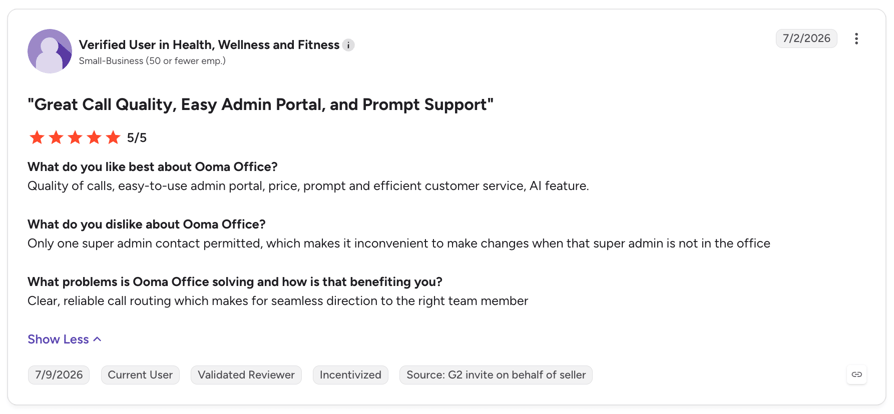
Positive Ooma user review:
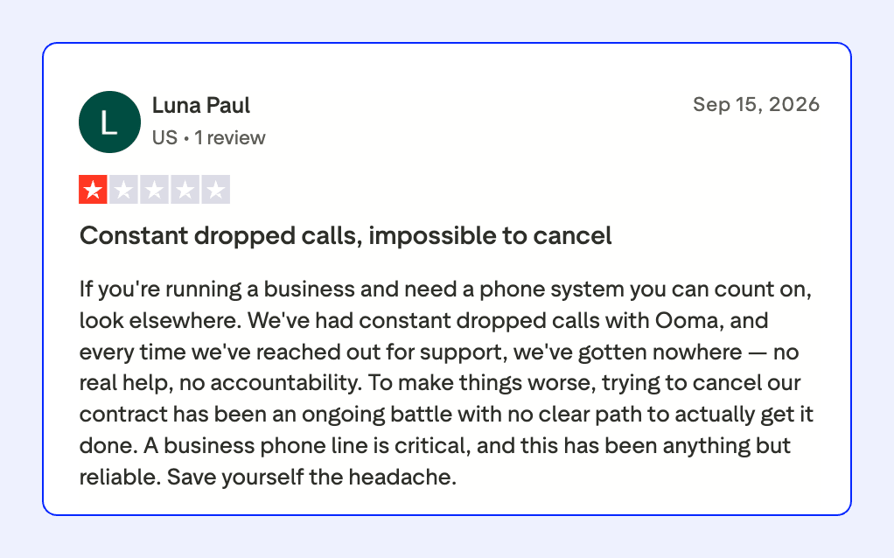
Negative Ooma user review:
What Real Users Say About RingCentral
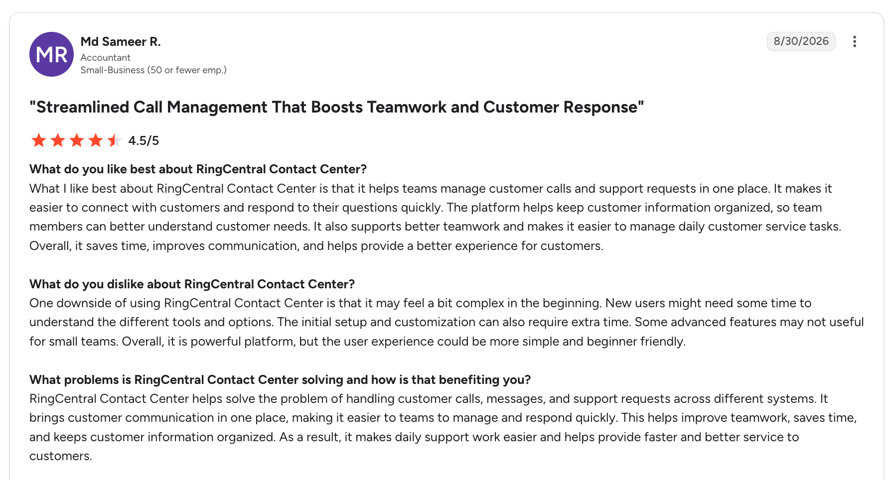
Positive RingCentral user review:
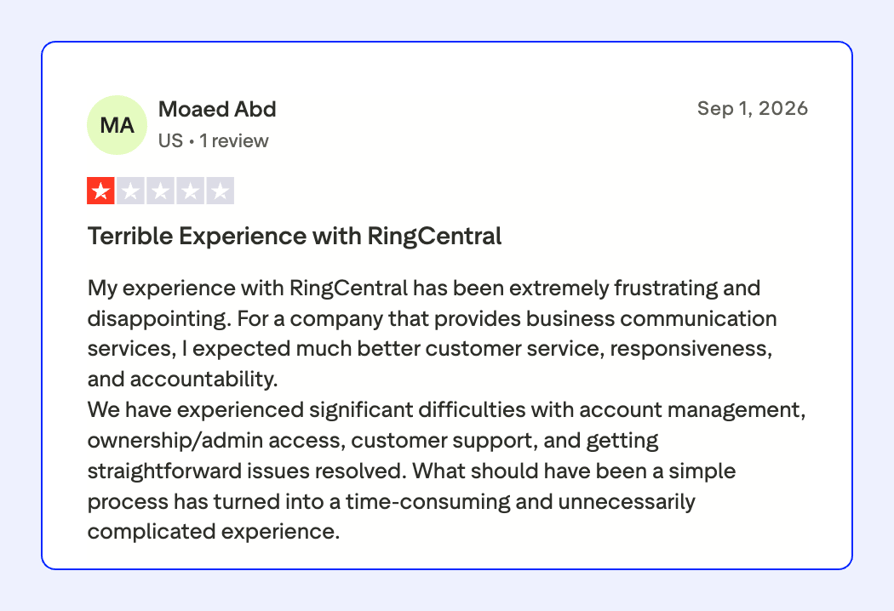
Negative RingCentral user review:
Ooma Reviews vs. RingCentral Reviews on Reddit & Quora
What Real Users Say About Ooma On Reddit & Quora
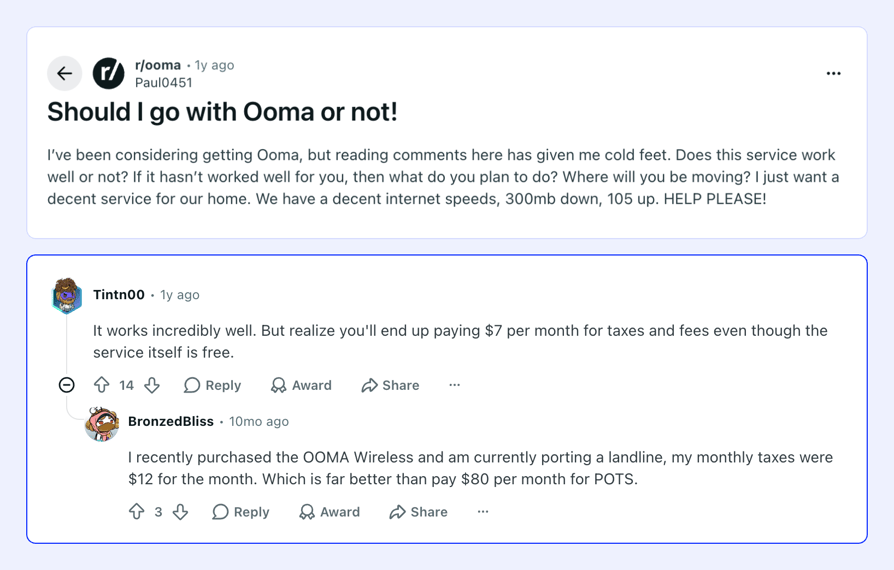
Reddit thread about Ooma:
What Real Users Say About RingCentral On Reddit & Quora
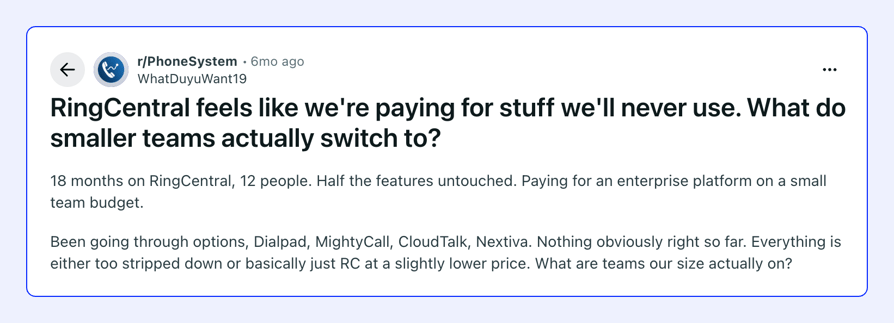
Reddit thread about RingCentral:
Ooma Pros & Cons vs. RingCentral Pros & Cons
Ooma Pros & Cons
| Pros | Cons |
|---|---|
| Lowest entry price of the two at $19.95 per user/month, no contracts | One-time $29.95 activation fee before your first call |
| Unlimited calling across the US, Canada, Mexico, and Puerto Rico on every plan | Video, recording, SMS, and the desktop app all gated to Pro tiers |
| G2’s best marks in this matchup: setup 9.1, support 9.0, call quality 9.2 | Only 500 incoming toll-free and 5,000 outbound minutes per month |
| Fax and a free toll-free number on all plans | No SSO advertised, HIPAA only on Pro Plus, no posted SOC 2 |
| Published pricing for every plan and add-on | 18+ integrations is thin; CRM sync needs the top tier |
RingCentral Pros & Cons
| Pros | Cons |
|---|---|
| Video, messaging, fax, and webinars to 10,000 attendees in one platform | Higher entry price: $30 per user/month, or $20 with annual commitment |
| 300+ integrations plus open APIs; CRM sync from Advanced | Unpublished compliance and E911 fees on invoices; real pricing less transparent than the tier cards |
| 99.999% uptime SLA, met for 20 straight quarters | Toll-free and SMS metered on every plan, with overage billing |
| Toll-free pools scale from 100 to 10,000 minutes | More configuration complexity: 44 G2 complex-process mentions, 8.2 setup score |
| Enterprise security: SOC 2, ISO 27001, HITRUST, HIPAA with BAA, SSO | AI Receptionist and other AI tools cost extra on every tier |
Try CloudTalk; you have nothing to lose.
Which Team Fits Which Platform?
Fit depends on budget, team size, and how much video, reporting, and integration depth you will actually use, not on abstract quality.
Which Team Fits Which Platform
| Ooma is the right fit for... | RingCentral is the right fit for... |
|---|---|
| Small or remote teams wanting simple, affordable calling | Growing teams that need large-scale webinars or video conferencing |
| Businesses that do not need advanced video or deep CRM integrations | Businesses that lean on generous toll-free minute pools |
| Teams prioritizing fast, IT-free setup over feature depth | Teams needing deep CRM and productivity integrations across 300+ apps |
| Offices replacing a landline with unlimited North America calling | Organizations scaling past 100 users, or with HIPAA and SSO requirements |
Ooma vs. RingCentral: The Verdict
The choice comes down to budget, team size, and how much built-in depth you actually need, not platform quality. Both do what they were designed to do.
Choose Ooma if you…
- Run a small or remote team and want the lowest dependable bill
- Call mostly within the US, Canada, Mexico, and Puerto Rico, unlimited
- Want to go live the same afternoon, without IT
- Still fax regularly and want it included
- Can live with recording, video, and SMS arriving on Pro tiers
- Prefer month-to-month billing, even without an annual discount
Choose RingCentral if you…
- Run webinars or large video meetings inside the phone platform
- Handle serious toll-free volume and need pools up to 10,000 minutes
- Need CRM, helpdesk, and Microsoft or Google integrations at 300+ app scale
- Operate in a regulated industry needing HIPAA with a BAA, SOC 2, and SSO
- Expect to scale past 100 users with multi-site administration
- Can commit annually to cut the price by roughly a third
Both platforms are strong at what they are built for.
The deciding factor is your budget and how much built-in feature depth you actually need, not which product is better.
The CloudTalk Angle:
If neither set of trade-offs fits, Ooma’s tier gates and activation fee or RingCentral’s price and complexity, there is a middle path.
CloudTalk, the best Ooma alternative and a G2-listed best RingCentral alternative, combines recording, native CRM sync, and international coverage with transparent pricing and no activation fee.
Book a demo to see exactly how CloudTalk can elevate your business.
FAQ: Ooma vs RingCentral
Its biggest rivals are UCaaS suites like Zoom Phone, Nextiva, and 8x8. For call-focused teams, G2 also lists CloudTalk among top RingEX alternatives, with recording and CRM sync on every plan.
Depends what Ooma is missing for you. RingCentral adds video, webinars, and integrations at a higher price, while an Ooma alternative like CloudTalk includes recording, analytics, and CRM sync without tier gates.
Yes. Ooma Office holds a 4.5/5 G2 rating, and 100% of its reviewers are small businesses valuing its price and easy setup. Our Ooma review covers where it fits and where it runs out of road.
RingEX costs $20 to $35 per user/month annually, or $30 to $45 monthly, plus metered toll-free and SMS overages and add-ons. Our RingCentral pricing guide breaks down the full bill.
Ooma Office runs $19.95 (Essentials), $24.95 (Pro), or $29.95 (Pro Plus) per user/month, plus a one-time $29.95 activation fee. Our Ooma pricing guide covers every add-on.
For depth, integrations, and scale, yes; for price and simplicity, no. Ooma rates higher on G2 (4.5 vs 4.2) with far fewer reviews. Our RingCentral review details what the extra cost buys.
Yes. Porting is standard in both directions, though timelines vary; do not cancel the old service until the port completes. Here is our guide to porting a number away from Ooma.
Ooma. G2 scores its setup 9.1/10 against RingCentral’s 8.2, and reviews describe going live without IT help. Any modern virtual phone system should deploy in hours, not weeks.
Ooma wins on simple, cheap calling; RingCentral on breadth and scale. CloudTalk includes recording, analytics, and CRM sync on every plan with transparent pricing and no activation fee, a strong fit for sales and support teams.