Ooma Pricing in 2026: Complete Breakdown of Plans, Costs & Fees
Summary of Ooma Pricing Plans
| Plan | Price (per user/month) | Best For... |
|---|---|---|
| Ooma Office Essentials | $19.95 | Solopreneurs and micro-businesses that need a professional phone presence without bells and whistles. |
| Ooma Office Pro | $24.95 | Small teams that need video meetings, call recording, and voicemail transcription. |
| Ooma Office Pro Plus | $29.95 | Growing SMBs that need CRM integrations, call queueing, and an auto dialer. |
In a Nutshell
Ooma Office offers three SMB-focused plans: Essentials ($19.95/user/month), Pro ($24.95/user/month), and Pro Plus ($29.95/user/month)—all month-to-month, with no contracts.
The entry-level Essentials plan covers the basics (unlimited US/Canada/Mexico/Puerto Rico calling, virtual receptionist, basic voicemail), but skips features most modern teams expect by default text messaging, call recording, video meetings, and a desktop app. Most growing teams quickly outgrow it and land on Pro or Pro Plus, which is where Ooma starts to compete with other providers.
What Pricing Plans Does Ooma Offer?
Ooma uses a three-tier model aimed at small and mid-sized businesses. Pricing ranges from $19.95 to $29.95 per user/month, with no annual contract required and no per-line minimum. Unlike enterprise platforms, Ooma keeps the licensing simple: you pick a plan, you pay per user, and you scale up or down month-to-month.
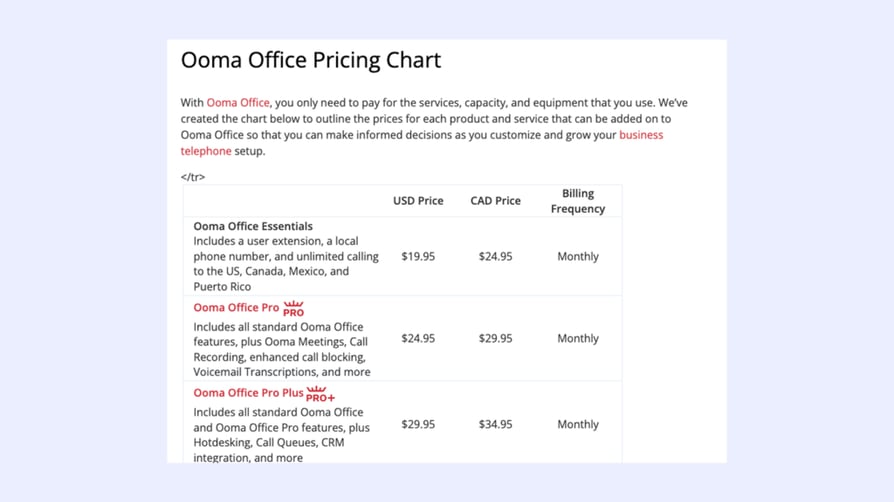
The trade-off? The feature gap between tiers is wide. Pro Plus carries most of the modern business-phone essentials (CRM integrations, call queueing, hot-desking, auto dialer), while Essentials and Pro feel deliberately stripped down to nudge teams up the ladder.
Here's how the three plans compare side-by-side:
| Feature | Essentials | Pro | Pro Plus |
|---|---|---|---|
| Price | $19.95 /user/month. | $24.95 /user/month. | $29.95 /user/month. |
| Unlimited Calling in the U.S., Canada, Mexico, and Puerto Rico | |||
| Advanced Virtual Receptionist | |||
| Voicemail Transcription | |||
| Call Recording | |||
| Desktop App | Yes (without calling). | ||
| Mobile App | |||
| Conference Calling | Up to 10 participants. | Up to 25 participants. | Up to 25 participants. |
| SMS | |||
| Call Queueing | |||
| Auto Dialer | |||
| CRM Integrations | |||
| Call Analytics |

If you're looking to hit quota, you need more than 'basic.'

What Do Real Users Say About Ooma Pricing?
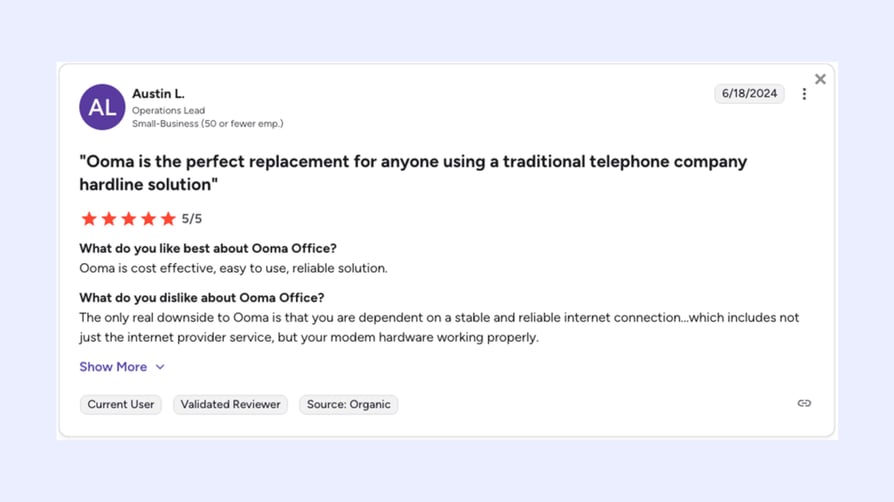
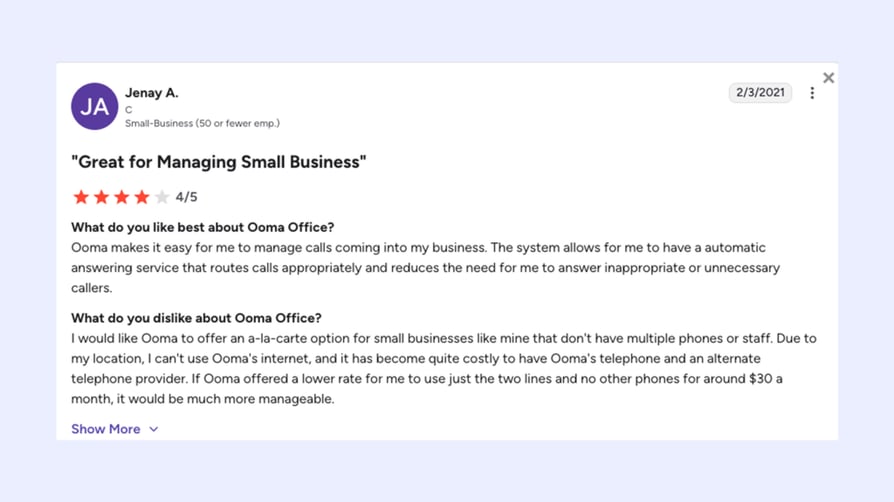
Ooma Office holds a strong 4.6/5 on G2 (based on 131 verified reviews) and a more polarized 3.9/5 on Trustpilot. It's a tale of two audiences: SMB owners who switched from a landline and never looked back, and heavier users who hit the limits of the entry-level plan or got tangled in billing.
The thread that runs through almost every review— positive or negative—is value. Customers consistently say Ooma delivers more than they expected for the price. The flip side is that the cheapest plan often isn't the one they actually need, and taxes, fees, and overage charges can stretch the headline number.
Ooma's Essentials Plan
What is Ooma's Essentials Plan?
The Essentials plan is Ooma's entry point—$19.95 per user/month for a working business phone with a local number, virtual receptionist, and unlimited calling across the US, Canada, Mexico, and Puerto Rico. It's the plan you choose when you want to look like a real business without paying for tools you won't use.
What's included in Ooma's Essentials Plan?
Here are the key features:
- Unlimited Calling in the U.S., Canada, Mexico, and Puerto Rico.
- Virtual Receptionist.
- Basic voicemail.
- Call Forwarding.
Who is Ooma's Essentials Plan best for?
This plan is the right fit for solopreneurs, freelancers, and micro-businesses that need a professional phone presence and rarely make outbound calls in volume. Think one-person law practices, real-estate agents, mobile contractors, and small non-profits replacing landlines.
What you need to know about Ooma's Essentials Plan:
Essentials skips a lot of the tools modern small teams now treat as standard: no SMS, no Call Recording, no voicemail-to-text transcription, no desktop app calling, no video meetings. The desktop app is essentially read-only at this tier. If your team relies on text messages with customers—or you want to record calls for compliance or training—you'll need to step up to Pro on day one. Most teams that try to save money on Essentials end up upgrading within the first quarter.
Ooma's Pro Plan
What is Ooma's Pro Plan?
Ooma's Pro plan is the mid-tier sweet spot, starting at $24.95 per user/month. It unlocks the features most growing small businesses actually need every day: a fully functional desktop app, video meetings, business texting, and call recording.
What's included in Ooma's Pro Plan?
Here are the key features:
- Desktop App.
- Video Conferencing (up to 25 participants).
- Text Messaging (up to 250 text messages/month).
- Call Recording.
Who is Ooma's Pro Plan best for?
Pro is built for small teams of 3–25 employees who handle a steady flow of calls and need to text customers, hop on a video call, and review a recorded call from yesterday — all without juggling separate tools. Insurance brokers, dental offices, real-estate teams, and small agencies tend to land here.
What you need to know about Ooma's Pro Plan:
Pro still leaves a few notable gaps. There's no CRM integration, no call queueing, no auto dialer, and no advanced virtual receptionist—those all live behind the Pro Plus paywall.
Ooma's Pro Plus Plan
What is Ooma's Pro Plus Plan?
Ooma's Pro Plus Plan (from $29.95 per user/month) is the only one with the CRM integrations, queue management, and dialing tools you'd expect from a modern business phone system.
What's included in Ooma's Pro Plus Plan?
Here are the key features:
- Hot Desking
- CRM Integration (like Salesforce and Microsoft Dynamics 365).
- Call Queuing.
- Auto Dialer.
Who is Ooma's Pro Plus Plan best for?
Pro Plus is the right call for growing SMBs of 10–50 employees with multiple departments—typically those running an inside sales motion, a customer support queue, or both. It's especially well-suited to teams that already live inside a CRM and need their phone system to log calls, pop screens, and trigger workflows automatically.
Recommended Content
What Are CloudTalk’s Plans and Pricing?
CloudTalk offers pricing plans designed for growing and global teams that need advanced features at an affordable price:
- Starter: It's a great fit for companies just beginning their operations, small teams with basic communication needs, and businesses working with limited budgets seeking affordable solutions.
Key Features: Unlimited inbound and intracompany calls, Call Flow Designer, Click-to-Call, Voicemail
Price: $25 per user/month - Essential: This plan is ideal for small to medium-sized businesses that need more advanced communication features than those offered in the Starter plan. It provides enhanced capabilities without the complexity of larger systems.
Key Features: Callback, SMS/MMS, Interactive Voice Response (IVR), Skill-Based Routing, Integrations + Open API.
Price: $29 per user/month - Expert: It's especially suited for companies with complex call routing needs, businesses handling high call volumes, and organizations that require advanced analytics and reporting.
Key Features: Power Dialer,Smart Dialer, WhatsApp Inbound & Outbound Messages, Call Monitoring, VIP Queues
Price: $49 per user/month - Custom: : The Custom plan is tailored for large enterprises' contact centers and companies needing tailored reporting, integrations, and premium support.
Key Features: Custom Onboarding, Unlimited Outbound Calls with Flat Rates, Enterprise-Level Security, Developer Support.
Price: Varies based on features, number of users, etc.
How Do CloudTalk and Ooma Compare in Features, Pricing, and Value?
Let's take a closer look at how the Ooma and CloudTalk plans stack up against each other:
| Aspect/Features | CloudTalk | Ooma |
|---|---|---|
| Starting Price | From $25/user/month. | From $19.95/user /month. |
| Inbound Calls | Unlimited. | Limitations based on the plan or contract. |
| Mobile and Desktop App | ||
| Call Queuing | Included from the Starter plan (from $25/user/month). | From the Pro Plus Plan ($29.95/user/month). |
| Smart Dialer | ||
| Power Dialer | ||
| WhatsApp Inbound/Outbound | ||
| Call Flow Designer | Included in all plans (from $25/user/month). | From the Pro Plus plan ($29.95/user/month). |
| Callback | ||
| Call notes | Included | Via CRM or third‑party integrations |
| Sentiment Analysis | ||
| Call Transcription |
CloudTalk vs. Ooma: Key Insights
Find below the main takeaways to help you choose between Ooma and CloudTalk:
- Essential Features: CloudTalk includes features like Call Queuing, Call Flow Designer, and Callback in all plans. Ooma only offers these from the Pro Plus plan onwards.
- Dialers: CloudTalk offers both a Smart Dialer and a Power Dialer, features that can help you reach up to three times more prospects. Ooma, on the other hand, has a basic auto dialer.
- Integrations: CloudTalk supports 35+ integrations compared to Ooma’s 13. Moreover, Ooma lacks integrations with tools like Gong and Pipedrive.
- Inbound Calling: Ooma’s inbound calling is limited to the U.S., Canada, Mexico, and Puerto Rico, while CloudTalk provides global options.
- Additional Features: CloudTalk's Expert plan includes advanced features like WhatsApp Inbound and Outbound integration, VIP Queues, and Smart and Power Dialers, missing in Ooma. Furthermore, Ooma’s Advanced Virtual Receptionist and Call Queueing are only available from the Pro Plus plan.
- Customization: CloudTalk offers custom plans. Ooma doesn’t.
- Unique Features: CloudTalk's Essential plan includes Callback and Call Notes, which Ooma doesn't offer. Additionally, some AI-powered features that CloudTalk offer as an add-on are missing in Ooma's plan, such as Sentiment Analysis or Call Transcription.
"CloudTalk has exceeded our expectations in every way! The platform is intuitive, making it easy to onboard our team and integrate with our existing tools. The call quality is crystal clear, and the advanced features—like smart routing and real-time analytics—have significantly improved our workflow."
What Are Ooma's Best Features?
As we’ve seen, Ooma's VoIP plans are affordable and offer a range of features. However, users see 3 of them stand out:
- Voicemail Transcription: Available from the Pro plan, this feature converts voicemails into text and sends them via email, enabling quick scanning and response.
- Advanced Virtual Receptionist: This feature, available in the Pro Plus plan, helps you boost your professionalism by automatically routing calls and offering custom greetings.
- Videoconferencing: Available in the Pro and Pro Plus plans, this feature supports up to 25 participants (Pro) or 100 participants (Pro Plus) and offers robust video meeting capabilities for teams or client meetings.
What Are Ooma's Pros & Cons?
In addition to what we’ve already discussed, here are Ooma's key advantages and disadvantages that users highlight:
PROS:
- User-Friendly Interface: Ooma offers an easy setup process that doesn’t require advanced technical skills. Its intuitive dashboard simplifies managing call flows, greetings, and business hours.
- 24/7 customer support: Users appreciate Ooma's round-the-clock customer support, available at all service levels, ensuring assistance is accessible whenever needed.
CONS
- Inconsistent call quality: Some users have reported issues with call clarity and reliability, noting that call quality can be poor or calls may not connect.
- Buggy applications: Users have described the mobile and desktop applications as buggy and difficult to use. It includes problems with text messaging capabilities and collaborative features.
- Limited integrations and AI features: Basic features require upgrades to access, and users find that Ooma lacks modern integrations and AI-powered functionalities unless they opt for higher-tier plans.
CloudTalk: Unmatched Features at the Best Price
As discussed, while Ooma offers affordable plans and videoconferencing features, it's essential to consider if it meets your business’s needs. It lacks several advanced tools, such as Smart Dialer, Power Dialer, and WhatsApp integration, which can significantly boost productivity and customer engagement.
In contrast, CloudTalk offers all these features, giving your business the cutting-edge communication tools that Ooma simply doesn't provide.
If you’re looking for more than just basic functionality and want advanced features to streamline your operations and improve productivity, CloudTalk is the best choice for your growing business.
Frequently asked questions
Ooma Office is a VoIP phone system for businesses, offering features like unlimited calls, virtual receptionist, and CRM integration, with plans from $19.95/user. Ooma Home, designed for personal use, provides free U.S. calling, smart home integration, and lower costs compared to landlines. Ooma Office targets businesses with advanced features, while Ooma Home is ideal for households replacing landlines.
Ooma is a VoIP service that lets users make and receive calls using an internet connection instead of traditional phone lines. It requires an Ooma Telo device, which connects to the internet and an existing home phone. Setup takes about 15 minutes, and users can make free U.S. calls, with additional features like voicemail and call blocking, depending on the plan. Ooma also offers mobile app access for call management.
Ooma's cost to port a phone number to Ooma is $39.99 per number. This fee applies to transferring an existing phone number from another provider to Ooma.
Ooma offers two home phone service tiers: Ooma Basic and Ooma Premier. Both provide unlimited free U.S. calling, standard features like call waiting, voicemail, and high-quality audio with PureVoice technology. Ooma Basic is free (with applicable taxes), while Ooma Premier costs $9.99 monthly and includes additional features.
Ooma has different usage limits based on the plan. Residential phone service allows up to 5,000 minutes per month. Ooma Connect internet plans include 10 GB for the Backup plan and unlimited data for other plans but speeds slow after 50 GB or 125 GB. Business plans offer 250 monthly texts for Pro and 1,000 for Pro Plus. The Ooma Telo device supports speeds up to 100 Mbps. These limits can change, so it's better to check for updates regularly.
Before committing to Ooma, keep these things in mind:
- Pricing and features: Ooma offers three plans—Essentials ($19.95), Pro ($24.95), and Pro Plus ($29.95)—with different features like unlimited calling, voicemail, and video conferencing. Make sure the plan you choose meets your business needs.
- Limits and Fees: Ooma's business plans have limits, such as 5,000 minutes for "unlimited" calling and text message limits. Additional fees may apply for extra features like phone numbers and directory assistance.
- Advanced Features: Only the higher-tier Ooma's phone plans include advanced tools like call queueing, auto-dialer, and integrations, so consider if these are necessary for your business.
- Potential Extra Costs: Be aware of hidden fees, taxes, and overage charges, which can increase the total cost.
Ooma's VoIP pricing is competitive, starting at $19.95 per user/month, which is lower than many VoIP providers. However, Ooma's lower-tier plans lack advanced features like call queuing and auto dialers, included in CloudTalk's plans. Overall, Ooma offers affordability but fewer advanced tools compared to some competitors.
Yes, Ooma's pricing plans can scale with business growth, offering Essentials, Pro, and Pro Plus plans that add features like call recording, video conferencing, and integrations as you upgrade. However, for businesses with more advanced needs, some key features are missing, even in higher-tier plans. For example, Ooma lacks tools like Power Dialers, Smart Dialers, and WhatsApp integration, which are crucial for companies handling high call volumes or needing advanced communication tools.