Softphone vs. VoIP: Everything You Need to Know in 2026
A softphone is a software application that uses VoIP to make calls from a computer or mobile device. A VoIP phone is any phone — hardware or software — that uses Voice over Internet Protocol to make voice calls over the internet instead of the traditional public switched telephone network (PSTN).
In short: VoIP is the technology; softphones and IP phones (desk phones) are the two ways to use it.
TL;DR: Softphones vs VoIP Phones in 2026
- Softphones turn existing devices into virtual phones using apps installed on desktops and mobile devices.
- IP phones (hardphones) are dedicated physical phones purpose-built for VoIP calls.
- Softphones can reduce phone costs by 60% compared to traditional phone systems and setup takes only minutes—no dedicated hardware required.
- VoIP phones is an umbrella term that includes both softphone apps and IP desk phones.
Jump to a section:
- What Are VoIP Phones?
- What Are Softphones?
- What Are IP Phones / Hardphones?
- Softphones vs VoIP Phones Comparison Table
- Key Features Compared
- Pros and Cons Analysis
- Use Cases and When to Choose Each
- How to Get a Softphone with CloudTalk
How We Chose the Best Approach for Comparing Softphones vs VoIP Phones
To build this guide, we evaluated 30+ leading VoIP providers and softphone software platforms using verified user reviews, official product documentation, feature comparisons, and hands-on market research. Our goal was to cut through the confusing terminology and give you a clear, technically accurate view of the softphones vs voip phones debate.
We evaluated each option against the following criteria:
- Features—call recording, auto attendant, video calls, and additional features that a modern voip service should offer.
- Ease of use—user interface quality, setup time, and how quickly a business team can start making calls.
- Integrations—native support for CRM systems, helpdesks, and other business communications tools.
- Pricing—monthly costs, applicable taxes, and total cost of ownership for cell phone plan replacements.
- Customer support—availability, response times, and self-service resources.
- Scalability—how easily you can add users, phone numbers, and phone lines.
- User satisfaction—verified reviews on G2, Capterra, TrustRadius, Reddit, and Quora.
Why Trust Our Software Reviews?
For nearly a decade, we've helped over 30,000 professionals choose and implement better communication tools. We've reviewed 200+ products, analyzed 5,500+ verified reviews from G2 and Capterra, and drawn insights from real user discussions on platforms like Reddit and Quora.
In the past year alone, we've published 1,000+ articles, all written and reviewed by humans, for humans, to provide reliable, data-backed insights you can trust. Learn how we maintain content integrity and our software review methodology.
What Are VoIP Phones?
A VoIP phone is any phone—hardware or software—that uses Voice over Internet Protocol (VoIP) to make and receive calls via an internet connection instead of the traditional public switched telephone network (PSTN). This makes VoIP phone an umbrella term, not a specific device type.
Under this definition, voip phones include:
- Softphones (software-based voip phones running as a mobile app or desktop application)
- IP phones or desk phones (hardware-based voip phones)
In many articles and sales conversations, "voip phone" is used to mean a physical desk phone. While common, this usage is imprecise. Technically, a softphone is also a voip phone because it uses the same underlying internet protocol technology.
Key clarification
VoIP describes how voip calls are transmitted, not what form the physical device or app takes. Features like call recording and auto attendant are generally provided by the voip service itself, not the endpoint.
What Are Softphones?
A softphone is a software application that uses VoIP to make calls. It runs on your computer or mobile device and provides a digital user interface that enables voice calls over the internet—no physical phone or dedicated hardware required.
Softphone apps run on:
- Desktop applications (Windows, macOS, Linux)
- Mobile phones and tablets (iOS and Android)
- Internet browsers (via WebRTC)
They rely on the device's built-in microphone and speaker or an external headset to handle voice communication. Softphones turn existing devices into virtual phones using apps, so employees can answer work calls from wherever they are.
Key Characteristics of Softphone Software
- No physical phone or dedicated hardware required
- Uses internet protocol to transmit voice data
- Highly portable and location-independent across desktop and mobile apps
- Ideal for remote workers, hybrid teams, and small business use
- Includes advanced features like call recording, visual voicemail, voicemail transcriptions, CRM integrations, video conferencing, and instant messaging
- Softphones allow users to keep personal cell numbers private during work calls
- Can be set up in minutes without hardware
From a technical standpoint, a softphone application is simply a voip application delivered as software. Many softphones now integrate with CRM systems for seamless communication, enabling incoming call notifications with full caller ID context, click-to-call from records, and one-click transfer calls between teammates.
What Are IP Phones / Hardphones?
IP phones, also known as hardphones or voip desk phones, are physical devices purpose-built for making voip calls. Unlike a softphone system that lives inside a computer or mobile device, IP phones do not require another endpoint to operate.
They connect directly to a network via Ethernet (local area network) or Wi-Fi and handle voice processing internally. Dedicated hardware ensures a stable connection for voip phones in high-volume environments.
Key Characteristics of IP Phones
- Dedicated hardware with physical buttons and displays
- Consistent call quality and high reliability
- Common in offices, reception areas, and call centers
- Use the same voip infrastructure as softphones
- Generally more reliable and easier to troubleshoot than a landline phone
- Ideal for static, location-bound operations
Final Takeaway on the Terminology
- VoIP = the internet calling technology that carries phone calls over the internet
- Softphones = software-based voip phones that run on a computer or mobile device
- IP phones / hardphones = physical devices that use VoIP
Different form factors, same underlying internet protocol. Many businesses use both softphones and desk phones to meet different needs.
Softphones vs VoIP Phones Comparison Table
While all of these options rely on VoIP technology for internet calling, they differ significantly in hardware requirements, flexibility, and use cases. Here's how the three stack up at a glance:
| Factor | Softphone (Software-Based VoIP) | IP Phone / Hardphone (Hardware VoIP) | VoIP Phones (General) |
| Definition | VoIP client delivered as a softphone application | Dedicated hardware device with VoIP | Any device/app using VoIP |
| Typical Cost | Softphone services typically start at $15/user/month | High—hardware + subscription + maintenance | VoIP services generally cost $10–$20/month |
| Initial Setup Cost | Minimal—online onboarding in minutes | High—technical team + network + desk setup | Varies |
| Mobility / Portability | High—use on the go from any internet-connected device | Low—fixed location | Varies |
| Device Dependency | Computer or mobile device | Dedicated desk phone | Any supported device |
| Ease of Use | Very intuitive user interface | Easy but hardware-specific | Varies |
| Features & Integrations | Extensive (CRM, analytics, SMS, dialers, AI voice agents, video conferences) | Isolated call features focused on dialing and routing | Depends on application |
| Scalability | Very high—add users/numbers/licenses easily | Low—hardware purchasing needed for each new user | High overall |
| Reliability | Depends on device and internet connection | High with dedicated device | Overall technology reliable |
| Best Use Case | Remote workers, mobile teams, small business | Office desks, call centers | All types of teams |
| Multichannel Support | Excellent (chat, email, SMS, team messaging) | Limited to voice calls | Depends on software |
Summary & Insights
Softphones are the best fit for all types of teams, especially remote and hybrid workers, because of their high mobility, low cost, rich feature sets, and easy scaling. Their main considerations are network stability and headset quality.
IP phones / hardphones are the best fit for office desks, reception areas, and high-reliability environments. They offer excellent dedicated hardware quality, but have higher upfront costs and less portability.
VoIP phones (general) is a broader category that includes softphones, IP phones, and any voip application. "VoIP phone" is often used colloquially—it's not a distinct device type.
What Are the Key Features of Softphones vs VoIP Phones?
You likely came to this article looking to compare softphones vs voip phones, assuming that a voip phone refers specifically to a physical desk phone or handset. That's a common assumption—and a big reason this topic feels confusing.
As clarified above, voip phone is an umbrella term that includes all phone systems that use VoIP technology, whether software-based or hardware-based. To match your original intent, this section focuses on a practical feature comparison between softphones and IP phones (hardphones).
What Are the Key Softphone Features?
Softphones are software-based voip phones, which allows them to evolve quickly and support a wide range of advanced, cloud-driven features. Softphones offer specific features that hardware simply can't match at the same price point.
- AI Voice Agents for handling incoming calls, FAQs, call routing, and after-hours support calls
- Omnichannel communication—voice, SMS, and WhatsApp messages in one interface
- CRM and business tool integrations for automatic contact syncing, activity logging, and workflow automation
- Advanced analytics and real-time reporting to track performance and agent productivity
- Video conferencing, video calls, and instant messaging—softphones support video conferencing and instant messaging natively from any location
- Drag and drop call flow design and simple call transfers
- Call forwarding and voicemail management, including visual voicemail and voicemail messages you can read at a glance
What Are the Key IP Phone Features?
IP phones (hardphones or voip desk phones) are dedicated hardware designed primarily for reliable, high-quality voice communication.
- Dedicated handset and physical keypad, offering a familiar, tactile calling experience
- Programmable buttons for speed dialing, call transfers, line appearances, and busy lamp fields (BLF)
- HD audio quality with built-in microphones and speakers optimized for voice clarity
- Conference calling capabilities for multi-party voice calls directly from the device
- Power over Ethernet (PoE) support, reducing cable clutter
- Always-on availability, without reliance on a computer or mobile device
- High reliability for fixed workstations—ideal for offices, reception desks, and call centers
Bottom line: Softphones excel in advanced features, AI capabilities, integrations, and mobility. IP phones focus on hardware reliability, voice quality, and physical call control. Both use the same VoIP infrastructure under the hood—the differences show up at the endpoint, not the network.
CloudTalk Quality & Reliability
While CloudTalk is a software-based voip phone (softphone), it's built to deliver enterprise-grade call quality and reliability that rivals dedicated hardware:
- 99.999% uptime, so your teams stay reachable when it matters most
- Global voice coverage in 160+ countries
- Carrier-grade infrastructure optimized for call stability and HD call quality
CloudTalk combines the flexibility of a softphone provider with the performance traditionally associated with hardware-based phone service.
”CloudTalk has become an integral part of our daily operations, especially because we handle a high volume of customer service and support calls. The platform is extremely reliable—we rarely experience call drops or latency issues. The call quality is consistently excellent, even during peak hours. One of the most beneficial features is the Analytics Dashboard, which provides detailed insights into call duration, agent performance, and customer engagement metrics.”
Softphones vs VoIP Phones: Pros and Cons Analysis
Choosing between softphone software and an IP phone depends on how your team works, where calls are made, and which features matter most. The following breakdown highlights the key softphone benefits and IP phone trade-offs.
Softphone Advantages and Disadvantages
| Softphone Pros | Softphone Cons |
| Cost savings - softphones reduce phone costs by 60% compared to traditional systems, with no hardware to buy | Internet dependency - call quality relies on a stable internet connection |
| Fast Setup - softphones can be set up in minutes without hardware | Device dependency - performance can vary based on the user's computer or mobile device |
| High mibility - softphones allow calls from any internet-connected device, so employees can use softphones while traveling or working remotely | Audio consistency varies - depends on headsets, microphones, and device quality |
| Privacy - softphones keep personal cell numbers private during work calls | Feature overload - the wide range of great features can require initial training |
| Advanced features variety - AI capabilities, CRM integrations, video calls, and omnichannel tools | |
| Esy updates - new features are added via software releases automatically |
IP Phone Advantages and Disadvantages
| IP Phone Pros | IP Phone Cons |
| High reliability - dedicated hardware with consistent performance | Higher upfront costs - voip phones often require purchasing physical hardware for each user |
| Excellent call quality - built-in HD audio optimized for voice communication | Limited mobility - designed for fixed desk of office use |
| Familiar interface - physical handset and buttons reduce learning curves | Space requirements - occupies desk space and requires cabling |
| Enhances security - hardware-level controls and controlled network environments | Slower scalability - adding users often means buying and provisioning new hardware |
When Should You Choose a Softphone vs a VoIP Desk Phone?
Use this quick checklist to determine the best option in under a minute.
Choose Softphones if…
- Your team works remotely, in hybrid setups, or frequently changes locations
- You want to scale quickly without investing in physical hardware or a new cell phone plan
- You rely on essential features like CRM integration and automated workflows
- Most users already spend their day on laptops or a mobile phone
- You prefer automatic updates and feature rollouts to your softphone system
- You want to reduce desk clutter and simplify workspaces
- Agents need to answer work calls from home or while traveling
- You want voicemail transcriptions, video conferences, and team messaging in one app
Choose Hardphones if…
- Your setup requires physical call pickup—front desks, reception areas, administrative roles
- You can't depend on users unlocking computers to answer incoming calls
- Your IT team prefers separate, dedicated devices for easier troubleshooting
- Users dislike wearing headsets or prefer a traditional handset
- You're working with legacy infrastructure and want to keep it
- Your team is mostly desk-bound and values the tactile feel of physical phones
How to Get a Softphone with CloudTalk
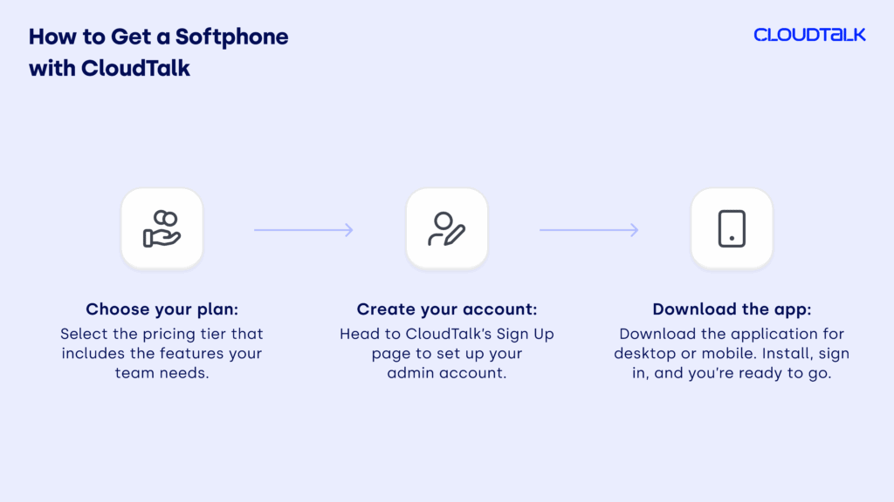
CloudTalk is a cloud-based calling service built on softphone apps. Setting up your softphone for business takes minutes—no complicated installation or dedicated hardware. Here's how it works:
- 01Choose your plan. Select the pricing tier that includes the features your team needs. Not sure which one fits best? Request a demo and have our team walk you through the options.
- 02Create your account. Head to CloudTalk's sign-up page to set up your admin account. This profile serves as your central hub for managing users, integrations, area code selection, and phone numbers.
- 03Download the app. Visit the downloads page and choose your platform—desktop or mobile app. Install, sign in, and you're ready to start making calls and receive calls instantly.
CloudTalk's cloud-based calling solution gives you everything you need in one place: voice, analytics, integrations, and reliability—all without the hardware headaches.
Recommended articles
Conclusion: Why Softphones Are the Way to Go in 2026
Softphones are redefining how businesses communicate, collaborate, and scale. Cloud-based voip systems with softphone support are easier to expand with new users, and over 100,000 businesses now use softphones with CRM integration features.
The numbers speak for themselves. 82% of companies save money when they switch to softphone calls, and most businesses see their phone bills drop by about 50%—some by as much as 90%.¹ For a small business watching the budget, those savings are a game-changer.
Ready to ditch the old setup and scale in 2026? CloudTalk's business softphone checks every box, so your team can grow, streamline operations, make calls smarter, and stay focused on customers—not tech hassles. Start a 14-day free trial and pay applicable taxes only after you're ready to commit.
Sources:
- Enterprise Apps Today—VoIP Statistics
Frequently Asked Questions
Softphones depend on internet quality and the user's device. Poor networks, low-quality headsets, or device issues can affect call quality. Softphones typically require a stable internet connection for optimal performance.
A VoIP softphone is a software-based phone that uses VoIP technology to make voice calls and video calls on computers, mobile devices, or internet browsers.
Any calling software app that enables VoIP calling—desktop applications, mobile app clients, or browser-based apps—is considered a softphone.
VoIP relies on a stable internet connection. Network outages, latency, or bandwidth issues can impact voip calls' reliability and quality.
Yes. Many businesses use softphones for remote teams and IP phones for offices, all on the same voip service. This gives desk-bound staff a traditional phone experience while giving mobile employees full flexibility.
Softphones are cheaper, with no hardware costs and low monthly taxes on top of the subscription. VoIP desk phones require upfront hardware purchases and ongoing maintenance. Softphone services typically start at $15 per user per month, while a full voip service generally runs $10–$20 per month depending on plan and features. On top of that, you'll pay monthly taxes based on your region.
Both can be highly secure. Softphones rely on app-level encryption, while IP phones add hardware and network-based security controls. The choice comes down to how your team operates and where the endpoints live.