
Monitor Agent Status In
Real Time
Instantly see who’s busy, idle, or ready to take the next call. The Agent Status provides real-time visibility into team availability, ensuring seamless call routing, optimized workflows, and better customer experiences.
 SOC2 CompliantISO 27001
Trusted by 30,000+ sales & support professionals worldwide
















See Who’s Active at a Glance
Live Team Status
See team-wide availability instantly to optimize workload distribution and enhance productivity.
Custom Status Labels
Let agents create custom labels to inform the team about what they are working on.
Personalized Routing
Customize call routing rules to ensure calls reach only available agents, improving efficiency.
We’ve helped thousands of global companies
Case studies featuring customers who are building faster.

Global Sales Engine Powered by Connected Conversations
“CloudTalk’s AI transcripts and analytics make it easier to track talk ratios, discovery depth, and regional performance—all without requiring formal training to get started.”

Revolutionizing Revolut’s Efficiency and Saving 40+ Hours
"Thanks to CloudTalk’s reliability, we could improve sales teams’ performance and close more deals than we could have ever imagined."

Increasing productivity for 200 customer support agents
"With CloudTalk's Analytics I now get to see every step of the way. We can find discrepancies and gain a much better understanding of our teams."

Delivering success for Glovo’s customer support team
"CloudTalk improved our team's cost and efficiency. The script feature allows us to lead the calls in a much more systematic way."
Agent Status
What is Agent Status?
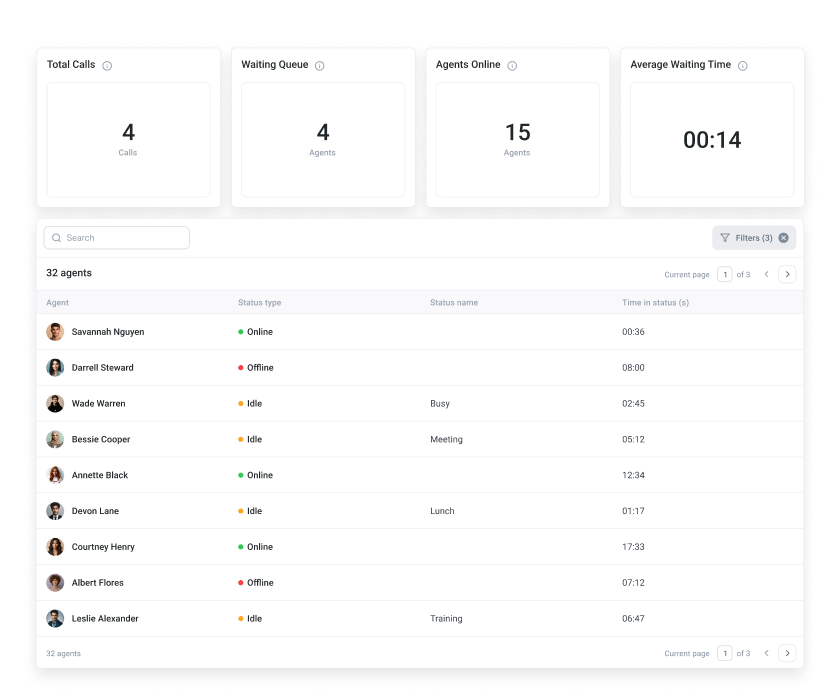
Agent Status is a real-time monitoring feature that helps track and manage the availability of call center agents. By setting their status to “Online,” “Offline,” or “Idle,” agents can instantly communicate their availability.
As their status changes, the system automatically reflects these updates and adjusts call routing accordingly. This ensures that inbound calls are directed only to available agents, reducing wait times and improving overall efficiency.
Benefits of Agent Status
Make Call Distribution More Efficient
Improve Call Routing
Instantly distribute calls to agents who are currently available, reducing the likelihood of missed or dropped calls. Ensure that customers always receive timely assistance.
Enhance Team Efficiency
Monitor team availability to balance workloads. Quickly identify gaps in coverage and reassign tasks, ensuring peak efficiency without overwhelming agents.
Increase Accountability
Support accountability by keeping an eye on agents’ work ethics. Ensure that they are focused and productive during work hours and maintain high-performance standards.
Quickly Adapt to Changes
Enable informed decision-making. Make immediate adjustments to call routing or team assignments based on current availability, ensuring optimal response to shifting demand.
How To Set Up Agent Status On CloudTalk
- 01Once you're logged into your CloudTalk account, tap on your profile icon.
- 02Look for the status bar in the upper right corner—it’s where you control your availability.
- 03Select Online, Offline, or Idle to let your team know if you're available.
- 04If you pick Idle, you can specify why—Busy, Break, Lunch, Meeting, or Training.
- 05Click Save, and your status updates instantly for your team to see!
Features
Other features you might like

Group Reporting
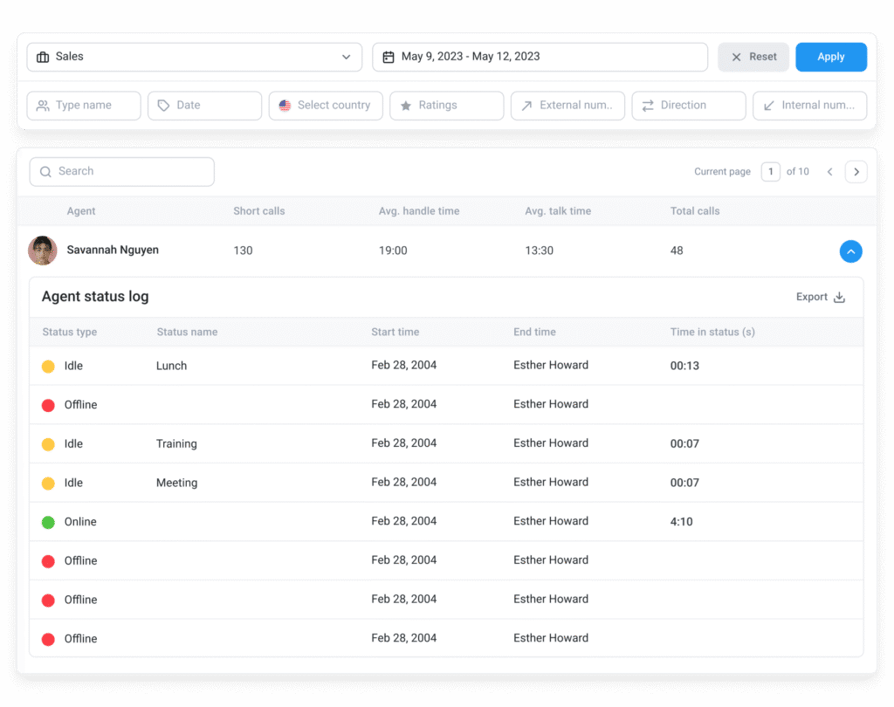
Give your managers full visibility over their team’s performance, and the tools to identify what, when and how to improve.
Learn more about Group Reporting
Wallboard
Showcase real-time performance and call center metrics to your entire team — live and in a variety of different formats.
Learn more about Wallboard
User Management
Upload users, assign permissions, and manage call queues and ringing strategies in bulk without any extra effort.
Learn more about User Management
Analytics
Access centralized real-time data on your agent’s performance or call statistics, and use it to optimize your strategy.
Learn more about Analytics
Ready to get started?
Join over 5,500+ modern companies that already trust CloudTalk to have MORE and BETTER calls.
Frequently asked questions
Using Agent Status empowers your team to manage their call center availability effectively, ensuring that calls are handled by the right agents at the right time. When agents update their status in real time, they can optimize call routing and improve response times.
To check an agent’s status in CloudTalk, simply navigate to the Dashboard, where you can view the real-time status of all agents. Each agent’s status—whether they are Online, Busy, Offline, or Idle—is displayed, allowing managers to monitor availability instantly.
Agent status monitoring in a call center refers to the real-time availability and activity state of each agent. It includes indicators like Online, Busy, Offline, and Idle. These statuses help in managing call distribution, monitoring agent performance, and ensuring that customer interactions are handled promptly and efficiently.


Hello 👋 My name is Emma. Still have questions?
Can’t find the answer you’re looking for? Please chat to our friendly team.