HVAC Answering Service: The Complete Guide + Best Services for 2026
It's 9:15 pm in January, a furnace has quit, and the homeowner is calling HVAC contractors. Your line rolls to voicemail because both techs are on jobs and you have no HVAC answering service covering nights. The second company's line rings out. The third picks up and gets the job.
You call back at 7:30 the next morning from a number they don't know. According to Hiya's State of the Call 2026 report<sup>1</sup>, 86% of unknown calls go unanswered, so your callback will likely ring out too.
An HVAC answering service is a live, AI or hybrid service that picks up your company's calls when your office and techs can't. A good one answers 24/7, sorts emergencies from routine calls, books service visits and estimates, and escalates urgent calls to your on-call tech. You can buy it from an outside agency, or run it as an HVAC AI answering service on your own phone system.
Key takeaways
- An unanswered call usually goes to the next contractor on the homeowner's list.
- Coverage breaks during seasonal peaks and after hours, when your office is smallest.
- Emergencies need triage and a fast handoff to your on-call tech, not a message for the morning.
- Pick live, AI or hybrid based on call volume, budget and how much your customers expect a familiar voice.
What Is an HVAC Answering Service?
An HVAC answering service is the layer between a ringing phone and your dispatch board. It captures the job details, sorts urgent calls from routine ones, and then books, routes or transfers each call. Vendors also sell it as an HVAC call answering service or an HVAC phone answering service.
Most contractors we talk to start with something improvised: an agency for nights, voicemail for weekends, and customers calling a tech's personal cell once the voicemail box fills up.
Live vs. AI vs. Hybrid HVAC Answering Services
Live services put human agents on your line, and some are HVAC specialty answering services with trade scripts. They follow your script and usually bill by the minute or by the call.
An AI answering service picks up right away, takes several calls at the same time and asks every caller the same intake questions. Hybrid services put AI on the line first and send harder calls to a human team, or the other way around.
Live agents still have the edge with upset callers: an angry repeat customer or a messy warranty dispute often goes better with a person.
| Live | AI | Hybrid | |
|---|---|---|---|
| Availability | 24/7 on most plans | 24/7 | 24/7 |
| Simultaneous calls during a heat wave | Limited by how many agents are free | Several calls at once | AI absorbs the surge, humans take what they can |
| Consistency | Depends on the agent and the script | Same questions on every call | AI part is consistent, human part varies |
| Emergency escalation | Agent follows your on-call protocol | Your triage rules, transfer to your on-call tech | AI flags urgency, a human takes over |
| Cost model | Per minute or per call bundles | Per-minute plans | Usually a platform fee plus usage |
| Setup | Script review with the vendor | You configure it, minutes to days | Vendor-led onboarding |
Answering Service vs. Voicemail, On-Call Cell Phones and IVR
Voicemail is the cheapest option, and it's where emergency calls go to die. A homeowner with no heat at 10 pm hangs up and dials the next number on Google.
Forwarding your line to the on-call tech's cell works until that one person is driving, asleep or under a house. Then the call goes nowhere, and nobody knows it happened.
Interactive voice response (IVR) menus have the opposite problem. A stressed caller hears "press 1 for sales, press 2 for billing" and presses zero, or hangs up. The menu itself isn't what hurts you; the maze is. A short greeting that asks "What's going on with your system?" and routes on the answer works better than six options read out in a row.
Outsourced IVR and overflow setups add one more risk. If every change needs a ticket to the vendor, a tech calling in sick means calls keep landing on the wrong phone until the vendor gets to it.
Why HVAC Companies Use an Answering Service
Most owners don't go looking for an answering service for their HVAC company until the phones have already cost them jobs. The pain usually shows up in four places.
Every Missed Call Goes to the Next Contractor
In an emergency, homeowners hire whoever answers first. Price and reviews matter less when the house gets colder by the hour.
That turns most missed calls into a booked visit on someone else's schedule. For an HVAC contractor answering service, catching that first call is the whole point.
Seasonal Peaks: Heat Waves and Cold Snaps
The first hot week of summer or the first hard freeze can flood your phones overnight. According to the U.S. Energy Information Administration (EIA)<sup>2</sup>, hot weather pushed US electricity demand to new records twice in the last week of July 2025. Some of those overworked systems fail, and their owners call you.
Staffing for the peak means paying for idle desks the other nine months. And seasonal hiring is slow: by the time a new customer service rep is trained, the heat wave is over. Planning for high call volume has to start before the first hot week.
After-Hours and Weekend On-Call Coverage
A real 24/7 HVAC answering service does more than take messages. An after-hours answering service should:
- Answer every call, including weekends and holidays.
- Triage it against your rules: emergency now, or booked for business hours.
- Escalate emergencies to whoever is on call, with a backup if they don't pick up.
- Log who took each call and whether anyone returned it.
Contractors told us the on-call rotation gets switched by hand every week, someone forgets, and on Monday nobody can tell whether Saturday night's calls reached anyone. Whether you're comparing a 24 hour HVAC answering service or an HVAC after hours answering service that only covers evenings, ask to see that log.
Techs in the Field, Office Overloaded
Your office manager is juggling quotes, billing questions and three customers asking when their tech will show up. Your techs are in attics and crawlspaces, where they can't answer and shouldn't.
An answering layer takes the routine calls and the overflow that would otherwise sit in a call queue, so your office can focus on the ones that need a person.
What an HVAC Answering Service Should (and Shouldn't) Do
Before you compare vendors, decide what you want the service to handle and where it has to stop.
Triage Emergencies vs. Routine Calls
You set the rules, and the service follows them. Typical urgent calls include no heat in freezing weather, no AC in extreme heat with an elderly person or an infant at home, and an active water leak. Tune-ups, quotes and filter questions are routine.
Urgent calls should transfer straight to your on-call tech or trigger an immediate callback. Routine calls get booked for business hours. Both paths are call routing rules you can write down before you talk to any vendor.
Give every escalation path a final fallback. If the on-call tech doesn't answer, the call should go to a second tech, ring a group, or end with a guaranteed callback. A chain that steps through two people and then drops into hold music loses the call the same way voicemail does.
Book Service Calls and Estimates
Tune-ups, maintenance visits and standard service calls can go straight onto your calendar during the call. An AI voice agent for appointment booking can offer open slots and confirm the time before the caller hangs up.
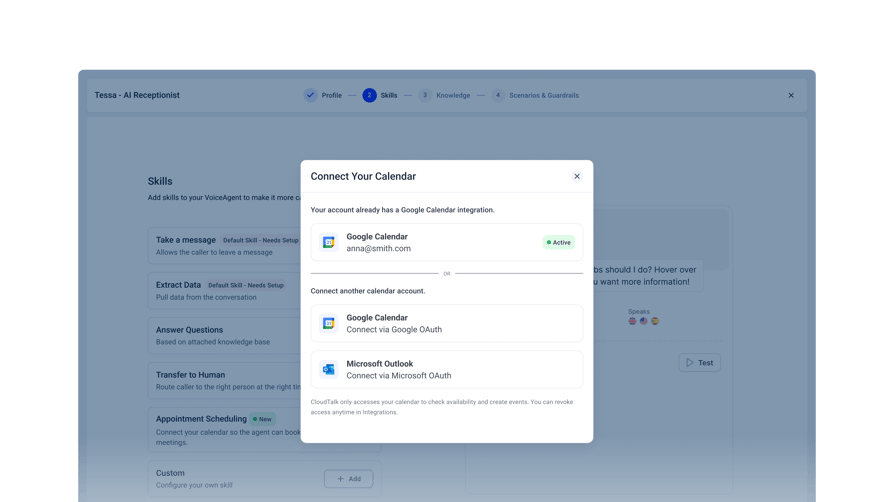
For installs and replacements, the service should capture the details (home size, current system, what the customer wants) and book a callback with your estimator instead of quoting on the phone.
Capture Job Details for Dispatch
Dispatch moves faster when every call record looks the same. A good intake captures:
- Name, service address and callback number
- Equipment type and approximate age, if the caller knows
- What's happening (no heat, short cycling, noise, leak) and since when
- Urgency, based on your rules
- Membership plan or warranty status
The service should push that record into your customer relationship management (CRM) system or helpdesk through a CRM integration, so your dispatcher starts with the full picture instead of a voicemail that says "call me back."
Handle "Where's My Technician?" Calls
In peak season, many of your calls come from existing customers asking about status, billing or a follow-up. Sorting calls by reason (new job, job status, billing) shows you where the time goes, and lets you measure how many real leads turned into booked jobs.
Status calls are where an AI voice agent for customer support earns its keep. With an API connection to your job or tracking system, it can share the tech's ETA. Without one, it takes the message and alerts your dispatcher.
Where It Must Stop: Gas, CO and Electrical Emergencies
Some calls are beyond any answering service, human or AI. The U.S. Energy Information Administration's October 2026 Winter Fuels Outlook<sup>2</sup> notes that natural gas was the main heating fuel in 46% of US homes in 2024, so gas-smell calls will reach your line sooner or later.
The service should never troubleshoot a gas smell, a carbon monoxide alarm, sparking or a burning electrical smell. The script tells the caller to leave the building first, then call 911 or the gas utility from outside, away from the smell. Then it escalates to a person on your team right away.
Gas leak guidance from the Pipeline and Hazardous Materials Safety Administration (PHMSA) says not to use a phone or light switches near a gas leak and to call 911 from well away from it. For carbon monoxide, the U.S. Environmental Protection Agency's CO guidance says to get fresh air immediately and leave the house. Test the script before you go live.
Common Concerns About AI Answering for HVAC Companies
If you're weighing an AI answering service for HVAC companies, you probably have the same four questions we hear on sales calls.
"Will My Customers Hate Talking to AI?"
Some will. Pew Research Center's 2025 survey<sup>3</sup> found that 50% of US adults are more concerned than excited about the increased use of AI in daily life, up from 37% in 2021.
We've talked to a heating company that tried an AI agent and pulled it back. The answers were fine, but long-time customers wanted to reach people they knew. If your business runs on relationships like that, start AI on after-hours calls, overflow and new callers, and keep regulars with your office during business hours.
A natural voice helps, and so does a short, polite disclosure at the start of the call. Salesforce's State of the AI Connected Customer report<sup>4</sup> found that 72% of customers say it's important to know if they're communicating with an AI agent.
"Can AI Handle a True Emergency?"
AI can flag urgency from what the caller says and the rules you give it. If a caller says "no heat" and your rule applies, it transfers the call to your on-call tech with the details captured. It can't diagnose a system, and you shouldn't trust a service that claims it can.
The safety net is the escalation path you design, including a fallback for when your on-call tech doesn't pick up. Test both paths yourself, with a 2 am no-heat call and a gas-smell call, before a real customer does.
"Will It Work With ServiceTitan, Housecall Pro or Jobber?"
It depends on the vendor. Many phone and AI vendors connect to field service software through an API, webhooks or Zapier integrations rather than natively. Some shops treat native ServiceTitan as a must-have, and that's a fair requirement for a large dispatch team.
Before you pay extra for native, ask what it changes in your day. For many small shops, getting the caller's details pushed into the CRM or job notes covers most of the work. Ask every vendor to demo your exact setup and show you where the job data lands.
"Is It Worth It for a Small HVAC Business?"
Do the math with your own numbers. Count the calls you miss in a typical week, multiply by your average ticket, and compare that with the plan cost. If even a couple of missed calls a month would have turned into jobs, a small HVAC business answering service usually pays for itself.
Start small: cover after hours only, then add overflow once you trust it. The same logic applies to any answering service for small business owners. When you compare live services, look past the per-minute rate. Check for minimum billed minutes, and ask whether you pay for minutes spent on hang-ups, wrong numbers and silence.
How to Choose an HVAC Answering Service
Score each provider on this checklist, whether it's a live service or the best AI virtual receptionist you've found. The best answering service for an HVAC company fits how your calls arrive and how you dispatch.
- Coverage. 24/7, after hours only or overflow only, with room for peak season?
- Emergency triage. Can you set your own urgency rules and an on-call path with a fallback?
- Booking. Does it book service calls and estimator callbacks?
- Job details. Does it capture what dispatch needs, the same way every time?
- Integrations. Calendar, CRM and field service software: native, API or Zapier?
- Simultaneous calls. How many calls can it take at once in a heat wave?
- Voice and languages. Does it sound natural, pronounce your company name, towns and equipment brands correctly, and speak your customers' languages?
- Control. Can you change on-call schedules and messages yourself, today, or do you file a ticket and wait?
- Reporting. Can you see missed calls, who answered each one, and how many calls by reason turned into booked jobs?
- Desk phones. If your office uses desk phones, do they keep working or do you have to replace them?
- Pricing and setup. What are the pricing model, minimums and contract length? Is there a trial or pilot, and who helps with setup?
On our sales calls, contractors who signed picked a provider for fast setup, call flows they could edit and clear missed-call visibility.
Best HVAC Answering Services in 2026
To find the best HVAC answering service for your shop, we scored providers on the checklist above, covering live, hybrid and AI options. If you only want AI, see our list of the best AI voice agents.
| Tool | Type | Best for | Emergency escalation | After hours | Integrations | Starting price |
|---|---|---|---|---|---|---|
| CloudTalk | AI on your own phone system | AI, office and on-call techs on one system | Your triage rules, transfer to on-call tech with context | 24/7, or after hours and overflow only | HubSpot, Salesforce, Pipedrive, Zoho; field service via API or Zapier | 50 free minutes, then from $99/month |
| AnswerForce | Live (home services) | Trades-trained human agents | Agents dispatch the on-call tech | 24/7 live | ServiceTitan, Housecall Pro, Jobber, Workiz, Zapier | Not public; per-minute plans |
| Specialty Answering Service | Live (HVAC offering) | Published per-minute pricing | Reaches techs by phone, text, email or pager | 24/7 live | None named on its site | $44/month + $1.54/min |
| Nexa | Live, optional Voice + AI hybrid | Live first, AI optional | Per your protocol, team alerted by call, SMS or email | 24/7/365 live | Not named on its site | Not public; minute bundles |
| Avoca | Hybrid (AI + Avoca human CSRs) | ServiceTitan shops wanting human backup | AI routes emergencies, Avoca CSRs as backup | 24/7 | ServiceTitan (direct) | Not public; demo |
| LeadTruffle | AI (HVAC and home services) | Shops buying paid leads | Keyword detection, alerts on-call tech | 24/7 | ServiceTitan, Housecall Pro, Jobber; Zapier, webhooks, API | Not public; month-to-month |
| Housecall Pro CSR AI | AI add-on from field service software | Shops already on Housecall Pro | Custom escalation rules | 24/7 | Built into Housecall Pro | AI not public; platform from $59/month |
| Quo + Sona | Phone system + AI add-on | Small shops wanting a low-cost phone app | Transfer or route per your setup | Per your call flow | HubSpot, Salesforce, Zapier, Make | Sona free for about 10 calls; Quo from $15/user/month |
All competitor details were checked on each vendor's own website in October 2026.
1. CloudTalk
Best for: HVAC contractors who want AI on the same phone system as their office staff and on-call techs.
What it is: CloudTalk is a cloud phone system with an AI receptionist inside the call flow. The AI hands calls to your own office team and on-call techs.
Key features for HVAC:
- Answers calls 24/7, weekends and holidays included, and takes multiple calls at once so a heat-wave morning doesn't queue.
- Routes by conversation instead of a phone tree and hands off with context, so your tech hears the address and problem once.
- Books appointments into Google or Outlook calendars during the call.
- Shares the call flow and number with your team, so it can cover only after hours or overflow. It speaks 70+ languages.
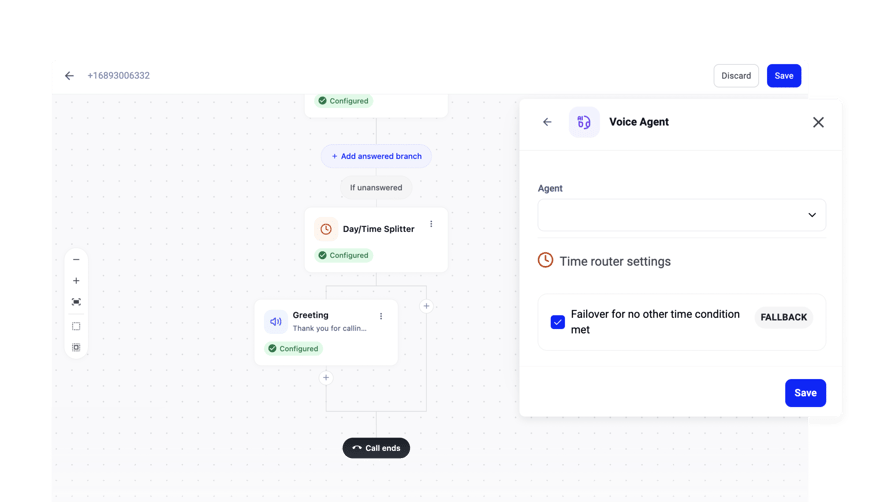
Emergency handling: You set the triage rules. On a no-heat or no-AC call, CloudTalk's AI Receptionist captures the address and problem and routes the call to your on-call process. Gas, CO and electrical calls should get the safety script and a transfer to a person.
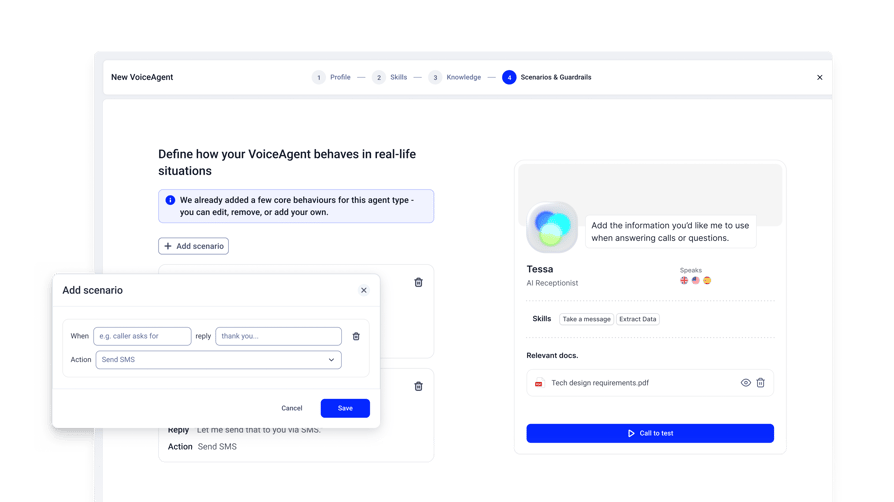
Integrations: Native CRM integrations with HubSpot, Salesforce, Pipedrive and Zoho. ServiceTitan, Housecall Pro, Jobber and FieldEdge connect through CloudTalk's open API, webhooks or Zapier, with help from an onboarding specialist.
Pricing: The AI Receptionist starts with 50 free minutes, then from $99/month for 200 minutes. The AI Specialist, for API-connected workflows like job status lookups and ticket creation, starts at $349/month for 1,000 minutes with expert implementation. AI Voice Agents are an add-on, not included in CloudTalk's phone plans (checked October 2026).
Considerations: CloudTalk doesn't supply live receptionists, so pick a live service if you want an outside human team on every call. Field service software connects through API or Zapier rather than natively.
2. AnswerForce
Best for: Contractors who want trades-trained human agents with direct links into field service software.
What it is: AnswerForce is a US live answering service for home and field service businesses, with human receptionists who book jobs and log call details in your software.
Key features for HVAC:
- 24/7 live answering, so a person picks up nights and weekends.
- Custom scripts and scheduling on all HVAC plans.
- Minutes you can adjust as seasonal volume shifts.
Emergency handling: Agents capture the details and dispatch your on-call technician (AnswerForce HVAC page, Oct 2026).
Integrations: Vendor-built links to ServiceTitan, Housecall Pro, Jobber, Workiz, Salesforce, HubSpot and more, plus Zapier (AnswerForce ServiceTitan integration, Oct 2026).
Pricing: Not published without a form. All plans bill by the minute, and the first 30 calls under 30 seconds each month are free (AnswerForce HVAC FAQ, Oct 2026).
Considerations: You share contact details to see prices, and per-minute billing makes a heat-wave month more expensive.
3. Specialty Answering Service
Best for: Small shops that want live answering with published per-minute prices.
What it is: Specialty Answering Service (SAS) is a US live answering service with an HVAC offering. Agents take messages and dispatch your on-call staff.
Key features for HVAC:
- On-call schedule changes handled by SAS, so rotations don't depend on a forwarded phone.
- Payment collected before dispatch, which cuts unpaid after-hours trips.
- 14-day free trial, no setup fee and no long-term contract.
Emergency handling: Agents reach your technicians by phone, text, email or pager, following your existing protocols (SAS HVAC page, Oct 2026).
Integrations: No field service or CRM integrations named on its site (SAS software page, Oct 2026).
Pricing: Economy is $44/month plus $1.54 per minute; the 100 Minute plan is $159/month plus $1.44 per extra minute (SAS pricing, Oct 2026).
Considerations: Overage adds up in a surge month, and you'll need to confirm any field service connection before signing.
4. Nexa
Best for: Companies that want live receptionists by default, with AI available as a first line or a backup.
What it is: Nexa is a US outsourced receptionist service for home services. Its Voice + AI option runs human-first, with AI only when no agent is free, or AI-first, with escalation to a human.
Key features for HVAC:
- 24/7/365 live coverage with custom scripts on all plans.
- You choose how much AI your customers hear.
- Scheduling and outbound reminder calls.
Emergency handling: Nexa handles emergencies according to your protocol and alerts your team by phone, SMS and email (Nexa 24/7 answering, Oct 2026).
Integrations: Nexa says it integrates with your software but names no field service tools (Nexa integrations, Oct 2026).
Pricing: No dollar prices published. Plans are voice-minute bundles such as Nexa 100 and Nexa 300 (Nexa pricing, Oct 2026).
Considerations: You'll need a sales conversation for prices and to confirm your field service tool connects.
5. Avoca
Best for: Multi-truck companies on ServiceTitan that want AI booking with a human backup.
What it is: Avoca is a hybrid service for home services. Its AI CSR answers and books calls 24/7 and passes calls it can't handle to Avoca's human CSR team.
Key features for HVAC:
- AI booking around the clock, so after-hours jobs don't wait for a dispatcher.
- Human CSRs behind the AI for harder calls.
- Jobs land on the ServiceTitan board with name, address, service type and call notes.
Emergency handling: Avoca's AI CSR routes emergencies 24/7, and its HVAC page shows urgent calls routed to a tech (Avoca HVAC page, Oct 2026). Set gas-smell calls to get safety instructions first.
Integrations: Connects directly with ServiceTitan as a certified app (Avoca ServiceTitan integration, Oct 2026). Other field service tools weren't listed.
Pricing: Not published; sold through demos (Avoca, Oct 2026).
Considerations: No public price, and in hybrid mode a third-party team, not your own staff, may speak to your customers.
6. LeadTruffle
Best for: Shops buying a lot of paid leads (Google Local Services Ads, Yelp, Thumbtack, Angi) that want AI voice plus text follow-up.
What it is: LeadTruffle is an AI answering and lead-response platform for home services that answers 24/7 and follows up by text.
Key features for HVAC:
- Asks about tonnage, system type and age, so techs arrive knowing the equipment.
- Texts back missed callers and connects to lead sources.
- Month-to-month terms, with a managed setup option.
Emergency handling: LeadTruffle detects keywords like "no heat" and "AC down" and escalates to your on-call tech by text, call or push notification (LeadTruffle HVAC page, Oct 2026).
Integrations: Booking into Jobber, Housecall Pro and ServiceTitan on all plans, plus Zapier, webhooks and API (LeadTruffle pricing, Oct 2026).
Pricing: Not published. Packages are scoped to lead volume, with no per-minute answering charges (LeadTruffle pricing, Oct 2026).
Considerations: It's built for lead capture, so it doesn't replace your phone system or office lines.
7. Housecall Pro CSR AI
Best for: Shops already on Housecall Pro that want AI booking tied to their existing jobs and schedule.
What it is: CSR AI is an AI customer service rep built into Housecall Pro's field service software. It answers calls and chats and books jobs 24/7.
Key features for HVAC:
- Works as your main line or as after-hours backup.
- Uses your existing jobs and availability, so you don't set them up twice.
- A call log that tracks the calls and revenue it handled.
Emergency handling: You set hours, scripts and escalation rules; no HVAC-specific emergency procedure is described (Housecall Pro CSR AI, Oct 2026).
Integrations: Native to Housecall Pro, and it works with your existing number through call forwarding (Housecall Pro CSR AI, Oct 2026).
Pricing: CSR AI is quoted after a demo. Housecall Pro plans start at $59/month (Basic, billed annually) (Housecall Pro pricing, Oct 2026).
Considerations: It only fits if you run Housecall Pro, and the AI is priced on top of the platform fee. For a low-volume shop, ask what the native tie-in saves you first.
8. Quo (formerly OpenPhone) with Sona
Best for: One-truck and small shops that want a low-cost phone app with light AI answering.
What it is: Quo is a cloud business phone system for small teams. Sona, its paid AI add-on, answers inbound calls, takes messages and captures leads.
Key features for HVAC:
- Different greetings for business hours and after hours in the same call flow.
- Business details and FAQs loaded in, with test calls before launch.
- English, Spanish and French, on inbound calls only.
Emergency handling: No HVAC emergency procedure published; you can tell Sona to transfer calls or route them to specific departments (Quo Sona, Oct 2026).
Integrations: HubSpot and Salesforce on the Business plan, plus Zapier and Make; no field service tools named (Quo pricing, Oct 2026).
Pricing: About 10 Sona calls a month free, then from $25/month for 40 calls. It needs a paid Quo plan from $15/user/month billed annually (Quo Sona, Oct 2026).
Considerations: Sona only works inside Quo, so you'd have to move your phone lines to Quo first.
How to Set Up an Answering Service Before Peak Season
Give yourself a few weeks and a plan. These seven steps take you from call history to go-live with little risk.
- 01Map your calls. Sort a month of call history into emergencies, routine service, after-hours calls and status calls. Note your peak months.
- 02Write the triage rules and escalation path. Decide what counts as urgent, who gets each kind of emergency, and the final fallback if that person doesn't answer.
- 03Start with after-hours and overflow calls only. Keep your office answering during business hours while you build trust in the setup.
- 04Load your FAQs and the safety script. Add service area, hours, membership plans and what to expect on a visit, plus the gas, CO and electrical script word for word.
- 05Test real scenarios. Call as a no-heat customer at night, a caller who smells gas, an angry regular and someone outside your service area. Check how it says your company name and local towns, and whether it spells back names and addresses.
- 06Go live a few weeks before peak season. We recommend this so problems show up before the rush, not during it.
- 07Review transcripts every week. Tune the rules, then expand to booking and status calls once the basics work.
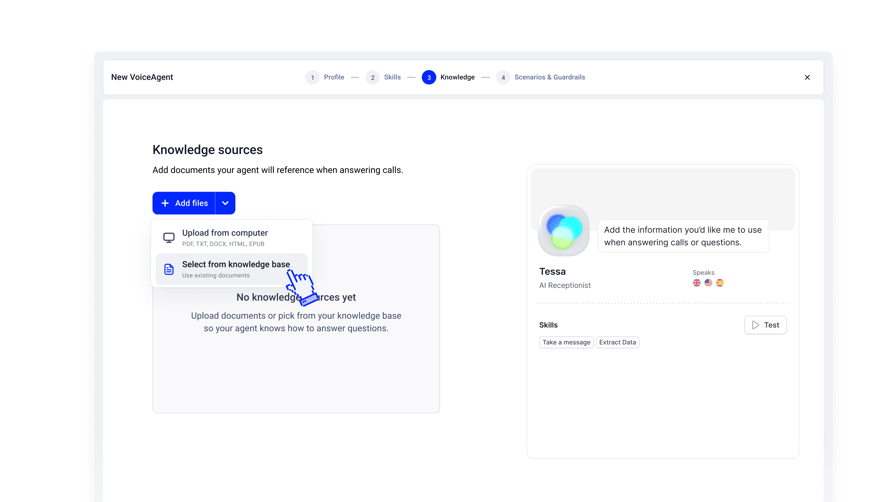
On CloudTalk, the AI Receptionist sets up in minutes, and the AI Specialist takes 1 to 2 weeks with expert help. On-call schedules and routing live in the same Call Flow Designer, where you can make edits without interrupting calls.
Get Ready Before the Next Heat Wave
A homeowner with a broken system keeps calling until someone picks up, and your line is most likely to ring out in peak weeks and late at night. Live, AI or a mix, an HVAC answering service picks up when your team can't and gets urgent calls to your on-call tech the same night. Pick one in the off-season, while you still have time to test it.
Start where the risk is lowest. Put our HVAC AI answering service on your after-hours calls, keep your office answering during business hours, and test it on real calls with 50 free minutes.
Sources
- 01Hiya
- 02U.S. Energy Information Administration
- 03Pew Research Center
- 04Salesforce
Frequently Asked Questions
An HVAC answering service answers your calls when your office and techs can't. It captures job details, sorts urgent calls from routine ones, books service visits or estimates, and escalates emergencies to your on-call tech along a call flow you design. You can pick a live, AI or hybrid service.
A 24/7 answering service is usually worth it for a small HVAC business if missed calls are costing you jobs. Multiply the calls you miss each week by your average ticket and compare that with the plan cost. Start with after hours and overflow on a small plan, as you would with any phone answering system for a small business.
An answering service handles HVAC emergencies by following the triage rules you set. Inbound call routing sends urgent calls, like no heat in freezing weather, to your on-call tech or triggers an immediate callback. Gas, CO and electrical calls get instructions to leave and call 911 or the utility from outside, then go to a person right away. It should never troubleshoot.
Yes, an AI answering service can book HVAC service calls and tune-ups onto your calendar during the call. For installs, it should book an estimator callback instead of quoting a price. Booking straight into field service software depends on the vendor: CloudTalk integrations, for example, cover CRMs natively, while field service tools connect through API or Zapier.
Whether an HVAC answering service works with ServiceTitan depends on the vendor. A few offer a direct ServiceTitan app, while many connect through an API, webhooks or Zapier rather than natively. CloudTalk, for instance, connects through its open API or its Zapier integration. Get a demo on your own setup before you sign.
An HVAC answering service costs a monthly fee plus per-minute or per-call charges for live agents, and per-minute plans for AI. To estimate, multiply your monthly call minutes by the rate, then check minimum billed minutes, seasonal spikes and contract length. CloudTalk's AI Receptionist starts with 50 free minutes, and its pricing runs from $99/month for 200 minutes after that.
For after-hours HVAC calls, AI usually wins on speed and live agents on complex callers. AI picks up right away, handles surges and asks the same questions every time, while a person does better with an upset or confused caller. A common setup is AI after hours, urgent calls transferred to your own on-call tech, and staff on the phones during business hours.
Customers will know they're talking to AI if you tell them, and you should. A short, polite disclosure in the greeting builds trust, and Salesforce found that 72% of customers say it's important to know when they're dealing with an AI agent. If regulars prefer a familiar voice, keep them routed to your staff during business hours, a common pattern in AI customer service.