TL;DR:
Reviewers on Gartner Peer Insights keep circling back to the same point about CloudTalk: the calls sound clear and stay connected. That is the lens for this whole list. We ranked the best business calling software for call quality using verified Gartner Peer Insights reviews, then layered in pricing, features, and honest trade-offs.
Here are the 12 tools we cover:
- 01CloudTalk - Best for global SMB sales & support teams that need clear, reliable calls
- 02Dialpad - Best for AI-native calling with sharp voice clarity
- 038x8 - Best for global unified communications and compliance
- 04Nextiva - Best for SMB customer experience
- 05RingCentral - Best for all-in-one UCaaS at scale
- 06Aircall - Best for CRM-connected sales & support
- 07Five9 - Best for high-volume inbound and outbound contact centers
- 08Talkdesk - Best for enterprise CX operations
- 09Genesys - Best for enterprise omnichannel routing
- 10Zoom Phone - Best for Zoom-first organizations
- 11JustCall - Best for SMB sales dialing
- 12Vonage - Best for flexible UCaaS with add-ons
Skip ahead to the at-a-glance comparison, or read on for the full breakdown, ratings, and buying advice.
A business phone system can look great on a features list and still fail the only test that matters on a live call: does the other person hear you clearly, without the line dropping? When audio garbles or calls cut out, every deal, support ticket, and follow-up takes the hit.
So we started from the audio, not the spec sheet. We read verified Gartner Peer Insights reviews for a dozen leading platforms and ranked them on the trait buyers actually feel every day. Use this as a business calling software comparison built around call quality first, features second.
Hear the Difference on Your First Call
How Gartner Peer Insights Reviews Led Us to These Business Calling Software Picks for Call Quality
Most "best of" lists rank tools on feature counts. We flipped that. Gartner Peer Insights collects verified, first-hand reviews from people who use these platforms at work every day, which makes it a strong source for judging something as practical as call clarity.
Across CloudTalk's Gartner Peer Insights profile, reliable call quality shows up again and again as a top-praised trait. Reviewers describe audio that stays clear on daily calls and connections that hold, alongside the features they lean on most: call recording, click-to-call, and CRM sync. One recurring theme in reviews is simple: the calls just work.
That is why CloudTalk leads this list, and why every other pick had to clear the same bar. The tools below all carry a real Gartner Peer Insights presence in the contact center and unified communications categories, and each earns its spot on how reviewers describe the calling experience, not on marketing claims. If you are choosing the best calling software for customer service teams, this is the shortlist to start from.
Our Approach to Vetting Gartner Peer Insights Reviews for Call Quality Claims
- Freshness: Based on Gartner Peer Insights reviews published through the last full quarter of 2026, last updated 2026, covering the trailing 12 months.
- Recurring over outlier: We prioritized call-quality themes that appear across many independent reviews rather than single standout ratings.
- Both sides of the ledger: We cross-checked negative feedback (lag during high call volume, mobile app gaps) against the positive so the picture is honest.
- Identity-verified sources: Gartner Peer Insights validates each reviewer's identity, role, industry, and company size before publishing, which strengthens every one of these gartner peer insights call center reviews.
Where reviews were thin or a rating rested on only a handful of responses, we said so instead of treating a small sample as a verdict. For deeper reading on how audio is measured, see our guides on call quality score and packet loss and why it matters.
Why Trust Our Software Reviews?
For nearly a decade, we've helped over 30,000 professionals choose and implement better communication tools. We've reviewed 200+ products, analyzed 5,500+ verified reviews from G2 and Capterra, and drawn insights from real user discussions on platforms like Reddit or Quora.
In the past year alone, we've published 1,000+ articles, all written and reviewed by humans, for humans, to provide reliable, data-backed insights you can trust.
Learn how we keep our content integrity and our software review methodology.
At a Glance: Business Calling Software Ratings, Pricing, and Best Fit
Here is the quick-scan version for skimmers. Ratings and review counts reflect Gartner Peer Insights and should be refreshed before publish, since they update continuously.
Business Calling Software: Ratings and Pricing at a Glance
| Software | Best For | Call Quality Highlight | Starting Price | Total Reviews | Gartner Rating |
|---|---|---|---|---|---|
| CloudTalk | Global SMB sales & support teams | Clear, reliable calls on a 99.999% uptime SLA | From $25/user/mo | 73 | 4.6 |
| Dialpad | AI-native calling | Sharp audio, strong uptime | From $15/user/mo | 323 | 4.5 |
| 8x8 | Global UC & compliance | Stable once configured | Custom (contact sales) | 162 | 4.6 |
| Nextiva | SMB customer experience | Reliable HD voice | From $20/user/mo | 782 | 4.6 |
| RingCentral | All-in-one UCaaS | Solid, occasional peak-time lag | From $20/user/mo | 55 | 4.3 |
| Aircall | CRM-connected sales & support | Reliable, connection-dependent | From $30/license/mo | / | / |
| Five9 | High-volume contact centers | Enterprise-grade voice | From $119/user/mo | 4.5 | 957 |
| Talkdesk | Enterprise CX | Strong voice, cloud-native | From $85/user/mo | 4.4 | 929 |
| Genesys | Enterprise omnichannel | Robust at scale | From $75/user/mo | 4.6 | 1,207 |
| Zoom Phone | Zoom-first organizations | Familiar Zoom audio stack | From $10.50/user/mo | 4.5 | 397 |
| JustCall | SMB sales dialing | Good, route-dependent | From $29/user/mo | 3.8 | 12 |
| Vonage | Flexible UCaaS with add-ons | Reliable core voice | From $13.99/user/mo | 4.4 | 396 |
12 Best Business Calling Software for Call Quality: Ranked by Gartner Peer Insights Reviewers in 2026
Each tool below is scored on how reviewers describe the calling experience first. CloudTalk leads because reliable call quality is its most-praised trait; the rest follow based on their Gartner Peer Insights standing and fit.
CloudTalk: Best Business Calling Software for Call Quality
What Is CloudTalk?
CloudTalk is a cloud-based business phone system built for sales and customer service teams that run high call volumes. It carries 70+ premium features and 160+ international numbers across 160+ countries, so teams can sound local anywhere while keeping one platform.
On call quality specifically, CloudTalk runs on carrier-grade infrastructure with a 99.999% uptime SLA. If you want the technical detail, we break it down on our business phone system call quality page.
CloudTalk Is Best For: growing SMB and mid-market sales and support teams that need dependable audio, global numbers, and CRM-connected workflows in one place.
CloudTalk Is Not Best For: very large enterprises that require a full workforce-engagement suite, or solopreneurs who only need a single virtual number.
What Are CloudTalk's Key Features?
- AI-powered conversation intelligence: transcription, call summaries, and sentiment analysis
- Advanced dialers: power, preview, and parallel dialing modes
- Smart call routing & IVR: skill-based, preferred-agent, and a visual call flow designer
- Global voice coverage: local, mobile, and toll-free numbers in 160+ countries
- Live call monitoring & coaching: listen-in, whisper, and barge
- 100+ integrations including HubSpot, Salesforce, and Zendesk
- Call recording, transcripts, and real-time & historical analytics
What Are CloudTalk's Pros and Cons? (based on real reviews)
Pros & Cons: CloudTalk
| Pros | Cons |
|---|---|
| Reliable, clear call quality named as a top praised trait | Occasional minor connectivity or delay blips reported |
| Intuitive interface and fast setup | Most advanced AI features sit on higher-tier plans |
| Deep CRM and helpdesk integrations | Routing design benefits from some upfront planning |
| Strong analytics and live call monitoring |
Where CloudTalk shines on call quality
- Reviewers repeatedly describe audio that stays clear on everyday calls
- Connections hold through routine sales and support workflows
- Call recording and click-to-call are cited as time-savers that don't compromise audio
Where reviewers want more
- A few reviewers note occasional connectivity or delay issues, described as minor and non-disruptive
- Teams that want the full AI toolkit should budget for a higher tier
How Much Does ClodTalk Cost?
From $25/user/month, with a 14-day free trial.
Flexible Pricing Plans to Scale with You
Compare our plans
What are real users saying about CloudTalk on Gartner Peer Insights?
CloudTalk's Gartner Peer Insights Rating and Review Count: from reviews.
Reviewers consistently point to reliable call quality as a standout, alongside easy CRM sync and quick setup. The most common critique is occasional, minor connectivity blips that reviewers say don't disrupt daily operations.
I've had a positive experience using Cloudtalk for outbound prospecting and daily calling workflows. The platform is easy to set up and integrates well with our CRM, which makes it simple to manage call activity and keep records organized. Call quality has generally been reliable, and features like call recording and click to call save time. One thing that works particularly well for me is easily tracking conversations and reviews calls afterwards, which is helpful for improving messaging. The interface is also fairly intuitive. There are occasional minor issues with call connectivity or delays but nothing that significantly disrupts operating. Overall it's been a solid tool so far.

Connect Your Phone to HubSpot and Salesforce in 1 Click

Dialpad: Best Calling Software for AI-Native Voice Clarity
What Is Dialpad?
Dialpad is an AI-first business communications platform that pairs cloud calling with real-time transcription and coaching. It is widely reviewed across Gartner's unified communications and contact center categories.
Dialpad Is Best For: teams that want AI transcription and coaching baked into calling. Not Best For: buyers who need heavy outbound dialing at the entry tier.
What Are Dialpad's Key Features?
- Real-time AI transcription and call summaries
- Built-in video meetings and messaging
- AI-powered coaching and sentiment cues
- Call routing, IVR, and analytics
- CRM integrations with Salesforce, HubSpot, and Zendesk
What Are Dialpad's Pros and Cons?
Pros & Cons: Dialpad
| Pros | Cons |
|---|---|
| Reviewers praise sharp call quality and excellent uptime | Many features and AI add-ons sit on higher tiers |
| Strong AI transcription accuracy | Advertised entry price lands higher in practice |
| Clean, modern interface | Deeper contact center tooling is less mature than pure CCaaS |
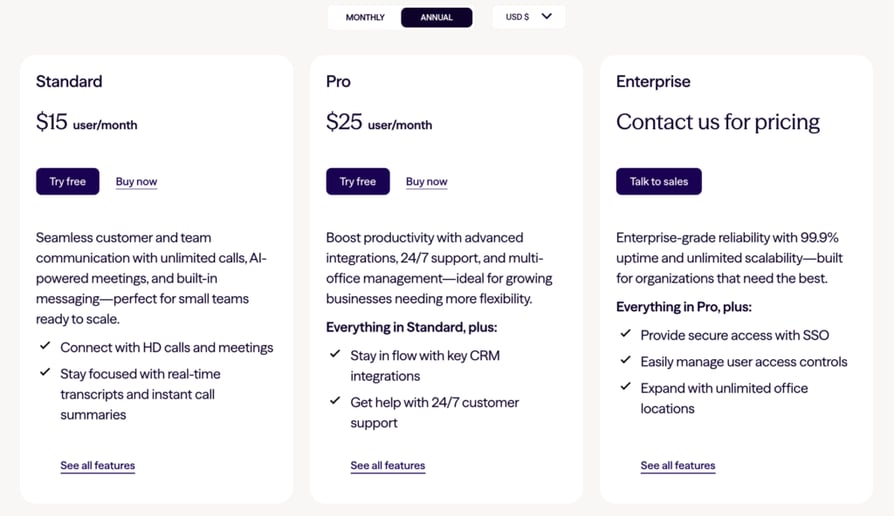
How Much Does Dialpad Cost?
From $15/user/month (annual billing).
What are real users saying about Dialpad on Gartner Peer Insights?
Reviewers highlight that the call quality is genuinely good and uptime is excellent, with video conferencing among the sharpest they have used.
Overall it's a good call and the transcriptions are good. Call routing and departmentalization needs serious work and improvements to make it an outstanding product"
Dialpad vs. CloudTalk: both deliver clear audio and strong AI. CloudTalk leans further into outbound dialing modes and global numbering for sales and support teams, while Dialpad centers its experience on native AI meetings. See the CloudTalk vs. Dialpad comparison.
8x8: Best for Global Unified Communications and Compliance
What Is 8x8?
8x8 is a unified communications platform that combines voice, video, chat, and contact center in one system with broad global coverage and compliance certifications.
8x8 Is Best For: global organizations needing unified communications with compliance. Not Best For: small teams wanting a lightweight, quick-start dialer.
What Are 8x8's Key Features?
- Global numbers across 50+ countries
- Unified voice, video, and messaging
- Speech analytics and quality management
- Contact center routing and reporting
- Security and compliance (HIPAA, PCI)
What Are 8x8's Pros and Cons?
Pros & Cons: 8x8
| Pros | Cons |
|---|---|
| Stable and reliable once configured | Reviewers note latency during high call volume |
| Strong global compliance and coverage | Interface can feel cluttered |
| All-in-one voice, video, and contact center | Support response times vary |
What are real users saying about 8x8 on Gartner Peer Insights?
Reviewers describe a stable system with reliable messaging and call features, while flagging occasional latency when call volume spikes.
Overall Comment:"When you get to talk to support, they are very good, some of the processes can take a while to resol;ve such as call example expires after 24hours, when your a reseller there are multiple people that we have to go through to get a call example, by the time its reviewed by 8x8 it expires."
8x8 vs. CloudTalk: 8x8 is a broad enterprise UC suite; CloudTalk is a focused calling platform that is faster to deploy for sales and support teams. Compare on the 8x8 alternative page.
Nextiva: Best for SMB Customer Experience
What Is Nextiva?
Nextiva is a business communications platform popular with small and mid-sized businesses that want dependable voice plus customer-experience tooling.
Nextiva Is Best For: SMBs prioritizing dependable voice and service. Not Best For: outbound-heavy sales teams needing power or parallel dialing.
What Are Nextiva's Key Features?
- HD voice calling with auto attendant
- Team messaging and video meetings
- Call routing and voicemail-to-email
- CRM and helpdesk integrations
- Analytics and call recording
What Are Nextiva's Pros and Cons?
Pros & Cons: Nextiva
| Pros | Cons |
|---|---|
| Reliable HD voice and strong support reputation | Advanced features gated behind higher tiers |
| Straightforward setup for SMBs | Fewer outbound-sales dialing modes |
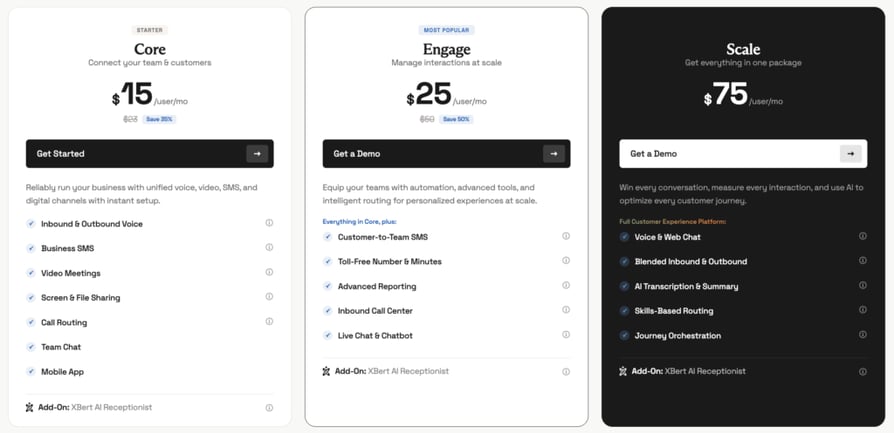
How Much Does Nextiva Cost?
From $20/user/month (annual billing).
What are real users saying about Nextiva on Gartner Peer Insights?
Reviewers rate voice reliability and customer support highly, which is why it earns a strong standing among SMB buyers.
The Nextiva team is always quick to help when something isn't working as intended or I need help changing policies. They are true to their SLA and any downtime we have experienced in the last 4 years has been clearly communicated before hand.
Nextiva vs. CloudTalk: both suit SMBs, but CloudTalk adds deeper sales dialing and 160+ international numbers for teams selling across borders. See Nextiva alternatives.
RingCentral: Best All-in-One UCaaS at Scale
What Is RingCentral?
RingCentral is one of the most established unified communications platforms, combining phone, message, video, and contact center under one roof.
RingCentral Is Best For: organizations wanting one vendor for voice, video, and messaging. Not Best For: teams wanting a lean, calling-first tool without a large suite.
What Are RingCentral's Key Features?
- Cloud phone with global numbers
- Team messaging and video
- AI note-taking and call summaries
- Contact center add-ons
- Large integrations marketplace
What Are RingCentral's Pros and Cons?
Pros & Cons: RingCentral
| Pros | Cons |
|---|---|
| Broad feature set and integrations | Reviewers report occasional lag or brief freezes at peak traffic |
| Reliable core calling for most teams | Can be complex and pricey to fully configure |
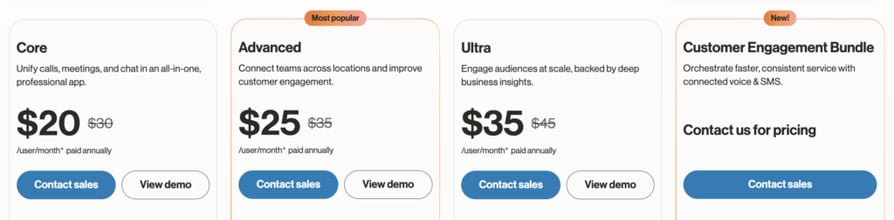
How Much Does RingCentral Cost?
From $20/user/month (annual billing).
What are real users saying about RingCentral on Gartner Peer Insights?
Reviewers value the breadth of the platform; the most cited call-quality note is a brief lag or freeze during peak traffic, typically lasting seconds.
Despite RingCentral Contact Center lagging or freezing up during peak traffic times or "seasons" wherein a lot of calls or chats are coming through the system; I think it more than makes up for it since it very accurately predicts the flow of contact within the next 30 minutes. The freeze up only lasts about 30 seconds though, so there's nothing a fast refresh on the window will not fix. Overall, I think it is still a fantastic system and it more than provides the monitoring and forecasting needs for a contact center
RingCentral vs. CloudTalk: RingCentral is a full UC suite; CloudTalk is purpose-built for sales and support calling with faster setup. See RingCentral alternatives.
Try Clear, Reliable Calling Free for 14 Days
Aircall: Best for CRM-Connected Sales and Support
What Is Aircall?
Aircall is a cloud phone system for sales and support teams, known for its integrations marketplace and remote-friendly setup.
Aircall Is Best For: sales and support teams that live in their CRM. Not Best For: solo users or very small teams below the license minimum.
What Are Aircall's Key Features?
- Virtual numbers in 100+ countries
- Call routing and IVR via Smartflows
- Call queuing and callback
- Call recording and coaching
- 250+ app integrations
What Are Aircall's Pros and Cons?
Pros & Cons: Aircall
| Pros | Cons |
|---|---|
| Easy setup and broad integrations | Occasional connection issues reported |
| Reliable call quality across regions | 3-license minimum on entry plans |
How Much Does Aircall Cost?
From $30/license/month.
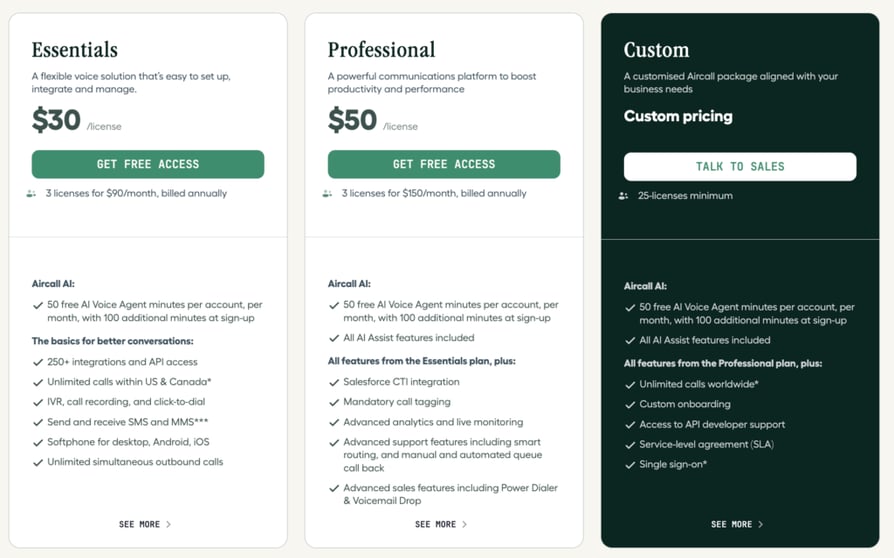
Aircall vs. CloudTalk: similar audience, but CloudTalk offers more advanced dialers and a lower entry point per seat. Compare on the Aircall alternative page.
Five9: Best for High-Volume Contact Centers
What Is Five9?
Five9 is a cloud contact center (CCaaS) platform built for inbound, outbound, and blended operations at scale, with a large Gartner Peer Insights review base.
Five9 Is Best For: large contact centers with high call volumes. Not Best For: small teams that don't need full CCaaS.
What Are Five9's Key Features?
- Predictive dialing and intelligent virtual agents
- Omnichannel voice, chat, and SMS
- Skill-based routing
- Real-time and historical analytics
- CRM integrations with Salesforce, Dynamics, and Zendesk
What Are Five9's Pros and Cons?
Pros & Cons: Five9
| Pros | Cons |
|---|---|
| Enterprise-grade voice and automation | Setup can be time-consuming |
| Deep analytics and CRM ecosystem | Higher price and 50-seat minimum |
How Much Does Five9 Cost?
From $119/user/month (Digital), with voice plans higher and a 50-seat minimum.
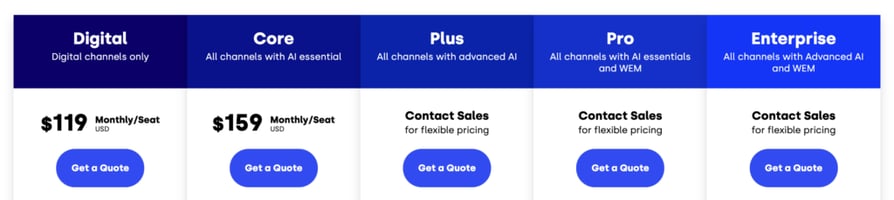
What are real users saying about Five9 on Gartner Peer Insights?
With one of the larger review bases in the category, reviewers point to reliable, enterprise-grade voice and strong routing, balanced against a heavier setup.
Every company has their good and bad days, but Five9 is truly a partner to help you through the bad days and make the good days even better! Their Technical Account Manager team has truly incredible talent that stands beside you and helps you do what you need to do. They are responsive and work with you to make your environment the best it can be! The implementation was a little rocky but that was years ago and with different team members. Our representative, is truly a partner to us, and we have mentioned on several occasions that we consider him to be an honorary member of our team at our company because of how dedicated and reliable his support is for us. Working with Five9 has been an incredible experience for us as a company and they continue to work with us through our projects today!
Five9 vs. CloudTalk: Five9 targets large enterprise contact centers; CloudTalk is the lighter, faster-to-deploy pick for SMB and mid-market teams. See Five9 alternatives.
Talkdesk: Best for Enterprise CX
What Is Talkdesk?
Talkdesk is a cloud contact center platform focused on enterprise customer experience, with AI features and a modern agent workspace.
Talkdesk Is Best For: enterprise CX teams. Not Best For: small teams on tight budgets.
What Are Talkdesk's Key Features?
- Omnichannel routing and IVR
- AI agent assist and self-service
- Workforce engagement tooling
- Quality management and analytics
- Prebuilt CRM and helpdesk integrations
What Are Talkdesk's Pros and Cons?
Pros & Cons: Talkdesk
| Pros | Cons |
|---|---|
| Strong, cloud-native voice quality | Enterprise pricing and contracts |
| Rich AI and CX feature set | More than SMBs typically need |
How Much Does Talkdesk Cost?
From $85/user/month (CX Cloud Digital Essentials).
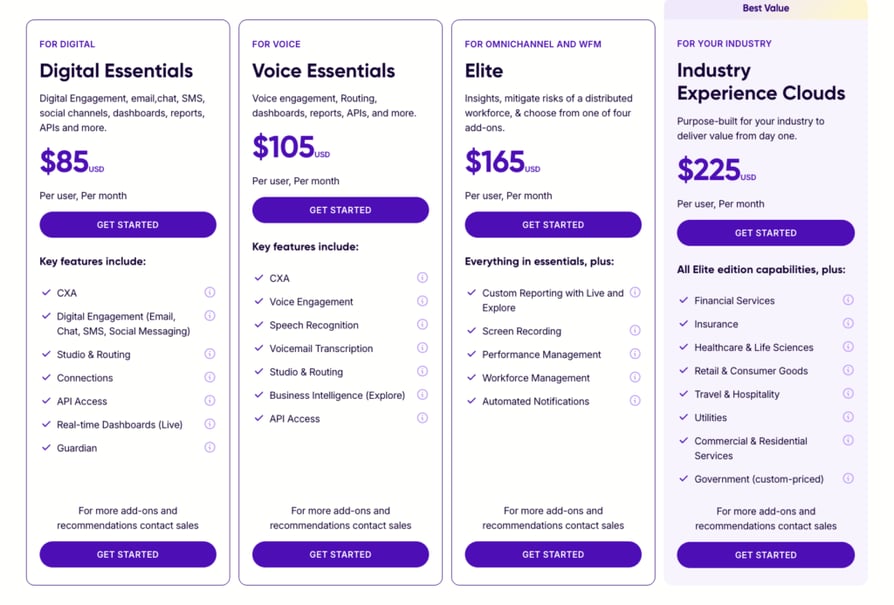
What are real users saying about Talkdesk on Gartner Peer Insights?
Reviewers value the cloud-native voice quality and AI tooling; the sample skews toward larger organizations, so weigh the review count when reading the rating.
As a telephony platform, it provides the configuration and customization we need to support our operations. The biggest opportunity is improved resiliency - reducing critical outages and accelerating incident response. I call this out as a "culture" point because it also shows up in the lack of proactive call-health monitoring and early warning signals that would help prevent issues and improve stability.
Talkdesk vs. CloudTalk: Talkdesk fits enterprise CX; CloudTalk is the more agile, affordable option for growing sales and support teams. See Talkdesk alternatives.
Genesys: Best for Enterprise Omnichannel Routing
What Is Genesys?
Genesys Cloud CX is an enterprise contact center platform known for advanced routing, workforce engagement, and omnichannel orchestration.
Genesys Is Best For: large enterprises with complex routing needs. Not Best For: SMBs seeking simple, fast calling.
What Are Genesys's Key Features?
- Omnichannel routing across voice and digital
- Workforce engagement management
- AI-powered bots and predictive engagement
- Advanced reporting and dashboards
- Broad integration ecosystem
What Are Genesys's Pros and Cons?
Pros & Cons: Genesys
| Pros | Cons |
|---|---|
| Robust, reliable voice at enterprise scale | Complex to deploy and administer |
| Deep omnichannel and WEM tooling | Minimum spend and higher cost |
How Much Does Genesys Cost?
From $75/user/month (Genesys Cloud CX 1), with a minimum monthly commitment.
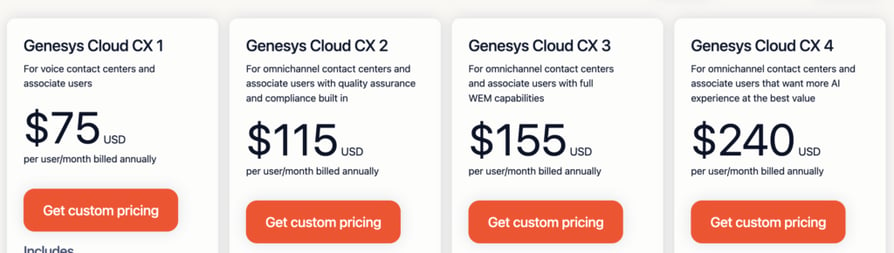
What are real users saying about Genesys on Gartner Peer Insights?
Reviewers describe reliable voice and powerful orchestration at scale, offset by deployment complexity.
Our experience with Genesys Cloud has been a journey of moving from reactive handling to proactive orchestrating. For years, we operated within the constraints of a "toggle tax," where our agents' energy was spent fighting fragmented systems rather than those complexities that required more of a human heart. By shifting our philosophy and treating Genesys as an orchestration engine, we bridged the gap between rigid information and human intuition. The result is a system that "thinks" before it acts, using Architect’s AI to effectively clear the noise of the workload. We thrived, turning a high-pressure volume and recall season into a record-breaking productivity and agent morale. Genesys didn't just give us a new tool; it gave us a way to protect the people on both ends of the line.
Genesys vs. CloudTalk: Genesys is built for enterprise complexity; CloudTalk delivers clear calling and quick time-to-value for leaner teams. See Genesys Cloud CX alternatives.
Zoom Phone: Best for Zoom-First Organizations
What Is Zoom Phone?
Zoom Phone extends Zoom's meeting platform into cloud calling, so teams already standardized on Zoom can add business phone without a new vendor.
Zoom Phone Is Best For: organizations already standardized on Zoom. Not Best For: outbound sales teams needing advanced dialers.
What Are Zoom Phone's Key Features?
- Cloud calling inside the Zoom app
- Call recording and voicemail transcription
- Call routing and IVR
- Elevate a call to a meeting in one click
- Global numbers and unlimited domestic plans
What Are Zoom Phone's Pros and Cons?
Pros & Cons: Zoom Phone
| Pros | Cons |
|---|---|
| Familiar Zoom audio stack and UI | Metered plan bills outbound by the minute |
| Simple for existing Zoom customers | Fewer sales-dialing features |
How Much Does Zoom Phone Cost?
From $10.50/user/month (metered), or about $16/user/month for unlimited US and Canada.
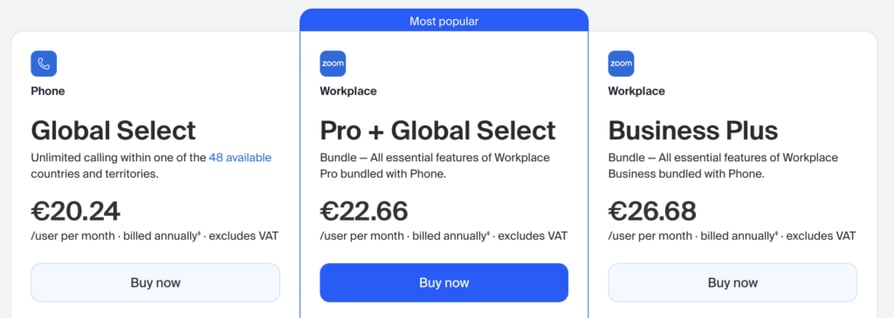
What are real users saying about Zoom Phone on Gartner Peer Insights?
Reviewers appreciate the familiar Zoom experience and pricing, and choose it to keep meetings and calling on one stack.
Customer service was great at first but after the onboarding the customer service assistance went downhill
Zoom Phone vs. CloudTalk: Zoom Phone is convenient for Zoom shops; CloudTalk is the stronger dedicated calling tool for sales and support workflows. See the CloudTalk vs. Zoom Phone comparison.
JustCall: Best for SMB Sales Dialing
What Is JustCall?
JustCall is a cloud phone and SMS platform aimed at SMB sales and support teams, with dialers and CRM integrations.
JustCall Is Best For: SMB sales teams wanting dialers plus SMS. Not Best For: enterprises needing full CCaaS.
What Are JustCall's Key Features?
- Auto, predictive, and dynamic dialers
- SMS and MMS campaigns
- AI call scoring and transcripts
- 100+ CRM and helpdesk integrations
- Numbers in 70+ countries
What Are JustCall's Pros and Cons?
Pros & Cons: JustCall
| Pros | Cons |
|---|---|
| Solid dialing and SMS for SMB sales | Call quality can vary by route |
| Broad CRM integrations | 2-license minimum on entry plan |
How Much Does JustCall Cost?
From $29/user/month (annual, 2-license minimum).
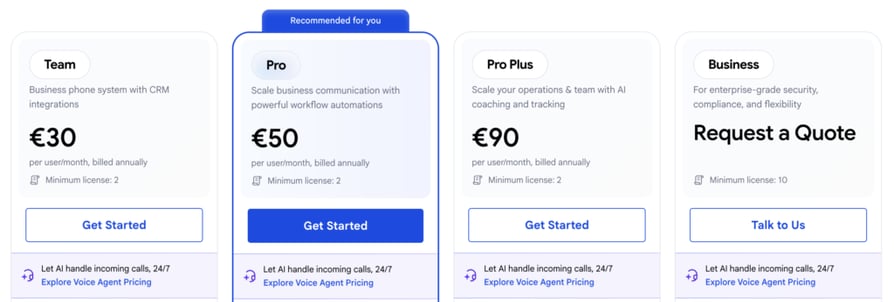
What are real users saying about JustCall on Gartner Peer Insights?
Reviewers like the dialing and messaging tooling; call clarity is generally good but can depend on the calling route and network.
Generally it's really good tool, the best thing? Easy set-up. No need for some time consuming configurations. The only downside is lack of good analysis
JustCall vs. CloudTalk: both serve SMB sales, but CloudTalk pairs its dialers with a 99.999% uptime SLA and broader global numbering. Compare on the JustCall alternative page.
Vonage: Best for Flexible UCaaS with Add-Ons
What Is Vonage?
Vonage is a unified communications platform with a modular App Center, letting teams add capabilities as they grow, plus a strong developer/API side.
Vonage Is Best For: teams wanting a customizable UCaaS with an API path. Not Best For: buyers who want everything included in one flat plan.
What Are Vonage's Key Features?
- App Center with 50+ add-ons
- Multi-level auto attendant
- Visual voicemail
- CRM integrations
- Communications APIs for custom builds
What Are Vonage's Pros and Cons?
Pros & Cons: Vonage
| Pros | Cons |
|---|---|
| Reliable core voice and flexible add-ons | Many capabilities are paid add-ons |
| Scales as teams grow | Mobile app can be resource-heavy |
How Much Does Vonage Cost?
From $13.99/user/month.
What are real users saying about Vonage on Gartner Peer Insights?
Reviewers describe dependable core calling and appreciate the flexibility of the App Center, while noting costs can climb with add-ons.
Vonage VCC has been a reliable and effective communication platform for our organization. The system is easy to manage, offers strong reporting capabilities, and has helped improve call routing and overall communication workflows
Vonage vs. CloudTalk: Vonage is modular and API-friendly; CloudTalk bundles the sales and support essentials with clear, reliable calling out of the box. See Vonage alternatives.
Put Call Quality to the Test
Why Gartner Peer Insights Reviews Are a Solid Test for Call Quality
Not all review sources are equal. Gartner Peer Insights verifies each reviewer's identity, job title, industry, and company size before a review goes live, a stronger identity check than most open review platforms. That verification is what makes these verified call quality reviews worth weighting more heavily than anonymous ratings.
Call quality is also a functional, easy-to-judge criterion. A reviewer can hear whether audio is clear and whether a call held, which is more objective than a subjective take on, say, "ease of use." That makes it an unusually good fit for a review-based comparison.
Gartner's moderation process screens submissions for authenticity and removes reviews that don't meet its standards, so the ratings you see reflect vetted, real-world use rather than promotional noise. For the operational side of maintaining clarity, our guides on QoS in business telephony and reliable call quality software in 2026 go deeper.
See Why Reviewers Rate CloudTalk on Call Quality
What to Check Before You Switch Business Calling Software
Ratings get you to a shortlist. These checks get you to the right decision.
1. Network and VoIP Infrastructure Redundancy
Clear calls start with the network under them. Ask whether the provider runs redundant data centers, how it routes around outages, and what uptime it commits to. CloudTalk, for example, publishes a 99.999% uptime SLA. Understanding packet loss and jitter helps you ask sharper questions.
2. Desktop vs. Mobile Call Quality Parity
Audio that is crisp on desktop can degrade on a mobile app. Test both before you commit, and read reviews that mention mobile specifically, since mobile app gaps are a common source of complaints across the category.
3. Performance During High Call Volume
Several platforms in this list draw the same honest caveat from reviewers: lag or brief freezes when traffic spikes. If your team runs peaks, ask how the platform handles concurrency and test under load. This is where call center software with clear call quality earns its keep.
4. International vs. Domestic Call Clarity
Domestic clarity does not guarantee clean international calls, which depend on routing and local carrier relationships. If you sell or support across borders, verify audio on the specific routes you use and check country coverage.
5. Integration Stability with CRM and Helpdesk Tools
A dropped integration can be as disruptive as a dropped call. Confirm the CRM sync is native and two-way, and that call data, recordings, and summaries log reliably. Explore CloudTalk's integrations to see how deep the connections go.
6. What to Ask a Vendor About Uptime SLAs
Ask for the SLA in writing, what it excludes, and how the vendor credits you if it misses. Pair that with a look at how they score and monitor audio; our guides to call quality score and quality assurance call monitoring give you the vocabulary. For AI-driven scoring, see the best AI call scoring software.
The Best Business Calling Software for Call Quality: Final Takeaways
If call quality is your first filter, the shortlist sorts itself by fit. CloudTalk is the pick for global SMB and mid-market sales and support teams that want clear, reliable calls with deep CRM sync. Dialpad suits AI-native teams; 8x8 and RingCentral fit organizations that want a full unified-communications suite; Nextiva is a dependable SMB customer-experience choice.
For high-volume contact centers, Five9, Talkdesk, and Genesys bring enterprise-grade voice and routing. Zoom Phone is the natural add-on for Zoom-first orgs, JustCall covers SMB sales dialing, and Vonage offers a flexible, add-on-driven UCaaS.
What ties the ranking together is the source. Because Gartner Peer Insights verifies every reviewer and moderates every review, the call-quality signal behind these picks reflects real, vetted use, not marketing. That is exactly why it is a trustworthy lens for a decision your customers will hear on every call.
Ready to Hear the Difference?
Frequently Asked Questions
Reviewers generally describe CloudTalk's call quality as reliable in day-to-day use, running on a 99.999% uptime SLA. A minority mention occasional connectivity or delay blips, which they characterize as minor and not disruptive. As with any platform, test under your own peak load before committing.
Gartner Peer Insights validates each reviewer's identity along with their job title, industry, and company size before publishing, and moderates submissions for authenticity. That verification makes its ratings a stronger signal than anonymous review sites.
Both desktop and mobile run on the same carrier-grade backbone, so core call quality is consistent. Mobile clarity always depends partly on the device's local network, so we recommend testing your typical mobile conditions during the 14-day free trial.
Treat a rating built on only a handful of reviews with caution. As a rule of thumb, look for at least 20 to 30 verified reviews before weighting a score heavily, and read the recent ones to see whether call-quality themes are consistent rather than one-off.