3CX AI Receptionist Review 2026: Pricing, Features & Alternatives
TL;DR:
3CX AI Receptionist is a capable call-handling layer built into 3CX's AI Edition—but it's not a plug-and-play solution for every business.
It works best for IT-savvy teams already running 3CX who need intelligent call routing, spam screening, and multilingual call handling without adding headcount or paying per-minute fees.
Key takeaways from this 3CX AI Receptionist review:
- Pricing: Included in the 3CX AI Edition (formerly Enterprise), which starts at ~$635/year for 8 SC—no per-minute fees, but hosting and SIP trunking add to total cost
- Best for: Teams already using 3CX with moderate-to-high inbound call volume who want AI deflection without usage-based billing
- Strengths: Flat annual licensing, on-premise or cloud deployment, multilingual support, bring-your-own-AI-provider flexibility
- Limitations: Requires IT resources to deploy and maintain, no no-code onboarding, AI features locked behind the premium AI Edition tier
- Language support: Supports multiple languages with automatic language-switching during calls; specific language list varies by AI provider configured
- User sentiment: G2 reviews praise call quality and flexibility; complaints center on setup complexity, admin UI, and post-2023 security incident trust concerns
- Best alternative: Cloudtalk. For teams that need faster, easier setup, predictable cloud pricing, and purpose-built AI call handling, alternatives like CloudTalk are often a better fit.
Businesses receive hundreds of calls every week—and every missed call or clunky routing experience has a cost. 3CX's AI Receptionist, rolled out as part of its AI Edition in 2026, promises to change that: answering calls automatically, routing intelligently, and screening spam without involving a single human agent.
But is the 3CX AI Receptionist actually the right fit for your business?
This review covers everything you need to make that call: real 3CX AI Receptionist pricing, a full feature breakdown, user feedback from G2, Trustpilot, and Reddit, and five alternatives worth considering—including the one we'd recommend most.
What Is 3CX AI Receptionist?
3CX is a software-based PBX system that has been around since 2005, offering voice calls, video conferencing, live chat, WhatsApp messaging, and team collaboration—all within a single platform. Unlike cloud-only competitors, 3CX gives businesses a choice: deploy it on their own servers, host it in the cloud, or let 3CX host it for them.
That flexibility has made 3CX popular with IT-focused organizations, managed service providers, and businesses that want control over their communication infrastructure and data.
How Does 3CX AI Receptionist Work?
The 3CX AI Receptionist is part of the 3CX AI Edition (formerly called the Enterprise/AI Edition). It sits on top of existing call flows as an intelligent automation layer—not a standalone chatbot. When a call arrives, the AI handles it immediately: greeting the caller, understanding their intent, and routing them where they need to go. According to the AI Receptionist framework, the core capabilities include:
- Inbound call handling: Answers calls 24/7, greets callers naturally, and manages the interaction without human involvement
- Intelligent routing: Routes calls to the right extension, queue, ring group, IVR, or external number based on caller intent and department logic
- Spam and nuisance call screening: Detects and filters spam calls before they reach your team
- Multilingual support: Detects the caller's language and switches automatically to respond in kind
- Deployment flexibility: Works on-premise, self-hosted, or cloud-hosted through 3CX—giving organizations full control over where voice data is processed
Not sure if 3CX AI Receptionist fits your business?
What Are The Key Features of 3CX AI Receptionist?
Let's look at the core 3CX AI Receptionist features and how each one works in practice.
Call Handling and Routing
Instead of legacy IVR menus, callers speak naturally, and the AI interprets their intent in real time. The system supports routing to extensions, ring groups, queues, shared parking, IVRs, call scripts, and external numbers—giving administrators granular control over where calls land.
Routing logic supports:
- By department or intent: Maps caller requests to the right team or queue automatically
- CRM-aware routing: Identifies callers against company phonebooks, CRM systems, Google Workspace, and Microsoft 365 to route known contacts more efficiently
- Availability checks: 3CX introduced Busy Check Before Transfer—so calls are only passed through when the destination is actually available
- Abusive caller handling: Administrators can configure how the AI manages frustrated or uncooperative callers before escalating to a live agent
This connects directly with CRM integrations—3CX supports Salesforce, HubSpot, Zoho, and other major CRM platforms, so caller context is already visible when a handoff happens.
Integration Capabilities
3CX's virtual receptionist connects with a range of third-party tools. On the calendar side, it integrates with Google Workspace and Microsoft 365 for availability lookups. On the CRM side, it supports major platforms for contact identification during call screening and routing.
One differentiator is the bring-your-own-AI-provider model. Rather than locking users into one AI vendor, 3CX lets administrators choose between OpenAI, xAI Grok (added as a more cost-effective option), Google, or a self-hosted engine for transcription and AI processing. This matters for businesses with strict data residency requirements—especially in healthcare, legal, and financial services.
Voicemail and Transcription
AI Transcription is bundled into the AI Edition and converts calls and voicemails into written transcripts automatically. Key capabilities include:
- Speaker diarization: Accurately separates and logs who said what during a call—useful for compliance, dispute resolution, and coaching
- Sentiment analysis: Transcripts feed into sentiment scores visible across call logs, extensions, queues, and ring groups in 3CX Reports
- Voicemail-to-text: Voicemails are transcribed and delivered by email so agents can scan messages without listening to recordings
- Local or cloud processing: Organizations can run transcription on their own GPU-equipped server for maximum data privacy, or use 3CX's cloud transcription service
Multi-Channel Support
Beyond voice, 3CX supports SMS messaging, WhatsApp, Facebook Messenger, live website chat, and video conferencing—all managed from the same platform. For businesses that receive inquiries across multiple channels, this consolidated view reduces the need for separate tools.
AI call screening—standardized across Windows, Android, iOS, and the web client—brings the same consistent experience regardless of which device an agent is using when a call comes in.
Want AI call handling without the IT overhead?
How Much Does 3CX AI Receptionist Cost?
Understanding 3CX AI Receptionist pricing requires looking at the full picture—because the AI Receptionist is not sold as a standalone add-on. It's part of the 3CX AI Edition, which means you're paying for an entire communications platform, not just an AI answering feature.
Pricing Tiers Explained
3CX uses simultaneous-call (SC) licensing—you pay based on how many calls can happen at the same time, not per user. There are four editions:
3CX Plans Overview
| Edition | Starting Price | What's Included |
|---|---|---|
| 3CX SMB Free | Free (up to 10 users) | Basic PBX features only; no AI features |
| 3CX Basic | From ~$330/year (8 SC) | Standard calling and PBX features |
| 3CX PRO | From ~$440/year (8 SC) | Advanced routing, queues, CRM integrations—no AI Receptionist |
| 3CX AI Edition | From ~$635/year (8 SC) | Everything in PRO + AI Receptionist, AI Personal Assistant, AI Agents, AI Transcription |
The AI Receptionist is only available in the AI Edition. Businesses on Basic or PRO must upgrade to access it—which means paying the AI Edition premium for the full license, not just the receptionist feature.
Hidden Costs to Consider
The license is just the starting point. The true 3CX AI Receptionist cost includes several layers that don't appear on the pricing page:
- Hosting: Self-hosted deployments require a server or VM (estimate $6–$30/month for small instances). Hosted by 3CX adds an annual hosting fee on top of the license.
- SIP trunking: 3CX doesn't include call minutes. You'll need a SIP trunk provider and pay separately for inbound and outbound calls—typically $20–$50/month for small deployments.
- IT resources: Unlike managed cloud platforms, 3CX requires someone to handle installation, maintenance, updates, and security hardening. For teams without in-house IT, this often means hiring a 3CX partner or MSP.
- AI provider costs: If you use OpenAI or Google for transcription, those API calls are billed separately to your account. Only self-hosted GPU transcription eliminates this ongoing cost.
Total Cost of Ownership
For a realistic picture of what 3CX AI Receptionist actually costs, you need to combine the license, hosting, SIP trunking, and any IT or MSP support costs. Based on our 3CX pricing breakdown, a small business running 3CX on the AI Edition might budget:
Estimated 3CX AI Edition Annual Cost (Small Deployment)
| Cost Component | Estimate |
|---|---|
| AI Edition license (8 SC) | ~$635/year |
| Hosting (cloud VM or 3CX Hosted) | $330/year |
| SIP trunking | $240–$600/year |
| IT support / MSP (if no in-house IT) | Variable |
| Estimated annual total | ~$1,200–$1,600+/year |
The upside: unlike per-minute models such as RingCentral AIR, 3CX's SC licensing means there are no usage-based overage charges. High-volume teams pay the same flat rate regardless of how many calls the AI handles—which makes budgeting more predictable as call volume scales.

Stop paying for infrastructure just to handle calls

3CX AI Receptionist Pros and Cons
What are 3CX AI Receptionist's Strengths?
- Flat annual licensing: No per-minute fees and no usage-based billing—what you pay each year stays the same regardless of call volume, making costs predictable at scale.
- Deployment flexibility: Self-host on-premise, deploy on a cloud VM, or let 3CX host it—organizations with data residency or compliance requirements can keep voice data entirely within their own infrastructure.
- Bring-your-own-AI model: Choose OpenAI, xAI Grok, Google, or a self-hosted GPU engine for transcription—giving cost and privacy control that proprietary AI platforms don't offer.
- All-in-one communications platform: Voice, video, live chat, WhatsApp, and AI reception managed from one system—no need to stitch together multiple vendor contracts.
- Cost efficiency for larger deployments: The SC model often becomes significantly cheaper than per-user cloud alternatives at 50+ users, particularly when existing server infrastructure can be reused.
What are 3CX AI Receptionist's Weaknesses?
- Requires technical resources: There is no no-code onboarding. Deploying, configuring, and maintaining 3CX requires IT knowledge or a certified 3CX partner—adding cost and time compared to managed cloud alternatives.
- AI features locked behind the premium tier: The AI Receptionist is exclusive to the AI Edition. Teams on Basic or PRO must upgrade the entire platform license to access it—there's no modular AI add-on.
- Hidden infrastructure costs: Hosting, SIP trunking, and potential MSP fees mean the real cost is substantially higher than the license price alone—which isn't always obvious upfront.
- Admin UI and reporting complexity: G2 reviewers consistently note the admin interface is not beginner-friendly. Advanced reporting requires Grafana, which adds another layer of setup for non-technical administrators.
- Security incident history: A 2023 supply chain breach damaged trust—3CX has since implemented binary scanning, code analysis, and a HackerOne bug bounty program, but security-conscious buyers should review the full incident timeline.
What Do Real Users Say About 3CX AI Receptionist?
3CX's G2 reviews (4.4/5 from 530+ verified users for 3CX overall) highlight the platform's flexibility and call quality as standout strengths. Users frequently mention:
- The system is stable and reliable, even as usage has grown
- Call transfers between team members are smooth and easy to manage
- The unified feature set—calls, messaging, video—reduces the need for multiple tools
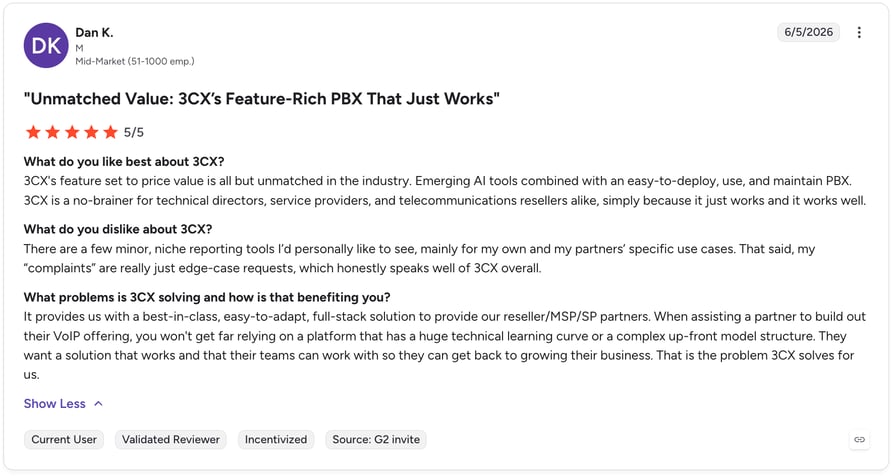
Common criticisms on G2 focus on the admin interface being less friendly for non-technical users, reporting requiring Grafana for deeper insights, and occasional audio hardware conflicts on desktop apps.
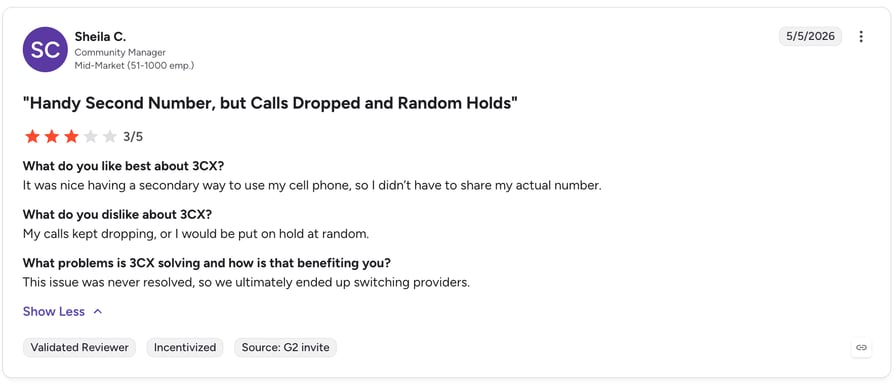
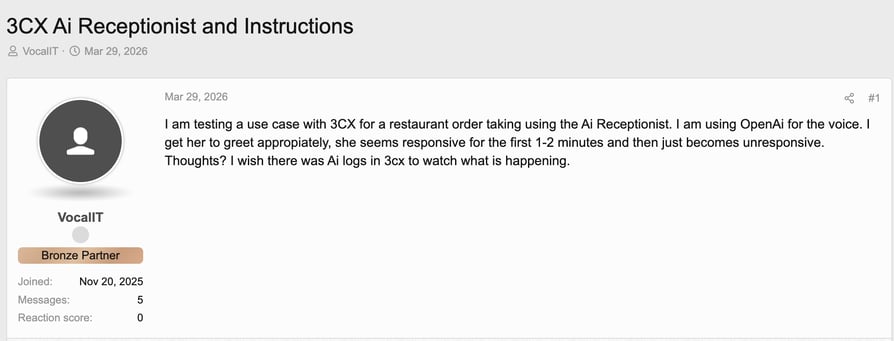
3CX AI Receptionist Reddit and forum discussions are mostly practical. One thread on the 3CX community forums noted that the AI Receptionist becomes unresponsive after 1–2 minutes of use when connected to low-tier OpenAI accounts—caused by OpenAI rate limits, not 3CX itself. The recommendation: ensure your OpenAI account is at a sufficient tier before deploying the AI Receptionist in production. This is the kind of setup nuance that doesn't appear in a product brochure.
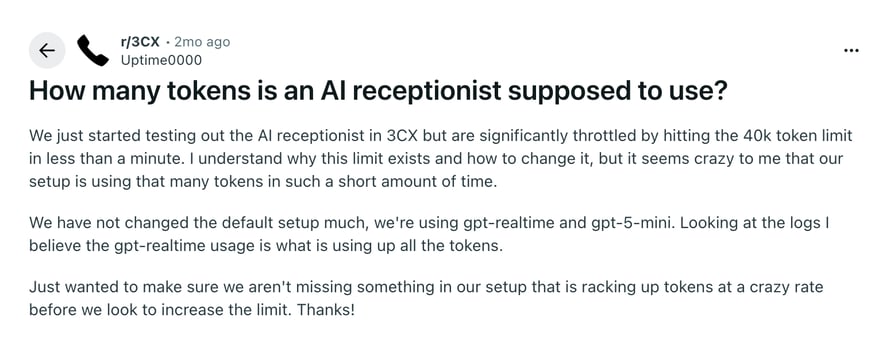
On Reddit, users are questioning 3CX's AI voice agents from a performance perspective. This is also one of the more important things to flag beforehand, so you don't run into any issues that might unnecessarily raise your costs.
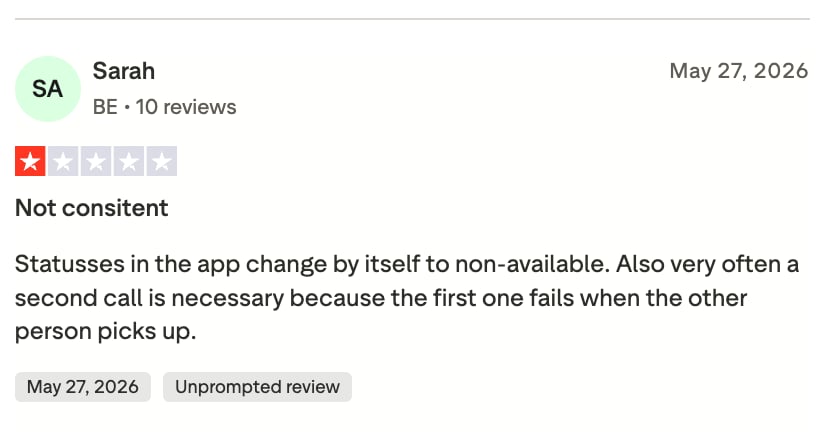
3CX's Trustpilot reviews are mixed—but context is important. Many negative reviews target billing, contract renewal processes, or partner-level issues rather than the AI Receptionist feature itself. The most recurring concern from technically experienced users is the post-2023 security incident. While 3CX's remediation steps are substantive (ReversingLabs Spectra binary scanning, Coverity code analysis, HackerOne bug bounty), the initial response—dismissing EDR alerts as false positives—remains a point of concern for security-focused organizations.
The honest takeaway:
Tired of managing infrastructure just to answer calls?
Who Is 3CX AI Receptionist Best For?
| 3CX AI Receptionist Is a Good Fit For... | 3CX AI Receptionist May Not Be the Best Fit For... |
|---|---|
| Teams already running 3CX PRO who want to upgrade to AI features | Businesses without in-house IT or 3CX implementation experience |
| Organizations with strict data residency requirements needing on-premise deployment | Teams wanting fast no-code setup and immediate productivity |
| IT-managed businesses that want control over hosting, AI providers, and infrastructure | High-growth teams looking for a managed cloud solution with no infrastructure overhead |
| Larger deployments where SC licensing is more cost-efficient than per-user pricing | Small businesses that only need an AI receptionist—not a full PBX overhaul |
| Organizations that can leverage existing server infrastructure to reduce hosting costs | Businesses that need predictable all-in monthly pricing with support included |
5 Best 3CX AI Receptionist Alternatives in 2026
If 3CX AI Receptionist isn't the right fit for your team after reading this review, here are five alternatives that address its main gaps—particularly around setup simplicity, managed cloud hosting, and AI-first design.
Top 5 3CX AI Receptionist Alternatives
| Tool | Best For | Starting Price | Key Benefits |
|---|---|---|---|
| 1. CloudTalk | Growing SMB sales & support teams | From $99/mo (200 min) | No-code setup, 100+ integrations, 60+ languages and accents |
| Smith.ai | Businesses wanting human + AI backup | From $285/month | Hybrid AI and live human receptionists, 24/7 coverage |
| Nextiva | SMBs seeking simplicity and managed cloud | Quote-based | Fully managed cloud PBX, strong customer support reputation |
| RingCentral AI Receptionist | Existing RingCentral users with low call volume | $49/month standalone | No-code setup, CRM sync, appointment booking |
| Dialpad | AI-first businesses needing real-time transcription | Quote-based | Real-time AI transcription, native conversation intelligence |
1. CloudTalk (Best Overall Alternative)
CloudTalk's AI Receptionist is a cloud-based solution built from the ground up for sales and support teams. It requires no server management, no IT overhead, and deploys in minutes—not days. Key strengths include:
Key Features of CloudTalk's AI Voice Agents
- 60+ languages and accents: Broader multilingual support than most alternatives, making it the practical choice for businesses serving global or multilingual markets
- No-code onboarding: Most teams are live on the same day—no engineers, no 3CX partner, no GPU server procurement required
- 100+ integrations: Deep two-way sync with Salesforce, HubSpot, Pipedrive, Zendesk, and more—so every call is automatically logged with context
- Predictable pricing: Flat plans with no per-minute overages, no hidden infrastructure costs, and no IT maintenance budget required
- AI conversation intelligence: Call summaries, sentiment analysis, topic extraction, call scoring, and many other useful AI features
Listen To CloudTalk's AI Voice Agents In Action
Signature Capability
See CloudTalk’s AI Voice Agent in Action!
CeTe is an AI that talks like a human: no breaks, no training, no time off. It makes and answers calls, updates CRMs, books meetings, and loops in a human only when needed.
Press play to hear it. Want a wow moment? Get a free test call and try it live.

What AI Voice Agents Does CloudTalk Offer?
CloudTalk has 3 AI Voice Agents plans to choose from:
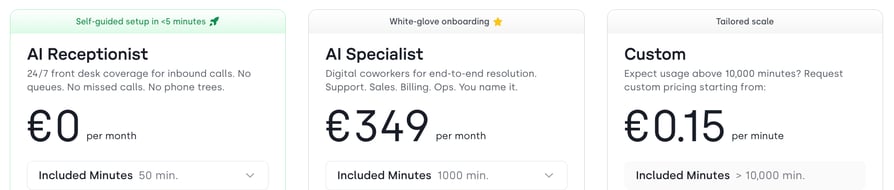
- AI Receptionist: CloudTalk's AI Receptionist handles 24/7 inbound call coverage with no phone trees—answering FAQs, routing calls conversationally, blocking spam, and collecting contact data, so your team never misses a call regardless of time or volume.
- AI Specialist: The AI Specialist goes beyond basic call handling to act as a fully autonomous digital coworker—resolving complex multi-step requests across support, sales, and billing, with real-time system integrations, identity authentication, and live analytics for end-to-end workflow automation.
- Custom: Built for high-volume teams with bespoke needs, the Custom plan offers discounted per-minute rates, tailored minute packages, and deep system integrations—so businesses running complex, large-scale AI workflows can scale without limits or pricing surprises.
Try CloudTalk's AI Voice Agents For Free!
No credit card required.
2. Smith.ai (Best Hybrid Human + AI Solution)
Smith.ai combines AI automation with live human receptionists—meaning there's always a real person available as backup when the AI can't handle a call. This makes it well-suited for businesses where call quality and brand impression are non-negotiable.
- Hybrid model: AI handles routine calls; live agents take over for complex situations
- 24/7 coverage: Human receptionists are available around the clock, not just during business hours
- Lead capture and intake: Designed specifically for professional services firms needing structured intake workflows
- Pricing: Starts at $285/month—higher than pure-AI options, but includes human backup that pure AI platforms don't provide
3. Nextiva (Best for SMBs Seeking Simplicity)
Nextiva offers a fully managed cloud communications platform with a strong reputation for customer support and onboarding. It's particularly strong for appointment-based businesses and service providers that want a simple, reliable setup.
- Managed cloud PBX: No servers, no IT burden—Nextiva handles infrastructure entirely
- Smart routing + human handoff: AI routes calls intelligently and escalates to live agents seamlessly
- Customer support reputation: Frequently cited for responsive onboarding and support quality
- AI Receptionist pricing: $99/month for 99 interactions—predictable, but interaction-capped
4. RingCentral AI Receptionist (Best for Existing RingCentral Users)
RingCentral's AI Receptionist (AIR) is a standalone add-on that works well for teams already embedded in the RingCentral ecosystem. Its no-code setup and appointment booking features are strong—but usage-based pricing can get expensive quickly for high-volume teams.
- No-code setup: Much faster onboarding than 3CX—suitable for non-technical teams
- Appointment booking: Integrates with Google Calendar, Outlook, and Calendly for real-time scheduling
- Pricing risk: Starts at $49/month with 100 minutes included—overages at $0.50/min can compound fast for busy teams
5. Dialpad (Best for AI-First Businesses)
Dialpad takes an AI-native approach to business communications, with real-time transcription, live coaching, and conversation intelligence baked in at every level. It's best suited for teams that want AI woven throughout their call workflows—not just at the reception layer.
- Real-time transcription: Live call transcription and AI-suggested responses during calls
- Native conversation intelligence: Post-call summaries, sentiment tracking, and coaching built into the platform
- Cloud-native architecture: No infrastructure overhead—fully managed SaaS with enterprise-grade reliability
- Pricing: Quote-based for AI features; standard plans start lower but AI Receptionist requires a higher tier
...or simply join CloudTalk for free.
How to Choose the Right AI Receptionist For Your Business
Choosing between 3CX AI Receptionist and alternatives comes down to four practical questions. Answer them honestly and the right fit becomes clear.
Assess Your Call Volume
3CX's SC licensing rewards high call volume—the flat annual fee means the per-call cost drops the more the AI handles. If your business receives hundreds of inbound calls per day, 3CX's model becomes very cost-efficient. If call volume is low or unpredictable, a per-interaction or per-user model may be more appropriate.
Evaluate Integration Requirements
3CX integrates with major CRMs and calendar platforms, but setup requires configuration. Cloud-native alternatives like CloudTalk offer plug-and-play CRM integrations that sync call data automatically with minimal setup. Consider how much engineering time you're willing to invest in getting integrations live.
Consider Your Budget and ROI
3CX pricing can look attractive on the license alone—but add hosting, SIP trunking, and IT support, and the total cost of ownership often exceeds what the headline price suggests. Calculate the full picture, including the time cost of deployment and ongoing maintenance, before comparing it to an all-in managed cloud price.
Determine Hosting Preferences
3CX's biggest differentiator is deployment choice. If your business operates in a regulated industry—healthcare, legal, finance—and needs voice data to stay on your own servers, 3CX's on-premise option is one of the few that delivers that. If you want zero infrastructure overhead, a fully managed cloud platform is the more practical path.
- Scalability: SC licensing scales well for large deployments; per-user models scale better for teams that grow in headcount faster than call volume
- Support quality: Managed cloud platforms typically include support in the subscription; 3CX often routes support through certified partners
- Security compliance: Review 3CX's post-2023 security measures carefully if compliance is a primary concern
- Ease of setup: If you need to be live in hours rather than days, cloud-native platforms have a meaningful advantage
Why CloudTalk Is the Best 3CX Alternative in 2026
3CX is a powerful platform for organizations with IT resources and existing infrastructure. But for growing sales and support teams that need to move fast, the gap in setup speed, ongoing management, and AI depth makes CloudTalk the stronger long-term choice.
Here's where CloudTalk AI pulls ahead:
- No IT burden: CloudTalk's cloud-native architecture eliminates server procurement, patch management, and infrastructure troubleshooting entirely
- Transparent pricing: What you see is what you pay—no hidden hosting costs, no SIP trunk setup, no MSP fees on top of the license
- 100+ integrations: Deep CRM and helpdesk connectivity with Salesforce, HubSpot, Zendesk, and more—syncing automatically without engineering work
- 60+ languages and accents: Broader language coverage than 3CX for global and multilingual markets
- AI built in, not bolted on: Call summaries, sentiment analysis, topic extraction, and smart routing are included—not locked behind an additional tier upgrade
Still relying on a setup where calls might slip through the cracks? It might be time to rethink it.
Ready to replace a complex PBX with something that just works?
FAQs About 3CX AI Receptionist
An AI Receptionist is an automated system that answers incoming business calls, understands what the caller needs using natural language processing, and routes the call or resolves the inquiry without involving a human agent. Unlike traditional IVR menus, it doesn't require callers to press buttons—they simply speak, and the AI responds intelligently.
It depends on technical capability. Small businesses with in-house IT or an existing 3CX deployment can benefit from the flat annual pricing and AI features in the AI Edition.
However, small businesses without technical resources will likely find the setup, hosting, and maintenance requirements more complex—and potentially more costly in total—than a managed cloud alternative. For a simpler starting point, see the benefits of virtual receptionists and compare options.
Yes. 3CX integrates with Salesforce, HubSpot, Zoho, Microsoft Dynamics, and other major CRMs. During call screening, the AI can look up callers against CRM records—alongside company phonebooks, Google Workspace, and Microsoft 365—to inform routing decisions. Setup requires configuration rather than a one-click install, so plan for some initial technical work.
Yes. Deploying 3CX and configuring the AI Receptionist requires IT knowledge—either in-house or through a certified 3CX partner. You'll also need to connect an AI provider (such as OpenAI or xAI Grok), configure your SIP trunk, and manage hosting. This is not a no-code platform. Teams without these resources should evaluate simpler platforms, such as CloudTalk, that offer no-code development.
3CX AI Receptionist and CloudTalk's AI Receptionist serve different audiences. 3CX suits IT-managed organizations that want deployment control and flat SC pricing at scale. CloudTalk suits growing sales and support teams that want fast no-code setup, predictable all-in pricing, 60+ language support, and deep CRM integrations out of the box. For a full comparison, see our 3CX alternative guide.
Yes—and this is one of 3CX's strongest use cases. The SC licensing model means there are no per-minute overages, so high call volume doesn't increase costs the way usage-based alternatives can. Multi-location support is built in: the AI Edition supports department-aware routing, separate phonebooks per department or location, and multi-tenant installations for businesses managing multiple sites. Right-sizing your SC count is critical—a good rule of thumb is to estimate your peak concurrent calls and add 25–50% headroom.