Top 7 Call Center Wallboard Software for SMBs in 2026
TL;DR:
Here's a list of the best call center wallboard software for SMBs:
- 01CloudTalk — best for SMBs needing real-time custom dashboards
- 02Talkdesk — best for enterprise contact centers with AI insights
- 03RingCentral — best for UCaaS and CCaaS users
- 04Five9 — best for large teams with advanced reporting needs
- 05Aircall — best for fast-growing SMBs
- 06Genesys Cloud — best for omnichannel contact centers
- 07Avaya OneCloud — best for legacy system modernization
Imagine trying to coach a sports team without a scoreboard. No idea who's winning, how much time is left, or who's slacking off.
That's what running a call center without wallboard software feels like.
Call center wallboard software puts real-time metrics front and center. It gives your team a live look at performance data so they can self-correct, stay motivated, and hit targets. These visual dashboards keep everyone on the same page, especially in fast-moving environments where every second and every call counts.

What Is a Call Center Wallboard and Why Does It Matter?
Think of a call center wallboard as a real-time scoreboard for your team. It displays live data like the number of calls in queue, average wait time, SLA breaches, and agent availability. Instead of digging through spreadsheets or dashboards, agents and supervisors can glance up and see how the team is doing.
It's not just a flashy screen on the wall. A wallboard can:
- Drive agent engagement
- Provide visibility across teams
- Surface issues before they spiral
For example, a spike in wait times? Your team sees it immediately — and can act. Someone crushing their daily goals? That visibility can drive healthy competition.
Digital wallboards with call center customization options let you highlight whatever matters most: team KPIs, top performers, missed calls, and more.
Top 7 Call Center Wallboard Software in 2026
Here's a side-by-side comparison of the top providers and what they offer:
| Provider | Best For | Key Features | Pricing |
|---|---|---|---|
| 1. CloudTalk | SMBs needing real-time custom dashboards | KPI views, SLA tracking, real-time customization | From $25/user/month |
| 2. Talkdesk | Enterprise centers with AI insights | AI workflows, visual dashboards, SLA alerts | From $85/user/month |
| 3. RingCentral | UCaaS + CCaaS users | Agent timers, SLA displays, visual alerts | Contact sales |
| 4. Five9 | Large teams with advanced reporting | Forecasting, AI dashboards, custom KPI widgets | Custom pricing |
| 5. Aircall | Fast-growing SMBs | Lightweight stats, team monitoring, notifications | From $30/user/month |
| 6. Genesys Cloud | Omnichannel contact centers | SLA widgets, queue metrics, agent scorecards | Custom pricing |
| 7. Avaya OneCloud | Legacy system modernization | Queue visibility, utilization tracking, SLA alerts | Contact sales |
#1: CloudTalk — Best for SMBs Needing Real-Time Custom Dashboards
What Is CloudTalk?
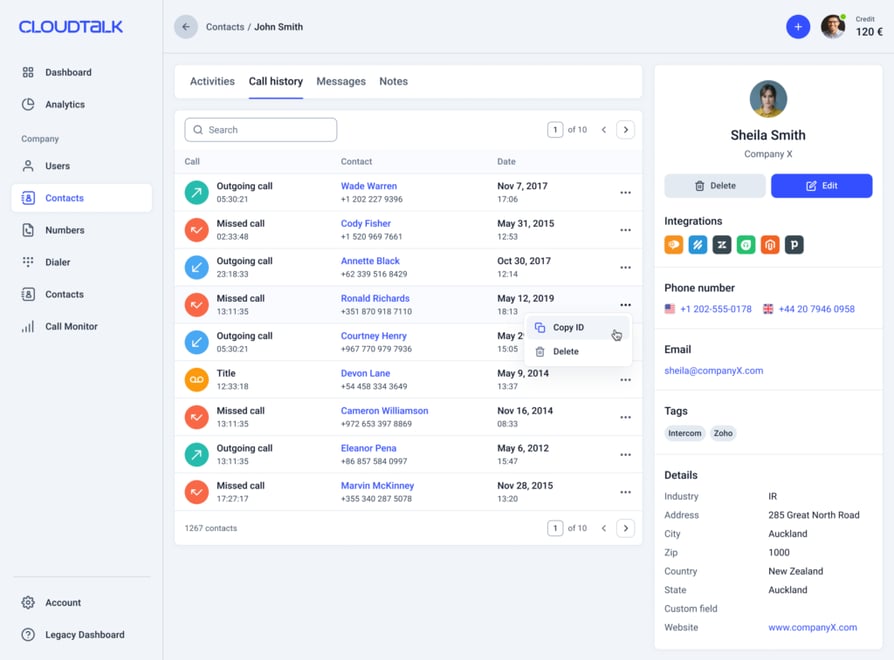
CloudTalk offers real-time wallboard software tailored for SMB call centers. It highlights live team performance data, call queues, and KPIs on fully customizable dashboards — so agents and managers always know exactly where they stand.
Who Is CloudTalk Best For?
Small to mid-size teams that want easy-to-read displays to boost visibility, agent performance, and accountability — without the complexity of enterprise platforms.
What Is CloudTalk's Pricing?
CloudTalk offers various pricing plans for you to choose from, alongside add-ons and AI Voice Agents.
- Starter plan: $25 per user/month billed annually
- Essential plan: $29 per user/month billed annually
- Expert plan: $49 per user/month billed annually
- Custom plan: Contact our team for a tailor-made offer
What Are CloudTalk's Key Features?
- Real-time team-wide KPI display
- Configurable wallboards for specific workflows
- Easy SLA and wait time tracking
- Agent reporting and performance monitoring
- Real-Time Dashboard with live and historical data
What Are CloudTalk's Key Integrations?
- Zendesk
- Salesforce
- HubSpot and other CRM platforms
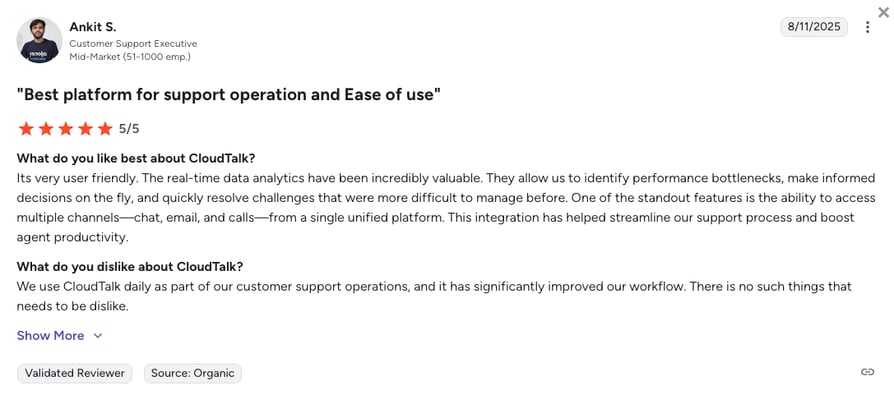
How Do Users Rate CloudTalk?
What Are CloudTalk's Pros & Cons?
| Pros | Cons |
|---|---|
| Real-time, fully customizable wallboards built specifically for SMB call center workflows | Fully cloud-based — no support for on-premises PBX hardware |
| Easy SLA and KPI tracking with no technical overhead | Voice-first platform — email, live chat, and video conferencing live in separate dedicated tools |
| Seamless CRM integrations (Zendesk, Salesforce, HubSpot) provide live customer context alongside wallboard data |
#2: Talkdesk — Best for Enterprise Contact Centers with AI Insights
What Is Talkdesk?
Talkdesk is a cloud-native contact center platform with built-in wallboard capabilities and AI-enhanced dashboards. It's designed for enterprise support teams that need real-time data and advanced performance tracking at scale.
Who Is Talkdesk Best For?
Enterprise support teams that need real-time data, advanced performance tracking tools, and AI-powered workflows across their contact center operations.
What Is Talkdesk's Pricing?
- Digital Essentials: $85 per user/month
- Voice Essentials: $105 per user/month
- Elite: $165 per user/month
- Industry Experience Clouds: $225 per user/month
What Are Talkdesk's Key Features?
- AI-powered queue management and reporting
- Configurable agent displays
- SLA breach alerts and visual workflows
What Are Talkdesk's Key Integrations?
- Slack, Microsoft Teams, 60+ business tools
- Salesforce, Zendesk, HubSpot
How Do Users Rate Talkdesk?
What Are Talkdesk's Pros & Cons?
| Pros | Cons |
|---|---|
| AI-powered dashboards and SLA breach alerts built into the platform | Starting at $85/user/month, it is significantly more expensive than SMB-focused alternatives |
| Highly configurable agent and supervisor displays | Implementation can be complex and may require professional services fees |
| Strong enterprise integrations with 60+ tools | Contracts typically require long-term commitments with strict seat minimums |
Recommended Reads
#3: RingCentral — Best for UCaaS and CCaaS Users
What Is RingCentral?
RingCentral offers unified communications with wallboard displays included as part of its contact center solution. It's a strong fit for teams already using RingCentral's UCaaS platform who want wallboards as a native feature.
Who Is RingCentral Best For?
Teams already using RingCentral's UCaaS platform that want wallboards as a native feature without adding a separate tool.
What Is RingCentral's Pricing?
RingCentral's contact center (RingCX) pricing is not published publicly — contact sales for a quote.
- RingCX (Contact Center): Contact sales for pricing
What Are RingCentral's Key Features?
- Live queue updates and SLA countdowns
- Agent timers and performance snapshots
- Visual alerts for spikes in call volume
What Are RingCentral's Key Integrations?
- Microsoft Teams, Salesforce, Zendesk
How Do Users Rate RingCentral?
What Are RingCentral's Pros & Cons?
| Pros | Cons |
|---|---|
| Wallboards are natively integrated with the broader RingCentral UCaaS ecosystem | Contact center pricing is not publicly available — evaluation requires a sales conversation |
| Strong integrations with Microsoft Teams and major CRM platforms | Advanced supervisor features are reserved for RingCX plans, separate from the standard business license |
| Live queue and SLA countdown displays are easy to set up within the platform | Can feel bloated for teams that only need voice and wallboard functionality |
Recommended Reads
#4: Five9 — Best for Large Teams with Advanced Reporting Needs
What Is Five9?
Five9 provides a robust wallboard dashboard within its CCaaS suite, ideal for data-heavy support centers. It pairs live wallboard visibility with powerful forecasting tools and workforce management features.
Who Is Five9 Best For?
Large contact centers that want detailed analytics and forecasting alongside live wallboard views — with a minimum of 50 seats.
What Is Five9's Pricing?
Five9 uses custom, bundle-based pricing with a minimum of 50 seats. No public per-user prices are available — contact Five9 for a quote.
- Custom pricing — contact Five9 for a quote
What Are Five9's Key Features?
- AI-driven performance dashboards
- Custom KPI reporting widgets
- Forecasting tools for shift planning
- Real-time wallboards with holistic reporting across systems
What Are Five9's Key Integrations?
- Salesforce, Zoho CRM, Oracle, ServiceNow, Zendesk
How Do Users Rate Five9?
What Are Five9's Pros & Cons?
| Pros | Cons |
|---|---|
| AI dashboards and forecasting tools make it a strong choice for data-heavy contact centers | Minimum of 50 seats makes it inaccessible for smaller teams |
| Holistic real-time reporting across disparate systems in a single wallboard view | Custom pricing with no public tiers requires full sales engagement to evaluate cost |
| Strong CRM integrations including Salesforce, Zendesk, and Oracle | Implementation complexity may require professional services support |
Recommended Reads
#5: Aircall — Best for Fast-Growing SMBs
What Is Aircall?
Aircall delivers an easy-to-use wallboard dashboard baked into its VoIP phone system for support teams. It keeps things light and focused — just what a scaling SMB needs.
Who Is Aircall Best For?
Fast-growing SMBs that want visibility and speed without technical overhead or complex enterprise configurations.
What Is Aircall's Pricing?
- Essential plan: $30 per license/month billed annually
- Professional plan: $50 per license/month billed annually
- Custom plan: Price upon request
What Are Aircall's Key Features?
- Simple live metric tracking
- Call queue visibility
- Desktop notifications for missed KPIs
What Are Aircall's Key Integrations?
How Do Users Rate Aircall?
What Are Aircall's Pros & Cons?
| Pros | Cons |
|---|---|
| Lightweight and easy to use — minimal setup required for SMB teams | Starting price is higher than some SMB competitors at $30/user/month |
| Call queue visibility and desktop KPI notifications are accessible out of the box | Wallboard customization is more limited compared to enterprise platforms |
| Good integrations with HubSpot, Intercom, and Pipedrive for CRM-connected teams | Lacks essential video calling features native to some all-in-one platforms |
Recommended Reads
#6: Genesys Cloud — Best for Omnichannel Contact Centers
What Is Genesys Cloud?
Genesys Cloud offers a flexible dashboard and wallboard tool as part of its all-in-one contact center suite. It's ideal for omnichannel contact centers needing granular, multi-touch visibility across voice, chat, email, and more.
Who Is Genesys Cloud Best For?
Omnichannel contact centers that need wallboards flexing across voice, chat, email, and social — with a minimum platform commitment of $2,000/month.
What Is Genesys Cloud's Pricing?
Genesys Cloud uses custom pricing with a minimum platform commitment of $2,000/month. Final costs depend on user count and the usage tier selected.
- Custom pricing — contact Genesys for a quote
What Are Genesys Cloud's Key Features?
- Visual SLA tracking widgets
- Queue performance breakdowns
- Agent scorecard tools
What Are Genesys Cloud's Key Integrations?
- Custom CRMs, analytics dashboards, Salesforce
How Do Users Rate Genesys Cloud?
What Are Genesys Cloud's Pros & Cons?
| Pros | Cons |
|---|---|
| Wallboards flex across voice, chat, email, and social — ideal for omnichannel teams | Minimum platform commitment of $2,000/month makes it unsuitable for small teams |
| Granular SLA widgets and agent scorecards give supervisors deep visibility | Custom pricing requires a full sales conversation to evaluate costs |
| Strong integration options with custom CRMs and analytics dashboards | Can be complex to configure and maintain without dedicated technical resources |
Recommended Reads
#7: Avaya OneCloud — Best for Legacy System Modernization
What Is Avaya OneCloud?
Avaya's legacy-friendly OneCloud platform supports customizable wallboards for teams upgrading from on-prem systems. It's designed for enterprises transitioning from legacy infrastructure to cloud-based contact centers.
Who Is Avaya OneCloud Best For?
Enterprises transitioning from legacy on-premises infrastructure to cloud-based contact center solutions.
What Is Avaya OneCloud's Pricing?
Avaya does not publish public pricing for its contact center solutions. All plans are available upon request.
- Custom pricing — contact Avaya for a quote
What Are Avaya OneCloud's Key Features?
- Agent and queue utilization tracking
- Visual alerts for SLA breaches
- Multi-location visibility tools
What Are Avaya OneCloud's Key Integrations?
- Legacy systems, SIP platforms, proprietary CRMs
How Do Users Rate Avaya OneCloud?
What Are Avaya OneCloud's Pros & Cons?
| Pros | Cons |
|---|---|
| Strong compatibility with legacy on-premises infrastructure and SIP platforms | Pricing is not publicly available — requires a sales conversation to evaluate |
| Multi-location visibility tools make it well suited for large, distributed enterprises | Primarily geared toward legacy modernization — not ideal for SMBs starting fresh in the cloud |
| Visual SLA breach alerts and queue utilization tracking are well established | Limited ecosystem compared to cloud-native alternatives |
Recommended Reads
Key Benefits of Using Wallboard Software in Call Centers
Boost Agent Motivation & Productivity
When agents can see how they're doing in real time, it adds a sense of purpose and competition. Call center monitors displaying live progress encourage reps to stay sharp, beat their own records, and work toward team goals.
Want to turn that boost into a habit? Pair your wallboard with agent reporting tools that spotlight individual wins and coaching opportunities.
Monitor Performance in Real Time
Forget waiting until the end of the day to know if you're meeting targets. Wallboards let you view everything — call volume, wait time, resolution rate — right as it's happening. That means faster course correction when things go south and better resource management on the fly.
With tools like CloudTalk's call center performance dashboard, your team can act on trends before they become problems.
Increase Transparency & Accountability
When everyone sees the same data, it levels the playing field. Real-time displays help reduce guesswork and build trust between agents and managers. Missed SLAs? Long queues? The wallboard makes it visible and actionable.
Learn how wallboards support call center metrics analytics and reporting that keep your ops honest.
Make SLAs and KPIs a Team Sport
Your SLA goals shouldn't live in a spreadsheet. Displaying live service level metrics keeps them top-of-mind and easier to meet. Whether it's a digital wallboard or a contact center dashboard synced to your call volume, everyone sees what matters most.
Combine that with contact center reporting software to track what's working and what's not.

Make your metrics more than just numbers with CloudTalk's wallboard software and watch your team sync up in real time.
How to Pick the Right Wallboard Software
Choosing the right call center wallboard software isn't just about flashy visuals. It's about functionality, integration, and long-term usability. Here's what to prioritize when making your decision:
1. Make Sure It Integrates Easily With Your Existing Systems
Your wallboard should work smoothly with your CRM, phone system, and helpdesk tools. For example, CloudTalk's dashboard integrates with Zendesk, Salesforce, and HubSpot, giving you live context without switching tabs.
2. Look for Ease of Use and Quick Adoption
If your team needs a manual to understand it, it's not the right tool. The best options make setup and training frictionless — so your agents actually use it. Bonus if it works across both call center monitors and smaller personal screens.
3. Insist on Real-Time Data Visibility and Dashboard Customization
Your wallboard should show data the second it changes — and let you decide what data matters most. Whether it's calls in queue, agent status, or customer satisfaction, you should have full call center customization control.
4. Make Sure It Scales and Adapts With You
Whether you're onboarding five new agents or launching a new product line, the software should flex with your operations. Look for tools that let you add new teams, metrics, and integrations without headaches.
5. Ensure It's Affordable — and Not a Hardware Nightmare
Some teams still rely on clunky, static wallboards mounted to a wall. Modern digital wallboard software lets you stream key metrics to TVs, desktops, or mobile dashboards without extra gear or IT tickets. Read more about cloud phone systems and how they eliminate hardware overhead entirely.
See Your Team's Performance — Live and in Action
If your team's still operating without real-time visibility, you're flying blind.
Call center wallboard software gives you the power to display what matters most — live. Whether it's call queues, SLA breaches, or top performers, the right wallboard keeps your team aligned and motivated. It's a simple change that can drive serious gains in performance, transparency, and accountability.
If you're ready to improve team visibility without piling more tools on your agents, CloudTalk's wallboard features are built to plug in seamlessly. Custom dashboards, real-time data, and easy CRM integration — it's everything you need to coach smarter, not harder.
Frequently asked questions
The most impactful wallboard metrics are live stats that agents and managers can act on immediately: calls in queue, SLA breaches, agent availability, average wait time, and first-call resolution rate. For a full breakdown, see CloudTalk's dashboard statistics guide.
The most common issues are poor customization, unclear or overcrowded metrics, and displays that don't reflect what agents actually need to see. Using digital wallboards that are configurable to your workflow — and reviewing which KPIs actually drive behavior — helps avoid these pitfalls.
A wallboard is designed to be seen by the whole team — it displays real-time metrics publicly to drive shared awareness and accountability. A dashboard is typically a private tool used by managers and analysts for deeper reporting, trend analysis, and individual performance review. Both serve different purposes and work best together.
Avoid data that rarely changes, metrics agents can't influence in real time, or information that adds noise without driving action. Clutter reduces focus — if a metric doesn't directly support your call center performance goals, leave it off the wallboard and keep it in your reporting suite instead.
Yes — most modern wallboard platforms offer CRM integrations and connect to your existing phone system. CloudTalk, for example, integrates natively with Zendesk, Salesforce, and HubSpot, so your wallboard displays data from across your full stack in real time.
The right time is when your team is struggling with visibility, accountability, or hitting KPI targets consistently. If managers are discovering problems after the fact rather than in the moment, a wallboard is a direct solution. It's also valuable when onboarding new agents — giving them a clear, shared picture of team standards from day one.
Start by identifying the three to five KPIs that most directly drive your team's daily performance. Configure your real-time settings around those metrics first, then expand as the team gets comfortable. Make sure the display is visible to everyone in the team's workspace, and review which metrics are actually changing behavior on a regular basis.