Avaya Pricing & Plans: Full Guide 2026
When it comes to selecting a business communication platform, Avaya is often a name that businesses recognize. However, its cost can become complex, and the pricing doesn’t always reflect the value businesses need—especially for those seeking a single, comprehensive solution package.
In this guide, we will break down Avaya pricing, plans and features. Plus, we will give you an honest look at how Avaya compares with CloudTalk. Let’s dive in.
TL;DR: Avaya Plans & Pricing
- Avaya Cloud Office offers three plans: Core ($20 per user/month), Advanced ($25 per user/month), and Ultra ($35 per user/month) plans, with plenty of add-ons available.
- Built to foster team collaboration, Avaya packages offer a Unified Communications Suite that integrates voice, video, messaging, and third-party app integrations.
- Avaya plans may seem attractive at first, but many capabilities rely on overlaying add-ons and other products from the portfolio, making the pricing complex and challenging to assess the total costs upfront.

Nothing is more convincing than putting it to the test

What Are Avaya’s Pricing & Plans?
Avaya offers multiple plans across various products, each catering to different business needs. For comparison purposes, we will dedicate our most in-depth analysis to the Avaya Cloud Office pricing, whose operation we can draw parallels with other options on the market.
Its pricing model primarily covers three main tiers: Core, Advanced and Ultra.
| Feature | Core | Advanced | Ultra |
|---|---|---|---|
| Annual Pricing | $20 per user/month | $25 per user/month | $35 per user/month |
| Unlimited calls within the US/CA | ✅ | ✅ | ✅ |
| Business SMS | 25/user/mo | 100/user/mo | 200/user/mo |
| Voicemail transcription | ✅ | ✅ | ✅ |
| Team messaging | ✅ | ✅ | ✅ |
| Document sharing | ✅ | ✅ | ✅ |
| Unlimited audio conferencing | ✅ | ✅ | ✅ |
| Video meetings and participants | ✅ | ✅ | Up to 200 participants |
| Integrations including 365, G Suite, Slack and more | ✅ | ✅ | ✅ |
| Call recording | On-demand | Automatic | Automatic |
| Call Monitoring | ✅ | ✅ | ✅ |
| Call Handling | ❌ | ✅ | ✅ |
| Real-time Analytics | ❌ | ✅ | ✅ |
| CRM integrations with Salesforce, Zendesk, and more | ❌ | ✅ | ✅ |
| Developer Platform and Custom Integrations | ❌ | ✅ | ✅ |
| Unlimited Storage | ❌ | ❌ | ✅ |
Get 50% off your first month with CloudTalk. No questions asked.

Core Plan
Avaya's Core Plan is designed for companies seeking essential communication tools at an affordable rate of $20 per user/month. Ideal for startups and small businesses, it covers core needs with simplicity.
Key Features:
- Video meetings for up to 100 participants
- AI Video meeting summaries, transcripts, and highlights
Advanced Plan
With additional features aimed at improving call handling and team management, Avaya's Advanced Plan suits mid-sized businesses looking to streamline operations. This tier starts at $30 per user per month, and it is Avaya's most cost-effective.
Key Features:
- Advanced call-handling features
- Multi-location management and custom user permissions.
- Real-time Analytics
Ultra Plan
The Ultra Plan is Avaya’s premier offering, which includes extended storage, deeper analytics, and multi-level security controls. It doesn't bring many new features compared to the previous plan, focusing instead on expanding the capacity and scalability of resources already offered in the other tiers. This makes it a better option for large companies with a high volume of calls.
Key Features:
- Device status reports
- Device status alerts
- Unlimited files storage
What Are Avaya's Add-Ons?
Behind Avaya's competitive pricing lies a drawback: several features are available as add-ons. This not only makes it challenging to grasp the true cost of the service upfront but also turns business expansion into a costly endeavor.
As companies grow, the need for additional features can place an increasing financial burden. Some of the most common add-ons include:
- Additional local, toll-free, or vanity numbers: From $4.99/user per month
- Additional international toll-free numbers: $14.99/month + $25 one-time fee
- Additional international numbers: Starting at $5.99/user per month
- Avaya Cloud Office Rooms: $49 per room/month or $468 annually
What Are Avaya's Other Plans?
Alongside Avaya Cloud Office, the provider offers a variety of tailored packages designed to meet specific, customized demands. However, many features overlap across these solutions, making it challenging and complex for businesses to choose the most suitable option. Avaya’s additional plans include:
- 01Avaya Experience Platform On-Prem: A solution for companies to manage customer communications (calls, messages, etc.) on their own servers.
AXP On-Prem Pricing: Essentials plan at $119 per user/month, and Advanced plan at $169 per user/month. - 02Avaya Experience Platform Public Cloud: A cloud-based contact center solution for managing customer interactions. It's scalable and doesn't require on-site hardware.
AXP Public Cloud Pricing: Digital plan at $35 per user/month; Voice plan at $60 per user/month; and All Media plan at $89 per user/month. - 03Avaya Experience Platform Private Cloud: A dedicated cloud setup that gives companies a private environment for customer communications and enhances security and control.
AXP Private Cloud Pricing: Customized by the sales team. - 04Avaya Aura Private Cloud: A communication solution that integrates voice, video, and messaging, enabling businesses to connect their communication tools seamlessly.
Avaya Aura Pricing: Customized by the sales team. - 05Avaya IP Office: An on-premises communication system tailored for small to mid-sized businesses, offering voice, video, and messaging in one platform.
Avaya IP Office Pricing: Customized by the sales team.
CloudTalk vs Avaya:
Which Is the Best Choice for Your Business?
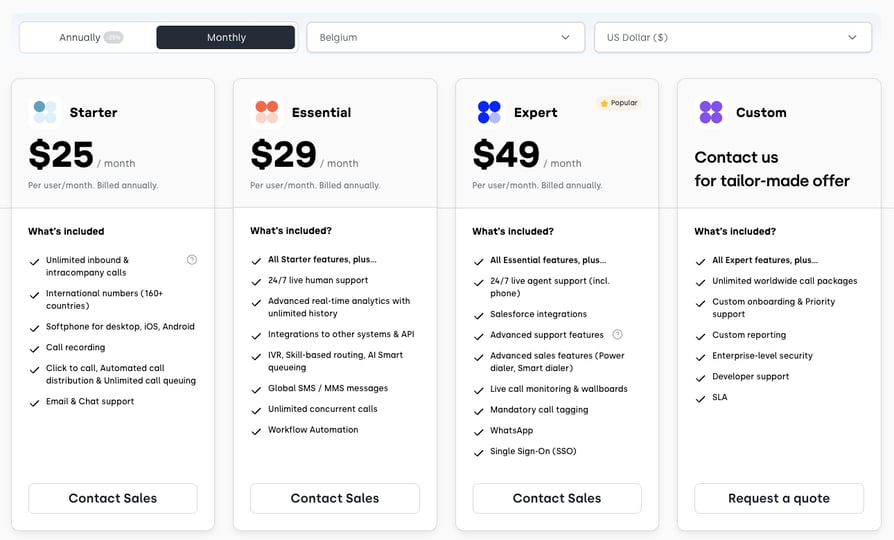
CloudTalk has 5 pricing plans on offer, ranging in price from $19 to $50 per user/month, with a special exception for the custom pricing plan, which lets you tailor your solution to your unique business needs. Here's a breakdown of CloudTalk's plans:
- Lite: CloudTalk’s special entry-level plan for micro and small businesses in the NA and LATAM. Uniquely quick to deploy, with all the basic calling and call center management tools you need to enter the global market.
Key Features: Unlimited calling in US & Canada, Business SMS, Click-to-Call,Call Recording,Analytics
Price: 19 per user/month - Starter: CloudTalk's basic plan is designed specifically for small businesses. Easy to set up and easier to use, this plan offers small teams everything they need to kick off their call center operations.
Key Features: Click-to-Call, Voicemail, Call Flow Designer (CFD), Automatic Call Distribution (ACD)
Price: 25 per user/month - Essential: CloudTalk's medium plan, focused on growing SMBs and MMBs. This plan helps teams expand their inbound and outbound operations, automate processes, and improve experiences.
Key Features: SMS/MMS, Interactive Voice Response (IVR), Skill-Based Routing, Callback, Integrations + Open API
Price: 29 per user/month - Expert: CloudTalk's feature-packed plan for growing MMBs and enterprises or any team that requires robust calling capabilities. This plan helps customer-facing departments streamline outreach and improve performance.
Key Features: Power Dialer, Smart Dialer, VIP Queues, WhatsApp Inbound & Outbound Messages, Call Monitoring
Price: 49 per user/month - Custom: CloudTalk's ultimate plan for the most demanding of companies, tailored perfectly to their particular business needs. This plan allows you to do it all, from coordinating teams to conquering the world's many markets.
Key Features: Custom Onboarding, Unlimited Outbound Calls with Flat Rates, Enterprise-Level Security, Developer Support
Price: Varies based on features, number of users, etc.
CloudTalk vs. Avaya, How Do They Differ?: Direct Comparison
Choosing between Avaya and CloudTalk? Here’s a direct comparison of both platforms in terms of cost, flexibility, and features.
| Feature | CloudTalk | Avaya |
|---|---|---|
| Price Range | $19 - $49/user/month or custom solution | $20 - $35/user/month |
| International Numbers | 160+ countries | 100+ countries |
| Unlimited Storage | From the Essential plan ($29 per user/month) | From the Ultra plan ($35 per user/month) |
| Advanced Analytics | From the Essential plan ($29 per user/month) | From the Advanced plan ($25 per user/month) |
| Inbound Calls | Unlimited | Unlimited |
| Domestic Calls | 500 / 1,000 / Unlimited Based on plan, worldwide | Unlimited in the US & CA |
| File Sharing | Not available | From the Core plan ($20 per user/month) |
| Mobile Apps (iOS, Android) | Included in all plans | Included in all plans |
| Toll-Free Numbers | Available in all plans | Available in all plans |
| Number Porting | Available in all plans | Available in all plans |
| Integrations | From the Essential plan ($29 per user/month) | From the Advanced plan ($25 per user/month) |
| Business Hours | From the Essential plan ($29 per user/month) | Not available |
| WhatsApp Integration | Available from Expert plan ($49 per user/month) | Not available |
| Voicemail Drop | From the Essential plan ($29 per user/month) | Not available |
CloudTalk vs. Avaya: Key Takeaways
Choosing the right communication tool is no small feat. To help you make the right decision for your business, we highlighted the main advantages that each one of them brings to the table:
CloudTalk:
- Offers more transparent and straightforward pricing, with pay-as-you-go options for additional usage.
- Known for its flexibility and user-friendly interface, with a quick setup process and intuitive dashboard.
- Designed with sales and customer service representatives in mind, focusing on ease of access to customer information and call handling.
- Built with flexibility to integrate with CRM and sales tools like HubSpot, Salesforce, Zendesk, Shopify, and more.
- Ideal for small to medium businesses, contact centers, and sales-oriented teams needing an affordable, user-friendly communication solution focused on outbound and inbound calling
Avaya Cloud Office:
- Offers competitive pricing plans, but it can increase significantly due to the eventual integration of other products and add-ons.
- Built on the RingCentral platform, combines Avaya's experience with communication systems with RingCentral’s cloud-based technology.
- Targets larger enterprises with diverse communication needs, especially businesses transitioning from traditional PBX systems.
- Supports businesses that want a complete UCaaS (Unified Communications as a Service) setup for voice, video, messaging, and team collaboration.
Stop settling for phone systems that slow you down
What Are Avaya's Best Features?
Here’s what users appreciate most about Avaya:
- 01Omnichannel Integration: Avaya Cloud Office centralizes all business communications, enabling users to make calls, hold video meetings, share files, and chat within one application.
- 02Hybrid and On-Premises Options: In addition to its cloud solutions, Avaya supports hybrid and on-premise deployment options, which appeal to large enterprises with sophisticated infrastructure.
- 03Collaborative-drive integrations: It creates a collaborative work environment by connecting their contact centers with third-party applications such as Microsoft 365, Canvas, G Suite, Slack, and more.
- 04Video Conferencing Tools: Avaya's platform supports high-definition video quality and accommodates large meetings with up to 200 participants, which is ideal for large virtual events, webinars, or conferences.
What Are Avaya's Pros & Cons?
Considering the points we've covered, we can draw several conclusions about Avaya's key strengths and areas for improvement, such as:
| Pros | Cons |
|---|---|
| Robust Enterprise Solutions: Provides flexible, tailored infrastructure (cloud, hybrid, on-premises) designed to meet complex needs for large organizations. | Complex Architecture: Its modular-based structure can lead to overly intricate configurations and higher-than-expected costs. |
| Unified Collaboration: Offers a strong suite of team tools, including messaging, video conferencing, file sharing, and task management in one space. | Toilsome UX: Interfaces often have a steeper learning curve and lack the intuitive, user-friendly design found in modern platforms like CloudTalk. |
| Strict Security & Compliance: Delivers robust data protection tailored for sensitive industries, with built-in HIPAA, PCI-DSS, and GDPR compliance. | Challenging Deployment: Due to a heavy focus on legacy on-premises and hybrid models, initial setup is often time-consuming and difficult to manage. |
Feature-Rich, Wallet-Friendly: CloudTalk Takes the Lead
There’s no such thing as a free lunch—or a free phone call. Every customer interaction comes with a cost, and in a call center, cloud-based software and licensing alone account for 10% to 20% of overall expenses. This is a relevant slice of the pie.
So why not choose the most cost-efficient option? When it comes to offering the best features at the best prices, CloudTalk speaks louder. While Avaya comes with around 30 features, CloudTalk got you covered with 100 advanced tools to serve and support all business needs.
As you might imagine, running a successful call center business involves a number of operating expenses, such as salaries for your agents, software costs, and facility maintenance. Not everything is within your control, but choosing the best phone system for your call center is up to you.
Sources:
Frequently asked questions
Avaya’s Cloud Office plans start at $20 per user/month for the Core Plan, $25 per user/month for the Advanced Plan, and $35 per user/month for the Ultra Plan. Annually, this translates to $240, $300, and $420 per user, respectively. Additional add-ons or higher-tier features may increase the annual cost significantly, depending on business needs.
Popular alternatives to Avaya include CloudTalk, RingCentral, Zoom, Nextiva, and 8x8. CloudTalk, in particular, is known for transparent pricing and advanced call center features, making it a strong competitor for businesses prioritizing cost efficiency and ease of use.
Avaya offers a range of communication products tailored to various business needs, including Avaya Cloud Office for unified messaging, video, and calls; Avaya Experience Platform for customer interactions with on-premises, public, and private cloud options; and Avaya IP Office for small to mid-sized business communication on-premises.
Avaya is best suited for large enterprises and organizations with complex communication needs, such as hybrid or on-premises solutions. Its robust security and compliance capabilities (e.g., HIPAA, PCI-DSS, and GDPR compliance) make it appealing for industries like healthcare, government, and finance that handle sensitive data.
Before committing, consider Avaya’s complex modular structure, which may require additional add-ons for full functionality. The user experience can also have a steeper learning curve, and scaling up with Avaya can become costly. It’s essential to evaluate your business’s specific needs and budget to avoid unexpected expenses.
Avaya’s strengths include Omnichannel Integration (consolidates messaging, calls, and file sharing in one platform), Different Deployment Options (cloud, hybrid, and on-premises setups), Enterprise-Grade Security, and High-Definition Video Conferencing.
Avaya's pricing is competitive, starting at $20 per user/month, but can increase significantly due to the eventual integration of other products and add-ons. Many VoIP providers, like CloudTalk or RingCentral, offer more transparent and straightforward pricing. While Avaya’s costs can be manageable for large enterprises, smaller businesses may find alternative providers more affordable.
Avaya does offer free trials for some of its plans. However, key features, such as advanced call handling and analytics, may only be available in higher-tier packages or as add-ons, so it’s essential to review what’s included before committing.