Nextiva vs Ooma 2026: Pricing, Features & Full Comparison
Nextiva vs Ooma: At a Glance
| Nextiva | Ooma Office | |
|---|---|---|
| What it is | A broader platform running voice, video, SMS, team chat and contact center workflows in one place. | A voice-first phone system built around a hardware base station, in three short tiers. |
| Best for | Teams that text customers, want multichannel from one vendor, and expect to add routing and reporting. | Micro-offices replacing a landline that need to be live the same day with no IT help. |
| Entry price per user/month | $15 on Core annual, or $23 billed monthly. | $19.95 on Essentials, the same rate either way. |
| Texting on the entry tier | 100 business SMS per user/month on Core. | None on Essentials. SMS starts at Pro, capped account-wide. |
| Contact center | Add-on on Engage, included on Scale, with separate agent plans from $75/agent/month. | Not offered at any tier. |
| CRM depth | Native CRM integrations, billed as an add-on on Core, Engage and Scale. | CRM integration on Pro Plus ($29.95) only, without two-way sync. |
| International calling | US, Canada and toll-free minutes vary by tier. No published country count for international numbers. | Unlimited US, Canada, Mexico and Puerto Rico on every tier. Everything else metered. |
| Desk phones and analog devices | IP phones supported. | Base station supports IP phones plus fax, door phones and card terminals. |
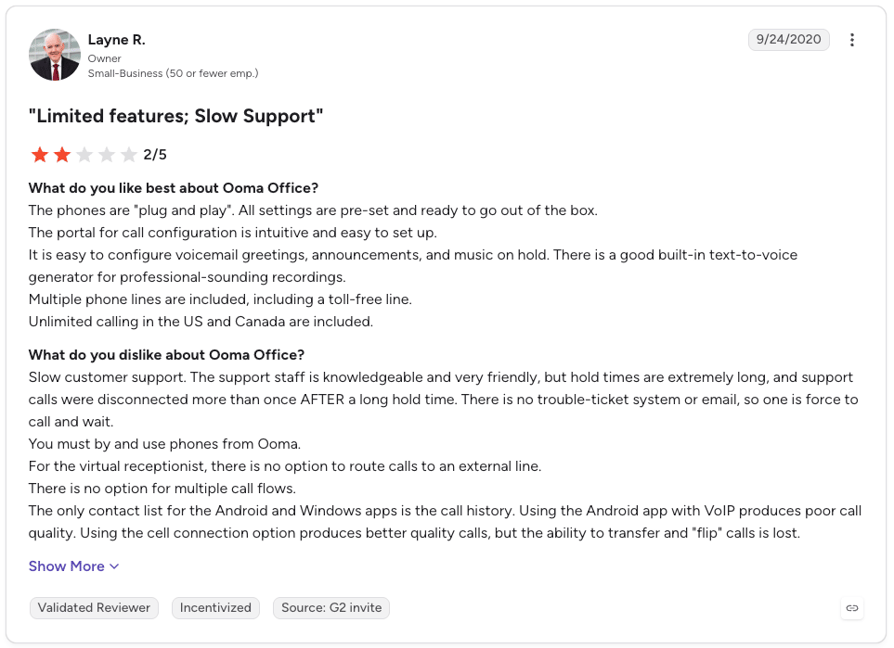
| Where users push back | Contract terms and add-on pricing that isn't published. | Trustpilot sentiment at 2.3/5, far below its 4.6/5 on G2. |
Nextiva vs Ooma is a choice between two business phone systems built for small companies with very different ambitions.
Ooma Office is the lower-friction of the two: a setup a non-technical owner can finish in an afternoon, and support for the desk phones and analog devices. Nextiva is a broader platform that runs voice, video, SMS, team chat and contact center workflows in one place, with deeper analytics, a wider integration set and 24/7 support on every plan.
Neither is the better product per se; the right pick depends on how much you need the phone system to do.
This Nextiva vs Ooma comparison covers pricing, feature-by-feature inclusions, call quality, integrations, security, usability, real review sentiment and who each platform actually fits. Start with the at-a-glance table if you want the short version, or browse our other phone system comparisons if Nextiva and Ooma aren't the only two on your list.

CloudTalk: the third way

Why You Can Trust This Comparison
For nearly a decade, we've helped over 30,000+ professionals find and implement smarter business communication tools. We've reviewed 200+ software tools across industries, analyzed 5,500+ verified customer reviews from platforms like G2, Capterra, Trustpilot and TrustRadius, and drawn insights from real user discussions on Reddit and Quora.
In the past year alone, we published 1,000+ articles, each one written by humans for humans. Every figure on this page is either sourced to a vendor's own published page or marked as unverified, and where a number could not be confirmed we left the gap visible instead of filling it. Read our content integrity statement for the rules behind that.
Nextiva vs. Ooma: Core Strengths of Each Platform
Both vendors solve the same surface problem, which is moving a business from a landline to VoIP. They disagree about what happens next. Ooma optimizes for the cheapest, simplest phone line that works on day one; Nextiva optimizes for keeping every customer conversation in one system as the company grows.
Where Ooma Shines
| Strength | Why it matters |
|---|---|
| Lowest entry price of the two, at a flat per-seat rate | Ooma Office Essentials lists at $19.95 per user/month with no tier maths to do. Every seat costs the same. |
| No annual contract required | Ooma sells month to month, so a team that changes its mind pays nothing to leave. |
| Same-day DIY setup | A business owner with no IT support can unbox the base station and configure it in a day. |
| Works with existing desk phones and analog devices | Fax machines, door phones and card terminals can stay on the line through the base station, which matters for clinics, workshops and retail. |
| No seat minimum | A two or three person office pays for two or three seats, with a bill that doesn't move month to month. |
Where Nextiva Shines
| Strength | Why it matters |
|---|---|
| Voice, video, SMS and team messaging on one platform | Nextiva's Core plan bundles business texting, video and team chat with calling, so a growing team isn't stitching three tools together. |
| Contact center capability when simple call handling stops working | Nextiva's Scale plan includes blended inbound and outbound, skills-based routing and journey orchestration; Engage offers the call center as an add-on. |
| Reporting depth for owners and managers | Advanced reporting arrives at Engage, and Scale adds AI call notes, summaries and real-time transcription on top. |
| A wide integration catalog including the major CRMs | Salesforce, HubSpot and other CRMs connect natively, although they are billed as an add-on on every small-business tier. |
| Support on every plan, not just the top one | Nextiva includes 24/7 phone, email and chat support on Core, Engage and Scale alike, so a small team gets the same support model as a large one. |
Those two lists barely overlap, and that's the real question an Ooma vs Nextiva shortlist puts to you: which ceiling you can live with.
At a Glance: Nextiva vs. Ooma, Key Differences
Use this table to find the dimension that decides it for your team, then jump to that section for the detail behind the row.
| Dimension | Nextiva | Ooma Office | Best suited for |
|---|---|---|---|
| Entry price per user/month | $15 (Core, annual) or $23 monthly | $19.95 (Essentials), same either way | Both for teams on budget |
| Contract term required | 12-month or longer minimum term for the advertised annual rate | None; month to month | Ooma for short-horizon or seasonal teams |
| Texting on the entry tier | 100 business SMS per user/month on Core | None on Essentials | Nextiva for teams that text customers from day one |
| Call recording | Add-on on Core, included from Engage | Included from Pro ($24.95) | Ooma for small teams that need recording without a tier jump |
| Transcription | Voicemail transcription on all plans; AI notes and real-time transcription are Scale-only ($75) | Voicemail transcription from Pro | Nextiva for teams that need conversation-level AI, at a price |
| Channels covered | Voice, video, SMS, team chat, live chat and chatbot on Engage | Voice-first, with a mobile and desktop app | Nextiva for multichannel; Ooma for a phone line |
| Contact center capability | Add-on on Engage, included on Scale | Not offered | Nextiva for teams heading toward a real queue |
| CRM depth | Native CRM integrations, billed as an add-on on Core, Engage and Scale | CRM integration only on Pro Plus ($29.95) | Nextiva for CRM-driven sales teams |
| International calling | US, Canada and toll-free minutes vary by tier; no published country count for international numbers | Unlimited US, Canada, Mexico and Puerto Rico on every tier, everything else metered from a prepaid balance | Ooma for North American calling; neither for global coverage |
| Desk phone and analog device support | IP phones supported | Base station supports IP phones plus fax, door phones and card terminals | Ooma for offices with hardware to keep alive |
| Support model | 24/7 phone, email and chat on all plans | Phone, chat, email and help desk | Roughly even |
| Review volume | 3,400+ G2 reviews, 900+ on Capterra | 131 G2 reviews, 245 on Capterra | Nextiva, on sample size alone |
An Ooma Office vs Nextiva decision usually resolves on two of those rows: contract term, and what the entry tier actually includes. That's the same split that separates most small business phone plans.
Nextiva Features vs. Ooma Features
The Nextiva vs Ooma features gap isn't subtle, and it runs in one direction. Nextiva sells a communications platform; Ooma sells a phone system, and the business phone features you get at the entry tier diverge from there.
Nextiva Features
Nextiva consolidates the things a growing small business usually buys separately: calling, business texting, video meetings, internal team chat, and, from the top tier, a real contact center with routing and AI. Reporting sits over all of it. The catch is that the consolidation is spread across three price points that are a long way apart.
What Nextiva Does Well
- Multichannel from the entry tierCore includes voice, video, team chat and 100 business SMS per user per month, so texting a customer doesn't require an upgrade.
- A real path to a contact centerEngage adds inbound call center as an add-on and Scale includes blended inbound and outbound with skills-based routing, which is more runway than most SMB phone systems give you.
- Reporting that managers actually useAdvanced reporting lands on Engage, and Scale layers AI call notes, summaries and real-time transcription on top of it.
- The major CRMs connect nativelySalesforce, HubSpot and other CRMs connect without middleware, which matters once call data has to reach a pipeline.
- Support is included, not tiered24/7 phone, email and chat come with Core, Engage and Scale alike, which is unusual at a $15 entry price.
Where Nextiva Falls Short
- The advertised price is a contract priceNextiva's own pricing footnote limits annual small-business rates to new customers with 1 to 100 employees "signing a paid 12-month or longer minimum term agreement."
- Paying monthly costs a lot moreCore goes from $15 to $23 per user/month, a 53% premium, and Engage goes from $25 to $50, a straight doubling.
- CRM integration is an add-on on every tierNextiva's plan comparison lists Salesforce, HubSpot and other CRMs as an add-on across Core, Engage and Scale, so CRM sync is never simply included.
- Conversation AI is locked to the top planAI call notes, summaries and real-time transcription are Scale-only at $75 per user/month, five times the Core rate.
Ooma Features
Ooma Office is built around a hardware base station and three tiers, Essentials, Pro and Pro Plus. It's voice-first by design. Features arrive as you move up, and the ladder is short: what Pro Plus leaves out, no Ooma plan adds back.
What Ooma Does Well
- A flat, low per-seat price with no termEssentials at $19.95 per user/month is the cheapest way onto either platform, and nothing about the rate changes if you pay monthly.
- Setup is a same-day jobOoma built the base station model for owner-operators with no IT support, which counts for a lot when there's nobody to call.
- Existing hardware keeps workingDesk phones, fax machines, door phones and card terminals connect through the base station instead of getting replaced.
- Basic routing comes with the entry tierEssentials includes a virtual receptionist and a standard auto-attendant instead of holding them back for an upgrade.
- North American calling is unlimited on every tierCalls to the US, Puerto Rico, Canada and Mexico are included regardless of plan.
Where Ooma Falls Short
- The entry tier has no texting at allSMS starts at Pro, so an Essentials seat can't message a customer.
- Messaging caps are account-wide, not per userPro allows 250 messages a month and Pro Plus 1,000, counted across the whole account and including inbound, deleted and internal messages. At 25 seats, Pro Plus works out to 40 messages per person per month.
- CRM integration only exists on the top tierSalesforce, HubSpot, Microsoft Dynamics 365 and a handful of vertical tools connect on Pro Plus and nowhere below it.
- Anything past simple call handling is missing, not expensiveNo contact center, no dialer and no conversation AI exist to buy at any tier.
Feature-by-Feature Comparison
| Feature | Nextiva | Ooma Office | CloudTalk |
|---|---|---|---|
| SMS included | 100/user/month on Core; 500/user/month customer-to-team on Engage | None on Essentials; 250/month account-wide on Pro, 1,000/month on Pro Plus | Business SMS and MMS in the same workspace as calls; WhatsApp available |
| Call recording | Add-on on Core; included on Engage and Scale | Included from Pro | Included from Starter ($25/user/month) |
| Voicemail transcription | All three plans | From Pro | Post-call transcription via the AI Conversation Intelligence add-on ($9/user/month) |
| Conversation AI | AI call notes, summaries and real-time transcription on Scale only | Not offered | AI Conversation Intelligence and AI Voice Agents (add-ons) |
| Video meetings | Included from Core | Not offered | Not offered; CloudTalk is voice, SMS and WhatsApp only |
| Team messaging | Team chat from Core | Not offered | Not offered |
| Call routing and IVR | Smart call routing not on Core; on Engage it needs the call-center add-on | Standard auto-attendant and virtual receptionist from Essentials | IVR with skill and smart condition-based routing included from Starter, plus a drag-and-drop Call Flow Designer |
| Outbound dialers | Not offered on the small-business tiers | Not offered | Smart Dialer from Essential; Power Dialer included on Expert and available as a $15/user/month add-on below; Parallel Dialer as an add-on |
| Contact center | Add-on on Engage, included on Scale | Not offered | Call queues and ACD (automatic call distribution) from Starter; wallboards and real-time call monitoring on Expert |
| Native CRM sync | Salesforce, HubSpot and other CRMs, add-on on all three tiers | Salesforce, HubSpot, Microsoft Dynamics 365, Clio, AgencyZoom, NexHealth and Square, Pro Plus only | 100+ integrations with click-to-call and screen pops |
| International numbers | No published country count | Metered per-minute outside US, Canada, Mexico and Puerto Rico | Local and toll-free numbers in 160+ countries, from $6 per number/month |
| Desk phone and analog device support | IP phones supported | Base station supports IP phones plus fax, door phones and card terminals | Softphone for browser, desktop and mobile; no analog base station |
| Free trial | 7-day trial on the entry plan; demo otherwise | Money-back window rather than a software trial | 14-day free trial, no credit card required |
Feature-Complete Out of the Box
Total Cost of Ownership: Nextiva vs. Ooma
The per-seat gap between $15 and $19.95 is the least useful number on either pricing page.
Ooma's flat rate buys a narrower product, so evaluating VoIP pricing here means asking how far up the ladder a team has to climb before the system does its job. Nextiva's advertised rate assumes a term commitment and gates several expected features to tiers that cost two to five times the entry price.
Both bills land above the sticker, for opposite reasons: Ooma because of tier cliffs and hardware, Nextiva because of contract terms and add-ons.
| Cost dimension | Nextiva | Ooma Office | CloudTalk |
|---|---|---|---|
| Headline entry price | $15/user/month (Core, annual) | $19.95/user/month (Essentials) | $25/user/month (Starter, annual) |
| Monthly-billing premium | +53% on Core ($23) and +100% on Engage ($50) | None | +36% on Starter ($34 monthly vs $25 annual) |
| Cost to get SMS, call recording and transcription together | Engage ($25) for SMS and recording; Scale ($75) for AI notes and real-time transcription | Pro ($24.95) for recording, voicemail transcription and 250 account-wide messages; no conversation AI at any tier | Starter for recording and SMS, plus the AI Conversation Intelligence add-on at $9/user/month for transcription and summaries |
| Per-number and international add-ons | Toll-free number and minutes included from Engage; add-on pricing not published | Unlimited US, Canada, Mexico and Puerto Rico; everything else metered from a prepaid balance | International numbers from $6 per number/month across 160+ countries |
| All-in, 5 seats, first year | $900 on Core annual, $1,380 if billed monthly, $1,500 on Engage annual | $1,197 on Essentials, $1,497 on Pro, $1,797 on Pro Plus | $1,500 on Starter, $1,740 on Essential, $2,940 on Expert |
| All-in, 25 seats, first year | $4,500 on Core annual, $6,900 monthly, $7,500 on Engage annual, $22,500 on Scale | $5,985 on Essentials, $7,485 on Pro, $8,985 on Pro Plus, with SMS still capped at 1,000/month account-wide | $7,500 on Starter, $8,700 on Essential, $14,700 on Expert |
Two things fall out of that table. A 25-seat Nextiva team that won't sign a term agreement pays $6,900 on Core, more than Ooma's mid tier, for a plan where call recording is still an add-on. And a 25-seat Ooma team on Pro Plus has bought the top of the ladder and still has 40 texts per person per month to work with.
Nextiva Pricing vs Ooma Pricing
We cover each vendor's plans in more depth in our Nextiva pricing breakdown and our Ooma pricing breakdown. Here's each plan in a nutshell.
Nextiva Pricing
Nextiva sells three small-business plans, priced per user per month. Annual rates are the ones advertised, and they carry a term commitment.
- Core: $15 annual, $23 monthlyVoice, video, team chat, 100 business SMS per user/month, call routing and the mobile app. Call recording is an add-on, smart call routing isn't available, and there's no built-in call center.
- Engage: $25 annual, $50 monthlyAdds 500 customer-to-team SMS per user/month, a toll-free number with minutes, advanced reporting, live chat and chatbot, and call recording. Inbound call center is available as an add-on.
- Scale: $75 annualThe full customer experience (CX) tier: blended inbound and outbound, skills-based routing, journey orchestration, live and web chat, AI call transcription and summaries. Monthly pricing isn't published for this plan.
- Contact center plans are separateNextiva's contact center Essential tier starts at $75 per agent/month, with Professional and Premium quoted by sales.
- Add-ons apply on every tierCRM integrations are listed as an add-on across Core, Engage and Scale, and call recording is an add-on on Core. Nextiva doesn't publish add-on prices on the pricing page.
One Condition Most Comparison Pages Leave Out
The term is spelled out in Nextiva's own footnote: annual small-business pricing applies to new customers with 1 to 100 employees signing a paid 12-month or longer minimum term agreement. A team that can't sign for 12 months is comparing Ooma's $19.95 against Nextiva's $23, not against $15.
Ooma Pricing
Ooma Office runs three tiers with no contract, and the rate is the same whether you pay monthly or yearly.
- Essentials: $19.95 per user/monthUnlimited calling in the US, Puerto Rico, Canada and Mexico, virtual receptionist, mobile app, and a standard auto-attendant. No texting, no call recording.
- Pro: $24.95 per user/monthAdds call recording, voicemail transcription, desktop app features and 250 SMS per month account-wide.
- Pro Plus: $29.95 per user/monthAdds CRM integration (Salesforce, HubSpot, Microsoft Dynamics 365, Clio, AgencyZoom, NexHealth and Square) and raises the messaging cap to 1,000 per month account-wide.
- Hardware is a separate first-year costOoma Wi-Fi phones list from roughly $80 to $320, and IP conference phones from roughly $60 to $400. The per-seat price doesn't include them.
- Ooma advertises "35+ advanced calling features"That's Ooma's own count, not an independent one.
What to Know About Both Pricing Models
- This is commitment versus capability, not cheap versus expensiveOoma trades features for flexibility and a lower rate. Nextiva trades flexibility for breadth and asks for a term in return.
- Both bills grow past the pricing pageNextiva grows through tier upgrades and add-ons that aren't priced publicly; Ooma grows through hardware and the jump from Essentials to Pro or Pro Plus.
- Nextiva vs Ooma contract terms are the single biggest variableA team that can't sign for 12 months is comparing Ooma's $19.95 against Nextiva's $23, not against $15, which reverses the price ranking entirely.
Pricing Compared Line by Line
| Pricing dimension | Nextiva | Ooma Office | CloudTalk |
|---|---|---|---|
| Entry price, annual | $15/user/month (Core) | $19.95/user/month (Essentials) | $25/user/month (Starter) |
| Entry price, monthly | $23/user/month (Core) | $19.95/user/month, same rate | $34/user/month (Starter) |
| Top published tier | $75/user/month (Scale) | $29.95/user/month (Pro Plus) | $49/user/month (Expert), plus Custom on request |
| Seat minimum | Not published for small-business plans | None | None on Starter; Custom typically starts at five users |
| Call recording | Add-on on Core, included from Engage | Included from Pro ($24.95) | Included from Starter |
| SMS inclusion and caps | 100/user/month on Core, 500/user/month on Engage | 250/month on Pro and 1,000/month on Pro Plus, account-wide | Business SMS and MMS; WhatsApp included on Expert |
| Voicemail transcription | All plans | From Pro | Post-call transcription via the AI add-on at $9/user/month |
| Contact center pricing | Contact center Essential from $75/agent/month; higher tiers quoted | Not offered | Queues and ACD included in the platform plans |
| Hardware cost | IP phones purchased separately | Roughly $60 to $400 per device | None required |
| International numbers | No published country count | Metered outside US, Canada, Mexico and Puerto Rico | From $6 per number/month in 160+ countries |
| Free trial | 7-day trial on the entry plan; demo otherwise | Money-back window rather than a software trial | 14-day free trial, no credit card |
CloudTalk's Pricing
Now, compare it to CloudTalk's transparent and predictable pricing, so you always know what you're paying for.
Flexible Pricing Plans to Scale with You
Compare our plans
Call Quality & Reliability: Nextiva vs. Ooma
On the Nextiva call quality vs Ooma question, the published numbers only take you so far. Nextiva states 99.999% uptime across eight points of presence on its network page. Ooma publishes no comparable plan-level SLA that we could verify, which isn't the same as saying its uptime is worse.
| Dimension | Nextiva | Ooma Office | CloudTalk |
|---|---|---|---|
| Published uptime | 99.999%, across eight points of presence | Not published as a plan-level SLA | 99.999% uptime SLA on a decentralized SIP architecture with multiple backup carriers |
| Geographic coverage | Strong US and Canada; no published country count for international numbers | Unlimited US, Puerto Rico, Canada and Mexico; metered elsewhere | Numbers in 160+ countries on a multi-carrier network |
Coverage is the row that actually separates them. Ooma's unlimited calling stops at the North American border and everything beyond it runs on a metered prepaid balance, while Nextiva publishes no country count for international numbers at all.
Either way, a team calling outside the US, Canada and Mexico is buying minutes, not a plan. And on either platform, day-to-day VoIP call quality depends as much on the network at each end as on the vendor.
Nextiva Integrations vs. Ooma Integrations
Before you ask yourself if you really need integrations, check this out: Salesforce research1 found that 76% of customers expect consistent interactions across departments, and McKinsey2 puts the revenue lift from getting personalization right at 10–15%. Neither is possible if the phone system keeps call data to itself, so integration depth is what decides whether your reps open a customer record with the last conversation in it. The benefits of VoIP CRM integration are where that shows up first.
Nextiva Integrations
Nextiva connects natively to the major CRMs and productivity suites, including Salesforce, HubSpot, Microsoft 365 and Google Workspace. The important detail is on the billing: Nextiva lists CRM integrations as an add-on on every tier.
Ooma Integrations
Ooma's list is short, but the CRM integration is a Pro Plus feature covering Salesforce, HubSpot, Microsoft Dynamics 365, Clio, AgencyZoom, NexHealth and Square, with Microsoft 365 and Google Workspace contact sync alongside.
What Ooma doesn't offer is two-way sync of call data back into CRM records, a public API for custom work, or helpdesk integrations. The integrations that exist are click-to-call and contact lookup rather than a data pipeline.
Integration Capability Compared
| Integration capability | Nextiva | Ooma Office | CloudTalk |
|---|---|---|---|
| Total native integrations | Not published | Low tens, concentrated on Pro Plus | 100+ tools available |
| Salesforce sync | Native, billed as an add-on on all tiers | Pro Plus only | Native CTI with call logging via the Salesforce integration, included on Expert |
| HubSpot sync | Native, billed as an add-on on all tiers | Pro Plus only | Native CTI with campaign result export via the HubSpot integration, from Essential |
| Helpdesk integrations | Available | Not offered | Zendesk, Freshdesk, Intercom, Help Scout, Front and Gorgias among others |
| Microsoft 365 and Google Workspace | Supported | Contact sync supported | Microsoft Teams telephony and Google Workspace calendar and contacts |
| Tier gating | Add-on on every small-business tier | Pro Plus only | Integrations start on Essential |
| API and webhooks | Available | Not published | Public API and native webhooks covering numbers, users, call records, contacts and AI summaries |
| Workflow automation | Available on higher tiers | Not offered | Workflow Automation Designer plus a Zapier connector |
Security & Compliance: Nextiva vs. Ooma
Nextiva Security & Compliance
- SOC 2 and ISO 27001 on every small-business planNextiva lists both certifications against Core, Engage and Scale rather than reserving them for higher tiers.
- 24/7 support is part of the security storyEvery plan includes round-the-clock phone, email and chat, which matters when an outage or a porting problem needs a human.
- HIPAA, PCI and GDPR posture isn't stated on the pricing pageNextiva markets HIPAA support elsewhere, but we couldn't confirm the current scope at source in this pass.
Ooma Security & Compliance
- Ooma publishes a lot less than Nextiva doesThere's no public SOC 2 or GDPR certification page we could reach, which isn't the same as saying the controls are absent.
- HIPAA Mode exists, but the tier is unclearOoma's own support documentation titles it as a Pro feature while third-party summaries place it on Pro Plus.
- Ooma carries calls over its own networkThat's the same infrastructure the base station depends on for in-office devices.
Security & Compliance Compared
| Security and compliance | Nextiva | Ooma Office |
|---|---|---|
| SOC 2 | Certified, all small-business plans | Not published |
| ISO 27001 | Certified, all small-business plans | Not published |
| HIPAA | Marketed, scope not confirmed at source | HIPAA Mode available; tier unclear |
| PCI | Not published on the pricing page | Not published |
| GDPR | Not published on the pricing page | Not published |
| Encryption | Not detailed publicly | Not detailed publicly |
| SSO / SAML | Not published on the pricing page | Not published |
| Data residency | Not published | Not published |
CloudTalk: the third way for regulated industries
Usability & Scalability: Nextiva vs. Ooma
Ooma Usability
- The simplest setup of the two, by a wide marginA base station, a few handsets and an afternoon is a realistic plan for a non-technical owner.
- Simple call flows really are simpleA virtual receptionist and a standard auto-attendant cover what a small office needs without a configuration project.
- The ceiling is low, and it's a hard stopPast basic routing, the capability doesn't exist at any tier. There's no queue strategy to design, no dialer to configure and no conversation AI to switch on.
Nextiva Usability
- More to configure, across channels, tiers and admin rolesThat depth is the reason a growing team picks it, and the reason rollout takes longer than a day.
- More admin surface to maintainChannels, tiers and roles each have their own settings, so routine changes touch more places than they would on a single-purpose phone system.
- It grows with departments and locationsAdding a queue, a location or a channel is a configuration change rather than a migration, which is where a phone-line product runs out.
Usability & Scalability Compared
| Dimension | Nextiva | Ooma Office |
|---|---|---|
| Setup time | Days to weeks, depending on channels and routing | Same day for a small office |
| Learning curve | Moderate; multiple admin surfaces | Low |
| Admin overhead | Higher, with more to maintain | Minimal |
| Call flow configuration depth | Smart routing on Engage with the call-center add-on; skills-based routing on Scale | Auto-attendant and virtual receptionist only |
| Ceiling before you outgrow it | Contact center scale on Scale | Simple call handling |
| Scaling across departments and locations | Supported | Limited |
| Support model | 24/7 phone, email and chat on all plans | Phone, chat, email, help desk and forum |
Nextiva Reviews vs. Ooma Reviews on G2
G2 is the most widely used peer review platform for B2B software, and it's where most Nextiva vs Ooma reviews research starts. The samples here aren't comparable: Nextiva's UCaaS (unified communications as a service) listing on G2 carries 3,400+ reviews, while Ooma Office's G2 listing carries 131.
We compare Nextiva's main UCaaS listing rather than its contact center listing, and Ooma Office rather than Ooma's residential products. We also pull Capterra and Trustpilot alongside G2, because Ooma's G2 sample is thin. Our standalone Nextiva review and Ooma review go through each platform in more detail.
G2 Ratings Compared
| Review dimension | Nextiva | Ooma Office |
|---|---|---|
| G2 rating | 4.5/5 | 4.6/5 |
| G2 review count | 3,400+ | 131 |
| Capterra rating | 4.6/5 | 4.4/5 |
| Capterra review count | 900+ | 245 |
| Trustpilot rating | 4.7/5 | 2.3/5 |
| Trustpilot review count | 8,000+ | 1,750+ |
| Listing compared | Nextiva UCaaS listing | Ooma Office listing |
Ratings and counts are from our 15 July 2026 cache of each platform: Nextiva on Capterra and Trustpilot, Ooma Office on Capterra. Nextiva's own site currently advertises a higher and more recent Trustpilot figure than the one above, so treat the cached number as a floor rather than a current reading.
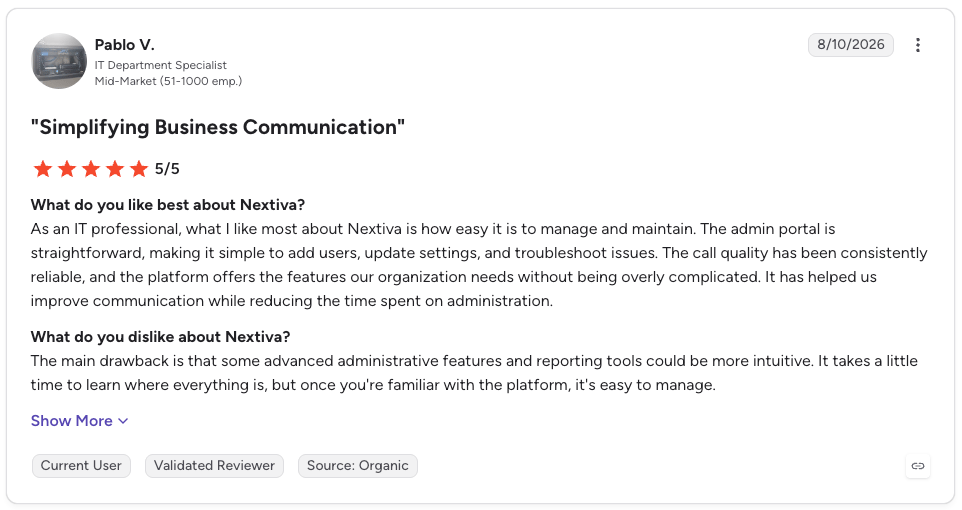
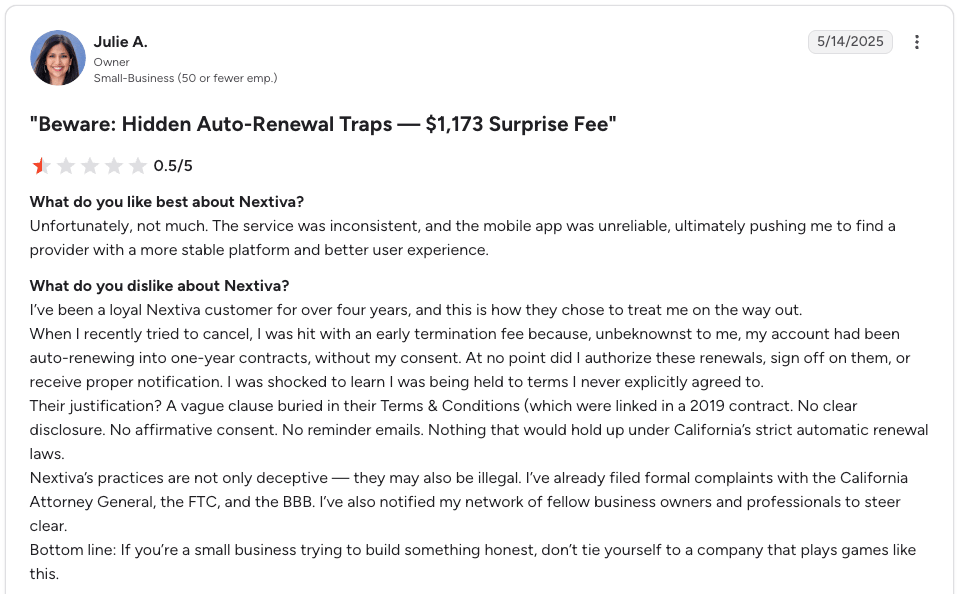
What Real Users Say About Nextiva On G2
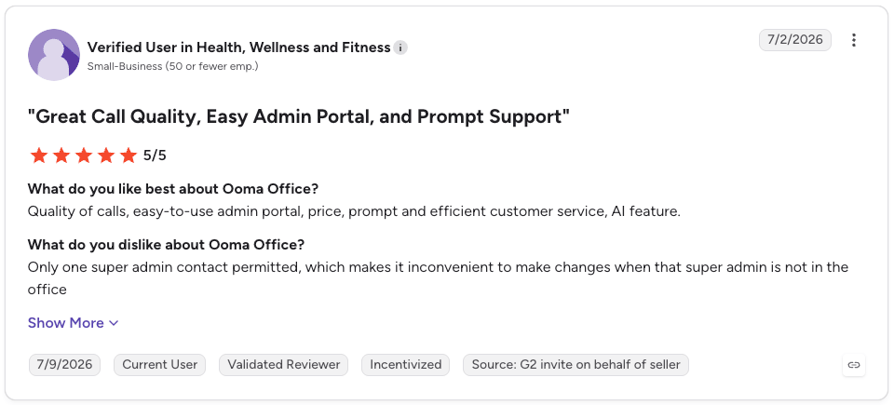
What Real Users Say About Ooma On G2
CloudTalk: the third way
Nextiva Reviews vs. Ooma Reviews on Reddit & Quora
Star ratings tell you who's happy. Forum threads tell you who regrets the decision six months in.
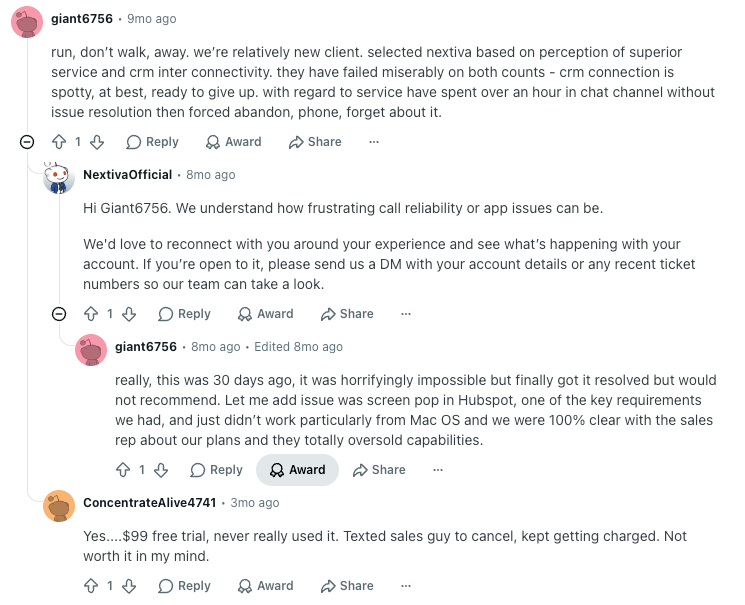
What Real Users Say About Nextiva On Reddit & Quora
Nextiva's complaints cluster on reliability and integrations.
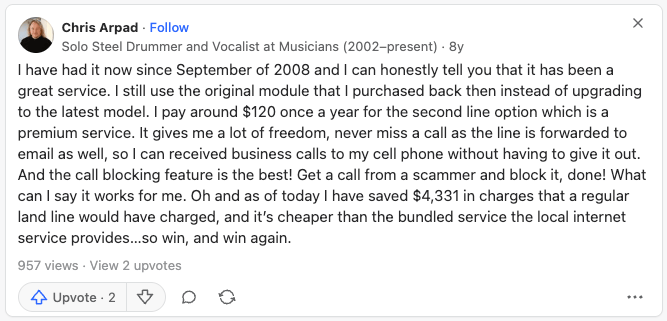
What Real Users Say About Ooma On Reddit & Quora
Nextiva Pros & Cons vs. Ooma Pros & Cons
What's left is deciding which trade-offs you can live with.
Nextiva Pros & Cons
| Pros | Cons |
|---|---|
| Voice, video, SMS and team chat included from the entry plan | The advertised annual rate requires a 12-month or longer minimum term agreement |
| A real path to contact center capability without changing vendors | Monthly billing costs 53% more on Core and twice as much on Engage |
| Advanced reporting from Engage, with AI notes and summaries on Scale | CRM integrations are billed as an add-on on Core, Engage and Scale alike |
| 24/7 phone, email and chat support on every plan | AI transcription and summaries are locked to Scale at $75 per user/month |
| SOC 2 and ISO 27001 across all small-business plans | Add-on pricing isn't published, so the real bill is hard to model in advance |
| The largest review base of the two, by an order of magnitude |
Ooma Pros & Cons
| Pros | Cons |
|---|---|
| The lowest entry price of the two, at a flat $19.95 per seat | No texting at all on the Essentials tier |
| No contract, so leaving costs nothing | Messaging caps are account-wide, not per user, at 250 and 1,000 per month |
| Same-day setup with no IT support required | CRM integration exists only on Pro Plus, without two-way data sync |
| Existing desk phones, fax machines and card terminals keep working | No contact center, dialer or conversation AI at any tier |
| Unlimited calling to the US, Puerto Rico, Canada and Mexico on every tier | Trustpilot sentiment sits at 2.3/5 across 1,750+ reviews, far below the 4.6/5 on G2 |
| The same rate whether you pay monthly or annually |
Weighing a third option before you commit?
Which Team Fits Which Platform?
Fit comes down to scope and commitment: what you need the system to cover, and what you're willing to sign for.
| Nextiva is the right fit for... | Ooma is the right fit for... |
|---|---|
| Teams that text customers and need SMS from day one | Micro-offices and two-to-five-person teams replacing a landline |
| Businesses that want voice, video and team chat from one vendor | Businesses that want no contract and a bill that never moves |
| Companies heading toward a queue, routing rules and reporting | Offices with desk phones, fax machines or card terminals to keep working |
| Teams that can sign a 12-month term to get the advertised rate | Owners who need to be live the same day without IT help |
| Sales or support teams that need CRM data flowing into call records | Teams whose calling stays inside the US, Canada and Mexico |
Nextiva vs. Ooma: The Verdict
The trade here is commitment against capability. Nextiva asks for a term and gives you a platform that keeps working as you add departments, channels and reporting. Ooma asks for nothing and gives you a phone line that's very good at being a phone line. Neither answer is wrong; the deciding variable is how soon you expect to outgrow simple call handling.
The bottom line: both platforms do what they were built to do, which is why this Nextiva vs Ooma comparison for 2026 deliberately stops short of naming an overall winner. Rank them against your own constraints instead: contract tolerance first, feature ceiling second.
If neither set of trade-offs fits, CloudTalk is the third option on this page. CloudTalk publishes per-user pricing with no minimum term, includes call recording and IVR with skill-based routing from Starter, opens native CRM integrations from Essential, and sells AI Conversation Intelligence as a paid add-on rather than a top-tier plan gate. Our roundup of Nextiva alternatives covers the wider field, CloudTalk included.
Still stuck between the two?
Sources
Frequently Asked Questions about Nextiva vs Ooma
Quick answers on Nextiva's and Ooma's pricing, contract terms, feature gaps, and how the two stack up against each other.
Neither Nextiva nor Ooma is better across the board; the answer flips with the size and ambition of the team. Ooma wins on simplicity and commitment for a two-to-five-person office moving to small business VoIP from a landline, since Essentials at $19.95 per seat needs no contract and no IT help. Nextiva wins for a business that already texts customers, wants video and team chat in the same tool, or expects to add routing and reporting, because Ooma has no path to any of it.
Choose Nextiva if you can sign a term agreement and need multichannel; choose Ooma if you can't commit or only need a reliable phone line. The contract question changes the price ranking and most of the real business phone system cost with it: Nextiva's $15 Core rate requires a 12-month or longer minimum term, and without one Core costs $23 per user/month, more than Ooma Essentials at $19.95.
Nextiva's small-business plans are Core at $15, Engage at $25 and Scale at $75 per user per month on annual billing. Those rates apply to new customers with 1 to 100 employees signing a paid 12-month or longer minimum term agreement, per Nextiva's own pricing footnote. Paying monthly removes the commitment but raises Core to $23 and Engage to $50, a premium of 53% and 100% respectively, which is worth weighing against what a business phone line costs elsewhere.
Not on the entry tier: Ooma Office Essentials at $19.95 includes neither call recording nor texting. Call recording and voicemail transcription arrive at Pro ($24.95), which also adds 250 SMS per month, and Pro Plus ($29.95) raises the cap to 1,000. Both caps are account-wide rather than per user, so a 25-seat team on Pro Plus is sharing 1,000 messages a month across everyone.
Yes, and this is one of Ooma's clearest advantages. The Ooma Office base station supports IP desk phones alongside analog equipment such as fax machines, door phones and credit card terminals, so a business doesn't have to settle the hardphone versus softphone question before it moves off a landline. If you'd rather buy new, Ooma's own Wi-Fi phones list from roughly $80 to $320 and IP conference phones from roughly $60 to $400.
Nextiva, by a wide margin. It connects natively to Salesforce, HubSpot, Microsoft 365 and Google Workspace, although CRM integrations are billed as an add-on on all three small-business tiers. Ooma's CRM integration exists only on Pro Plus and covers a short list without two-way sync of call data, a public API or helpdesk connections, which is a thinner form of VoIP integration than the label suggests. Nextiva doesn't publish a total integration count, so neither vendor gives you a clean number to compare.
Neither publishes enough to settle it outright. Nextiva claims 99.999% uptime on its network page; Ooma states no plan-level SLA we could verify. The one asymmetry in the verified data is Ooma's 2.3/5 on Trustpilot against its 4.6/5 on G2, a spread Nextiva doesn't show. Check current reviews for your own region, since call quality is mostly a last-mile question and things like jitter sit on your network, not the vendor's.
Nextiva, on structure rather than price. At 25 seats Ooma Pro Plus costs $8,985 a year and still caps the whole account at 1,000 messages a month, with no queue, skill-based routing, dialer or conversation AI to grow into. Nextiva at the same headcount runs $7,500 on Engage annual or $22,500 on Scale, and both have somewhere to go next. The trade is that the annual rate needs a term agreement.
It depends on which constraint pushed you off them. Teams looking at the best Ooma alternatives usually want depth Ooma can't reach, while teams leaving Nextiva usually want out of the contract and the add-on stack. CloudTalk covers both cases with published per-user pricing, no minimum term, call recording included from Starter, and native CRM sync. RingCentral, Dialpad and 8x8 are the other names that come up on this shortlist.
For that specific combination, yes. CloudTalk publishes per-user pricing from $25/user/month with no minimum term, includes call recording and IVR with skill-based routing from Starter, and opens 100+ native integrations from Essential. AI Conversation Intelligence is a paid add-on at $9/user/month rather than a top-tier plan gate, and there's a 14-day free trial with no credit card required.