
Scale Your Team's Call Handling with Phone Extensions
Streamline your team's workflow while delivering the instant connections your customers expect. Eliminate hold times and connect customers to the right team member with smart 4-digit routing.
 SOC2 CompliantISO 27001
Dôveruje nám viac ako 30 000 odborníkov na predaj a podporu po celom svete
















Improve Call Distribution
Connect Smarter
Connect customers to solutions, not hold music. Route calls to available team members and handle requests the smart way.
Spend Less
Cut out costly phone line fees and reduce staff time spent on misdirected calls. One main number handles unlimited extensions.
Start Faster
Set up professional phone extensions in minutes using a browser—no tech team required. Let your IT focus on strategic projects instead.
We’ve helped thousands of global companies
Case studies featuring customers who are building faster.

Global Sales Engine Powered by Connected Conversations
“CloudTalk’s AI transcripts and analytics make it easier to track talk ratios, discovery depth, and regional performance—all without requiring formal training to get started.”

Revolutionizing Revolut’s Efficiency and Saving 40+ Hours
"Thanks to CloudTalk’s reliability, we could improve sales teams’ performance and close more deals than we could have ever imagined."

Increasing productivity for 200 customer support agents
"With CloudTalk's Analytics I now get to see every step of the way. We can find discrepancies and gain a much better understanding of our teams."

Delivering success for Glovo’s customer support team
"CloudTalk improved our team's cost and efficiency. The script feature allows us to lead the calls in a much more systematic way."
Extensions
Čo je telefónne predĺženie?
Telefónne predĺženie je krátke interné číslo (napríklad #4005), ktoré sa používa v rámci podnikového telefónneho systému na okamžité prepojenie volajúcich na konkrétneho člena tímu alebo oddelenia bez potreby samostatných telefónnych liniek.
Umožňuje bezproblémovú komunikáciu:
- Interne sa zamestnanci môžu navzájom rýchlejšie spojiť a vynechať plné čísla alebo telefónne ústredne.
- Externe môžu zákazníci obísť dlhé ponuky a hovoriť priamo s tým správnym kontaktom, čo šetrí čas a zvyšuje spokojnosť.
Rozšírenia, ktoré sa rýchlo nastavujú a ľahko spravujú, predstavujú inteligentný spôsob, ako urýchliť chod vašej firmy a zabezpečiť jej lepšiu konektivitu.

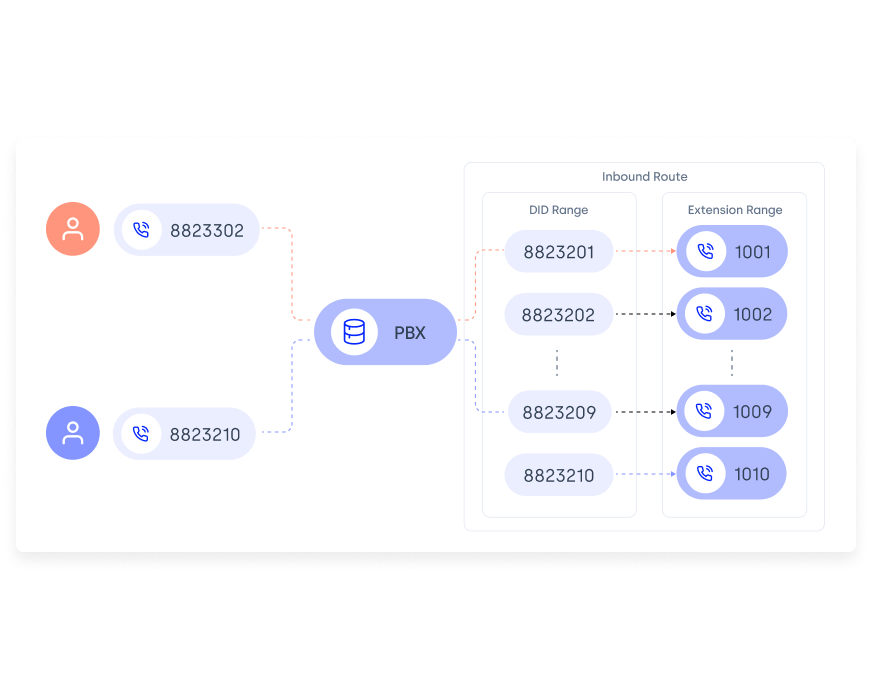
Ako fungujú telefónne predĺženia?
Telefónne predĺženia fungujú tak, že volajúcich spájajú s konkrétnymi osobami alebo oddeleniami pomocou krátkeho interného čísla namiesto celého telefónneho čísla. Fungujú na systémoch ako PBX (Private Branch Exchange) alebo VoIP (Voice over Internet Protocol), ktoré smerujú hovor v zákulisí.
Keď volajúci vytočí internú linku, systém ju automaticky rozpozná a presmeruje hovor na správne miesto určenia.
Ako nastaviť telefónne rozšírenia?
- 01In the Dashboard, go to the "Users" tab.
- 02Choose "+ Add User" at the top right corner of the page.
- 03Complete the required information in Basic settings.
- 04Navigate to the bottom of the page to enter the extension in the dedicated field.
- 05Click "Create user" to save the changes.

Benefits of Phone Extensions
Why Smart Teams Use Phone Extensions
Streamline Call Routing
Phone extensions simplify how you call a number with an extension, ensuring calls go straight to the right person or department. This reduces wait times and eliminates the need for complex menus.
Stop Overpaying for Phone Lines
Instead of buying separate numbers, use a single phone line with multiple phone line extension numbers. Adding an extension to a phone number is easy and helps teams grow without increasing telecom costs.
Improve Connections
A well-structured business phone extension system gives clients a professional impression. Internally, teammates can use calling extensions or dial an extension on the office phone to connect quickly.
Skip the IT Hurdle
Set up a phone extension from your browser. No hardware, no IT tickets, no waiting for phone company technicians. Manage extension examples across locations without the technical know-how.

Prípady použitia telefónnych rozšírení
Telefónne rozšírenia sú výkonné nástroje, ktoré zjednodušujú spojenie tímov, smerovanie hovorov a poskytovanie lepších služieb. Tu sa dozviete, ako telefónne rozšírenia zmenia vaše každodenné operácie:
- Zrýchlite pripojenie zákazníkov pomocou jednociferného smerovania: Okamžite smerujte hovory s vysokou prioritou pomocou číslic 1-9. Predajné vyhliadky sa dostanú k vašim najlepším obchodníkom v priebehu niekoľkých sekúnd.
- Zvyšujte svoj tím bez toho, aby ste museli znižovať svoj účet za telefón: Nasaďte neobmedzené rozšírenia pre každého člena tímu pomocou jedného profesionálneho čísla.
- Automatizujte rutinné dopyty, aby ste uvoľnili svojich najlepších ľudí: Bežné otázky môžete okamžite presmerovať na nahraté správy. Vaši vysokohodnotní členovia tímu sa budú sústrediť len na uzatváranie obchodov.
- Zachyťte každý kontakt pomocou inteligentného smerovania hlasovej pošty: Premeňte hovory po pracovnej dobe na kvalifikované potenciálne zákazníkov pomocou cielených predĺžení hlasovej pošty.
- Odstráňte zmätok v otázke "s kým mám hovoriť?": Umožnite volajúcim nájsť správnu osobu podľa mena prostredníctvom inteligentných zoznamov.
Rýchle nastavenie, jednoduchá správa
Nasadenie profesionálnych rozširujúcich systémov v priebehu niekoľkých minút prostredníctvom konfigurácie v cloude. Žiadne obstarávanie hardvéru, žiadne prideľovanie zdrojov IT a žiadne oneskorenia pri koordinácii s dodávateľmi.
Bezproblémové škálovanie operácií, okamžité poskytovanie nových rozšírení pri rozširovaní tímov, úprava smerovacích protokolov v reálnom čase a zachovanie úplnej administratívnej kontroly z centralizovaných ovládacích panelov.


Efektívne smerovanie a správa hovorov
Pokročilé algoritmy smerovania hovorov presmerujú prichádzajúce hovory na kvalifikované tímy na základe dostupnosti a odbornosti. Podrobná analytika poskytuje prehľad o vzorcoch objemu hovorov, ukazovateľoch odozvy a ukazovateľoch výkonnosti oddelení.
Využívanie prevádzkových údajov na skrátenie čakacích časov zákazníkov a zlepšenie výsledkov poskytovania služieb.
Features
Other features you might like

Call Flow Designer
Design your own inbound calling journey to fit the specific needs of your business and customers’ expectations.
Learn more about Call Flow Designer
Interactive
Voice Response
Streamline your callers’ journey with a multi-level IVR menu and lead them where they need to be.
Learn more about InteractiveVoice Response
Skill-Based Routing
Assign custom skills to your agents or teams and route customer calls automatically based on their unique expertise.
Learn more about Skill-Based Routing
Caller-Based Routing
Route customers automatically based on factors like agent skills and skill levels, custom fields and even CRM or HelpDesk info.
Learn more about Caller-Based Routing
Ready to get started?
Join over 5,500+ modern companies that already trust CloudTalk to have MORE and BETTER calls.
Často kladené otázky
A US phone extension is a short number (e.g., 101) used to reach a person or department within a business phone system.
No, a virtual number is a full phone line, while an extension is a short code linked to it for internal routing.
Choose a VoIP provider like CloudTalk to set up a main number, then assign custom extensions for teams or individuals.
Extensions can route calls to voicemail, mobile, or backup agents when a team member is out, keeping service uninterrupted.
Dial the main number, wait for the prompt, then enter the extension—or use a comma in your dialer (e.g., 5551234,101).
A virtual phone is a complete number; an extension is a subline connected to that number for easier call routing.
An internal extension is a short number that lets employees call each other directly within the same phone system.
Log in to your VoIP or phone system dashboard and assign extension numbers to users or departments from the settings panel.
Use extension dialing to reach a person or team directly—ideal for offices, support centers, and growing businesses.
Your phone system recognizes the extension entered and forwards the call to the assigned user, line, or voicemail.


Máte ešte otázky?
Nenašli ste odpoveď, ktorú hľadáte? Kontaktujte náš priateľský tím prostredníctvom chatu.