Best Call Center Software on Capterra: TL;DR
CloudTalk currently tops this list, with a 4.4 out of 5 rating across 260+ Capterra reviews and 88% of reviewers rating it above 4 stars. Reviewers most often praise its ease of use and native contact center CRM integrations.
That said, the right pick for your team depends on your dialing volume, your CRM, and how many seats you’re buying, so here’s the full list of 11 Capterra-rated call center platforms we reviewed for this piece:
- 01CloudTalk: best for CRM-native sales and support teams
- 02Ringover: best for unified calling, video, and messaging
- 03CallHippo: best for budget-conscious teams needing fast setup
- 04DialedIn CCaaS: best for high-volume outbound dialing
- 05CallTools: best for predictive dialing with deep CRM sync
- 06Kixie PowerCall: best for power dialing inside your CRM
- 07Squaretalk: best for global outbound teams on a budget
- 08Aircall: best for simple helpdesk and CRM sync
- 09Nextiva: best for all-in-one unified communications
- 10Talkdesk: best for enterprise, AI-driven contact centers
- 11JustCall: best for calling and SMS inside a CRM workflow
Best Call Center Software on Capterra: Comparison Table
This is the condensed version of our best call center software Capterra 2026 rankings, in the same order we cover each tool below. Full pricing caveats and review-count context for each provider are in their own section further down.
| Provider | Key Features | Best For | Starting Price | Capterra Rating |
|---|---|---|---|---|
| CloudTalk | 100+ native CRM integrations, AI Sales Dialer, AI Conversation Intelligence add-on | CRM-native sales and support teams | $25/user/mo | 4.4/5 |
| Ringover | Unified calls, video, SMS, WhatsApp; native CRM click-to-call | Unified calling, video, and messaging | $15/user/mo | 4.7/5 |
| CallHippo | Multi-tier VoIP, CRM click-to-call, call recording add-on | Budget teams needing fast setup | Free; paid plans from $19/user/mo | 4.4/5 |
| DialedIn CCaaS | Predictive/power/progressive dialing, call filtering | High-volume outbound dialing | ~$69/user/mo | 4.8/5 |
| CallTools | 40+ integrations, predictive/power dialer, detailed reporting | Predictive dialing with deep CRM sync | Quote-based (not published) | 4.8/5 |
| Kixie PowerCall | CRM-embedded power dialer, AI routing, SMS templates | Power dialing inside your CRM | Not published | 4.6/5 |
| Squaretalk | Local-presence dialer, Salesforce CTI, real-time dashboards | Global outbound teams on a budget | $15/user/mo | 4.8/5 |
| Aircall | Helpdesk/CRM sync, click-to-call, IVR | Simple helpdesk and CRM sync | $30/user/mo (3-user min) | 4.2/5 |
| Nextiva | Unified comms, CRM-lite NextOS, analytics | All-in-one unified communications | $15/user/mo | 4.6/5 |
| Talkdesk | Omnichannel routing, AI Copilot/Autopilot add-ons | Enterprise, AI-driven contact centers | $85/user/mo | 4.5/5 |
| JustCall | 100+ CRM integrations, AI coaching, SMS | Calling and SMS inside a CRM workflow | $29/user/mo (2-user min) | 4.1/5 |
Why We Looked at Recent Capterra Reviews
According to Capterra's 2026 Software Buying Trends Report, only one in three software buyers has a smooth buying experience, while two-thirds face implementation issues or purchase regret. In fact, 89% of buyers who regret their purchase also experience implementation problems.
The takeaway is simple: choosing the right software is only half the battle—successful implementation matters just as much.
For call center phone solutions that means looking beyond feature lists and demos to see how well the platform fits into your team's everyday workflow. That's when problems show up: CRM data doesn't sync, agents juggle multiple tabs, and teams fall back to manual work.
And this is why user reviews matter. Instead of relying on vendor claims, we analyzed Capterra reviews for the 11 highest-rated call center platforms, focusing on the two factors buyers mention most: ease of use and CRM integration.
Those two areas consistently separate the best platforms from the rest. The question isn't which tool has the most features—it's which one works with your CRM and is simple enough for your team to adopt quickly.

See why CloudTalk tops the ease-of-use and CRM-integration charts

Our Methodology
This is how we evaluated the platforms:
- We analyzed Capterra reviews for all 11 shortlisted vendors, focusing on feedback from the last 12–18 months to reflect the products teams use today.
- We looked at negative reviews first to uncover recurring issues that high ratings can hide, such as support problems or billing complaints.
- We cross-checked product names and ratings with vendor websites and G2 to make sure we were comparing the right solutions.
- We used Capterra as our main source because it’s a common platform for buyers researching call center software.
Why Trust Our Software Reviews?
We’ve spent close to a decade helping teams evaluate business communication software. In that time we’ve helped more than 30,000+ professionals compare tools, reviewed over 200 software products across categories, and read through more than 5,500 verified customer reviews on platforms including G2, Capterra, and Trustpilot, plus discussion threads on Reddit and Quora that never show up in an official review count.
We published more than 1,000+ articles like this one in the past year. Each one is written by a person and checked against the sources it cites, not generated wholesale and left unverified.
The 11 Best Call Center Software Tools for Ease of Use and CRM Integration in 2026
Every tool below made the cut because real users rate it highly for ease of use, CRM integration, or both. We start with CloudTalk, then move through the rest roughly in order of Capterra rating and relevance to CRM-driven teams.
1. CloudTalk: Best for CRM-Native Sales and Support Teams
What Is CloudTalk?
CloudTalk is a cloud phone system for sales and support teams that need deep native CRM integration and an AI-powered outbound dialer, without the cost or complexity of an enterprise CCaaS suite. It’s one of the more AI-forward picks among AI call center software on this list, and the company positions itself as the global AI business calling software built for SMB growth.
Key Features of CloudTalk
- 100+ native CRM and helpdesk integrations, including Salesforce, HubSpot, Pipedrive, Zoho CRM, Zendesk, and Intercom, with two-way sync of contacts, calls, recordings, AI summaries, and tags.
- An AI Sales Dialer with Power, Progressive, and Parallel dialing modes, AI voicemail detection, and local-presence dialing that CloudTalk credits with a 40% lift in answer rates.
- AI Conversation Intelligence for call transcription, AI summaries, sentiment analysis, topic detection, and AI call scoring, sold as a paid add-on rather than bundled into any plan.
- AI Voice Agents that handle inbound and outbound calls, qualify leads, answer customer questions, book appointments, and follow up automatically while syncing outcomes back to your CRM.
What Are CloudTalk’s Pros and Cons?
| Pros | Cons |
|---|---|
| Fast onboarding; reviewers consistently call the interface easy to learn | No native video conferencing |
| Deep native CRM sync, especially with HubSpot, Salesforce, and Pipedrive | Solo users may not need its collaboration and routing depth |
Who Is CloudTalk Best For?
CloudTalk is for SMB sales and support teams who want native CRM integration and an AI dialer without enterprise CCaaS pricing or complexity. It’s less of a fit for large enterprise contact centers that need deep omnichannel routing across chat and social built into the same platform, since CloudTalk’s core product is voice-first.
What Is the Pricing of CloudTalk?
CloudTalk runs three self-serve plans plus a custom enterprise tier, all billed per user per month on an annual plan:
- Starter: $25/user/month
- Essential: $29/user/month
- Expert: $49/user/month
- Custom: quote-based.
- Add-ons: AI Conversation Intelligence at $9/user/month, Parallel Dialer at $39/user/month, and the AI Voice Agent starting at $99 for 200 minutes a month.
What Is CloudTalk’s Capterra Rating and Review Count?
CloudTalk holds a 4.4 out of 5 rating across 260 reviews on Capterra, with a 4.5/5 for its ease of use.
What Are Real Users Saying About CloudTalk on Capterra?
Reviewers consistently highlight its ease of use and CRM integrations, calling out HubSpot, Salesforce, and Pipedrive sync and click-to-call as strengths, alongside call quality reviewers describe as reliable.

2. Ringover: Best for Unified Calling, Video, and Messaging
What Is Ringover?
Ringover is a cloud-based business phone system built around unified communications: calls, video, SMS, and WhatsApp in one app. It’s aimed at SMBs, especially EU-based teams, that want one platform instead of stitching together separate calling and messaging tools.
Key Features of Ringover
- Native CRM integrations with Salesforce, HubSpot, Zoho CRM, and Pipedrive, including one-click Chrome-extension calling and call recordings with notes and tags synced back to the CRM.
- Calls, video conferencing, SMS, and WhatsApp bundled into a single app rather than separate products.
- Analytics and live call monitoring built for coaching, not just reporting.
What Are Ringover’s Pros and Cons?
| Pros | Cons |
|---|---|
| Reliable, flexible telephony that centralizes communications | Occasional performance and speed delays |
| Quick setup and live call-monitoring features | Connectivity dependent and unstable |
Who Is Ringover Best For?
Ringover fits SMBs, especially EU-based teams, that want phone, video meetings, and team chat consolidated under one roof with broad CRM connectivity out of the box. It’s a weaker fit for teams whose main priority is North America-specific compliance or contact-center features rather than unified communications.
What Is the Pricing of Ringover?
Ringover pricing includes three tiers, billed annually:
- Talk: $15/user/month.
- Business: $47/user/month.
- Advanced: quote-based.
What Is Ringover’s Capterra Rating and Review Count?
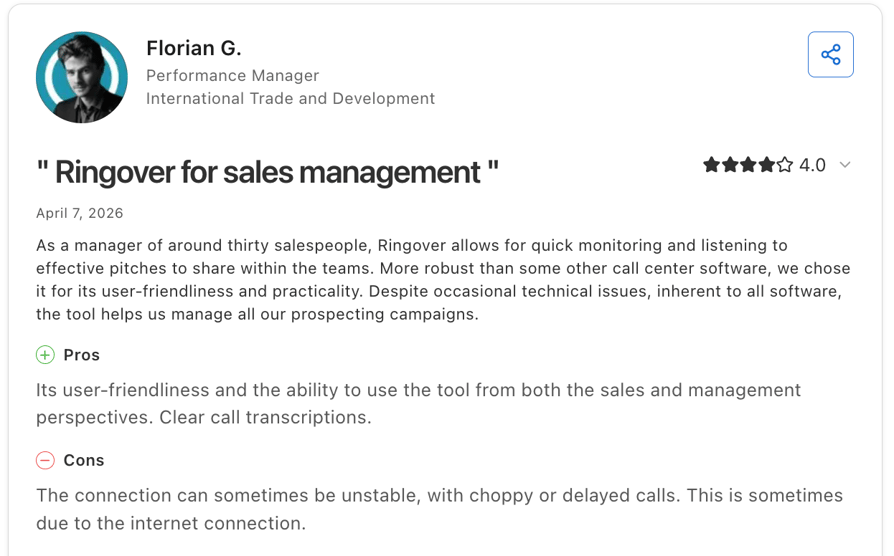
Ringover rates 4.7 out of 5 across 884+ reviews on Capterra and has been recognized as a best ease of use tool in 12 Capterra rankings.
What Are Real Users Saying About Ringover on Capterra?
Reviewers most often praise how the platform consolidates communications and how quickly teams can get set up and start coaching with the live-monitoring tools, but note some occasional connection issues.
Ringover vs. CloudTalk
Both platforms score well on ease of use, but CloudTalk’s Capterra reviews lean harder on CRM-integration depth (Salesforce, HubSpot, and Pipedrive sync built for sales workflows), while Ringover’s reviewers value it more for pulling phone, video, and team chat into a single app. If CRM sync is your main driver, compare CloudTalk’s Essential plan directly against Ringover’s Business tier before deciding.
3. CallHippo: Best for Budget-Conscious Teams Needing Fast Setup
What Is CallHippo?
CallHippo is a cloud-based virtual phone system built for sales and support teams that want basic CRM click-to-call without a long setup process.
Key Features of CallHippo
- CRM integrations with HubSpot, Salesforce, Pipedrive, and Zoho for calling and activity sync.
- A tiered set of dialer and call-routing plans, from a limited free Basic tier up through Ultimate.
- Call recording and analytics available on higher-tier plans.
What Are CallHippo’s Pros and Cons?
| Pros | Cons |
|---|---|
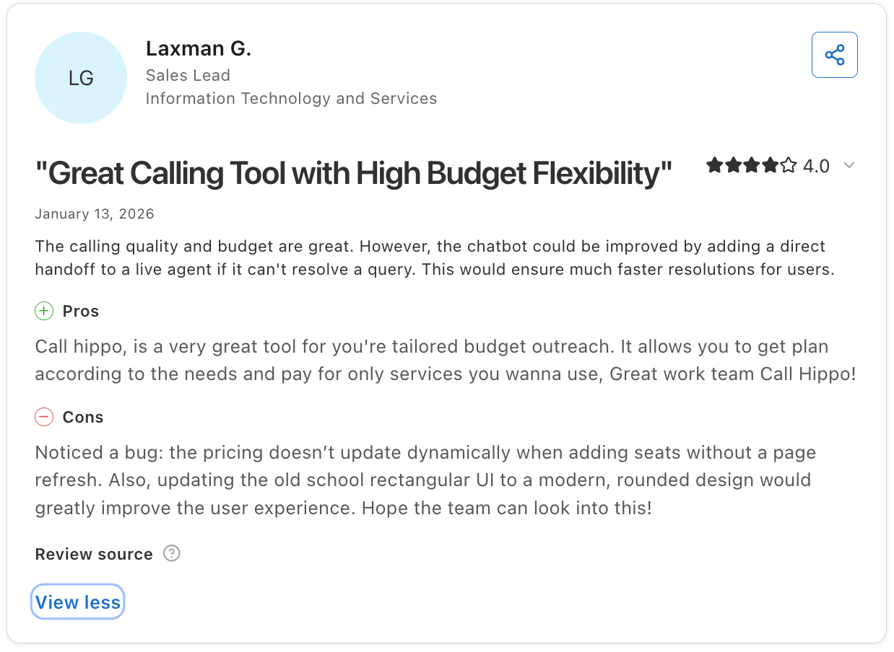
| Setup described as straightforward, with minimal technical knowledge needed | Multiple reviewers describe pricing as confusing, citing unexpected charges or extra per-minute fees |
| Customer support frequently praised as responsive | Complicated refund and cancellation process |
Who Is CallHippo Best For?
CallHippo fits small teams that want a quick VoIP setup with basic CRM click-to-call and don’t need advanced dialer features. It’s a weaker fit for teams that want fully transparent, predictable pricing, since several reviewers report add-on charges that weren’t obvious upfront.
What Is the Pricing of CallHippo?
CallHippo pricing lists four paid tiers plus a limited free option, billed annually:
- Basic: free, limited features.
- Starter: $19/user/month.
- Professional: $30/user/month.
- Ultimate: $42/user/month.
- Enterprise: quote-based, for 50+ seats.
What Is CallHippo’s Capterra Rating and Review Count?
CallHippo rates 4.4 out of 5 across roughly 688 reviews on Capterra.
What Are Real Users Saying About CallHippo on Capterra?
Reviewers most often praise fast setup and responsive support, while a recurring complaint centers on pricing that feels less predictable once add-ons and extra minutes are factored in.
CallHippo vs. CloudTalk
Both target budget-conscious teams, but CloudTalk’s Essential plan bundles native CRM integrations and unlimited call recording at $29/user/month, while CallHippo reviewers report some features as separate add-ons on top of the listed price. If predictable, all-in pricing matters more to you than the lowest sticker price, compare the two plans line by line.
4. DialedIn CCaaS: Best for High-Volume Outbound Dialing
What Is DialedIn CCaaS?
DialedIn CCaaS is a cloud contact center and predictive dialer platform built for outbound, inbound, and blended call campaigns.
Key Features of DialedIn CCaaS
- Multiple dialing modes, including predictive, progressive, preview, manual, power, and agentless campaigns.
- Integrations with Salesforce, HubSpot, Microsoft Dynamics, Oracle, Zoho, and Zapier.
- Smart call routing and ACD that route by skills, queue availability, IVR choices, CRM data, time of day, and other rules.
What Are DialedIn CCaaS’s Pros and Cons?
| Pros | Cons |
|---|---|
| Frequently described as intuitive, with smooth onboarding cited by multiple reviewers | Users report call delays and dropped calls |
| Useful CRM and call management features | Some users find it difficult to adjust calling rules |
Who Is DialedIn CCaaS Best For?
DialedIn fits outbound-heavy call centers, like collections or telemarketing teams, that need predictive or power dialing at a lower price point than enterprise CCaaS suites. It’s a weaker fit for buyers who want to see exact pricing published on the vendor’s own site before requesting a quote, since DialedIn’s plans aren’t fully confirmed there.
What Is the Pricing of DialedIn CCaaS?
DialedIn pricing includes four main tiers:
- Enterprise: $39/user/month
- Small Business: $69/user/month
- Professional: $59/user/month
- Enterprise Plus: $25/user/month
What Is DialedIn CCaaS’s Capterra Rating and Review Count?
DialedIn rates 4.8 out of 5 across roughly 328 reviews on Capterra and has been recognized as a best ease of use tool in 11 Capterra rankings.
What Are Real Users Saying About DialedIn CCaaS on Capterra?
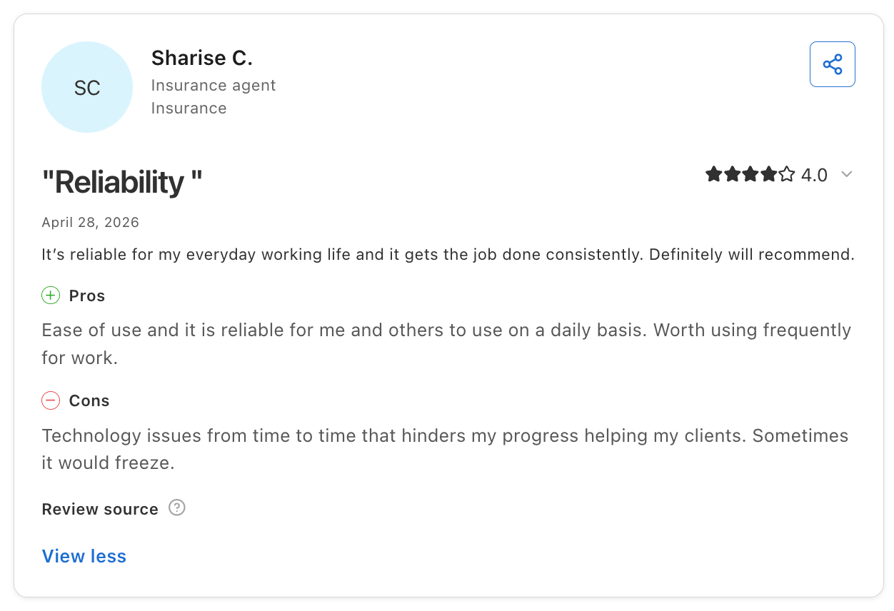
Reviewers most often mention an intuitive interface and smooth onboarding, but note some occasional technical disruptions.
DialedIn CCaaS vs. CloudTalk:
DialedIn CCaaS is the stronger fit if you need a true predictive dialer and blended contact-center features, while CloudTalk is usually better for SMB sales/support teams that want easier setup, strong CRM integrations, and power/smart dialing instead of full predictive dialing.
5. CallTools: Best for Predictive Dialing with Deep CRM Sync
What Is CallTools?
CallTools is a cloud-based contact center platform built around advanced dialers, CRM integration, and real-time reporting for sales and customer service teams.
Key Features of CallTools
- 44+ direct integrations, including Salesforce, HubSpot, Zoho, Pipedrive, Microsoft Dynamics, Slack, Shopify, and Zapier.
- Predictive and power dialer modes that reviewers credit for measurable connect-rate and talk-time gains.
- Detailed reporting, including end-of-day reports and activity tracking.
What Are CallTools’s Pros and Cons?
| Pros | Cons |
|---|---|
| Fast, knowledgeable support | Pricing isn’t published, so buyers have to go through a sales call to get a number |
| Predictive and power dialer features praised for measurable connect-rate gains | Some users report a steep learning curve for the dialer feature |
Who Is CallTools Best For?
CallTools fits outbound sales and call-center teams that want a predictive or power dialer with deep CRM sync and detailed campaign reporting. It’s a weaker fit for buyers who want transparent, published pricing before talking to sales, since CallTools keeps its pricing quote-based.
What Is the Pricing of CallTools?
CallTools doesn’t publish pricing on its own site.
What Is CallTools’s Capterra Rating and Review Count?
CallTools rates 4.8 out of 5 across 156+ reviews on Capterra, with a 4.8/5 for ease of use.
What Are Real Users Saying About CallTools on Capterra?
Reviewers most often mention fast support and measurable gains from the predictive and power dialer.

CallTools vs. CloudTalk:
CloudTalk delivers better call quality, global coverage, native CRM integrations, and built-in AI analytics, while CallTools relies on limited coverage, paid integrations, and third-party tools for advanced capabiliti
6. Kixie PowerCall: Best for Power Dialing Inside Your CRM
What Is Kixie PowerCall?
Kixie PowerCall is an AI-powered sales calling platform built to embed a power dialer directly inside the CRM your team already uses.
Key Features of Kixie PowerCall
- Deep CRM embedding, with click-to-call and auto-logging inside HubSpot, Salesforce, Zoho CRM, Pipedrive, Pipeline CRM, and ClickUp.
- Power Dialer and multi-line power dialing with AI-driven call routing and voicemail detection.
- SMS and text templates, plus a ConnectionBoost add-on aimed at improving connect rates.
What Are Kixie PowerCall’s Pros and Cons?
| Pros | Cons |
|---|---|
| Voicemail drops, text templates, and CRM integration consistently praised across reviews | Some reviewers report technical issues, such as lack of call history and spam notifications affecting usability |
| Support described as responsive during onboarding and troubleshooting | Limited reporting features |
Who Is Kixie PowerCall Best For?
Kixie fits sales teams already standardized on a CRM like HubSpot, Salesforce, Zoho, or Pipedrive that want a power dialer embedded directly in that workflow. It’s a weaker fit for teams that want one flat number covering everything, since add-ons like ConnectionBoost and Conversation Intelligence stack meaningfully on top of the base plan.
What Is the Pricing of Kixie PowerCall?
Kixie doesn’t publish exact pricing on its own site. See the full Kixie pricing breakdown, including add-on stacking, before you compare it to a base-plan price elsewhere.
What Is Kixie PowerCall’s Capterra Rating and Review Count?
Kixie rates 4.6 out of 5 across roughly 295+ reviews on Capterra, with Ease of Use at 4.7 and Customer Service at 4.7.
What Are Real Users Saying About Kixie PowerCall on Capterra?
Reviewers most often cite voicemail drops, text templates, and CRM integration as strengths, alongside occasional frustration with connection.

Kixie PowerCall vs. CloudTalk
Kixie is a strong choice for outbound sales teams thanks to its CRM integrations and power dialer. CloudTalk builds on those strengths with transparent pricing, coverage in 160+ countries, AI-powered analytics, and advanced inbound capabilities for teams that need to scale.
7. Squaretalk: Best for Global Outbound Teams on a Budget
What Is Squaretalk?
Squaretalk is a cloud contact center and VoIP platform built for decentralized sales and support teams that need local-presence dialing across multiple countries.
Key Features of Squaretalk
- CRM and helpdesk integrations, including Salesforce CTI, Zoho Phonebridge, HubSpot, Freshworks, Freshdesk, and Zendesk.
- A predictive dialer with campaign management and IVR.
- Real-time dashboards built for campaign optimization.
What Are Squaretalk’s Pros and Cons?
| Pros | Cons |
|---|---|
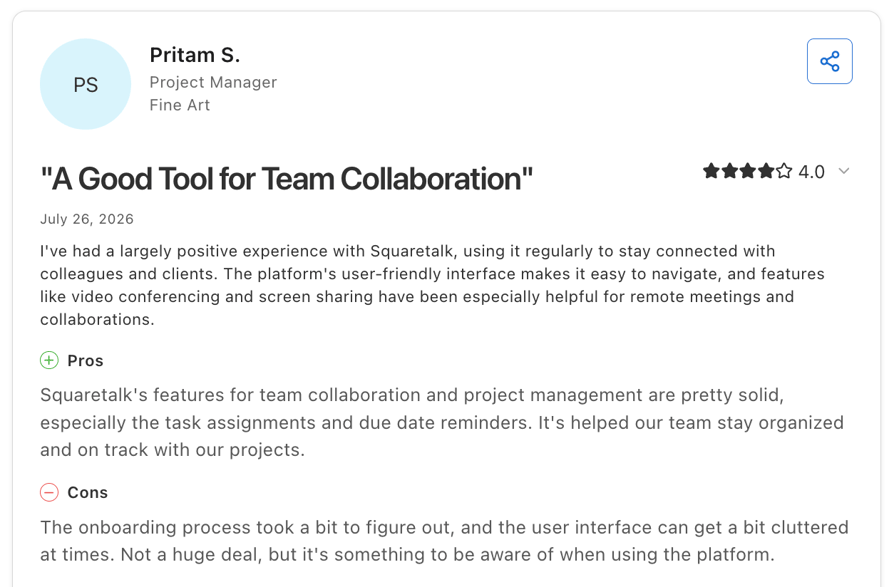
| Reviewers credit automated dialing tools with real productivity gains | Some users find the setup challenging |
| Strong CRM integrations and an interface reviewers call intuitive | Some users report connection issues during peak hours |
Who Is Squaretalk Best For?
Squaretalk fits global outbound sales teams that need local-presence dialing and CRM click-to-call at a lower cost than premium contact-center suites. Its smaller review base, around 101 on Capterra, means it’s worth reading a wider spread of individual reviews yourself, rather than leaning on the star rating alone.
What Is the Pricing of Squaretalk?
Squaretalk publishes two confirmed tiers, with a third still rolling out:
- Core: $15/user/month, 3 to 5 user minimum.
- Connect: $25/user/month, 5-user minimum.
- Scale: not yet published.
What Is Squaretalk’s Capterra Rating and Review Count?
Squaretalk rates 4.8 out of 5 across 109+ reviews on Capterra, the highest rating of any tool on this list, though also the smallest review sample.
What Are Real Users Saying About Squaretalk on Capterra?
Reviewers most often credit Squaretalk’s automated dialing tools with real productivity gains and call out its CRM integrations and interface as strengths, but some users note limited features and a difficult setup for advanced workflows.
Squaretalk vs. CloudTalk:
Squaretalk’s Core plan undercuts CloudTalk’s Starter plan on price, but CloudTalk’s review base is more than double the size, which makes its ratings statistically steadier. If your team is small and cost-sensitive, weigh Squaretalk’s lower entry price against a rating built on fewer data points.
8. Aircall: Best for Simple Helpdesk and CRM Sync
What Is Aircall?
Aircall is a cloud-based phone system built for sales and support teams that want a straightforward setup tightly synced with common helpdesk and CRM tools.
Key Features of Aircall
- CRM and helpdesk integrations that reviewers describe as smooth, boosting workflow automation across major tools.
- An Essentials and Professional plan structure with click-to-call, call recording, and IVR.
- A broad app marketplace and integration ecosystem.
What Are Aircall’s Pros and Cons?
| Pros | Cons |
|---|---|
| CRM and business-tool integrations described as smooth and productivity-boosting | Strict 3-user minimum, increasing the entry-level plan to $90/mo |
| Intuitive interface | Lacks native bulk SMS tools |
Who Is Aircall Best For?
Aircall fits sales and support teams that want a simple, well-designed phone system tightly synced with their helpdesk and CRM. It’s a weaker fit for teams that have been burned by billing surprises before, since billing complaints show up repeatedly in reviews, and for very small teams, since Essentials requires a 3-license minimum.
What Is the Pricing of Aircall?
Aircall lists two self-serve tiers plus a custom option, billed annually. Because of the 3-license minimum, the real entry cost on Essentials works out to about $90/month, not the $30 headline per-user rate. See the full Aircall pricing breakdown, including the license minimums, before you compare it to a per-seat rate elsewhere.
- Essentials: $30/user/month, 3-license minimum.
- Professional: $50/user/month, 3-license minimum.
- Custom: quote-based, 25-license minimum.
What Is Aircall’s Capterra Rating and Review Count?
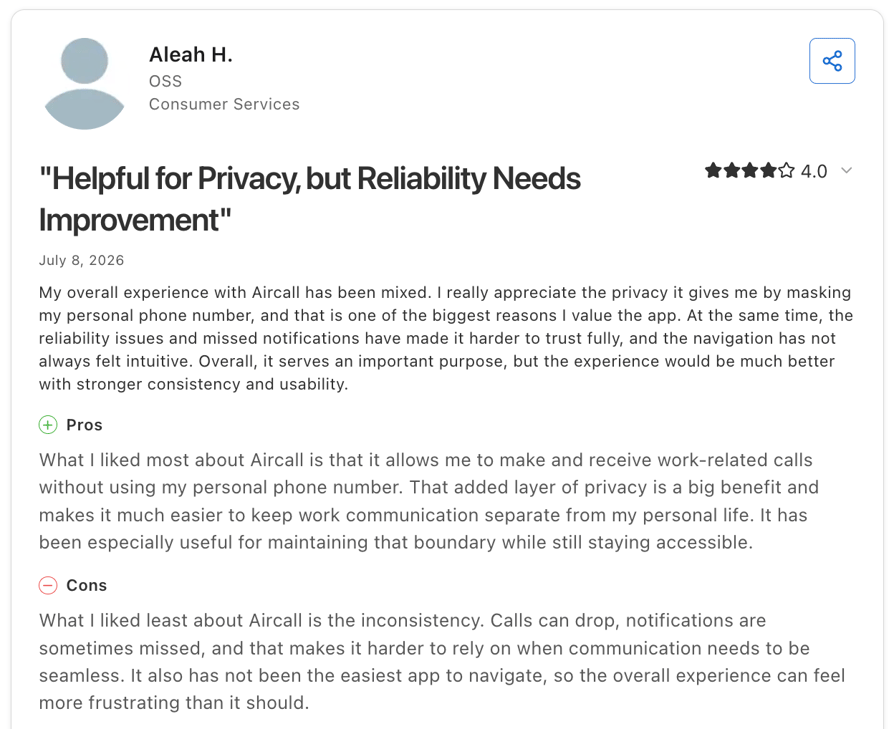
Aircall rates 4.2 out of 5 across roughly 465+ reviews on Capterra, with Ease of Use at 4.4 but Value for Money at 3.9.
What Are Real Users Saying About Aircall on Capterra?
Users frequently praise Aircall’s reliability when connecting to major CRMs and its overall ease of use for remote teams, but report inconsistent call quality and delays in connecting calls when scaling.
Aircall vs. CloudTalk:
Both integrate tightly with common CRMs and helpdesks, but CloudTalk’s Starter plan has no seat minimum, while Aircall requires at least 3 licenses on every plan. If you’re a very small team, that minimum changes your real cost per seat more than the headline price suggests.
9. Nextiva: Best for All-in-One Unified Communications
What Is Nextiva?
Nextiva is a unified communications and customer experience platform for mid-market teams that want voice, a lightweight CRM layer called NextOS, and analytics in one place, not just a standalone call center tool.
Key Features of Nextiva
- CRM integrations like Salesforce, HubSpot CRM, and Microsoft Dynamics 365.
- A separate Nextiva Contact Center product line with enterprise per-agent and custom pricing models.
- Built-in analytics alongside unified voice, video, and chat.
What Are Nextiva’s Pros and Cons?
| Pros | Cons |
|---|---|
| Combines voice, video, and chat natively | Pricing jumps for advanced routing |
| Responsive and high-quality customer service teams | The interface can feel overwhelming for non-technical users |
Who Is Nextiva Best For?
Nextiva fits mid-market teams that want an all-in-one unified communications and CX platform, not just a lean outbound dialer. It’s more than a small, outbound-only team typically needs, so a pure call-center tool built around CRM integration may fit that use case better.
What Is the Pricing of Nextiva?
Nextiva pricing for small businesses includes three tiers:
- Core: $15/user/month.
- Engage: $25/user/month.
- Scale: $75/user/month.
What Is Nextiva’s Capterra Rating and Review Count?
Nextiva rates 4.5 out of 5 across roughly 112+ reviews on Capterra..
What Are Real Users Saying About Nextiva on Capterra?
Nextiva customers love the platform’s reliability and all-in-one convenience, though some mention the learning curve is steep.
Nextiva vs. CloudTalk:
If your team needs a full CX suite beyond the phone, Nextiva’s scope goes further; if you want a lighter, calling-first tool that plugs into the CRM you already run, CloudTalk’s scope is narrower on purpose.
10. Talkdesk: Best for Enterprise, AI-Driven Contact Centers
What Is Talkdesk?
Talkdesk is a cloud contact center platform, marketed as CX Cloud, built for larger or enterprise-leaning teams that want AI-driven customer experience tools like Copilot, Autopilot, and Navigator alongside omnichannel routing, not just a phone system.
Key Features of Talkdesk
- A CX Cloud tiered structure spanning Digital Essentials, Voice Essentials, and Elite.
- AI add-ons, including Copilot for agent assist, Autopilot for virtual agents, and Navigator for AI-driven routing, priced separately even on the top Elite plan.
- Enterprise-grade reporting and omnichannel routing across channels.
What Are Talkdesk’s Pros and Cons?
| Pros | Cons |
|---|---|
| Ease of use | Users report call issues like dropped calls |
| Easy CRM integrations | Trustpilot reviewers describe Talkdesk’s support as slow |
Who Is Talkdesk Best For?
Talkdesk fits larger or enterprise-leaning contact centers that need AI-driven CX tools and omnichannel routing beyond voice. It’s a weaker fit for small or budget-conscious teams, since its entry pricing starts at $85/user/month and requires a 3-year contract to get that rate.
What Is the Pricing of Talkdesk?
Talkdesk pricing lists three CX Cloud tiers:
- Digital Essentials: $85/user/month
- Voice Essentials: $105/user/month
- Elite: $165/user/month
- Industry Experience Clouds: $225/user/month
What Is Talkdesk’s Capterra Rating and Review Count?
Talkdesk rates 4.5 out of 5 across roughly 733+ reviews on Capterra, with a 4.7 in Ease of Use.
What Are Real Users Saying About Talkdesk on Capterra?
Users consistently praise its ease of use, intuitive interface, and robust reporting capabilities, though some criticize call stability and audio lag issues.
Talkdesk vs. CloudTalk:
Talkdesk is built for enterprise contact centers with omnichannel needs and a much higher price floor. CloudTalk starts at $25/user/month with no long-term contract requirement, which makes it the more realistic option for SMB teams that don’t need Talkdesk’s enterprise scale.
11. JustCall: Best for Calling and SMS Inside a CRM Workflow
What Is JustCall?
JustCall is an AI-powered business calling and SMS platform built for sales and support teams that want calling, texting, and AI coaching embedded directly in their CRM workflow.
Key Features of JustCall
- 100+ CRM integrations on the Pro plan and above, including Salesforce and HubSpot.
- AI call coaching and AI voice agents.
- Unlimited calling minutes and AI transcription bundled from the entry Team plan.
What Are JustCall’s Pros and Cons?
| Pros | Cons |
|---|---|
| Simple setup and an easy-to-use interface | Some reviewers report occasionally dropped calls or poor call quality |
| CRM integrations log calls and messages to keep teams aligned automatically | A strict 2-user minimum creates a deceptive starting entry price |
Who Is JustCall Best For?
JustCall fits sales teams that want calling, SMS, and AI coaching embedded directly in a CRM workflow, at a lower price point than enterprise CX suites. It’s a weaker fit for teams prioritizing the strongest Capterra track record on this list, since JustCall carries the lowest Capterra rating of the 11 tools here.
What Is the Pricing of JustCall?
JustCall pricing lists three tiers, billed annually with a 2-user minimum:
- Team: $29/user/month (2-user minimum; real entry ~$58/month).
- Pro: $49/user/month.
- Pro Plus: $89/user/month.
- Business: Custom
What Is JustCall’s Capterra Rating and Review Count?
JustCall rates 4.1 out of 5 across 225+ reviews on Capterra.
What Are Real Users Saying About JustCall on Capterra?
Reviewers most often praise simple setup and an easy-to-use interface, while some mention dropped calls or inconsistent call quality.
JustCall vs. CloudTalk:
Both target sales teams that want calling and CRM integration in one workflow, but CloudTalk’s Capterra rating (4.4/5) and review base (260) run ahead of JustCall’s (4.1/5, ~225). If call quality consistency is a top concern based on what you’ve read here, weigh that gap alongside your own CRM and pricing requirements.
How to Choose the Right Call Center Software for Your CRM Team
Ratings and reviews show what other buyers think, but they don’t tell you if a tool is the right fit for your team. Before choosing call center software, look at how well it works with your CRM, how easy it is to use, and what you’ll actually pay once you add extra features.
Check Which CRM Integrations the Software Really Supports
A vendor may advertise dozens or even hundreds of integrations, but the number that matters is whether it supports your specific CRM with a real two-way sync — not just basic click-to-call features.
For example, some call center platforms work great with Salesforce but offer limited functionality for HubSpot or Pipedrive. Always check the vendor’s integration page for your CRM before making a decision, and see our guide on integrating your call center with powerful tools to understand what a deeper connection should include.
Calculate the Real Cost, Including Dialers and AI Features
A low starting price doesn’t always mean a cheaper solution. Many tools charge extra for features like advanced dialers, AI coaching, or conversation analytics, which can quickly increase your monthly costs.
Before comparing platforms, calculate the full price per user, including all the features your team needs. Our call center software cost guide explains what to consider when comparing prices.
Make Sure Your Team Can Set It Up Without a Developer
Ease of use is one of the most common things users mention in Capterra reviews. If your team doesn’t have a developer available, choose a platform that lets admins set up workflows, routing, IVR, and CRM connections on their own.
Don’t just look for reviews saying the software is easy to use. Focus on feedback from users who actually configured the system themselves.
Test If the Mobile App Works for Your Team
A strong desktop platform doesn’t always mean a great mobile experience. Some vendors receive positive reviews for their main product but mixed feedback about their mobile apps.
If your team makes calls outside the office, check mobile-specific reviews to see how well the app handles everyday calling tasks.
Evaluate Support and CRM Sync Reliability Over Time
A call center tool that works well during the first few weeks but starts losing data later can create bigger problems down the road.
Look for reviews that mention long-term reliability, accurate call logging, and consistent CRM syncing — not just smooth onboarding. Also pay attention to how customers describe the support experience after they have used the platform for a while.
If your team grows and needs more detailed call reviews, you may also want to explore dedicated quality assurance software to improve call scoring and coaching.
Why Capterra Ratings Actually Matter
A single star rating doesn't tell the whole story. Before you compare tools based on Capterra scores, pay attention to three aspects:
- How reviews are verified. Capterra requires reviewers to verify they've actually used the software before publishing a review. That helps filter out many fake or incentivized reviews that appear on less-moderated platforms. No review platform is perfect, but this process makes Capterra a more reliable source. CloudTalk users have made similar calls on other verified review sites too, including Trustpilot, where it's recognized as one of the easiest business phone systems to use.
- Look beyond the overall rating. An overall score can hide important trade-offs. A platform might earn 4.5 overall, while scoring 4.8 for Ease of Use but only 4.0 for Value for Money. Depending on your priorities, those differences may matter more than the headline score. That's why we've highlighted sub-category ratings throughout this comparison instead of relying only on the overall average.
- Treat the Shortlist badge as a signal, not a guarantee. Several tools in this guide carry Capterra's Shortlist badge. It reflects a combination of user ratings and market presence—not paid placement. It's a useful indicator that a product is popular and well reviewed, but it doesn't guarantee it's the right choice for your specific team or workflow.
Recommended articles
Choose the Call Center Software That Fits Your Team
If your priorities are ease of use and CRM integration, CloudTalk stands out for good reason. Capterra reviewers consistently praise how easy it is to use and how smoothly it connects with CRMs like HubSpot, Salesforce, and Pipedrive. That said, the best choice still depends on your team's needs, from call volume and budget to the features you'll actually use.
Start by narrowing your options to two or three platforms that fit your CRM and budget. Then, go beyond the overall rating and read the lower-rated reviews to understand where each tool falls short. It's one of the easiest ways to spot potential issues before you commit.
If CloudTalk makes your shortlist, book a demo to see how it fits your workflows and CRM setup before making your final decision.
Ready to see CloudTalk on your own call volume?
Frequently Asked Questions
Both are native. HubSpot syncs from the Essential plan, and Salesforce integration is included from Expert—no third-party connector required for either.
Capterra’s pricing data and reviewer feedback show that call center software costs typically scale in tiers, with per‑user pricing rising as teams add advanced routing, analytics, and automation features needed at larger scale.
CloudTalk’s 4.5/5 Ease of Use score on Capterra leads most tools on this list, though DialedIn (4.8) and Kixie (4.7) also score well, so compare Ease of Use sub-scores for your own shortlist directly.
Look for at least 100 verified reviews. Below that, a handful of extreme ratings can swing the average, as smaller-sample tools like Squaretalk (~101 reviews) show.
A rating reflects verified user feedback; a Shortlist badge blends that rating with market presence and popularity. It’s not paid placement, but it’s also not proof a tool fits your specific use case.
Not usually. Most CRM call center integrations are admin-configurable inside the CRM’s app marketplace, though custom routing or field mapping may still need IT input.