Best G2-Rated Contact Center Workforce Management Software in 2026
TL;DR:
Finding the right contact center workforce management software on G2 means cutting through vendor noise and trusting contact center workforce management software reviews and ratings from people who actually use these tools every day. Based on verified G2 ratings, review volume, and real-world feature depth, here are the top 10:
Here are the 10 tools covered in this guide:
- 01CloudTalk — Best for SMBs needing real-time visibility and CRM-connected calling
- 02Agentforce Service (Salesforce Service Cloud) — Best for Salesforce-native enterprises already on Service Cloud
- 038x8 Contact Center — Best for mid-market teams wanting an all-in-one UCaaS and contact center bundle
- 04Genesys Cloud CX — Best for large omnichannel contact centers needing WFM inside a full CCaaS platform
- 05Five9 — Best for mid-enterprise teams needing intelligent cloud calling with WFM capabilities
- 06Verint Workforce Management — Best for large enterprises needing precision forecasting across multi-site operations
- 07RingCentral Contact Center — Best for teams wanting a unified UCaaS and contact center stack with acquired WFM capability
- 08Talkdesk — Best for mid-market contact centers needing AI-assisted scheduling inside a full CCaaS suite
- 09NICE CXone — Best for enterprise contact centers needing a full-suite AI platform with deep native WFM
- 10ServiceNow Customer Service Management — Best for enterprises unifying customer service with IT service management on the Now Platform

Best Contact Center Workforce Management Software Comparison Table
Comparison Table
| Provider | Key Features | Best For | Starting Price | G2 Rating |
|---|---|---|---|---|
| CloudTalk | Real-time dashboards, AI Conversation Intelligence (add-on)100+ CRM integrations, AI Sales Dialer | SMBs needing calling and WFM-adjacent analytics | $25/user/month | 4.4/5/5 |
| Agentforce Service (Salesforce Service Cloud) | Einstein AI routing, omnichannel case management, Agentforce AI agents, native Salesforce CRM integration | Salesforce-native enterprise contact centers | $25/agent/month | 4.4/5 |
| 8x8 Contact Center | Omnichannel routing, WFM module, speech analytics, quality management, UC integration | Mid-market teams on UCaaS and CCaaS bundle | Quote required | 4.2/5 |
| Genesys Cloud CX | Multi-channel WFM forecasting, intraday reforecasting, AI self-scheduling, 600+ integrations | Large omnichannel contact centers | From $75/agent/month | 4.4/5 |
| Five9 | Automated WFM forecasting, real-time dashboards, predictive dialer, omnichannel ACD | Mid-to-large contact centers; WFM as add-on module | $119/seat/month | 4.1/5 |
| Verint Workforce Management | AI forecasting, automated schedule optimization, back-office WFM, compliance tracking | Enterprise 100+ agent deployments | Quote required | 4.2/5 |
| RingCentral Contact Center | AI-powered routing, WFM via CommunityWFM (acquired 2025), omnichannel, UC integration | Teams wanting unified UCaaS and contact center WFM | $20/user/month | 4.1/5 |
| Talkdesk | AI WFM forecasting, intraday schedule adjustments, performance dashboards, integrations | Mid-market contact centers needing full CCaaS with WFM | From $85/user/month | 4.4/5 |
| NICE CXone | 40+ forecasting algorithms, real-time adherence, agent self-scheduling, embedded QM | Enterprise omnichannel contact centers | From $110/agent/month | 4.3/5 |
| ServiceNow Customer Service Management | Case management, agent workspace, IT and CS workflow integration, workforce optimization, virtual agent | Enterprises unifying customer service with IT operations | Quote required | 4.4/5 |
If your contact center is still trying to plan staffing with static forecasts or spreadsheets, you are not just losing efficiency—you are losing control over your operations.
That’s why workforce management software has become critical.
In this article, we review the 10 best G2-rated contact center workforce management software in 2026 to help you choose the right platform.
What Is the Best G2-Backed Contact Center Workforce Management Software in 2026?
CloudTalk is the G2 contact center workforce management leader for growing SMBs that need real-time visibility into agent activity and CRM-connected calling without an enterprise WFM suite—recognized as a Top Trending product in G2's Contact Center Workforce category, with a 4.4/5 rating from 1,844 verified users.
What puts CloudTalk ahead for teams at this scale? It's a cloud calling platform where supervisors can see live agent status, queue health, and call performance without a separate WFM tool, and where every call is already connected to a CRM record.
For an SMB contact center using HubSpot, Salesforce, or Pipedrive, that combination addresses the most urgent workforce visibility problems—without an enterprise budget or a six-month implementation.
This article covers all 10 of the G2 best contact center workforce management software in 2026: what each platform does, who it's built for, what real users say, and how it compares to CloudTalk—so you can make a confident, data-backed decision.
Our Methodology: How We Chose the Best Contact Center Workforce Management Software in 2026
This list isn't based on vendor relationships or sponsored placements. Every tool earned its place through the same evaluation criteria:
- G2 rating (4.0+): We focused on platforms with verified ratings above 4.0 stars and meaningful review volume from real users in operations, WFM, and contact center leadership roles
- Core WFM capabilities: We assessed demand forecasting accuracy, scheduling flexibility, intraday management, and real-time adherence monitoring
- AI and automation depth: We evaluated AI-powered scheduling, quality monitoring, real-time agent assist, and virtual agent capabilities — and whether they're included in base pricing or gated behind add-ons
- Integration quality: We looked at native vs. API-based connections to CRMs, helpdesks, and CCaaS platforms, and whether data syncs reliably in both directions
- Use case fit: We matched each platform to its strongest context — SMB, mid-market, enterprise, outbound-heavy, regulated industry, or platform-native (Salesforce, ServiceNow)
- Total cost transparency: We flagged platforms where entry-level pricing hides significant add-on costs for the features teams actually need
Why Trust Our Software Reviews?
For nearly a decade, we've helped over 30,000 professionals choose and implement better communication tools. We've reviewed 200+ products and analyzed 5,500+ verified reviews from G2 and Capterra.
Learn how we keep our content integrity and our software review methodology.
The 10 Top-Rated Contact Center Workforce Management Software in 2026
1. CloudTalk—Best for SMBs needing real-time visibility and CRM-connected calling
What Is CloudTalk?
CloudTalk is an AI-powered business calling platform for growing SMBs and G2's Top Trending product in the Contact Center Workforce category. Used by 5,500+ companies, it helps sales and support teams improve workforce productivity through intelligent call routing, real-time monitoring, automation, and AI-powered analytics.
What Are CloudTalk's Key Features?
- Real-time monitoring with live call center dashboards, wallboards, and agent activity tracking
- Analytics and reporting for queue performance, agent productivity, and call center KPIs
- AI Conversation Intelligence with call transcription, summaries, sentiment analysis, topic extraction, and smart notes (add-on)
- Visual Call Flow Designer, IVR, Skill-Based Routing, and AI Smart Queueing
- Workflow Automation to eliminate repetitive tasks and streamline operations
- Call Recording, call monitoring, whisper coaching, and call barging for quality assurance
- AI Voice Agents to automate inbound and outbound customer conversations
What Are CloudTalk's Pros and Cons?
| Pros | Cons |
|---|---|
| Fast setup, zero IT dependency | Not a standalone CRM—designed to integrate with your CRM rather than replace it |
| Real-time dashboards give supervisors immediate queue visibility | WFM isn't the primary focus—excels in call handling and real-time performance visibility |
Who Is CloudTalk Best For?
CloudTalk is ideal for SMBs and mid-market contact centers seeking to improve workforce productivity through real-time monitoring, AI-powered analytics, and intelligent call routing. It's a great fit for teams looking to optimize agent performance while integrating with leading CRM and help desk platforms.
How Much Does CloudTalk Cost?
CloudTalk pricing starts at $25/user/month (billed annually) and includes four plans:
- Starter: $25/user/month · Essential: $29
- Expert: $49 ·
- Custom pricing.
A 14-day free trial is available.
What Is CloudTalk's G2 Rating and Review Count?
CloudTalk has a 4.4/5 out of 5-star rating on G2, based on 1936+ customer reviews.
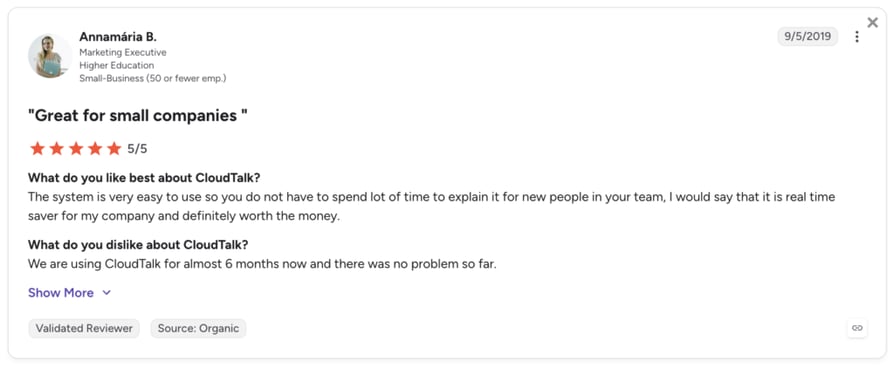
What Are Real Users Saying About CloudTalk?
CloudTalk's users value CloudTalk's fast setup, intuitive interface, and strong CRM integrations.
Ready to Improve Workforce Visibility?
2. Agentforce Service (formerly Salesforce Service Cloud)—Best for enterprises in the Salesforce ecosystem
What Is Agentforce Service?
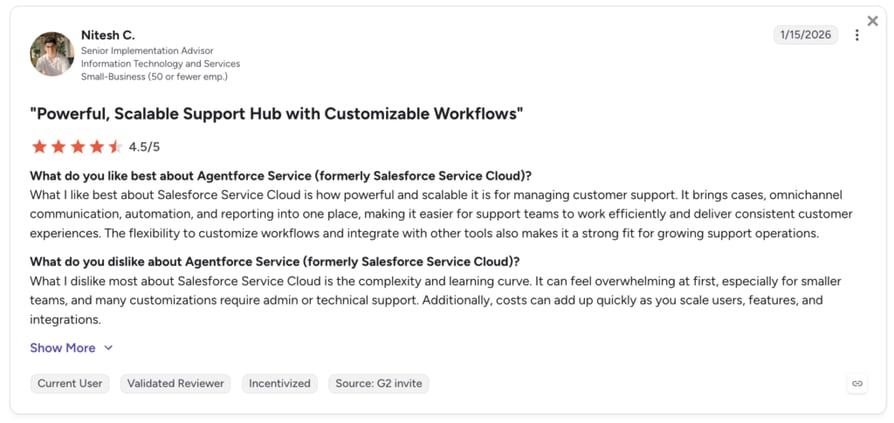
Agentforce Service—previously Salesforce Service Cloud—is G2's Category Leader in Contact Center Workforce Software, with 7,355+ verified reviews. For businesses already using Salesforce, it's one of the best-integrated service platforms available. It combines AI, workforce management, omnichannel routing, and case management in one platform built directly into Salesforce.
What Are Agentforce Service's Key Features?
- AI agents collaborating with human reps across the full service lifecycle
- Omnichannel case routing: voice, chat, email, social, messaging
- Native Salesforce CRM integration—every interaction lives in the same record, no sync needed
- Einstein AI: case summarization, sentiment detection, next-best-action
- Workforce scheduling and workload visibility tools
What Are Agentforce Service's Pros and Cons?
| Pros | Cons |
|---|---|
| Integration depth for Salesforce-native organizations | Cost escalates quickly when activating multiple modules |
| Enterprise-grade security and compliance tooling | Implementation requires dedicated Salesforce admins or certified partners |
Who Is Agentforce Service Best For?
Enterprise contact centers that already run on Salesforce CRM and want to extend that platform into customer-facing service operations without managing a separate CCaaS tool.
How Much Does Agentforce Service Cost?
Agentforce Service pricing starts at $25/user/month (billed annually) and includes three plans:
- Starter Suite: $25/user/month
- Pro Suite: $100/user/month
- Enterprise: $175/user/month
What Is Agentforce Service's G2 Rating and Review Count?
Agentforce Service (formerly Salesforce Service Cloud) has a 4.4 out of 5-star rating on G2, based on 7,355+ customer reviews.
What Are Real Users Saying About Agentforce Service?
Agentforce Service's users value the unified customer timeline and deep Salesforce-native integration, but struggle with UI complexity and find the cost a barrier for advanced features.
3. 8x8 Contact Center—Best for midmarket omnichannel teams
What Is 8x8 Contact Center?
8x8 Contact Center is a cloud-based, AI-powered platform unifying voice, chat, email, video, SMS, and social media support from a single agent workspace. Its 2025 innovation—JourneyIQ—helps businesses understand the customer journey by tracking interactions, spotting friction points, and identifying ways to improve the customer experience across channels.
What Are 8x8 Contact Center's Key Features?
- Omnichannel workspace (voice, chat, email, SMS, video, social, and RCS)
- JourneyIQ for real-time customer journey mapping
- Native quality management with timestamp coaching notes and supervisor @mentions
- AI-powered sentiment analysis and interaction analytics
- Skills-based routing and intelligent IVR
What Are 8x8 Contact Center's Pros and Cons?
| Pros | Cons |
|---|---|
| Every customer channel is managed from one unified agent workspace | Pricing requires a sales consultation—no public rates |
| JourneyIQ goes further than standard interaction analytics | Deeper WFM relies on the Verint integration, not a fully native suite |
Who Is 8x8 Contact Center Best For?
Midmarket contact centers with strong digital channel volume—email, chat, social—that need a unified agent workspace and journey intelligence alongside voice operations.
How Much Does 8x8 Contact Center Cost?
8x8 Contact Center pricing is quote-based—contact 8x8 directly for custom pricing based on your team size and channel mix.
What Is 8x8 Contact Center's G2 Rating and Review Count?
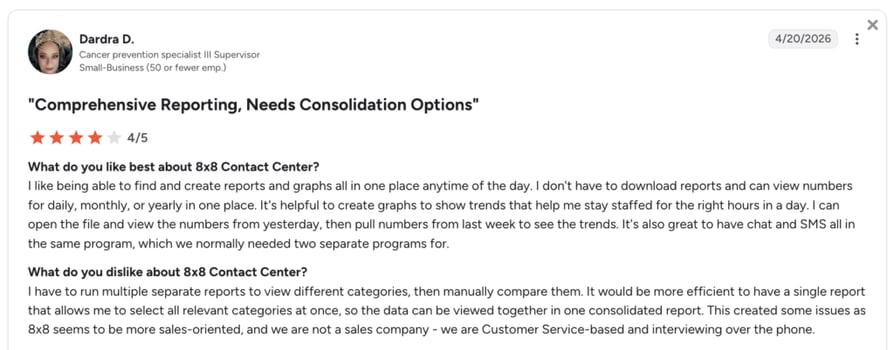
8x8 has a 4.1 out of 5-star rating on G2, based on 256+ customer reviews.
What Are Real Users Saying About 8x8 Contact Center?
8x8's users value the intuitive analytics, seamless call transfers, and solid API, but struggle with support response times.
4. Genesys Cloud CX—Best for large omnichannel contact centers
What Is Genesys Cloud CX?
Genesys Cloud CX is a G2 Leader in Contact Center and one of the few enterprise WFM platforms that publishes its pricing publicly. Built for large omnichannel operations, it bundles WFM, quality management, and routing in one CCaaS platform—with the full WEM suite included from the CX 3 tier. For teams evaluating contact center as a service options, Genesys sets a high bar on feature depth.
What Are Genesys Cloud CX's Key Features?
- Multi-channel, multi-skill WFM forecasting with intraday reforecasting
- AI-powered agent self-scheduling via mobile (time off, shift swaps, availability)
- Omnichannel routing across voice, chat, email, and messaging from a single queue
- Genesys Cloud WEM suite: WFM, QM, speech analytics, and performance dashboards (CX 3+)
- 600+ marketplace integrations and open APIs
What Are Genesys Cloud CX's Pros and Cons?
| Pros | Cons |
|---|---|
| Comprehensive omnichannel WFM across voice, chat, email, and messaging in one plan | Usage-based add-ons (outbound minutes, SMS, AI units) can inflate annual spend |
| Significant onboarding investment to unlock full platform potential | Full WFM and analytics require CX 3 ($155/user/month) or above |
Who Is Genesys Cloud CX Best For?
Large omnichannel contact centers that need WFM, QM, and routing in a single platform—and teams that need to share pricing internally before starting a vendor conversation.
How Much Does Genesys Cloud CX Cost?
Genesys Cloud CX pricing starts at $75 per named user/month (billed annually) and includes four plans:
- CX 1: $75/agent/month (no WFM)
- CX 2: $115 (no WFM)
- CX 3: $155 (WFM included)
- CX 4: $240 (adds AI orchestration)
What Is Genesys Cloud CX's G2 Rating and Review Count?
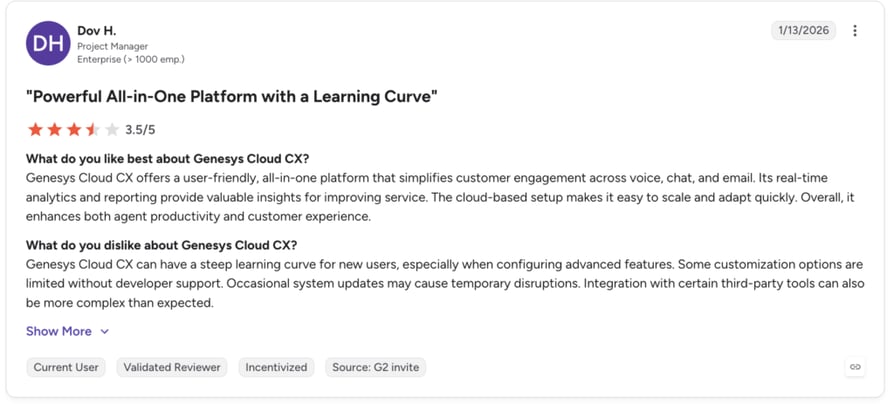
Genesys Cloud CX has a 4.4 out of 5-star rating on G2, based on 1,553+ customer reviews.
What Are Real Users Saying About Genesys Cloud CX?
Genesys' users value the comprehensive omnichannel WFM and user-friendly platform, but feel frustrated by the complex interface and limited features at lower tiers.
5. Five9—Best for mid-enterprise cloud contact centers
What Is Five9?
Five9 is a consistent G2 Leader in Contact Center, purpose-built for mid-to-large operations that need omnichannel ACD, intelligent routing, outbound dialing, and workforce management in a single cloud suite. Teams that already run heavy outbound call center operations will find Five9's dialing and forecasting toolset purpose-built for that use case.
What Are Five9's Key Features?
- WFM forecasting and scheduling
- Real-time adherence monitoring and agent/supervisor views
- Predictive dialer for outbound with answer machine detection
- Omnichannel ACD: voice, email, chat, social, and messaging
- Native CRM integrations with Salesforce, ServiceNow, and Zendesk
What Are Five9's Pros and Cons?
| Pros | Cons |
|---|---|
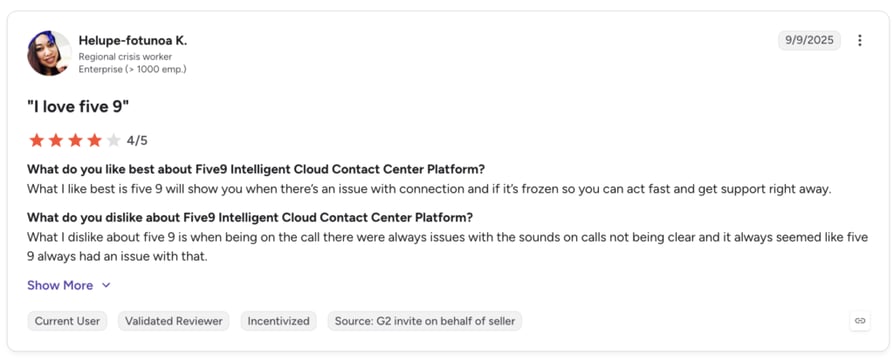
| Consistent G2 Leader recognition with strong cloud infrastructure reliability | Occasional call quality issues reported during high-volume periods |
| Real-time dashboards give supervisors immediate queue and adherence visibility | Mid-enterprise price point—rarely competitive for teams under 50 agents |
Who Is Five9 Best For?
Mid-to-large contact centers that have outgrown basic calling tools and need enterprise-grade CCaaS with WFM, outbound dialing, and QM—without the implementation complexity of NICE or Verint.
How Much Does Five9 Cost?
Five9 pricing starts at $199 per seat/month, offering 5 plans:
- Digital: $119 per seat/month
- Core: $159 per seat/month
- Plus: Custom
- Pro: Custom
- Enterprise: Custom
What Is Five9's G2 Rating and Review Count?
Five9 has a 4.1 out of 5-star rating on G2, based on 1,553+ customer reviews.
What Are Real Users Saying About Five9?
Five9's users value the intuitive interface and the responsive support, but mention a lack of customization and experience technical issues.
6. Verint Workforce Management—Best for enterprise multi-site operations
What Is Verint Workforce Management?
Verint is a leading enterprise WFM vendor, known for AI-assisted forecasting and scheduling at scale. After acquiring Calabrio in 2026, Verint expanded its offering to serve both large enterprises and mid-sized businesses, while Verint WFM continues to be its main solution for enterprise customers.
What Are Verint Workforce Management's Key Features?
- AI forecasting with 95% stated accuracy across voice, digital, and back-office workloads
- Automated schedule optimization across thousands of configurations
- Real-time adherence monitoring with supervisor alert workflows
- Agent self-service portal for time off, shift swaps, and availability
- Back-office WFM—extends scheduling beyond the contact center to claims, document management, and operations teams
What Are Verint Workforce Management's Pros and Cons?
| Pros | Cons |
|---|---|
| Industry-leading forecasting accuracy for multi-site, multi-skill, multi-channel operations | Best suited for enterprise—smaller teams will find it more than they need |
| Extends WFM to back-office teams, not just contact center agents | Interface can feel dated compared to newer platforms |
Who Is Verint Workforce Management Best For?
Large contact centers that need more advanced forecasting and scheduling than bundled CCaaS tools can offer.
How Much Does Verint Workforce Management Cost?
Verint Workforce Management pricing is quote-based.
What Is Verint Workforce Management's G2 Rating and Review Count?
Verint Workforce Management has a 4.2 out of 5-star rating on G2, based on 216+ customer reviews.
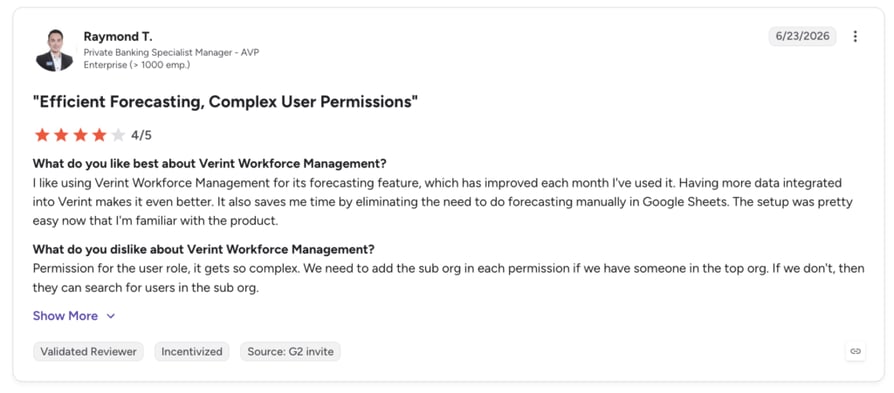
What Are Real Users Saying About Verint Workforce Management?
Users value the robust and comprehensive features of Verint Workforce Management, but struggle with the steep learning curve and limited customization for reports.
7. RingCentral Contact Center—Best for teams already on RingCentral UCaaS
What Is RingCentral Contact Center?
RingCentral Contact Center is the CCaaS product inside RingCentral's unified communications platform. In 2025, RingCentral acquired CommunityWFM, adding purpose-built WFM forecasting to its contact center offering—though the integration is still maturing.
What Are RingCentral Contact Center's Key Features?
- AI-powered omnichannel routing across voice, digital, and messaging
- WFM via CommunityWFM (acquired 2025)—dedicated forecasting and scheduling
- Shared UCaaS + CCaaS platform—contact center and business phone on one system
- Real-time AI agent assist and after-call summaries
- Native CRM integrations: Salesforce, ServiceNow, Zendesk
What Are RingCentral Contact Center's Pros and Cons?
| Pros | Cons |
|---|---|
| Unified UCaaS and CCaaS simplifies IT administration and vendor management | CommunityWFM integration still maturing—depth of native WFM varies by tier |
| Large ecosystem with broad third-party integrations and certified partner network | Best value when fully within the RingCentral ecosystem |
Who Is RingCentral Contact Center Best For?
Teams already on RingCentral UCaaS that want to add contact center without switching communications vendors—and are willing to verify the current WFM integration scope with sales before committing.
How Much Does RingCentral Contact Center Cost?
RingCentral Contact Center pricing starts at $20/user/month, offering four main plans:
- Core: $20/user/month
- Advanced: $25/user/month
- Ultra: $35/user/month
- Customer Engagement Bundle: Custom pricing
What Is RingCentral Contact Center's G2 Rating and Review Count?
RingCentral Contact Center has a 4.1 out of 5-star rating on G2, based on 207+ customer reviews.
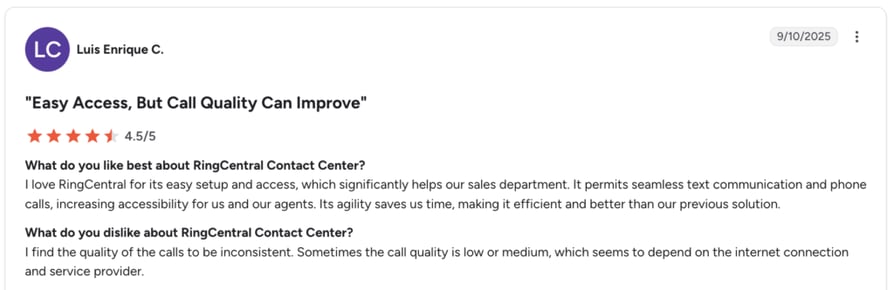
What Are Real Users Saying About RingCentral Contact Center?
RingCentral's users value the platform's intuitive interface, but report frequent call quality issues.
8. Talkdesk—Best for mid-market teams wanting enterprise WFM at faster deployment
What Is Talkdesk?
Talkdesk is a G2 Leader in Contact Center that packages WFM, AI-assisted scheduling, omnichannel routing, and QM in one suite. WFM is available in the Elite tier ($165/user/month), making it the entry point for teams that need workforce management without a full enterprise implementation timeline.
What Are Talkdesk's Key Features?
- AI-driven WFM forecasting with intraday schedule adjustment recommendations
- Real-time supervisor dashboards: call volume, agent activity, queue health, adherence
- Talkdesk Workspace—unified agent interface with CRM context on one screen
- Embedded QM with automatic call scoring and coaching workflows
- Native CRM and helpdesk integrations including Salesforce, ServiceNow, and Zendesk
What Are Talkdesk's Pros and Cons?
| Pros | Cons |
|---|---|
| Fast deployment—teams live in days, not months | Costs escalate with omnichannel and WFM add-ons |
| Seamless CRM integrations | Platform instability flagged in multiple G2 reviews |
Who Is Talkdesk Best For?
Mid-market contact centers that want enterprise-grade WFM with shorter deployment timelines—plan budget from the Elite tier from day one.
How Much Does Talkdesk Cost?
Talkdesk pricing starts at $85/agent/month (billed annually) and includes four plans:
- Digital Essentials: $85/agent/month
- Voice Essentials: $105 · Elite: $165 (WFM included)
- Industry Clouds: $225/agent/month
What Is Talkdesk's G2 Rating and Review Count?
Talkdesk has a 4.4 out of 5-star rating on G2, based on 2,506+ customer reviews.
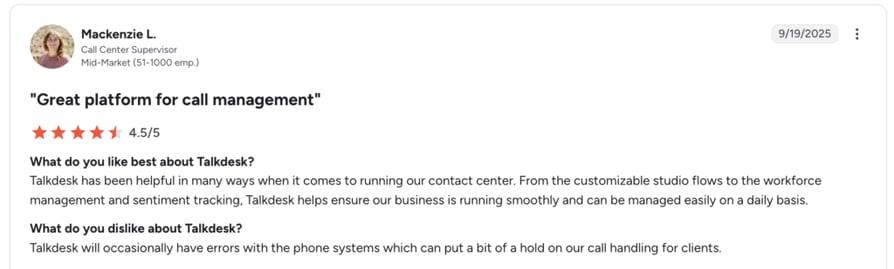
What Are Real Users Saying About Talkdesk?
Users value the faster implementation, but frequently mention call and connection issues.
9. NICE CXone—Best for enterprises needing the deepest native WFM
What Is NICE CXone?
NICE CXone is an enterprise contact center platform built for businesses with strict compliance requirements and advanced workforce management needs. It combines forecasting algorithms, omnichannel routing, quality management, and a full workforce engagement management suite in one platform.
What Are NICE CXone's Key Features?
- 40+ algorithm AI WFM forecasting and scheduling across omnichannel queues
- Real-time schedule tracking with alerts when agents go off schedule
- Agent self-scheduling and shift bidding via mobile portal
- Embedded QM: call recording, screen recording, evaluations, and coaching workflows
- Full WFO and WEM suite covering the complete agent performance lifecycle
What Are NICE CXone's Pros and Cons?
| Pros | Cons |
|---|---|
| Deep compliance support for regulated industries | Technical issues reported by users |
| WFM, QM, analytics, and routing in one unified platform | Enterprise-scale pricing—typically out of reach for SMBs |
Who Is NICE CXone Best For?
Enterprise contact centers managing hundreds to thousands of agents whose scheduling complexity has outgrown every other tool they've tried.
How Much Does NICE CXone Cost?
NICE CXone pricing starts at $110/agent/month and includes multiple tiers:
- Omnichannel Suite: from $110/agent/month
- Essential Suite: $135/agent/month
- Core Suite: $169/agent/month
- Complete Suite: $209/agent/month
- Ultimate Suite: $249 per agent/month / $0.25/session
What Is NICE CXone's G2 Rating and Review Count?
NICE CXone has a 4.3 out of 5-star rating on G2, based on 1,730+ customer reviews.
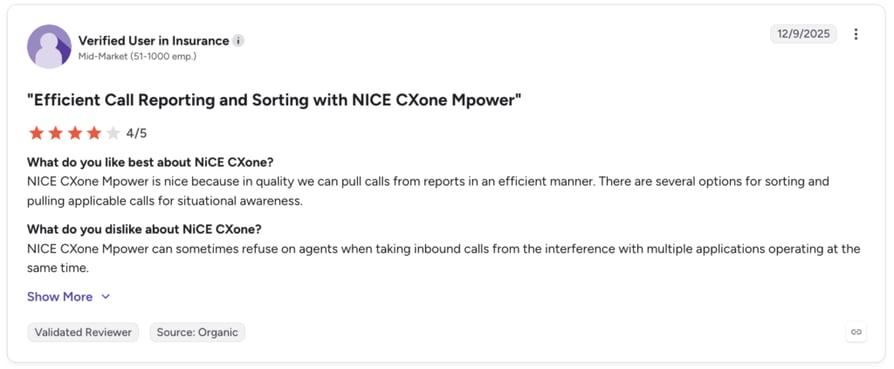
What Are Real Users Saying About NICE CXone?
NICE CXone's users value its intuitive interface, but struggle with occasional call stability issues.
10. ServiceNow Customer Service Management—Best for enterprises on the Now Platform
What Is ServiceNow CSM?
ServiceNow Customer Service Management (CSM) is the customer service module of the Now Platform—the enterprise system of record for IT, HR, and field service. For organizations already running ServiceNow ITSM, CSM connects customer-facing operations with back-office and IT workflows on a single platform.
What Are ServiceNow CSM's Key Features?
- Omnichannel case management: web, chat, email, phone, and social—all in one unified case record
- Agent workspace with AI-powered Virtual Agent and context-rich support
- IT and CS workflow integration—cases auto-trigger ITSM, field service, or back-office workflows
- Virtual agent for answering common queries on web and messaging
- Performance Analytics for compliance, resolution time, and agent performance
What Are ServiceNow CSM's Pros and Cons?
| Pros | Cons |
|---|---|
| Seamless fit for ServiceNow-native organizations | Setup requires ServiceNow expertise or certified partner support |
| Scales IT, HR, field service, and CS from one system | Steep learning curve for teams not already embedded in the ServiceNow ecosystem |
Who Is ServiceNow CSM Best For?
Enterprise companies using ServiceNow that want to extend it to customer service operations, with connected front- and back-office data.
How Much Does ServiceNow CSM Cost?
ServiceNow CSM pricing is quote-based.
What Is ServiceNow CSM's G2 Rating and Review Count?
ServiceNow Customer Service Management has a 4.4 out of 5-star rating on G2, based on 440+ customer reviews.
What Are Real Users Saying About ServiceNow CSM?
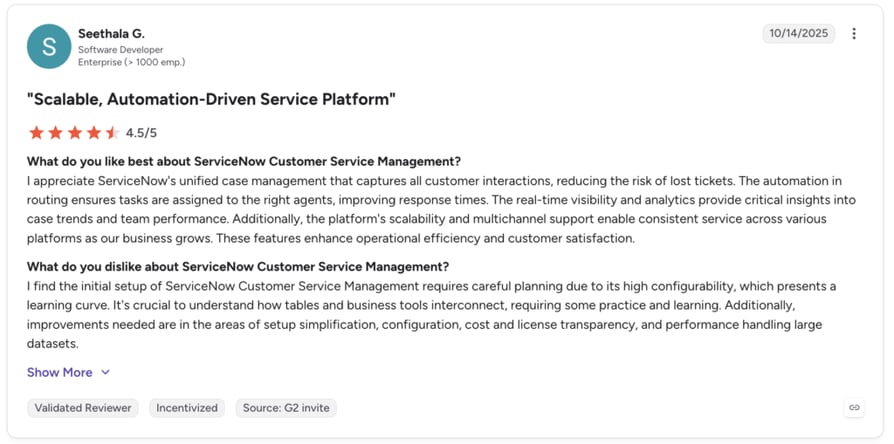
Users value the automation features and centralized case management, but struggle with a steep learning curve and limited customization options.
How to Choose the Right Contact Center Workforce Management Software for Your Team
Request a demo to see how CloudTalk fits your inbound scheduling setup before working through the questions below.
With so many tools in G2's Contact Center Workforce category, choosing the right software starts with understanding what you actually need—not what looks good in a demo. These six questions help you focus on what really matters.
1. Define Your Biggest Operational Problem First
Don't start with features—start with the problem.
Start by:
- Identifying whether the issue is forecasting, scheduling, visibility, automation, or QA
- Mapping the problem to a clear operational pain (e.g., missed SLAs, manual work, low QA coverage)
- Avoiding tool evaluation before the real issue is clear
2. Match the Platform to Your Team Size and Growth
Think beyond your current headcount.
Focus on:
- Small teams: Simple setup, fast onboarding, low complexity
- Mid-market: Balanced WFM, routing, and integrations without heavy implementation
- Enterprise: Advanced WFM, compliance, and multi-site scalability
- Where your team will be in 12–18 months
3. Check How Well It Actually Integrates
Don't trust "we integrate with Salesforce" at face value.
Look at:
- Whether integrations are native or API-based
- If data sync is one-way or two-way
- Whether workflows run automatically or require manual steps
- If agents see full customer context at call start
4. Understand What "AI-Powered" Really Means
Every vendor says they use AI—but what does it actually do?
Break it down into:
- Before the call: Forecasting, staffing, scheduling
- During the call: Agent assist, sentiment detection
- After the call: Summaries, QA scoring, coaching insights
- Whether AI is included or sold as an add-on
5. Calculate the Real Total Cost
Don't rely on the starting price.
Include:
- Base per-seat pricing (current and future headcount)
- Add-ons like WFM, AI, QA, and omnichannel
- Implementation and onboarding costs
- Contract minimums and commitments
6. Test It in Real Conditions, Not Just a Demo
A demo doesn't show how a system behaves under pressure.
Test by:
- Running a pilot with real or near-real traffic
- Observing dashboard performance during spikes
- Checking agent usability without heavy training
- Seeing how quickly teams can make changes without IT support
Put Your Evaluation Checklist to the Test
Why G2 Ratings Actually Matter When Choosing Contact Center Workforce Management Software
When evaluating contact center workforce management software reviews and ratings, you’ll find plenty of vendor case studies, sponsored analyst reports, and comparison sites that rank tools based on affiliate payouts. G2 stands out because its data works differently—and that difference matters more than most buyers realize.
- Reviews come from verified real users, not marketing teams. G2 asks reviewers to confirm their identity and prove they actually use the product. So the feedback reflects real day-to-day use, not polished demos or marketing content.
- G2 scores reflect real usage across different company sizes. Ratings are split by small business, mid-market, and enterprise, so you can see how a tool performs in environments like yours. A 4.8/5 from 50 reviews and a 4.4/5 from 1,800 reviews also tell very different stories about consistency and reliability.
- Ratings go beyond features and include real experience. Aspects like ease of use, support quality, and ROI matter a lot. A tool with lots of features but a hard setup usually scores lower, while tools that are easy to adopt and well supported score higher.
- G2 badges like "Leader," "High Performer," and "Momentum Leader" are based on user feedback, not paid placement. G2 doesn’t allow companies to pay for rankings. A “Leader” badge means users consistently rate the tool highly over time and across segments.
When you see CloudTalk listed as a G2 Leader in call center infrastructure across multiple reports, that reflects thousands of real users sharing consistent feedback—not a one-off marketing push or sponsored report.
That’s why this article starts with G2 data: it’s one of the most reliable signals when comparing G2 best contact center workforce management software in 2026.
Match the Right Workforce Management Tool to Your Needs
Choosing the right G2 best contact center workforce management software in 2026 is about matching each platform's strengths to your operational needs. For teams building a long-term contact center strategy, the decision goes beyond features—it's about finding the platform your team will use consistently under real operating pressure.
- CloudTalk: SMBs and growing teams needing real-time visibility, CRM sync, and AI insights
- Agentforce Service and ServiceNow CSM: Enterprises already in those ecosystems needing native integration
- Genesys Cloud CX and NICE CXone: Large enterprises with complex omnichannel operations
- Verint WFM: Advanced forecasting and scheduling accuracy
- Five9: High-volume outbound and Salesforce-heavy teams
- Talkdesk, 8x8, RingCentral: Mid-market teams with different setup and channel needs
Across all tools, G2 ratings remain a reliable independent signal based on real user feedback. Use them as a starting point, validate with a pilot, and choose the platform your team will actually use.

See Why Growing Contact Centers Choose CloudTalk
Match the Right Workforce Management Tool to Your Needs
Choosing the right G2 best contact center workforce management software in 2026 is about matching each platform's strengths to your operational needs. For teams building a long-term contact center strategy, the decision goes beyond features—it's about finding the platform your team will use consistently under real operating pressure.
- CloudTalk: SMBs and growing teams needing real-time visibility, CRM sync, and AI insights
- Agentforce Service and ServiceNow CSM: Enterprises already in those ecosystems needing native integration
- Genesys Cloud CX and NICE CXone: Large enterprises with complex omnichannel operations
- Verint WFM: Advanced forecasting and scheduling accuracy
- Five9: High-volume outbound and Salesforce-heavy teams
- Talkdesk, 8x8, RingCentral: Mid-market teams with different setup and channel needs
Across all tools, G2 ratings remain a reliable independent signal based on real user feedback. Use them as a starting point, validate with a pilot, and choose the platform your team will actually use.
FAQs
About Contact Center Workforce Management Software
Find quick answers to the most common questions about choosing and implementing contact center WFM software.
A basic scheduling tool creates and publishes agent shifts. Contact center workforce management software goes significantly further— it forecasts demand based on historical call volume and channel patterns, optimizes schedules against those forecasts, and monitors real-time adherence.
Most WFM platforms use historical interaction data—call volumes, handle times, channel distributions—to build demand models by time of day, day of week, and seasonal patterns.
Yes—and integration quality is one of the most important evaluation criteria. Most platforms in this list offer native integrations with major CCaaS platforms and CRMs (Salesforce, HubSpot, Zendesk).
Modern WFM platforms are built for distributed teams. Agents can access schedules, submit time-off requests, and swap shifts through mobile apps without manager involvement.
Appearing in multiple G2 categories reflects a platform's functional breadth—a tool reviewed in Contact Center Workforce, Contact Center, and Speech Analytics categories simply covers multiple use cases. It doesn't inflate or deflate reliability.
G2 ratings can vary significantly by company size. A platform that scores highly with small businesses may receive lower ratings from enterprise users due to different needs. Always filter reviews by your business segment and look for platforms with consistently high ratings in your company size.