Summary
An AI Receptionist is only as good as the skills you give it. In episode 2 of Ana in the Labs, Ana sits down with Senior Product Manager Nazarii Ovcharchyn to build one from scratch. They cover the setup decision you can't undo, the greeting trick you need to know, and the two default skills that shape every call: Take a Message and Extract Information.
In episode 1, Josef told me what an AI Receptionist is and who it's built for. Now it's time to actually build one.
Meet our fake business: Apex Home Services, an imaginary HVAC company that provides services including AC maintenance, plumbing, etc. Or they should, if they weren’t losing so many leads outside business hours or because the team couldn’t reach the phone on time.
To build their AI Receptionist, I had to create a few things before we started. A basic knowledge base, a list of things I wanted my agent to do and say, and even how I wanted it to react to certain situations. Where exactly each thing would go, I had no clue. So I enlisted Nazarii Ovcharchyn, one of our Product Managers, who took it from there.
This is the first of two articles about the AI Receptionist’s skills. In this one, we covered the initial setup itself, including giving it a name and a greeting, and the two skills that come switched on by default. Here’s how it went.
Before the skills: name, greeting, and one decision you can't undo
Setting up the agent itself was easy, but it also meant making our first irreversible decision. You see, when you’re creating a new AI Voice Agent, you’re given a choice: create a Receptionist or a Custom AI Voice Agent, which, as we learned in the first session, have different goals.
The Receptionist has a predefined goal: to be a Receptionist. The Custom AI Voice Agent is a free form, and you will have to invest a little bit more time into prompting its goal.
If your goal is to answer calls, take messages, and route people to the right place, the Receptionist is your best pick. And it’s also easier to set up, because CloudTalk has already done the prompting work for you.
The greeting is the other thing you should watch out for. It's the one part of the setup that the agent will say verbatim, meaning that whatever you type is what callers hear, word for word. So write it the way you'd want a real receptionist to answer the phone.
Take a Message
This is the first of the two skills you get by default when you pick a Receptionist, and one that can’t be removed.
The skill teaches the agent to write down a request and collect the basic caller details: name and phone number. The only thing you configure is how the agent should respond after the message is taken, depending on whether you want it to end the call or ask a follow-up question.
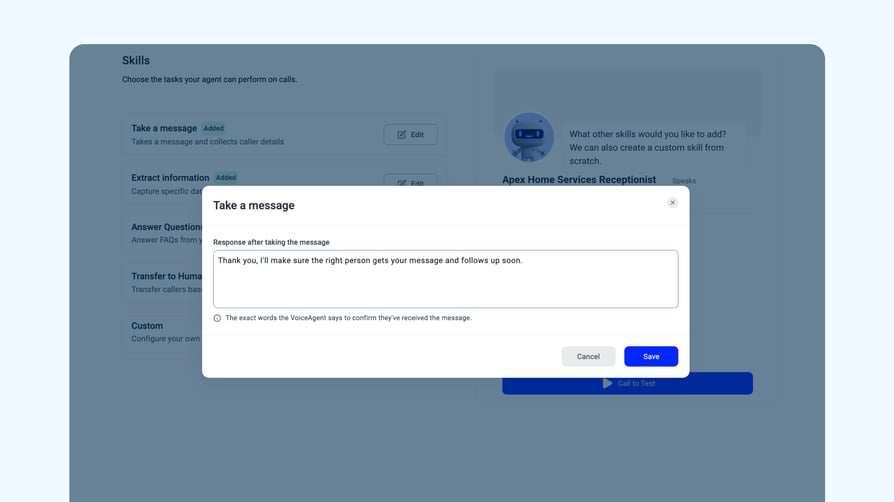
The clever part is that you don't have to tell the agent to ask for a name or a number. It's a receptionist, so it already knows how to do it.
Also, if there are no other skills enabled, this is the agent's fallback. Ask it anything outside its capability, and it'll say something along the lines of: "I can't help you with this, but I can take a message and pass it to the team." Which makes Take a Message the safety net of your entire setup.
Extract Information
The second default skill, and what turns calls into useful data after the fact.
Out of the box, it'll save a call summary, but you can add custom properties. In our case, we added the urgency level, the type of request, and the zip code. Basically, whatever your team needs to act on later. The information lives inside CloudTalk and, if you have integrations running, it also gets passed along to whatever system you're using. But we’ll get more into that in a more advanced module.
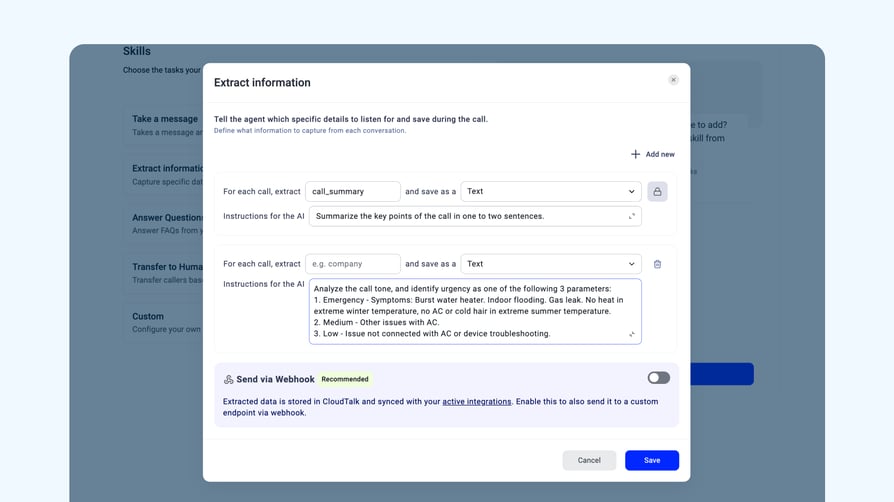
There's one thing to know about this skill that tripped me up. The instructions you write here don't tell the agent what to ask during the call, just what it needs to extract after the call ends.
By putting this information here, you are not really instructing the Voice Agent to ask for it. This will be analyzed after the call is done.
So if you want to capture urgency, you'd describe it as "analyze the call tone and identify urgency as one of the following three parameters." The agent then reviews the call and classifies it based on what was said, not what was asked.
That means that, if you need the agent to actively ask a question on the call, that belongs in a different skill. Which is exactly where part 2 picks up.
What's next
So far, we've got an AI Receptionist that can pick up the phone, greet the caller, take a message, and turn the conversation into a summary to share with the team. And that might be enough for some businesses, but for most, it’s not.
In the next episode, we’ll move on to the two optional skills that decide where calls can actually go: Transfer to a Human, for the ones that need to be handled by a specialist, and Answer Questions, for those cases when the Receptionist can answer on its own.
See you there.