Summary
Default skills get your AI Receptionist answering the phone, but there are two others that decide what happens next. In episode 3 of Ana in the Labs, Ana and Senior Product Manager Nazarii Ovcharchyn cover Transfer to Human (for the calls that need a person) and Answer Questions (for the calls that don't), and the prompt details that make both of them work.
In the previous lesson, Nazarii walked me through setting up the AI Receptionist itself and the two pre-configured skills: Take a Message and Extract Information. That alone gets you an agent who picks up the phone and turns the call into useful data.
But there are two more skills you should check if you want to take your Receptionist to the next level, the ones that decide what happens after your call ends. That’s Transfer to Human and Answer Questions, two skills where the prompt quality matters the most.
If you haven’t checked the previous episodes, make sure you do to follow right along while we set up.
Transfer to Human
This is the first optional skill, and the one where prompt quality matters most. Transfer to Human tells the agent when to hand a call off and to whom.
You describe the symptoms or conditions that should trigger a transfer. The agent reads the context, figures out intent, and decides. You can route to a specific agent, a team, or break it down by department. Nazarii mentioned customers running 15 or 20 different transfer branches.
This tells the voice agent what to look for, it will cover the context, and the intention. It'll try to understand what the caller is actually trying to resolve.
A few things that are easy to miss:
- You can add a doorknob question right before the transfer (something like "do you want me to connect you to a human?") to cut down on unnecessary handoffs.
- The agent shares context with the human in real time, via a card that pops up in the app as the call rings on the human's side. You can prompt extra info to be included here, like the caller's urgency level or sentiment.
- If you need the agent to collect specific information before transferring (a zip code, a policy number), you have to instruct it explicitly: "Do not transfer without knowing the zip code first." Otherwise it might transfer too early.
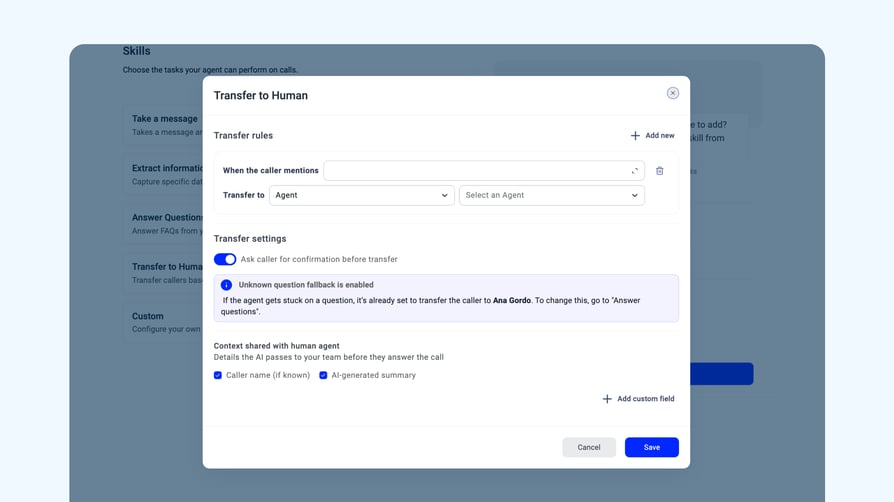
The mental model that helped me: Extract Information runs after the call. Transfer to Human runs during the call. Two different jobs.
Answer Questions
This is the skill that takes your agent from "I'll pass that along" to actually being helpful.
Answer Questions plugs the agent into your knowledge base. Without it, even if you've uploaded a beautiful troubleshooting guide, the agent won't use it. With it enabled, the agent looks for relevant answers and tries to respond on its own.
Without the knowledge base, it'll not have that kind of agency to answer the question on its own..
The configuration you'll spend the most time on is the fallback. What happens when the agent doesn't know the answer?
You've got three options:
- Be honest and say so ("I have certain information, but not the answer to that")
- Defer to another skill (like take a message)
- Hand the call to a specific person
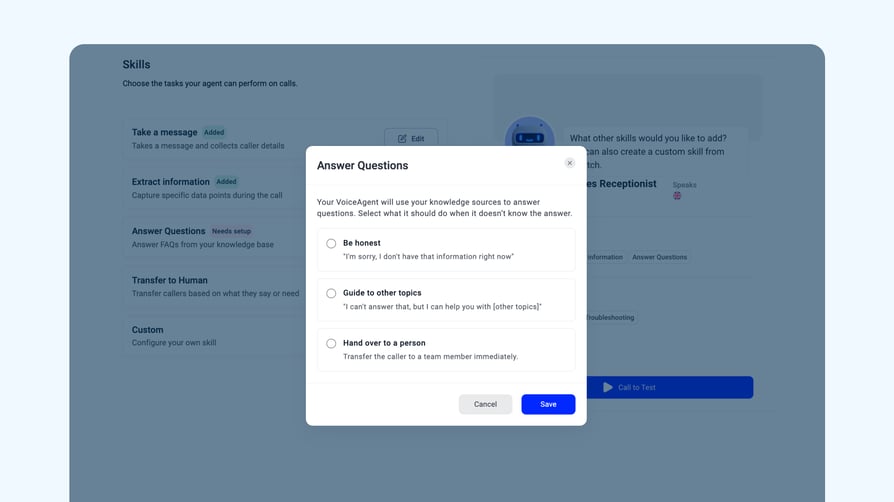
If you pick the third option, you don't need to add a separate Transfer to Human rule for unanswered questions. Answer Questions handles it.
This is also where the knowledge base pays off. A list of common scenarios, troubleshooting steps, or an FAQ pasted into the knowledge base is enough to handle the low-stakes calls that don't need a human at all.
What's next
Our Receptionist has skills now, but there are still a few extra steps we need to take. One of the most important of them all: build your knowledge base. Because, as we’ve seen, without it, how is your Receptionist supposed to know how to answer questions?
In the next lesson, we’ll talk all things Knowledge Base, what you should and shouldn’t include, why it’s so important and if it’s possible to build a very bad one or not (spoiler alert: it is).
See you there.