8 Best GoHighLevel Phone Integrations and Dialers for Sales Teams (2026)
A GoHighLevel phone integration connects an outside phone system or dialer to GoHighLevel (also called HighLevel or GHL), so calls, texts and recordings land on the right contact. GoHighLevel has its own dialer, but it works a list one call at a time.
Our shortlist of 8 tools that work with GoHighLevel:
- CloudTalk: every call on the contact, plus Parallel dialing
- JustCall: predictive dialing from GoHighLevel tags
- Kixie: multi-line dialing fed by GoHighLevel workflows
- Aloware: calling and texting from a panel inside GoHighLevel
- Allo: small teams that want AI summaries on every call
- Aircall: teams already on Aircall (through the Airlinx app)
- WAVV: a 3-line dialer embedded in GoHighLevel
- PhoneBurner: high-volume power sessions from Smart Lists
Prices are per user per month, billed annually, for the lowest plan that includes the GoHighLevel connection. GoHighLevel's own subscription is billed separately.
According to Hiya's State of the Call 2026 report¹, 86% of calls from unknown numbers go unanswered. If your reps dial from a number that's flagged as spam, or from a number in the wrong country, most of your list never picks up.
Salesforce's 2026 State of Sales report (Seventh Edition)² found that sales reps spend 60% of their time on non-selling tasks, including manually entering customer notes into the CRM. For a team that books appointments by phone, that's time spent copying call outcomes into GoHighLevel instead of dialing.
When we talk to GoHighLevel users, the story is the same: the CRM and texting live in GoHighLevel, but the calls live somewhere else. Zapier workarounds need upkeep, and a list exported to a separate dialer goes stale the moment someone edits a contact.
A good GoHighLevel phone integration logs every call for you, keeps contacts in sync both ways and gives reps a dialer that fits their volume. Below, we review the 8 best options: how each connects, what it writes onto the contact and what the full stack costs. If GoHighLevel is already your CRM, see what the CloudTalk GoHighLevel integration logs on every contact.


Why Trust Our GoHighLevel Phone Integration Reviews?
For nearly a decade, we've helped over 30,000 professionals find and implement smarter business communication tools. We've reviewed 200+ software tools across industries, analyzed 5,500+ verified customer reviews from platforms like G2, Capterra, Trustpilot and TrustRadius, and drawn insights from real user discussions on Reddit and Quora.
In the past year alone, we published 1,000+ articles, each one written by humans for humans. Learn how we keep our content integrity and our software review methodology.
Top 8 GoHighLevel Phone Integrations and Dialers Reviewed
Each tool below gets the same review: what it is, who its GoHighLevel integration suits, what it does inside GoHighLevel, other integrations, what it costs and what customers say. CloudTalk is our product, so we held it to the same standard and spelled out its limits.
GoHighLevel Phone Integration Comparison Table: 8 Tools Side by Side
| Provider | Connects via | Dialer | Starting price | G2 rating |
|---|---|---|---|---|
| CloudTalk | Native app | Power and Parallel (up to 10 lines) | $29 | 4.4/5 |
| JustCall | Native app | Power and predictive | $29 (2-licence min.) | 4.3/5 |
| Kixie | Native app | Up to 4 lines | Not published | 4.8/5 |
| Aloware | Panel inside GoHighLevel | Power | $30 (10-user min.) | 4.1/5 |
| Allo | Native app | Power (add-on) | $32 | 4.7/5 |
| Aircall | Partner app (Airlinx) | Power | $30 + Airlinx $99/mo | 4.4/5 |
| WAVV | Embedded in GoHighLevel | Up to 3 lines | $69.30 | 4.6/5 |
| PhoneBurner | Marketplace connector | Power sessions | $140 | 4.7/5 |
1. CloudTalk
What Is CloudTalk?
CloudTalk is a cloud phone system and call center software used by 7,500+ companies, with local numbers in 160+ countries and 99.999% uptime.
CloudTalk's native GoHighLevel integration is set up from the CloudTalk Dashboard and connects one GoHighLevel sub-account per integration. Reps make and take calls in the CloudTalk Phone app, and every call is logged back to the GoHighLevel contact.
Who Is CloudTalk's GoHighLevel Integration Best For?
Best for: teams that want every call on the contact plus Parallel dialing.
CloudTalk suits outbound teams (appointment setters, lead-gen agencies, insurance, solar and real-estate sales) that run their CRM in GoHighLevel but need more dialing capacity than one call at a time. It also fits teams whose agents call from abroad and need local numbers in the prospect's country.
What Can CloudTalk's GoHighLevel Integration Do?
You connect it from the CloudTalk Dashboard and authorize it in GoHighLevel. From there:
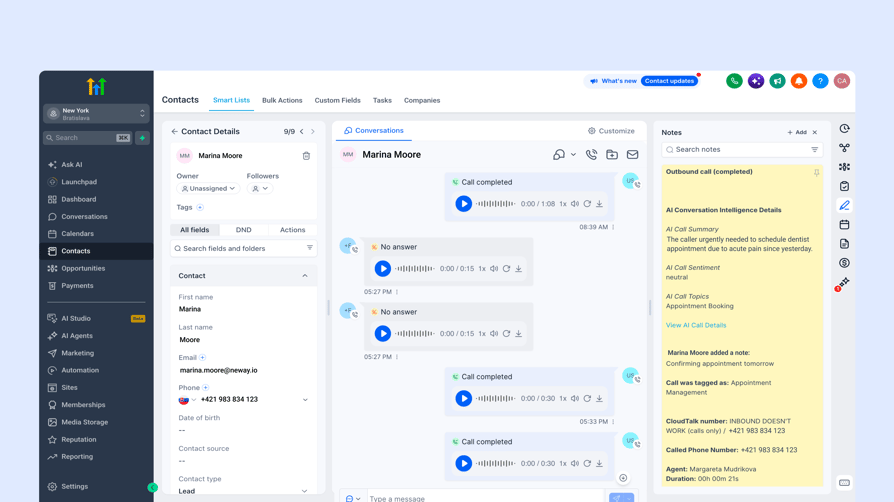
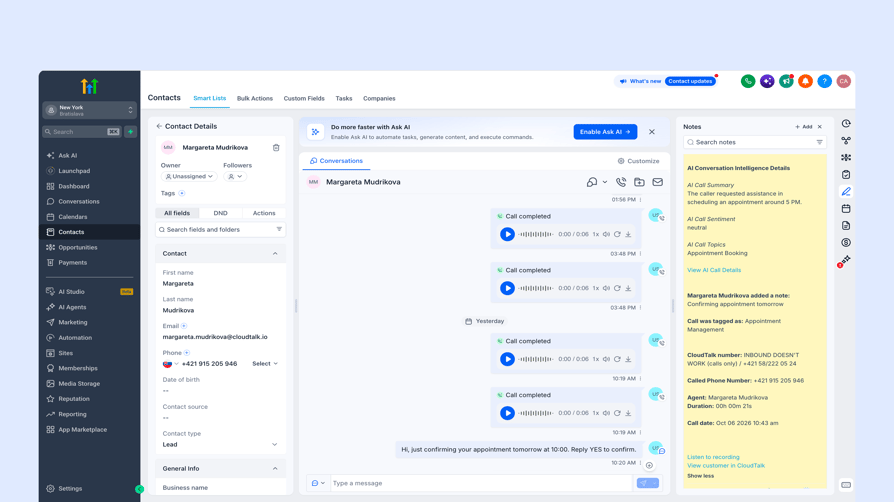
- Every call on the contact, twice: a note on the contact (outcome, agent, numbers, duration, recording link) plus an entry in the Conversations thread.
- A note that fills in after the call: tags, agent notes and AI data (summary, sentiment, topics) are added to the note later. AI data needs the Conversation Intelligence add-on.
- Recordings you can play in GoHighLevel: a recording link on the note, and the audio attached in Conversations for calls under 5 MB (about 5 minutes).
- Your rules for what gets logged: toggles for each call type and voicemails, a business-hours policy, which numbers log, and optional notes on open opportunities.
- Contacts in sync both ways: a full import on connect, then a sync every 15 minutes, matched on phone and email so nothing is duplicated.
- Texts in the same thread: "Export SMS to GoHighLevel" puts CloudTalk texts in Conversations (off by default).
- Click-to-call from GoHighLevel pages: the Click to Call extension sends a number from a contact or conversation page to the CloudTalk Phone app.
On the dialer side, the AI Sales Dialer runs campaigns in Power mode (one contact at a time) or Parallel mode (up to 5 lines per rep by default, up to 10 on request, with AI voicemail detection that skips machine-answered calls).
Every contact synced from GoHighLevel carries the integration's contact tag, so a campaign can target all synced contacts of that sub-account. Smart Rotation Caller ID spreads outbound calls across several of your numbers to protect them from spam flags.
Limits to know before a trial:
- Calls run in the CloudTalk Phone app, not inside GoHighLevel, and one integration covers one sub-account.
- CloudTalk call events can't trigger GoHighLevel workflows, and there's no predictive dialer.
- Campaigns can't use a GoHighLevel list or tag directly, and you can't send SMS from GoHighLevel through CloudTalk numbers.
What Other Tools Does CloudTalk Integrate With?
- CRMs such as HubSpot, Pipedrive and Zoho, plus Salesforce on the Expert plan
- Help desks such as Zendesk and Intercom
- Zapier and the CloudTalk API, which can start outbound AI voice agent calls (an add-on) from a workflow webhook or Zapier
- 100+ CloudTalk integrations in total
How Much Does CloudTalk Cost With GoHighLevel?
CloudTalk starts at $25 per user per month billed annually, and the GoHighLevel integration is available from Essential at $29, the first plan that includes CRM integrations.
| Plan | Price (annual / monthly) | What it adds for GoHighLevel teams |
|---|---|---|
| Starter | $25 / $34 | Core phone system; no CRM integrations |
| Essential | $29 / $39 | GoHighLevel and the other CRM and help desk integrations |
| Expert | $49 / $69 | Power mode of the AI Sales Dialer included, Salesforce; minimum 3 licences |
| Custom | Contact sales | Tailored setup for larger teams |
Add-ons are priced per user per month. Power mode costs $15 on Starter and Essential. Parallel mode costs $39 on any plan and includes Power mode. Conversation Intelligence costs $9 (Basic) or $19 (Plus). Numbers start at $6 a month with one number free, and incoming calls are free.
Each CloudTalk plan includes minutes or unlimited calling for one region; calls outside it and SMS are paid from calling credit. There's a 14-day free trial. Compare every plan and add-on on the CloudTalk pricing page.
What Do Customers Say About CloudTalk?
G2 reviewers keep coming back to ease of use and call quality: four reviewers describe the call quality or call performance as reliable.
One outbound rep says calling international prospects is straightforward, another likes that the auto-dialer lets salespeople call a list of leads quickly, with recordings on hand for coaching, and a third says the integrations fit well into their workflow.
The criticism is about setup and edge cases. One reviewer says some features take time to get familiar with, another finds importing large contact lists takes manual work, and one reports the desktop app's call history sometimes doesn't load.
"Salespeople can call a list of leads very quickly without having to dial manually, and having the automatic recordings right there makes it much easier to audit calls and provide feedback to the team." Read the review
"Uploading and updating larger contact lists could be more intuitive, and sometimes it takes a bit too much manual work to make sure everything is imported correctly." Read the review
What Is CloudTalk's G2 Rating?
G2 rating: 4.4/5 (1961+ reviews). Read CloudTalk reviews on G2.
CloudTalk Pros and Cons for GoHighLevel Teams
| Pros | Cons |
|---|---|
| Calls land on the contact as a note and a Conversations entry, with recordings and AI data | Calls run in the CloudTalk Phone app; click-to-call is a browser extension |
| Power and Parallel dialing with Smart Rotation Caller ID | No predictive dialer, and campaigns can't use a GoHighLevel list directly |
| G2 reviewers describe the call quality as reliable | One integration per sub-account, so agencies connect each client account |
Test CloudTalk against your real GoHighLevel call volume with a 14-day free trial.
2. JustCall
What Is JustCall?
JustCall calls itself an "AI Communication Platform for Sales & Support Teams." Its native HighLevel integration connects from the JustCall dashboard to a GoHighLevel sub-account, and a Chrome extension adds click-to-call and click-to-text buttons on numbers in HighLevel.
Calls themselves run in JustCall's dialer. If you're weighing it against other phone systems, see our JustCall alternative roundup.
Who Is JustCall's GoHighLevel Integration Best For?
Best for: teams that want predictive dialing from GoHighLevel tags.
JustCall fits outbound teams that want their dialer campaigns to pull contacts straight from GoHighLevel and want call outcomes to kick off GoHighLevel workflows.
What Can JustCall's GoHighLevel Integration Do?
JustCall connects at the sub-account level; it doesn't integrate with agency accounts.
- Call and SMS logging: calls log on the contact as a Task or a Note (your choice), and SMS as a Note. An optional "JustCall SMS" conversation provider syncs texts into HighLevel conversations.
- Workflows on call outcomes: call dispositions sync to HighLevel and can trigger workflows, such as moving a pipeline stage or tagging a lead.
- Dialer campaigns from GoHighLevel tags: Sales Dialer campaigns import HighLevel contacts by tag, and "Resync Contacts" pulls newly tagged contacts into a running campaign.
- Predictive dialing: the SalesPro bundle includes a predictive dialer (up to 10 lines) plus power and dynamic dialing.
- AI on the record: JustCall AI adds a transcript link, call summary and analysis data about 20 minutes after the call.
Each Account Owner, Admin and Team Member connects individually, their emails must match, and setup happens only in the JustCall web portal.
What Other Tools Does JustCall Integrate With?
- 100+ CRM and data integrations, according to its pricing page
- API access and workflows
How Much Does JustCall Cost With GoHighLevel?
JustCall starts at $29 per user per month billed annually, with a minimum of 2 licences, and the HighLevel integration is included in all plans.
| Plan | Price (annual / monthly) | GoHighLevel-relevant features |
|---|---|---|
| Team | $29 / $39 | HighLevel integration |
| Pro | $49 / $69 | Adds a power dialer |
| Pro Plus | $89 / $109 | Higher tier |
| Business | Custom, 10-licence minimum | Custom setup |
| SalesPro | Quote | Predictive dialer (up to 10 lines), power and dynamic dialing |
There's a 14-day free trial. Our guide to JustCall pricing breaks down each plan and add-on.
What Do Customers Say About JustCall?
G2 reviewers praise how JustCall logs calls and texts into their CRM, and one says setting up international local numbers was fast.
The criticism we saw most is about pricing: one reviewer says the pricing approach could be simpler, and another says JustCall moved them to a higher tier when it discontinued their basic plan.
"It automatically logs every call and text, which saves our team a lot of manual data entry." Read the review
"I think the pricing approach for JustCall could be improved." Read the review
What Is JustCall's G2 Rating?
G2 rating: 4.3/5 (2396+ reviews). Read JustCall reviews on G2.
JustCall Pros and Cons for GoHighLevel Teams
| Pros | Cons |
|---|---|
| Dialer campaigns pull GoHighLevel contacts by tag | Predictive dialing sits in the quote-based SalesPro bundle |
| Call dispositions can trigger GoHighLevel workflows; integration on every plan | Calls log as Tasks or Notes; setup only in the web portal |
| G2 reviewers say every call and text logs automatically | G2 reviewers criticize the pricing, including an unrequested plan upgrade |
3. Kixie
What Is Kixie?
Kixie PowerCall is a sales phone and dialer that markets itself as "Better Sales Made Simple." It has a native OAuth connection to one GoHighLevel sub-account, and its PowerCall Chrome extension adds click-to-call and click-to-text on every plan.
Who Is Kixie's GoHighLevel Integration Best For?
Best for: outbound teams that want multi-line dialing driven by GoHighLevel workflows.
Kixie suits teams that already build their follow-up in GoHighLevel workflows and want those workflows to decide who gets called next.
What Can Kixie's GoHighLevel Integration Do?
Kixie connects to a single sub-account chosen during OAuth.
- Logging to Conversations: calls, SMS, dispositions and notes log to the contact's Conversations section, with the recording link and call duration in the note body. GoHighLevel shows the activity on associated opportunities.
- Workflow actions: five native actions in GoHighLevel's workflow builder (Add to PowerList, Remove from PowerList, Remove from All PowerLists, Send SMS, Send Team SMS), and Kixie dispositions can trigger GoHighLevel workflows.
- Multi-line dialing: the Multi-Line PowerDialer dials up to 4 lines at once; a Single-Line PowerDialer is also available. It's a multi-line power dialer, not a predictive one.
- Lists fed by workflows: PowerLists fill when a workflow trigger fires (a tag added, a pipeline stage change, a form submitted); there's no direct smart-list sync.
- Number health add-on: ConnectionBoost adds local presence rotation, number health monitoring and replacement, carrier registration and STIR/SHAKEN.
Contacts match on phone number, and custom phone fields can't be searched.
What Other Tools Does Kixie Integrate With?
- HubSpot, Salesforce and Pipedrive
- Zoho and Copper
- Zapier
How Much Does Kixie Cost With GoHighLevel?
Kixie doesn't publish its prices. Its plans are Professional, Single-Line PowerDialer and Multi-Line PowerDialer, and all of them include the core business phone service, CRM integration and unlimited US and Canada minutes.
| Plan | Price | GoHighLevel-relevant features |
|---|---|---|
| Professional | On request | Business phone, CRM integration |
| Single-Line PowerDialer | On request | One-line power dialing |
| Multi-Line PowerDialer | On request | Up to 4 lines at once |
ConnectionBoost, Conversation Intelligence, DNC tools and AI Human Voice Detection are paid add-ons. There's a 7-day free trial with no credit card. Our guide to Kixie pricing covers what to expect from a quote.
What Do Customers Say About Kixie?
G2 reviewers who cold call credit Kixie's auto dialer and local presence, and one likes having calls, texts and email in one place.
The complaints we saw are about support response and call quality: two reviewers say they couldn't reach a person, one mentions inconsistent audio on weaker connections, and another reports calls that drop or don't register in the CRM.
"Kixie have a suite of features that make cold calling more effective." Read the review
"What I dislike about Kixie PowerCall & SMS is that the call quality can sometimes be inconsistent, especially when I’m on a weaker internet connection." Read the review
What Is Kixie's G2 Rating?
G2 rating: 4.8/5 (868+ reviews). Read Kixie reviews on G2.
Kixie Pros and Cons for GoHighLevel Teams
| Pros | Cons |
|---|---|
| Calls, texts and dispositions log to Conversations | Prices aren't published |
| Five GoHighLevel workflow actions feed PowerLists that dial up to 4 lines | No direct smart-list sync; one Kixie account per sub-account |
| G2 reviewers credit the auto dialer and local presence for cold calling | G2 reviewers report hard-to-reach support and occasional dropped calls |
4. Aloware
What Is Aloware?
Aloware describes itself as a "Business Phone System That Works Inside Your CRM." With GoHighLevel, the Aloware dialer runs as a panel inside HighLevel, so reps place and answer calls on any HighLevel page without an extension or second tab.
Teams comparing Aloware with other options can start with our Aloware alternative guide.
Who Is Aloware's GoHighLevel Integration Best For?
Best for: teams that want to call and text from a panel inside GoHighLevel.
Aloware fits teams of 5 to 10 or more agents who'd rather not switch windows and want Aloware to handle texting inside GoHighLevel conversations.
What Can Aloware's GoHighLevel Integration Do?
You connect in Aloware under Integrations > HighLevel, then an agency admin adds the dialer by pasting a script under Settings > Company > Whitelabel > Custom JS.
- Dialer inside HighLevel: call, answer, transfer, add notes and tags without leaving the page.
- Your choice of where calls land: calls log as a Task, in the Conversations timeline, or both, with recordings playable in Conversations.
- SMS and MMS provider: Aloware becomes the SMS provider inside HighLevel, so reps send and receive texts from the conversation.
- Power Dialer from HighLevel lists: import a list by tags, company or created date; the dialer works one contact at a time with voicemail drop.
- AI notes: AI call summaries log as a Note with AloAi Voice Analytics.
Contacts sync both ways, with HighLevel as the source of truth. Each HighLevel account or sub-account connects to its own Aloware account.
What Other Tools Does Aloware Integrate With?
- HubSpot, Salesforce (on xPro), Zoho and Pipedrive
- Calendly and Cal.com
- Clio, Guesty and Gong
- Zapier
How Much Does Aloware Cost With GoHighLevel?
Aloware starts at $30 per user per month billed annually on iPro + AI, with a 10-user minimum, and the HighLevel integration works on every plan.
| Plan | Price (annual / monthly) | GoHighLevel-relevant features |
|---|---|---|
| iPro + AI | $30 / $40, 10-user minimum | HighLevel integration |
| uPro + AI | $60 / $70, 5-user minimum | Adds the Power Dialer |
| xPro + AI | $85 / $100, 5-user minimum | Adds Salesforce |
| Startup packages | $199/month (up to 3 users) or $399/month (up to 5 users) | Limited minutes and texts |
There's a 7-day free trial. Aloware's pricing card lists conflicting user minimums for uPro, so confirm yours in a quote. Our guide to Aloware pricing covers each plan in more detail.
What Do Customers Say About Aloware?
G2 reviewers like having calls, texts and CRM workflows in one platform, and one singles out building a contact list and working it with the power dialer.
The complaints we saw are about reliability and setup: one reviewer says the CRM connection sometimes disconnects, one says their number sometimes shows as "Scam Likely", and another says the price doesn't include significant extra charges.
"Being able to build a list of contacts and use it directly for calling makes it much easier to work through larger contact lists." Read the review
"Sometimes I have very low response rates because, on occasion, my number appears as "Scam Likely" on my clients' phones." Read the review
What Is Aloware's G2 Rating?
G2 rating: 4.1/5 (828+ reviews). Read Aloware reviews on G2.
Aloware Pros and Cons for GoHighLevel Teams
| Pros | Cons |
|---|---|
| Reps call and answer inside HighLevel, with no extension | User minimums outside the startup packages |
| Power Dialer imports HighLevel lists by tag, company or date | Power Dialer starts on uPro + AI; the agency admin installs the dialer |
| G2 reviewers like calls, texts and CRM workflows in one platform | G2 reviewers report occasional CRM disconnects and "Scam Likely" labels |
5. Allo
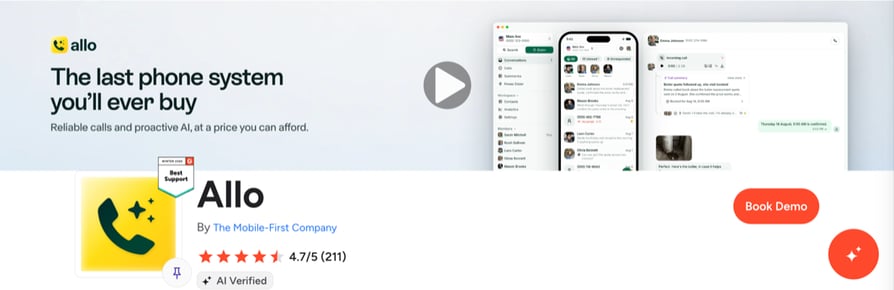
What Is Allo?
Allo calls itself a "Business phone system with AI agents." Its native GoHighLevel integration connects from Allo's settings, and clicking a number in GoHighLevel opens the call in the Allo desktop app.
Who Is Allo's GoHighLevel Integration Best For?
Best for: small teams that want AI summaries and transcripts on every call.
Allo fits small sales or service teams that want AI notes without buying a separate add-on and don't need multi-line dialing.
What Can Allo's GoHighLevel Integration Do?
Admins and managers connect it under Settings > Integrations > GoHighLevel, on the Business plan or higher.
- Calls in the conversation: each call is added to the contact's existing conversation with the recording.
- AI on the note: a note on the contact carries an AI summary, the full transcript and the recording link.
- Texts logged: texts land in the conversation, plus one note per contact per day.
- Contact sync: contacts and companies sync from GoHighLevel into Allo, and contacts created or updated in Allo are pushed back, about every 10 minutes; only contacts with a phone number sync.
- Power Dialer from a page: on a GoHighLevel contact list, the Chrome extension's "Import to Power Dialer" adds every number on the page to the queue.
"Create lead for unknown calls" is off by default, and calls with contacts saved as favorites in Allo aren't synced by default.
What Other Tools Does Allo Integrate With?
- HubSpot, Salesforce and Attio, according to its pricing FAQ
- Allo MCP
How Much Does Allo Cost With GoHighLevel?
Allo starts at $10 per seat per month billed yearly, but the GoHighLevel integration needs the Business plan at $32.
| Plan | Price (annual / monthly) | GoHighLevel-relevant features |
|---|---|---|
| Solo | $10 / $15, one seat | No CRM integrations |
| Business | $32 / $45 | GoHighLevel integration |
| Ultra | $100 / $120 | Higher tier |
The Power Dialer is $50 a month for the whole team, the AI Receptionist is $32 a month per agent, and A2P 10DLC registration is a one-time $24. There's a 3-day free trial.
What Do Customers Say About Allo?
G2 reviewers keep returning to the AI call summaries and transcripts, and one solo user says the pricing is realistic for a one-person business. One reviewer credits local numbers in each country with higher answer rates.
The criticism we saw is about call quality and depth: one reviewer reports inconsistent call quality, another notes a poor connection at times, and others want more advanced features, analytics or messaging.
"The AI call summaries are almost instantaneous and the platform's design makes it super easy to use." Read the review
"It happens that the connection is of poor quality, but this seems to be the case with all VOIP tools." Read the review
What Is Allo's G2 Rating?
G2 rating: 4.7/5 (211 reviews). Read Allo reviews on G2.
Allo Pros and Cons for GoHighLevel Teams
| Pros | Cons |
|---|---|
| AI summary and full transcript on the contact note | Calls run in the Allo desktop app |
| Calls and texts land in the contact's conversation | Power Dialer is a paid add-on, and list import goes page by page |
| G2 reviewers praise the fast AI call summaries and easy setup | G2 reviewers mention occasional call-quality problems; contact sync runs about every 10 minutes |
6. Aircall
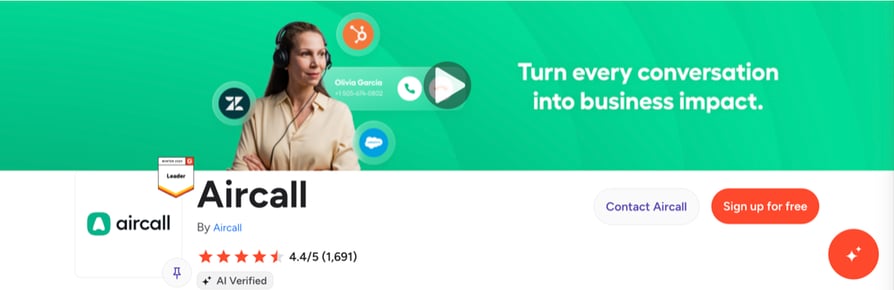
What Is Aircall?
Aircall is an "AI-Powered Customer Communications Platform for SMBs & Enterprise." It doesn't build its own GoHighLevel integration: the connection comes from its partner Airlinx, which Aircall's listing notes "may incur a cost." If you're reviewing Aircall itself, our Aircall alternative comparison lists other options.
Who Is Aircall's GoHighLevel Integration Best For?
Best for: teams already on Aircall that now run their CRM in GoHighLevel.
Aircall with Airlinx also fits agencies with several GoHighLevel locations, since Airlinx sells agency tiers.
What Can Aircall's GoHighLevel Integration Do?
Airlinx connects Aircall to GoHighLevel and supports multiple GoHighLevel locations.
- Call logging: inbound and outbound calls log in HighLevel with timestamps, direction, duration and contact details.
- Recordings and transcripts: recordings and AI transcripts sync to the contact record.
- SMS both ways: Aircall SMS stays in the contact's timeline, and you can send Aircall SMS from the HighLevel contact view and from workflows.
- Workflow triggers: GoHighLevel automations can launch on Aircall events such as missed calls, specific outcomes or voicemails.
- Outcomes and notes: dispositions and agent notes sync to the contact or opportunity, and contacts are matched or created from calls and texts.
Aircall's Power Dialer (Professional plan) imports up to 1,000 numbers and dials them in sequence, but a dialer fed from GoHighLevel lists isn't documented.
What Other Tools Does Aircall Integrate With?
- 250+ integrations, according to its pricing page
- Salesforce and monday.com
- Slack and Microsoft Teams
How Much Does Aircall Cost With GoHighLevel?
Aircall starts at $30 per licence per month billed annually, with a 3-licence minimum, and the GoHighLevel connection adds an Airlinx subscription on top.
| Plan | Price (billed annually) | GoHighLevel-relevant features |
|---|---|---|
| Essentials | $30/licence, 3-licence minimum | Phone system |
| Professional | $50/licence, 3-licence minimum | Adds the Power Dialer |
| Enterprise | Custom, 25-user minimum | Custom setup |
| Airlinx (partner) | $99/month per HighLevel location, plus usage | GoHighLevel connection |
Airlinx usage is $0.02 per call and $0.02 per outbound SMS; inbound texts are free. Agency tiers run from $189 a month for 2 locations to $499 for unlimited locations. For the full plan list, see our guide to Aircall pricing.
What Do Customers Say About Aircall?
G2 reviewers like the interface: three reviewers call it user-friendly or easy to navigate, and one says the app makes it easier to reach prospects across many numbers. Reviewers also value re-listening to calls and reading AI summaries and transcripts after the fact.
The complaints center on numbers and recordings. Two reviewers say changing numbers through support takes a while, two mention numbers going to spam, and one says recorded calls take a long time to load when they want to listen again.
"I use the dialer and power dialer, and I can choose from multiple numbers when calling different regions." Read the review
"That the numbers go to spam and, when I want to change them, the support staff takes a long time to respond." Read the review
What Is Aircall's G2 Rating?
G2 rating: 4.4/5 (1691+ reviews). Read Aircall reviews on G2.
Aircall Pros and Cons for GoHighLevel Teams
| Pros | Cons |
|---|---|
| G2 reviewers call the interface easy to use | A second subscription (Airlinx) with per-call and per-SMS fees |
| GoHighLevel workflows can fire on missed calls, outcomes and voicemails | Power Dialer only on Professional, with a 3-licence minimum |
| Airlinx agency tiers cover several GoHighLevel locations | Reviewers report slow number changes and recordings that take time to appear |
7. WAVV
What Is WAVV?
WAVV is an "Embedded Multi-Line Power Dialer." It runs inside GoHighLevel and is listed in the HighLevel marketplace, so reps click a contact and WAVV calls without a second app.
Who Is WAVV's GoHighLevel Integration Best For?
Best for: outbound reps who want a 3-line dialer embedded in GoHighLevel.
WAVV suits pure outbound teams that spend the day working GoHighLevel smart lists and care more about dial volume than inbound routing.
What Can WAVV's GoHighLevel Integration Do?
WAVV turns on inside GoHighLevel in a few clicks, with no code.
- Dialing inside GoHighLevel: click a contact and WAVV calls, right from the GoHighLevel interface.
- Multi-line dialing: the Multi Line plan dials up to 3 lines per seat and connects to the first person who answers.
- Smart lists as call lists: WAVV dials from your HighLevel contacts and smart lists.
- Logging back to the contact: dispositions, recordings and call logs sync back to the GoHighLevel contact.
- Spam protection: carrier registration, spam-flag monitoring and local presence.
WAVV doesn't document exactly where calls land (note or Conversations), and SMS for the GoHighLevel integration isn't documented.
What Other Tools Does WAVV Integrate With?
- HubSpot
- A Chrome extension
- A developer API
How Much Does WAVV Cost With GoHighLevel?
WAVV starts at $69.30 per seat per month billed annually for Single Line ($99 billed monthly), and Multi Line costs $104.30 billed annually ($149 monthly).
| Plan | Price (annual / monthly) | GoHighLevel-relevant features |
|---|---|---|
| Single Line | $69.30 / $99 | Embedded dialer, one line |
| Multi Line | $104.30 / $149 | Up to 3 lines per seat |
Quarterly billing works out to $84.15 (Single Line) or $126.65 (Multi Line) a month, and larger teams get a further 5 to 15% off per seat. There's a 7-day free trial. Our guide to WAVV pricing compares the plans and billing terms.
What Do Customers Say About WAVV?
Most of the WAVV reviews we read on G2 come from GoHighLevel users, and they praise its speed, the 3-line dialer and how it syncs with GoHighLevel tags to trigger automations.
The criticism we saw: one reviewer reports the dialer being down for a day at a time, one wants automatic number cycling to keep numbers off spam lists, and one finds the 3-line plan expensive once fees are added.
"It syncs with GHL's tags, which can trigger status updates and other automations." Read the review
"I find the lack of an automated system for cycling through numbers to prevent them from getting spam reported to be a downside." Read the review
What Is WAVV's G2 Rating?
G2 rating: 4.6/5 (18 reviews). Read WAVV reviews on G2.

WAVV Pros and Cons for GoHighLevel Teams
| Pros | Cons |
|---|---|
| Embedded in GoHighLevel, no second app | Dialer-first: inbound routing and IVR aren't documented for HighLevel |
| Dials smart lists up to 3 lines at a time, with spam protection | Maximum of 3 lines per seat, from $69.30 a seat for one line |
| G2 reviewers, many on GoHighLevel, praise its speed and tag-based automations | G2 reviewers report occasional outages and no automatic number cycling |
8. PhoneBurner
What Is PhoneBurner?
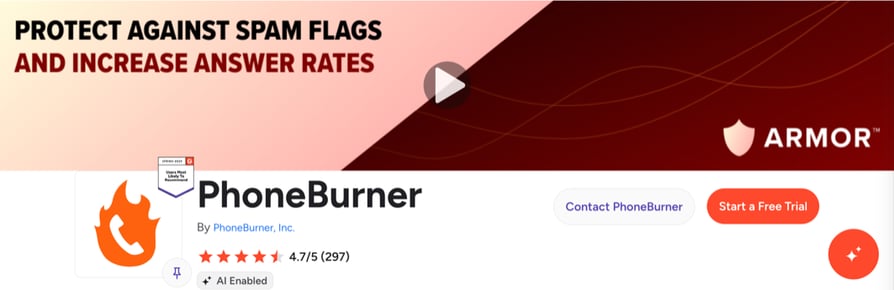
PhoneBurner is a power dialer whose homepage promise is to "Get more calls answered." The GoHighLevel connection, "PhoneBurner for HighLevel," is a free connector built and maintained by The Marketer's Toolkit. You install it on the sub-account from the HighLevel Marketplace. For other options, see our PhoneBurner alternative roundup.
Who Is PhoneBurner's GoHighLevel Integration Best For?
Best for: high-volume reps who dial GoHighLevel Smart Lists in power sessions.
PhoneBurner fits reps who spend most of the day in dial sessions and want each contact's record to open as the session moves.
What Can PhoneBurner's GoHighLevel Integration Do?
The connector installs from the marketplace with no browser extension, and each user signs in to their own PhoneBurner account once.
- Dial sessions from Smart Lists: select up to 500 contacts in a Smart List and click the PhoneBurner button; HighLevel opens each contact's record as the session moves.
- Logging when the call ends: call outcomes, notes and recordings sync back to the contact the moment a call ends.
- Follow-ups from dispositions: dispositions such as Live Answer, Set Appointment or Follow Up can send email, text or voicemail follow-ups.
- One-click voicemail: reps leave a recorded voicemail with one click and move on.
- Spam monitoring: spam flag monitoring and remediation, plus local presence.
PhoneBurner doesn't document parallel or predictive modes, and SMS needs the Premium plan with A2P 10DLC registration.
What Other Tools Does PhoneBurner Integrate With?
- 100+ integrations, according to its pricing page
- Salesforce, HubSpot and Zoho dialers
How Much Does PhoneBurner Cost With GoHighLevel?
PhoneBurner starts at $140 per user per month billed annually, and the HighLevel connector itself is free. PhoneBurner's pricing page lists its 100+ integrations without tying them to a plan, so the connector works from Standard, and activating it also needs a ContactConnector account.
| Plan | Price (annual / monthly) | GoHighLevel-relevant features |
|---|---|---|
| Standard | $140 / $165 | Power dialer |
| Professional | $165 / $195 | Higher tier |
| Premium | $183 / $215 | Adds SMS messaging |
There's a free trial with free minutes. Our guide to PhoneBurner pricing covers the plans and add-ons in more detail.
What Do Customers Say About PhoneBurner?
G2 reviewers credit PhoneBurner with faster cold calling, quick onboarding and strong support, and one reviewer says phone scoring raised their connect rate.
The criticism we saw: one reviewer finds the interface dated, one can't change the outbound number once a session starts, and one says the Armor add-on didn't include the spam protection they expected.
"The product is great, makes the process of cold calling a lot faster." Read the review
"There isn’t much to dislike, but the one thing that stands out is not being able to change the number I’m dialing from once a session starts." Read the review
What Is PhoneBurner's G2 Rating?
G2 rating: 4.7/5 (297+ reviews). Read PhoneBurner reviews on G2.
PhoneBurner Pros and Cons for GoHighLevel Teams
| Pros | Cons |
|---|---|
| Dial sessions start straight from HighLevel Smart Lists | Highest per-seat price in this list |
| Free connector, no browser extension; dispositions trigger follow-ups | Third-party connector; SMS only on Premium |
| G2 reviewers credit faster cold calling, quick onboarding and support | G2 reviewers find the interface dated and can't switch numbers mid-session |
How to Connect CloudTalk to GoHighLevel (Step-by-Step)
Setup starts in CloudTalk, not in GoHighLevel. Before you begin, you need admin access in CloudTalk, admin access to the GoHighLevel sub-account you're connecting and a CloudTalk plan that includes CRM integrations (Essential or higher). CloudTalk's help center article Configure GoHighLevel has the same steps with every setting explained.
- 01Add the integration in CloudTalk. In the CloudTalk Dashboard, go to Settings > Integrations > GoHighLevel and click Add.
- 02Authorize the sub-account in GoHighLevel. CloudTalk redirects you to GoHighLevel. Choose the sub-account and grant access. Back in CloudTalk, you'll see "Authentication completed."
- 03Name the connection and set the contact tag. Under General settings, add a Caption (the sub-account name works) and pick the Contact's tag every synced contact gets. You'll target dialer campaigns with it.
- 04Choose which calls to log. Under Workflow settings, switch on the call types you want, then choose whether to log to opportunities, export recordings, create contacts for unknown numbers and log only during business hours.
- 05Turn on SMS logging and pick your numbers. Switch on "Export SMS to GoHighLevel" for texts in Conversations, and choose which CloudTalk numbers log (leave empty for all).
- 06Install the Click to Call extension. With the Click to Call extension, clicking a number in GoHighLevel sends it to the CloudTalk Phone app. Turn on auto-dial to start the call by itself.
- 07Make a test call and check the result. Call a test contact and look for the note and the Conversations entry in GoHighLevel. The integration's Activity card in CloudTalk shows the last sync and any failures.
Tip for agencies: one integration connects one GoHighLevel sub-account. If you manage ten client accounts, you add ten integrations, and a clear Caption on each one keeps them apart.
What Is a GoHighLevel Phone Integration?
A GoHighLevel phone integration connects a phone system or dialer to GoHighLevel so calls and texts are logged on the right contact, recordings and AI notes are attached, and reps can call a number with a click. The phone system places the call, and the integration writes it into GoHighLevel.
How Does a Phone System Connect to GoHighLevel?
Most third-party phone systems place the call in their own app and then write the result back to GoHighLevel. The call shows up as a note, a task or an entry in the contact's Conversations thread, depending on the vendor.
A few vendors go further and embed their own dialer inside the HighLevel interface: Aloware adds a dialer panel, WAVV runs its dialer inside GoHighLevel, and PhoneBurner launches dial sessions from a button in HighLevel.
Others, including CloudTalk, JustCall, Kixie and Allo, add click-to-call through a browser extension or a desktop app, and Aircall logs through a partner app. Whichever route a vendor takes, the connection is usually made per sub-account, so agencies set it up once for every client account.
Native App, Browser Extension, Embedded Dialer or Zapier: What's the Difference?
| Option | How it connects | What's logged | Setup | Trade-off |
|---|---|---|---|---|
| Native app | OAuth connection between the vendor and a GoHighLevel sub-account | Calls, often texts, recordings and AI notes on the contact | A few settings screens, no code | Calls usually run in the vendor's app |
| Browser extension | Adds click-to-call buttons to numbers on GoHighLevel pages | Nothing by itself; it pairs with a native app | Install per rep | One more thing to install on every browser |
| Embedded dialer panel | The vendor's dialer runs inside the GoHighLevel interface | Calls and dispositions back to the contact | Marketplace install or a custom script from the agency admin | Usually dialer-first, with fewer phone system features |
| Zapier or API | You build the sync with triggers, actions or code | Whatever you map | You build and maintain it | Breaks when either side changes; no click-to-call |
CloudTalk is a native app with click-to-call by extension. JustCall, Kixie and Allo work the same way, Aloware, WAVV and PhoneBurner bring an embedded dialer, and Aircall connects through Airlinx.
A Zapier integration and the API stay useful for jobs no integration covers, such as starting a CloudTalk AI voice agent call from a GoHighLevel workflow webhook.
Does GoHighLevel Have a Dialer?
Yes. According to GoHighLevel's Phone Dialer overview, it has a browser-based Phone Dialer that places and receives calls inside HighLevel and logs them to the contact automatically. It supports warm and blind transfers, keypad navigation through phone menus, voicemail and call scripts, and you choose which number you call from.
Its power dialer is built from workflows. A "Manual Action To Call" step queues contacts under Conversations > Manual Actions, and the rep works the list one call at a time, marking each outcome. GoHighLevel doesn't document a parallel mode.
GoHighLevel also offers Voice AI agents that answer inbound calls and place outbound ones, but they only work on accounts using LC Phone (GoHighLevel's phone system) or Twilio numbers. Teams add a dedicated dialer when one line per rep isn't enough, which is what the next section covers.
GoHighLevel's Built-In Phone System vs. a Third-Party Phone System
GoHighLevel's own phone (LC Phone) can be all a small team needs. The question is whether your calling volume, countries and dialing style have outgrown it.
When Is GoHighLevel's Own Phone Enough?
GoHighLevel's phone makes sense if your team wants everything in one system and calls a manageable number of contacts a day. Calls happen inside HighLevel, logging is native, and the Manual Call queue gives reps a simple way to work a list.
GoHighLevel's phone also fits teams that want its Voice AI, since Voice AI only runs on LC Phone or Twilio numbers.
The cost is usage-based. GoHighLevel's LC Phone pricing guide lists US and Canada numbers at $1.15 a month and calls at about $0.0166 a minute outbound and $0.01165 inbound. For a small team with modest volume, that can beat per-seat licences.
When Do Teams Add a Dedicated Phone System or Dialer?
GoHighLevel users who are switching give us the same reasons. Reps want to dial faster than one call at a time, so they look for Parallel or multi-line dialing.
Their numbers get flagged as spam and pick-up rates drop, so they want number rotation and spam handling. And some have agents calling from one country into another and need international phone numbers that look local in the prospect's country.
Usage fees add up at volume too. On LC Phone, recording, transcription, answering machine detection and voicemail drops are each billed per minute or per call, on top of call minutes. CloudTalk and Kixie include minutes in the seat price instead.
| GoHighLevel's own phone | Third-party phone system or dialer | |
|---|---|---|
| Where calls happen | Inside HighLevel | Vendor's app, an extension or an embedded panel |
| Dialing | Web dialer plus a one-call-at-a-time Manual Call queue | Power, multi-line or predictive, depending on the vendor |
| Logging | Native | Through the integration (note, task or Conversations entry) |
| Pricing model | GoHighLevel plan plus per-minute and per-feature usage | Per-seat licence, often with minutes included, plus your GoHighLevel plan |
| AI voice agent | Voice AI on LC Phone or Twilio numbers, with an AI Employee plan or pay-per-use | Vendor's own AI add-ons |
CloudTalk is one way to cover those gaps, with local numbers in 160+ countries, Power and Parallel dialing, Smart Rotation Caller ID and anti-spam number registration, while calls still land on the GoHighLevel contact.
Why Connect a Phone System to GoHighLevel? 5 Benefits
Each benefit starts from what GoHighLevel users tell us when they explain why they started looking.
Every Call and Text Lands on the Right Contact
The most common complaint we hear is that the team works in GoHighLevel, but the calls happen somewhere else, so the contact record is missing half the story.
A phone integration looks up the caller by phone number, logs the call to the matching contact and, if you want, creates a new contact for an unknown number. With CloudTalk, contacts sync both ways and match on phone and email, so a contact edited in either system isn't duplicated.
Calls Sit in the Conversations Thread Next to Texts
Reps who live in GoHighLevel's Conversations view want calls there too, not buried in a separate log. The better integrations write each call into the thread next to the contact's texts and emails, so whoever picks up the conversation next sees the whole history.
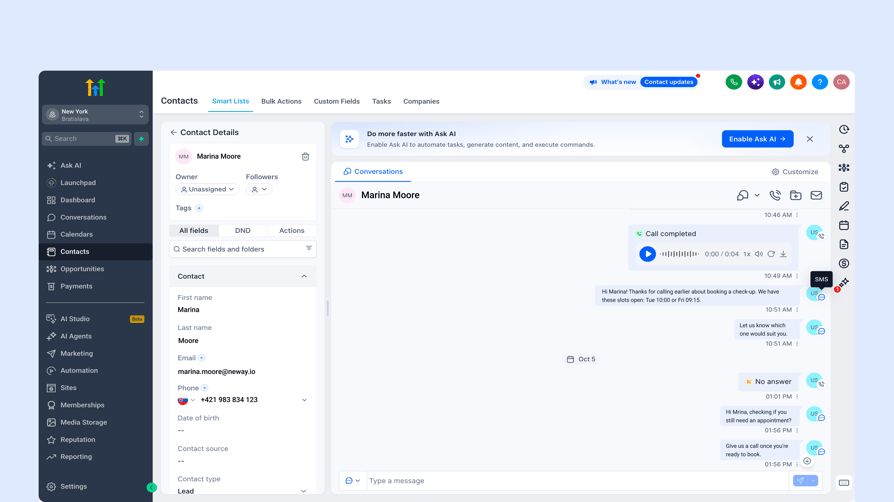
CloudTalk writes every logged call as a Conversations entry and a contact note, and with SMS export on, texts sent through CloudTalk land in the same thread.
Recordings and AI Notes Come With the Call
Teams we talk to want to coach from real calls without hunting for a recording in another tool. When the recording and an AI summary arrive on the contact, a manager can review the call from the record they already have open.
CloudTalk attaches the recording to the Conversations entry (for calls under 5 MB) and links it on the note, and with the Conversation Intelligence add-on the note gains a summary, sentiment and topics.
Dialing at Volume Gets Easier With Rotation and Local Numbers
Outbound teams tell us that pick-up rates fall the moment their numbers get flagged. Spreading calls across several numbers and calling from a local number both help a prospect recognize the call.
CloudTalk's Smart Rotation Caller ID spreads outbound calls across your numbers, and anti-spam registration (including STIR/SHAKEN for US calls and CNAM) comes at no extra cost. Spam remediation for US outbound numbers is a paid add-on quoted on volume.
One Phone System Works for Agencies and Single Businesses
Agencies ask whether one phone system can serve all their client accounts. It can, but most native integrations, CloudTalk's included, connect one sub-account per integration, so an agency sets up each client separately.
The upside is clean separation: each sub-account gets its own logging rules, numbers and contact tag, and a single business only ever needs one connection.
What Should a GoHighLevel Phone Integration Sync Automatically?
Take this checklist into every demo. Vendors describe their integrations in similar words, but what lands on the contact differs from tool to tool.
Contacts, Calls, Texts and Notes: What Syncs and Where Does It Land?
| What | Why it matters | Ask the vendor |
|---|---|---|
| Contacts, both ways | Caller ID works and new contacts don't get duplicated | How often does it sync, and what does it match on? |
| Unknown callers | New leads shouldn't vanish | Can unknown numbers create a contact, and can I switch that off? |
| Call entry in Conversations | Calls sit next to texts and emails | Does every call appear in the Conversations thread? |
| Contact note | One readable summary per call | Does the note update when tags, notes or AI data arrive? |
| Opportunity notes | Deal owners see call activity | Can calls log to the open opportunity? |
| Call recording | Coaching and disputes | Is it a link, an attached audio file or both? |
| AI notes | Faster review | Summary, sentiment, transcript? Is it an add-on? |
| SMS | Texts belong in the same thread | Are texts logged, and can I send through your numbers from GoHighLevel? |
| Click-to-call | Fewer misdials | Extension, desktop app or embedded panel? |
| Automations on call events | Follow-ups run on their own | Can a missed call or outcome trigger a GoHighLevel workflow? |
| Sub-account or agency connection | Setup effort for agencies | Does one connection cover one sub-account or the whole agency? |
| GoHighLevel usage costs | Hidden fees | Do any features rely on GoHighLevel premium workflow actions? |
What Usually Doesn't Sync (Ask Before You Buy)
Some gaps come up across vendors, so check them early:
- Edits to a logged call entry. In CloudTalk's case, Conversations entries aren't updated after they're written, and later details go to the note instead. Ask each vendor how theirs behaves.
- Workflow triggers on call events. Some tools offer them (JustCall, Kixie and Aircall through Airlinx document them), others don't.
- GoHighLevel lists as dialer audiences. Several dialers pull smart lists or tags; others need a tag, a CSV or a page-by-page import.
- Agency-level connection. Most native integrations connect one sub-account at a time.
- SMS sent from GoHighLevel through the vendor's numbers. Some vendors become the SMS provider inside GoHighLevel; others only log texts sent from their own app.
- Custom field mapping. Ask whether call data can map to custom GoHighLevel fields before you count on it.
If a vendor answers "yes" to everything, ask to see it in a trial account. The answer is usually more specific once you're looking at a real contact.
GoHighLevel Dialer Integrations: Auto, Power, Parallel and Predictive Dialers
"Dialer for GoHighLevel" can mean four different things, and the terms overlap; even power and progressive dialers are often confused. The tables below show how they differ and which tools offer which mode.
Dialer Types Explained: Which Is Which?
| Dialer type | What it does | Also called | CloudTalk |
|---|---|---|---|
| Auto dialer | Software that dials numbers from a list for you | Automatic dialer | Yes, AI Sales Dialer campaigns |
| Power dialer | Dials one contact at a time and moves to the next when the call ends | Progressive dialer (the terms overlap) | Power mode |
| Parallel dialer | Dials several numbers at once for one rep and connects whoever answers first | Multi-line dialer | Parallel mode, up to 5 lines per rep by default, up to 10 on request |
| Predictive dialer | Uses an algorithm to pace calls across a team based on agent availability | None | Not offered |
Power dialing suits reps who want a moment to prepare between calls. Parallel dialing suits high-volume lists where most calls go unanswered, since the rep only talks to people who pick up.
With Parallel mode in CloudTalk's AI Sales Dialer, AI voicemail detection skips machine-answered calls, and those calls never reach the rep. If you'd rather hand the first call to an AI agent, compare the best AI voice agents before you build a dialer workflow around one.
Can a Dialer Work From a GoHighLevel List or Tag?
Sometimes, and this is where tools differ most. JustCall's Sales Dialer imports HighLevel contacts by tag, Aloware imports a HighLevel list by tags, company or created date, WAVV dials HighLevel contacts and smart lists, and PhoneBurner starts dial sessions from Smart Lists.
Kixie fills its PowerLists through GoHighLevel workflow actions, and Allo's Chrome extension imports one page of a contact list at a time.
CloudTalk campaigns use CloudTalk tags and CRM lists, not a GoHighLevel list or GoHighLevel tag directly. Every contact synced from GoHighLevel carries the integration's contact tag, so a campaign can target all synced contacts of a sub-account.
If your reps need a campaign that follows a specific GoHighLevel smart list or tag, put that requirement at the top of your trial checklist.
Which Tools Offer Which Dialer Modes With GoHighLevel?
| Tool | How it connects | Power (one line) | Multi-line or parallel | Predictive | Dials from GoHighLevel lists |
|---|---|---|---|---|---|
| CloudTalk | Native app, extension | Yes (included on Expert, add-on below) | Yes, up to 5 lines (10 on request) | No | Through the integration's contact tag |
| JustCall | Native app, extension | Yes (Pro) | Not documented separately | Yes, up to 10 lines (SalesPro) | Yes, by tag |
| Kixie | Native app, extension | Yes | Yes, up to 4 lines | No | Through workflow actions |
| Aloware | Embedded panel | Yes (uPro + AI and up) | Not documented | Not documented | Yes, by tags, company or date |
| Allo | Native app, desktop app | Yes (add-on) | Not documented | Not documented | Page by page through the extension |
| Aircall | Partner app (Airlinx) | Yes (Professional) | Not listed | Not listed | Not documented |
| WAVV | Embedded | Yes | Yes, up to 3 lines | Not documented | Yes, contacts and smart lists |
| PhoneBurner | Marketplace connector | Yes | Not documented | Not documented | Yes, Smart Lists |
If you're new to multi-line dialing, start with fewer lines than the maximum and add more once reps are comfortable handling the pace.
Best GoHighLevel Phone Integration by Team Type
The right pick depends on how your team works. Here's the short version, with the reasoning below.
| If your team… | Pick | Why |
|---|---|---|
| Dials high volume and needs several lines | CloudTalk | Parallel dialing up to 5 lines (10 on request), AI voicemail detection, number rotation |
| Needs a true predictive dialer | JustCall | SalesPro dials up to 10 lines from GoHighLevel tags |
| Wants to dial without leaving GoHighLevel | Aloware, WAVV or PhoneBurner | Embedded panel, embedded dialer or Smart List sessions |
| Runs many client sub-accounts | Aircall + Airlinx or Aloware | Multi-location pricing, or one dialer script for the agency |
| Is small and wants AI notes cheaply | Allo | AI summaries and transcripts on the contact for $32 a seat |
| Calls into several countries | CloudTalk | Local numbers in 160+ countries |
Best for Outbound Sales and Appointment-Setting Teams
Pick CloudTalk if Parallel dialing covers your volume: up to 5 lines per rep by default (10 on request), AI voicemail detection, Smart Rotation Caller ID and every call logged to the GoHighLevel contact.
For a true predictive dialer, look at JustCall's SalesPro bundle. To stay inside GoHighLevel and work smart lists, WAVV and PhoneBurner are the alternatives. If an AI agent should qualify leads first, see our guide to an AI voice agent for lead qualification, and if you review calls in Gong, the best phone systems that integrate with Gong.
Best for Agencies Running Several Client Accounts
CloudTalk, JustCall, Kixie and Aloware all connect per sub-account, and Kixie needs a separate account for each one. With CloudTalk, each client gets its own integration, Caption and contact tag: clean separation, but ten clients means ten connections.
The only multi-location pricing we could verify is Aircall through Airlinx, up to unlimited locations at $499 a month. With Aloware, the agency admin installs the dialer script once, and each sub-account connects its own Aloware account.
Best for Single Businesses With a Small Team
With moderate call volume in one country, GoHighLevel's own phone may be enough. For a dedicated system on a small budget, Allo Business ($32 per seat, billed yearly) adds AI summaries and transcripts on the contact.
CloudTalk Essential at $29 fits small teams that expect to add a Power or Parallel dialer later. If missed inbound calls are the bigger problem, look at the CloudTalk AI receptionist.
Best for Teams Calling Internationally
Pick CloudTalk if your agents call into several countries: its international numbers cover 160+ countries, from $6 a month. Each plan includes calling for one region, and calls outside it come from calling credit, so check rates for every country you call.
For the other tools, ask each vendor about number availability in your target countries; their GoHighLevel pages don't cover it.
Best for Teams That Want to Dial Inside GoHighLevel
You have four options: GoHighLevel's own Phone Dialer, Aloware's dialer panel, WAVV's embedded dialer and PhoneBurner's Smart List sessions. CloudTalk isn't one of them: calls run in the CloudTalk Phone app, with click-to-call from GoHighLevel pages.
How Much Does a GoHighLevel Phone Integration Cost?
The per-seat price is only part of it. You also pay for GoHighLevel itself, and some tools add partner fees or dialer add-ons.
| Tool | Lowest plan with the GoHighLevel connection | Price per user/month (annual) | Dialer cost | Other costs |
|---|---|---|---|---|
| CloudTalk | Essential | $29 | Power $15 add-on; Parallel $39 add-on; Power included on Expert | Calls outside your region and SMS from calling credit |
| JustCall | Team | $29 (2-licence minimum) | Power dialer on Pro ($49); predictive on SalesPro (quote) | None listed |
| Kixie | Professional | Not published | Dialer plans not published | ConnectionBoost and AI voice detection add-ons |
| Aloware | iPro + AI | $30 (10-user minimum) | Power Dialer on uPro + AI ($60) | None listed |
| Allo | Business | $32 | Power Dialer $50/month for the team | A2P 10DLC registration $24 one-time |
| Aircall | Essentials | $30 (3-licence minimum) | Power Dialer on Professional ($50) | Airlinx from $99/month plus $0.02 per call |
| WAVV | Single Line | $69.30 | Multi Line $104.30 | None listed |
| PhoneBurner | Standard | $140 | Included | SMS only on Premium ($183) |
On top of the phone system, you pay for GoHighLevel. According to GoHighLevel's pricing page, its plans are $97 a month (Starter), $297 (Unlimited) and $497 (Founder), and calling and AI usage are billed separately.
If you keep GoHighLevel's phone for some numbers, its per-minute charges, A2P registration fees and per-call answering machine detection still apply.
If you plan to start AI voice agent calls from a GoHighLevel workflow through the CloudTalk API, note that workflow webhooks are a premium action: each sub-account gets 100 free executions, then usage is billed, per GoHighLevel's webhook guide.
In our conversations about price, the surprises usually come from numbers, SMS registration and calls outside the home region, not from the seat price. Price the whole stack for one month of real volume before you compare, and use our checklist to evaluate VoIP pricing when you read each quote.
How to Pick the Right GoHighLevel Phone Integration or Dialer
Use these eight steps during a trial. Each one maps to a reason we've seen GoHighLevel teams pick or reject a phone system.
- 01Check how it connects. Native app, extension, embedded panel, partner app or Zapier? Time how long it takes to connect a sub-account.
- 02See what lands on the contact. Make a test call and look for the Conversations entry, the note, the recording and any AI data.
- 03Decide whether you need predictive dialing. If Parallel dialing covers your volume, you have more options and simpler setups.
- 04Test the dialer on a real list. Run it against your current tool for a day and compare connects per hour.
- 05Check where call lists come from. GoHighLevel smart list, tag, workflow action or CSV import?
- 06Test number rotation and spam handling. Watch pick-up rates on the numbers your reps will dial from, and read up on VoIP spam traps before you scale.
- 07Check number coverage and rates. Confirm local numbers and call rates for every country you call.
- 08Price the full stack. Add GoHighLevel's plan, SMS registration, numbers, dialer add-ons, AI add-ons and any partner fees.
You can run this whole checklist in a CloudTalk 14-day free trial.
How We Chose the Best GoHighLevel Phone Integrations
We started from our own conversations with GoHighLevel users who were choosing or setting up a phone system, and from why they picked or rejected each option. Then we read each vendor's GoHighLevel integration documentation, help center and pricing page, and checked G2 ratings.
We scored every tool on the same criteria:
- How it connects to GoHighLevel and how long setup takes
- What lands on the contact: Conversations entry, note, recording, AI data
- Click-to-call and whether reps can dial inside GoHighLevel
- Dialer modes and where call lists come from
- Spam handling and local number coverage
- Total cost, including GoHighLevel and add-ons
- G2 ratings and review feedback on reliability
CloudTalk is our product. To keep the review fair, we described every tool from its own documentation, listed CloudTalk's limits in its entry and named the tools that beat it on specific needs, such as predictive dialing.
We also looked at RingCentral and Dialpad. RingCentral connects only through a paid third-party connector with no published price, and Dialpad has no first-party GoHighLevel integration, so neither made the list. If you're weighing RingCentral for other reasons, our RingCentral alternative review covers it.
Start Logging Every GoHighLevel Call Automatically
If your team wants every call and text on the GoHighLevel contact, Power and Parallel dialing with number rotation, and local numbers in many countries, start with CloudTalk.
If you need a predictive dialer fed by GoHighLevel tags, look at JustCall. If you'd rather dial without leaving GoHighLevel, compare Aloware, WAVV and PhoneBurner, or stay with GoHighLevel's own phone if your volume is modest.
Whichever you pick, run the checklist above on a real list before you commit.
Sources:
Frequently Asked Questions About GoHighLevel Phone Integrations
Yes. GoHighLevel has a browser-based Phone Dialer that logs calls to the contact, and a power dialer built from workflow Manual Call actions that works one call at a time. Third-party tools add multi-line dialing; our explainer on types of dialer systems compares them.
It depends on how your team calls. CloudTalk fits teams that want every call on the contact and Parallel dialing, JustCall suits predictive dialing, and WAVV or PhoneBurner suit reps who dial inside GoHighLevel. HubSpot teams can compare our HubSpot phone integrations guide.
Yes. You set it up in the CloudTalk Dashboard under Settings > Integrations > GoHighLevel, authorize one sub-account and choose what gets logged. It needs admin access on both sides and Essential or higher. Unlike Zapier integrations, there's no zap to maintain.
No. Reps call from the CloudTalk Phone app, a softphone, and the Click to Call extension sends numbers from GoHighLevel pages to it. Every call is still logged to the contact. If dialing inside GoHighLevel matters most, look at Aloware, WAVV or PhoneBurner.
With CloudTalk, each call becomes a contact note and a Conversations entry. The note shows the outcome, agent, numbers, duration and a recording link, and later gains tags, agent notes and AI call summaries (with the Conversation Intelligence add-on).
Some can. CloudTalk can't use a GoHighLevel list or tag directly, but every synced contact carries the integration's tag, so an outbound call campaign can target a whole sub-account. JustCall imports by tag, WAVV and PhoneBurner dial smart lists, and Aloware imports lists.
No. Power and progressive dialers call one contact after another, parallel dialers call several numbers at once for one rep, and predictive dialers pace calls across a team. CloudTalk offers Power and Parallel (up to 10 lines), not predictive.
Usually one connection covers one sub-account. With CloudTalk, ten client accounts means ten integrations, each with its own tag, logging rules and virtual phone number. Aircall's partner Airlinx sells multi-location tiers.
Yes, through the CloudTalk API: a GoHighLevel workflow webhook or Zapier can start an outbound CloudTalk voice agent call. Voice agents are a paid add-on, and webhooks are billed after 100 free executions per sub-account. See our guide to implementing an AI voice agent.
Often, yes. Porting depends on the country and number type, and some mobile numbers can't move. Check every number you rely on, and ask each vendor how number porting works in your countries and during the switch.