
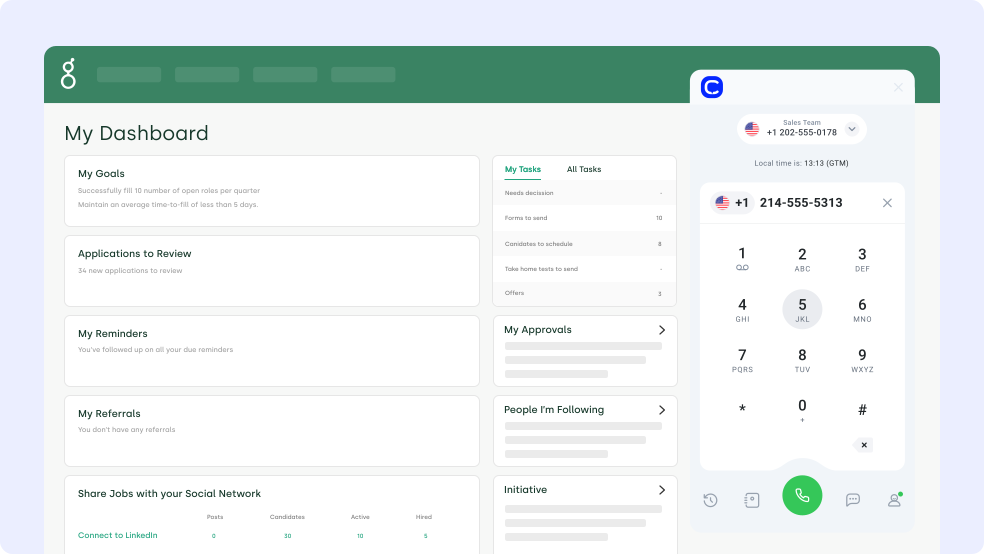
What Is Greenhouse Phone Integration?
Greenhouse is an applicant tracking system that runs job postings, candidate pipelines, and interview coordination for hiring teams. A Greenhouse phone integration connects that candidate database to a business phone system, so calls and messages attach to the right profile. CloudTalk adds calling, SMS, and automatic activity logging on top of the ATS your recruiters already work in.
How Does Greenhouse Phone Integration Work With CloudTalk?
CloudTalk authenticates with a Greenhouse Harvest API key and your Greenhouse subdomain, then imports every candidate record. First name, last name, email, and phone number move one way, from Greenhouse into CloudTalk, and later edits in Greenhouse follow automatically.
After each call, CloudTalk posts a note on the Greenhouse candidate profile with the duration, tags, call notes, and a recording link. SMS lands in the same activity history, tied to the candidate's primary job listing. Workflow Automation handles the follow-up steps around it.
Benefits of Greenhouse Phone Integration
- 01Log Every Candidate Call Without Writing a NoteCloudTalk writes the call duration, tags, notes, and a call recording link straight onto the Greenhouse candidate profile. Recruiters keep the pipeline current without typing after every conversation.
- 02Work Candidate Lists With a Greenhouse DialerImported candidates feed CloudTalk campaigns, so recruiters run a screening list instead of copying numbers between tabs. Power Dialer queues the next candidate the second a call ends.
- 03Reach Candidates on the Channel They AnswerSend interview confirmations and reminders with text messages SMS, and dial from any screen using Click-to-Call. Both channels log back to the candidate's activity history in Greenhouse.
- 04Screen More Applicants With an AI Voice AgentAn AI Voice Agent runs first-touch screening calls and books interviews around the clock. Your recruiters spend their day on the shortlist instead of the whole applicant pile.
- 05Coach Recruiters on Real Screening CallsCall transcription and sentiment analysis turn every screening call into reviewable data. Hiring managers see how a pitch landed without replaying the full recording.
- 06Give the Whole Hiring Team the Same ContextNotes and recordings sit on the candidate profile in Greenhouse, where interviewers already work. Customer Details shows the same history inside CloudTalk before the phone rings.
Greenhouse Phone Integration

CloudTalk's Greenhouse phone integration imports every candidate record into your dialer and writes each call back as a note on the candidate profile. Recruiters call, text, and log activity without leaving the hiring workflow.

What Data Do Greenhouse & CloudTalk Share?
Greenhouse CloudTalk
CloudTalk Receives
Greenhouse Receives
How to Integrate Greenhouse with CloudTalk?
- Make sure you have admin rights in both CloudTalk and Greenhouse.
- In Greenhouse, go to Dev Center → API Credentials → Create new API credentials. Set API type to Harvest and Partner to Custom.
- Open Dev Center → API Credential Management and edit your new key.
- Enable these permissions: GET: Retrieve Candidate, GET: List Candidates, POST: Add Note, GET: List Users.
- Copy your Greenhouse subdomain, the first part of your Greenhouse URL. For yourcompany.greenhouse.io, the subdomain is yourcompany.
- In your CloudTalk Dashboard, go to Account → Integrations, find Greenhouse, and click + Add.
- Enter your authentication name, the API Key, and the Greenhouse subdomain, then click Submit.
- Toggle the Integration Status to Active and add a Caption to name this instance.
- Apply a Contact tag to synced candidates and pick the numbers CloudTalk uses for calls and SMS.
- Click Save. Your CloudTalk email has to match your Greenhouse email exactly, or the sync will not run correctly.
How to Set Up Calling in Greenhouse
- Finish the Greenhouse integration in your CloudTalk account.
- Assign the CloudTalk numbers you want to use for calls during setup.
- Open a candidate profile inside Greenhouse.
- Find the candidate's phone number in their contact details.
- Click the phone number.
- The CloudTalk Phone app opens with the number pre-filled, ready to dial.
AI runs the first round. Your recruiters run the rest.
CloudTalk's Greenhouse phone integration pulls your candidate list into the dialer, then logs every call and SMS back onto the candidate profile.

Hi! This is CeTe from the recruiting team. Do you have two minutes to run through your application?
Still on the Fence?
Unsure if CloudTalk is right for you? Let us help make up your mind.
100%
Security
Summaries, transcripts, sentiment, and automation, all built on a reliable calling foundation. Let your team focus on the conversation instead of the write-up.
Explore AI Features5,500+
Happy customers (and counting)
From fast-growing startups to global brands, teams trust CloudTalk to power conversations that drive results.
View Wall of LoveOur reviews
Hear first-hand from our incredible community of customers.
I love the smart dialer as it removes procrastination from cold calling business development time. I also recently trialled the AI notetaker and will be purchasing that as it removes the need to write notes manually. It was very accurate as well!
Co-Founder
We needed the lines for our business with a lot of urgency and the team resolved it for us in just one business day. Everything was integrated and set up immediately, ready for our team to deliver support right away.
Project Manager
Easy to use. I love that support quickly and clearly helped me understand the more difficult mechanisms. The integration via API with our inhousing application also allowed for automations like SMS reminders.
Customer Support Specialist
It's simple to use, has a clean interface, and offers many options for using numbers from many parts of the world. It's also a great tool to use for opening accounts on messaging platforms like WhatsApp and Telegram.
Revenue System Specialist
The calling dashboard and the reporting structure is flawless as it supports campaign-wise reporting as well. We can allocate caller IDs to ISDRs, making it easier to use them whenever required in real-time...
Senior Manager
For us the main upside of using CloudTalk is saving of contacts. We're a business thousands of people contact, so seeing who's calling prior to taking the calls is a big boost. It also has detailed analytics for tracking.
Account Manager
Integrations
Get more value from your tools
Connect your tools, connect your teams. With over 100 apps already available in our directory, your favourite tools are just a click away.

HubSpot
Supercharge your outreach connecting CloudTalk to HubSpot for automated call logging and real-time data synchronization.
Learn more
Salesforce
Empower your sales and support teams with a seamless 2-way data sync between your phone system and Salesforce CRM.
Learn more
Zendesk Sell
Maximize productivity and drive revenue through a simple platform that offers full pipeline visibility.
Learn more
Pipedrive
Accelerate your sales cycle by making and logging calls directly within your Pipedrive deal pipelines.
Learn more
noCRM
Focus strictly on closing deals by eliminating manual logging through a streamlined outbound calling integration.
Learn more
MS Dynamics 365
Optimize your enterprise workflows by connecting professional telephony to your Microsoft Dynamics environment.
Learn moreDiscover 99+ Integrations


What Changes When Your Team Calls From CloudTalk Numbers?
Want 3x more of your calls picked up and up to 40% fewer missed? These teams got there with local numbers, one phone system and AI.

3x Pickup Rate With Local Mobile Numbers
“With CloudTalk, we could get real mobile numbers in-region, not just landlines. It made a huge difference in deliverability and how prospects responded.”

Up to 40% Fewer Missed Calls Globally
“CloudTalk isn't just a tool, it's become a core part of how we connect with prospects, manage conversations, and grow our presence in the U.S. market.”

From a Personal iPhone to Local Numbers
“We went from juggling personal phones and manual call forwarding to a unified platform that saves us time and delivers a much better customer experience.”

Missed Calls Cut From 80% to Just 16%
“Customers used to wait over 20 minutes just to speak to an agent. Now, they get through in 3 to 4 minutes. We also went from missing 80% of calls to just 16%.”

40% More Connected Calls for Sales Reps
“Find a tool that's not only reliable but can scale with your growth. CloudTalk offered us the consistency and support we needed to expand with confidence.”

500+ SDRs on One Global Phone System
“We managed to reduce sales operations by 40 hours per month and give our team the tools they need to scale globally, without sacrificing efficiency.”

Is your existing phone system more drama than dial tone? Book a chat with CloudTalk - we make calls fun again!
Join thousands of teams already growing with CloudTalk.
Greenhouse Phone Integration FAQ
Everything you need to know about this integration.
You add Greenhouse under Account → Integrations in the CloudTalk Dashboard, then submit your Greenhouse subdomain and a Harvest API key. Setup takes a few minutes and needs no code.
The Greenhouse integration costs nothing extra for CloudTalk users on eligible plans. Contact our team to confirm your access.
CloudTalk imports each candidate's first name, last name, email address, and phone number. Job listings, pipeline stages, and scorecards stay in Greenhouse.
Yes. Click a candidate's phone number in Greenhouse and CloudTalk Phone opens with the number ready to dial. CloudTalk then logs the call back to that candidate profile.
Yes. Inbound and outbound SMS sent through CloudTalk appear in the candidate's activity history in Greenhouse, linked to their primary job listing.
CloudTalk exports only calls that match a candidate in Greenhouse. A call from an unrecognized number stays in CloudTalk, where call tracking still records it.
The Harvest API key needs Retrieve Candidate, List Candidates, Add Note, and List Users. You enable them under Dev Center → API Credential Management after creating the key.
AI recruiting tools cover screening calls, interview reminders, and follow-up SMS. CloudTalk also runs as the full phone system for a recruiting firm across every hiring stage.


Hello 👋 My name is Emma. Still have questions?
Can't find the answer you're looking for? Please chat to our friendly team.