
What Is Intercom Phone Integration?
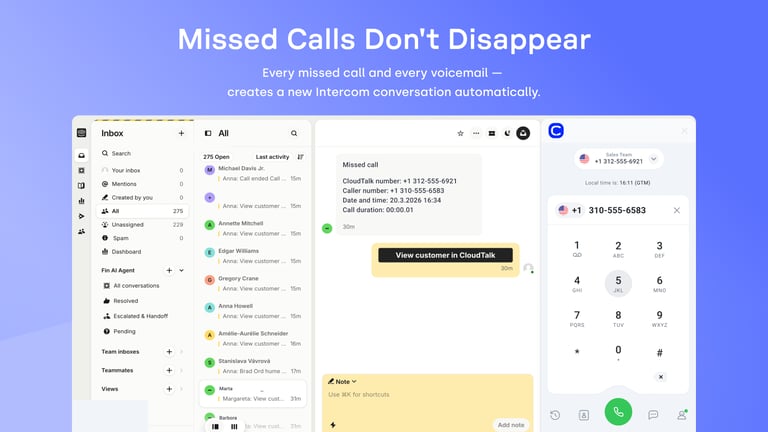
An Intercom phone integration is a software connection that links your cloud-based phone system to your customer messaging platform. CloudTalk connects to Intercom through Intercom’s API rather than embedding a dialer in the Intercom interface. Your team calls from the CloudTalk app, and CloudTalk writes each call to the matching Intercom contact. Voice activity then sits beside chat and email history with no manual logging.
How Does Intercom Phone Integration Work With CloudTalk?
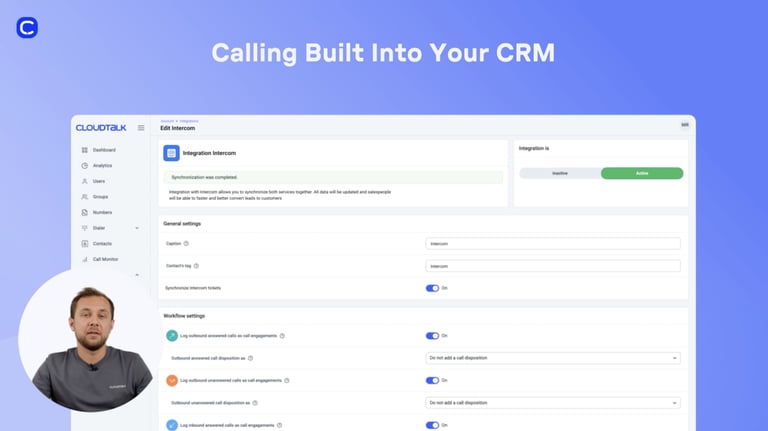
You add Intercom from Account → Integrations in the CloudTalk Dashboard and authorize it with an Intercom admin account. CloudTalk does not place a dialer inside Intercom, so agents work in the CloudTalk app. The Click-to-Call Chrome extension makes phone numbers shown in Intercom clickable, and clicking one loads the number into CloudTalk Phone. You choose whether the Intercom conversation is created when the call is answered or when it ends, and Workflow Automation handles the logging from there.
What Are the Benefits of Integrating a Phone System with Intercom?
- 01Drive Speed-to-Lead with Intercom Dialer IntegrationsReach more prospects without dialing numbers by hand. CloudTalk’s Power Dialer runs your outbound queue in the CloudTalk app, so reps move down the list without stopping to type. Power Dialer is included on the Expert plan and available as an add-on on Starter and Essential.
- 02Gain Instant Context with Intercom Call IntegrationKnow who is calling before you answer. This best phone integration for Intercom shows the caller’s customer details and conversation history in the CloudTalk app while the phone is still ringing. Agents open the conversation with context instead of asking the customer to repeat it.
- 03Master High Volumes with Intercom Call Center IntegrationHandle enterprise-level traffic with a professional Intercom call center integration. Route callers to the most qualified department using skill-based routing configured in CloudTalk, which cuts wait times and improves resolution rates.
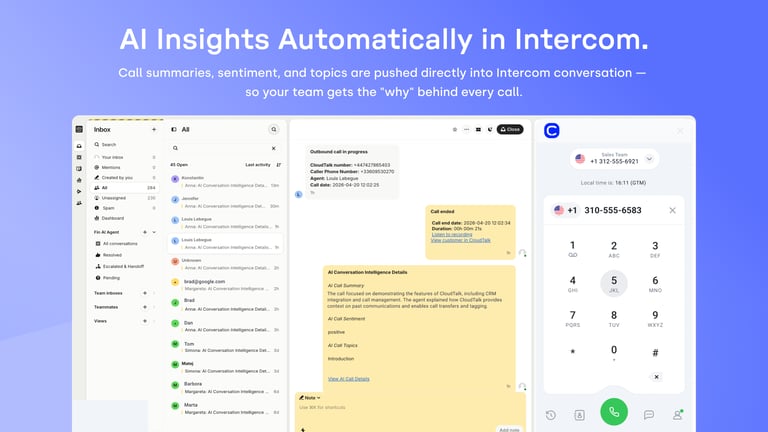
- 04Capture Intelligence via Intercom AI Voice Call AutomationTurn every conversation into a strategic data point for coaching and growth. This Intercom calling integration pushes the call summary, sentiment and topics from Conversation Intelligence into the Intercom conversation. They are added as a message or an internal note, depending on your integration settings, with a link to the call recording.
- 05Maintain Professionalism with Intercom Voice IntegrationTake your office anywhere while ensuring no interaction goes unrecorded in your central database. CloudTalk’s Intercom VoIP integration allows agents to handle calls on their mobile devices, ensuring that remote activities are synced and logged in real-time via business phone app technology.
- 06Maximize Efficiency with Intercom Call AutomationPair Click-to-Call with follow-up messaging. The Chrome extension makes phone numbers in Intercom clickable and drops the number straight into CloudTalk Phone. Follow up with text messages SMS from the same app once the call is done.
Intercom Phone System Integration

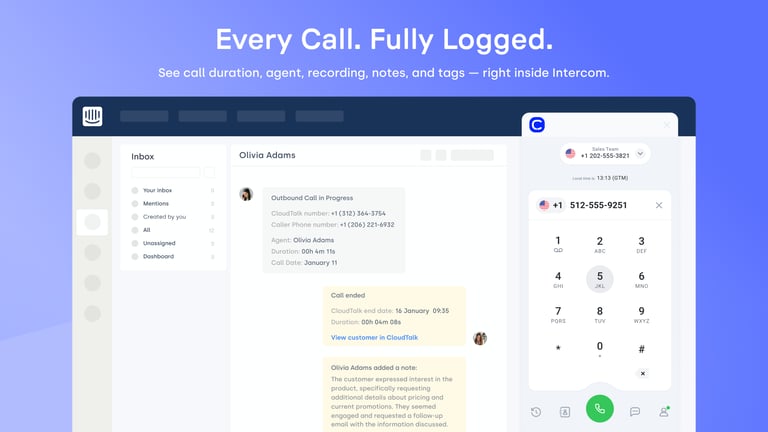
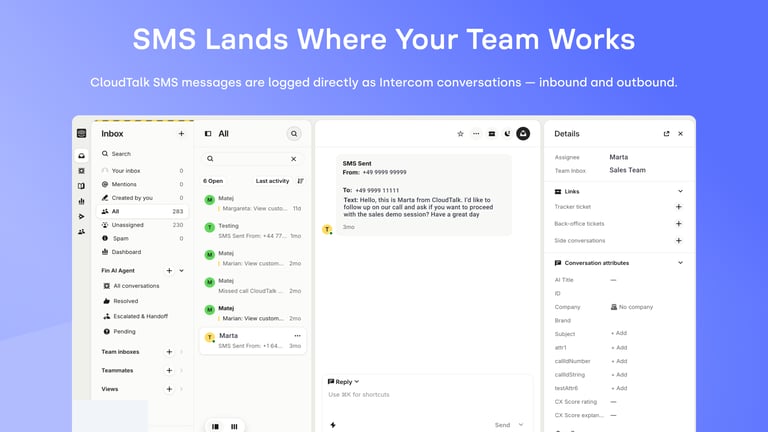
Combine the strength of your messaging platform with CloudTalk's Intercom VoIP integration. Your team makes and receives calls and sends text messages SMS in the CloudTalk app. Every call, recording and note syncs back to the matching Intercom contact, with 2-way contact synchronization on top.

Use CloudTalk, like these companies







What data do Intercom & CloudTalk Share?
Intercom CloudTalk
INTERCOM RECEIVES
CLOUDTALK RECEIVES
TWO-WAY SYNC
AI handles the routine. Your team handles what matters.
CloudTalk’s Intercom phone integration automates your administrative burden. Let AI Voice Agents and AI smart notes sync every detail to Intercom instantly while your reps focus on building relationships.

Good morning! Thank you for your call. I am CeTe, your AI voice assistant. How can I help you today?
Still on the Fence?
Unsure if CloudTalk is right for you? Let us help make up your mind.
100%
Security
Summaries, transcripts, sentiment, automation, all built into a reliable calling foundation. Let your team focus on having conversations, not catching up.
Explore AI Features5,500+
Happy customers (and counting)
From fast-growing startups to global brands, teams trust CloudTalk to power conversations that drive results.
View Wall of LoveOur reviews
Hear first-hand from our incredible community of customers.

Honestly, what I liked most was how easy it was to just get on a call. No complicated setup, no hunting through menus—you log in, and you're ready to take calls. For a customer service team handling a high volume of interactions every day, that kind of simplicity actually matters a lot."
Small-Business
Customer Service Agent
CloudTalk has exceeded our expectations. The platform is intuitive, making it easy to onboard our team and integrate with our existing tools. Call quality is crystal clear, and features like smart routing have significantly improved our workflow. What truly stands out is the proactive customer support—they always go the extra mile to ensure a smooth experience."
Mid-Market
Team Lead Manager
What I like most about CloudTalk is how it brings structure and clarity to communication (...). Having a centralized calling platform helps keep everything organized. Features like call recording are particularly useful, as they allow me to revisit discussions and ensure nothing is missed. Overall, CloudTalk improves efficiency while keeping interactions well-documented and easy to track."
Enterprise
Mechanical Design Engineer
I like that CloudTalk helps in keeping in contact with our international customers between the USA and Finland, making long-distance communication easier. It's great that CloudTalk integrates with my CRM, which is beneficial for our workflow. The initial setup process of CloudTalk was easy, which I appreciated."
Small-Business
Sales Representative
We’ve been using CloudTalk with a small team, and it’s the best solution we found that integrates directly with my CRM. Calls are automatically logged, and the overall setup is very straightforward. The interface is clean, and it works great with Spanish numbers. We did thorough research before deciding on CloudTalk, and it fits our specific use case perfectly."
Small-Business
Product Owner
CloudTalk is a game changer for business communications. Its reliability is unmatched (...). The standout integration with my CRM is particularly impressive, automatically logging calls and leveraging AI tools to create transcriptions and summaries. This automation streamlines our workflow and ensures no essential details slip through the cracks. CloudTalk’s user-friendly interface and crystal-clear call quality all contribute to superior customer interactions."
Mid-Market
Business Development Manager
Integrations
Get more value from your tools
Connect your tools, connect your teams. With over 100 apps already available in our directory, your favourite tools are just a click away.

HubSpot
Supercharge your outreach connecting CloudTalk to HubSpot for automated call logging and real-time data synchronization.
Learn more
Salesforce
Empower your sales and support teams with a seamless 2-way data sync between your phone system and Salesforce CRM.
Learn more
Zendesk Sell
Maximize productivity and drive revenue through a simple platform that offers full pipeline visibility.
Learn more
Pipedrive
Accelerate your sales cycle by making and logging calls directly within your Pipedrive deal pipelines.
Learn more
noCRM
Focus strictly on closing deals by eliminating manual logging through a streamlined outbound calling integration.
Learn more
MS Dynamics 365
Optimize your enterprise workflows by connecting professional telephony to your Microsoft Dynamics environment.
Learn moreDiscover 99+ Integrations


Intercom Phone Integration FAQ
Everything you need to know about this integration.
CloudTalk is a top-rated choice for an Intercom calling integration due to its deep 2-way synchronization and enterprise-grade reliability. CloudTalk logs each call on the Intercom contact as a conversation or an event, so voice history sits beside chat and email.
Yes. You send text messages SMS from the CloudTalk app rather than from inside Intercom, and the integration can log them against the Intercom contact. Your full message history stays in CloudTalk.
Intercom does not have a native phone system, but it supports a professional Intercom phone integration through third-party providers like CloudTalk. This connection keeps call records alongside chat and email.
No. CloudTalk does not embed a dialer or a CTI panel in the Intercom interface. Calls are made and received in the CloudTalk app for desktop, web and mobile. The Click-to-Call Chrome extension makes phone numbers in Intercom clickable, and each click loads the number into CloudTalk Phone. Call details, recordings, tags and notes are then written back to the Intercom contact.
The cost depends on your chosen provider's subscription tier. For CloudTalk, the integration is available to users on an Essential plan or higher.
Yes. CloudTalk’s Intercom VoIP integration connects your cloud-based phone system to Intercom through Intercom’s API. Calls are made and answered in the CloudTalk app, and CloudTalk writes each one back to the Intercom contact automatically.
CloudTalk is widely considered the best phone integration for Intercom in the US and globally because of its extensive offer of international, local, and toll-free numbers.
Here is how:
- Ensure you have admin access for both Intercom and CloudTalk, with matching email addresses.
- In the CloudTalk Dashboard, go to Account → Integrations.
- Select Intercom and authorize access using your Intercom login.
- Configure your sync rules for calls, recordings, and transcripts.
- Install the Click-to-Call Chrome extension for Chrome so phone numbers shown in Intercom load straight into CloudTalk Phone.
Complete records: call activity, recordings, tags and notes land on the Intercom contact beside chat and email.
- Workflow Automation: Set custom triggers for repetitive tasks like follow-ups or deal creation.
- Real-time Sync: Eliminate manual data entry and prevent duplicate records with 2-way synchronization.
Yes, you can connect existing infrastructure using Intercom integration with SIP trunking or by porting your current business numbers to CloudTalk.
Yes, CloudTalk’s Intercom VoIP integration can be configured in just a few clicks through a simple API-based authentication process.
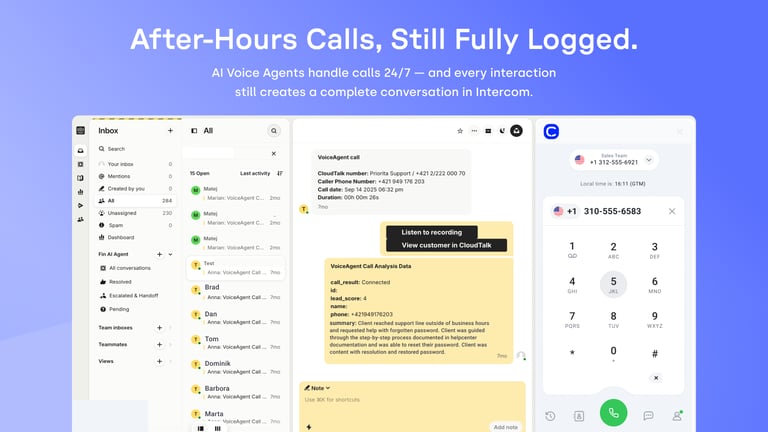
Core Intercom calling integration features include Click-to-Call, Call Recording, VoiceAgent call logging, and Intercom AI Voice Call Automation for sentiment analysis.
You need an active Intercom subscription and a compatible Intercom voice integration plan, such as CloudTalk Essential. Admin permissions are required on both platforms to authorize data access.


Hello 👋 My name is Emma. Still have questions?
Can't find the answer you're looking for? Please chat to our friendly team.