
How to Make Calls Go Straight to Voicemail: 4 Quick & Effective Steps
You can call a voicemail directly with Ringless Voicemail Drop. In this article, we’ll talk about what that is, how it works, and how to make calls go straight to voicemail, and get your message to your audience quickly.
TL;DR
Ringless voicemail is the only true way to skip ringing, but it’s heavily restricted. Voicemail Drop is the most practical option—reps call normally and send a pre-recorded message instantly when voicemail picks up. Call routing only works for inbound calls. AI Voice Agents can automate follow-ups and voicemail tasks entirely.
Did you know?
A quarter of Gen Z and Millennials are done answering your call¹. Combine that with the fact that 80% of calls (averaging 1-minute each) go to voicemail, and we’re talking about a serious time suck for your agents.²
Save Hours Every Week with Voicemail Drop
How to Make Calls Go Straight to Voicemail?

First of all—What is voicemail, really? The answer is simple—virtual voicemail is a system that records and stores voice messages when the recipient of a call doesn’t answer. Virtual voicemail is hosted in the cloud instead of being tied to a single phone.
When most people think about “sending a call straight to voicemail” they’re usually trying to dodge calls. But for teams who need to reach lots of people and fast, making calls go to voicemail sounds pretty appealing. So let’s see exactly how to make calls go straight to voicemail.
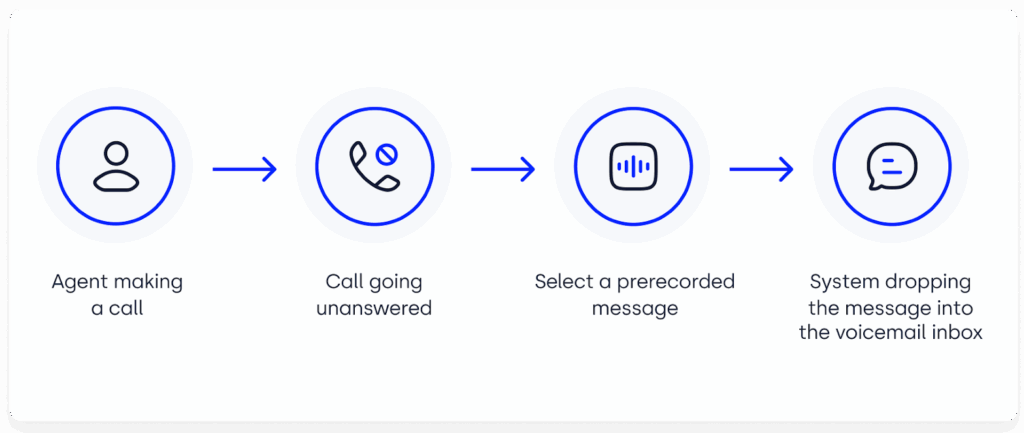
Ringless Voicemail
Ringless Voicemail uses server to server technology to deliver a message right into a person’s inbox. It requires no dialing, no calling, no ringing. It is the only real way to bypass ringing, but there’s a catch—it’s also highly scrutinized by the FCC and TCPA.
Ringless Voicemail
| Pros | Cons |
|---|---|
| Guaranteed straight-to-voicemail delivery. | Legally murky in many regions (especially U.S.). |
| Saves reps from waiting through unanswered rings. | Risk of complaints if contacts feel “spammed.” |
| Limited availability depending on carrier/regulation. |
Voicemail Drop
Voicemail drop software lets your reps call as usual, but once they get the voicemail, they can instantly “drop” a pre-recorded message instead of speaking live. It’s not technically ringless, but it eliminates wasted time and keeps voicemails consistent.
Voicemail Drop
| Pros | Cons |
|---|---|
| Saves hours by skipping manual voicemail recordings. | Still requires a call attempt (not true “direct to voicemail”). |
| Scales across entire sales/recruiting teams. | Needs a compatible VoIP dialer or sales platform. |
| Polished, consistent messaging every time. |
Call Routing (Inbound)
With conditional call routing (built into many business phone systems), you can set rules for inbound calls, so unanswered or after-hours calls automatically go to voicemail. This ensures prospects and customers always have a way to leave a message, even if no one’s available.
Call Routing
| Pros | Cons |
|---|---|
| Reliable way to capture missed inbound calls. | Doesn’t bypass ringing for outbound calls. |
| Great for support teams and small businesses. | Only for inbound calls. |
AI Voice Agents
Sometimes the best way to save time on voicemails… is not to leave them at all. An AI Voice Agent can make the calls that your team is too busy to deal with. That way your agents can focus on the higher priority leads, while the voice agent ensures nothing falls through the cracks.
AI Voice Agents
| Pros | Cons |
|---|---|
| No manual voicemail work for reps. | Requires setup and training (not plug-and-play). |
| Consistent, professional follow-ups every time. | Works best for teams already using AI in workflows. |
| Can also answer inbound calls or qualify leads. |
How to Go Straight to Someone’s Voicemail Using CloudTalk in 4 Steps
CloudTalk’s Voicemail Drop allows you to leave a pre-recorded voicemail when a call goes to voicemail—no extra talking and on to the next call.
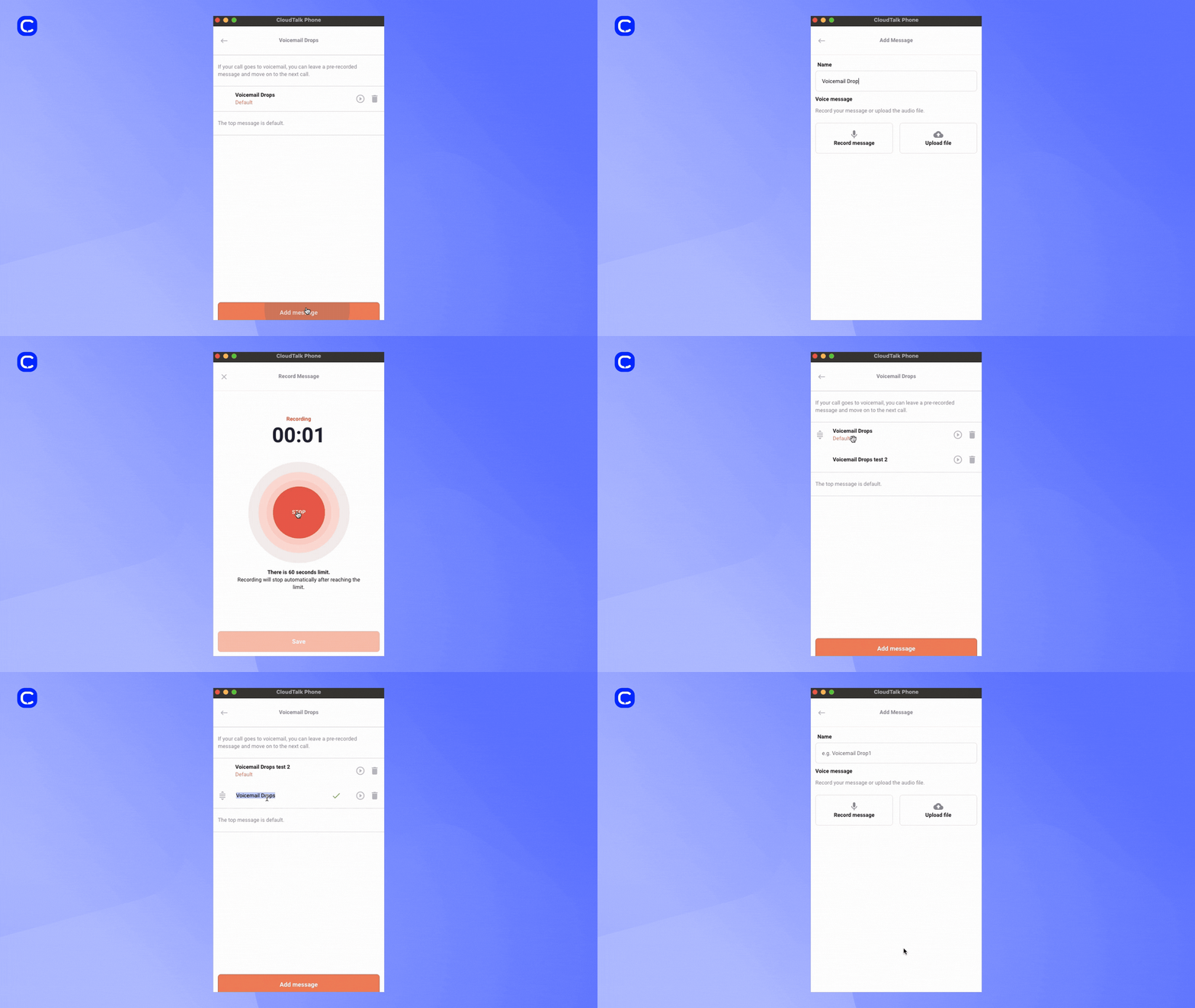
Here’s how to make that happen:
Step 1: Enable Voicemail Drops in Settings
-
Go to Settings → Voicemail Drops in your CloudTalk dashboard.
-
Choose whether to record your message directly in the app or upload an audio file, and name your voicemail template.
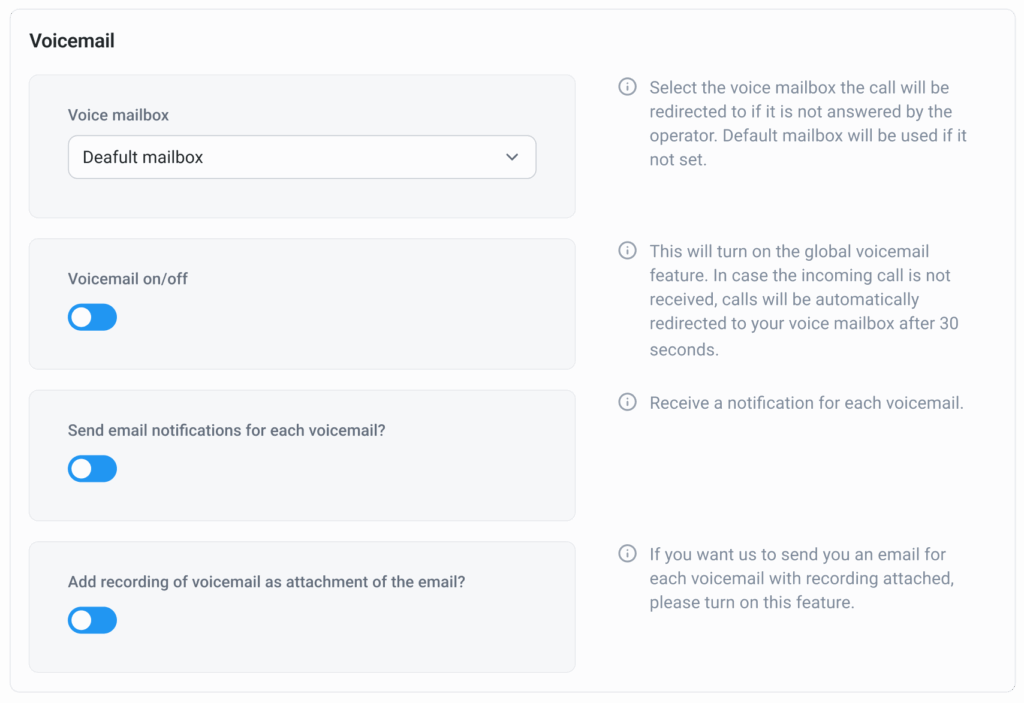
Step 2: Create & Manage Your Voicemails
-
After setup, you can play, rename, or delete voicemail templates as needed within your visual voicemail list.
-
Set one as your default or keep multiple versions for different campaign purposes.
-
If you need help creating your voicemail, you can use a voicemail greeting generator.

Step 3: Drop the Voicemail During a Call
When making outbound calls via CloudTalk:
-
If you reach voicemail (i.e., after the beep), click “More” → “Voicemail Drop”, then select the appropriate template.
-
Finish with “Done”, then tag or add notes to log the call action.
Step 4: Track & Refine Your Strategy
-
After dropping the voicemail, the call summary logs your activity—including message sent and any tags or notes added.
-
Use this data to optimize messaging, target segments more effectively, or trigger follow-ups.
Other Ways People Send Calls Straight to Voicemail (Phone Settings)
When people search for “how to send a call straight to voicemail,” they’re often referring to built-in phone settings, not sales tools. Here are the most common consumer methods:
Do Not Disturb (iPhone & Android)
Do Not Disturb is the quickest way to make calls go straight to voicemail.
- iPhone: Open Control Center and tap the moon icon, or go to Settings → Do Not Disturb to schedule it.
- Android: Pull down the notification shade and tap Do Not Disturb (usually a crescent moon). Many devices let you customize which calls are allowed through.
Call Forwarding
You can forward all incoming calls directly to your voicemail number.
- Open your Phone app settings
- Go to Call Forwarding or More Settings
- Select Always forward and enter your voicemail number
Airplane Mode
Turning on Airplane Mode also sends all calls straight to voicemail because it disconnects your phone from the network.
- Open Quick Settings and tap the airplane icon
Per-Contact Settings
Most phones let you control voicemail behavior for specific callers:
- Send to Voicemail: Some contact cards include an option to route a caller directly to voicemail.
- Block: Blocking a number prevents ringing and typically sends the call straight to voicemail.
These phone settings are helpful for individual users, but they don’t apply to outbound sales workflows. If your goal is efficiency and compliance, Voicemail Drop is the most practical way to handle large-scale outreach without wasting time.
Gain Time Every Week with Voicemail Drop
Recommended Articles
Want to Close More Deals in Less Time?
Getting your message across doesn’t have to mean wasting time listening to endless rings or repeating the same voicemail 20 times a day. Whether it’s ringless voicemail, voicemail drop, or even AI voice agents, the goal is the same: help your team save time while keeping outreach consistent and professional.
CloudTalk’s Voicemail Drop makes that simple. With pre-recorded, on-brand messages and seamless CRM logging, your reps can focus on live conversations, the ones that actually help you close deals.
If you’re ready to skip the beeps and boost productivity, it might be time to see how CloudTalk’s Voicemail solutions can transform the way your team works.
Stop Wasting Time on Repeated Voicemails
Sources:






















