TL;DR: CloudTalk vs Aircall
CloudTalk vs Aircall: The TL;DR
| Question | Quick Answer | |
|---|---|---|
| Is CloudTalk better than Aircall? | For most sales and support teams, yes. CloudTalk is cheaper to start, dials in parallel, and writes call data into the CRM without a rep typing it. Aircall is the faster platform to be live on. | |
| Which is cheaper? | CloudTalk at the entry point: $25/user/month with a one-licence minimum, against a $90/month floor on Aircall, whose $30 Essentials plan requires three licences. Higher up it flips twice; the pricing section has the line-by-line. | |
| What does each one cost all in? | For eight seats with conversation intelligence, roughly $464/month on CloudTalk Expert and $400 on Aircall Professional. Aircall reaches $760 once Analytics+ and Salesforce Voice are added, both of which sit inside CloudTalk's Expert plan. | |
| Which is better for outbound? | CloudTalk, and it isn't close. Parallel dialing up to 10 lines per agent with roughly 1.5-second voicemail detection, against no parallel or predictive mode on Aircall at any tier; its Power Dialer dials sequentially from the $50 Professional plan. | |
| Which covers more countries? | CloudTalk, and Aircall doesn't contest it: local numbers in 160+ countries on a multi-carrier network, against no published country count for phone-number coverage on Aircall's side. | |
| Which connects to more tools? | Aircall on count, with 100+ connectors from its entry plan against CloudTalk's 95+ from Essential. CloudTalk goes deeper: AI summaries, topics, sentiment, and tags post onto the record itself in HubSpot, Salesforce, Pipedrive, and Zendesk. | |
| Which has better AI and coaching? | It splits. Both ship listen, whisper, and barge, so live human coaching is close to a tie. Aircall bundles conversation intelligence into Professional and is the only one that surfaces AI prompts and playbooks while a call is live. CloudTalk is cheaper and deeper on everything that happens after the call ends. | |
| Which is faster to set up? | Aircall, comfortably: the fastest first-day setup in the category and an interface most reps need no training for. CloudTalk asks for more configuration up front and pays it back in headroom. | |
| Which one clears a security review? | CloudTalk, narrowly, and on plan gating rather than certificates. Both hold SOC 2 and GDPR and both offer a HIPAA BAA; the difference is that Aircall lists single sign-on on its 25-licence Custom tier, and CloudTalk ships SAML SSO without an enterprise contract. | |
| How do the reviews compare? | Level. CloudTalk holds 4.4/5 on G2 and Aircall holds 4.4/5, so the decision gets made in the sub-scores and the review text rather than the star rating. | |
| Who should pick which? | CloudTalk if you dial in volume, sell across borders, or answer to a compliance team. Aircall if you have three or more agents, straightforward routing, and need to be live this week. | |
CloudTalk is the better platform if you need local numbers in markets where you have no legal entity, more conversations per rep per hour, routing you can change while calls are live, or call data that reaches the CRM without a rep typing it. Those are the four things teams actually switch for, and they are the four places the gap is widest.
The specifics behind each one: local numbers in 160+ countries on a multi-carrier network, with number-reputation monitoring and automated rotation when one gets flagged. Parallel dialing up to 10 lines per agent with roughly 1.5-second voicemail detection, against no parallel or predictive mode on Aircall at any tier.
A drag-and-drop Call Flow Designer with branching, failover, and edits that apply mid-call. Real-time analytics from the Essential plan rather than behind a $15 per licence add-on. And AI summaries, topics, sentiment, and tags posting themselves onto the contact record in HubSpot, Salesforce, Pipedrive, and Zendesk.
Aircall’s counterweight is speed, and it is real: it is the faster platform to be live on, and AI Assist Pro is the only thing in this comparison that prompts a rep mid-call. Neither moves the $90 entry floor or the dialing ceiling.
Below we compare features, pricing, integrations, security, usability, and what real users report on G2 and Reddit, with every price checked against both vendors’ current pricing pages. Or jump straight to the 15 key dealbreakers and find yours.
Switching from Aircall to CloudTalk
Velu, a UK consulting agency running Aircall, was stuck at a 20-30% pickup rate during prime calling hours and reached 40-50% after switching. Read the story.
What Changed at Aircall in 2026
Most CloudTalk vs Aircall comparisons still describe Aircall as a business phone system with a CRM integration attached. That framing is a year out of date, and evaluating on it means misjudging what you would actually be buying. Aircall spent 2026 repositioning toward AI-native customer communications, and it shipped.
- Piper AI acquisition, announced June 2026Revenue intelligence and agentic execution: automatic CRM updates, deal scoring, and pipeline-risk signals. It moves Aircall out of telephony and into sales automation.
- AI Messaging Agents, May 2026Autonomous SMS and WhatsApp handling on existing numbers, with AI Actions wired into HubSpot, Zendesk, Shopify, and Calendly.
- AI Voice Agent and AI Assist ProThe voice agent is built on Aircall's Vogent acquisition; AI Assist Pro adds real-time in-call coaching. This is the one place Aircall is genuinely ahead of CloudTalk today.
- 250+ integrationsUp from the 100+ figure most comparison pages, including older versions of this one, still quote.
Two things temper it, and both are worth raising on a sales call rather than discovering later. Aircall’s AI language coverage is narrow relative to the rest of its footprint, so a multilingual team should confirm its specific languages are supported before assuming the AI layer applies to them at all. And the AI Voice Agent is metered per minute on top of the licence, so its cost scales with call volume rather than with headcount.
Who is better here? Aircall, on shipping velocity over the last twelve months, and it isn’t close. CloudTalk’s answer is breadth of language coverage and pricing you can forecast, not a longer feature list.
Why You Can Trust This Comparison
For nearly a decade, we’ve helped over 30,000+ professionals find and implement smarter business communication tools. We’ve reviewed 200+ software tools across industries, analyzed 5,500+ verified customer reviews from platforms like G2, Capterra, Trustpilot, and TrustRadius, and drawn insights from real user discussions on Reddit and Quora.
In the past year alone, we published 1,000+ articles, each one written by humans for humans.
CloudTalk makes one of the two products reviewed here, so we’ve been careful to name the places where Aircall wins. We read every Aircall price, plan limit, and add-on below off Aircall’s own published pricing data. Where we couldn’t verify something, we say so rather than guess.
Curious What Your Call Data Looks Like When Nobody Has to Type It In?
Why CloudTalk Is Better Than Aircall
CloudTalk comes out ahead on the things that show up on the invoice and in the pipeline: what you pay to get started, how many calls a rep can make in a day, how far your numbers reach, and whether call data ends up in the CRM on its own. Aircall competes hard on simplicity and on AI packaging at its top self-serve tier, and we’ll get to both. But across the dimensions that drive most platform decisions, the evidence favors CloudTalk.
CloudTalk’s Core Advantages Over Aircall
CloudTalk's Core Advantages Over Aircall
| Advantage | What It Changes |
|---|---|
| Start with one licence, not three | CloudTalk's Starter and Essential plans have a one-licence minimum, at $25 and $29/user/month. Aircall's Essentials plan requires three licences at $30 each, so the cheapest real Aircall invoice is $90/month. A founder testing a phone system on CloudTalk pays $25. |
| Parallel dialing, up to 10 lines per agent | An add-on on every CloudTalk plan, with answering-machine detection at roughly 1.5 seconds. Aircall has no parallel or predictive dialing mode at any tier, and its Power Dialer works through a list one number at a time. For an outbound team, that gap is measured in conversations per rep per day. |
| Local numbers in 160+ countries | Backed by a multi-carrier strategy and decentralized SIP infrastructure, so selling into a new market takes a number purchase rather than a local entity. Aircall does not currently publish a country count for phone-number provisioning. |
| Call intelligence writes itself into the CRM | Dedicated Conversation Intelligence Data Export integrations for HubSpot, Salesforce, Pipedrive, and Zendesk push AI summaries, topics, sentiment, and tags onto the contact or deal record. This is the two-hours-a-week problem from the Salesforce data above, and the rep never opens a notes field. |
| Conversation intelligence at a flat $9/user/month | On any plan, covering transcription, AI Call Summary, AI Smart Notes, sentiment, topic detection, AI tags, talk/listen ratio, transcript search, and AI call scoring. Aircall bundles a comparable set into Professional at $50/licence, but its deeper coaching layer, AI Assist Pro, is $49/licence/month on top of any plan. |
At a Glance: CloudTalk vs. Aircall, 15 Key Dealbreakers
Most people reading a CloudTalk Aircall comparison have one or two dealbreakers and don’t much care about the rest. Find yours in this table, then jump to the section that covers it.
CloudTalk vs Aircall: 15 Key Dealbreakers
| Dimension | CloudTalk | Aircall | Winner |
|---|---|---|---|
| Entry price | $25/user/month billed annually (Starter) | $30/licence/month billed annually (Essentials) | CloudTalk |
| True minimum monthly spend | $25 – Starter and Essential have a one-licence minimum | $90 – Essentials requires three licences | CloudTalk |
| Seat minimum, top self-serve tier | 3 licences on Expert | 3 licences on Professional | Tie |
| Native integrations | 95+ CRM, helpdesk, and ATS integrations, unlocked on Essential | 100+ tool integrations plus API access, from the entry plan | Aircall |
| IVR, queues, and call routing | Included from Starter, with a drag-and-drop Call Flow Designer | Included from Essentials | Tie |
| Parallel / predictive dialing | Parallel Dialer, up to 10 lines per agent, add-on on any plan at $39/user/month | Not available at any tier | CloudTalk |
| Power (sequential) dialing | Included on Expert; $15/user/month add-on below it | Included on Professional ($50/licence/month) | Tie |
| Conversation intelligence packaging | Always a paid add-on at $9/user/month, on every plan | $9/licence add-on on Essentials, bundled into Professional | Aircall |
| Live in-call prompts and playbooks | Not currently offered | AI Assist Pro, $49/licence/month on top of any plan | Aircall |
| AI voice agents | Add-on, from $99/month for 200 minutes | 50 free minutes per account per month on every tier, then bundles from $175 for 500 minutes | Tie |
| International number coverage | Local numbers in 160+ countries | No current country count published | CloudTalk |
| Recording and analytics retention | Unlimited call recording storage from Essential | Recordings up to 1 year on Essentials; advanced analytics capped at 6 months unless you add Analytics+ at $15/licence/month | CloudTalk |
| Salesforce | Full CTI on Expert, plus a pre-built Support KPIs dashboard | Aircall for Salesforce Voice is a separate $30/licence purchase | CloudTalk |
| Security and compliance | SOC 2 Type 1 and Type 2, GDPR, HIPAA since Q1 2025 with BAA support, SAML SSO on any plan | SOC 2 Type 2, GDPR, and a HIPAA BAA; SAML SSO gated to the 25-licence Custom tier | CloudTalk |
| First-day setup speed | Guided setup, with 24/7 support during onboarding | Fastest in the category and a very low learning curve | Aircall |
The short verdict: CloudTalk takes the cost, outbound, and reach columns. Aircall takes packaging at its top self-serve tier and speed to first call.
CloudTalk Features vs. Aircall Features
Both products do the obvious things well. Anyone comparing CloudTalk vs Aircall features on a spec sheet will find IVR, recording, click-to-dial, SMS, and softphones on both sides. The differences start where call volume, coaching, and data flow come in.
CloudTalk Features
CloudTalk puts calling, AI, CRM sync, dialing modes, and analytics inside one product rather than stitching them together from separate purchases. Deloitte’s 2025 contact centre research2 found that resolving an issue on first contact matters more to customers (47%) than self-service options (13%), which is a decent argument for spending your budget on routing quality rather than on deflection.
What CloudTalk Does Well
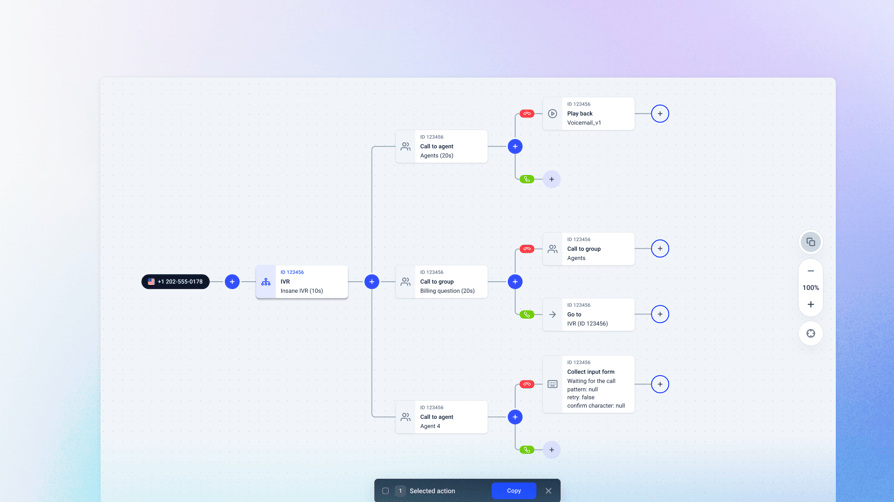
- Visual call flow designer on every planDrag-and-drop designer for incoming call flows with 19 actions, branching logic, failover actions, condition-based routing, and real-time edits that don't interrupt live calls.
- Routing that remembers peopleFavorite and preferred agent routing sends repeat callers back to the agent they last spoke to, with the contact owner imported automatically through native integrations.
- Listen, whisper, and barge for supervisorsReal-time call monitoring on the Expert plan, so a manager can sit silently on a call, coach the rep without the customer hearing, or take over.
- Parallel dialing with voicemail detectionUp to 10 parallel lines per agent, connecting the rep to the first live answer. Answering-machine detection runs at roughly 1.5 seconds, and skipped leads go back into the queue rather than getting lost.
- Conversation intelligence that exports itselfThe $9/user/month AI add-on covers transcription, AI Call Summary, AI Smart Notes, sentiment analysis, topic detection, AI tags, talk/listen ratio, transcript search, and AI call scoring, with dedicated data-export integrations that push all of it into HubSpot, Salesforce, Pipedrive, and Zendesk.
Customer story: Velu, a UK consulting agency, was running Aircall and stuck at a 20-30% pickup rate during prime calling hours. On CloudTalk it reached 40-50%, with fewer dropped calls and faster SDR onboarding. “We were stuck at a 20-30% pickup rate with Aircall. With CloudTalk, we’ve hit 40-50%. That’s made all the difference.” Syon Joshi, CMO. Read the story.
If your reps are losing their afternoon to redials and voicemail greetings, that’s the stack to test first. Start your 14-day free trial, no credit card required.
Aircall Features
Aircall’s strongest card is first-day simplicity. The entry plan carries IVR, call recording, click-to-dial, SMS and MMS, desktop and mobile softphones, unlimited simultaneous outbound calls, and 100+ integrations with API access, which is a complete starting kit by any reasonable measure. Professional adds smart routing, queue callback, Power Dialer, Voicemail Drop, and the full AI Assist set including call scoring.
Where Aircall Falls Short
- Three licences minimum on both self-serve plansYou cannot buy one seat or two. The entry invoice is $90/month, and the Custom tier jumps to a 25-licence minimum.
- No parallel or predictive dialing modePower Dialer dials sequentially and only appears on the $50 Professional plan, so a high-volume outbound team hits a hard ceiling on conversations per hour. Our Aircall Power Dialer vs CloudTalk Power Dialer breakdown walks through what that costs per rep per day.
- Conversation intelligence is tier-gatedOn Essentials, AI Assist is a $9/licence/month add-on. To get it bundled you move to Professional at $50/licence, which is a $20 jump per seat rather than a $9 one.
- Coaching depth is expensiveAI Assist Pro, which carries the live transcription, live prompts, playbooks, and custom call scoring, is $49/licence/month on top of whatever plan you're on. On Essentials that nearly triples the seat cost.
- The dialer is a rep-level tool, not a managed campaignLists are built by the person dialing them, so a manager cannot centrally create a campaign, assign it, and watch progress across the floor. For five reps that's fine. For twenty working a shared list it's the difference between running an outbound operation and hoping twenty people each run their own.
- Analytics history runs outAdvanced analytics retention is capped at 6 months unless you buy Analytics+ at $15/licence/month, and Essentials limits you to three teams.
Feature-by-Feature Comparison
Feature-by-Feature Comparison
| Feature | CloudTalk | Aircall |
|---|---|---|
| Entry price (annual billing) | $25/user/month | $30/licence/month |
| Seat minimum on the entry plan | 1 licence | 3 licences |
| IVR and visual call flow builder | Call Flow Designer on every plan, 19 actions | IVR from Essentials |
| Skill-based and favorite-agent routing | Skill-based, caller-based, and condition-based routing; favorite agent routing | Smart routing from Professional |
| Power (sequential) dialer | Included on Expert; $15/user/month add-on on Starter and Essential | Included on Professional |
| Parallel dialer | Up to 10 lines per agent, $39/user/month add-on on any plan | Not available at any tier |
| AI call summaries and notes | AI Call Summary and AI Smart Notes, in the $9/user/month AI add-on | AI Assist: call summaries, action items, key topics |
| AI call scoring | In the $9/user/month AI add-on | In AI Assist; custom-question scoring in AI Assist Pro |
| Live in-call prompts | Not currently offered | AI Assist Pro, $49/licence/month |
| AI voice agents | From $99/month for 200 minutes | 50 free minutes per account per month, then $175 for 500 minutes; metered per minute above the bundle |
| Listen, whisper, barge | Included on Expert | Live Monitoring, included on Professional |
| Real-time analytics and wallboards | Real-time analytics from Essential; wallboards and custom dashboards on Expert | Advanced analytics from Professional; Analytics+ at $15/licence/month for unlimited retention |
| SMS and MMS | Included from Essential | Included from Essentials |
| Included in Expert; add-on on lower plans | $10/licence/month add-on | |
| Mobile app | iOS and Android | iOS and Android |
| Call recording storage | Unlimited from Essential | Up to 1 year on Essentials; unlimited on Professional |
| Local numbers | 160+ countries | 1 local or toll-free number included per plan |
Who is better here? CloudTalk, if your team dials or sells internationally. Aircall, if you want a clean phone system with AI attached and three seats isn’t a problem.
Coaching & Call Monitoring: CloudTalk vs. Aircall
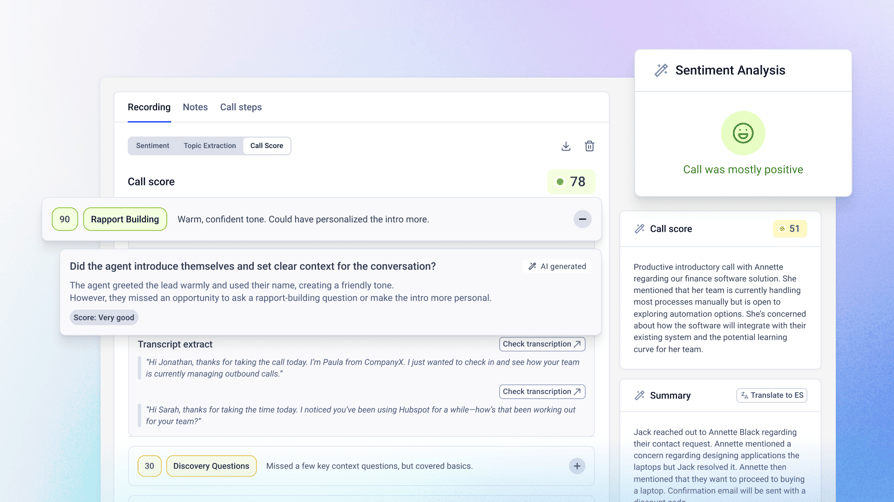
Salesforce’s 2026 State of Sales report1 found that 46% of sellers rarely get feedback on their sales conversations, and 47% say they don’t get enough roleplay before customer calls. That gap costs you in a specific way: a rep who ramps two weeks slower costs two weeks of quota, and the fix is rarely another training day. A shorter feedback loop on calls that already happened moves the number faster, which is the whole case for call software with AI coaching for agents.
Coaching and Call Monitoring Compared
| Dimension | CloudTalk | Aircall |
|---|---|---|
| Live call listening | Included on Expert | Included on Professional |
| Whisper coaching | Included on Expert | Included on Professional |
| Barge-in | Included on Expert | Included on Professional |
| AI call scoring | In the $9/user/month AI Conversation Intelligence add-on | In AI Assist ($9/licence add-on on Essentials, bundled on Professional); custom-question scoring in AI Assist Pro at $49/licence/month |
| Live prompts and playbooks during a call | Not currently offered | AI Assist Pro, $49/licence/month |
| Post-call coaching data | Transcripts, AI summaries, smart notes, sentiment, topic detection, talk/listen ratio, and transcript search, all in the $9 add-on | Call summaries, talk-to-listen ratios, sentiment, trending topics, and action items in AI Assist |
| How far back you can look | Unlimited call recording storage from Essential | Recordings up to 1 year on Essentials; advanced analytics capped at 6 months without Analytics+ |
Who is better here? It splits. Live human coaching is close to a tie: both ship listen, whisper, and barge, CloudTalk on Expert at $49 and Aircall on Professional at $50. The real gap is AI-driven coaching in the moment, and that is Aircall’s alone: AI Assist Pro is the only thing here that will surface a prompt or a playbook to a rep while the call is live. CloudTalk is cheaper and deeper on everything that happens after the call ends, and it keeps recordings long enough to build a coaching library out of them.
Number Reputation: What Kills Pickup Rates Before You Dial
Two platforms can offer identical dialers and identical call quality and still produce very different pickup rates, because the variable that moves first is what the carrier network thinks of your number. A number that arrives pre-labeled as spam is a number your reps are paying to have ignored, and no dialer speed fixes that.
It is worth checking on any shortlist because it is invisible in a demo and expensive later. Three questions separate the two platforms.
- Where do the numbers come from?A provider reselling through a single upstream carrier inherits that carrier's reputation pool, including whatever the previous holder of your number did with it. CloudTalk provisions through multiple direct carriers, which is the same thing sitting behind the call-quality claim.
- Can you see a number's reputation, and fix it?CloudTalk runs number-reputation monitoring through Numeracle, so a flagged number is something you find out about from a dashboard rather than from a connect rate that quietly drifts down over a quarter.
- Can rotation happen without a human doing it?CloudTalk rotates numbers automatically when reputation degrades. Doing that by hand across a few dozen outbound numbers is a job nobody has time for, which is why it usually doesn't happen at all.
Aircall does not publish number-reputation monitoring or automated rotation as product features. Branded caller ID and STIR/SHAKEN attestation do a related job from the other direction: rather than avoiding a spam label, they put your company name on the recipient’s screen.
Number Provisioning and Reputation Compared
| Dimension | CloudTalk | Aircall |
|---|---|---|
| Carrier model | Multiple direct carriers | Carrier partners, per its own number-purchase documentation |
| Number reputation monitoring | Numeracle-based monitoring | Not published |
| Automated number rotation | Yes, triggered on reputation degradation | Not published |
| Branded caller ID | From $0.07 per outbound call | Not published |
| Local numbers | 160+ countries | 100+ countries per its country-coverage page |
| SMS country availability | Included from Essential | US, Canada, UK, France, Australia, and Germany; in the UK, France, Australia, and Germany only mobile numbers can send SMS |
Who is better here? CloudTalk, and it’s the least contested win in this comparison, because Aircall does not compete on it. If your outbound numbers are more than a year old and your connect rate has drifted down without an obvious cause, this is the first place to look.
Total Cost of Ownership: CloudTalk vs. Aircall
Headline per-seat pricing is close enough between these two that it barely decides anything. The second invoice decides it: the dialer, the AI layer, the analytics retention, and the CRM connector that turns out to be a separate SKU. Deloitte Digital’s 2026 contact center research2 found that 43% of organizations expect AI to cut contact center costs by 30% or more within three years, which is a good reason to check what the AI actually costs before you count the saving.
Add-On Cost Compared
| Add-On | CloudTalk | Aircall |
|---|---|---|
| Power / sequential dialer | $15/user/month; included on Expert | Included on Professional ($50/licence/month) |
| Parallel dialer | $39/user/month on any plan | Not available at any tier |
| Conversation intelligence | $9/user/month, always an add-on | $9/licence/month on Essentials; bundled on Professional |
| Live coaching layer | Not currently offered | AI Assist Pro, $49/licence/month |
| Advanced analytics and retention | Real-time analytics from Essential; wallboards and custom dashboards included on Expert; unlimited recording storage from Essential | Analytics+, $15/licence/month for unlimited retention |
| Extra phone numbers | From $6 per number per month | 1 number included per plan |
| Branded caller ID | From $0.07 per outbound call | Not published |
| Salesforce | Included on Expert | Aircall for Salesforce Voice, $30/licence |
| Included in Expert; add-on below | $10/licence/month | |
| AI voice agents | From $99/month for 200 minutes | 50 free minutes per account per month, then $175 for 500 minutes or $725 for 2,500 |
Retention and price are the visible part of the analytics line. The one that changes how a manager actually works is refresh. On Aircall, calls can take hours to appear in reporting, so a dashboard checked at 2pm is not describing 2pm. And Analytics+ is bought account-wide rather than for the three managers who need it, so $15 per licence applies to every seat, including the reps who will never open a dashboard.
A Note on Negotiating Either Quote
Neither vendor's list price is what a mid-size team pays. Vendr's marketplace data puts the median Aircall discount at 23% off list, so treat the published $30 and $50 as opening positions. The number worth comparing is not the seat price but the twelve-month total with the add-ons your team will actually switch on: the dialer, the AI layer, analytics retention, extra numbers, and the CRM connector. Build that on one page for both vendors before either sales call. Whichever way you go, the quote improves when you can show the other one's twelve-month number.
Typical All-In Cost for a Small Sales Team (Estimate)
- CloudTalk: Expert at $49/user/month plus the AI Conversation Intelligence add-on at $9/user/month works out to $58 per seat, or roughly $464/month for eight seats. Power Dialer, real-time analytics, wallboards, custom dashboards, Salesforce, and unlimited recording storage are already in the Expert plan. Adding the Parallel Dialer at $39/user/month takes it to roughly $776/month.
- Aircall: Professional at $50/licence/month with AI Assist bundled is $400/month for eight seats. Add Analytics+ at $15/licence for unlimited analytics retention and it’s $520/month. Add Salesforce Voice at $30/licence and it’s $760/month. Parallel dialing isn’t purchasable at any price.
Aircall’s bare Professional tier is the cheaper line item, and we’re not going to pretend otherwise. CloudTalk gets cheaper the moment you need analytics retention, Salesforce, or wallboards, because those sit inside the Expert plan rather than beside it.
Who is better here? CloudTalk, once your requirements go past calling plus basic AI. If they stop at Professional, Aircall is the smaller invoice.
CloudTalk Pricing vs Aircall Pricing
CloudTalk Pricing
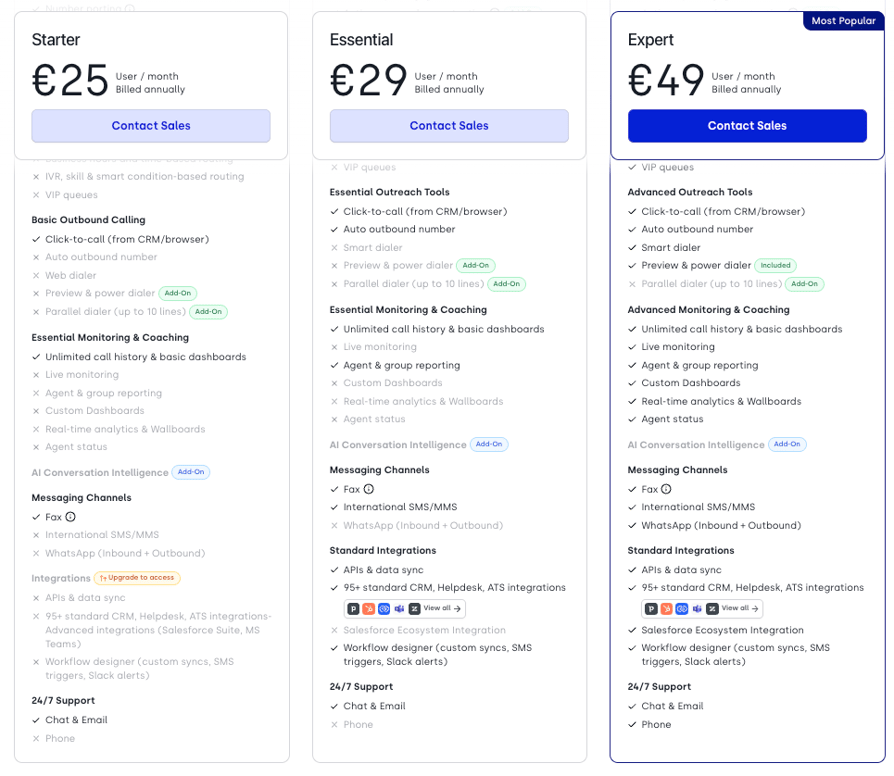
CloudTalk sells four plans. Annual billing is the cheaper option, and monthly billing is available on every tier.
- Starter – $25/user/month billed annually, or $34/user/month billed monthly. Minimum one licence. Automatic call distribution, the Call Flow Designer, IVR with skill and smart condition-based routing, unlimited call queues, business-hours routing, a local number, click-to-call, the web dialer, and desktop and mobile apps.
- Essential – $29/user/month annually, or $39/user/month monthly. Minimum one licence. Adds the 95+ CRM, helpdesk, and ATS integrations, public API and data sync, the Workflow Automation Designer, Smart Dialer, real-time analytics, unlimited call recording storage, and 24/7 live support.
- Expert – $49/user/month annually, or $69/user/month monthly. Minimum three licences. Adds the Salesforce integration, Power Dialer included, wallboards, custom dashboards, real-time call monitoring with listen, whisper, and barge, and advanced reporting.
- Custom – Contact Sales. Minimum five users. Custom SLAs, dedicated account management, and specific compliance arrangements.
Two Add-Ons Are Never Bundled Into Any Plan
AI Conversation Intelligence at $9/user/month and AI Voice Agents from $99/month for 200 minutes are add-ons on every tier, including Expert. The Parallel Dialer is a $39/user/month add-on on every plan. Power Dialer is $15/user/month on Starter and Essential and included on Expert.
Aircall Pricing
Aircall sells three plans, all with licence minimums. Our full Aircall pricing breakdown goes through each tier in detail.
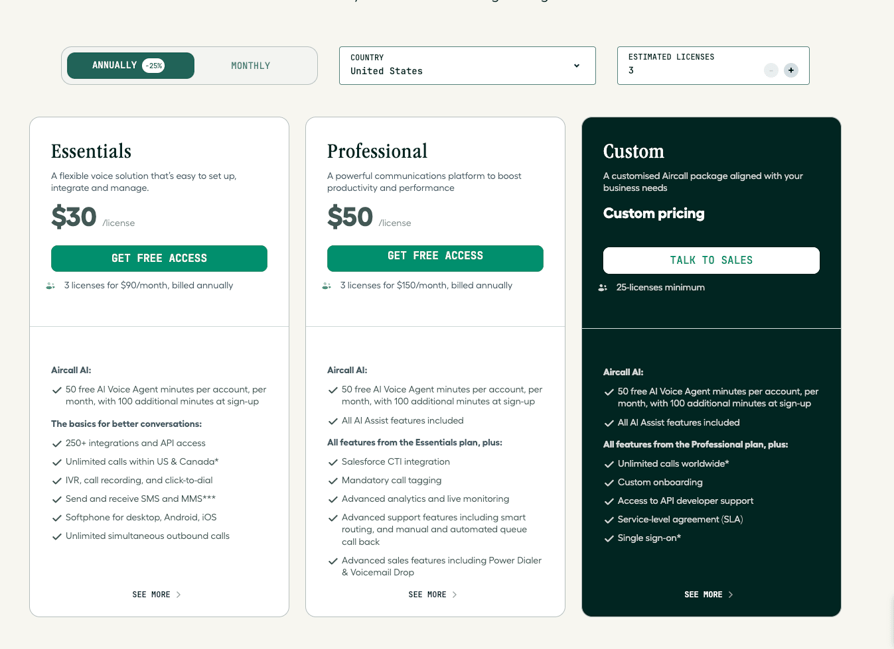
- Essentials – $30/licence/month billed annually. Minimum three licences, so $90/month is the entry invoice. 100+ integrations and API access, IVR, call recording, click-to-dial, SMS and MMS, softphone for desktop and mobile, unlimited simultaneous outbound calls. Capped at three teams, with recording access up to one year and up to six months of basic analytics.
- Professional – $50/licence/month billed annually. Minimum three licences, so $150/month to start. Everything in Essentials plus all AI Assist features, advanced analytics, smart routing, queue callback, Power Dialer, and Voicemail Drop.
- Custom – quote-based. Minimum 25 licences. Everything in Professional plus custom onboarding, API developer support, an SLA, and single sign-on.
Aircall’s pricing page offers an annual-or-monthly toggle, with annual billing advertised at 25% less than monthly.
The Catch With Aircall Pricing
Anyone running an Aircall vs CloudTalk pricing comparison on headline numbers will conclude the two are within a few dollars of each other. Four things move the real total.
The Catch With Aircall Pricing
- The three-licence minimum applies whether or not you have three peopleA two-person team pays for three seats. On CloudTalk's Starter and Essential plans, a two-person team pays for two.
- The Custom tier requires 25 licencesCloudTalk's Custom plan requires five. If your growth path runs through an enterprise contract, that's a very different threshold to clear.
- The AI you probably want sits above the plan you probably wantedConversation intelligence is bundled at Professional, not Essentials, so the practical cost of AI on Aircall is either $9/licence as an add-on or a $20/licence tier jump. The coaching layer with live prompts is another $49/licence on top of either.
- Several things that ship inside CloudTalk's Expert plan are separate purchasesSalesforce Voice is $30/licence, unlimited analytics retention is $15/licence, and WhatsApp is $10/licence.
Pricing Compared Line by Line
The full CloudTalk vs Aircall pricing picture in one table, with every figure taken from both vendors’ current pricing pages.
Pricing Compared Line by Line
| Pricing Dimension | CloudTalk | Aircall |
|---|---|---|
| Lowest entry price | $25/user/month (Starter, annual) | $30/licence/month (Essentials, annual) |
| Seat minimum on the entry plan | 1 | 3 |
| True minimum monthly spend | $25 | $90 |
| Seat minimum on the top self-serve plan | 3 (Expert) | 3 (Professional) |
| Seat minimum on the enterprise plan | 5 (Custom) | 25 (Custom) |
| Monthly billing option | Yes, on every plan | Yes, at roughly 25% more than annual |
| Conversation intelligence included in a plan | No, always a $9/user/month add-on | Yes, bundled from Professional |
| Power dialer tier | Included on Expert; $15/user/month add-on below | Included on Professional |
| Parallel dialer availability | $39/user/month add-on on any plan | Not available |
| 10 seats, top self-serve tier with conversation intelligence | $580/month (Expert + AI add-on) | $500/month (Professional, AI Assist bundled) |
| The same 10 seats with advanced analytics retention and Salesforce | $580/month, both already included on Expert | $950/month (Professional + Analytics+ + Salesforce Voice) |
CloudTalk pricing starts at $25/user/month with a one-licence minimum on Starter. See all plans.
Who is better here? CloudTalk below three seats, and CloudTalk again once you need more than a basic feature set. Aircall owns the narrow band in between.
CloudTalk Integrations vs. Aircall Integrations
Connector counts are close. The difference is whether the data arrives. Salesforce’s 2026 State of Sales report1 found that 51% of sales leaders using AI say disconnected systems are slowing their AI initiatives down, which is the failure a long integrations page tends to hide: the logo is there, the sync is shallow.
CloudTalk Integrations
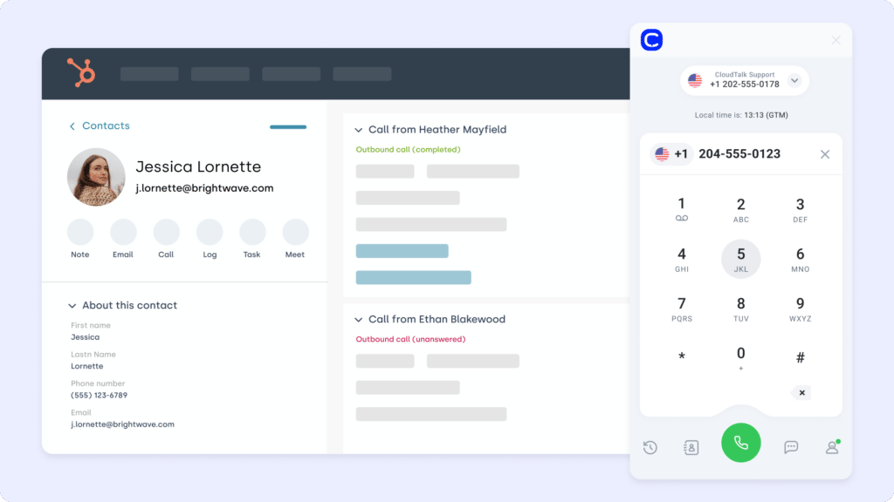
CloudTalk’s 95+ standard CRM, helpdesk, and ATS integrations unlock on the Essential plan, alongside public API access and data sync. Native integrations carry two-way sync of contacts, calls, recordings, AI summaries, and tags, embedded click-to-call inside the partner UI, CTI screen-pops on inbound calls, and configurable workflow triggers.
On the CRM side that covers Salesforce with full CTI plus a pre-installed Support KPIs dashboard, HubSpot with CTI and campaign result export, Pipedrive with inbound caller pop-out and public campaign filters, Zoho CRM, Microsoft Dynamics 365 Sales, Copper, Close, and monday.com CRM. Helpdesk coverage includes Zendesk, Freshdesk, Intercom, Help Scout, Front, Kustomer, and Gorgias.
The part that matters for CloudTalk vs Aircall integrations is the export layer. Dedicated Conversation Intelligence Data Export integrations for HubSpot, Salesforce, Pipedrive, and Zendesk push call topics, summaries, sentiment, and a link back to the recording onto the record itself. On Zendesk it lands as an internal note on the ticket. Nobody types it.
Customer story: Poliglota, a Chilean ed-tech company, was waiting roughly three hours between a lead filling in a form and an agent calling it. Two months after switching from Aircall, outbound success was up 30%, agent productivity up 10%, and the lost-deal rate had fallen from about 50% to 25%. Read the story.
Where a native connector doesn’t exist, the Workflow Automation Designer handles multi-step automations in-product, and a Zapier connector reaches roughly 5,000 downstream apps through triggers like new call, call ended, missed call, and new SMS.
Aircall Integrations
Aircall lists 100+ integrations with API access from the entry plan, which is broader and earlier than CloudTalk’s, and it’s a fair reason to pick Aircall if your stack is unusual. Its comparison marketing leans on exactly that breadth.
Two things temper it. Aircall for Salesforce Voice is a separate $30/licence purchase rather than part of the plan, which we break down in Aircall’s Salesforce integration vs CloudTalk’s. And we could not verify the depth of the HubSpot and Pipedrive syncs from Aircall’s published material; our Aircall HubSpot integration vs CloudTalk comparison covers what each connector writes back.
Integration Capability Compared
Integration Capability Compared
| Integration Capability | CloudTalk | Aircall |
|---|---|---|
| Native integrations | 95+ CRM, helpdesk, and ATS | 100+ |
| Plan that unlocks integrations | Essential | Essentials (entry plan) |
| Salesforce | Full CTI on Expert, plus a pre-built Support KPIs dashboard | Aircall for Salesforce Voice, $30/licence |
| HubSpot | Two-way sync, CTI, campaign result export, CI data export | Native integration; sync depth not verified |
| Pipedrive | CTI with inbound person or deal pop-out, public campaign filters, CI data export | Native integration; sync depth not verified |
| AI summaries auto-logged to the CRM | Yes, dedicated CI Data Export for HubSpot, Salesforce, Pipedrive, and Zendesk | AI Assist logs call data to the CRM |
| Native workflow automation | Workflow Automation Designer with multi-step flows, no developer required | Not verified |
| Developer requirement | Public API and webhooks available; native integrations are an OAuth setup | API access from Essentials |
| Reach beyond native connectors | Zapier connector to roughly 5,000 apps | Not verified |
Who is better here? Aircall on breadth and on getting integrations at the entry tier. CloudTalk on what happens after the connector is switched on.
Security & Compliance: CloudTalk vs. Aircall
If you’re in healthcare, financial services, or anywhere with a legal team that reads vendor questionnaires, this section decides the deal before the pricing does.
It also won’t decide it the way a vendor comparison usually implies. Both platforms clear the compliance floor: SOC 2, GDPR, encryption in transit and at rest, SSO, and a HIPAA business associate agreement are on both sides. The separation is narrower and more practical than a certificate list, and it comes down to three things: which plan you have to buy to get single sign-on, who can delete a recording without opening a ticket, and where your call transcripts physically sit.
CloudTalk Security & Compliance
- SOC 2 Type 1 and Type 2 compliantAcross the platform.
- GDPR compliantWith hidden-call support in analytics so sensitive call data can be restricted by user role.
- HIPAA compliant as of Q1 2025Including BAA support and PHI handling on the recording and transcription pipeline. This isn't gated to an enterprise-only tier.
- With Okta, Azure AD, and Google Workspace.
- Recording controls built for consent lawsPause and resume recording mid-call, consent management tooling, and recording retention controls, with pause/resume available in the mobile app as well as on desktop.
- Role-based permissions managementOn every plan.
Customer story: Allycom, a financial services provider, achieved 100% reliable call recording across 100 countries. Read the story.
Aircall Security & Compliance
Aircall’s posture is stronger than most competitor comparisons give it credit for, this one included until we checked. Its security page states SOC 2 Type 2 certification outright, alongside TLS 1.2 in transit and AES-256 at rest, TLS/SRTP encryption on the calls themselves, two-factor authentication, SAML authentication, and role-based user permissions. It runs on AWS, publishes a 99.95% uptime commitment, runs regular third-party penetration tests and a bug bounty, and holds a CSA STAR Level 1 self-assessment.
On privacy it is thorough. Aircall acts as a data processor, its privacy documentation applies automatically to every customer without anyone signing anything extra, its Data Protection Officer is registered with the French CNIL, it is registered with the UK ICO, and it is certified under the EU-U.S. Data Privacy Framework including the UK and Swiss extensions. For healthcare, it offers a Business Associate Agreement tailored to the product, though it stops short of calling the product HIPAA compliant, describing practices designed to safeguard PHI instead.
One caveat on the certificate list you’ll see repeated on third-party vendor-risk sites: ISO 27001, PCI DSS, and FedRAMP belong to AWS, Aircall’s host, not to Aircall. Aircall’s own wording is that its information security program is aligned with ISO 27001 and SOC II standards. If procurement needs an ISO 27001 certificate with Aircall’s name on it, ask for it specifically.
Where Your Transcripts Actually Live
Aircall offers multi-region hosting for call recordings and voicemails, on AWS in Oregon, Frankfurt, or Sydney, assigned by the country code of the number you signed up with. Voice transcriptions and the AI-generated files built from them are the exception: Aircall stores those exclusively on AWS US West servers in Oregon, regardless of where the underlying recording sits. For an EU team whose recordings are in Frankfurt, the transcript and the AI summary of the same call are in the United States. Worth raising in a data residency review before it surfaces in one.
The other practical gap is self-service. Retention is set by your pricing plan, and changing it, or deleting a specific call or a batch of calls, means an admin opening a support request rather than clicking something in the dashboard. Consent for recording is handled through a welcome message you record yourself; Aircall does not publish a mid-call pause and resume control.
Security & Compliance Compared
Security and Compliance Compared
| Security & Compliance | CloudTalk | Aircall |
|---|---|---|
| SOC 2 | Type 1 and Type 2 | Type 2 |
| GDPR | Compliant, with role-based hiding of sensitive calls | Compliant; DPA applies automatically to every customer, DPO registered with the CNIL, ICO-registered in the UK |
| EU-U.S. Data Privacy Framework | Not published | Certified, including the UK and Swiss extensions |
| HIPAA | Compliant since Q1 2025, with BAA support and PHI handling on recordings and transcripts | BAA offered; describes practices designed to safeguard PHI rather than claiming the product is compliant |
| ISO 27001 | Not published | Not certified; its security program is described as aligned with ISO 27001, and the certificate belongs to AWS as its host |
| SSO / SAML | SAML SSO with Okta, Azure AD, Google Workspace | SAML authentication supported, but listed on the 25-licence Custom tier |
| Permissions and roles | Role-based access control on every plan | User roles and permissions, plus two-factor authentication |
| Call recording consent | Pause and resume mid-call, on desktop and mobile, plus consent management | Consent through a recorded welcome message; no mid-call pause and resume published |
| Recording retention control | Unlimited storage from Essential, with deletion controls | Retention set by plan; changes and bulk deletions go through a support request from an admin user |
| Data residency | Not published | Recordings and voicemails in Oregon, Frankfurt, or Sydney; transcripts and AI files in Oregon only |
| Enterprise SLA | Custom plan | Custom plan |
Who is better here? CloudTalk, but narrowly, and on plan gating rather than on certificates. The clearest reason is single sign-on: needing a 25-licence enterprise contract to get SSO stops a lot of mid-market security reviews dead, and CloudTalk ships SAML SSO without one. Retention control and mid-call recording consent are self-service on CloudTalk and a support ticket on Aircall, which matters more in a consent-law jurisdiction than it sounds. If your review is a checklist of certifications, though, Aircall passes it.
Usability & Scalability: CloudTalk vs. Aircall
This is the one trade-off in the comparison that genuinely cuts both ways. Aircall is easier on day one, and CloudTalk is easier in year two. Which of those matters more depends on whether your call operation is going to get more complicated than it is today.
CloudTalk Usability
CloudTalk asks for more configuration up front, because there’s more to configure: call flows with branching and failover, skill-based routing and caller-based routing, ring groups with VIP tags and ring strategies, campaign rules, dialing modes. A five-person support team doesn’t need most of that on day one, which is exactly why it can feel like more product than the job requires at first.
The payoff is headroom. The same account that starts as a shared inbound line becomes an outbound engine with parallel dialing, local-presence numbers, wallboards on the wall, and Salesforce writing itself, without changing vendors. Support runs 24/7 in multiple languages, with average chat response under a minute and email response within two hours.
Scaling down is straightforward too, as long as you’re on the right plan. Starter and Essential have a one-licence minimum, so a seasonal team can shrink without a penalty clause. Expert holds a three-licence minimum, the same as Aircall’s Professional plan.
Migrating from Aircall to CloudTalk, in the order it usually happens:
- Export your Aircall data: contacts, call history, and recordings.
- Start the number port: number porting is available on every CloudTalk plan, and numbers can move in batches rather than all at once.
- Rebuild your routing: use the Call Flow Designer’s 19 actions plus branching and failover.
- Connect your CRM: switch on the Conversation Intelligence Data Export so summaries and tags start landing on records.
- Run both systems side by side while the port completes and your team tests the new flows.
- Point the last numbers over and close the old account.
The port is the long pole here; you can build everything else while it runs. For a straightforward setup that’s a matter of days. A complex multi-region deployment with heavy customization is realistically a 30 to 90 day project.
Aircall Usability
Aircall’s reputation for the fastest first-day setup in the category is well earned, and it’s the strongest argument for buying it. The agent interface is clean enough that most reps need no training, admin screens are shallow by design, and a small team can be routing calls the same afternoon they buy.
The cost of that design shows up later. Routing options are simpler because there are fewer of them, analytics stop at six months without a paid extension, Essentials caps you at three teams, and the outbound ceiling is fixed by the absence of any parallel or predictive dialing mode.
The setup gap is also narrower than the reputation suggests. Poliglota onboarded its entire team onto CloudTalk in a single day, so “faster to deploy” is a real Aircall advantage measured in hours rather than in weeks.
Usability & Scalability Compared
Usability and Scalability Compared
| Dimension | CloudTalk | Aircall |
|---|---|---|
| First-day setup speed | Guided, but there's more to configure | Fastest in the category |
| Agent UI learning curve | Low, with more surface area for admins | Very low |
| Admin and call flow builder | Call Flow Designer with 19 actions, branching, failover, live edits | Simpler routing; smart routing from Professional |
| Onboarding and support | 24/7 multi-language support, average chat response under a minute | Custom onboarding on the Custom tier |
| Migration | Number porting on every plan, in batches, with parallel running | Not verified |
| Seat minimum to scale down | 1 on Starter and Essential; 3 on Expert | 3 on Essentials and Professional |
| Global number provisioning | Self-service in 160+ countries, with automated ordering in the US and Canada | 1 number included per plan |
| High-volume outbound | Parallel dialing up to 10 lines, local presence, voicemail detection, campaign management | Sequential Power Dialer from Professional |
| Analytics you can look back through | Unlimited recording storage from Essential | 6 months of advanced analytics without Analytics+ |
| Contract flexibility | Monthly or annual on every plan | Monthly or annual; annual is 25% cheaper |
Who is better here? Aircall for the first month. CloudTalk for every month after it.
CloudTalk Reviews vs. Aircall Reviews on G2
G2 is the most widely used peer review platform for B2B software, and it’s where most CloudTalk vs Aircall reviews research starts and ends. On overall score the two are level. We go deeper on the second half of that in our full Aircall review.
G2 Ratings Compared
G2 Ratings Compared
| G2 Review Dimension | CloudTalk | Aircall |
|---|---|---|
| Overall G2 rating | 4.4/5 | 4.4/5 |
| Number of G2 reviews | 1,702+ | 1,600+ |
| Meets requirements | 8.7 | 8.8 |
| Ease of use | 9.1 | 9.2 |
| Ease of setup | 8.9 | 8.9 |
| Ease of admin | 8.9 | 8.7 |
| Quality of support | 8.8 | 8.6 |
The overall scores are tied and the sub-scores are close enough that nobody should choose a phone system on them. The shape is still informative: Aircall edges ahead on ease of use and on meeting requirements, CloudTalk on ease of admin and quality of support, and setup is a dead heat, which is the quietest argument against the idea that one of these is dramatically faster to stand up. On CloudTalk vs Aircall G2 scores the review text is where the decision gets made. Away from G2, Aircall holds 4.2/5 on Capterra from 450+ reviews and 3.0/5 on Trustpilot from 1,000+ reviews.
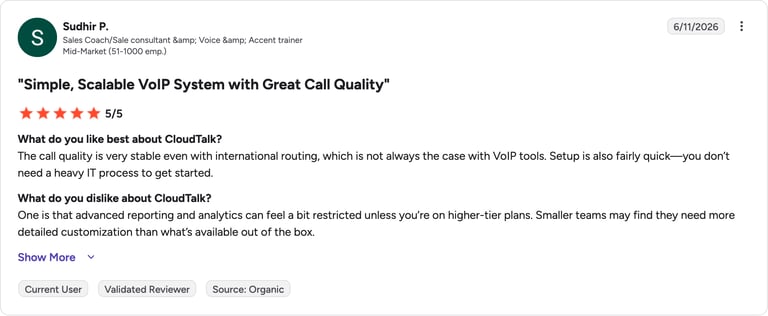
What Real Users Say About CloudTalk On G2
G2 reviewers give CloudTalk [cgv rating_g2] (1,702+ reviews).
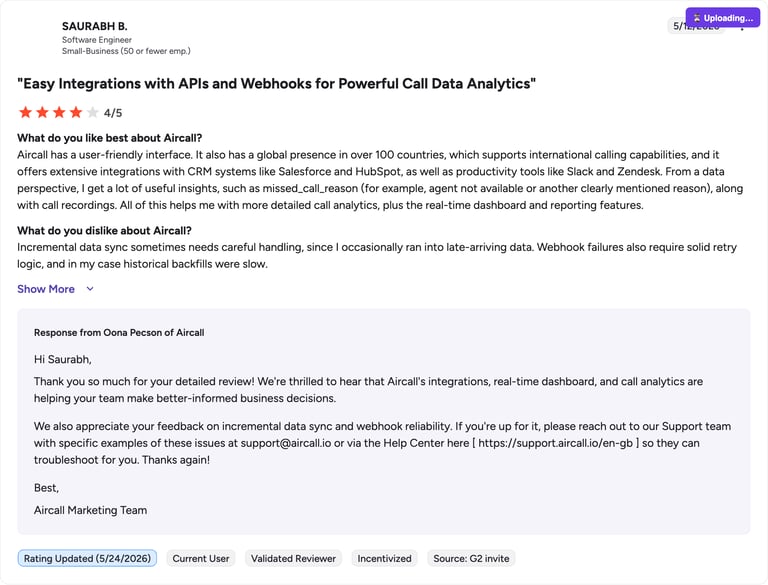
What Real Users Say About Aircall On G2
G2 reviewers give Aircall 4.4/5.
CloudTalk Reviews vs. Aircall Reviews on Reddit & Quora
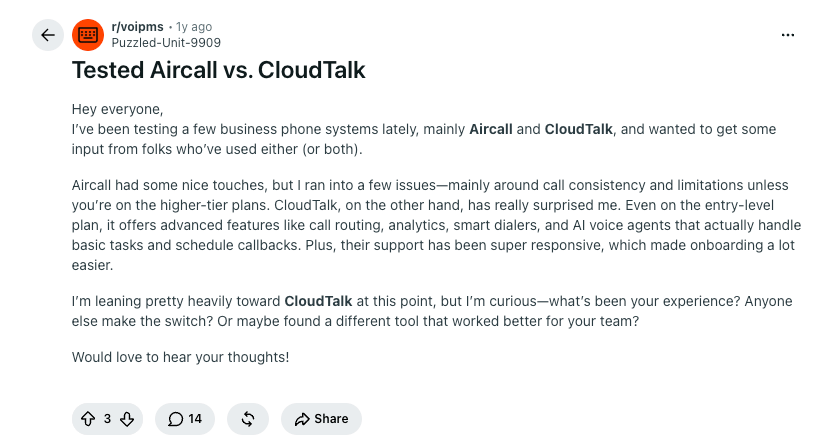
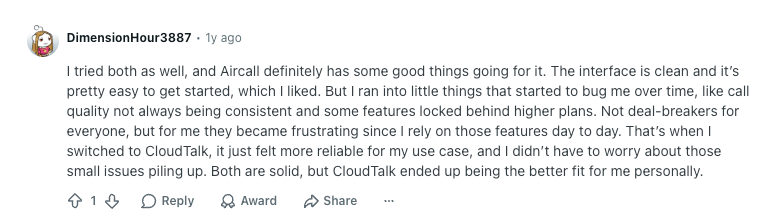
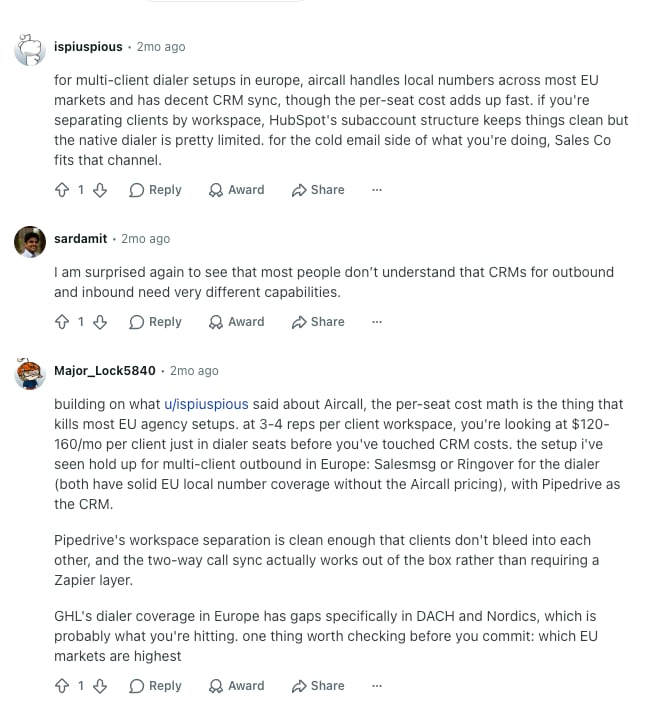
Google currently ranks a Reddit thread above every vendor page for this comparison, which tells you how much weight buyers put on practitioners over marketing copy. This section carries real screenshots rather than paraphrase. Two questions are worth taking into those threads, and neither is about features: does the dialer keep up when the list is long, and does call quality hold when everyone is on a call at once.
What Real Users Say About CloudTalk On Reddit & Quora
What Real Users Say About Aircall On Reddit & Quora
CloudTalk Pros & Cons vs. Aircall Pros & Cons
CloudTalk Pros & Cons
| Pros | Cons |
|---|---|
| Starter and Essential have a one-licence minimum, so small teams pay for the seats they use | Expert requires three licences and Custom requires five, so the seat floor rises as you move up |
| Entry price of $25/user/month billed annually | AI Conversation Intelligence and AI Voice Agents are always paid add-ons, never bundled into a plan |
| Parallel dialing up to 10 lines per agent, with roughly 1.5-second answering-machine detection | No live in-call prompts, real-time transcription, or real-time sentiment yet |
| IVR, the Call Flow Designer, and skill-based routing from the entry plan | Power Dialer, Salesforce, wallboards, and real-time monitoring all sit on the Expert tier |
| Local numbers in 160+ countries on a multi-carrier network | A complex multi-region rollout is realistically a 30 to 90 day project |
| Conversation intelligence at a flat $9/user/month regardless of plan | No native video conferencing; anything beyond voice, SMS, and WhatsApp runs through integrations |
| AI summaries, topics, sentiment, and tags export automatically into HubSpot, Salesforce, Pipedrive, and Zendesk | |
| SOC 2 Type 1 and Type 2, GDPR, and HIPAA with BAA support, plus SAML SSO | |
| Unlimited call recording storage from Essential |
Aircall Pros & Cons
| Pros | Cons |
|---|---|
| Fastest first-day setup in the category, with an interface most reps need no training for | Three-licence minimum on both self-serve plans, so $90/month is the real entry price |
| 100+ integrations and API access from the entry plan | The Custom tier requires 25 licences |
| Conversation intelligence bundled into Professional rather than sold as an add-on | No parallel or predictive dialing mode at any tier; Power Dialer dials sequentially and starts at $50/licence |
| Live in-call prompts, playbooks, and custom-question call scoring through AI Assist Pro | AI Assist Pro is $49/licence/month on top of any plan, which nearly triples the cost of an Essentials seat |
| 50 free AI Voice Agent minutes per account per month on every tier | Advanced analytics retention stops at 6 months unless you add Analytics+ at $15/licence/month |
| Essentials caps you at three teams | |
| Salesforce Voice, WhatsApp, and unlimited analytics are all separate per-licence purchases | |
| Single sign-on is listed on the Custom tier only |
Everything in That Pros Column, Free for 14 Days
CloudTalk Alternatives and Competitors Worth Shortlisting
These two aren’t the whole category, and if you’re searching for CloudTalk alternatives or the best Aircall alternative you’ll hit roughly the same shortlist either way. It helps to know which group each name belongs to, because the groups fail in different ways.
SMB-first cloud phone systems are the direct comparison set: CloudTalk, Aircall, JustCall. Built for sales and support teams under a few hundred seats, priced per user, quick to deploy, with CRM integration as the center of gravity. This is where most people shopping CloudTalk vs Aircall for small business end up, and seat minimums, dialer depth, and whether call data reaches the CRM are what decide it.
UCaaS suites bundle telephony with meetings, chat, and sometimes contact-center modules: RingCentral, Nextiva, 8x8, GoTo Connect. Strong if you want one vendor for the whole communications stack, heavier to administer, and outbound dialing tends to be a bolt-on rather than a core competency.
Contact-center and AI-first platforms like Dialpad and Five9 aim at larger operations with workforce management, omnichannel queues, and deeper automation. Powerful, and more platform than a 20-rep sales team needs to buy.
Budget VoIP providers show up on price-led shortlists, which is how comparisons like Aircall vs CloudTalk vs Zadarma get made. Be careful here: Zadarma holds 4.6/5 on G2 from just 30 reviews, which is far too thin a sample to read anything into. A low headline price with almost no peer feedback behind it puts your phone numbers on the line to save a few dollars a seat.
For a CloudTalk vs Aircall contact center software decision specifically, the useful question is which of those groups you belong to. If your team lives in the CRM and dials for a living, the first one is the right shelf, and the choice comes down to the details in the tables above.
Which Team Fits Which Platform?
Fit comes down to team size, outbound volume, how much you lean on the CRM, and what your compliance team will sign off on.
CloudTalk vs Aircall: Which Fits Your Team
| CloudTalk Is the Right Call For… | Aircall Still Works If… |
|---|---|
| High-volume outbound teams that need parallel dialing and local-presence numbers | You have five or more agents and first-day simplicity matters more than dialer depth |
| Solo founders and two-person teams who don't want to pay for a third seat | Your call volume is modest and your routing is straightforward |
| Multi-region teams that need local numbers across 160+ countries | You're already in the Aircall ecosystem and switching cost outweighs the difference |
| Healthcare, fintech, and any team with HIPAA, GDPR, or SOC 2 requirements to satisfy | You want conversation intelligence bundled into the plan rather than added to it |
| Teams whose reps are losing hours a week to logging calls in the CRM by hand | You need live in-call prompts and playbooks, which CloudTalk doesn't currently ship |
| Anyone who needs SSO without signing a 25-seat enterprise contract | Your analytics needs are covered by six months of history |
CloudTalk vs. Aircall: The Verdict
So, is CloudTalk better than Aircall? On the evidence in this CloudTalk vs Aircall 2026 comparison, yes, for most sales and support teams. CloudTalk is cheaper to start and cheaper once you need real analytics and Salesforce, and it’s the only one of the two that can dial in parallel. Aircall is faster to deploy and packages its AI more generously at the Professional tier, and both of those count for something.
Choose CloudTalk If You…
- Run outbound at volume and need parallel dialing, local presence, and voicemail detection rather than a sequential dialer
- Have fewer than three people and don't want to buy a third seat to make the math work
- Sell into multiple countries and need local numbers in 160+ markets on demand
- Want AI call summaries, topics, sentiment, and tags landing in HubSpot, Salesforce, Pipedrive, or Zendesk without a rep typing them
- Need HIPAA with BAA support, SOC 2 Type 1 and Type 2, or SAML SSO without an enterprise contract
- Want IVR, the Call Flow Designer, and skill-based routing on the entry plan instead of a tier up
- Expect to look back through more than six months of call recordings and analytics
- Are planning to grow the call operation rather than keep it the size it is now
Choose Aircall If You…
- Need to be live this week and want the shortest setup with the least training
- Already have three or more agents and simple, low-volume routing needs
- Want conversation intelligence bundled into the subscription rather than bought as an add-on
- Need live coaching prompts during a call, which CloudTalk doesn't currently offer
The Bottom Line
CloudTalk wins on entry price, outbound capability, international reach, CRM data flow, and compliance depth. Aircall wins on first-day setup speed and on bundling AI into its Professional plan. If your call operation is going to get more complicated over the next two years, that first list is the one that ages well.
Still Weighing the Switch?
Sources:
- Salesforce, State of Sales report, 2026
- Deloitte, contact centre research and Deloitte Digital, the future of service
Frequently Asked Questions About CloudTalk vs Aircall
Direct answers to the questions buyers ask most when comparing CloudTalk and Aircall.
CloudTalk is the better fit for most sales and support teams, and yes, on G2 it’s closer than the rest of this comparison suggests. Both platforms score well overall because both handle core calling properly. The separation happens off the star rating: entry price, a one-licence minimum on Starter and Essential, parallel dialing, and AI summaries that write themselves into the CRM. If your requirements stop at reliable outbound dialing plus basic AI, the practical gap between them narrows to almost nothing.
Yes, Aircall’s three-licence minimum makes it more expensive at the entry tier. Essentials is $30/licence/month, but you have to buy three, so $90/month is the real floor. CloudTalk’s Starter and Essential plans have a one-licence minimum, so a two-person team pays for two seats at $25 or $29/user/month. The floors converge higher up, though: CloudTalk’s Expert plan requires three licences, exactly like Aircall’s Professional, and Custom requires five against Aircall’s 25. It matters most if you’re a startup buying your first phone system.
CloudTalk has a Parallel Dialer; Aircall has no parallel or predictive dialing mode at any tier. CloudTalk’s version is a $39/user/month add-on available on every plan, dialing up to 10 lines per agent with answering-machine detection at roughly 1.5 seconds. Aircall’s Power Dialer works one number at a time, sequentially, from the $50 Professional plan up. One clarification worth making: Aircall does sell a feature called Parallel Calls, but that’s concurrent call capacity rather than a dialing mode, so it doesn’t change conversations per hour the way parallel versus predictive dialing does.
CloudTalk has the deeper CRM integrations; Aircall has slightly more of them. Aircall lists 100+ connectors with API access from its entry plan, against CloudTalk’s 95+ from Essential. The depth difference is the Conversation Intelligence Data Export, which pushes summaries, topics, sentiment, and tags onto the contact or deal record itself in HubSpot, Salesforce, Pipedrive, and Zendesk, so nobody retypes a call. Breadth still wins if your stack is unusual and you need a connector Aircall happens to have.
CloudTalk records calls on every plan and offers AI call summaries as a paid add-on rather than a bundled feature. Recording is included from Starter, with unlimited storage from Essential. AI Call Summary and AI Smart Notes sit inside AI Conversation Intelligence at $9/user/month, alongside call transcription, sentiment analysis, topic detection, and AI call scoring. That add-on is never included in a subscription plan on any tier, so budget the $9 separately from the seat price.
CloudTalk is a legitimate, established provider, running for nearly a decade and serving 5,500+ businesses worldwide. On G2 it holds 4.4/5 from 1,702+ reviews, against Aircall’s 4.4/5 from 1,600+. Those scores are close enough that they shouldn’t decide anything on their own; the named customer stories tend to tell you more, because they say what changed and by how much.
For a 30-person SMB sales team, CloudTalk is usually the better call, mainly on outbound throughput and on what the invoice looks like once reporting is included. Thirty seats on Expert at $49 plus the $9 AI add-on is $1,740/month, with the Power Dialer, Salesforce, wallboards, and unlimited recording storage already inside the plan. The same 30 seats on Aircall Professional is $1,500, rising to $2,850 once you add Analytics+ and Salesforce Voice. Aircall still wins if you need everyone live this week; a power dialer built for sales is the harder thing to add later.