10 Best AI Receptionists for Insurance Agencies to Never Miss a Call in 2026
TL;DR:
As cloud telephony and AI calling experts, we reviewed and tested 25+ cloud phone systems and AI receptionists for international insurance agencies to help teams capture every inbound call across regions, support multilingual policyholders, automate client interactions, and improve response times in 2026.
Here are our top 10 AI receptionists for insurance agencies:
- 01CloudTalk — Best for high-volume call handling and CRM-driven workflows
- 02Sonant AI — Best for insurance-specific workflows and AMS integrations
- 03Smith.ai — Best for hybrid AI + human receptionist support
- 04My AI Front Desk — Best for simple, budget-friendly automation
- 05Kenyt.AI — Best for multi-channel lead capture and FNOL automation
- 06IBM Watsonx Assistant — Best for enterprise-grade AI and complex workflows
- 07DataRobot — Best for predictive analytics and underwriting automation
- 08Synthflow AI — Best for fast, no-code voice agent deployment
- 09Retell AI — Best for developer-friendly, natural-sounding voice agents
- 10Vapi — Best for fully customizable voice AI infrastructure
51% of consumers say they prefer interacting with bots when they need immediate service. For insurance agencies, where speed often determines who wins the client, that shift is already reshaping how inbound calls are handled.
So which solutions actually deliver on that expectation?
In this guide, we break down the 10 best AI receptionists for insurance agencies and brokerages in 2026—and how they help you handle inbound policy inquiry calls, respond instantly, and keep your pipeline moving without adding headcount.
How We Selected the Top AI Receptionists for Insurance Agencies for 2026
To build this list, we reviewed 25+ AI receptionist platforms commonly used by insurance agencies and service-based businesses, narrowing them down to the top solutions for agencies looking to improve call handling, lead capture, and client experience. We also analyzed real user feedback (including G2 ratings) to understand how each tool performs in day-to-day operations.
We shortlisted providers based on a set of practical criteria:
- Call handling and routing: Ability to manage inbound calls, triage urgency, and route claims or high-priority cases correctly
- Insurance-specific capabilities: Support for FNOL, policy inquiries, and quote request workflows
- Integrations: Compatibility with AMS/CRM systems to automate logging, updates, and follow-ups
- Automation and efficiency: Features like appointment scheduling, call summaries, and lead capture
- Conversation quality: Natural Language Understanding and human-like voice interactions
- Pricing and scalability: Cost structure and ability to handle increasing call volumes without added complexity
- International coverage: Availability of local numbers in multiple countries, number porting across regions, and global call quality SLAs
- Multilingual support: Native AI receptionist voices and live agent coverage in multiple languages — critical for serving international policyholders
The goal wasn’t to highlight the most well-known tools. Instead, the focus was on solutions that remain reliable as your agency grows—handling more calls, more clients, and more complex workflows over time.
Why Trust Our Software Reviews?
Over the last decade, we’ve helped over 30,000 professionals find and implement smarter communication tools.
We’ve reviewed 200+ products, analyzed 5,500+ verified reviews from business-relevant platforms like G2, Capterra, or Trustpilot, and drawn insights from real user discussions on forums like Reddit or Quora.
In the past year alone, we published 1,000+ articles, all written and reviewed by humans, for humans, to provide reliable, data-backed insights you can trust.
Learn how we keep our content integrity and our software review methodology.
10 Best AI Receptionists for Insurance Agencies in 2026
Insurance agencies miss up to 30% of incoming calls when relying only on human staff. For teams handling quotes, renewals, and urgent claims, that gap quickly turns into lost revenue and missed opportunities.
Choosing the right AI receptionist helps close that gap—ensuring every call is answered, routed, and handled without delay.
Before diving into the full breakdown, take a look at the comparison table below. It highlights the top AI receptionists side by side, so you can quickly identify which solution fits your agency’s size, workflows, and growth plans.
Best AI Receptionists for Insurance Agencies in 2026
| Tool Name | Best For | Starting Price | Key Feature |
|---|---|---|---|
| CloudTalk | SMBs with high call volume | $25/user/mo + $99 AI add-on | No-code call flow designer with CRM sync |
| Sonant AI | Insurance-focused agencies using AMS systems | Custom pricing | Native AMS integrations (Applied, HawkSoft, etc.) |
| Smith.ai | Agencies needing AI + human support | $95/month (AI) | AI + live agent handoff for complex calls |
| My AI Front Desk | Solo agents and small agencies | $0–$99/month | Omnichannel lead capture with unified inbox |
| Kenyt.AI | Agencies focused on social + multi-channel leads | $9/month | Automated claims intake across chat and voice |
| IBM Watsonx Assistant | Large enterprises with complex workflows | $530/month | Document intelligence for claims and underwriting |
| DataRobot | Enterprise agencies focused on data-driven decisions | Custom pricing | AI-driven risk scoring and churn prediction |
| Synthflow AI | Startups and small teams needing fast setup | Usage-based | Drag-and-drop builder for insurance call flows |
| Retell AI | Tech-enabled agencies with developer resources | $0.07+/minute | Highly natural voice with customizable APIs |
| Vapi | Enterprises building custom AI voice infrastructure | $0.05/min + $10/line | Full control over AI models and call logic |
#1 CloudTalk — Best for high-volume call handling and CRM-driven workflows
What is CloudTalk?
CloudTalk is the leading AI receptionist for insurance agents and brokerages that need a complete phone system to handle inbound policy inquiry calls and connect every interaction to their agency's workflows.. It handles voice and SMS 24/7, qualifies leads, and logs them directly into your CRM (like HubSpot or Salesforce). With automated claims triage and smart appointment routing—built on secure, compliant infrastructure—it handles routine tasks so your team can focus on closing deals.
What are the key features of CloudTalk?
- 24/7 Multilingual Coverage: An AI receptionist that answers instantly in 60+ languages, eliminating "Spam Likely" tags and hold times.
- No-Code Call Flow Designer: A visual drag-and-drop builder that lets insurance managers customize routing, escalation rules, and scripts without IT help.
- Seamless CRM Sync: Automatically logs every interaction, recording, and transcript into your insurance management system (AMS) or CRM.
- HIPAA & SOC2 Compliance: Enterprise-grade security designed to protect sensitive policyholder data and medical information.
- 24/7 Multilingual Coverage: An AI receptionist that answers instantly in 60+ languages, eliminating "Spam Likely" tags and hold times.
What are the pros and cons of choosing CloudTalk?
| Pros | Cons |
|---|---|
| No‑code setup with a drag‑and‑drop or node‑based flow editor | Teams needing video conferencing must integrate with other platforms |
| Multilingual AI voice agent that speaks 60+ languages | No native SMS/Chatbot AI (Voice-first approach) |
CloudTalk — Best for high-volume call handling and CRM-driven workflows G2 Rating
⭐ 4.4 / 5
How Much Does CloudTalk Cost?
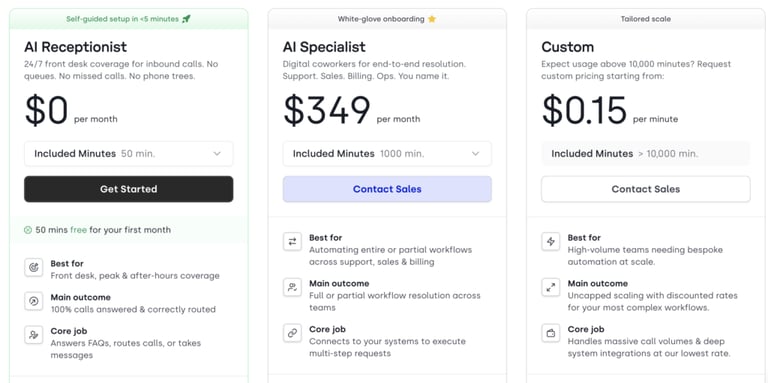
CloudTalk offers a flexible, hybrid pricing model that scales with your agency’s call volume:
- Base Platform: Starts at $25/user/month, providing the core phone system and CRM integration infrastructure.
- AI Virtual Receptionist Add-on: For $99/month, you unlock the AI receptionist, which includes 200 monthly minutes to handle your inbound overflow.
- Free Test Drive: You can claim 50 free minutes to put the AI receptionist to the test in your own environment—no commitment required.
Bottom Line:


#2 Sonant AI — Best for insurance-specific workflows and AMS integrations
What is Sonant AI?
Sonant is an insurance-focused AI voice platform designed for agencies, brokers, and distributors. It integrates with existing agency systems to automate call handling, intake, and documentation, using insurance-specific workflows and terminology.
What are the key features of Sonant AI?
- Automatic Quote Intaking: Captures quote details directly from a call and pushes them into your AMS or rater, making the lead-to-quote process hands-off.
- Intelligent Live Transfers: Instantly connects high-value customers to human agents or specific third parties based on the intent of the call.
- Automated Appointment Scheduling: Fully integrated with your team's calendars (like Outlook) to book consultations without manual intervention.
- Deep AMS Ecosystem: Native integrations with industry staples, including Applied, HawkSoft, EZLynx, QQCatalyst, and Zapier.
What are the pros and cons of choosing Sonant AI?
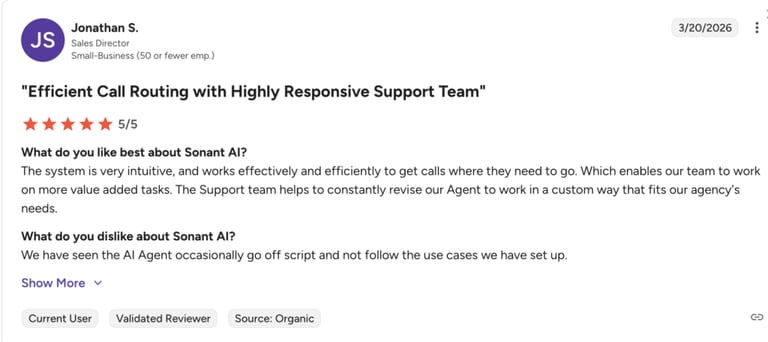
Sonant AI — Best for insurance-specific workflows and AMS integrations G2 Rating
⭐ 4.9 / 5
How Much Does Sonant AI Cost?
Sonant does not offer public pricing tiers, so you should contact their sales team to request a quote.
Bottom Line:
#3 Smith.ai — Best for hybrid AI + human receptionist support
What is Smith.ai?
Smith.ai is an AI receptionist for insurance brokers that combines 24/7 automation with real human support. It handles routine calls and lead intake automatically, while human receptionists step in for more complex or sensitive conversations—like active claims or detailed policy questions.
What are the key features of Smith.ai?
- 24/7 Live & AI Hybrid: AI handles the volume, but North America-based human receptionists are always available for situations that require a personal touch.
- Warm Lead Transfers: The system qualifies prospects and can instantly transfer "hot" leads to your agents via phone, SMS, or Slack.
- Unified Multichannel Workflow: Manages not just phone calls, but also web chats, SMS, and even social media messages in one centralized dashboard.
- Spam Blocking & Call Screening: Protects your insurance business from unwanted robocalls and effectively filters out tire-kickers.
What are the pros and cons of choosing Smith.ai?
| Pros | Cons |
|---|---|
| Native support in both English and Spanish | The interface could be more intuitive when searching for older call logs or historical data |
| Effortlessly handles multiple simultaneous calls | Users have expressed a desire for a wider selection of voices |
Smith.ai — Best for hybrid AI + human receptionist support G2 Rating
⭐ 4.9 / 5
How Much Does Smith.ai Cost?
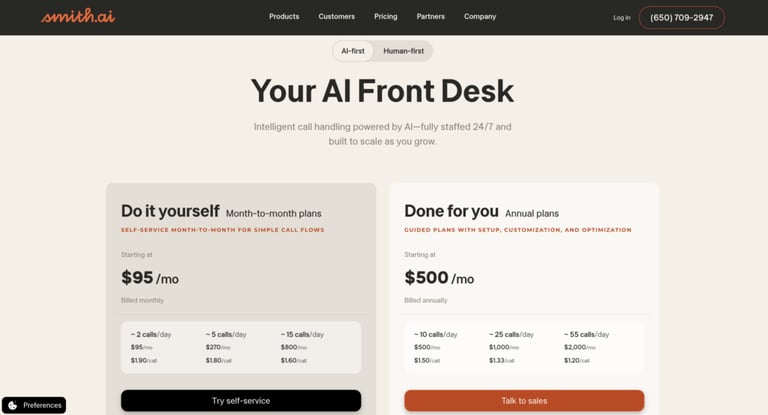
Smith.ai offers two paths depending on your agency's preference for AI vs. human interaction:
- AI Receptionist Plans: Starting at $95/month
- Human-First Plans: Starting at $300/month (30 calls included)
Bottom Line:
Recommended Reads
#4 My AI Front Desk — Best for simple, budget-friendly automation
My AI Front Desk — Best for simple, budget-friendly automation What Is My AI Front Desk?
My AI Front Desk is an accessible solution for agencies that need an automated digital receptionist without the complexity of a full-scale telephony migration. It offers the essential frontline support every agency needs: 24/7 call answering and automated quote consultations, all without the enterprise price tag or the need for a dedicated IT department.
My AI Front Desk — Best for simple, budget-friendly automation What Are the Key Features of My AI Front Desk?
- Omnichannel Lead Capture: Works 24/7 across every touchpoint—AI phone reception, web chatbots, smart forms, and SMS agents.
- Intelligence Layer: Automatically creates customer profiles, tickets, and calendar events from conversations, removing the manual effort of data entry.
- Smart Scheduling: A built-in platform that books quote consultations and meetings directly into your calendar.
- Unified Inbox: Consolidates every channel (calls, chats, and texts) into a single view so your team can see the full context of a lead .
My AI Front Desk — Best for simple, budget-friendly automation What Are the Pros and Cons of Choosing My AI Front Desk?
| Pros | Cons |
|---|---|
| Ultra-fast setup, so your AI receptionist can be live in minutes | Limited developer capabilities, which restricts advanced automation and custom workflows |
| One of the most budget-friendly options for solo agents or very small teams | Limited native CRM integrations compared to other providers |
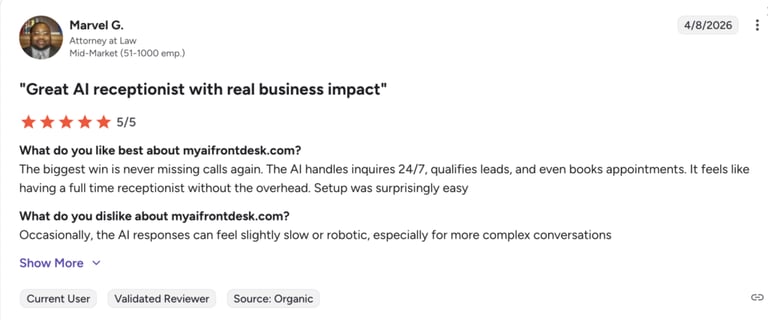
My AI Front Desk — Best for simple, budget-friendly automation G2 Rating
⭐ 4.6 / 5
My AI Front Desk — Best for simple, budget-friendly automation How Much Does My AI Front Desk Cost?
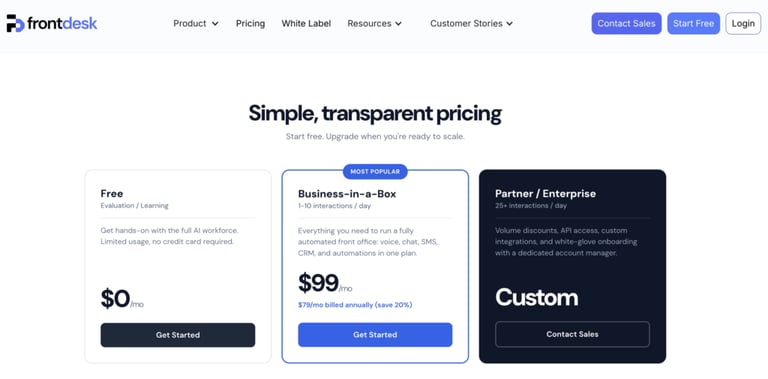
- Free: $0/mo — Limited usage for evaluation and learning. No credit card required.
- Business-in-a-Box: $79/mo (billed annually) or $99/mo month-to-month.
- Partner / Enterprise: Custom — For high-volume agencies (25+ interactions/day) needing API access and white-glove onboarding.
Bottom Line:
#5 Kenyt.AI — Best for multi-channel lead capture and FNOL automation
Kenyt.AI is a cost-effective choice for insurance agencies that want to bridge the gap between their website, social media, and phone lines. It’s particularly strong for agencies looking to automate the First Notice of Loss (FNOL) and routine policy inquiries through a mix of chat and voice.
What are the key features of Kenyt.AI?
- Automated Claims Submission: Allows clients to upload claim photos and incident details through chat or voice bots, speeding up the triage process.
- Intelligent Lead Funnel: Captures and qualifies prospects from various mediums (WhatsApp, Instagram, Web) and organizes them for your sales team.
- AI‑based Policy Assistant: Provides support for renewals, updates, and easy policy management, including trackable status on applications and claims.
- Secure Policyholder Authentication: Features built-in authentication and Single Sign-On (SSO) to ensure policy details are only shared with the right people.
What are the pros and cons of choosing Kenyt.AI?
| Pros | Cons |
|---|---|
| Highly customizable, offering deep flexibility to tailor the AI's responses | Requires training and setup effort to get the accuracy and automation you want |
| Great for Lead Gen, engaging prospects on social media. | Syncing it deeply with legacy insurance AMS systems may require more effort than "plug-and-play" tools. |
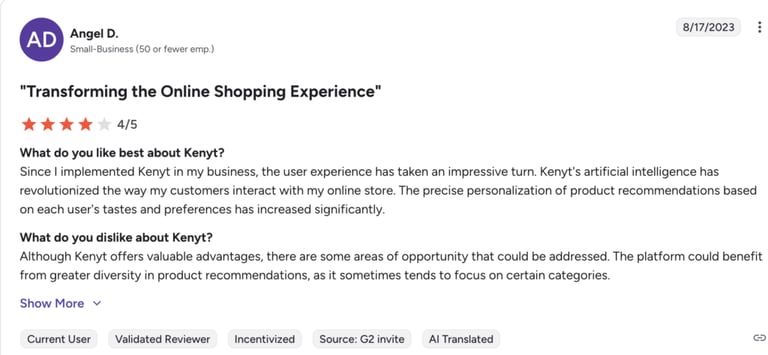
Kenyt.AI — Best for multi-channel lead capture and FNOL automation G2 Rating
⭐ 4.6 / 5
How Much Does Kenyt.AI Cost?
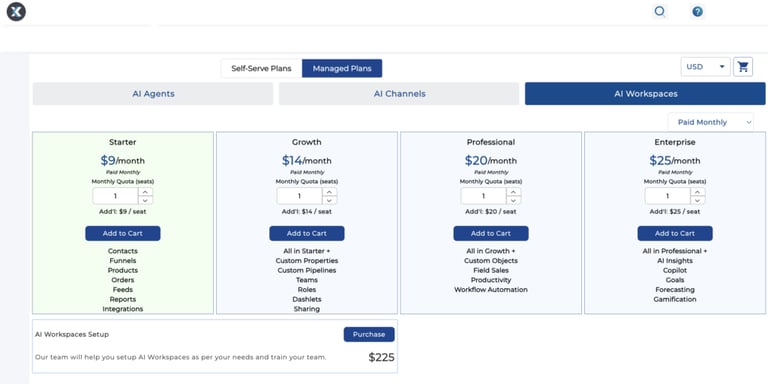
Kenyt.AI offers a highly accessible, seat-based pricing model:
- Starter: $9/month
- Growth: $14/month
- Professional: $20/month
- Enterprise: $25/month
Bottom Line:
#6 IBM Watsonx Assistant — Best for enterprise-grade AI and complex workflows
What is IBM Watsonx Assistant?
IBM Watsonx Assistant is an enterprise-grade AI platform that acts as a highly sophisticated digital agent capable of navigating dense policy documents, automating claims classification, and providing data-driven insights during risk assessments.
What are the key features of IBM Watsonx Assistant?
- Multi-Agent Orchestration: Manages several AI agents at once, coordinating tasks across your agency without needing to replace your current programs.
- Agentic Sales Automation: Handles the "busy work" of data entry and lead routing so your producers can focus on closing deals instead of manual clicking.
- Document Intelligence: Automatically processes and extracts information from thousands of insurance applications and claims forms.
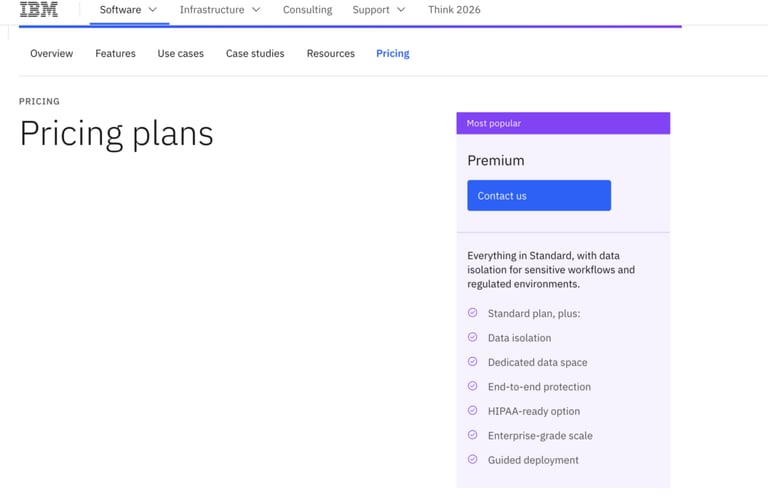
- HIPAA-Ready Security: Provides specialized data isolation and encryption, making it safe to handle sensitive medical and personal policyholder information.
What are the pros and cons of choosing IBM Watsonx Assistant?
| Pros | Cons |
|---|---|
| Its intent recognition and NLP are well‑established and consistently rank among the most reliable enterprise‑grade options | Advanced features and complex integrations require significant technical expertise |
| Works across web chat, mobile apps, SMS, WhatsApp, and messaging platforms | It can be too expensive for small-to mid-sized agencies |
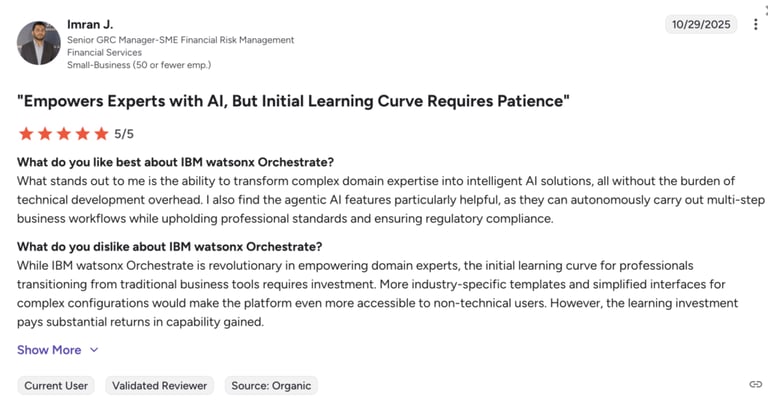
IBM Watsonx Assistant — Best for enterprise-grade AI and complex workflows G2 Rating
⭐ 4.4 / 5
How Much Does IBM Watson Assistant Cost?
IBM offers a tailored pricing structure based on your agency’s specific needs and volume.
Bottom Line:
#7 DataRobot — Best for predictive analytics and underwriting automation
What is DataRobot?
DataRobot is a unified AI platform for insurance that powers predictive analytics and automation. It acts as the intelligence layer behind your receptionist—helping automate decisions like claim approvals or identifying at-risk customers.
What are the key features of DataRobot?
- Claims and underwriting: Automatically sorts incoming claims based on risk and summarizes key documents to speed up underwriting decisions.
- Lead scoring and management: Uses machine learning to analyze past interactions and behavior, helping you focus on leads most likely to convert.
- Churn prevention: Detects customers at risk of leaving by analyzing past conversations and sentiment, then triggers actions like priority support or retention offers.
- Real-time automated quotes: Allows AI agents to deliver instant quotes with clear pricing and full tracking for compliance.
What are the pros and cons of choosing DataRobot?
| Pros | Cons |
|---|---|
| The AI uses your agency’s data to make smart predictions and risk assessments | It’s an enterprise platform, not a "plug-and-play" app |
| Provides clear tracking and records of all action, helping you stay compliant | Pricing isn’t public and may be better suited for large agencies, not small ones |
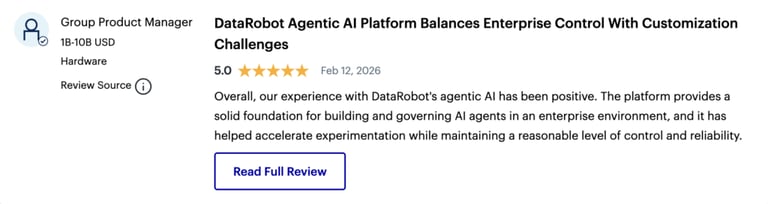
Gartner Rating
⭐ 4.6 / 5
How Much Does DataRobot Cost?
DataRobot does not publish a standard price list as it scales based on the complexity of your models and data volume.
Bottom Line:
#8 Synthflow AI — Best for fast, no-code voice agent deployment
What is Synthflow AI?
Synthflow is a leading no-code AI voice platform designed for agencies that prioritize speed and simplicity. It’s the "drag-and-drop" solution for insurance brokers who want to launch a voice assistant in days rather than months.
What are the key features of Synthflow AI for Insurance?
- No-Code Visual Builder: A drag-and-drop interface that lets you visually map out insurance workflows, such as lead screening or claims intake.
- Multilingual Accuracy: Supports 30+ languages and uses its own specialized speech-to-text engine to maintain accuracy in non-English conversations.
- Omnichannel Follow-ups: Automatically triggers SMS confirmations or quote links immediately after a voice call concludes.
- Enterprise-Grade Compliance: Fully compliant with SOC 2, HIPAA, and GDPR, ensuring that sensitive policyholder data and medical info stay secure.
What are the pros and cons of choosing Synthflow AI?
| Pros | Cons |
|---|---|
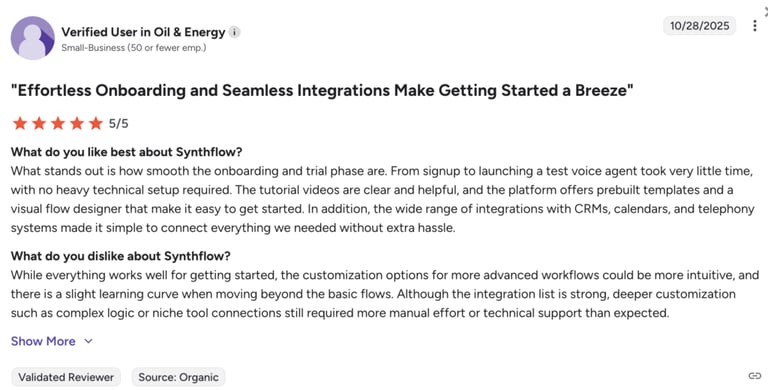
| Pre-built templates and an intuitive visual builder | Users report limitations when building complex logic and advanced branching |
| Supports thousands of concurrent calls with 99.99% uptime | Pricing can become expensive as call minutes increase |
Synthflow AI — Best for fast, no-code voice agent deployment G2 Rating
⭐ 4.5 / 5
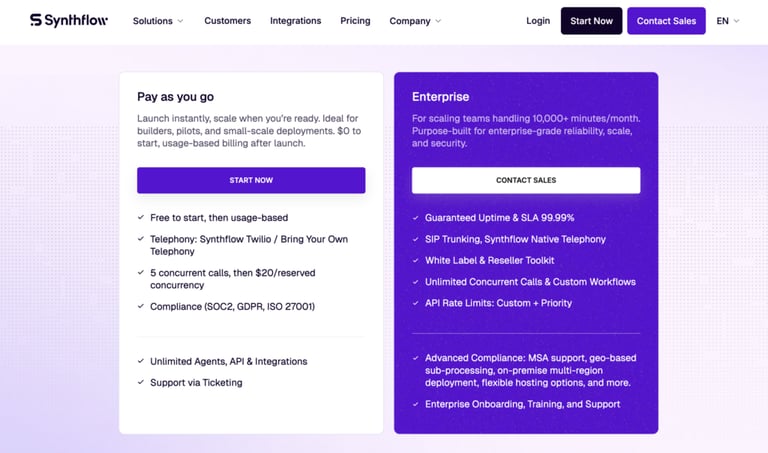
How Much Does Synthflow AI Cost?
Synthflow typically charges based on the number of minutes used, meaning you only pay for the conversations the AI actually handles.
Bottom Line:
#9 Retell AI — Best for developer-friendly, natural-sounding voice agents
What is Retell AI?
Retell AI is a developer-friendly voice platform built for speed and responsiveness. While popular in healthcare, it is a perfect fit for insurance agencies that want to launch a "lightweight" digital receptionist that sounds remarkably natural.
What are the key features of Retell AI?
- Conversation Flow Builder: A flexible tool to design how calls progress—from gathering incident details to answering specific policy FAQs.
- Detailed Performance Analytics: Tracks every interaction to show you call outcomes, lead quality, and where the AI might need more training.
- High-Level Compliance: Fully supports SOC 2, HIPAA, and GDPR, making it safe for handling sensitive medical records in health and life insurance.
- Developer-First API: While easy to start, it offers deep customization options for agencies that want to build unique, proprietary call workflows.
What are the pros and cons of choosing Retell AI?
| Pros | Cons |
|---|---|
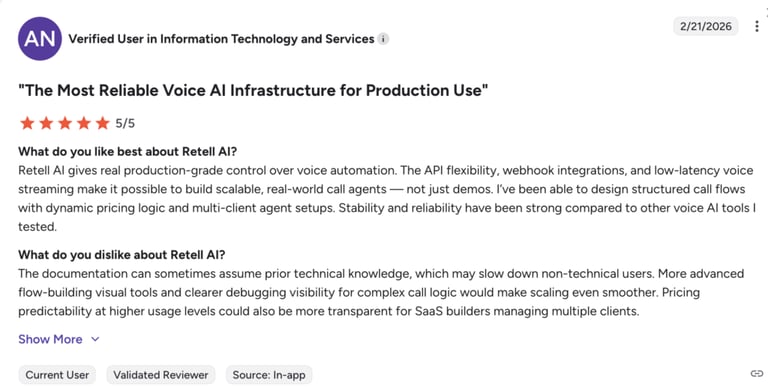
| Supports claims intake/FNOL workflows with structured data collection, transcription, and routing | Getting the most out of the API might require some technical help. |
| Integrates with tools like Zendesk, Salesforce, Make, and n8n | Pricing can become harder to estimate as usage and integrations scale |
Retell AI — Best for developer-friendly, natural-sounding voice agents G2 Rating
⭐ 4.8 / 5
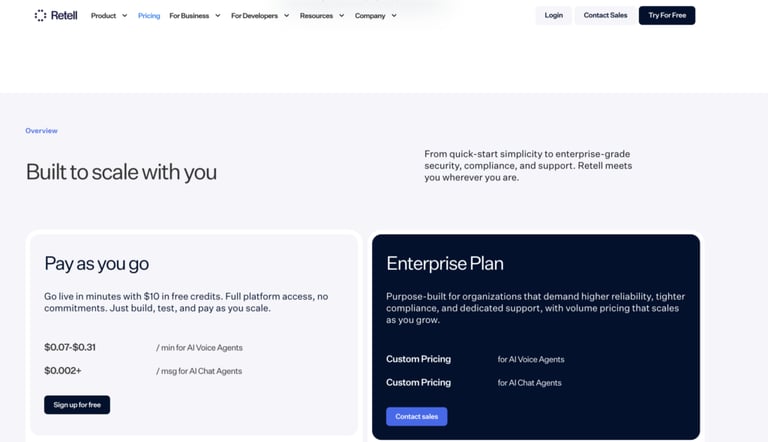
How Much Does Retell AI Cost?
Retell uses a transparent "Pay-as-you-go" model that is ideal for managing costs based on actual usage:
- Pay-as-you-go: from $0.07+/minute
- Enterprise: Custom pricing
#10 Vapi — Best for fully customizable voice AI infrastructure
What is Vapi?
Vapi is a voice AI developer platform that gives engineering teams complete control over the "stack"—from choosing the specific AI brain (like GPT-4) to the voice quality and the telephony infrastructure.
Vapi — Best for fully customizable voice AI infrastructure What Are the Key Features?
- Real-Time Voice Interactions: Optimized for fast, natural conversations—so clients reporting claims or asking about policies don’t experience delays or awkward pauses.
- AI Model Orchestration: Acts as the “brain” behind calls, allowing you to use and switch between leading AI models depending on your agency’s needs.
- Customizable Call Flows: Full control over how calls are handled—whether it’s routing FNOL cases, qualifying leads, or guiding quote requests based on caller input.
- Multilingual Support: Supports conversations in 100+ languages, helping agencies serve diverse policyholders across regions without language barriers.
What are the pros and cons of choosing Vapi?
| Pros | Cons |
|---|---|
| Full API access to control call orchestration, AI logic, and infrastructure behavior | Limited no-code tools and fewer built-in operational dashboards for non-technical teams |
| Flexible integration with multiple LLM providers | Primarily focused on voice with SMS support—no full native omnichannel coverage |
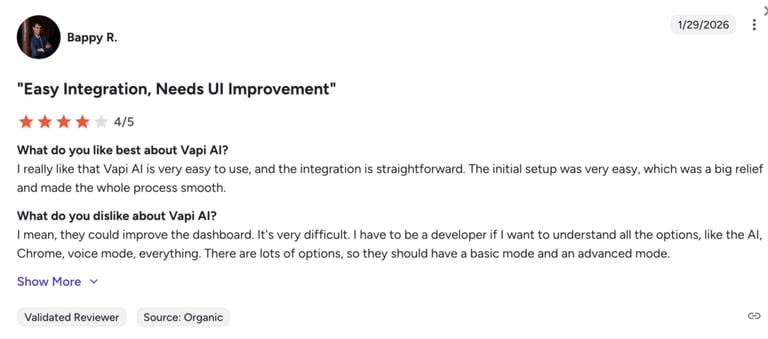
Vapi — Best for fully customizable voice AI infrastructure G2 Rating
⭐ 4.5 / 5
How Much Does Vapi Cost?
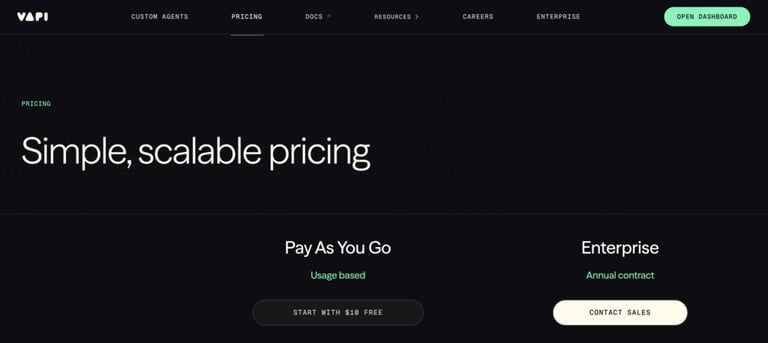
Vapi uses a pay-as-you-go model:
- Pay As You Go: $0.05 / min + $10 / line/month
- Enterprise (Annual Contract): Custom pricing
Bottom Line:
Recommended Reads
Ready to stop comparing and start closing?
How to Choose an AI Receptionist for Your Agency’s Size and Needs
Not every AI receptionist is built for insurance. Beyond answering calls, you need a solution that understands policyholders, integrates with your systems, and handles urgent situations without delay.
Here’s how to evaluate your options:
Make Sure It Understands Insurance Terminology and Workflows
Why This Matters
Your AI receptionist should understand insurance terminology like premium, deductible, and FNOL.
This reduces confusion and unnecessary transfers. For example, a client asking about lowering premiums by adjusting their deductible gets a clear, accurate answer right away.
What to Look For
Look for strong Natural Language Processing (NLP) that can interpret free-form conversations—not just scripted inputs. The interaction should feel natural, even when callers interrupt or change direction mid-conversation.
Consider How It Integrates With Your Existing Systems
Why This Matters
An AI receptionist should fit into your existing workflow—not create more manual work.
With proper integration, every call becomes actionable data. New leads are captured instantly, client interactions are recorded automatically, and follow-ups can be triggered without extra admin work.
What to Look For
- Native integrations with systems like EZLynx, Applied Epic, or HawkSoft
- Automatic call logging and transcript syncing
- Real-time updates to client records and policy details
Evaluate Its Ability to Route Calls and Handle Urgent Situations
Why This Matters
Some require immediate human intervention.
Smart call routing ensures high-priority cases—like claims or emergencies—are escalated without delay, while routine inquiries are handled automatically.
What to Look For
Your AI should be able to:
- Answer 24/7 and respond instantly
- Identify urgency (e.g., “my house is flooding”)
- Route calls intelligently to on-call agents
Take Pricing and Scalability Into Account
Why This Matters
AI receptionist pricing varies widely, so it’s important to match the model to your call volume and growth plans.
These are the most common pricing structures:
- Per-minute: Flexible for low or variable call volumes
- Per-call: Predictable costs for consistent interactions
- Flat-rate: Best for high-volume agencies that need cost stability
Beyond pricing, consider scalability. Can the solution grow with your agency as call volume increases or as you expand into new markets?
What to Look For
- Transparent pricing with no hidden usage fees
- Plans that scale with your call volume
- Flexibility to switch pricing models as your needs change
- Clear limits on minutes, calls, or features included
Use a Clear Framework to Compare Options
Why This Matters
Without a clear framework, it’s easy to choose a tool that looks good on paper but doesn’t fit your actual workflows.
When comparing solutions, use a simple framework:
- Core functionality: Does it solve your biggest operational challenges?
- Integration: Will it work with your current tech stack?
- Scalability: Can it support long-term growth?
- Implementation effort: How quickly can you deploy it?
- Support: What happens after onboarding?
- Total cost of ownership: What are the ongoing costs?
What to Look For
Prioritize solutions that align with your day-to-day operations,not just feature lists.
Plan for a Gradual Rollout
Why This Matters
Rolling out too much at once can lead to errors and poor caller experiences—and works best when done in stages:
- Start with a specific use case (e.g., inbound calls)
- Collect feedback early
- Adjust workflows based on real usage
- Set clear expectations with your team
- Track results to measure impact
What to Look For
Start with high-impact, repeatable use cases and expand as performance improves.
Why AI Receptionists Are Essential for Insurance Agencies in 2026
Here’s why more insurance agencies are integrating an AI answering service for insurance:
- 24/7 availability without increasing headcount: Coverage across evenings, weekends, and holidays ensures no inquiry goes unanswered—at a fraction of the cost (~$100/month vs. $2,500+ for a full-time hire).
- No missed revenue opportunities: Unanswered calls leadto lost policies and delayed claims. Immediate response and real-time lead capture help close that gap.
- High-volume call handling without delays: Unlimited simultaneous call capacity eliminates hold times during peak periods like open enrollment or post-disaster claim surges.
- Stronger lead capture and conversion: Instant responses—including after-hours inquiries—support faster qualification and reduce the risk of leads turning to competitors.
Don't let your team drown during the next peak season.

Key Features to Look for in an AI Receptionist for Insurance Agencies
The right solution should improve both client experience and internal efficiency without adding friction to your processes.
Here are the features that matter most:
Natural Language Processing and Human-Like Voice
Insurance conversations often involve sensitive or complex topics. A robotic or scripted experience can quickly erode trust.
Using conversational AI for insurance ensures callers feel heard and understood, maintaining trust even in complex interactions.
What to look for:
- Advanced Natural Language Processing (NLP) that understands free-form speech
- Human-like voice quality with natural pacing and tone
- Ability to handle interruptions and non-linear conversations
This ensures callers can explain situations in their own words—whether they’re reporting a claim or asking about coverage—without needing to “adapt” to the system.
Automated Appointment Scheduling
Back-and-forth scheduling slows down both agents and prospects. AI receptionists remove that friction by handling bookings in real time.
What to look for:
- Direct calendar syncing (Google, Outlook)
- Real-time availability checks
- Automatic confirmations and rescheduling
Appointments for policy reviews, consultations, or follow-ups can be booked instantly during the call—without manual input.
Claims Intake and Quote Request Handling
Capturing accurate information at the first touchpoint is critical for both claims and new business.
What to look for:
- Structured data collection for FNOL (e.g., policy number, incident details)
- Guided workflows for quote requests (coverage type, assets, risk factors)
- Real-time data entry into your system
This reduces back-and-forth, speeds up processing, and ensures your team has everything they need before taking over.
Call Summaries and Transcriptions
Every call contains valuable information—but manually documenting it slows your team down and increases the risk of errors.
What to look for:
- AI-generated summaries with key points and next steps
- Syncing with CRM or email for easy follow-up
With instant documentation, your agents always have full context—making follow-ups faster, more accurate, and more personalized.
How to Get Started with an AI Insurace Receptionist
Getting an AI receptionist up and running doesn’t require a full system overhaul, but it does require a structured setup. The goal is to train the AI like a new team member and connect it to your existing workflows.
Here’s a practical step-by-step approach:
- 01Define call flows and use cases: Identify why clients typically call—policy questions, claims (FNOL), or quote requests—and map out how each scenario should be handled from start to finish.
- 02Train the AI with FAQs and knowledge base content: Upload common questions, policy details, deductible information, and internal guidelines so the AI can respond accurately and consistently.
- 03Customize scripts for claims and quotes: Set clear instructions for how the AI should greet callers, collect key details (e.g., policy number, incident info), and handle different conversation paths.
- 04Set up integrations and call forwarding: Connect your phone system to route calls to the AI, sync calendars for scheduling, and link your CRM/AMS to log interactions automatically.
- 05Enable call summaries and transcripts: Activate automatic transcription and summaries so every interaction is documented and ready for follow-up in your CRM or inbox.
- 06Test, refine, and launch in phases: Simulate real calls, review transcripts, and adjust responses before going live—starting with a limited rollout (e.g., after-hours) before scaling to full 24/7 coverage.
Your Next Policyholder Is Calling—Will You Pick Up?
When a prospect calls for a quote or a client needs help with a claim, delays often push them to the next available provider.
Your team shouldn’t be tied up handling repetitive calls, chasing voicemails, or manually logging data. Their time is better spent advising clients, managing complex cases, and closing policies.
That’s where AI receptionists make the difference.
With a solution like CloudTalk, you’re not just adding an AI receptionist—you’re connecting every call to your workflows. Calls are answered 24/7, leads are automatically logged into your CRM, and key processes like claims triage or appointment scheduling happen without manual input.
Still letting calls go unanswered? It might be time to change that.
Frequently asked questions
CloudTalk is a top choice, combining 24/7 call handling, CRM integration, and automated workflows for claims, leads, and scheduling.
CloudTalk’s insurance receptionist answers instantly 24/7, handles multiple calls at once, and automates tasks—while humans focus on complex cases.
Yes, it syncs with calendars like Google or Outlook to book, confirm, and reschedule appointments in real time.
It captures every call, automates workflows, logs data in your CRM, and helps your team focus on closing deals.
Yes, CloudTalk meets standards like GDPR, HIPAA, and SOC 2 to ensure secure handling of sensitive data.
Yes, it integrates with CRMs and tools like HubSpot, Salesforce, and insurance systems to streamline workflows.