I migliori software di helpdesk per le piccole imprese nel 2026: recensiti per caso d'uso
In sintesi e INDICE
Il miglior software di helpdesk per la tua piccola impresa dipende da come il tuo team gestisce l'assistenza: via email, chat, telefono o tutti e tre. Questa guida recensisce 10 piattaforme in base al caso d'uso, con prezzi verificati, pro e contro onesti e un verdetto chiaro su a chi si adatta davvero ogni strumento.
Cosa troverai in questa guida:
- 01Come CloudTalk migliora qualsiasi helpdesk: il livello vocale che rende il tuo helpdesk più potente
- 02Cos'è un software di helpdesk? e perché le piccole imprese ne hanno bisogno
- 03Come scegliere lo strumento giusto: 5 criteri per chi acquista per una piccola impresa
- 04I 10 migliori software di helpdesk per le piccole imprese: recensiti per caso d'uso con prezzi verificati
- 05Domande frequenti: risposte rapide ai dubbi più comuni
Le caselle di posta condivise mostrano i loro limiti non appena il volume dei ticket aumenta. Se il team di assistenza della tua piccola impresa smista ancora le richieste dei clienti tramite un account Gmail condiviso, stai già perdendo ticket, inviando risposte doppie e perdendo i dati necessari per migliorare il servizio clienti.
Il software di helpdesk giusto risolve tutto questo, ma quello sbagliato crea un altro insieme di problemi: flussi di lavoro troppo complessi, prezzi che lievitano man mano che cresci e funzionalità che non userai mai. Questa guida recensisce 10 piattaforme come i migliori software di helpdesk per i casi d'uso delle piccole imprese, con prezzi verificati dalle fonti ufficiali, pro e contro onesti e un verdetto chiaro su a chi si adatta davvero ogni strumento.
I migliori software di helpdesk per le piccole imprese nel 2026
| Strumento | Ideale per | Prezzo di partenza | Adatto a |
|---|---|---|---|
| 1. Freshdesk | Email, chat e AI: il miglior tuttofare | Gratuito; Growth da €19/agente/mese | Tutte le dimensioni |
| 2. Zendesk | Helpdesk omnichannel scalabile | Suite Team da €55/agente/mese | PMI in crescita e mid-market |
| 3. Zoho Desk | Il miglior rapporto qualità-prezzo per i team dell'ecosistema Zoho | Gratuito; Express da €7/agente/mese | PMI attente al budget |
| 4. Help Scout | La migliore casella di posta condivisa focalizzata sulle email | Gratuito; Standard da €25/utente/mese | Piccoli team incentrati sulle email |
| 5. LiveAgent | Il pacchetto omnichannel con il miglior rapporto qualità-prezzo | Small Business da €15/agente/mese | Team attenti al budget |
| 6. Intercom | Il migliore per l'assistenza basata su chat e AI | Essential da €29/postazione/mese | Aziende SaaS e tecnologiche |
| 7. Front | La migliore casella condivisa per alti volumi di email | Starter da €25/postazione/mese | Team che gestiscono più caselle di posta |
| 8. Hiver | Il migliore per i team di supporto basati su Gmail | Gratuito; Growth da €25/utente/mese | Team di Google Workspace |
| 9. HappyFox | Il migliore per flussi di lavoro strutturati e SLA | Basic da €29/agente/mese | Team operativi e IT |
| 10. Kustomer | Il migliore per un supporto B2C ad alto contatto | Enterprise da €89/utente/mese | Marchi retail e DTC |
Cos'è un software di helpdesk e perché ne ha bisogno una piccola impresa?
Un software di helpdesk è una piattaforma che centralizza le richieste di assistenza clienti da tutti i canali (email, live chat, telefono, social media) in un'unica coda tracciabile. Ogni richiesta in arrivo diventa un ticket con uno stato, un agente assegnato e una tempistica di risoluzione. Nulla va perso. Nessuno risponde due volte alla stessa richiesta.
Per le piccole imprese in particolare, l'utilità di un software di helpdesk si riduce a tre aspetti. Primo, la visibilità: non puoi gestire ciò che non puoi vedere. Una casella di posta condivisa non ti dice nulla sui tempi di risposta, sul carico di lavoro degli agenti o sui problemi ricorrenti dei clienti. Un helpdesk lo fa. Secondo, la coerenza: i clienti che ti contattano via email, chat e telefono dovrebbero ricevere lo stesso livello di servizio su ogni canale. Terzo, la scalabilità: lo strumento che configuri oggi dovrebbe funzionare anche quando il tuo team raddoppierà. Il momento peggiore per valutare un software di helpdesk per la tua piccola impresa è durante una crisi del servizio clienti.
Distinzione chiave
I termini software di helpdesk e software di ticketing per il servizio clienti sono spesso usati come sinonimi. Storicamente, gli helpdesk si concentravano sul supporto IT (richieste interne), mentre le piattaforme moderne servono altrettanto bene i team di assistenza clienti. Questa guida si concentra sugli strumenti di helpdesk rivolti ai clienti per i team di supporto e vendita delle piccole imprese.
Come scegliere il software di helpdesk giusto per la tua piccola impresa
Prima di valutare fornitori specifici, allineati su questi cinque criteri, che ti permetteranno di eliminare subito la maggior parte delle opzioni sbagliate.
- 01Adattamento ai canaliInizia da dove i tuoi clienti ti contattano effettivamente. I team focalizzati sulle email hanno bisogno di una solida casella di posta condivisa e di una knowledge base. I team che usano molto la chat hanno bisogno di un widget di live chat con automazioni. I team che usano molto il telefono hanno bisogno di un helpdesk che si integri strettamente con un sistema telefonico aziendale o una piattaforma per call center come CloudTalk.
- 02Tempi di configurazione e complessità di gestioneLe piccole imprese raramente hanno un team IT dedicato. Evita gli strumenti che richiedono settimane di configurazione o uno specialista per la manutenzione. I migliori helpdesk per piccole imprese sono attivi in poche ore, con flussi di lavoro che puoi modificare tu stesso.
- 03Trasparenza dei prezziI prezzi per agente scalano in modo prevedibile. I prezzi basati sul volume dei ticket possono riservare sorprese. Fai attenzione alle funzionalità riservate ai piani tariffari più elevati che ti serviranno nel giro di pochi mesi: la gestione degli SLA, le automazioni e la reportistica sono spesso bloccate.
- 04Profondità delle integrazioniIl tuo helpdesk dovrebbe connettersi al tuo CRM, al tuo sistema telefonico e al tuo provider di posta elettronica senza bisogno di sviluppo personalizzato. Le integrazioni native sono più affidabili delle soluzioni alternative basate su Zapier per i flussi di lavoro di supporto in produzione.
- 05Qualità della prova gratuitaOgni piattaforma in questo elenco offre una prova gratuita o un piano gratuito. Usala con ticket reali prima di impegnarti. Gli strumenti che richiedono molta configurazione e che sembrano semplici in una demo possono risultare molto diversi quando iniziano a scorrere i dati reali dei tuoi clienti.
Prima di scegliere un helpdesk: aggiungi un livello vocale per renderlo più potente
Ogni helpdesk in questo elenco gestisce bene email, chat e ticket. La maggior parte gestisce le telefonate in modo approssimativo o non le gestisce affatto, affidandosi a registrazioni di base delle chiamate, IVR limitati o nessuna funzionalità nativa per call center. Prima di tuffarsi nel confronto degli helpdesk, vale la pena capire come CloudTalk si integra perfettamente con ognuno di essi.
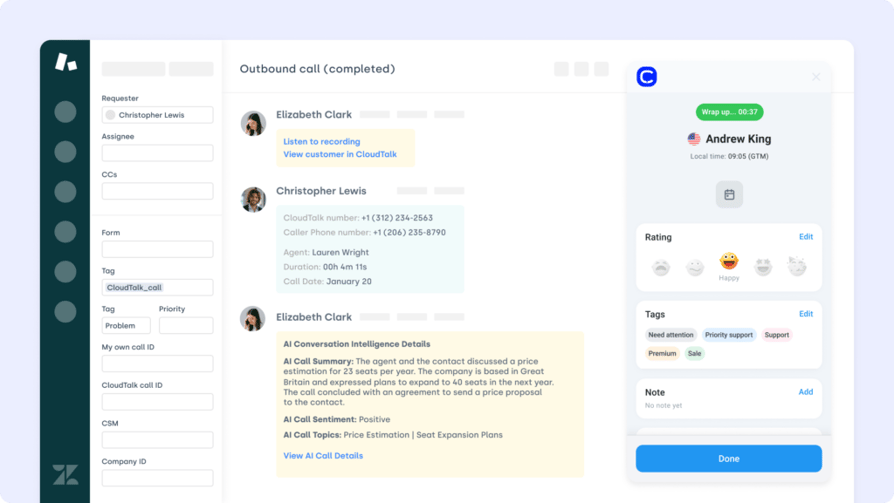
CloudTalk non è un helpdesk. È il livello vocale potenziato dall'AI che rende il tuo helpdesk davvero omnichannel. Quando un cliente chiama, l'operatore vede l'intera cronologia dei ticket, i problemi aperti e le interazioni precedenti prima ancora di rispondere. Ogni chiamata viene registrata automaticamente come ticket. I riepiloghi delle chiamate generati dall'AI, le registrazioni e i punteggi del sentiment si sincronizzano nell'helpdesk in tempo reale. Nessun inserimento manuale. Nessun passaggio da una scheda all'altra. Nessuna perdita di contesto tra i canali.
Per le piccole imprese che gestiscono anche un volume modesto di chiamate in entrata insieme all'assistenza via email e chat, l'aggiunta di CloudTalk a un helpdesk offre un'esperienza utente davvero fluida senza i costi e la complessità di una piattaforma per contact center di livello enterprise. I piani partono da €19/utente/mese (meno della maggior parte degli helpdesk recensiti di seguito) e la configurazione del call center per piccole imprese richiede minuti, non settimane.
A chi si adatta meglio CloudTalk?
- Ai team di supporto delle piccole imprese che gestiscono chiamate in entrata insieme a email e chat, e desiderano che ogni chiamata venga registrata automaticamente nel proprio helpdesk senza interventi manuali degli operatori.
- Ai team di vendita delle piccole imprese che utilizzano un CRM o un helpdesk come sistema di riferimento e hanno bisogno di effettuare chiamate in uscita con coaching basato su AI, registrazioni delle chiamate e sincronizzazione automatica con il CRM.
- A qualsiasi piccola impresa che utilizzi Freshdesk, Zendesk, Intercom, LiveAgent, Help Scout, Front o Kustomer e desideri aggiungere la voce senza dover cambiare piattaforma di helpdesk.
Cosa aggiunge CloudTalk al tuo helpdesk?
- Riepiloghi delle chiamate con AI: ogni chiamata viene riassunta automaticamente e sincronizzata con il ticket dell'helpdesk non appena termina. Nessuna attività amministrativa post-chiamata per gli operatori.
- Monitoraggio e coaching delle chiamate: i manager possono ascoltare le chiamate in diretta, suggerire indicazioni agli operatori senza che il cliente senta, o intervenire per prendere il controllo della chiamata: fondamentale per i piccoli team che stanno sviluppando competenze di supporto.
- Analisi del sentiment: ogni chiamata riceve automaticamente un punteggio per sentiment positivo, neutro o negativo, segnalando gli operatori in difficoltà e i clienti insoddisfatti prima che i problemi peggiorino.
- Analitica in tempo reale: dashboard live che mostrano il volume delle chiamate, la disponibilità degli operatori, i tempi di attesa e i tassi di connessione: la visibilità di cui ha bisogno il manager di una piccola impresa senza richiedere un team operativo dedicato.
- IVR e instradamento delle chiamate: instrada le chiamate in entrata all'operatore o al reparto giusto in base alle scelte del chiamante, agli orari di apertura o alle competenze degli operatori, disponibile fin dal primo giorno senza progetti IT complessi.
- Copertura in oltre 160 paesi: numeri locali in oltre 160 paesi: un'unica piattaforma per i team di supporto distribuiti a livello internazionale.
Quali sono i pro e i contro di CloudTalk?
| Pro | Contro |
|---|---|
| Integrazioni native con tutti i principali helpdesk: Freshdesk, Zendesk, Intercom, LiveAgent, Help Scout, Front e Kustomer sono tutti supportati di default | Solo voce: non sostituisce un helpdesk; deve essere associato a una delle piattaforme indicate di seguito |
| Funzionalità AI senza prezzi enterprise: riepiloghi delle chiamate, analisi del sentiment e trascrizione disponibili a partire da €29/utente/mese | Integrazioni CRM incluse a partire dal piano Essential: i piani Lite e Starter non includono la connettività CRM o helpdesk |
| Configurazione in pochi minuti: si connette al tuo helpdesk esistente tramite il marketplace delle integrazioni, senza bisogno di sviluppatori | |
| Prova gratuita di 14 giorni: testa l'integrazione completa con il tuo helpdesk prima di impegnarti, senza inserire la carta di credito |
Quali sono i prezzi di CloudTalk?
Flexible Pricing Plans to Scale with You
Compare our plans
Hai già un helpdesk? Aggiungi le chiamate potenziate dall'AI in pochi minuti.
I 10 migliori software di helpdesk per piccole imprese nel 2026
Usa questo confronto tra software di helpdesk analizzando cinque casi d’uso: team incentrati sulle e-mail, team incentrati sulla chat, team che usano molto il telefono, team basati su Gmail e team in crescita che hanno bisogno di scalare. Tutti i prezzi sono verificati dalle fonti ufficiali dei fornitori a partire da giugno 2026.
1. Freshdesk — Il miglior helpdesk tuttofare per piccole imprese
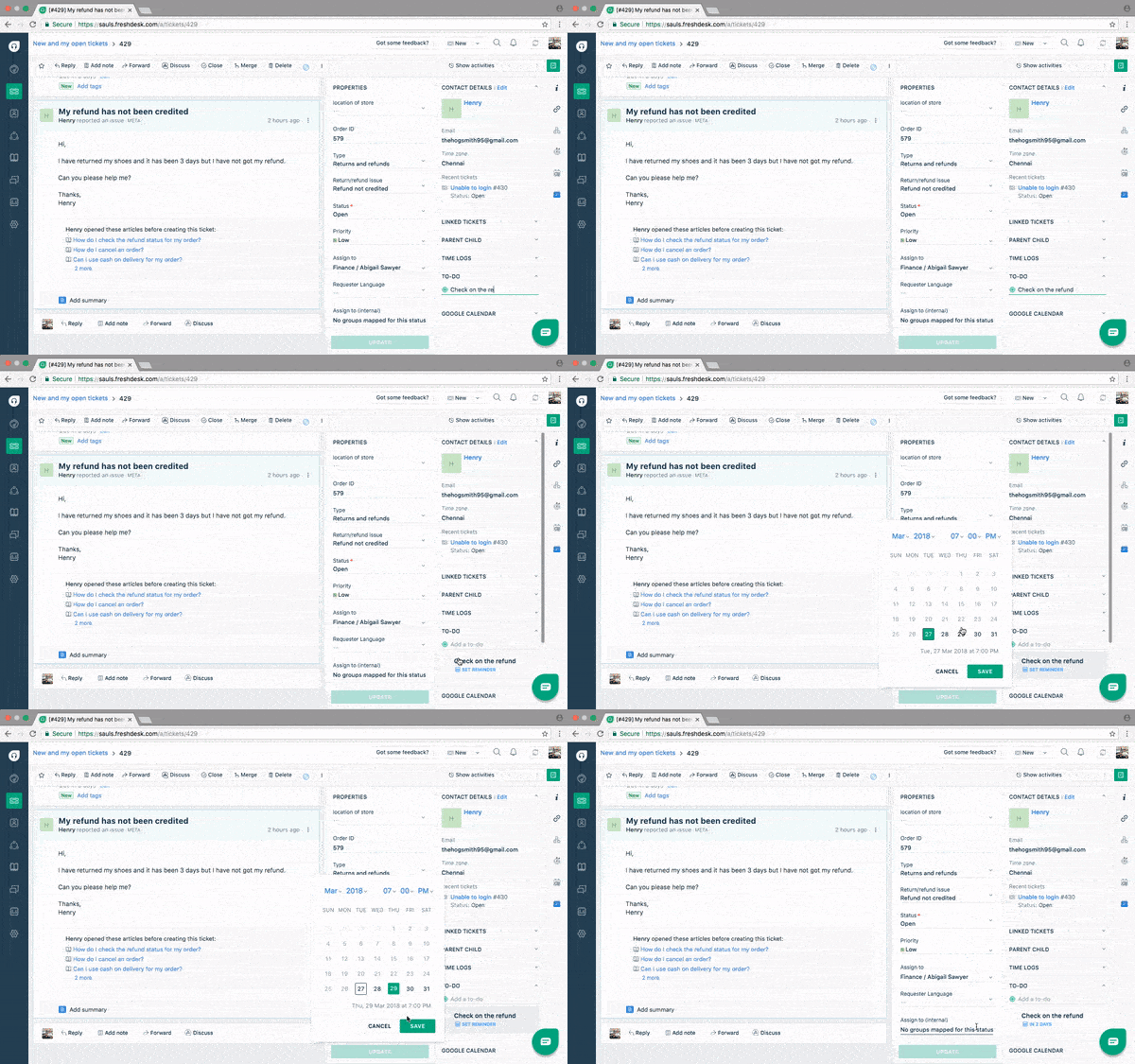
Freshdesk è il software di helpdesk più consigliato per le piccole imprese, e per ottime ragioni. Il suo piano gratuito è davvero utilizzabile, i piani a pagamento hanno prezzi competitivi e la suite Freddy AI — che gestisce la categorizzazione dei ticket, i suggerimenti di risposta e l’auto-risoluzione — è disponibile in tutti i piani, anziché essere riservata solo ai clienti enterprise. Per le piccole imprese che vogliono crescere fino a gestire un’assistenza interamente basata sull’IA senza dover cambiare piattaforma, Freshdesk è la scelta più pratica.
A chi è più adatto Freshdesk?
A piccoli e medi team di assistenza clienti che cercano un helpdesk accessibile e dotato di funzionalità IA, con margini di crescita. È particolarmente forte per e-commerce, SaaS e aziende di servizi che gestiscono l’assistenza tramite e-mail, chat e social media. I team che già utilizzano Freshworks CRM o Freshservice beneficiano di una sincronizzazione nativa dei dati all’interno della suite.
Funzionalità chiave
- Freddy AI: suggerisce automaticamente le risposte, categorizza i ticket e può risolvere autonomamente le richieste più comuni tramite un agente IA — disponibile nei piani a pagamento senza costi aggiuntivi per l’add-on IA.
- Inbox unificata: consolida e-mail, chat, telefono, social media e moduli web in un’unica area di lavoro per gli agenti.
- Regole di automazione: smistamento dei ticket, avvisi SLA e routing prioritario — disponibili a partire dal piano Growth.
- Knowledge base: portale di self-service integrato che riduce il volume di ticket in entrata consentendo ai clienti di trovare le risposte da soli.
- Integrazione nativa con CloudTalk: registra e sincronizza le chiamate direttamente tra Freshdesk e CloudTalk — vedi l’integrazione Freshdesk + CloudTalk per tutti i dettagli.
Quali sono i pro e i contro di Freshdesk?
| Pro | Contro |
|---|---|
| Il piano gratuito più generoso — 2 agenti, ticket illimitati, knowledge base e reportistica di base a costo zero | Reportistica limitata nei piani inferiori — i report personalizzati richiedono il piano Pro |
| Freddy AI incluso nei piani a pagamento — assistenza IA senza costi aggiuntivi separati | La complessità delle funzioni può disorientare — l’ampia gamma di opzioni richiede una curva di apprendimento per i team molto piccoli |
| Percorso di upgrade chiaro — da Free a Growth, Pro ed Enterprise senza dover cambiare piattaforma | Le sessioni dell’agente IA sono basate sul volume — un utilizzo intensivo dell’IA comporta costi extra oltre al piano base |
Quali sono i prezzi di Freshdesk?
Free: fino a 2 agenti, 6 mesi — gestione ticket via e-mail, knowledge base, reportistica di base.
Growth: €19/agente/mese — automazione, gestione degli SLA, rilevamento delle collisioni e analisi di base.
Pro: €55/agente/mese — report personalizzati, instradamento basato sulle competenze, sondaggi CSAT e Freddy AI Copilot.
Enterprise: €89/agente/mese — sandbox, audit log, whitelist di IP e sicurezza di livello enterprise. Tutti i prezzi si riferiscono alla fatturazione annuale. Fonte: freshworks.com/freshdesk/pricing
2. Zendesk — Il migliore per le piccole imprese in crescita che hanno bisogno di scalare
Zendesk è il leader del settore per un motivo: il suo sistema di ticketing, la logica di routing e la reportistica sono i migliori sul mercato. Per le piccole imprese che prevedono di crescere rapidamente e non vogliono migrare su un altro helpdesk dopo 18 mesi, Zendesk è una scommessa sicura a lungo termine. Il compromesso è il costo: i piani base di Suite partono da €55/agente/mese e le funzionalità IA (Copilot) richiedono altri €50/agente/mese in più. Non è una scelta economica, ma è la piattaforma più completa di questo elenco.
A chi è più adatto Zendesk?
Alle piccole imprese in rapida crescita che diventeranno medie imprese nel giro di 12-24 mesi, o ai team che necessitano di conformità di livello enterprise (HIPAA, SOC 2) fin dal primo giorno. È anche l’opzione più solida per le aziende che gestiscono l’assistenza su cinque o più canali contemporaneamente. Non è consigliato per i team con meno di 10 agenti e un budget limitato — per i team piccoli, Freshdesk o Zoho Desk offrono un rapporto qualità-prezzo migliore.
Funzionalità chiave
- Ticketing omnichannel: e-mail, chat, voce, social e app di messaggistica in un’area di lavoro unificata con cronologia completa delle conversazioni.
- Agenti IA: risolvono i ticket in modo autonomo su tutti i canali; fatturati per risoluzione andata a buon fine anziché per licenza.
- Instradamento basato sulle competenze: indirizza i ticket all’agente giusto in base alla lingua, all’esperienza sul prodotto o alla categoria dell’account — disponibile a partire da Suite Professional.
- Oltre 1.800 integrazioni nel marketplace: inclusa l’integrazione nativa Zendesk + CloudTalk per la registrazione delle chiamate, il click-to-call e la visualizzazione del contesto del chiamante.
Quali sono i pro e i contro di Zendesk?
| Pro | Contro |
|---|---|
| Migliore ticketing e routing della categoria — l’helpdesk più maturo e configurabile sul mercato | Costoso per i piccoli team — i piani Suite partono da €55/agente/mese, esclusi gli add-on IA |
| Non si diventa mai troppo grandi — scala da 3 a 3.000 agenti senza dover cambiare piattaforma | L’IA ha un costo extra — Copilot costa altri €50/agente/mese in più rispetto a qualsiasi piano Suite |
| Oltre 1.800 integrazioni — si connette praticamente a ogni CRM, sistema telefonico e strumento aziendale | Complessità di implementazione — la configurazione completa può richiedere 2-4 settimane per un team non tecnico |
Quali sono i prezzi di Zendesk?
Support Team: €19/agente/mese — solo e-mail e ticketing, senza agenti IA, senza omnichannel.
Suite Team: €55/agente/mese — omnichannel, agenti IA di base, centro assistenza e messaggistica.
Suite Growth: €89/agente/mese — aggiunge la gestione degli SLA, il portale clienti, il supporto multilingue e la CSAT.
Suite Professional: €115/agente/mese — instradamento basato sulle competenze, conformità HIPAA, analisi avanzata e report personalizzati.
Nota: l’add-on Copilot AI costa €50/agente/mese in più su qualsiasi piano Suite. Tutti i prezzi si riferiscono alla fatturazione annuale. Fonte: zendesk.com/pricing

CloudTalk si integra nativamente con Zendesk, Freshdesk, Intercom, LiveAgent e altri ancora. Aggiungi chiamate potenziate dall’IA a qualsiasi helpdesk in pochi minuti.
3. Zoho Desk — Il miglior rapporto qualità-prezzo per le piccole imprese nell’ecosistema Zoho
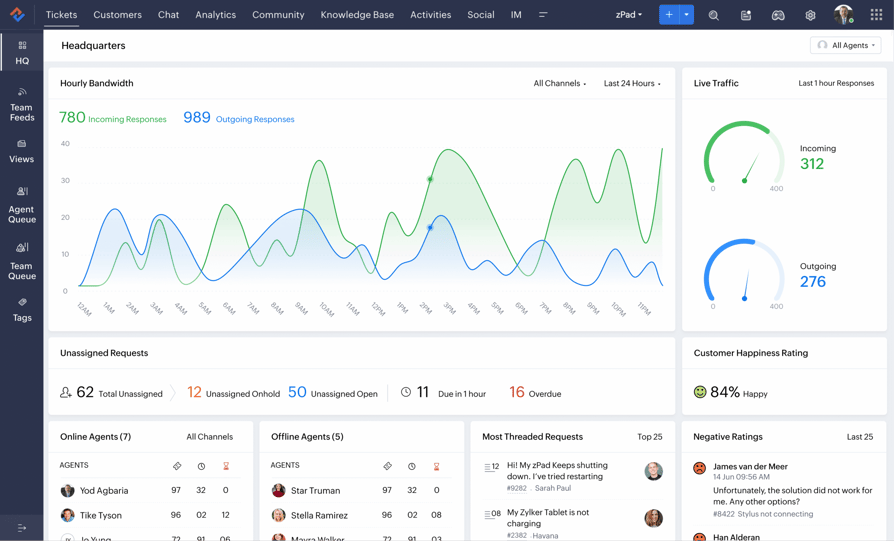
Zoho Desk è l’helpdesk completo più economico di questa lista, con piani a pagamento che partono da €7/agente/mese (Express) e un piano gratuito davvero utile per un massimo di 3 agenti. Il suo vantaggio principale è l’integrazione con l’ecosistema: i team che utilizzano Zoho CRM, Zoho Books o Zoho Projects ottengono una sincronizzazione nativa e bidirezionale dei dati che la maggior parte dei concorrenti fa pagare a parte. Il compromesso è che le funzioni di Zia AI e l’automazione avanzata sono riservate al piano Enterprise da €40/agente/mese.
A chi è più adatto Zoho Desk?
Alle piccole imprese attente al budget che utilizzano già o pianificano di adottare altri prodotti Zoho. Offre un ottimo valore per aziende di servizi, agenzie e attività commerciali che hanno bisogno di gestione degli SLA e automazione dei flussi di lavoro senza prezzi enterprise. È meno interessante per i team che non usano l’ecosistema Zoho, dove viene meno il vantaggio dell’integrazione.
Funzionalità chiave
- Integrazione con l’ecosistema Zoho: sincronizzazione nativa bidirezionale con Zoho CRM, Books, Projects e Analytics — senza bisogno di middleware.
- Automazione Blueprint: costruttore visivo drag-and-drop di processi per flussi di lavoro strutturati dei ticket — disponibile a partire dal piano Professional.
- Zia AI: analisi del sentiment, suggerimenti di risposta e tag automatici — disponibile nel piano Enterprise.
- Supporto multi-dipartimentale: code di ticket separate, SLA e knowledge base per ogni dipartimento — utile per aziende con diverse linee di assistenza (vendite, fatturazione, supporto tecnico).
Quali sono i pro e i contro di Zoho Desk?
| Pro | Contro |
|---|---|
| Prezzo d’ingresso basso — gratuito per 3 agenti, Express a €7/agente/mese e Standard a €14/agente/mese con SLA e automazione inclusi | Zia AI è solo Enterprise — le funzionalità IA sono limitate al piano da €40/agente/mese |
| Sincronizzazione nativa con l’ecosistema Zoho — CRM, Books e Projects connessi senza middleware | Configurazione impegnativa — la configurazione richiede 1-2 settimane e l’interfaccia ha una curva di apprendimento più ripida rispetto a Freshdesk |
| Multicanale nel piano intermedio — e-mail, chat, social e telefono disponibili a partire da Standard (€14/agente/mese) | Meno interessante senza Zoho — il vantaggio dell’integrazione scompare se utilizzi altri CRM |
Quali sono i prezzi di Zoho Desk?
Free: fino a 3 agenti — ticketing via e-mail, centro assistenza, SLA di base, nessuna automazione.
Express: €7/agente/mese — fino a 5 agenti, canali social di base, modelli di e-mail e dashboard di base.
Standard: €14/agente/mese — SLA con escalation, automazione dei flussi di lavoro, valutazioni CSAT, live chat e dominio personalizzato.
Professional: €23/agente/mese — automazione Blueprint, assegnazione round-robin, multi-dipartimento, dashboard personalizzate.
Enterprise: €40/agente/mese — Zia AI, centri assistenza multi-brand, routing basato sulle competenze, IVR multilivello. Tutti i prezzi si riferiscono alla fatturazione annuale. Fonte: zoho.com/desk/pricing
4. Help Scout — Il migliore per i piccoli team di assistenza incentrati sulle e-mail
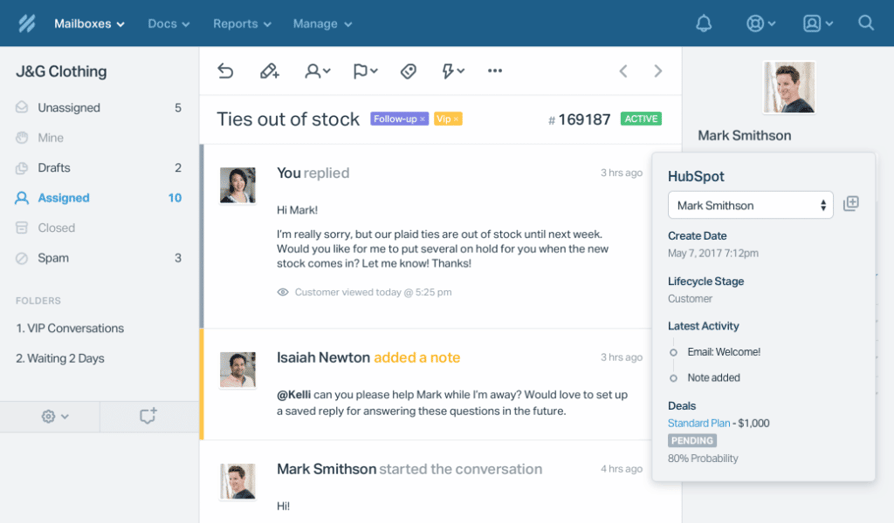
Help Scout è progettato per i team che vogliono la struttura di un helpdesk senza dare l’impressione di un helpdesk freddo. I clienti ricevono una risposta che sembra una normale e-mail personale — niente numeri di ticket, niente formattazione robotica — mentre gli agenti lavorano in una casella di posta condivisa con rilevamento delle collisioni, note interne e cronologia delle conversazioni. Per le piccole imprese in cui la qualità del rapporto con il cliente conta più del volume di ticket gestiti, Help Scout rappresenta la soluzione ideale che le piattaforme più complesse non riescono a offrire.
A chi è più adatto Help Scout?
A piccole aziende di servizi, agenzie e società SaaS con 2-20 agenti di supporto dove l’e-mail è il canale principale e il tono di voce del brand è fondamentale. Ideale per i team che vogliono una gestione condivisa della posta in arrivo senza la complessità del ticketing aziendale. Non è la scelta adatta per i team che gestiscono grandi volumi su cinque o più canali.
Funzionalità chiave
- Caselle di posta condivise: assegna, commenta e collabora sulle conversazioni e-mail senza che il cliente veda le discussioni interne.
- Docs (knowledge base): centro assistenza integrato con un widget Beacon che mostra gli articoli pertinenti prima che i clienti inviino una richiesta.
- AI Answers: scansiona la tua documentazione per risolvere automaticamente le domande più comuni — disponibile come add-on.
- Integrazione nativa con CloudTalk: collega le chiamate alle conversazioni dei clienti tramite l’integrazione Help Scout + CloudTalk.
Quali sono i pro e i contro di Help Scout?
| Pro | Contro |
|---|---|
| Risposte dal tocco umano — i clienti ricevono e-mail personali, non risposte con numeri di ticket | Focalizzato sulle e-mail — live chat limitata e nessun supporto telefonico nativo |
| La configurazione più semplice in assoluto — i team sono operativi in meno di un’ora, senza bisogno di specialisti | AI Answers tariffata per risoluzione — €0.75 per conversazione risolta dall’IA in aggiunta al piano base |
| Il widget Beacon riduce il volume dei ticket — mostra gli articoli della knowledge base prima che i clienti inviino le richieste | Reportistica di base nel piano Standard — i report personalizzati e l’analisi avanzata richiedono il piano Plus |
Quali sono i prezzi di Help Scout?
Free: fino a 5 utenti, 1 casella di posta — adatto a piccolissimi team che vogliono valutare la piattaforma.
Standard: €25/utente/mese — caselle di posta condivise, Docs knowledge base, widget Beacon, live chat e reportistica di base.
Plus: €45/utente/mese — report personalizzati, permessi avanzati, conformità HIPAA, integrazione con Salesforce e AI Drafts.
Pro: €75/utente/mese — onboarding dedicato, assistenza prioritaria e sicurezza avanzata (minimo 10 utenti). Tutti i prezzi si riferiscono alla fatturazione annuale. Fonte: helpscout.com/pricing
5. LiveAgent — Il pacchetto omnichannel con il miglior rapporto qualità-prezzo per le piccole imprese
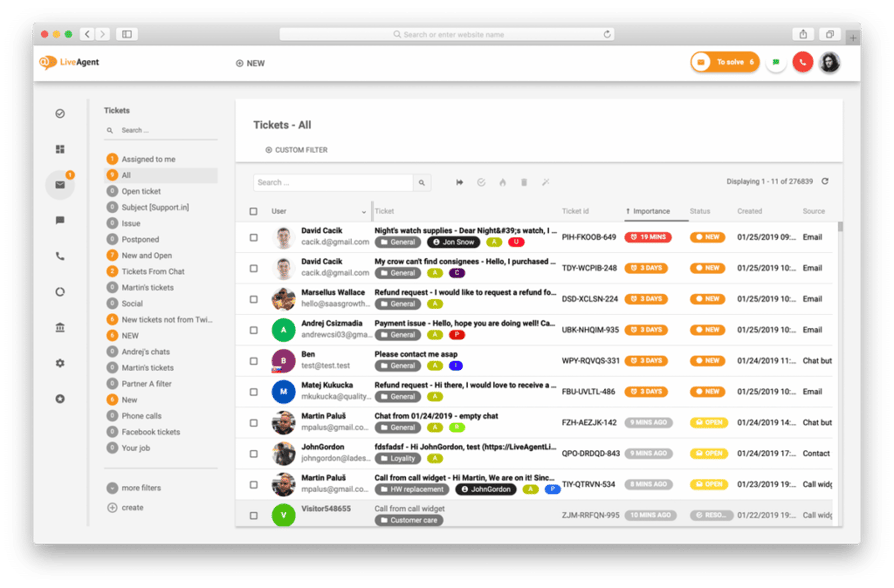
LiveAgent include più canali per singolo euro rispetto a qualsiasi altra piattaforma in questo elenco. I suoi piani d’ingresso offrono live chat, un call center integrato, ticketing e-mail e supporto social media — canali che i concorrenti fanno pagare a parte. Per le piccole imprese che gestiscono i contatti con i clienti su più punti di contatto e hanno bisogno di mantenere i costi per agente sotto i €20/mese, LiveAgent è la scelta più conveniente.
A chi è più adatto LiveAgent?
Alle piccole imprese attente al budget che hanno bisogno di un supporto multicanale (e-mail, chat, social e chiamate di base) senza dover pagare abbonamenti separati per ciascun canale. Ideale per e-commerce, settore alberghiero e aziende di servizi che ricevono un mix elevato di tipologie di canali con volumi moderati.
Funzionalità chiave
- Oltre 175 funzionalità incluse: live chat, e-mail, call center, social media e knowledge base inclusi fin dai piani d’ingresso — nessun costo aggiuntivo per i canali principali.
- Call center integrato: gestisci le chiamate in entrata e in uscita direttamente all’interno di LiveAgent — nessun sistema telefonico separato richiesto per le esigenze di chiamata di base.
- Gamification: classifiche, badge e incentivi sulle prestazioni per motivare i piccoli team di assistenza.
- Integrazione nativa con CloudTalk: per i team che superano le funzionalità di chiamata di base di LiveAgent e necessitano di IVR avanzato, analisi e composizione — vedi l’integrazione LiveAgent + CloudTalk.
Quali sono i pro e i contro di LiveAgent?
| Pro | Contro |
|---|---|
| Il maggior numero di canali per euro speso — e-mail, chat, chiamate e social in pacchetto a partire da €15/agente/mese | L’interfaccia sembra datata — l’interfaccia utente è più vecchia rispetto ad alternative moderne come Freshdesk o Intercom |
| Call center integrato — supporto voce di base senza un abbonamento a un sistema telefonico separato | Ecosistema di integrazione più limitato — meno integrazioni native rispetto a Zendesk o Freshdesk |
| Recensioni G2 decisamente positive — costantemente apprezzato per il valore e la reattività del supporto | Funzionalità IA limitate — mancano suggerimenti di risposta basati su IA o la risoluzione automatica paragonabile a Freddy di Freshdesk |
Quali sono i prezzi di LiveAgent?
Small Business: €15/operatore/mese — ticketing, live chat, call center e canali social di base.
Medium Business: €29/operatore/mese — in più conformità SLA, tracciamento del tempo, registro di controllo e reportistica avanzata.
Large Business: €49/operatore/mese — ruoli personalizzati, restrizioni IP e account manager dedicato.
Enterprise: €69/operatore/mese — supporto prioritario, integrazioni personalizzate e onboarding dedicato. Tutti i prezzi si riferiscono alla fatturazione annuale. Fonte: liveagent.com/pricing
Hai bisogno di funzionalità di chiamata avanzate per il tuo helpdesk? CloudTalk si collega con LiveAgent, Freshdesk, Zendesk e oltre 95 altri strumenti.
6. Intercom — Il migliore per il supporto basato su chat e IA per le piccole imprese
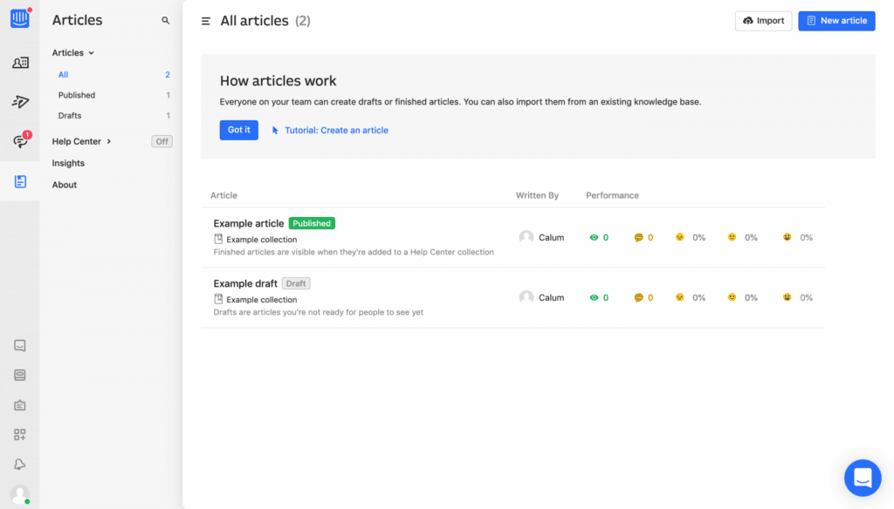
Intercom ha lanciato per primo il widget di chat in-app e rimane la piattaforma ideale per le aziende in cui la live chat e i messaggi proattivi sono i canali di supporto principali. Il suo agente Fin AI può risolvere autonomamente un'alta percentuale di richieste in arrivo rispondendo alle domande della tua knowledge base e compiendo azioni all'interno del tuo prodotto, senza l'intervento di un operatore umano. Per le aziende SaaS e tecnologiche che vogliono deviare una quota significativa di ticket tramite l'IA prima che raggiungano un operatore, Intercom è l'opzione più efficace su questa lista.
A chi si rivolge principalmente Intercom?
Aziende SaaS, startup tecnologiche e piccole imprese digital-first in cui il canale di supporto principale è la chat in-app o sul web. È particolarmente indicato per i team con una knowledge base ben sviluppata, in grado di alimentare la capacità di risoluzione automatica di Fin AI. È meno adatto per le aziende che gestiscono un volume elevato di telefonate in arrivo — le funzionalità voce di Intercom sono limitate rispetto a quelle delle piattaforme dedicate.
Funzionalità chiave
- Agente Fin AI: risolve autonomamente le richieste utilizzando la tua knowledge base e le integrazioni; ora è offerto come prodotto IA autonomo, separato dalla suite principale di Intercom.
- Messaggistica proattiva: invia messaggi mirati via e-mail o in-app in base al comportamento dei clienti, utile per ridurre contemporaneamente il tasso di abbandono e il volume del supporto.
- Inbox condivisa: un'area di lavoro unificata per gestire le conversazioni su chat, e-mail e social.
- Integrazione CloudTalk: passa da una chat a una chiamata e viceversa grazie all'efficace integrazione tra Intercom e CloudTalk.
Quali sono i pro e i contro di Intercom?
| Pro | Contro |
|---|---|
| Capacità di risoluzione IA leader del settore — Fin AI gestisce un'alta percentuale di ticket in autonomia se alimentato con ottimi contenuti della knowledge base | Costoso su larga scala — i costi aumentano rapidamente sia con il numero di utenti sia con il volume di risoluzioni dell'IA |
| Messaggistica in-app e chat migliori della categoria — la piattaforma originale e ancora oggi la più forte per i flussi di lavoro di supporto SaaS | Supporto vocale limitato — non sostituisce un sistema telefonico dedicato o una piattaforma di call center |
| Messaggistica proattiva — le campagne attivate in base al comportamento riducono contemporaneamente il volume di supporto e l'abbandono | Modello di prezzo complesso — le tariffe basate sugli utenti più i costi per risoluzione dell'IA rendono difficile prevedere il costo totale |
Quali sono i prezzi di Intercom?
Essential: €29/utente/mese — inbox condivisa, automazione di base, ticket e Fin AI (si applicano tariffe per risoluzione basate sull'uso).
Advanced: €85/utente/mese — inbox multiple, flussi di lavoro, assegnazione round-robin e funzionalità IA aggiuntive.
Expert: €132/utente/mese — SSO, HIPAA, sicurezza avanzata e gestione del carico di lavoro.
Nota: Fin AI applica una tariffa per ogni risoluzione andata a buon fine in aggiunta al prezzo per utente. Tutti i prezzi si riferiscono alla fatturazione annuale. Fonte: intercom.com/pricing
7. Front — La migliore inbox condivisa per i team con elevati volumi di e-mail
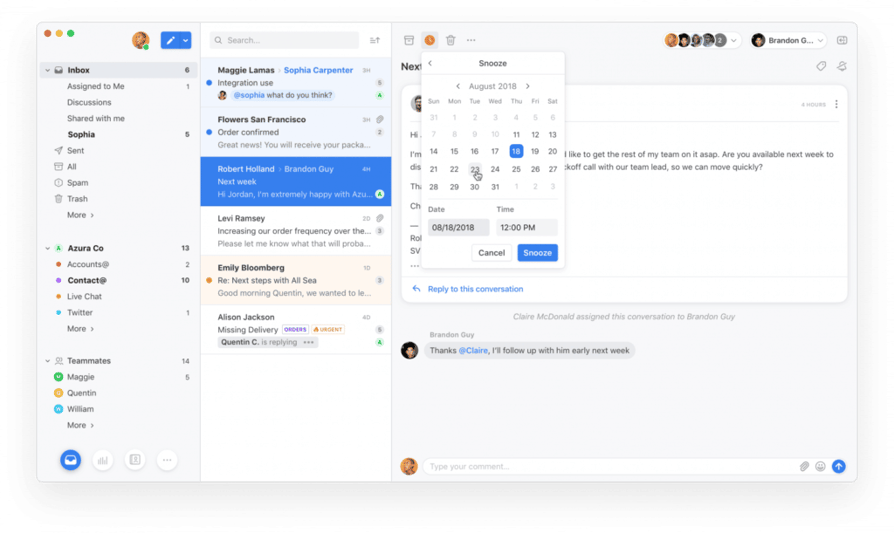
Front si colloca a metà strada tra una casella di posta condivisa e un helpdesk completo. Centralizza e-mail, SMS e social media in un'area di lavoro collaborativa in cui gli operatori possono assegnare conversazioni, lasciare commenti interni e condividere bozze prima di rispondere. A differenza degli helpdesk tradizionali, Front mantiene l'interfaccia e-mail familiare per gli operatori — non ci sono numeri di ticket, né flussi di lavoro rigidi. Per le piccole imprese che ricevono un volume elevato di e-mail da clienti, partner o account chiave, Front porta l'affidabilità dell'helpdesk sulle e-mail senza l'onere di migrare a una piattaforma completamente nuova.
A chi si rivolge principalmente Front?
Società di servizi professionali, aziende di logistica e qualsiasi piccola impresa in cui l'e-mail è il canale di supporto dominante e la qualità delle singole risposte conta tanto quanto la velocità di risposta. È ideale per i team che devono gestire in un unico posto le inbox condivise rivolte all'esterno (supporto@, amministrazione@, vendite@) senza strumenti separati per ognuna.
Funzionalità chiave
- Collaborazione nella inbox condivisa: assegna messaggi, lascia commenti interni nei thread e condividi bozze, il tutto senza che il cliente veda l'attività interna.
- Inbox multicanale: gestione di e-mail, SMS, social media e WhatsApp in un'unica interfaccia.
- Regole SLA: imposta soglie di priorità e tempi di risposta per i messaggi in arrivo, opzione disponibile a partire dal piano Professional.
- Integrazione CloudTalk: aggiungi funzionalità vocali all'inbox condivisa di Front tramite l'integrazione tra Front e CloudTalk.
Quali sono i pro e i contro di Front?
| Pro | Contro |
|---|---|
| Migliore esperienza di collaborazione — commenti interni e condivisione di bozze su ogni thread e-mail | Non è un helpdesk completo — meno robusto di Zendesk o Freshdesk per flussi di lavoro di ticketing complessi |
| Interfaccia nativa per le e-mail — gli operatori lavorano in un ambiente familiare, riducendo i tempi di formazione | Piano Starter limitato a 10 utenti — i team a partire da 11 utenti sono costretti a passare al piano Professional a €65/utente/mese |
| Gestione di inbox multiple — gestisce supporto@, vendite@, amministrazione@ e altro in un'unica area di lavoro | Le funzionalità IA sono componenti aggiuntivi — Copilot e Smart QA hanno un costo extra sui piani Starter e Professional |
Quali sono i prezzi di Front?
Starter: €25/utente/mese — inbox condivise, tag, assegnazioni, automazioni di base; solo un tipo di canale, limite di 10 utenti.
Professional: €65/utente/mese — supporto omnichannel, regole SLA, report sulle prestazioni del team, integrazione con Salesforce e flussi di lavoro personalizzati; fino a 50 utenti.
Enterprise: €105/utente/mese — utenti illimitati, funzionalità IA incluse (Copilot, Smart QA, Smart CSAT), permessi e reportistica avanzati.
Nota: i componenti aggiuntivi di IA (Copilot, Smart QA) hanno un costo extra sui piani Starter e Professional. Tutti i prezzi si riferiscono alla fatturazione annuale. Fonte: front.com/pricing
8. Hiver — Il miglior helpdesk per i team di piccole imprese basati su Gmail
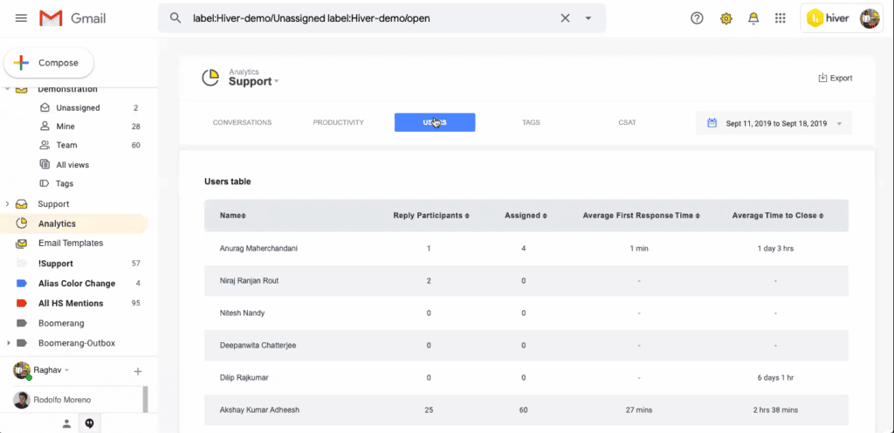
Hiver trasforma Gmail in un helpdesk completo. Aggiunge il rilevamento delle collisioni, l'assegnazione, le SLA e le analisi direttamente sopra Google Workspace, senza richiedere agli operatori di imparare una nuova interfaccia o di migrare i dati e-mail. Per le piccole imprese che utilizzano già Google Workspace, Hiver è la strada più rapida per passare da un account Gmail condiviso a un servizio di supporto strutturato.
A chi si rivolge principalmente Hiver?
Team di supporto di piccole imprese che lavorano interamente all'interno di Google Workspace e desiderano le funzionalità di un helpdesk senza l'interruzione dovuta alla migrazione a una nuova piattaforma. È particolarmente forte per i servizi professionali, gli studi legali, gli studi commerciali e le agenzie in cui Gmail è al centro di tutte le comunicazioni aziendali.
Funzionalità chiave
- Interfaccia nativa per Gmail: gli operatori lavorano in Gmail e Hiver aggiunge inbox condivise, assegnazioni e SLA come livello sovrapposto; nessuna nuova interfaccia da imparare.
- Multicanale: e-mail, live chat, WhatsApp, voce e un portale self-service, tutti convogliati nell'area di lavoro di Gmail.
- Copilot IA: suggerisce risposte, crea riepiloghi delle conversazioni e individua i ticket urgenti, disponibile nei piani superiori.
- Sondaggi CSAT: invia automaticamente valutazioni di gradimento alla chiusura delle conversazioni, con risultati visibili nelle analisi di Hiver.
Quali sono i pro e i contro di Hiver?
| Pro | Contro |
|---|---|
| Nessun cambio di interfaccia — gli operatori rimangono su Gmail; nessuna migrazione, nessuna nuova formazione | Dipendenza da Google Workspace — non è adatto ai team che utilizzano Outlook o altri provider di posta |
| La configurazione più rapida della lista — attivo in pochi minuti se il tuo team usa già Google Workspace | Funzionalità IA riservate ai piani superiori — gli agenti IA e il Copilot IA richiedono il piano Pro (€55/utente/mese) |
| Multicanale all'interno di Gmail — chat, WhatsApp e voce possono essere aggiunti senza uscire dall'interfaccia di Google Workspace | Meno adatto per flussi di lavoro complessi — l'automazione in stile Blueprint e l'instradamento tra più reparti sono meno maturi rispetto a Zendesk o Freshdesk |
Quali sono i prezzi di Hiver?
Free: disponibile — inbox condivisa e ticketing di base per iniziare.
Growth: €25/utente/mese — inbox condivise illimitate, SLA, automazione di base, sondaggi CSAT e live chat.
Pro: €55/utente/mese — agenti IA, Copilot IA, supporto vocale, WhatsApp, instradamento basato sulle competenze e analisi avanzate.
Elite: €85/utente/mese — QA con IA, Insights con IA, sicurezza avanzata e controlli di livello enterprise. Tutti i prezzi si riferiscono alla fatturazione annuale. Fonte: hiverhq.com/pricing/hiver-omni
9. HappyFox — Il migliore per flussi di lavoro strutturati e team di supporto operativo
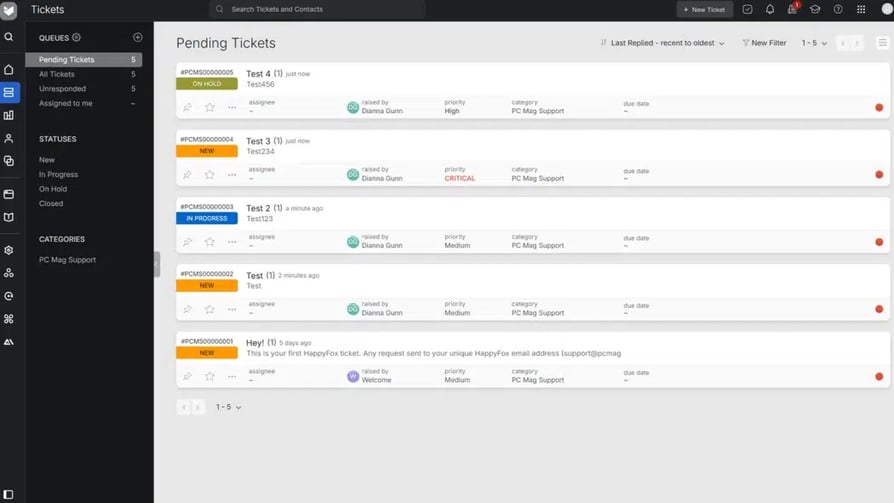
HappyFox è un helpdesk incentrato sul ticketing, progettato per i team in cui il supporto si sovrappone alle operazioni: richieste che si spostano tra i reparti, che richiedono approvazioni o che comportano attività assegnate a più persone. Il suo generatore di flussi di lavoro tratta ogni ticket come un processo strutturato con fasi, responsabili e scadenze, anziché come una semplice conversazione in inbox. Per le piccole imprese in settori come la logistica, la gestione di strutture o i servizi professionali, in cui la risoluzione comporta spesso passaggi interni, HappyFox aggiunge una visibilità che gli strumenti basati su e-mail non possono fornire.
A chi si rivolge principalmente HappyFox?
Team operativi di piccole imprese, IT, risorse umane e gestione strutture che gestiscono richieste di servizio interne o esterne strutturate, con flussi di lavoro a più fasi e conformità SLA. È meno adatto ai team di supporto a contatto con i clienti che necessitano di flussi veloci e di deviazione delle richieste tramite IA.
Funzionalità chiave
- Automazione dei flussi di lavoro: imposta attivatori, condizioni e azioni per processi di ticket a più fasi; automatizza l'escalation, l'assegnazione e gli aggiornamenti di stato.
- Supporto multicanale: gestione di e-mail, chat, telefono e social media da un'unica coda.
- Gestione delle SLA: definisci obiettivi di tempo per risposta e risoluzione in base al tipo di ticket, alla priorità o al segmento di clientela, con avvisi di escalation automatici.
- Forum della community: community di clienti integrata per il supporto tra pari e la condivisione delle conoscenze.
Quali sono i pro e i contro di HappyFox?
| Pro | Contro |
|---|---|
| Migliore struttura del flusso di lavoro — i ticket sono trattati come processi strutturati con fasi e responsabili, non come semplici elementi in una casella di posta | Prezzo d'ingresso più alto — parte da €29/operatore/mese, più costoso di Freshdesk o Zoho Desk a parità di livello |
| Automazione SLA — gli avvisi di escalation automatica evitano che i ticket superino i tempi di risposta previsti | Funzionalità IA meno mature — non sono avanzate come Freddy di Freshdesk o Fin di Intercom per la deviazione basata su IA |
| Forte per flussi di lavoro multi-reparto — i ticket possono comportare passaggi di consegne tra team operativi, finanziari e tecnici | Piano di base limitato a 5 operatori — i team da 6 o più operatori devono passare al piano Team a €49/operatore/mese |
Quali sono i prezzi di HappyFox?
Basic: €29/operatore/mese — ticketing, knowledge base, SLA di base e risposte preconfezionate; limite di 5 operatori.
Team: €49/operatore/mese — assegnazione round-robin, tracciamento del tempo, live chat e reportistica avanzata; nessun limite di operatori.
Pro: €69/operatore/mese — gestione delle risorse, campi personalizzati, chat proattiva e integrazioni aziendali.
Enterprise Pro: prezzi personalizzati — infrastruttura e SLA dedicati. Tutti i prezzi si riferiscono alla fatturazione annuale (sconto del 10% rispetto a quella mensile). Fonte: happyfox.com/help-desk-price
10. Kustomer — Il migliore per l'assistenza clienti B2C ad alto contatto
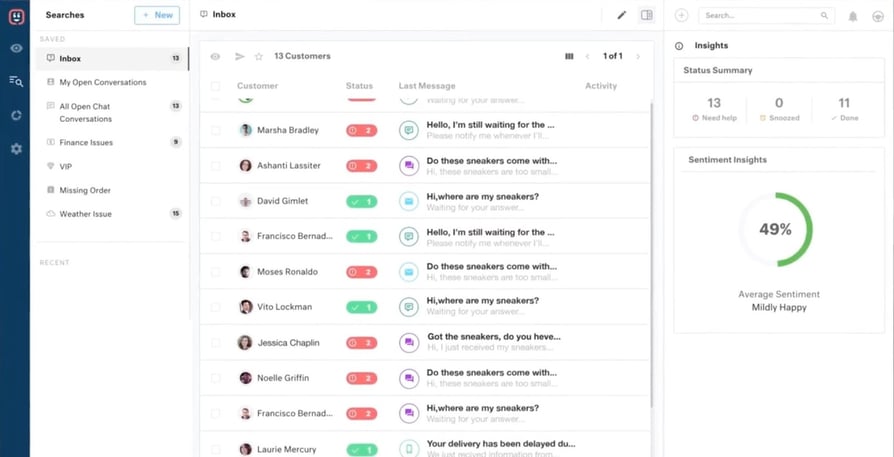
Kustomer adotta un approccio fondamentalmente diverso al software di helpdesk: invece di organizzare il supporto attorno ai ticket, organizza tutto attorno al cliente. Ogni interazione — e-mail, chat, chiamata, messaggio social — appare in un'unica timeline unificata del cliente, fornendo agli operatori il contesto completo di ogni conversazione che quel cliente ha mai avuto con la tua azienda. Per le piccole imprese del settore retail, DTC o in qualsiasi contesto B2C in cui la qualità di ogni singola relazione con i clienti guida direttamente i ricavi, questo approccio è davvero potente.
A chi si rivolge principalmente Kustomer?
Piccole imprese B2C nei settori retail, e-commerce o servizi in abbonamento in cui un supporto personalizzato e ad alto contatto rappresenta un vantaggio competitivo. Il prezzo di partenza di €89/utente/mese lo rende un investimento ponderato, particolarmente adatto ai team in cui il valore del ciclo di vita del cliente è sufficientemente alto da giustificare il costo per utente.
Funzionalità chiave
- Timeline del cliente unificata: cronologia completa di ogni interazione con il cliente su tutti i canali in un'unica vista; non occorre passare da una scheda o da un sistema all'altro.
- Supporto omnichannel: e-mail, chat, telefono, social, SMS e WhatsApp in un'unica area di lavoro.
- Instradamento basato su IA: instrada le conversazioni in base agli attributi del cliente, al sentiment o alla cronologia degli acquisti, non solo in base alla categoria del ticket.
- Integrazione CloudTalk: sincronizza i dati delle chiamate e le registrazioni direttamente nella timeline del cliente di Kustomer tramite l'integrazione tra Kustomer e CloudTalk.
Quali sono i pro e i contro di Kustomer?
| Pro | Contro |
|---|---|
| Cronologia cliente unificata — ogni interazione in un'unica vista; gli operatori non devono mai chiedere a un cliente di ripetersi | Prezzo d'ingresso elevato — il prezzo di partenza di €89/utente/mese lo rende inaccessibile per la maggior parte delle piccole imprese con budget limitati |
| Modello di dati incentrato sul cliente — organizzato intorno alle persone e alle relazioni, non a ticket e code | Eccessivo per team a basso volume — il set completo di funzionalità è utile soprattutto quando la frequenza di interazione con i clienti è elevata |
| Dati di acquisto e d'ordine contestualizzati — si integra con Shopify e altre piattaforme di e-commerce per mostrare lo stato dell'ordine nella vista operatore | Sforzo di configurazione — il modello di dati dei clienti richiede pianificazione e configurazione prima di andare live |
Quali sono i prezzi di Kustomer?
Enterprise: €89/utente/mese — cronologia cliente unificata, supporto omnichannel, routing AI e integrazioni standard.
Ultimate: €139/utente/mese — AI avanzata, sessioni bot aggiuntive, reportistica estesa e supporto premium.
Nota: i prezzi di Kustomer sono disponibili su richiesta. Fonte: kustomer.com/pricing
Domande frequenti
Il miglior software di helpdesk per le piccole imprese dipende dal tuo canale di supporto principale. Per i team incentrati sulle e-mail, Freshdesk o Help Scout offrono il miglior equilibrio tra funzionalità e valore. Per i team che usano Google Workspace, Hiver trasforma Gmail in un helpdesk completo senza dover migrare su un'altra piattaforma. Per i team attenti al budget che hanno bisogno di un supporto multicanale, LiveAgent include chat, e-mail e chiamate di base a partire da €15/operatore/mese. Per le aziende tecnologiche e SaaS, la chat basata sull'AI di Intercom è leader del settore. Zoho Desk offre il punto d'ingresso più conveniente per i team che già utilizzano la suite di strumenti aziendali Zoho.
Oggi questi termini vengono usati quasi come sinonimi nella maggior parte dei contesti d'acquisto. Storicamente, il software di helpdesk si riferiva alla gestione dei servizi IT (richieste interne dei dipendenti), mentre il software di assistenza clienti si rivolgeva ai clienti esterni. Le piattaforme moderne come Freshdesk, Zendesk e Zoho Desk rispondono benissimo a entrambi i casi d'uso. La differenza pratica sta nella finalità: se i tuoi utenti principali sono clienti che chiedono supporto sui prodotti, qualsiasi piattaforma in questo elenco va bene. Se invece i tuoi utenti principali sono dipendenti interni che inviano richieste IT, Freshservice o Jira Service Management sono più adatti. Per un confronto più ampio, consulta la nostra guida completa ai software di ticketing per il servizio clienti.
Il programma gratuito di Freshdesk (fino a 2 operatori, 6 mesi) è il piano gratuito più generoso: include ticketing via e-mail, knowledge base, reportistica di base e smistamento dei ticket senza inserire la carta di credito. Zoho Desk offre un piano gratuito permanente fino a 3 operatori con ticketing via e-mail e centro assistenza. Hiver offre un piano gratuito per caselle di posta condivise e ticketing di base. CloudTalk offre una prova gratuita di 14 giorni per i team che desiderano valutare le chiamate aziendali insieme al loro helpdesk. La maggior parte dei team nota che i piani gratuiti sono sufficienti per una valutazione iniziale, ma deve passare a un piano a pagamento entro 60-90 giorni con l'aumento del volume dei ticket e la necessità di automazione.
La maggior parte delle piattaforme di helpdesk offre integrazioni native con sistemi telefonici cloud come CloudTalk attraverso il proprio marketplace di integrazioni. Una volta stabilita la connessione, le chiamate in entrata mostrano automaticamente i ticket aperti e la cronologia del chiamante direttamente nell'interfaccia dell'helpdesk. Dopo una chiamata, viene creato o aggiornato un ticket con la registrazione, la durata e le note dell'operatore, senza alcun inserimento manuale. Le integrazioni native di CloudTalk con Freshdesk, Zendesk, LiveAgent, Intercom, Help Scout, Front e Kustomer si configurano in pochi minuti. Per i team che vogliono spingersi oltre, gli strumenti di servizio clienti basati sull'AI come Conversation Intelligence di CloudTalk aggiungono l'analisi del sentiment, la trascrizione delle chiamate e i riassunti automatici a ogni chiamata registrata nel tuo helpdesk.
Le funzionalità principali che ogni helpdesk per piccole imprese dovrebbe includere sono: casella di posta condivisa con rilevamento delle collisioni (evita che due operatori rispondano allo stesso ticket), assegnazione e proprietà dei ticket, gestione degli SLA con avvisi di escalation, una knowledge base per il self-service dei clienti e regole di automazione di base per l'instradamento e la categorizzazione dei ticket. Oltre a queste funzioni essenziali, cerca suggerimenti di risposta assistiti dall'AI, sondaggi CSAT per misurare la soddisfazione dei clienti e integrazioni native con il tuo CRM e sistema telefonico. Per le aziende in crescita, verifica se la reportistica e l'analisi non siano riservate solo ai piani superiori, poiché molte piattaforme le limitano nei piani d'ingresso. La nostra guida all'acquisto completa dei software di assistenza clienti esamina questi criteri nel dettaglio.
I software di helpdesk per le piccole imprese variano da gratuiti (Freshdesk, Zoho Desk, Hiver — fino a 3-5 operatori) a oltre €89/utente/mese (Kustomer). La maggior parte dei piccoli team con 3-10 operatori sceglie piani compresi tra €14 e €55/operatore/mese, a seconda dei canali e delle funzionalità di cui hanno bisogno. La tariffa a pagamento iniziale più comune è di €15-€29/operatore/mese, che copre e-mail, automazione di base e gestione degli SLA. Presta attenzione alle funzionalità sbloccabili solo con i piani superiori: reportistica personalizzata, strumenti AI e conformità HIPAA sono solitamente riservati ai piani intermedi o enterprise. Consulta la guida all'automazione dei flussi di lavoro per le piccole imprese per saperne di più su come mantenere prevedibili i costi totali del software mentre cresci.