TL;DR — Voiceflow Pricing at a Glance
Voiceflow pricing plans are split into two tracks depending on who you are: an agency or developer building AI agents for clients, or a business deploying AI agents for your own customer experience. Agencies get usage-based billing with a free trial, while businesses go through a sales demo for custom pricing.
Voiceflow pricing monthly doesn't follow a simple subscription model. Costs are spread across usage credits, AI models, telephony, and add-ons, making the platform flexible—but not always easy to price at a glance.
| Track | Best For | Voiceflow Pricing Model | Starting Point |
|---|---|---|---|
| Agencies & Partners | Agencies, freelancers, developers building for clients | Usage-based ($0.005/message; $0.05 per minute) | Free trial (no credit card) |
| Businesses | In-house CX teams, contact centers, enterprises | Custom (book a demo) | Contact sales |

Skip complex usage tracking.

What Voiceflow Pricing Plans Are Available?
Voiceflow offers two main options: one for agencies building AI agents for clients, and another for businesses using AI agents for their own customer experience. These aren't traditional SaaS tiers—the Voiceflow pricing model is closer to a platform play, where what you get depends heavily on what you need and how much you negotiate.
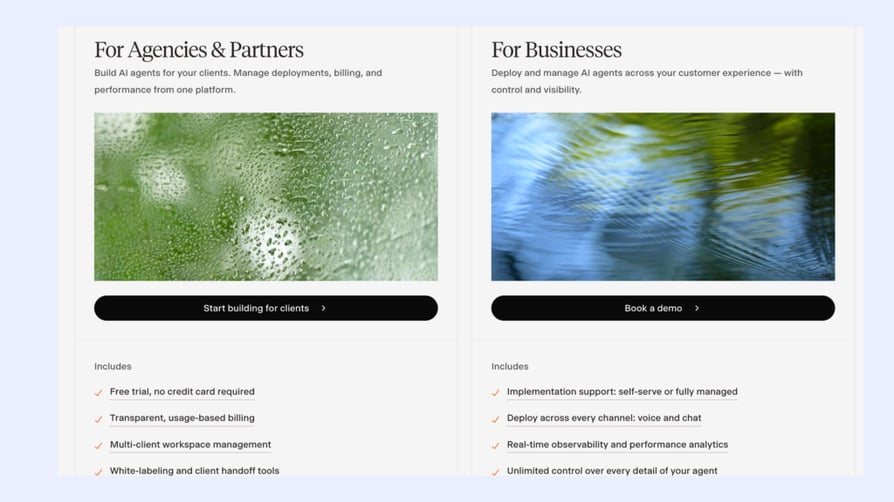
At first glance, the pricing page doesn't actually show what you'll pay under the Agency plan, despite describing it as "transparent" and "usage-based." To find the actual rates, you have to dig into the documentation, where chat usage is listed at roughly $0.005 per message or request and voice usage at $0.05 per minute.
For agencies, Voiceflow offers a free trial (no credit card required), pay-as-you-go pricing, tools to manage multiple client workspaces, white-label options, client handoff features, and access to popular AI models like GPT, Claude, Gemini, Llama, and Grok.
For businesses, you'll need to book a demo to get started. This plan includes implementation support, deployment across voice and chat channels, real-time monitoring, and user roles and permissions for teams.
Bottom line:
Agency pricing is usage-based, while Business pricing is custom. In both cases, understanding your final cost requires looking beyond the main pricing page.
What Do Real Users Think About Voiceflow's Pricing?
With ratings of 4.6/5 on G2 and 4.1/5 on Trustpilot, the platform earns high marks for its visual builder, flexibility, and ease of use. Many reviewers say they were able to build and launch AI agents quickly—even without a technical background.
Still, some reviewers raise questions about pricing. Some users say the credit system isn't always easy to follow, which can make cost planning more challenging at scale.
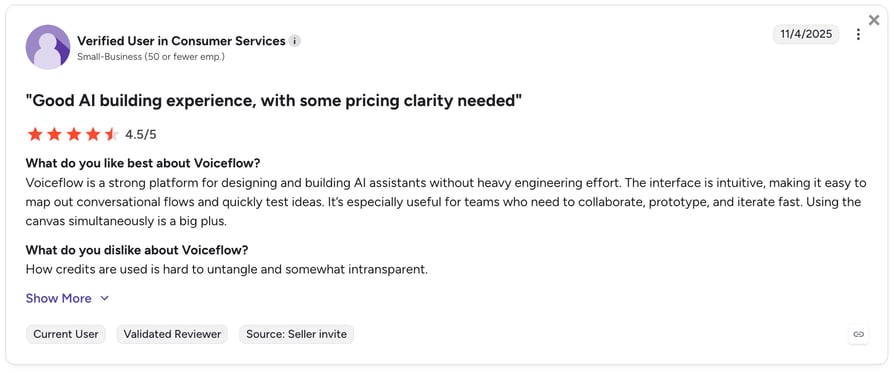
The same theme shows up on Reddit, where developers discuss token usage and how costs can add up faster than expected for more advanced AI agents.
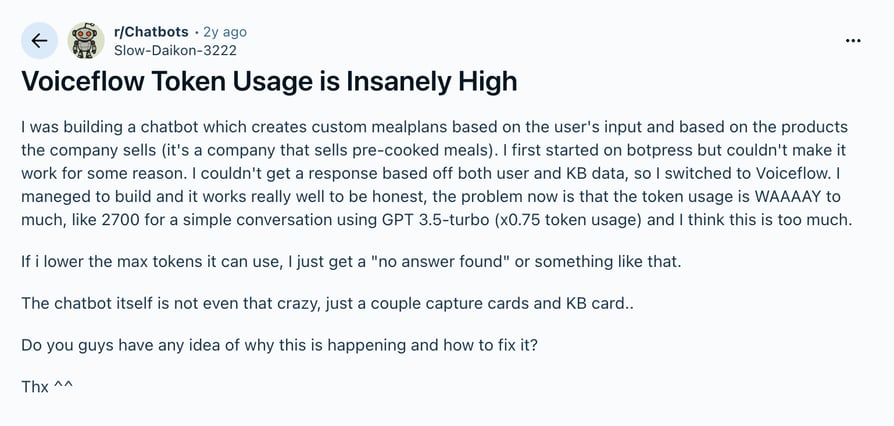
On the product side, the most common requests aren't about pricing but functionality. Users would like stronger enterprise controls, more built-in features, easier debugging, and additional integrations for complex projects.
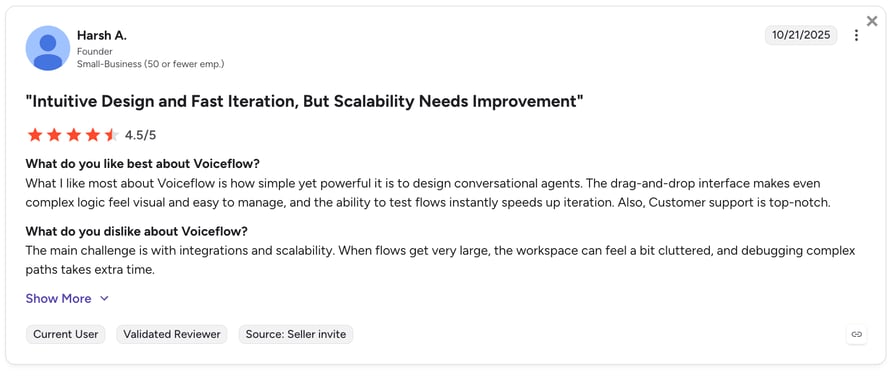
The overall takeaway is simple:
Voiceflow makes building AI agents feel easy. Most users are happy with the platform itself, but some start asking tougher questions once they scale—particularly around pricing transparency, credit consumption, and enterprise-level capabilities.
Voiceflow's Agency & Partner Track
What Is Voiceflow's Agency & Partner Track?
Voiceflow's Agency & Partner track is a usage-based plan for building AI agents for clients, starting at roughly $0.005 per chat interaction and $0.05 per phone minute, with Voiceflow AI pricing for LLM usage billed per 1,000 tokens depending on the model and provider.
What's Included in the Agency Track?
- Free trial with no credit card required
- Transparent, usage-based billing (pay for actual consumption)
- Multi-client workspace management
- White-labeling and client handoff tools
- Access to all major model providers (GPT, Claude, Gemini, Llama, Grok, and more)
- Voiceflow token pricing based on actual LLM usage
The Agency Track Is Best For…
Voiceflow pricing per month is usage-based—designed for developers and agencies who manage multiple clients from one platform and prefer paying for actual consumption instead of a fixed monthly fee. It also includes white-label features, so you can present Voiceflow-built agents under your own brand.
What to Expect From the Voiceflow Agency Track
Voiceflow cost isn't clearly shown in the main overview, even though it's labeled "transparent." You have to dig into the docs to see how usage translates into cost, and it's not always clear whether the rates apply specifically to the Agency track or to the broader billing system.
Voiceflow's Business Track
What Is Voiceflow's Business Track?
The Voiceflow's Business Track is designed for companies that want to power their own customer experience with AI agents. Pricing isn't public, and there's no free-tier path for production use—you need to talk to sales for a custom quote based on usage, team size, and setup.
What's Included in the Business Track?
- Implementation support: self-serve or fully managed (depending on your team's technical maturity)
- Deploy across every channel: voice and chat
- Real-time observability and performance analytics
- Unlimited control over every detail of your agent
- Team roles and permissions for collaborative building
The Business Track Is Best For…
In-house CX, support, and sales teams that want to build and manage AI agents without relying on an external agency. Companies at the scale where compliance, observability, and team collaboration become requirements—not nice-to-haves.
What to Expect From the Voiceflow Business Track
It's not really a fixed plan—it's more of a custom setup for companies running AI agents at scale. The focus moves away from simple usage-based pricing and toward enterprise needs like control, governance, and reliability across teams and channels.
Tired of unpredictable pricing?
How Does Voiceflow's Credit System Work?
Voiceflow AI pricing runs on a credit system. Every time someone interacts with your agent, credits are consumed based on what the agent is doing—this is the core of Voiceflow AI agent pricing in 2026, whether that's handling a chat message, making a voice call, or using an AI model like GPT or Claude.
The exact cost depends on the channel, model, and providers you're using. Your plan gives you a monthly credit allowance, and once that runs out, you either pay for extra usage or top up your balance.
Additionally, Voiceflow offers four plans that define both feature access and credit limits:
- Free: for testing and exploring the platform, with a one-time credit grant
- Pro: for individual builders with access to all LLM models and higher limits
- Business: for teams, with additional features like fallback models and priority support
- Enterprise: for large-scale use cases with custom credits, advanced security, and deployment options like SSO and private cloud
According to Voiceflow's documentation, here's how those costs are calculated:
| Category | What triggers it | Cost |
|---|---|---|
| Chat orchestration | Every user message or Conversations API call | $0.005 |
| Phone orchestration | Every minute of a voice call | $0.05/min |
| LLM — budget (e.g. Gemini 2.5 Flash) | Per 1,000 tokens processed | $0.000375 input / $0.003125 output |
| LLM — mid-range (e.g. GPT-4o mini) | Per 1,000 tokens processed | $0.0005 input / $0.002 output |
| LLM — premium (e.g. Claude Sonnet 4.6) | Per 1,000 tokens processed | $0.00375 input / $0.01875 output |
| Speech-to-text (e.g. Deepgram base) | Every minute of audio transcribed | $0.005/min |
| Text-to-speech (e.g. Cartesia) | Every 1,000 characters the agent speaks | $0.0475/1K chars |
Why can costs be hard to predict?
You're not paying for a single action—you're often paying for multiple layers at the same time. A chat interaction might combine orchestration + LLM usage, while voice adds speech-to-text and text-to-speech on top.
Costs also vary a lot depending on which model you pick, and that difference can be significant at scale. On top of that, your plan just defines your credit pool—it doesn't simplify how usage stacks up.
Confused yet? Same—we also had to dig through the docs to make sense of it.
What Are Voiceflow's Additional Costs?
The listed plan price—or in the business case, whatever you negotiate with sales—is not your total cost. Here's what else shows up on the bill:
| Cost area | What it is | Who you pay | What drives cost |
|---|---|---|---|
| LLM usage (core "brain") | Model calls to GPT, Claude, Gemini, Llama, etc. | LLM provider (not Voiceflow) | Model choice + token volume |
| Telephony (full coverage) | Voice calls via external carriers for regions outside US/Canada | Third-party telephony provider | Destination country, provider rates, call routing, call volume |
| Editor seats & access | Number of people building and managing agents | Voiceflow (via plan or enterprise agreement) | Team size, roles, and collaboration needs |
| Concurrent calls limit | Maximum simultaneous voice calls per workspace | Voiceflow (add-on if you exceed limits) | Peak traffic / real-time call concurrency (voice only) |
| PII redaction (data protection) | Feature that removes personal identifiable information | Voiceflow add-on | Whether you enable it per project and compliance requirements |
LLM Costs (You're Paying for the Brain Too)
Voiceflow is the build-and-deploy platform. The LLM—GPT, Claude, Gemini, Llama, or whichever model you use—is billed separately by the provider you choose. LLM token pricing depends entirely on the model and how much you use it. At scale, this is often the biggest cost driver.
Telephony Needed for Full Coverage
Voiceflow only supports native phone numbers in limited regions (mainly the US and Canada). For global coverage, you'll need a third-party telephony provider. Pricing changes depending on the country, provider, and routing—and at scale, small per-minute differences can quickly add up.
Editor Seats and Team Access
Pricing can also scale with the number of people building and managing agents. More editors or collaborators typically means higher costs, especially in team or enterprise setups where multiple roles and permissions are needed.
Concurrent Calls Limit
Each plan includes a limit on how many calls can happen at the same time across your workspace. This only applies to voice calls (not web chat or API sessions). If you need higher capacity, you'll need to purchase a concurrent calls add-on.
PII Redaction (Data Protection Feature)
This is a feature that automatically detects and removes personally identifiable information (such as names, email addresses, or phone numbers) from conversations. It's not included by default—you need to enable it as an add-on. Once activated, you can choose which projects in your workspace use it, depending on your compliance needs.
Make AI calling costs easier to plan.
Which Voiceflow Alternatives Offer More Predictable Pricing?
Voiceflow is a powerful platform, but its usage-based pricing can make costs harder to predict as you scale. If you want to avoid surprise bills (and awkward chats with finance), it's worth exploring alternatives with simpler pricing models.
Here are three options that offer more predictable costs than Voiceflow.
| Provider | Best for | Starting price | Key features | G2 rating |
|---|---|---|---|---|
| CloudTalk | Sales & support teams wanting complete AI calling without assembly | $19/user/month + AI receptionist from $99/month (200 min) | 160+ country telephony, 100+ native CRM integrations, 24/7 support | 4.4/5 |
| Telnyx | Developers needing full-stack voice infrastructure on their own network | $0.05/min | Own-network calling, bring-your-own AI model, HIPAA & SOC 2 compliant | 4.8/5 |
| Vapi | Developers who want maximum AI voice stack flexibility | $0.05/min | Full provider flexibility, custom call orchestration, HIPAA & SOC 2 compliant | 4.5/5 |
| Bland AI | High-volume outbound calling with branching call logic | $0.14/min (or $299/month) | High-concurrency outbound, Pathways call logic builder, custom brand voices | 5/5 |
What Are Voiceflow's Best Features?
Despite the pricing opacity, Voiceflow has genuine strengths that explain why 250,000+ users rely on the platform. Here's what Voiceflow features pricing actually buys you at each tier.
Agent Builder to Build AI Conversations Visually
Voiceflow's visual Agent Builder is basically a drag-and-drop canvas where you design how the conversation should flow.
You can map out structured steps for predictable parts of the experience (like forms, routing, or key decisions), and combine them with more flexible AI-driven steps where the user might go off-script.
On top of that, you can add global instructions and guardrails so the agent knows what it should never do or say, and when it needs to stay strictly within a defined path.
Where it could be better:
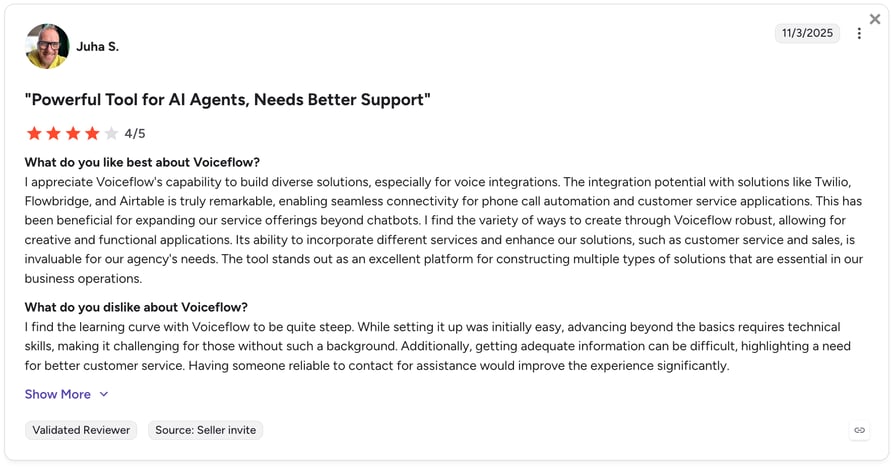
Some users report that Voiceflow is easy to get started with, but becomes harder as you go deeper. Once you move beyond the basics, it requires more technical knowledge, which can be challenging if you don't have that background.
Model Flexibility Without Getting Locked Into One Provider
Voiceflow lets you use different LLM providers like GPT, Claude, Gemini, Llama, or Grok, so you're not stuck with a single model. You can pick what works best for each use case and switch as prices or performance change.
Where it could be better:
The trade-off is choice. Having so many options also means more decisions to make, and teams without much AI experience might find it a bit overwhelming to figure out which model to use.
API Functions & Integrations for Connecting Your Stack
Voiceflow lets you connect your agents to external tools and services through API blocks and built-in Functions. In practice, this means your agent isn't limited to conversations—it can actually check customer data, create tickets, or update records in real time.
Where it could be better:
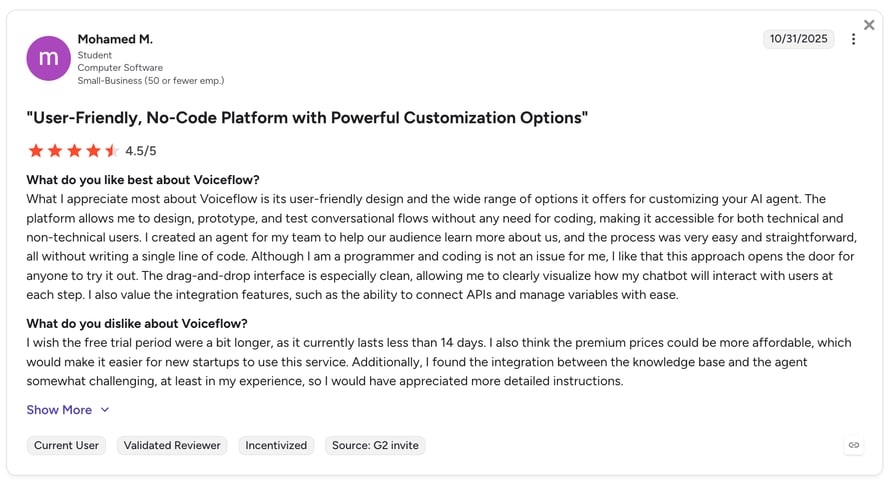
Some users mention that integrations and API setup can take time to figure out, especially if you're new to working with APIs or building more complex workflows. For larger projects, connecting everything cleanly sometimes requires extra setup or external tools, which can slow down implementation.
RECOMMENDED ARTICLES:
What Are the Pros and Cons of Voiceflow?
Across pricing, features, and real user reviews, the pattern is pretty consistent: Voiceflow is loved for how quickly it lets teams build and implement AI agents, but it can get complex (and harder to cost and manage) as projects scale.
Here's a table that sums it up:
| Pros | Cons |
|---|---|
| Fast, intuitive visual builder for designing conversational flows without code | Steep learning curve for advanced use cases beyond basic workflows |
| Flexible LLM and integration support via APIs and Function blocks | Costs can become hard to predict due to multiple usage layers (credits, tokens, voice, etc.) |
| Strong for prototyping and iteration across chat and voice agents | Debugging complex flows can take time as graphs grow in size |
| Combines no-code speed with developer-level control | Some integrations require extra setup or external tools |
| Good balance of structured logic and AI flexibility with guardrails | Enterprise-grade control and governance may require additional configuration or higher plans |
Is Voiceflow the Right Solution for Your Team?
Here's the short answer: Voiceflow is a great fit if you're building conversational AI agents and you're comfortable putting together the technical pieces yourself. But it's probably not the best option if you want AI calling up and running quickly with simple, predictable pricing from a single provider.
Voiceflow Is a Good Fit For:
- Agencies and conversation designers building AI agents for multiple clients, especially when white-labeling and multi-workspace management matter.
- Enterprise CX teams that have technical resources and can manage the full stack (Voiceflow + LLMs + telephony providers).
- Developer teams that want deep control over logic, model choice, and how everything is deployed.
- Teams that need a flexible platform for custom AI experiences, including those with more complex data or compliance requirements.
Voiceflow May Not Be the Best Fit For:
- Sales or support teams that want AI calling live in days without stitching together multiple tools.
- Businesses that prefer one predictable monthly bill instead of separate platform, model, and telephony costs.
- Smaller teams without AI or technical expertise who need the simplest possible path to production.
- High-volume calling use cases where usage-based pricing can make budgeting less predictable.
If you fall into that second group, CloudTalk offers a simpler setup: AI Voice Agents, telephony, and 100+ native integrations in one platform, plus 160+ international phone numbers. With bundled AI pricing and flat-rate telephony plans, costs are generally easier to predict than managing multiple vendors separately.
Too many tools to manage?
FAQs
Voiceflow is a platform for designing, building, and deploying conversational AI agents—chatbots and voice assistants—for customer experience, support, and automation use cases. It supports all major LLM providers and offers both a visual builder and API access for developers.
Voiceflow is best for agencies building AI agents for clients, conversation designers, and enterprise CX teams with technical resources. It's a build-and-deploy platform—not an out-of-the-box calling solution.
Yes. The agency track includes a free trial with no credit card required. For Voiceflow AI agent pricing in 2026, business track pricing is custom—discounts depend on volume and contract terms negotiated with the sales team.
For teams building complex conversational AI workflows with enterprise compliance requirements, yes. For sales and support teams that need AI calling without assembly, there are more purpose-built options that offer better value.
The agency track offers a free trial with no credit card required. There is no permanently free plan for production business deployments.
On the agency track, usage is billed as you go—so there's no hard cutoff. You pay for consumption. Business track terms depend on the custom agreement you negotiate.
Yes, Voiceflow is a strong platform for customer support automation—particularly for complex workflows where agent logic and observability matter. That said, if your team needs voice-first support with built-in telephony and CRM integrations, a purpose-built AI voice agent platform may offer faster time to value.
Pricing is usage-based, starting at $0.005 per message/request and $0.05 per voice minute. Business plans require custom quotes through sales.
The agency track offers a free trial with no credit card required. There is no permanently free plan for production business deployments.
Voiceflow charges via usage (tokens, messages, minutes). Editor seat counts and concurrent voice call limits can also influence your total costs.
It suits technical teams building complex agents. For small teams wanting simple, predictable pricing for calling, other platforms may offer more value.