
15 Best AI Sentiment Analysis Tools & Use Cases in 2026
QUICK SUMMARY
In this article, we’ll show you the 15 best AI sentiment analysis tools and the specific business needs they solve. We’ll also explain how sentiment AI works, how to test for accuracy across complex emotions like sarcasm, and how your business can use these real-time insights to boost customer retention and brand loyalty.
TL;DR
As experts in conversation intelligence, we’ve reviewed and tested 20+ top AI sentiment analysis tools to help businesses decode customer emotions and improve CX in 2026.
Here are 15 standout sentiment analysis platforms built to turn raw feedback into actionable data:
-
01
CloudTalk — Best for accurate call sentiment and CRM-driven contact centers
-
02
Balto — Best for Quality Assurance automation
-
03
Dialpad — Best for live transcription and built-in sentiment alerts
-
04
Talkdesk — Best for predictive insights and enterprise-ready routing
-
05
Genesys Cloud — Best for large-scale, omnichannel customer engagement
-
06
NICE inContact — Best for voice-heavy environments needing real-time coaching
-
07
Sprout Social — Best for social-first brands focused on engagement
-
08
Brandwatch — Best for deep consumer intelligence and competitor analysis
-
09
Hootsuite Insights — Best for unified social management and monitoring
-
10
Google Cloud NLP — Best for developers needing scalable, custom model training
-
11
IBM Watson NLU — Best for advanced emotion detection and deep text insights
-
12
Amazon Comprehend — Best for businesses integrated into the AWS ecosystem
-
13
Microsoft Azure — Best for enterprise security and large-scale cloud ecosystems
-
14
Lexalytics — Best for highly customized, industry-specific NLP solutions
-
15
SAS Visual Text Analytics — Best for massive datasets and advanced data visualization
What is an AI Sentiment Analysis Tool?
An AI sentiment analysis tool is a technology that uses machine learning and natural language processing (NLP) to analyse customer interactions and detect emotions such as happiness, frustration, sadness, or neutrality.
These tools are designed to understand the emotions behind words, process subjective responses, and categorize the conversation into positive, negative, or neutral.
Besides collecting data, it can function as an empathetic collaborator. Unlike basic keyword-based sentiment tools, AI-powered models can detect sarcasm and intent and pick up on subtle emotional cues, which makes them far more accurate and insightful.
Why Sentiment Analysis Matters in Customer Support
In business, what a customer says is rarely the full story. If someone tells your support team, “It’s fine,” but their tone could suggest they’re seconds away from canceling their subscription.
It decodes the mood, frustration, and hidden intent behind the text, giving brands a way to “read the room” at a massive scale. By picking up on these emotional subtexts, companies aren’t just guessing anymore—they’re seeing a 27% improvement in satisfaction scores simply by personalizing their response to a customer’s actual mood.
This ability to address the feeling, not just the words, has helped businesses turn lukewarm feedback into brand wins, leading to a 42% increase in neutral-to-positive review conversions and 31% decrease in churn.
Key Takeaways:
-
AI-powered sentiment analysis helps businesses quickly understand customer emotions by processing vast amounts of data from reviews, emails, and social media. This leads to better customer satisfaction and improved retention strategies.
-
AI-driven sentiment analysis gives businesses a competitive advantage. It helps brands monitor customer feedback, respond to issues quickly, and refine messaging based on insights, ultimately improving engagement and brand perception.
How AI Sentiment Analysis Tools Work
Initially, the system converts speech into text using transcription technology. After the transcript is ready, advanced machine learning and natural language processing (NLP) algorithms scan the dialogue to assess its emotional sentiment.
The analysis focuses on the meaning and context of the words used. By weighing linguistic patterns, word choice, and emotional signals within the text, the AI for sentiment analysis determines if the speaker’s tone is positive, negative, or indifferent.
The system classifies the call, enabling businesses to quickly understand customer reactions and respond more effectively.

The 15 Best AI Sentiment Analysis Tools (2026)
As businesses continue to prioritize customer experience and brand reputation, AI-powered sentiment analysis has become an essential asset. Below, we’ve compiled the 15 best tools in 2026.
| Provider | Starting Price | Key Analytical Features | Best For |
|---|---|---|---|
| CloudTalk | Lite Plan ($19/user/mo) + AI Features ($9/user/mo) | Sentiment Analysis, Topic extraction, Talk/Listen ratio, AI call scoring, and more. | SMB Sales & Support teams needing actionable call insights. |
| Balto | Custom Quote | Real-time agent guidance, Sentiment scouter, Manager alerts. | Live coaching during high-stakes sales or collections calls. |
| Dialpad | $39/user/month | Ai CSAT (predictive scoring), Real-time transcription, Purpose detection. | Remote-first teams wanting automated customer satisfaction data. |
| Talkdesk | $85/user/month | AI Trainer for jargon, Sentiment-based routing, Predictive churn insights. | Mid-to-large enterprises with industry-specific terminology. |
| Genesys Cloud | $75/user/month | Journey sentiment, Native NLU chatbots, Omnichannel dashboard. | Large organizations managing massive, multi-channel operations. |
| NICE inContact | $71/user/month | Enlighten AI (behavioral metrics), Empathy scoring, Real-time coaching. | High-volume contact centers focused on agent soft skills. |
| Sprout Social | $199/user/month | Social listening, Automated labeling, Brand trend reports. | Marketing & PR teams managing social reputation at scale. |
| Brandwatch | ~$800/month | Deep emotion analysis, Image insights (logo detection), Historical data. | Market researchers needing deep-dive consumer intelligence. |
| Hootsuite Insights | $249/month | Real-time sentiment alerts, Word clouds, Share of voice. | Social media managers already using the Hootsuite ecosystem. |
| Google Cloud NLP | Free Tier (up to 5k units) | Entity sentiment, Content classification, Syntax analysis. | Developers building custom sentiment tools via API. |
| IBM Watson NLU | Free Tier (up to 30k items) | 5-point emotion detection, Relationship extraction, Custom models. | Data scientists needing high-precision emotional nuance. |
| Amazon Comprehend | Free Tier (50k units/1st yr) | PII Redaction, Targeted sentiment, Automatic topic modeling. | AWS-native companies prioritizing security and compliance. |
| Microsoft Azure | Free Tier (5k trans.) | Opinion mining, Named Entity Recognition, Language detection. | Azure-centric enterprises integrating with Power BI. |
| Lexalytics | Custom Quote | Syntax matrix, Intention analysis, Industry-specific dictionaries. | Regulated industries (Healthcare/Finance) with complex jargon. |
| SAS Visual Text | ~€5,450/month | Rule/ML Hybrid, Advanced visual maps, Feature extraction. | Government/Global Corps analyzing massive, complex datasets. |
#1. CloudTalk
CloudTalk is the leading AI-powered sentiment analysis tool for SMBs that want to move beyond simple call logs and start understanding the emotional drivers behind every conversation.
Built specifically for sales and support teams, it functions as a high-intelligence “second pair of ears” that decodes the non-verbal cues.
By turning raw audio into a visual map of customer sentiment and call scoring, CloudTalk gives you deep analytical power without the complexity of navigating clunky dashboards or trying to make sense of messy, unorganized data dumps.
Key Analytical Features
-
Sentiment Analysis: Uncover the mood behind customers’ words and classify conversations as positive, negative, or neutral.
-
Topic Extraction: Reveal key themes, spot trends, and gain actionable insights, without the manual effort.
-
Call Transcription: Automatically capture your calls in written form, ensuring you never miss crucial details, making it easy to save, search, and review conversations anytime.
-
Talk/Listen Ratio: Track the balance between how much your agents talk versus how much they listen, helping you improve conversations.
-
Trending Topics: Detect emerging themes across customer conversations and adapt faster to shifts in your pipeline.
-
Transcript Keyword Search: Instantly analyze thousands of calls to find exactly what you want.
-
Call Scoring: Get instant AI-powered scores on every call to quickly evaluate agent performance across skills, playbook alignment, or any criteria you choose.
-
Smart Notes: Automatically capture key details, summarize conversations, and sync AI-generated call notes to your CRM.
Integrations:
CloudTalk natively connects with 100+ most popular CRM integrations, including HubSpot, Salesforce, Zoho, Pipedrive, Intercom, and Zendesk. The benefit? Your agents not only have AI-powered insights but also the context and history right in front of them.
Why it stands out:
It bridges the gap between conversation and conversion. While other tools just record words, CloudTalk focuses on delivering insights that actually make sense in the middle of a busy workday. No fluff, just actionable clarity.
-
14-day free trial available
-
Lite: $19/user/month (available only for NA & LATAM)
-
Starter: $25/user/month
-
Essential: $29/user/month
-
Expert: $49/user/month
-
Custom: Tailored pricing for large teams with complex needs
Best for:
CloudTalk is the top pick for outbound sales and support teams that need real-time visibility and flexibility while growing globally. And it’s the best choice for any SMB that wants to scale with AI.
Not ideal for:
It’s not the best fit for solo operators (without a team) or huge enterprises.
| Pros | Cons |
|---|---|
| Easy to use and set up, with an intuitive interface | Onboarding coach and phone support starting from the Expert plan |
| Provides reliable support for cloud-based phone systems | There is no support for landlines and traditional PBX |
| Robust package of calling features and AI-powered tools | Lack of omnichannel capabilities (email, video conferencing, etc.) |
#2. Balto
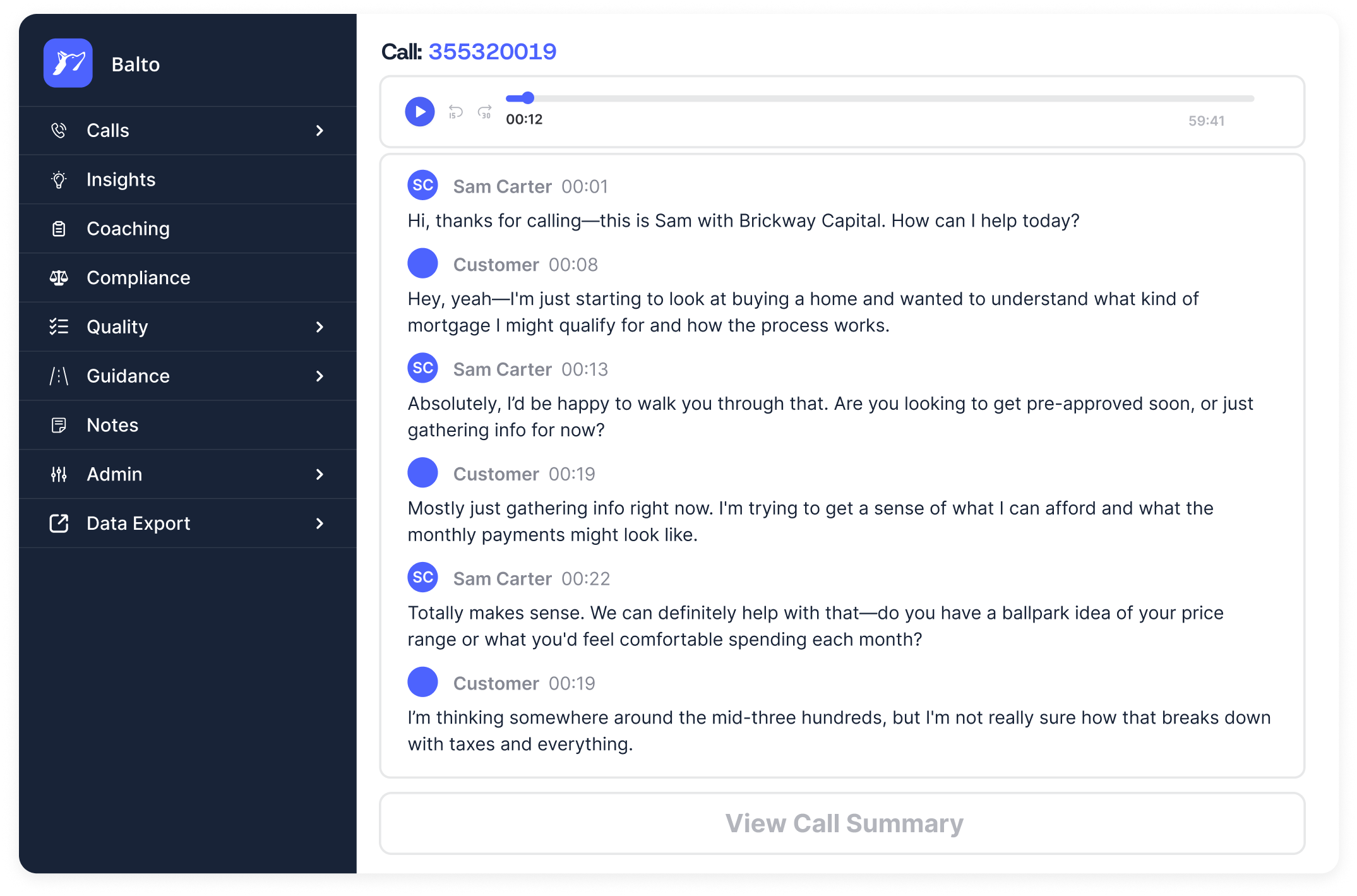
Balto is an AI tool built for real-time guidance, focusing on the “during” of a call rather than just the “after.” It uses sentiment analysis to monitor conversations as they happen, nudging agents with the right things to say the moment a customer’s tone shifts. However, it lacks native phone technology, so you’ll need to layer it over a VoIP provider like CloudTalk to start analyzing your conversations.
Key Analytical Features
-
Real-Time Guidance: Provides live prompts to agents based on the caller’s current mood and keywords.
-
Sentiment Scouter: Flags moments of high frustration or sudden tone shifts during a live call.
-
Smart Checklists: Automatically checks off required talking points as the AI hears them mentioned.
-
Manager Alerts: Notifies supervisors instantly when a call is going south so they can intervene.
Integrations:
Balto integrates with softphones and contact center platforms to layer its AI coaching over your existing calls.
Why it stands out:
It’s proactive. While most tools help you learn from past mistakes, Balto focuses on preventing them in the first place by acting as a real-time safety net for agents in high-pressure situations.
Balto Pricing:
-
Custom Quote: Pricing is typically tailored based on seat count and feature needs.
Best for:
Sales and collections teams that need to fix bad calls while they are still happening.
Not ideal for:
Small teams that don’t have the volume to justify a live coaching tool.
| Pros | Cons |
|---|---|
| Reduces human error during live interactions | Can be distracting for seasoned agents |
| Significantly lowers ramp-up time for new hires | High focus on voice; less helpful for text support |
| Excellent for compliance-heavy industries | Requires a very stable connection for low latency |
#3. Dialpad
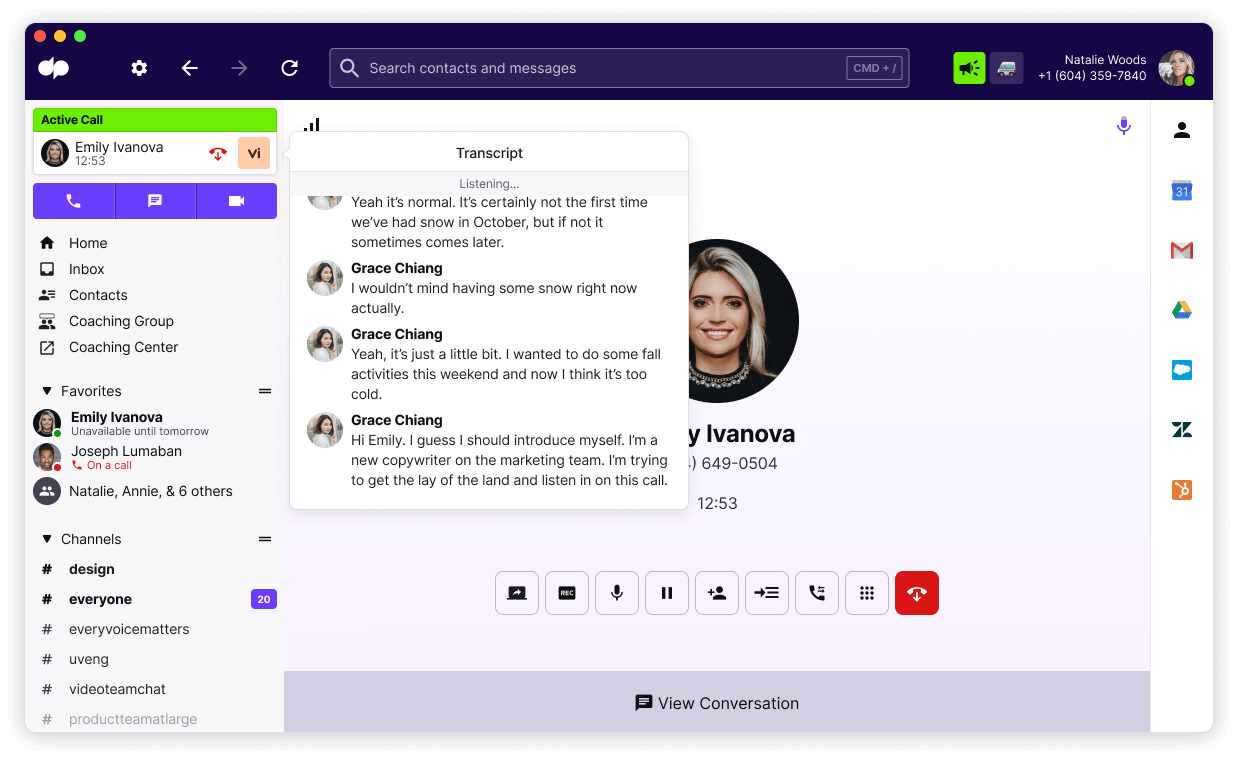
Dialpad is an all-in-one AI communication platform that specializes in “Ai CSAT”—using sentiment analysis to predict customer satisfaction scores without needing the customer to fill out a survey. It’s designed for teams that want a single place for calls, meetings, and messages with AI baked into every layer.
Key Analytical Features
-
Ai CSAT: Predicts satisfaction scores for 100% of calls based on the emotional cues detected in the transcript.
-
Real-Time Transcription: High-accuracy live text so you can read along as the customer speaks.
-
Purpose Detection: Automatically identifies why the customer is calling (e.g., “billing issue” or “cancelation”).
-
Moments Tracking: Flags specific events like competitor mentions or technical “bugs.”
Integrations:
Works natively with Google Workspace, Microsoft 365, and popular CRMs like Salesforce and HubSpot to sync transcripts and predicted scores.
Why it stands out:
It solves the “survey problem.” Instead of begging customers to rate you, Dialpad uses sentiment analysis to give you a satisfaction score for every single interaction automatically.
-
Standard: $15/user/month
-
Pro: $25/user/month
-
Enterprise: Custom quote for large teams
Best for:
Remote-first teams that want a modern, unified platform with highly accurate transcription and predictive analytics.
Not ideal for:
Businesses with very basic needs who don’t care about advanced AI or predictive scoring.
| Pros | Cons |
|---|---|
| Predictive CSAT gives you data on every call | The mobile app can occasionally feel cluttered |
| Very fast and accurate live transcription | Advanced AI features are locked behind higher tiers |
| Modern, slick interface that’s easy to navigate | Occasional lag during high-volume periods |
#4. Talkdesk

Talkdesk is an enterprise-grade contact center solution that uses “AI Trainer” to help businesses fine-tune how the system understands industry-specific sentiment. It focuses on predictive insights, helping large teams stay ahead of customer churn by spotting negative emotional trends across thousands of daily interactions.
Key Analytical Features
-
AI Trainer: Allows non-technical staff to “teach” the AI to better understand specific industry jargon or slang.
-
Predictive Insights: Uses historical sentiment data to forecast future customer behavior and churn risk.
-
Sentiment-Based Routing: Automatically sends frustrated callers to your most experienced “retention” agents.
-
Interaction Analytics: Deep-dive reporting into the root causes of customer dissatisfaction.
Integrations:
Strong enterprise-level connections with Salesforce, Zendesk, and Slack, plus an extensive “AppConnect” marketplace.
Why it stands out:
It’s built for complexity. If your business uses a lot of specific terminology that generic AI usually trips over, Talkdesk lets you train the model to actually understand your world.
-
Digital Essentials: Starting at $85/user/month
-
Voice Essentials: Starting at $105/user/month
-
Elite: Starting at $165/user/month
Best for:
Mid-to-large enterprises that need a customizable AI that can grow with their complex workflows.
Not ideal for:
Small startups or SMBs that need something simple and “out of the box.”
| Pros | Cons |
|---|---|
| Highly customizable sentiment models | Steep learning curve for the advanced features |
| Great for identifying churn risks early | Can be more expensive than SMB-focused tools |
| Solid enterprise-level security and compliance | Setup and configuration takes significant time |
#5. Genesys Cloud

Genesys Cloud is a heavy-hitter in the omnichannel space. It doesn’t just look at call sentiment; it tracks the “emotional journey” across email, chat, and social media too. It’s designed for massive teams that need to keep a consistent pulse on customer mood regardless of how they reach out.
Key Analytical Features
-
Journey Sentiment: Tracks how a customer’s mood changes from their first chat to their final phone call.
-
Native NLU: Powers chatbots that can detect frustration and escalate to humans.
-
Speech & Text Analytics: A unified dashboard that shows sentiment trends across all communication channels.
-
Topic Spotting: Identifies emerging issues across millions of data points to help with high-level decision making.
Integrations:
Comprehensive API and native integrations with almost every major enterprise CRM and workforce management tool.
Why it stands out:
Genesys excels at connecting the dots between different channels, showing you how a bad experience on chat might be fueling a negative phone call later.
Genesys Cloud Pricing:
-
Genesys Cloud 1: Starting at $75/user/month
-
Genesys Cloud 2: Starting at $115/user/month
-
Genesys Cloud 3: Starting at $155/user/month
Best for:
Large organizations that manage massive, omnichannel customer service operations and need total visibility.
Not ideal for:
Smaller teams that only handle phone calls or don’t need high-level “journey” mapping.
| Pros | Cons |
|---|---|
| Truly omnichannel sentiment tracking | The interface can be overwhelming for new users |
| Powerful automation for large-scale operations | Premium features come at a premium price point |
| Very reliable for high-volume environments | Requires dedicated IT support for full optimization |
#6. NICE inContact
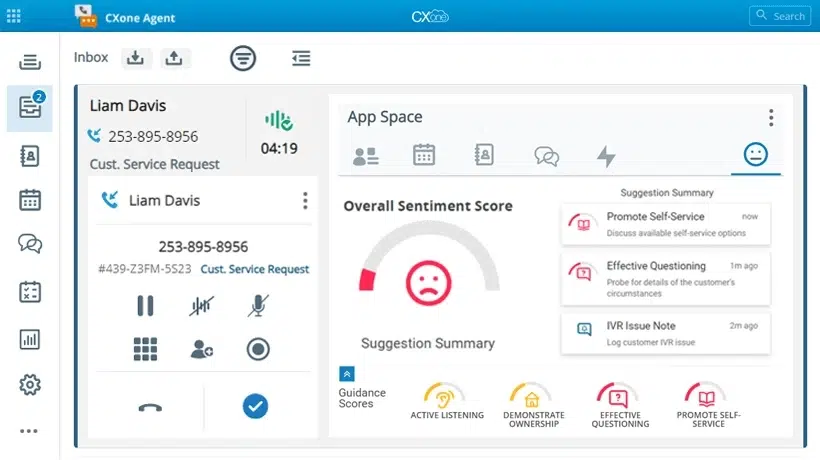
NICE inContact (CXone) focuses on “Enlighten AI”—a model pre-trained on billions of real customer interactions. It’s designed to analyze the behavioral side of sentiment, scoring agents on things like empathy and active listening rather than just searching for keywords in a transcript.
Key Analytical Features
-
Enlighten AI: Automatically scores agents on behavioral metrics like empathy and building rapport.
-
Sentiment Trend Discovery: Spot patterns in customer sentiment over weeks or months to see long-term shifts.
-
Real-Time Coaching Alerts: Notifies supervisors when an agent’s behavior or a customer’s mood requires immediate attention.
-
Interaction Analytics: Deep-dives into 100% of calls to find the root causes of customer frustration.
Integrations:
Integrates with leading CRMs like Salesforce and Oracle to centralize customer sentiment data.
Why it stands out:
It measures the “human” element. While other tools look for keywords, NICE looks for behavioral cues that indicate how well your agents are actually connecting with people.
NICE inContact Pricing:
-
Digital Agent: $71/user/month
-
Voice Agent: $94/user/month
-
Complete Suite: Starting at $209/user/month
Best for:
Large contact centers that want to automate their quality management and agent coaching based on behavioral sentiment.
Not ideal for:
Smaller teams on a budget, as the most advanced sentiment features are often locked in higher-tier suites.
| Pros | Cons |
|---|---|
| Pre-trained “empathy” metrics are very accurate | Pricing is at the highest end of the market |
| Excellent for automating quality management | Complex setup that usually requires professional help |
| Extremely scalable for global organizations | The UI can feel dated compared to newer startups |
#7. Sprout Social

Sprout Social uses AI sentiment analysis to monitor what people are saying about your brand across the web—even when they aren’t tagging you directly. It’s built for marketing teams that need to know the public “vibe” around their brand in real time.
Key Analytical Features
-
Social Listening: Tracks brand mentions across platforms to gauge overall public sentiment.
-
Automated Sentiment Labeling: Instantly marks incoming messages as positive, negative, or neutral.
-
Trend Reports: Visualizes how sentiment toward your brand changes over time or during a campaign.
-
Competitor Sentiment: Allows you to track how people feel about your rivals compared to you.
Integrations:
Connects with all major social platforms and integrates with CRMs like Salesforce and Zendesk.
Why it stands out:
It’s about the “unsolicited” feedback. While call centers deal with people reaching out to you, Sprout lets you hear what people are saying about you in the wild.
Sprout Social Pricing:
-
Standard: $199/user/month
-
Professional: $299/user/month
-
Advanced: $399/user/month (includes sentiment analysis)
Best for:
Marketing and PR teams that need to manage brand reputation and social media engagement at scale.
Not ideal for:
Customer support teams that primarily handle phone calls.
| Pros | Cons |
|---|---|
| Excellent visual reporting and dashboards | Can be very expensive for small businesses |
| Great for “catching” PR issues before they go viral | Sentiment detection can struggle with heavy sarcasm |
| Unified inbox makes responding to sentiment easy | Limited to social media and web mentions |
#8. Brandwatch

Brandwatch is for the teams who want to go deep. It analyzes trillions of conversations from across the internet—blogs, forums, and news sites. It doesn’t just tell you if sentiment is “bad”; it tells you why by breaking down the specific emotions and demographics involved.
Key Analytical Features
-
Emotion Analysis: Goes beyond “positive/negative” to identify specific feelings like joy, anger, or disgust.
-
Image Insights: Uses AI to find your logo in images, even if your brand isn’t mentioned in the text.
-
Historical Data: Access to years of online conversations to track long-term sentiment shifts.
-
Demographic Breakdown: Shows you who is saying what, categorized by location and interests.
Integrations:
Integrates with various BI tools and data platforms to help you bake consumer sentiment into your overall business intelligence.
Why it stands out:
The sheer scale of the data. Brandwatch is more about high-level market research, helping you understand global shifts in consumer mood before you launch a new product.
Brandwatch Pricing:
-
Consumer Intelligence: Typically starts around $800–$1,000/month (billed annually)
-
Custom Quote: For larger enterprise tiers with unlimited queries.
Best for:
Market researchers and large brand strategy teams who need deep, data-driven consumer insights.
Not ideal for:
Small businesses that just need to reply to a few social media comments.
| Pros | Cons |
|---|---|
| The most comprehensive data source available | Very steep learning curve for new users |
| Detailed emotion and demographic tracking | Pricing is tailored for large enterprise budgets |
| Great for competitive and market research | Can take time to set up relevant “queries” |
#9. Hootsuite Insights

Hootsuite Insights brings enterprise-level social listening into the familiar Hootsuite dashboard. It’s designed for teams that want a quick way to monitor the “temperature” of their industry without leaving their primary social management tool.
Key Analytical Features
-
Real-Time Sentiment Alerts: Notifies you if there is a sudden spike in negative mentions of your brand.
-
Word Clouds: Visualizes the most common words associated with your brand sentiment.
-
Filtered Searches: Narrow down sentiment by region, language, or specific platform.
-
Share of Voice: Compares how much of the “online conversation” is about you versus your competitors.
Integrations:
Natively part of the Hootsuite ecosystem, making it easy to schedule posts in response to current sentiment trends.
Why it stands out:
It takes complex social listening data and makes it easy to digest for social media managers who are busy juggling ten other things.
Hootsuite Insights Pricing:
-
Team: $249/month
-
Business: $739/month
-
Enterprise: Custom quote (includes Hootsuite Insights)
Best for:
Social media managers who already use Hootsuite and want to add sentiment tracking to their workflow.
Not ideal for:
Data analysts who need deep, raw data exports or specialized emotion tracking.
| Pros | Cons |
|---|---|
| Integration with Hootsuite is seamless | Not as deep as the standalone Brandwatch platform |
| Easy-to-read visual reports | Can get pricey when adding multiple “streams” |
| Good “at-a-glance” industry monitoring | Sentiment accuracy varies on shorter posts |
#10. Google Cloud NLP
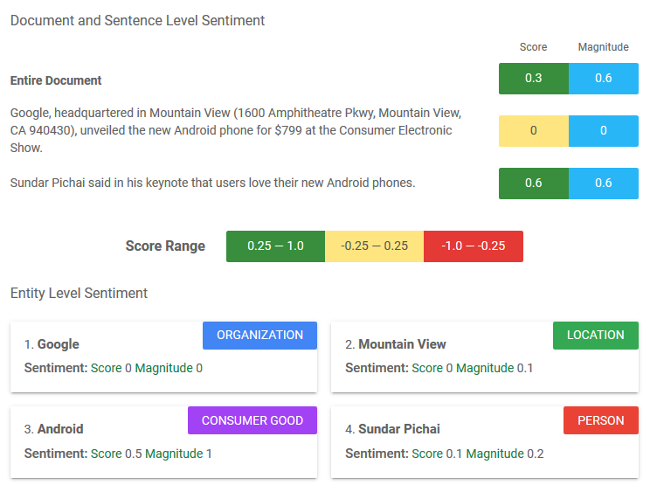
Google Cloud Natural Language is a powerful API for developers who want to build their own sentiment analysis tools. It uses Google’s massive machine learning models to extract entities and sentiment from any text you feed it. It’s an engine you use to build your own solutions.
Key Analytical Features
-
Entity Sentiment Analysis: Tells you how people feel about specific things mentioned in a sentence.
-
Content Classification: Automatically sorts text into 700+ predefined categories.
-
Multilingual Support: One of the best tools for analyzing sentiment in dozens of different languages.
-
Syntax Analysis: Breaks down sentences to help the AI understand complex grammar and context.
Integrations:
As a Cloud API, it can be integrated into literally any custom software, website, or internal tool your team builds.
Why it stands out:
It’s the “engine under the hood.” If you have a unique business need that off-the-shelf tools can’t solve, Google gives you the raw power to build exactly what you want.
Google Cloud NLP Pricing:
-
Free Tier: First 5,000 units/month are free
-
Pay-as-you-go: Approx. $1.00 per 1,000 units (prices decrease with higher volume)
Best for:
Product teams and developers who want to embed high-quality sentiment analysis into their own software.
Not ideal for:
Non-technical managers who want a dashboard they can log into today.
| Pros | Cons |
|---|---|
| Extremely scalable and powerful | Requires significant coding knowledge to use |
| Great for analyzing specific entities in text | No user interface (it’s just an API) |
| Pay-as-you-go pricing is cost-effective | Costs can spike if you process massive data |
#11. IBM Watson NLU

IBM Watson is focused on high-precision “deep” analysis. It’s particularly good at identifying specific emotions—like fear, sadness, and joy—within text, making it a favorite for researchers and large corporations that need more than just a “thumbs up or down.”
Key Analytical Features
-
Emotion Detection: Breaks down text into five specific emotional scores (Anger, Disgust, Fear, Joy, Sadness).
-
Custom Models: You can train Watson to understand your specific industry’s language.
-
Relationship Extraction: Identifies how different entities in a sentence are connected to each other.
-
Semantic Roles: Understands who did what to whom, which helps with complex sentiment context.
Integrations:
Works within the IBM Cloud ecosystem and can be integrated into enterprise workflows via API.
Why it stands out:
Watson is great for when the nuance of the emotion matters just as much as the overall sentiment, helping you understand the type of unhappy your customers are.
IBM Watson NLU Pricing:
-
Free: Up to 30,000 NLU items/month
-
Standard: Approx. $0.003 per NLU item (Tiered pricing applies)
Best for:
Enterprise organizations and data scientists who need highly detailed emotional data.
Not ideal for:
Small businesses looking for a quick, “plug-and-play” tool.
| Pros | Cons |
|---|---|
| Exceptional at identifying specific emotions | Very complex to set up and fine-tune |
| Highly customizable for specific industries | Can be more expensive than competitors |
| Strong focus on data privacy and security | Requires a technical background |
#12. Amazon Comprehend

Amazon Comprehend is the AWS version of a text analysis engine. It’s designed to be “easy AI”—you don’t need to be a machine learning expert to use it. It scans text for sentiment and even personally identifiable information (PII), making it a great choice for security.
Key Analytical Features
-
Sentiment Analysis: Provides a simple score for positive, negative, neutral, and mixed sentiment.
-
PII Redaction: Automatically finds and hides sensitive data like credit card numbers or addresses.
-
Topic Modeling: Groups large collections of documents into themes automatically.
-
Targeted Sentiment: Focuses on how customers feel about specific products mentioned in a review.
Integrations:
Natively connects with all other AWS services, making it easy to analyze data you already have stored in the cloud.
Why it stands out:
If your data is already on AWS, adding Comprehend is as simple as flipping a switch, allowing you to automate sentiment analysis without moving your data around.
Amazon Comprehend Pricing:
-
Free Tier: 50,000 units of text per month for first year
-
Pay-as-you-go: Approx. $1.00 per 10,000 units of text (100 characters per unit)
Best for:
Companies already on AWS who want to add sentiment analysis and compliance to their data pipelines.
Not ideal for:
Teams that aren’t on AWS or those who want a visual dashboard.
| Pros | Cons |
|---|---|
| Incredibly easy to scale for “Big Data” | Limited customization compared to IBM Watson |
| Built-in tools for data privacy and PII | Not a standalone app (requires AWS knowledge) |
| No upfront costs—pay for what you use | Sentiment detection can be a bit basic |
#13. Microsoft Azure

Microsoft Azure Text Analytics provides enterprise-grade sentiment scoring and language detection. It is designed to work seamlessly within the Microsoft ecosystem, making it the default choice for companies already running on Azure and Power BI.
Key Analytical Features
-
Opinion Mining: Identifies specific opinions about features (e.g., “the battery is great but the screen is dim”).
-
PII Detection: Automatically identifies and redacts sensitive information for security compliance.
-
Named Entity Recognition: Pulls out people, places, and organizations from messy text.
-
Language Detection: Instantly recognizes over 120 languages to route analysis correctly.
Integrations:
Deeply integrated with Power BI, Azure Data Factory, and the rest of the Microsoft cloud stack.
Why it stands out:
It’s built for the Microsoft-centric enterprise. If you’re already using Power BI for your reporting, adding sentiment data from Azure is a seamless transition without the data headache.
Microsoft Azure Pricing:
-
Free: 5,000 transactions/month
-
Standard: Approx. $1.00 per 1,000 transactions (volume discounts apply)
Best for:
Enterprises using Microsoft’s cloud stack in need of high-security, large-scale sentiment analysis.
Not ideal for:
Small startups looking for a standalone social media tool.
| Pros | Cons |
|---|---|
| Opinion mining provides great detail | Can be expensive for high-volume processing |
| Top-tier security and compliance features | Requires technical knowledge of the Azure platform |
| Massive multilingual support | Not as “plug-and-play” as some SaaS alternatives |
#14. Lexalytics
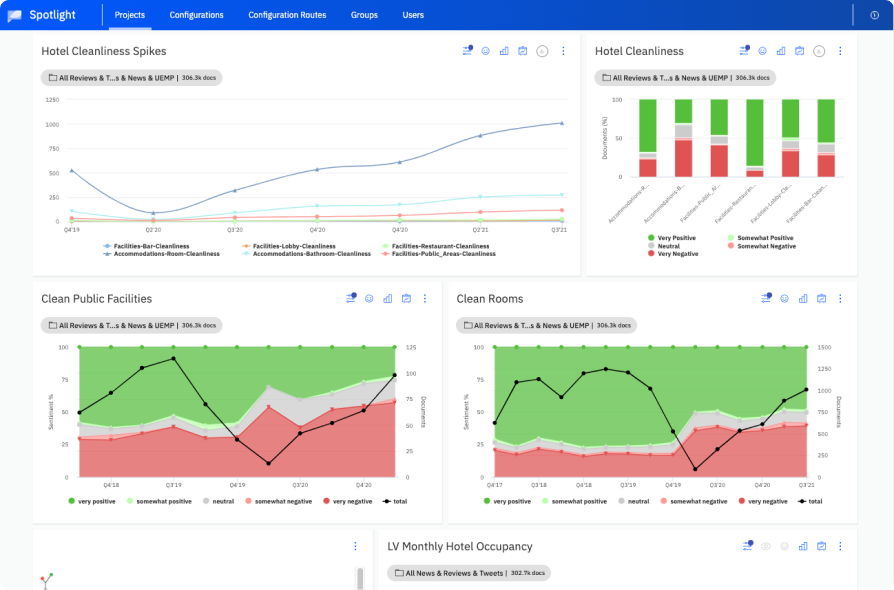
Lexalytics is a specialized text analytics tool that is highly “tunable.” You can tell the AI that in your specific industry, a word like “down” (as in “the system is down”) is a huge negative, whereas in a different industry, it might be neutral.
Key Analytical Features
-
Syntax Matrix: Breaks down the “why” behind the sentiment by showing the grammar used.
-
Intention Analysis: Determines if a customer is looking to buy, quit, or just complaining.
-
Custom Dictionaries: Define exactly how specific words should be scored for your business.
-
Theme & Entity Extraction: Identifies the “who, what, and where” alongside the tone.
Integrations:
Offers an API for developers and a “no-code” version for business analysts, plus integrations with BI tools like Tableau.
Why it stands out:
Lexalytics understands that words change meaning depending on the industry, making it accurate for specialized fields like healthcare or finance where generic AI trips up.
Lexalytics Pricing:
-
Custom Quote: Pricing is based on data volume and deployment type. Generally starts in the higher enterprise range.
Best for:
Regulated industries or businesses with specific jargon that need high-accuracy, “tunable” analysis.
Not ideal for:
Small marketing teams that just want to track a few hashtags on social media.
| Pros | Cons |
|---|---|
| Extremely accurate for industry-specific text | The interface is a bit technical and “old school” |
| Offers both on-premise and cloud options | High price point for the full feature set |
| Excellent at identifying customer “intent” | Requires manual “tuning” to get it perfect |
#15. SAS Visual Text Analytics

SAS is built for massive enterprise-level data crunching. It combines AI-driven sentiment analysis with heavy-duty visualization, helping you see the “story” hidden in millions of documents or customer interactions across your entire global market.
Key Analytical Features
-
Rule-Based & ML Hybrid: Combines “human” rules and machine learning for better accuracy.
-
Visual Exploration: Interactive maps and charts that let you “zoom in” on specific sentiment clusters.
-
Automated Feature Extraction: Finds important words in a massive dataset without being told where to look.
-
Multilingual Sentiment: Handles dozens of languages with deep linguistic rules.
Integrations:
Integrates seamlessly with the broader SAS Viya platform for total business intelligence and data management.
Why it stands out:
SAS helps you visualize the emotional state of your entire global market on a massive scale, giving you the “so what” without the complexity of deciphering endless spreadsheets.
SAS Pricing:
-
SAS Viya/Visual Analytics: Starting at approx. €5,450/month (via hosting partners like SaaSNow)
-
Enterprise Quote: Tailored for massive, custom deployments.
Best for:
Large corporations and government agencies that need to analyze massive data with high precision.
Not ideal for:
SMBs, startups, or anyone looking for a simple, low-cost tool.
| Pros | Cons |
|---|---|
| Unmatched power for massive datasets | Very expensive with a high entry cost |
| Beautiful and detailed data visualizations | Requires a high level of expertise to operate |
| Highly reliable and used by global brands | Not built for the daily pace of a small team |
Features to Look for in an AI Sentiment Analysis Tool
The right sentiment analysis solution turns emotion into actionable insight. Instead of reacting after churn or lost revenue, you can spot negative trends early, prioritize the right conversations, and coach with precision.
Here are the non-negotiable features to look for if you want to turn conversation data into measurable growth:
-
Context-Aware NLP (Beyond Keyword Spotting): The biggest trap in sentiment AI is “keyword matching.” A basic bot sees the word “expensive” and marks it negative. An advanced Natural Language Processing (NLP) model understands that “This is an expensive-looking feature” is actually a compliment.
-
Integrated Activity Mapping: A sentiment score is just a number until it’s attached to a contact record. The best tools don’t just give you a dashboard; they push sentiment data directly into your CRM (Salesforce, HubSpot, Pipedrive).
-
Aspect-Based Sentiment Analysis (ABSA): It’s one thing to know a customer is unhappy; it’s another to know they’re specifically unhappy with your pricing but love your features. ABSA breaks down feedback by specific entities, giving your product and sales teams exact targets for improvement.
-
Monitoring and Alerts: A sentiment report from last Tuesday won’t help you stop a crisis from happening right now. You need automated triggers that alert managers or agents the second a conversation’s sentiment score drops below a certain threshold.
-
Multilingual Support: If you operate globally, you can’t rely on a tool that translates everything into English before analyzing it—nuance gets lost in translation. You need an AI that supports native sentiment detection across multiple languages.
Key Feature Breakdown: Sentiment Analysis Essentials
| Feature | What it Does | Business Impact |
|---|---|---|
| Context-Aware NLP | Moves beyond simple keyword spotting to understand sarcasm, intent, and tone. | Higher Data Integrity: Prevents “false alarms” in your reporting. |
| CRM Activity Mapping | Automatically syncs sentiment scores and summaries to contact records (Salesforce, HubSpot, etc.). | No More Manual Data Entry: Reps save hours on post-call work (ACW). |
| Aspect-Based Analysis (ABSA) | Pinpoints what the customer is talking about (e.g., pricing vs. product usability). | Actionable Product Feedback: Tells your team exactly what to fix. |
| Smart Alerts | Triggers automated notifications when a sentiment score hits a specific threshold. | Proactive De-escalation: Managers can address it before a deal is lost. |
| Native Multilingual Support | Analyzes calls in their original language without losing nuance in translation. | Global Consistency: Provides a standard CX metric across all regions. |
The CloudTalk Perspective: Prioritizing Impact Over Fluff
When evaluating these features, ask yourself: Does this give my team more work, or does it take work off their plate?
At CloudTalk, we believe the most powerful AI isn’t the one with the most complex settings—it’s the one that integrates so deeply with your daily workflow.
Each week, I filter for neutral or negative sentiment and review those calls with my team. What went wrong? Could we have explained something better? That’s where the value is..
Cost & Pricing Comparison of Sentiment Analysis Tools
Sentiment analytics software ranges from low-cost, usage-based APIs to high-ticket enterprise suites. Below is a cost comparison of the providers discussed, categorizing them by their primary pricing models.
1. Contact Center & Voice Solutions
These platforms are typically priced per user/month and often offer significant discounts for annual commitments.
| Provider | Key Pricing Details |
|---|---|
| CloudTalk | The phone system plans start at $19/user/month (Lite Plan), while analytical AI features require the Conversation Intelligence add-on ($9/user/month). |
| Dialpad | The price to have Sentiment Analysis starts at $39/user/month for the Essential Plan. For Dialpad Connect, it may require buying it as an add-on. |
| Talkdesk | Digital-first plans start at $85; voice-enabled plans start at $105. Omnichannel support is typically reserved for the Elite tier ($165). |
| Genesys Cloud | Basic plans begin at $75, scaling up to $240+ for advanced AI and workforce engagement features. |
| NICE inContact | Digital Agent plans start at $71. The “Complete Suite” with advanced analytics starts at approximately $209/user/month. |
| Balto | Balto does not publish standard rates; pricing is tailored based on seat count and specific real-time coaching needs. |
2. Social Media & Brand Monitoring Tools
Marketing-focused tools often have higher entry costs due to the massive volume of external data they process.
| Provider | Key Pricing Details |
|---|---|
| Hootsuite | The Standard plan is $99/month annually ($149 monthly). Social listening and deeper analytics require the Advanced tier ($249/month). |
| Sprout Social | Standard plans start at $199. Advanced sentiment analysis is typically bundled into the Professional or Advanced tiers ($299–$399). |
| Brandwatch | This is an enterprise solution with no public pricing. Basic tiers are estimated at $800–$2,000/month, while full enterprise archives can exceed $15,000/month. |
3. Developer APIs & Usage-Based Models
These are ideal for custom builds, charging only for the data analyzed. Most offer a generous free tier for testing.
| Provider | Key Pricing Details |
|---|---|
| Google Cloud NLP | First 5,000 units/month free. ~$1.00 per 1,000 units (decreases with volume) |
| IBM Watson NLU | Up to 30,000 items/month free. ~$0.003 per NLU item |
| Amazon Comprehend | 50,000 units/month for 1st year. ~$1.00 per 10,000 units (100 characters per unit) |
| Microsoft Azure | 5,000 transactions/month free. ~$1.00 per 1,000 transactions |
4. Specialized & Enterprise Analytics
These tools are designed for specific industry needs or massive data visualization.
| Provider | Key Pricing Details |
|---|---|
| Lexalytics | Based on processing capacity and cloud vs. on-premise deployment. |
| SAS Visual Text | Packages can start around €5,450/month via hosting partners. |
How to Choose the Right AI Sentiment Analysis Tool
Still finding it hard to choose the perfect customer sentiment analysis tool for your business? Breaking it down into key factors makes the decision easier. Here’s what to focus on:
1. Accuracy: Can It Understand Real Conversations?
-
Does it detect sarcasm and complex sentence structures, such as “Oh great, another dropped call”?
-
Can it handle negations like “not great” without misinterpreting sentiment?
-
Look for tools that allow custom training to improve accuracy for your industry.
Potential Issue: If the tool struggles with real-world language, the insights may be misleading.
2. Data Sources: Where Can It Pull Sentiment From?
-
Does it analyze text, voice, and social media?
-
Can it consolidate all channels into a single dashboard?
-
Does it support various file formats, such as audio recordings, chat logs, and CSV files?
Potential Issue: Missing key data sources like phone calls means incomplete sentiment tracking.
3. Integration: Does It Fit Into Your Workflow?
-
Does it seamlessly connect to CRMs like Salesforce, HubSpot, and Zendesk?
-
Can it integrate with marketing automation tools for campaign optimization?
-
Does it support real-time triggers, such as escalating negative sentiment to a manager?
Potential Issue: A tool that doesn’t integrate well will slow down your team instead of helping them.
4. Real-Time vs. Batch Processing: Do You Need Instant Alerts?
-
Real-time processing is crucial for call centers and live chat support.
-
Batch processing is useful for tracking long-term sentiment trends.
-
Some tools offer both, providing more flexibility.
Potential Issue: A batch-only tool may miss urgent issues that require immediate action.
5. Scalability: Can It Grow With Your Business?
-
Is it designed for small businesses or enterprises?
-
Can it handle high data volume without lagging?
-
Does it offer flexible pricing, such as pay-as-you-go or tiered plans?
Potential Issue: Paying for features you don’t need or choosing a tool that cannot scale with your growth.
How Businesses Are Using AI Sentiment Analysis Today
Customers are constantly expressing their opinions, for instance, through reviews, social media, or support interactions. AI-powered sentiment analysis helps businesses understand customer emotions across multiple touchpoints.
Analyzing your customer sentiment in real time allows you to find important input, refine products, and improve brand perception. Let’s take a look at some ways automated sentiment analysis can help:
AI Analysis in Customer Experience & Call Centers
AI sentiment analysis allows businesses to improve customer service by detecting frustration, urgency, and satisfaction in real-time conversations.
-
Example: A telecom company’s AI system detects frustration in a caller’s voice and automatically prioritizes their request. It then alerts an agent to offer a resolution before escalation.
-
Use Case: AI-powered customer support tools analyze chatbot conversations, emails, and call transcripts to identify pain points and improve response strategies.
Social Media Sentiment Tools & Brand Monitoring
AI tracks brand sentiment across social platforms like Twitter, LinkedIn, and TikTok. The data sets can highlight if any PR issues need addressing before they escalate.
-
Example: A cosmetics brand notices a sudden rise in negative sentiment after an influencer critiques its product. AI flags the trend early, which allows the brand to engage customers with transparency and damage control.
-
Use Case: AI-powered social listening tools analyze customer sentiment trends. It helps brands refine messaging and product positioning based on real-time feedback.
AI analysis for Product & Market Research
Sentiment analysis helps businesses understand how customers feel about their products. This could mean analyzing reviews from platforms like Amazon, Trustpilot, Google Reviews, and other sources.
-
Example: A consumer electronics company uses AI to scan thousands of product reviews, revealing that customers love the battery life of a new phone but not so much the camera quality. This insight drives improvements in the next model.
-
Use Case: AI-powered competitive analysis helps brands compare their product sentiment against competitors while influencing product development and marketing strategies.
E-Commerce & Customer Reviews
AI helps online retailers analyze sentiment in customer feedback, pinpointing trends that impact purchasing decisions.
-
Example: An e-commerce platform uses AI to categorize product reviews by sentiment, allowing shoppers to see common praise and complaints before purchasing.
-
Use Case: Retailers use AI-driven sentiment analysis to optimize product descriptions, pricing, and inventory management based on customer preferences.
Challenges of Using AI Sentiment Analysis (And How to Overcome Them)
1. Sarcasm and Irony
The Challenge: AI often takes text literally. A customer who says, “Great, another delay!” is using positive words (“great”) to express negative frustration, which can lead the system to incorrectly flag the interaction as positive.
How to Overcome It: Use context-aware models (like transformer-based BERT or GPT) that analyze entire sentences rather than individual words. High-tier systems can also use multi-modal analysis, correlating text with emojis or a frustrated tone of voice to catch the underlying irony.
2. Context and Industry Jargon
The Challenge: The same word can mean very different things depending on the industry. For example, “unpredictable” is a glowing review for a thriller movie but a terrifying one for a car’s brakes. Similarly, “sick” is negative in healthcare but often high praise in informal pop culture.
How to Overcome It: Feed your AI domain-specific training data. Instead of using a generic model, fine-tune the system on your actual customer tickets and industry-specific language so it learns your particular “vocabulary”.
3. Handling Negations
The Challenge: Simple “word-count” models often miss the impact of negators like “not,” “never,” or “hardly”. A phrase like “not bad” is actually a positive sentiment, while “not exactly what I wanted” is negative.
How to Overcome It: Ensure your tool uses dependency parsing. This advanced NLP technique maps the grammar of a sentence to see exactly which words are being modified by “not,” ensuring the final score reflects the speaker’s true intent.
4. Multilingual Nuance and Slang
The Challenge: Simply translating a customer’s comment into English before analyzing it often destroys the meaning. Evolving internet speak (like “GOAT” or “lowkey”) and regional dialects move too fast for basic translation tools to keep up.
How to Overcome It: Look for tools with native multilingual support. These systems are trained on local syntax and slang directly, allowing them to understand the “vibe” of a conversation without needing an intermediate (and often inaccurate) translation step.
5. Data Privacy and Security
The Challenge: Sentiment analysis often involves processing sensitive customer or employee data, which brings up serious privacy and compliance concerns.
How to Overcome It: Implement privacy-preserving techniques like PII (Personally Identifiable Information) redaction and secure, anonymous data handling. Always inform users how their data is being used and ensure your provider complies with regulations like HIPAA.
Top Trends in AI Sentiment Analysis to Watch in 2026
As we move through 2026, AI sentiment analysis has shifted from a “nice-to-have” experiment to a core operational backbone for most businesses. The technology is no longer just about identifying if a customer is “happy” or “sad”; it has become significantly more integrated, proactive, and precise.
What are the top trends in AI sentiment analysis to watch in 2026?
1. Multimodal “Signal Fusion”
The biggest shift in 2026 is the move away from text-only analysis. Modern systems now use “signal fusion” to analyze text, vocal tone, facial micro-expressions, and even the context of emojis simultaneously. By combining these signals, AI can catch subtle nuances like sarcasm or hidden frustration that a text-only transcript would likely miss.
2. Fine-Grained Emotion Recognition
Sentiment is no longer a simple “positive/negative” toggle. Leading tools in 2026 can now detect a wide spectrum of specific emotions, including trust, urgency, disappointment, and skepticism. This allows support teams to prioritize a call not just because it’s “negative,” but because the AI has specifically flagged a high level of frustration or a crisis risk.
3. Agentic “Sentiment-to-Action” Workflows
We are seeing the rise of Agentic AI, where sentiment analysis doesn’t just produce a report but triggers a specific action. For example, if a social media tool detects a sudden dip in sentiment, it can autonomously draft an empathetic response tailored to that specific user’s tone or flag the interaction for immediate human intervention before the issue goes viral.
4. “Why-Behind-the-Emotion” Discovery
A major innovation for 2026 is the ability for AI to explain the trigger for an emotion. Instead of just reporting that customers are “angry,” advanced systems can now cross-reference thousands of document logs to identify that the anger stems from a specific UI update or a recurring billing error mentioned in previous interactions.
5. Privacy-First “Edge AI” Analysis
To comply with stricter global privacy regulations, more sentiment analysis is now happening directly on the user’s device rather than in the cloud. This “Edge AI” approach allows for real-time responsiveness—like a car’s safety system detecting driver distraction—without sensitive biometric or voice data ever leaving the device.
Understand Your Customer Preferences and Challenges with AI Analysis
The surge in Conversation Intelligence is a holistic upgrade that transforms how teams work, engage, and close deals. It helps automate time-consuming tasks, extract real-time insights from customer interactions, and uncover actionable data on what truly drives conversions.
These AI-powered solutions free your sales reps to focus on the strategic, relationship-building aspects that close deals and grow revenue. If you’re looking to harness the power of Conversation Intelligence and sentiment analysis in a single, streamlined platform, CloudTalk offers just that.
From recording and transcribing calls to generating sentiment insights in real time, CloudTalk helps you create a more efficient, data-driven sales process, all without sacrificing the human touch. It’s the go-to solution for businesses aiming to stay ahead in an increasingly competitive market.
Source:
- 01






















