
Softphones vs VoIP Phones: Definitions, Differences, and Common Misconceptions
If you’ve ever searched for “softphone vs VoIP phone” or “what is a VoIP phone”, you’ve probably noticed that the terminology is often used inconsistently, even by vendors in the VoIP industry itself.
In everyday language, terms like VoIP phone, softphone solution, IP phone, and desk phone are frequently mixed, oversimplified, or used interchangeably. As a result, many explanations blur the line between how calls work and what devices or applications are used to make them.
In this article, we’ll fix that–once and for all.
TL;DR
We’ll use the most technically accurate and widely accepted definitions to explain:
-
What softphones, VoIP phones, and IP phones (also called hardphones) really mean
-
How their features compare to each other
-
What are the pros and cons of each of them
-
How to choose the best solution for your business
By the end, you’ll have a clear mental model—regardless of how loosely the market may use these terms.
Vintage isn’t always cool
What Are VoIP Phones?
A VoIP phone is any phone—hardware or software—that uses Voice over Internet Protocol (VoIP) to make and receive calls via an internet connection instead of the traditional public switched telephone network (PSTN).
This makes VoIP phone an umbrella term, not a specific device type.
Under this definition, VoIP phones include:
-
Softphones (software-based VoIP phones)
-
IP phones or desk phones (hardware-based VoIP phones)
In many articles and sales conversations, “VoIP phone” is used to mean a physical desk phone. While common, this usage is imprecise. Technically, a softphone is also a VoIP phone because it uses the same underlying VoIP technology.
Key clarification:
VoIP describes how calls are transmitted, not what form the phone takes.
What Are Softphones?
A softphone is a software-based phone app that runs on your computer, tablet, or smartphone. It provides a digital phone interface that enables voice calls over the internet.
Softphones run on:
-
Desktop computers (Windows, macOS, Linux)
-
Mobile devices (iOS and Android)
-
Tablets or web browsers (via WebRTC)
They rely on the device’s built-in microphone and speaker or an external headset to handle calls.
Key characteristics of softphones:
-
No physical phone required
-
Use VoIP technology to transmit calls
-
Highly portable and location-independent
-
Ideal for remote work, hybrid teams, and mobile employees
-
Often include advanced VoIP features such as call recording, analytics, CRM integrations, and omnichannel communication
From a technical standpoint, a softphone is simply a VoIP application delivered as software.
You can see how the CloudTalk soft phone works in the following demo:
You can see how the CloudTalk soft phone works in the following demo:
And the video below explains it in more detail:

What Are IP Phones / Hardphones?
IP phones, also known as hardphones or VoIP desk phones, are physical devices purpose-built for making VoIP calls.
Unlike softphones, IP phones do not require a computer or mobile device to operate. They connect directly to a network via Ethernet (local area network) or Wi-Fi and handle voice processing internally.
Key characteristics of IP phones:
-
Dedicated hardware with physical buttons and displays
-
Consistent call quality and high reliability
-
Common in offices, reception areas, and call centers
-
Use the same VoIP infrastructure as softphones
From a technical perspective, IP phones are simply hardware-based VoIP solutions, while softphones are software-based VoIP clients.
Final takeaway
-
VoIP = the internet calling technology
-
Softphones = software applications that use VoIP
-
IP phones / hardphones = physical devices that use VoIP
Different form factors, same underlying technology.
Comparison Table: Softphone vs VoIP Phone vs IP Phone
While all of these options rely on VoIP technology for internet calling, they differ significantly in terms of hardware requirements, flexibility, and use cases. That’s why the Voip vs softphone comparison is so useful for businesses evaluating the best solution for their teams.
| Factor | Softphone (Software-Based VoIP) | IP Phone / Hardphone (Hardware VoIP) | VoIP Phones (General) |
|---|---|---|---|
| Definition | VoIP client as software app | Dedicated hardware device with VoIP | Any device/app using VoIP |
| Typical Cost | Low – subscription + device | High – hardware + subscription + potential maintenance | Depends on device |
| Initial Setup Cost | Minimal – online onboarding | High – technical team + network + desk setup | Varies |
| Mobility / Portability | High – use on the go | Low – fixed location | Varies |
| Device Dependency | Computer or mobile device | Dedicated desk phone | Any supported device |
| Ease of Use | Very intuitive (UI apps) | Easy but hardware-specific | Varies |
| Features & Integrations | Extensive (CRM, analytics, SMS, Dialers, AI Voice Agents, etc) | Isolated call features focused on dialing and routing. | Depends on applicaiton |
| Scalability | Very high – add users/numbers/licenses easily | Low – hardware purchasing needed | High overall |
| Reliability | Depends on device/network | High with dedicated device | Overall technology reliable |
| Security | Software-level security (encrypted VoIP) | Network + built-in security | Depends on endpoint |
| Network Requirements | Wi-Fi or mobile data | Wired/Wi-Fi; QoS recommended | Internet + appropriate network |
| Best Use Case | Remote work, mobile teams | Office desks, call centers | All types of teams |
| Maintenance | Minimal (app updates) | Hardware upkeep | Varies |
| Support for Multichannel | Excellent (chat, email, SMS) | Limited to voice (usually) | Depends on software |
| User Experience Control | High (UX/UI driven) | Standard hardware UX | Depends on endpoint |
Summary & Insights
Softphones
-
Best fit: All types of teams, especially for remote/hybrid workers
-
Why: High mobility, low cost, rich feature sets, easy scaling
-
Considerations: Depend on device and network quality
IP Phones / Hardphones
-
Best fit: Office desks, reception areas, high-reliability environments
-
Why: Excellent dedicated hardware quality and stability
-
Considerations: Higher upfront costs and less portability
VoIP Phones (General)
-
Meaning: A broader category that includes softphones, IP phones, and any VoIP application.
-
Why it exists: “VoIP phone” is often used colloquially, but it’s not a distinct device type
Softphone vs VoIP Phone: Key Features Compared
You likely came to this article looking to compare softphones vs VoIP phones, assuming that a VoIP phone refers specifically to a physical desk phone or handset. That’s a very common assumption—and a big reason this topic can feel confusing.
As we’ve clarified, VoIP phone is an umbrella term that includes all phone systems and devices that use VoIP technology, whether they are software-based or hardware-based.
To match your original intent, this section focuses on a practical feature comparison between softphones and IP phones (also known as hardphones). While both rely on the same VoIP technology to make and receive calls over the internet, they differ significantly in how features are delivered, expanded, and used in day-to-day operations.
Understanding these differences helps establish a solid foundation for choosing the right VoIP phone solution based on your needs for flexibility, scalability, and communication capabilities.
Below is a breakdown of the key features and capabilities of each option.
Softphone Features
Softphones are software-based VoIP phones, which allow them to evolve quickly and support a wide range of advanced, cloud-driven features.
Key softphone features include:
-
AI Conversation Intelligence, such as call transcription, sentiment analysis, and automatic summaries
-
AI Voice Agents and virtual assistants for handling inbound and outbound calls, FAQs, call routing, and after-hours support
-
Omnichannel communication, combining voice, SMS, and WhatsApp messages in a single interface
-
CRM and business tool integrations for automatic contact syncing, activity logging, and workflow automation
-
Advanced analytics and real-time reporting to track performance, call outcomes, and agent productivity
-
High mobility and device flexibility, enabling calls from desktop, mobile, or browser-based apps
-
Rapid feature updates and scalability, with new capabilities added through software releases
IP Phone Features
IP phones (also known as hardphones or VoIP desk phones) are dedicated hardware devices designed primarily for reliable, high-quality voice communication.
Key IP phone features include:
-
Dedicated handset and physical keypad, offering a familiar, tactile calling experience
-
Programmable buttons for speed dialing, call transfers, line appearances, and busy lamp fields (BLF)
-
HD audio quality with built-in microphones and speakers optimized for voice clarity
-
Conference calling capabilities for multi-party voice calls directly from the device
-
Power over Ethernet (PoE) support, reducing cable clutter and simplifying desk setups
-
Always-on availability, without reliance on a computer or mobile device
-
High reliability for fixed workstations, making them ideal for offices, reception desks, and call centers
TL;DR
-
Softphones excel in advanced features, AI capabilities, integrations, and mobility
-
IP phones focus on hardware reliability, voice quality, and physical call control
CloudTalk Quality & Reliability:
CloudTalk provides:
• Global voice coverage, supporting international numbers in 160+ countries
• Carrier-grade infrastructure optimized for call stability and HD call quality
In short, CloudTalk combines the flexibility and advanced features of a softphone with the performance and reliability traditionally associated with hardware-based phone systems.”
”CloudTalk has become an integral part of our daily operations, especially because we handle a high volume of customer service and support calls. The platform is extremely reliable—we rarely experience call drops or latency issues. The call quality is consistently excellent, even during peak hours. One of the most beneficial features is the Analytics Dashboard, which provides detailed insights into call duration, agent performance, and customer engagement metrics.”
And it’s not just individual users seeing results. CloudTalk is helping fast-moving sales teams streamline operations at scale.
Just look at Zaren—a high-growth organization that consolidated six disconnected phone systems into one unified CloudTalk platform, now powering 80–100 tracked calls per agent per day across three countries.
Get the Same Results as Zaren
Pros and Cons Analysis
Choosing between a softphone and an IP phone (hardphone) depends on how your team works, where calls are made, and which features matter most. The following breakdown highlights the key advantages and disadvantages of each option to help you weigh flexibility, cost, reliability, and long-term scalability.
Softphone Advantages and Disadvantages
| Softphone Pros | Softphone Cons |
|---|---|
| Cost savings – No hardware purchases and lower upfront investment | Internet dependency – Call quality relies heavily on network stability |
| High mobility – Make and receive calls from anywhere on desktop, mobile, or browser | Device dependency – Performance can vary based on the user’s computer or mobile device |
| Easy upgrades and updates – New features are added via software releases | Audio consistency varies – Depends on headsets, microphones, and device quality |
| Advanced feature variety – AI capabilities, integrations, analytics, and omnichannel tools |
IP Phone Advantages and Disadvantages
| IP Phone Pros | IP Phone Cons |
|---|---|
| High reliability – Dedicated hardware with consistent performance | Higher upfront costs – Requires purchasing and maintaining hardware |
| Excellent call quality – Built-in HD audio optimized for voice communication | Limited mobility – Designed for fixed desk or office use |
| Familiar interface – Physical handset and buttons reduce learning curves | Space requirements – Occupies desk space and requires cabling |
| Enhanced security – Hardware-level controls and controlled network environments | Slower scalability – Adding users often means buying and provisioning new hardware |
Use Cases and When to Choose Each
Use this quick checklist to determine the best option in under a minute.
Choose Softphones if…
-
Your team works remotely, in hybrid setups, or frequently changes locations
-
You want to scale quickly without investing in physical hardware
-
You rely on advanced features, CRM integration, and automated workflows
-
Most users already spend their day working from laptops or mobile devices
-
You prefer automatic updates and feature rollouts
-
You want to reduce desk clutter and simplify workspaces
-
Agents need to take calls from home or while traveling
-
Copying and pasting numbers is more efficient than manual dialing
Choose Hardphones if…
-
Your setup requires call pickup front desks, reception areas, administrative roles
-
You can’t depend on users unlocking computers to answer incoming calls
-
Your IT team prefers separate, dedicated devices for easier troubleshooting
-
Users dislike wearing headsets or prefer a traditional handset
-
You’re working with legacy infrastructure and want to keep it
-
Your team is mostly desk-bound and values the tactile feel of physical phones
How to Get a Softphone with CloudTalk
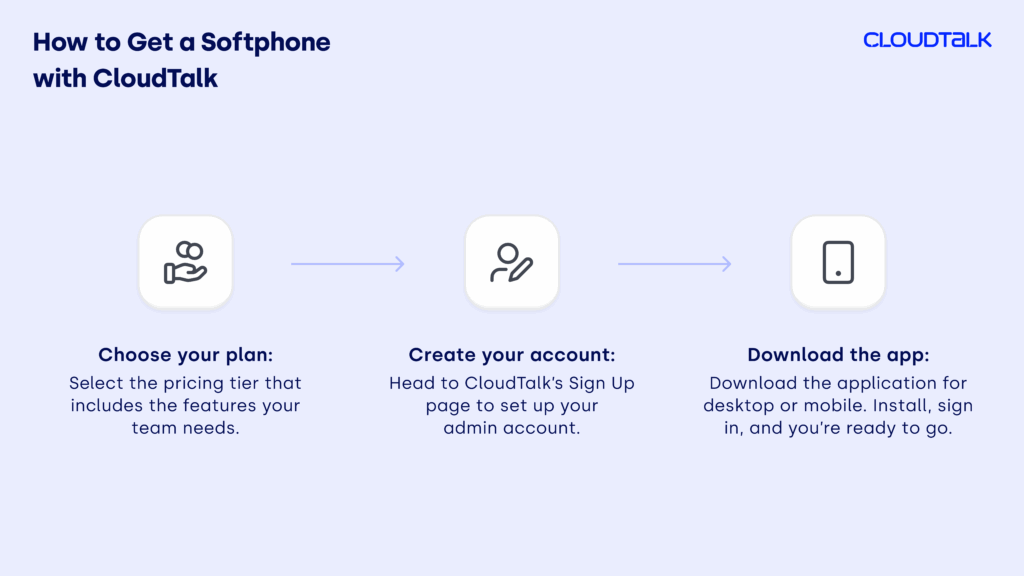
CloudTalk is a cloud-based calling service using soft phones. Setting up your softphone for business with CloudTalk takes just a few minutes — no complicated installation or hardware required. Here’s how it works:
1. Choose your plan: Start by selecting the pricing tier that includes the features your team needs. Not sure which one fits best? You can always request a demo and have our team walk you through the options.
2. Create your account: Head to CloudTalk’s Sign Up page to set up your admin account. This profile will serve as your central hub for managing users, integrations, and phone numbers.
3. Download the app: Visit the Downloads page and choose your preferred platform — desktop or mobile. Install, sign in, and you’re ready to start making and receiving calls instantly.
CloudTalk’s cloud-based calling solution gives you everything you need in one place: voice, analytics, integrations, and reliability — all without the hardware headaches.
Recommended Articles
Conclusion: Why Softphones Are the Way to Go in 2026
Softphones are redefining how businesses communicate, collaborate, and scale. With the right solution in place, companies gain dependable call quality, smoother team collaboration, fast deployment, and meaningful cost savings.
The numbers speak for itself. 82% of companies save money when they switch to softphone calls, and most businesses see their phone bills drop by about 50%—and some even as much as a whopping 90%!¹ If you’re watching your budget, those kinds of savings are a total game-changer.
Ready to ditch the old setup and scale in 2026? CloudTalk’s business softphone checks every box, so your team can grow, streamline ops, make calls smarter, and stay focused on customers, not tech hassles.

Ready to Grow Smarter?

Sources:
-
01
Enterprise Apps Today






















