
What Is SalesRabbit Phone Integration?
SalesRabbit is a mobile-first CRM and lead management platform for field sales teams. Reps use it to manage territories, track door-to-door leads, and log outcomes from the doorstep.
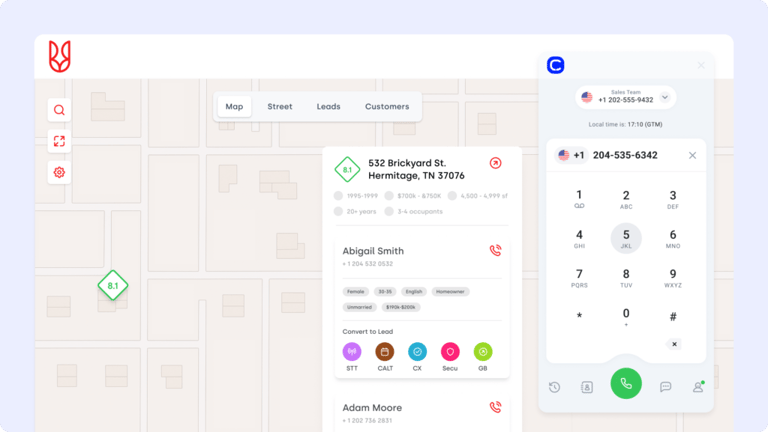
A SalesRabbit phone integration connects that lead database to your calling software. CloudTalk’s SalesRabbit VoIP integration keeps both systems on one lead record, so the canvasser and the caller always see the same status.
How Does SalesRabbit Phone Integration Work With CloudTalk?
The SalesRabbit API integration moves lead data both ways. CloudTalk imports names, phone numbers, emails, lead owners, and status updates from SalesRabbit, then writes call outcomes back to the matching lead.
New and edited leads sync as they change, so your Campaigns stay current without a manual export. Through the SalesRabbit CTI integration, agents dial the same list your field reps are updating in real time.
Benefits of SalesRabbit Phone Integration
- 01Sync Leads Both Ways With the SalesRabbit Calling IntegrationCloudTalk imports leads from SalesRabbit and exports call-generated updates back to the same record. Your field and phone teams read one lead status, and nobody retypes a result. Load an existing list on day one with Contact Import.
- 02Call Fresh Leads Faster With the SalesRabbit VoIP IntegrationA lead knocked this morning can be dialed this afternoon. CloudTalk’s Power Dialer queues new SalesRabbit leads automatically, so reps reach people while the visit is still fresh.
- 03Keep Dialer Lists Accurate With the SalesRabbit Call Center Software IntegrationEvery new or edited lead syncs across to CloudTalk. Your Smart Dialer queue reflects the current status, which keeps agents off dead records and on prospects worth a call.
- 04Hand Off From Field to Phone Without Losing ContextThe SalesRabbit phone integration carries lead owner and status into CloudTalk. Agents open a call with the canvassing history already on screen in Customer Details.
- 05Dial Straight From the Lead Record With Click-to-CallClick-to-Call starts a CloudTalk call from a SalesRabbit lead in one click. Reps skip the keypad and the copy-paste, and the call logs itself.
- 06Log Call Outcomes Automatically Instead of by HandCloudTalk writes results, durations, and Call Notes back to the SalesRabbit lead. Managers see real activity per territory without chasing reps for updates.
SalesRabbit Phone Integration

CloudTalk’s SalesRabbit phone integration syncs lead data in both directions between your field team and your dialer. New leads reach callers while interest is high, and every call outcome lands back on the SalesRabbit lead record. The integration is launching soon.

What Data Do SalesRabbit & CloudTalk Share?
SalesRabbit CloudTalk
SalesRabbit & CloudTalk exchange
SalesRabbit receives
Your field team knocks. Your phone team calls the same lead.
CloudTalk’s SalesRabbit phone integration syncs leads in both directions, so a door knocked this morning turns into a call this afternoon.

Good morning! Thank you for your call. I am CeTe, your AI voice assistant. How can I help you today?
Still on the Fence?
Unsure if CloudTalk is right for you? Let us help make up your mind.
100%
Security
Summaries, transcripts, sentiment, and automation, all built on a calling foundation you can rely on. Let your team focus on the conversation instead of the write-up.
Explore AI Features5,500+
Happy customers (and counting)
From fast-growing startups to global brands, teams trust CloudTalk to power conversations that drive results.
View Wall of LoveOur reviews
Hear first-hand from our incredible community of customers.
I love the smart dialer as it removes procrastination from cold calling business development time. I also recently trialled the AI notetaker and will be purchasing that as it removes the need to write notes manually. It was very accurate as well!
Co-Founder
We needed the lines for our business with a lot of urgency and the team resolved it for us in just one business day. Everything was integrated and set up immediately, ready for our team to deliver support right away.
Project Manager
Easy to use. I love that support quickly and clearly helped me understand the more difficult mechanisms. The integration via API with our inhousing application also allowed for automations like SMS reminders.
Customer Support Specialist
It's simple to use, has a clean interface, and offers many options for using numbers from many parts of the world. It's also a great tool to use for opening accounts on messaging platforms like WhatsApp and Telegram.
Revenue System Specialist
The calling dashboard and the reporting structure is flawless as it supports campaign-wise reporting as well. We can allocate caller IDs to ISDRs, making it easier to use them whenever required in real-time...
Senior Manager
For us the main upside of using CloudTalk is saving of contacts. We're a business thousands of people contact, so seeing who's calling prior to taking the calls is a big boost. It also has detailed analytics for tracking.
Account Manager
Integrations
Get more value from your tools
Connect your tools, connect your teams. With over 100 apps already available in our directory, your favourite tools are just a click away.

HubSpot
Supercharge your outreach connecting CloudTalk to HubSpot for automated call logging and real-time data synchronization.
Learn more
Salesforce
Empower your sales and support teams with a seamless 2-way data sync between your phone system and Salesforce CRM.
Learn more
Zendesk Sell
Maximize productivity and drive revenue through a simple platform that offers full pipeline visibility.
Learn more
Pipedrive
Accelerate your sales cycle by making and logging calls directly within your Pipedrive deal pipelines.
Learn more
noCRM
Focus strictly on closing deals by eliminating manual logging through a streamlined outbound calling integration.
Learn more
MS Dynamics 365
Optimize your enterprise workflows by connecting professional telephony to your Microsoft Dynamics environment.
Learn moreDiscover 99+ Integrations


What real users are saying
The inside scoop from actual CloudTalk customers.

From 20-Minute Waits to 3-Minute Service
“With CloudTalk, we dropped our missed calls from 80% to 16% and cut wait times by over 85%, while scaling from 2 to 20+ agents.”

40% Lift in Call Connections
“With CloudTalk, our pre-sales team stopped wasting time on dropped calls and started having more of the right ones.”

20% More Efficient Call Handling
“We replaced personal phones and manual processes with a scalable VoIP solution and saw a 20% jump in team productivity.”

40% Fewer Missed Calls
“We replaced personal phones and manual processes with a scalable VoIP solution and saw a 20% jump in team productivity.”

From 3 Phone Systems to One Source of Truth
“Before CloudTalk, our data was scattered. Now, everything lives in HubSpot — connected, visible, and fully unified.”

66% More Capacity Without Hiring
“CloudTalk made it easy to scale support fast: we cut handle time by 33% and now handle 66% more calls per agent.”

Is your existing phone system more drama than dial tone? Book a chat with CloudTalk - we make calls fun again!
Join thousands of teams already growing with CloudTalk.
SalesRabbit Phone Integration FAQ
Everything you need to know about this integration.
The SalesRabbit API integration takes minutes to connect. You link the two systems through Tray.io modules and authenticate with a SalesRabbit API key.
The SalesRabbit integration needs a paid CloudTalk plan, and Tray.io automations may carry their own fees. CloudTalk pricing starts on the Starter plan.
The SalesRabbit CTI integration syncs leads both ways over an API connection. CloudTalk pulls lead records in and pushes call outcomes back with Workflow Automation.
CloudTalk imports names, phone numbers, emails, lead owners, and status updates. Those fields feed dialer lists and your Call Tagging rules.
Yes. CloudTalk places outbound calls straight from a synced SalesRabbit lead, and inbound calls reach the right rep through Call Routing.
Field sales, inside sales, business development, and sales managers. Field reps create leads in SalesRabbit, and inside reps call those leads from CloudTalk with the Parallel Dialer.
Yes. Call Recording captures every call placed through CloudTalk, and each recording stays attached to its CloudTalk call record.
Yes. CloudTalk sends text messages SMS to any contact in your account, including leads imported from SalesRabbit.
CloudTalk adds the calling layer: dialers, routing, recording, and Call Transcription on every conversation.


Hello 👋 My name is Emma. Still have questions?
Can’t find the answer you’re looking for? Please chat to our friendly team.