
14 Best Zoho CRM Integrations to Boost Sales Efficiency in 2026

Your CRM holds the keys to every deal—but only if the rest of your tech stack plays along.
Without the right Zoho CRM integrations, reps lose time copying data, service teams miss context, and marketers fly blind.
Integrating Zoho CRM with tools like calling platforms, helpdesks, ecommerce systems, and spreadsheets doesn’t just improve efficiency—it drives real revenue.
In fact, McKinsey reports that the average employee spends 1.8 hours per day just searching for information. That’s nearly 20% of their time 1.
This guide highlights the most impactful Zoho CRM integration options available today. Each integration is selected based on a specific use case—from streamlining outreach to automating post-sale follow-ups—so you can match the right tool to the right job.
Let’s plug Zoho CRM into your workflow and put that time back where it belongs: into closing.
Key Takeaways:
- Zoho CRM integrations boost efficiency by syncing customer data across sales, support, and marketing tools.
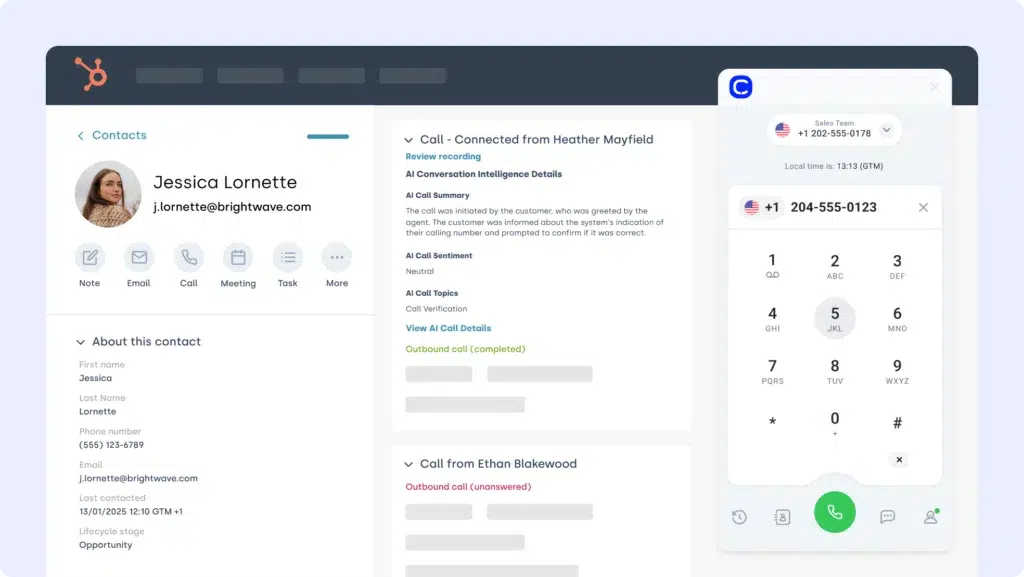
- CloudTalk’s Zoho CRM integration helps teams auto-log calls, route tickets, and surface real-time caller insights.
- Salesforce, HubSpot, and Pipedrive integrations ensure full pipeline visibility and reduced manual data entry.
- You can connect over a dozen tools—from Shopify to Google Sheets—via the Zoho CRM integration platform.
- The right integration saves hours per week, improves conversion rates, and strengthens your customer lifecycle touchpoints.

No more tab-switching. Just seamless workflows.
What Is a Zoho CRM Integration?
A Zoho CRM integration connects your CRM with other tools—like phone systems, email platforms, ecommerce apps, or helpdesks—to streamline sales and support workflows and reduce manual effort.
Instead of flipping between tools or duplicating data entry, integrations let information flow automatically between systems. That means faster follow-ups, better personalization, and fewer dropped balls across your customer lifecycle.
Here’s what Zoho CRM integrations help you do:
- Automate workflows: trigger emails, assign tasks, or update records when someone takes action
- Sync data: make sure contact info, deal status, and activity history stay up to date everywhere
- Trigger actions: set off alerts, create follow-ups, or move pipeline stages based on what happens in other tools
One standout example is CloudTalk’s integration with Zoho CRM. It lets you:
- Instantly identify callers and pull up CRM records mid-call
- Auto-log call notes, recordings, and tags into Zoho
- Trigger ticket creation or follow-ups based on call outcomes
Most Zoho CRM integrations are powered by APIs, middleware tools like Zapier, or native apps from the Zoho Marketplace.


Want Zoho CRM to talk to your dialer, VoIP, and helpdesk?
14 Must-Have Zoho CRM Integrations for 2026
Your Zoho CRM is only as powerful as the tools it connects with.
We’ve curated 14 high-impact Zoho CRM integrations for 2026—based on real use cases like sales alignment, marketing automation, ticket syncing, and voice communications. For each tool, we’ll show what it does, how it connects to Zoho CRM, and what it helps you improve.
Best Zoho CRM Integrations
Software
Category
Why It’s Useful with Zoho CRM
CloudTalk
VoIP/AI
Native calling, AI voice tools, and full contact sync inside Zoho
Salesforce
CRM
Sync accounts, leads, and pipelines across platforms
Pipedrive
CRM
Map deal stages and customer interactions into Zoho
Front
Shared Inbox
Sync customer conversations with CRM for real-time updates
Shopify
Ecommerce
Capture purchase activity to enrich CRM records and triggers
HubSpot
CRM/Marketing
Sync campaigns, leads, and marketing data for full-funnel visibility
Google Sheets
Productivity
Export CRM records to create real-time dashboards or reports
Front
Shared Inbox
Attach email and SMS threads directly to contact profiles in Zoho
LiveAgent
Helpdesk & Tracking
Log ticket info and support conversations into Zoho timelines
Zendesk
Helpdesk Platform
Trigger CRM workflows from ticket changes and agent actions
Gorgias
Ecommerce Helpdesk
Feed order support data into Zoho CRM for personalized follow-ups
Microsoft Teams
Collaboration
Sync Zoho CRM updates into chats and shared workspaces
BigCommerce
Ecommerce
Integrate order history, customer details, and payment info with Zoho
ActiveCampaign
Marketing Automation
Sync contact activity and trigger automations from Zoho CRM events
1. CloudTalk
CloudTalk is a modern cloud-based phone system built for ecommerce teams that rely on voice to drive sales and support. The Zoho CRM CloudTalk integration brings call activity, contact context, and customer data into one streamlined workflow—no tab-switching required.
Use Case
Connect CloudTalk to Zoho CRM to auto-log customer calls, match caller IDs with CRM records, and route support to the right agent—perfect for reducing wait times and improving resolution speed.
Benefits
- Improved agent productivity with automated call workflows
- Better customer experience through real-time access to caller data
- Eliminate tab-switching between phone and support tools
Key Features:
- Real-time call monitoring
- AI-Powered Conversation Intelligence
- Call recording and playback
- Sentiment Analysis
Pricing:
CloudTalk offers flexible plans tailored to business needs. With each of its plans offering more value than its competitors:
- Lite: $19/user/month (Americas)
- Starter: $25/user/month
- Essential: $29/user/month
- Expert: $49/user/month
- Custom: Pricing available upon request

2. Salesforce (CRM)
Salesforce is one of the most powerful CRMs available—built to handle complex B2B sales, service, and account workflows. The Zoho CRM Salesforce integration ensures customer and deal data flows between platforms without duplication.
Use Case
Sync leads, opportunities, and contact details between Salesforce and Zoho CRM—giving both systems a unified view of your pipeline and account activity.
Benefits
- Connect sales pipelines with real-time CRM data
- Eliminate manual entry with automated customer syncing
- Enable cross-team visibility into deal progress and touchpoints
Key Features
- Two-way sync between Zoho CRM and Salesforce
- Auto-update leads, deals, and custom fields
- Map stages, scores, and owner assignments across tools
Pricing:
Salesforce offers various pricing tiers:
- Sales Cloud Essentials: $25 per user/month
- Sales Cloud Professional: $75 per user/month
- Sales Cloud Enterprise: $150 per user/month
- Sales Cloud Unlimited: $300 per user/month
Salesforce dialer pricing guide

3. Pipedrive (CRM)
Pipedrive is a sales-focused CRM known for its visual pipelines. The Zoho CRM Pipedrive integration bridges deal activity, contact records, and support data—so your sales team never misses context.
Use Case
Sync Zoho CRM contact and activity data into Pipedrive to update pipeline stages, automate follow-ups, and keep lead records fresh without manual entry.
Benefits
- Keep sales pipelines updated with real-time contact activity
- Automate deal progression based on support events or behaviors
- Eliminate duplicate data entry between teams
Key Features
- Bi-directional sync of leads, contacts, and activities
- Trigger pipeline updates from CRM field changes
- Launch automations tied to form fills or support tags
Pricing:
Pipedrive offers flexible plans based on team size and needs:
- Essential: $14.90/user/month
- Advanced: $27.90/user/month
- Professional: $49.90/user/month
- Power & Enterprise: Custom pricing

4. Front (Shared Inbox Platform)
Front is a shared inbox platform that combines multichannel messaging with collaboration features. The Zoho CRM Front integration helps teams align sales communication with CRM workflows.
Use Case
Connect Zoho CRM with Front to sync email threads, tag conversations, and push lead or deal updates based on inbox activity—so nothing slips through.
Benefits
- Centralize communication with full lead and deal context
- Automate CRM updates from email replies or tags
- Improve visibility into outreach and follow-ups
Key Features
- Log Front conversations directly into Zoho CRM
- Trigger field updates based on message status or tags
- Assign or escalate based on CRM record data
Pricing:
- Starter: $19/user/month
- Growth: $59/user/month
- Scale: $99/user/month

5. Shopify (Ecommerce Platform)
Shopify powers ecommerce for millions of merchants. The Zoho CRM Shopify integration connects your store’s customer, order, and product data directly to your CRM—so sales and support stay aligned.
Use Case
Sync Shopify order activity and customer details into Zoho CRM to trigger follow-ups, personalize outreach, and maintain a complete customer view.
Benefits
- Unify ecommerce and CRM records automatically
- Automate post-purchase workflows and campaigns
- Gain visibility into customer value and purchase frequency
Key Features
- Auto-sync contacts and orders to Zoho CRM
- Trigger actions from purchase behavior
- Segment leads by products or cart activity
Pricing:
Shopify offers several plans depending on store size and feature needs:
- Basic: $39/month
- Shopify: $105/month
- Advanced: $399/month

6. HubSpot (CRM)
HubSpot is a popular platform for inbound marketing and sales. The Zoho CRM HubSpot integration connects your lead data, campaigns, and customer interactions—so nothing gets lost between systems.
Use Case
Sync HubSpot marketing engagement—like email opens, form fills, or page views—into Zoho CRM to keep lead scores and sales readiness up to date.
Benefits
- Align lead gen and CRM tracking in real time
- Route qualified leads to the right reps faster
- Create dynamic lists in Zoho based on HubSpot behavior
Key Features
- Map HubSpot properties to Zoho CRM fields
- Push CRM contact updates to HubSpot for retargeting
- Trigger workflows in Zoho based on campaign actions
Pricing:
HubSpot offers a free CRM plan, with paid tiers depending on your team’s size and needs. See HubSpot pricing for details.
7. Google Sheets
Google Sheets is a lightweight, flexible tool for custom reporting and data collaboration. The Zoho CRM Google Sheets integration keeps your CRM insights easily shareable and up to date.
Use Case
Push deal data, contact lists, or sales KPIs from Zoho CRM into Google Sheets for stakeholder reporting, forecasting, or dashboard building.
Benefits
- Eliminate manual exports with live sync
- Share filtered CRM views with non-CRM users
- Build custom dashboards across departments
Key Features
- Schedule automated exports from Zoho CRM
- Filter data by owner, deal stage, or tags
- Collaborate in real time with team-access controls
Pricing:
Free with Google Workspace. Advanced features may depend on add-ons.

8. Front (Shared Inbox Platform)
Front is a shared inbox tool that blends email, chat, and SMS into a collaborative workspace. The Zoho CRM Front integration gives teams full context on every customer interaction.
Use Case
Connect Front messages to Zoho CRM so agents can view conversation history, create tasks, and update records without switching tabs.
Benefits
- Centralize all customer messages in CRM
- Sync replies, tags, and internal notes across tools
- Improve team collaboration on deals and support
Key Features
- Link Front threads to Zoho CRM contacts
- Auto-create CRM tasks from conversations
- View message history alongside deal records
Pricing:
- Starter: $19/user/month
- Growth: $59/user/month
- Scale: $99/user/month
9. LiveAgent (Helpdesk Software)
LiveAgent is a multi-channel helpdesk built for speed and SLA precision. The Zoho CRM LiveAgent integration ensures that support and sales stay in sync—no silos.
Use Case
Create or update Zoho CRM records from LiveAgent tickets, track customer sentiment, and automate sales actions from service interactions.
Benefits
- Link ticket outcomes to CRM follow-ups
- Improve account visibility for sales teams
- Align service data with deal stages
Key Features
- Auto-create contacts or notes in Zoho CRM
- Tag service events that trigger sales workflows
- Sync ticket status with CRM activity timelines
Pricing:
LiveAgent offers transparent pricing for support teams:
- Small Business: $9/agent/month
- Medium Business: $29/agent/month
- Large Business: $49/agent/month
- Enterprise: $69/agent/month

10. Zendesk (Support Platform)
Zendesk powers global customer support teams. The Zoho CRM Zendesk integration brings together sales and service by syncing tickets, notes, and customer data between platforms.
Use Case
Push Zendesk ticket insights into Zoho CRM, so reps know which accounts need extra attention—and can follow up with full support context.
Benefits
- Strengthen customer relationships with context
- Track service issues inside your CRM pipeline
- Reduce handoff friction between sales and support
Key Features
- Map Zendesk fields to Zoho CRM records
- Trigger CRM actions from ticket status or tags
- Log ticket activity on contact timelines
Pricing:
Zendesk pricing tiers include:
- Support Team: $19 per agent/month
- Support Professional: $55 per agent/month
- Support Enterprise: $115 per agent/month

11. Gorgias (Ecommerce Helpdesk)
Gorgias is a helpdesk platform built for ecommerce brands. The Zoho CRM Gorgias integration links customer support with CRM workflows—so no one works in the dark.
Use Case
Trigger Zoho CRM updates from ticket changes in Gorgias—like logging refund conversations, tagging VIP support cases, or creating follow-up tasks.
Benefits
- Bring order and ticket history into CRM views
- Automate CRM workflows from helpdesk events
- Personalize sales follow-ups based on support activity
Key Features
- Auto-create or update Zoho CRM records from tickets
- Sync tags, notes, and customer satisfaction ratings
- Trigger drip campaigns or alerts from resolution events
Pricing:
- Basic: $10/month + usage
- Pro: $60/month + usage
- Advanced: $900/month

12. Microsoft Teams (Collaboration Platform)
Microsoft Teams enables real-time collaboration across teams. The Zoho CRM Microsoft Teams integration keeps reps informed—without email overload.
Use Case
Send Zoho CRM updates to Teams channels or chats: deal progress, task reminders, or contact activity—all in real time.
Benefits
- Improve deal velocity with instant alerts
- Keep teams aligned on account movements
- Reduce lag between updates and action
Key Features
- Push CRM activity to Teams messages
- Trigger alerts for pipeline changes or task due dates
- Link CRM records in channel threads
Pricing:
Microsoft Teams offers a free plan, with premium features available in Microsoft 365 bundles:
- Microsoft 365 Business Basic: $6/user/month
- Microsoft 365 Business Standard: $12.50/user/month

13. BigCommerce (Ecommerce Platform)
BigCommerce is a leading platform for online retail. The Zoho CRM BigCommerce integration connects your storefront with your sales funnel—so every purchase feeds pipeline progress.
Use Case
Sync customer data, order activity, and cart behavior into Zoho CRM to trigger deal creation, loyalty campaigns, or follow-up automations.
Benefits
- Link purchases directly to CRM leads or accounts
- Trigger automations based on customer behavior
- Build full lifecycle visibility from site to sale
Key Features
- Auto-create contacts from BigCommerce checkouts
- Track order events in Zoho timelines
- Launch workflows from tags like VIP or churn risk
Pricing:
BigCommerce offers three core pricing tiers:
- Standard: $39/month
- Plus: $105/month
- Pro: $399/month

14. ActiveCampaign (Marketing Automation Platform)
ActiveCampaign is a powerhouse for lifecycle email and automation. The Zoho CRM ActiveCampaign integration bridges CRM and marketing—so every campaign hits with context.
Use Case
Use CRM tags, deal stages, or contact behavior to launch campaigns in ActiveCampaign—and feed back engagement data into Zoho.
Benefits
- Sync marketing activity with sales progress
- Trigger emails from pipeline changes or notes
- Keep contact records updated with behavior insights
Key Features
- Auto-sync Zoho contacts to ActiveCampaign lists
- Trigger automations from CRM fields or tags
- Push open/click data into CRM activity feeds
Pricing:
- Plus: $49/month
- Professional: $149/month
- Enterprise: Custom pricing
15. Appy Pie Automate
Appy Pie Automate is a no-code automation platform that helps businesses connect apps and automate workflows without writing code. With the Zoho CRM integrations. You can connect Zoho CRM with hundreds of apps to automatically transfer customer data, trigger actions, and streamline business processes.
Use Case
Automatically connect Zoho CRM with other apps to sync leads, contacts, deals, and activities—ensuring your team always works with updated customer information across tools.
Benefits
- Automate repetitive CRM tasks and reduce manual work
- Keep leads, contacts, and deal data updated across connected apps
- Improve team productivity with seamless workflow automation
Key Features
- No-code integrations between Zoho CRM and multiple apps
- Automated triggers for leads, contacts, deals, and activities
- Custom workflow creation with conditional automation
Pricing:
Appy Pie Automate offers flexible pricing plans:
- Basic Plan: $9/month
- Connect Plan: $19/month
- Team Plan: $49/month
- Business Plan: $79/month

Why Integrate Zoho CRM? 5 Key Benefits That Drive Sales & Support
- Centralized Customer Insights
Integrating Zoho CRM pulls in real-time data from ecommerce, helpdesk, or telephony tools—so every rep sees the full customer story in one place. - Smarter, Faster Workflows
Automations triggered by external platforms (like calls, purchases, or tickets) help teams work faster without switching tabs or updating records manually. - Aligned Sales and Support
With integrations, support tickets, call logs, and sales tasks sync automatically—bridging the gap between front-line service and pipeline progress. - Behavior-Based Campaigns
Marketing tools like ActiveCampaign or HubSpot push engagement data into Zoho CRM, enabling timely, personalized outreach based on real activity. - Less Manual Data Entry
From syncing contact info to logging interactions, integrations eliminate repetitive tasks—freeing up time for high-impact work across teams.

Workflows aren’t broken—they’re just disconnected. Reconnect them!
How to Choose the Right Zoho CRM Integration for Your Business
Zoho CRM offers hundreds of integration paths—but not all are worth your team’s time. The best Zoho CRM integrations address pain points, reduce manual work, and scale with your operations. Here’s how to choose the right ones:
Identify Your Business Needs
Don’t get distracted by fancy features—start with friction. Are agents missing ticket context during calls? The CloudTalk Zoho CRM integration syncs call logs, contact records, and sentiment insights, so your team always has the full story.
Prioritize Ease of Setup
If it takes a dev team to connect your stack, it’s not really streamlining anything. Choose plug-and-play integrations with tested triggers and templates. CloudTalk’s one-click setup for Zoho CRM goes live in minutes—no coding required.
Choose Scalable Integrations
Your integration should grow with your business. Whether you scale from 5 to 50 users or expand into new markets, tools like CloudTalk are built for multi-team environments—ensuring your Zoho CRM stays in sync.
Assess Security and Compliance
Customer data is sacred. Only use integrations that support audit logs, access control, and GDPR-ready policies. CloudTalk’s telephony integration for Zoho CRM is designed with compliance baked in.
Evaluate Cost-Effectiveness
Not all integrations pay off. Track ROI by measuring time saved, errors reduced, or revenue gained. CloudTalk’s call analytics help you tie automation directly to results.
Look at Real Support, Not Just Features
Bells and whistles won’t help if the tool breaks. Choose vendors with live support and strong onboarding. With CloudTalk, expert help is a click away—no ticket queues required.
How to Integrate Zoho CRM with Other Business Platforms
Zoho CRM makes integration simple with a mix of pre-built apps, REST APIs, and third-party tools like Zapier and Make. You can connect it to your favorite platforms—such as phone systems, email services, helpdesk software, or ecommerce tools—to create a seamless customer journey.
Here’s how most teams do it:
- Connect via API: For more tailored use cases, Zoho CRM’s API allows dev teams to build custom integrations with full control over data sync and triggers.ility, and make your team faster where it counts.
- Use native integrations: Zoho Marketplace offers plug-and-play apps for popular tools like CloudTalk, HubSpot, and Shopify—no coding needed.
- Leverage automation tools: Platforms like Zapier and Make offer drag-and-drop workflows for hundreds of services. Perfect for quick, no-code automations.
Power Your Growth with the Right Zoho CRM Integration
Your CRM should be more than a place to store contacts—it should be the engine that drives sales, support, and retention. With the right Zoho CRM integration, you can automate busywork, connect siloed systems, and deliver seamless customer experiences at scale.
Whether you’re syncing calls from CloudTalk, aligning support with Zendesk, or fueling campaigns through HubSpot, Zoho CRM can sit at the center of your tech stack—doing the heavy lifting behind the scenes.
Ready to see what a smarter CRM stack looks like?
Setup shouldn’t be a separate project. We can help you!
Sources:







