
Call Queue Software for Call Centers and Support
Call queue software cuts call handling time by 40%, directs customers to the right agent using custom rules, reduces abandoned calls by keeping callers engaged, and distributes call traffic evenly among your agents.
Our price: Included in all plans starting at just $25users/mo
 SOC2 CompliantISO 27001
Trusted by 30,000+ sales & support professionals to power more & better conversations
















Call Queue Software That Eliminates Support Bottlenecks
40% Faster Handling Time
Reduce call bottlenecks and resolve customer inquiries faster with intelligent queuing.
3 Ring Strategies
Optimize call flow with three smart ring strategies to connect customers with efficiency.
+15 Custom Criteria
Design call queue rules with smart conditions to connect customers to the right agent.
Call Queuing
What is Call Queuing?
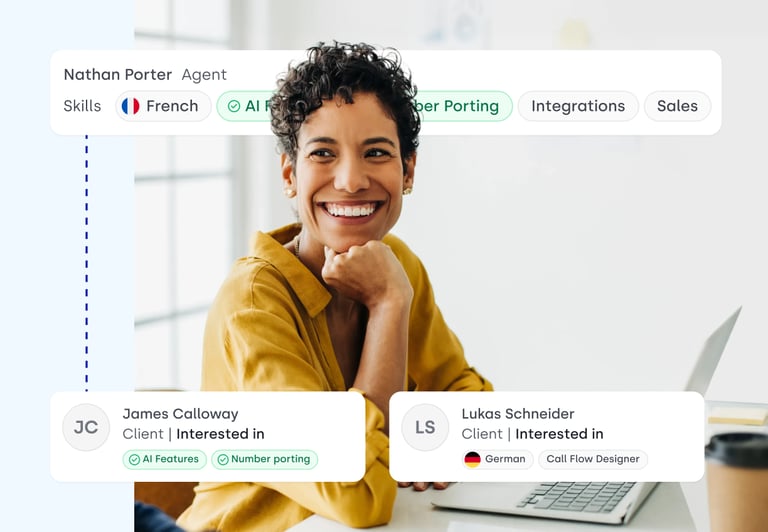
Call Queuing helps you craft the perfect calling experience by controlling how calls are routed to your agents. Set custom criteria based on expertise, language, priority, and availability to ensure every call reaches the best-fit person.
Reduce wait times, prevent dropped calls, and keep customers satisfied with seamless call management.
How Does Call Queuing Work?
Call Queuing organizes inbound calls in a virtual queue, holding them until an agent is available. Once a line frees up, CloudTalk routes the call to the predefined endpoint.
With Skill-Based Routing, customers connect with the most qualified agent, while VIP Queues prioritize high-value callers, letting them skip the line.
You can also enhance an on-hold experience by offering personalized greetings and custom music.
Deliver Better Service with Smart Ring Strategies
Call queuing keeps inbound calls organized, but the right ring strategy determines how they reach your agents.
Whether balancing workloads or prioritizing speed, choosing the best strategy improves efficiency, reduces wait times, and enhances customer experience.
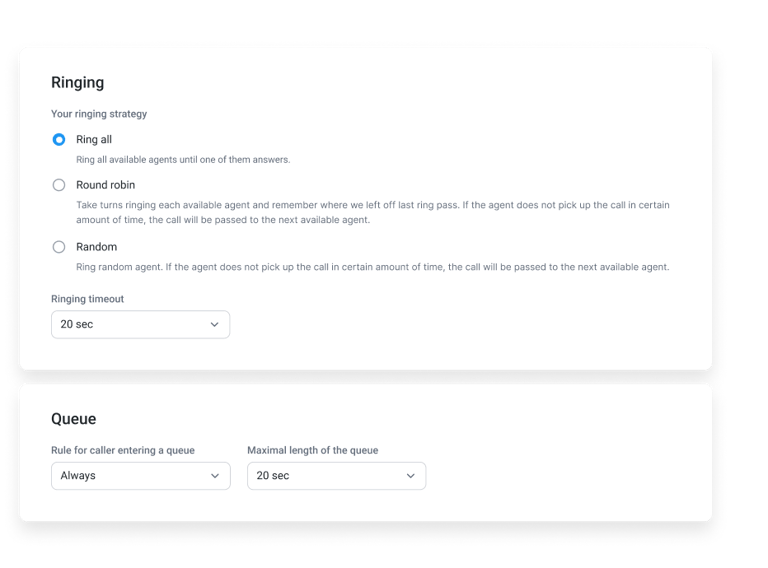
- 01Round Robin – Calls are distributed one by one in a set sequence.
- 02Ring All – All agents receive the call simultaneously.
- 03Random – Calls are assigned to agents at random.


Improve CX With CloudTalk's Call Queuing Solution
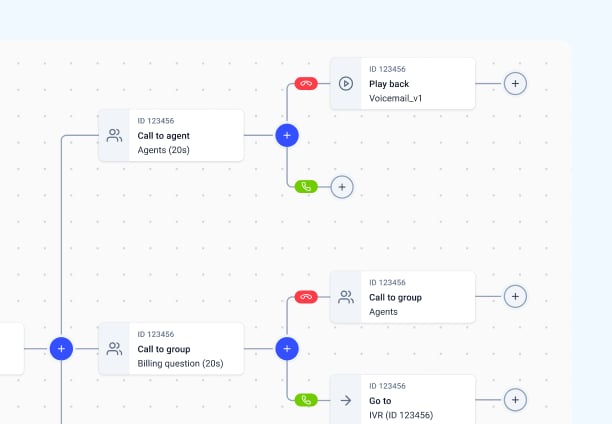
Creating a smooth, efficient customer journey doesn’t have to be complicated. With Call Flow Designer, you can visually lay out how calls move through your phone system—from the moment they come in to the moment they’re answered or resolved.
Best of all, it scales effortlessly—whether handling a few calls or a high-volume influx, your call queuing adapts to keep every interaction efficient and frustration-free.
How to Set Up Call Queues in CloudTalk?
- 01In your CloudTalk account, click the left-hand side Numbers tab on the Dashboard.
- 02Click the blue pencil icon next to the number you want to configure.
- 03In the call flow, click the + icon where you want to insert the condition splitter.
- 04Choose an action (e.g., route to a specific agent or group) for calls that meet certain criteria.
- 05Click Save flow to apply your changes
Call Queue Software: The Complete Guide
Call queuing is the process of holding inbound callers in an ordered line when every agent is busy, then connecting each caller to the next available agent according to rules you define. Below is everything you need to know about how call queues work, which ring strategy to pick, how skill-based routing and VIP priority change the outcome, and how to set a queue up in CloudTalk.
Call queuing is the process of holding inbound callers in an ordered line when every agent is busy, then connecting each caller to the next available agent according to rules you define. The queue is the waiting room; the routing rules decide who gets served, in what order, and by whom.
Without a queue, a call that arrives when the team is at capacity has nowhere to go: it hits a busy signal, drops to voicemail, or rings out. Call queue software replaces that dead end with a managed hold, so the call stays in the system instead of leaving it.
What a call queue does while the caller waits
- Holds the call in order: callers are served first in, first out unless a priority rule overrides it.
- Tells the caller where they stand: position in queue and estimated wait time, announced at intervals rather than left to guesswork.
- Offers a way out that is not hanging up: a callback request, voicemail, or a route to another team.
- Records what happened: wait time, abandonment, and queue depth become data you can staff against.
Call queuing usually sits directly behind an IVR menu: the IVR asks what the caller needs, and the queue holds them for the team that handles it.
Call queuing works by capturing an inbound call, identifying who should handle it, placing it in the matching queue, and releasing it to an agent when one frees up. Call queuing software runs that sequence automatically for every call, every time.
The path an inbound call takes
- 1. The call arrives on a business number and the system checks business hours, so out-of-hours calls follow a different path than daytime calls.
- 2. The caller is identified and sorted. An IVR menu, the number dialed, or CRM data attached to the caller ID determines which team the call belongs to.
- 3. The call enters a queue for that team. If an agent is free, it connects immediately and the queue is invisible to the caller.
- 4. The caller waits with information, not silence: greeting, hold audio, position, and estimated wait time.
- 5. A ring strategy picks the agent the moment one becomes available: ring everyone at once, rotate through the team, or go to whoever has been idle longest.
- 6. Overflow rules catch what the queue cannot. If the wait exceeds a threshold or the queue is full, the call routes to a backup team, a callback, or voicemail rather than sitting there indefinitely.
Everything after step three is configuration, not code: call center queue management software exposes each of these as a setting rather than a build. The difference between a queue that loses calls and one that does not is usually the exit paths, not the hold music. For the wider routing logic that sits around the queue, see our guide to call routing.
A ring strategy is the rule that decides which agent's phone rings when a queued call is released. Call queue software typically offers five, and the one you pick changes both how fast calls get answered and how evenly work lands across the team.
The five ring strategies you will see
- Simultaneous (ring all): every available agent rings at once and the fastest to answer takes the call. Shortest wait times, but it rewards whoever is quickest on the mouse and creates lopsided workloads.
- Sequential (linear): agents ring one after another in a fixed order. Useful when seniority or specialism genuinely matters, at the cost of a longer average wait and heavy load on whoever sits first in the list.
- Round robin: the starting point rotates with each call, so the queue works its way evenly through the team. The default choice when fairness matters more than shaving seconds.
- Longest idle: the call goes to whoever has gone longest without one. This is the strategy that keeps a team of mixed speeds balanced, because it corrects for agents who habitually finish faster.
- Skill-based: the call goes to the best-matched agent rather than the next one. Slower to connect and the most work to configure; by far the strongest on first-contact resolution.
Most teams run more than one. Support queues tend toward longest idle or skill-based because resolution quality drives the metric that matters; sales queues tend toward simultaneous because speed to answer is the metric that matters. You can check whether the strategy is working in your queue reports, where an uneven distribution of calls per agent is the first symptom of the wrong choice.
Skill-based routing improves call queue management by matching each caller to the agent best equipped to resolve their issue, rather than to whoever happens to be free. Agents are tagged with skills such as language, product line, tier, or account type, and the queue releases the call only to an agent carrying the required tag.
Where the gains show up
- Fewer transfers: a caller routed correctly the first time is not re-queued behind a second wait to reach the person who can actually help.
- Shorter handle times: an agent who knows the product or speaks the caller's language resolves the same issue faster than a generalist working it out live.
- Higher first-contact resolution: the single metric most sensitive to routing quality, because it measures exactly the thing skill matching is designed to fix.
- Less escalation load: complex calls reach senior agents directly instead of consuming a junior agent's time first and a senior agent's time afterward.
The tradeoff is real and worth naming: narrowing the pool of eligible agents can lengthen the wait, because a caller who needs a specific skill waits for that specific person. Most teams handle this with a fallback rule that widens the pool after a set number of seconds, so a skill match is preferred but not enforced forever. Skill-based routing pairs naturally with an IVR that collects the caller's need up front.
The main customer experience benefit of call queuing is certainty: the caller knows they have been received, roughly how long they will wait, and what their options are. A call queuing solution converts an unknown wait, which people abandon, into a known one, which they tolerate.
What callers actually get
- No busy signals or dead ends: every call is acknowledged and held rather than rejected, so a volume spike does not turn into a stack of missed customers.
- Visible progress: position and estimated wait announcements let the caller decide whether to hold, which is a very different experience from waiting blind.
- An exit that keeps the conversation: a callback option hands the caller back their time without costing you the contact.
- Fair, predictable order: calls are served in sequence rather than by luck of redial, which removes the incentive to hang up and try again.
- Consistency at peak: the same rules govern the queue at nine in the morning and at the worst hour of the month, so service quality does not swing with volume.
- Better answers on arrival: when queuing is paired with skill matching, the caller reaches someone who can resolve the issue rather than someone who has to pass it on.
There is a limit to what queuing can fix. It manages demand that exceeds capacity; it does not create capacity. If your queue reports show wait times climbing week over week, the queue is telling you about staffing, and no configuration change will answer that for you. Our guide to improving call center performance covers the staffing side.
A VIP queue is a priority rule that moves designated callers ahead of the standard queue, so your highest-value accounts are not waiting behind routine enquiries. In a call queue management system, this is the mechanism that lets you apply different service levels to different customers without running a separate phone system for each.
It works off data you already hold. The caller's number is matched against a tag or CRM field, and if it matches, the call is treated differently.
What changes for a flagged caller
- Queue position: the call is placed ahead of standard callers instead of at the back of the line.
- Agent assignment: the call routes to a named account manager or a senior group rather than the general pool.
- Different thresholds: overflow and callback rules can trigger sooner for priority callers than for everyone else.
- Context on arrival: with a CRM integration, the agent sees the account history before they say hello.
Two things worth deciding before you turn it on. First, priority is zero sum: every call you move up moves another call down, so a VIP list that covers a third of your customer base is not a VIP list. Second, define the tag against something durable such as contract tier or account value, not against whoever complained most recently. VIP queues work best fed by live CRM data through an integration rather than a list someone maintains by hand.
You set up a call queue in CloudTalk from the Dashboard, by adding a queue step to the call flow attached to a phone number and then configuring who it rings and what happens if nobody answers. No hardware and no engineering ticket required, which is the practical difference between cloud call queue management software and a legacy PBX.
Setting up the queue step by step
- 1. Open the call flow for the number you want to queue, in the Dashboard.
- 2. Add the agents who should serve the queue, as a group rather than as individuals, so team changes do not require editing the flow.
- 3. Choose the ring strategy: simultaneous, round robin, longest idle, or skill-based, depending on whether you are optimizing for speed or for match quality.
- 4. Set the caller experience: welcome message, hold audio, and position or estimated wait announcements.
- 5. Define the exits: maximum wait time, then where the call goes next, whether that is a callback offer, an overflow group, or voicemail.
- 6. Layer on priority if you need it, by tagging VIP contacts so their calls jump the standard queue.
- 7. Test it live by calling the number yourself with agents set to unavailable, which is the only reliable way to hear what your callers actually hear.
Once it is running, watch queue performance in real-time analytics and use call monitoring to hear how the calls the queue delivers are actually being handled. You can try the whole setup on a 14-day free trial, or see pricing for which plan includes the queue features you need.
Features
Features to Pair With Your Call Queue Software

Call Flow Designer
Design your inbound calling journey to fit the unique needs of your business and customers’ expectations.
Learn more about Call Flow Designer
VIP Queues
Assign VIP tags to your higher-priority customers so they can skip the queue and reach the right agent instantly.
Learn more about VIP Queues
Skill-Based Routing
Assign custom skills to your agents or teams and route customer calls automatically based on their expertise.
Learn more about Skill-Based Routing
Caller-Based Routing
Automatically route customers based on factors such as location, purchase history, and language.
Learn more about Caller-Based Routing
Ready to get started?
Join over 5,500+ modern companies that already trust CloudTalk to have MORE and BETTER calls
We’ve helped thousands of global companies
Case studies featuring customers who are building faster.

Global Sales Engine Powered by Connected Conversations
“CloudTalk’s AI transcripts and analytics make it easier to track talk ratios, discovery depth, and regional performance—all without requiring formal training to get started.”

Revolutionizing Revolut’s Efficiency and Saving 40+ Hours
"Thanks to CloudTalk’s reliability, we could improve sales teams’ performance and close more deals than we could have ever imagined."

Increasing productivity for 200 customer support agents
"With CloudTalk's Analytics I now get to see every step of the way. We can find discrepancies and gain a much better understanding of our teams."

Delivering success for Glovo’s customer support team
"CloudTalk improved our team's cost and efficiency. The script feature allows us to lead the calls in a much more systematic way."
Call Queuing FAQs
An invisible queue means that callers are unaware of what’s happening while they’re queuing. Due to that, they don’t know how long they’ll have to wait. This can make customers unhappy and irritated. You can avoid it. Simply employ messages that announce the position in line and the estimated waiting time.
An average wait time has a significant impact on customer satisfaction. In a traditional call center, calls should be answered within 20 seconds but in reality, it takes a bit under one minute.
Possible causes of long call queues are:
– Poor agent training
– Outdated technology
– Poor management skills
– A lack of accessible information about customers


Hello 👋 My name is Emma. Still have questions?
Can’t find the answer you’re looking for? Please chat to our friendly team.