Avaya Pricing 2026: Real Per-Agent Rates, Setup Costs and Contract Terms
TL;DR
Avaya's portfolio changed materially in 2025 and 2026, and most pricing guides have not caught up. Three things to know before you evaluate anything:
- Avaya Cloud Office is being retired as an Avaya product. The ACO product page on avaya.com now redirects to RingCentral, and RingCentral confirmed in July 2026 that it is moving existing ACO customers onto its own platform and brand. If a comparison article is still quoting Avaya Cloud Office at $20, $25 and $35 per user, it is quoting RingCentral's prices for a product Avaya no longer sells.
- Avaya Experience Platform is now Avaya Infinity. Announced April 2025 as "the evolution of our AXP platform." The AXP name still appears in contracts and support documents, so you will see both.
- Cloud contact centre carries a 200-seat minimum. Avaya imposed a 200-agent monthly minimum commit on AXP Public Cloud from 30 June 2025, applied to existing customers. Below 200 seats you pay for 200 anyway, or leave.
The verified pricing, and what sits around it:
| Item | Published price | Source |
|---|---|---|
| AXP Voice Only, named agent | £40.00 per agent per month | UK G-Cloud 14 filing |
| AXP All Media, named agent | £57.50 per agent per month | UK G-Cloud 14 filing |
| AXP Voice Only, concurrent agent | £50.00 per agent per month | 25% premium over named |
| AXP All Media, concurrent agent | £75.00 per agent per month | 30% premium over named |
| Workforce management add-on (Verint) | £18.00 to £22.00 per agent per month | Licensed separately |
| Setup and configuration, voice | £25,000 to £70,000 one-time | Scales with agent count |
| Each additional module | From £25,000 | Per module, one-time |
| Avaya Infinity | No published price | Quote only |
| Avaya IP Office | No published price | Quote only, per licence type |
| Minimum contract term | 60 months on the G-Cloud offer | 1, 3 or 5 years on subscription |
| Early termination fee | 50% of the remaining unpaid balance | 60% on Workforce Engagement |
Bottom line: Avaya can be competitive on licence cost and is genuinely well regarded on call quality. The cost risk is everything else: five-figure per-module professional services, seat minimums, five-year terms and a 50% exit fee.
Avaya publishes no list pricing for any of its products. The most reliable public figures come from UK G-Cloud filings, where Avaya Experience Platform licences are priced at £40 per named agent per month for Voice Only and £57.50 for All Media, with concurrent licensing carrying a 25% to 30% premium on top.
Everything else is quote-only, and the numbers that decide your total cost sit outside the licence: setup from £25,000, a 50% early termination fee, and a 200-seat minimum on cloud contact centre.
Compare It Against Pricing You Can Read in 30 Seconds
What Are Avaya's Products and Pricing in 2026?
Avaya sells four things in 2026: Avaya Infinity (the flagship CX platform), Avaya Aura (on-premise and private cloud), Avaya IP Office (SMB and mid-market), and Avaya Nexus (announced, not yet generally available). None of them has a published price.
Getting the product names right matters more than usual here, because Avaya has rebranded twice in three years and two product lines have effectively disappeared.
What Happened to Avaya Cloud Office?
Avaya Cloud Office is being retired as an Avaya-branded product. The product page at avaya.com/en/products/cloud-office/ now returns a redirect to RingCentral's RingEX page. Avaya no longer hosts an ACO product page at all.
RingCentral announced a restructured partnership in July 2026, under which it transitions existing ACO customers and partners onto the RingCentral platform and brand directly. RingCentral's CEO framed it as continuing "to serve the ACO community under the RingCentral brand."
why this matters for your evaluation
What Is Avaya Infinity and What Does It Cost?
Avaya Infinity is Avaya's current flagship CX platform, announced in April 2025 and described by Avaya's SVP of Products as "the evolution of our AXP platform." It handles voice and digital channels, AI orchestration and agent workflows.
Avaya Infinity is quote-only. There is no published price, no free tier and no trial. TrustRadius states plainly that Avaya Contact Center "does not currently have any pricing plans listed at this time," and G2 records that pricing is "not listed on G2 by the vendor."
Two useful signals in the absence of a rate card. G2's relative cost index puts Avaya at 36% below category average for small business, 30% above for mid-market and 4% above for enterprise, with a perceived cost rating in the top band. G2 also records an average 24-month ROI and a 3-month implementation.
What Does Avaya Experience Platform (AXP) Cost?
AXP is the previous name for what is now Infinity, and it is still the name you will see in contracts, support documentation and reseller listings. It is the only Avaya product with genuinely verifiable per-agent pricing, because UK public-sector suppliers are legally required to publish rates on the G-Cloud framework.
| Licence type | Named agent per month | Concurrent agent per month |
|---|---|---|
| AXP Voice Only | £40.00 | £50.00 |
| AXP All Media | £57.50 | £75.00 |
| Workforce management add-on (Verint) | £18.00 | £22.00 |
All figures exclude VAT. The published commercial basis for those rates is a 60-month contract term with a minimum of 100 contact centre agents. Volume tiers run 1 to 99, 100 to 199, 200 to 399 and 400 plus, and a further 10% to 20% discount is available if you also buy managed services.
The reseller spread is the real finding. On the same G-Cloud framework, one supplier lists AXP at £37.00 per user per month and another at £21.00 per licence per month. A £21 to £57.50 range for the same platform tells you there is no meaningful list price. Your reseller sets it, which means the number you are quoted is a starting position rather than a rate.
on the USD figures circulating elsewhere
What Does Avaya IP Office Cost?
IP Office is Avaya's SMB and mid-market on-premise system, sold either perpetually or on a fixed-term subscription of 1, 3 or 5 years. Avaya publishes no rates, stating only that "pricing will be provided per license type per user on a Fixed Term Software Subscription basis."
The licence structure is worth understanding because it is where costs accumulate. Subscription bundles cover IP Office Telephony (Basic, Essential or Power User), Avaya Call Reporting (Basic User, Realtime Agent, Contact Center Agent, WebChat Agent) and Avaya Contact Center Select (Base Software, Voice Agent, Supervisor, Media Channel Agent). Each is licensed separately.
Hardware, where prices are public:
- Avaya J179 IP phone: $349.99 street, against a $500.00 list price (CDW)
- Avaya IP500 V2 Control Unit: $474.99 (CDW)
- IP Office R12 Essential Edition software licence: $528.00
How Much Discount Should You Expect Off Avaya List Price?
Avaya list prices are notional. The clearest public evidence is the New Jersey state contract 11-X-21415, which applies a uniform 44% discount off Avaya list price across every line item, from $3.00 accessories to $250,000.00 systems, covering Aura, session border controllers, application enablement services and workforce optimisation licences.
That contract is dated 2018, so treat 44% as a historical public-sector floor rather than a current guarantee. The point stands: if you are being quoted at or near list, you have not started negotiating.
Avaya Plan Analysis: What Do You Actually Get for the Price?
Avaya does not sell tiers in the way a SaaS vendor does. It sells licence types, and the difference between them is which channels an agent can handle and whether the licence is tied to a person or to a seat. Getting this wrong is the most expensive mistake in an Avaya quote.
Named vs Concurrent Licensing: Which Should You Buy?
A named licence is assigned to one person and costs less. A concurrent licence is shared across a pool and costs 25% to 30% more, but you buy fewer of them.
| Licence model | AXP Voice Only | AXP All Media | Buy it when |
|---|---|---|---|
| Named agent | £40.00 | £57.50 | Every agent works a fixed shift and needs their own login |
| Concurrent agent | £50.00 | £75.00 | You run multiple shifts and peak simultaneous agents is well below headcount |
The break-even is roughly 1.25 to 1.30 people per seat. If you run two shifts of 40 agents and never exceed 45 online at once, 45 concurrent licences at £50 (£2,250) beats 80 named at £40 (£3,200). If everyone works the same hours, named wins outright.
Voice Only vs All Media: Is the Upgrade Worth It?
Voice Only covers telephony. All Media adds digital channels: chat, email, messaging and social. The step up costs £17.50 per named agent per month, or 44% more.
The practical test: count the share of contacts arriving on non-voice channels today. Below roughly 20%, All Media across the whole estate is hard to justify, and a mixed deployment (Voice Only for most, All Media for a digital team) is usually cheaper. Avaya permits mixing seat types.
What Does Workforce Management Add to the Bill?
Workforce management and quality management on AXP are Verint products, licensed separately at £18.00 to £22.00 per agent per month. On a 200-agent contact centre that is £43,200 to £52,800 a year on top of the licences, plus a professional services engagement starting at £25,000 to implement it.
What Are Avaya's Initial Setup and Implementation Costs?
Avaya setup and configuration for a voice contact centre costs £25,000 to £70,000 as a one-time charge, scaling with agent count. Each additional module carries its own professional services engagement starting at £25,000.
| Implementation scope | One-time cost |
|---|---|
| Setup and configuration, more than 250 agents (Voice) | £25,000 |
| Setup and configuration, 250 to 1,000 agents (Voice) | £35,000 |
| Setup and configuration, large or complex (Voice) | £70,000 |
| All Media licence integration | From £25,000 per module |
| Workforce management and quality management modules | From £25,000 per module |
The structure is what catches people out. This is not one implementation fee. Every capability you add later triggers a separate five-figure engagement, so a deployment that starts at £25,000 and adds digital channels and workforce management lands nearer £75,000 before a single agent logs in.
G2 records an average implementation time of three months for Avaya contact centre, and an average payback period of 24 months.
What Are Avaya's Ongoing Maintenance and Support Costs?
Avaya sells support under the Support Advantage programme, in two tiers, with software upgrades sold separately as Upgrade Advantage.
- Support Advantage Essential: remote software and hardware support, business hours only (8am to 5pm, Monday to Friday), phone and remote dial-in troubleshooting, web knowledge base and diagnostics.
- Support Advantage Preferred: the higher tier. Included at no extra charge with all subscription licensing bundles.
- Upgrade Advantage: covers software upgrade entitlements, and is "priced and billed separately from Support Advantage" except where a subscription bundle includes it.
Avaya publishes no support pricing, either as a percentage of licence value or per device. Any guide quoting you "18% to 22% of list" is inventing it, and we could find no source for such a figure.
one real support cost, from a public contract award
The critical detail if you are on subscription: Support Advantage Preferred is bundled in, which is genuinely good value. If you are on perpetual licences, support and upgrades are two separate line items you renew annually.
What Are the Costs of Scaling Avaya as Your Business Grows?
Scaling Avaya costs more than adding licences, and in one direction it is close to impossible. Four mechanics govern it.
- The 200-seat minimum on cloud contact centre. Avaya imposed a 200-agent monthly minimum commit on AXP Public Cloud effective 30 June 2025, applied to existing customers, not just new ones. Below 200 agents you pay for 200 regardless of actual headcount, terminate, or wait for a migration path. An Avaya partner consultant told The Register at the time that "the damage to customers trust is palpable."
- Subscription includes a 20% expansion allowance. You can grow up to 20% above your committed volume within the term without renegotiating. Beyond that, you are back in a commercial conversation.
- You cannot mix perpetual and subscription licences in the same system or location. This is stated explicitly in Avaya's Subscription Licensing Supplement, and it is the biggest migration trap in the portfolio. Moving part of an estate to subscription forces a whole-site conversion.
- Scaling down is contractually expensive. The term is fixed at 1, 3 or 5 years, and reducing seats before renewal runs into the termination fee below.
The asymmetry is the point. Avaya's pricing accommodates growth reasonably well within the 20% allowance. It handles contraction badly, which matters because most businesses that need to change a phone contract are shrinking, restructuring or consolidating rather than expanding.
What Are Avaya's Hidden Fees and Service Agreement Charges?
Eleven costs sit outside the headline per-agent licence. All of them come from Avaya's own documents or filed public contracts.
| Hidden cost | What it is |
|---|---|
| Concurrent licensing premium | 25% to 30% above named licensing (£50 vs £40 Voice, £75 vs £57.50 All Media) |
| Per-module professional services | Every added module starts at £25,000, separately from the initial setup |
| Verint workforce management | £18 to £22 per agent per month, licensed separately from Avaya |
| Upgrade Advantage | Billed separately from Support Advantage on perpetual licences |
| Renewal at then-current pricing | Auto-renewal carries no disclosed cap on the uplift |
| 60-month minimum term | On the published G-Cloud AXP offer, against 12 to 36 months typical in CCaaS |
| 100 to 200 agent minimums | 100-agent minimum on the G-Cloud offer, 200-seat minimum on AXP Public Cloud |
| 50% early termination fee | On the remaining unpaid balance, rising to 60% on Workforce Engagement |
| Perpetual and subscription cannot coexist | Forces whole-site conversion rather than gradual migration |
| Per-feature licensing on IP Office | Phones, modules and trunks licensed separately |
| Post-term certification | You must delete all licences and certify you have done so |
What Is Avaya's Total Cost of Ownership Over Five Years?
Because the term is five years on the published offer, the honest way to price Avaya is over five years rather than monthly. Here is a 200-agent AXP contact centre, using the verified G-Cloud rates.
| Cost component | Year 1 | Years 2 to 5 | 5-year total |
|---|---|---|---|
| AXP Voice Only, 200 named agents at £40 | £96,000 | £384,000 | £480,000 |
| Verint workforce management, 200 agents at £18 | £43,200 | £172,800 | £216,000 |
| Setup and configuration (voice) | £25,000 | £0 | £25,000 |
| Workforce management module implementation | £25,000 | £0 | £25,000 |
| Estimated 5-year total | £189,200 | £556,800 | £746,000 |
| Effective cost per agent per month | £62.17 |
The gap between the quoted rate and the real one is 55%. The licence is £40. The all-in cost per agent per month across the term is closer to £62, before any renewal uplift, any additional module, or any managed services.
three things to model before you sign
What Are Avaya's Contract Terms and Termination Fees?
Avaya subscription licensing runs on fixed terms of 1, 3 or 5 years, auto-renews, and carries a 50% early termination fee. These terms come from Avaya's Subscription Licensing Supplement, Issue 14.0, effective February 2025.
- Auto-renewal: subscriptions "automatically renew at the end of the term" unless you give 30 days' written notice. EU direct customers renew for a minimum of one year. Renewal is at then-current pricing.
- Early termination: 30 days' notice terminates the agreement, but a 50% fee on the remaining unpaid balance applies.
- Workforce Engagement carve-out: requires 120 days' notice, and only after month 28, with a 60% termination fee.
- Billing: monthly or annually in advance on subscription licensing, and in arrears on IP Office subscription.
- Post-term: you must delete or destroy all licences and certify that you have done so.
The Workforce Engagement terms deserve a second read. A 120-day notice period that cannot even begin until month 28 of the term, followed by a 60% fee, means a workforce management deployment is effectively unbreakable for the first two and a half years.


What Do Real Users Say About Avaya's Pricing?
Avaya reviews well on capability and poorly on cost predictability, and the split runs along company size. That pattern is consistent enough across platforms to be useful.
| Platform | Product | Rating | Reviews |
|---|---|---|---|
| G2 | Avaya Contact Center (formerly AXP) | 4.1 / 5 | 181 |
| G2 | Avaya Unified Communications | 4.2 / 5 | 42 |
| G2 | Avaya IP Office | 4.5 / 5 | 11 |
| Gartner Peer Insights | Avaya Infinity Platform | 4.2 / 5 | 53 ratings |
| Gartner Peer Insights | Avaya IP Office | 4.2 / 5 | 193 |
| TrustRadius | Avaya IP Office | 8.1 / 10 | 33 |
| Trustpilot | Avaya (avaya.com) | 2.5 / 5 | 6, not a meaningful sample |
read these carefully before you weigh them
What Do Users Say About Avaya's Cost and Licensing?
The recurring complaint is not that Avaya is expensive. It is that the licensing is hard to predict.
- "The licensing regime is not easy to understand" and "the license cost if not mindful can grow exponentially quite rapidly" (sic). Samuel Gumbs, IT Audit Manager at a 51 to 200 employee hospital, TrustRadius, December 2024.
- "Can become expensive without doing homework on what modules you need." Oliver L., IT Manager, Capterra. This is the per-module professional services cost showing up in the wild.
- "It is a very costly solution for unified communication." Kathiravan S., IT Engineer at an enterprise, G2, March 2023.
- "Pricing Remains a Concern" was the title of a banking contact centre review on Gartner Peer Insights in May 2026.
- "Should cost less, or allow more centralised management." Oscar B., sysadmin, Capterra, December 2024, translated from Spanish.
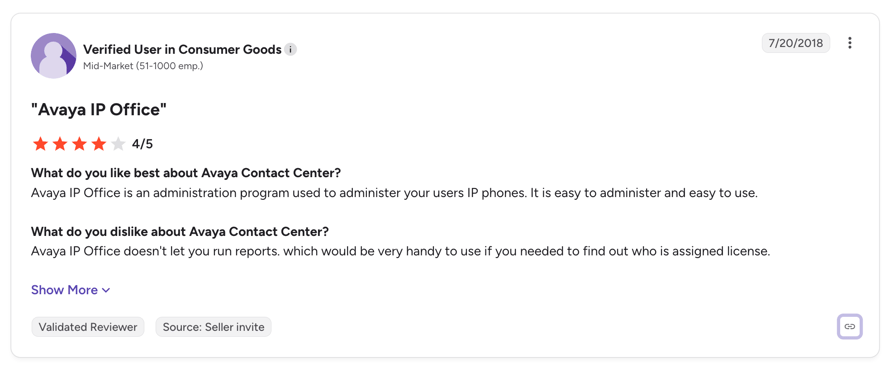
What Do Users Say About Avaya's Billing and Support?
- "Past 4 months have been awful. Double-billing us for our text messaging system, and every time we have to resubmit, they charge us another $23.54." Stephen G., General Manager in consumer services, Capterra, August 2026. This is the most recent and most specific billing complaint we found.
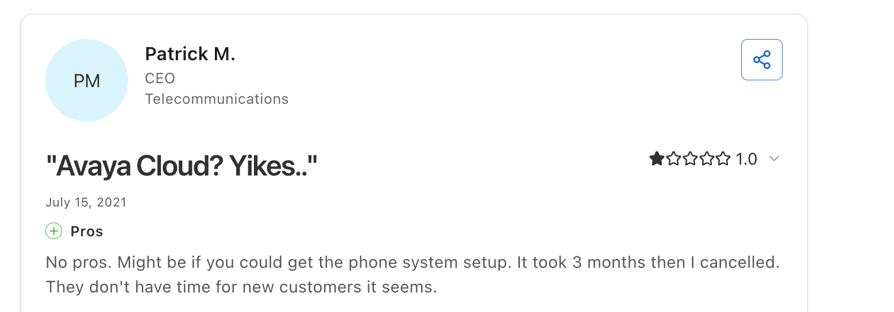
- "Signing up with Avaya was the biggest mistake I have made in a long time." Patrick M., CEO of a telecommunications company, Capterra, one star, citing three months of setup delays and unresponsive support after requesting a refund.
- "Great when it works, awful when something goes wrong and support is useless." Christopher W., IT Manager, Capterra.
What Do Positive Avaya Reviews Say?
The praise is real and it clusters around two things: call quality and, revealingly, price at the small end.
- "It's probably by price, one of the cheapest phone systems out there" and "the pricing is pretty wildly low in a good way." Verified engineer at a 51 to 200 employee company, TrustRadius, May 2026, reviewing IP Office.
- "What I like the most is its ease of implementation and intuitive way of handling." Brayan Felipe C., IT Systems Analyst at an enterprise, G2, September 2024.
- "I like how clear the calls are, and I also appreciate the settings I can adjust." Jose Pablo P., agent, G2, February 2026.
the contradiction is the most useful finding here
Does Avaya's Financial History Affect the Buying Decision?
It belongs in a risk assessment, though not in the way it is usually framed. Avaya has filed for Chapter 11 twice: January 2017 and February 2023. It emerged from the second filing on 1 May 2023 as a private company owned by its former creditors, having deleveraged its balance sheet by roughly 75% through an $810 million exit term loan and a $128 million ABL facility. It was delisted from the NYSE in February 2023 and has published no financial accounts since.
We found no review on any platform that names the bankruptcy as a reason for concern. Customers do not appear to be worried about Avaya disappearing. What they have experienced is the consequence of restructuring: a portfolio rationalisation that retired Avaya Cloud Office, a rebrand of AXP to Infinity, and a 200-seat minimum applied to existing cloud customers mid-relationship. Those are the practical risks of a five-year commitment, and they are better evidence than the bankruptcy itself.
How Does Avaya's Pricing Compare to Its Competitors?
Avaya is one of only two vendors in this set that publishes no price at all. Genesys, Five9 and Nextiva all publish at least entry tiers, and CloudTalk publishes every tier.
| Vendor | Published entry price per user or agent | Minimum seats | Contract term | Published pricing? |
|---|---|---|---|---|
| Avaya (AXP / Infinity) | £40 named, £50 concurrent (G-Cloud filing only) | 100 to 200 | 60 months on the published offer | No |
| CloudTalk | $25 per user per month | None | Month to month | Yes, every tier |
| Nextiva | $15 Core, $25 Engage, $75 Scale (monthly) | None published | Annual for best rate | Yes |
| RingCentral (RingEX) | $20 Core, $25 Advanced, $35 Ultra (annual) | None | No term required | Yes |
| Genesys Cloud | $75 CX 1, $115 CX 2, $155 CX 3, $240 CX 4 | None published | Annual commitment | Yes |
| Five9 | $119 Digital, $159 Core | 50 concurrent | Not published | Partial, top tiers quote-only |
| 8x8 | Not published | Not published | Not published | No |
On licence cost alone, Avaya is competitive. At £40 per named agent it sits below Genesys Cloud CX 1 and well below Five9. The difference is everything attached to it: a 60-month term and a 100 to 200 seat minimum that none of the comparators impose, plus five-figure per-module professional services and a 50% exit fee.
CloudTalk vs Avaya: Which Should You Choose?
These are built for different buyers, and the honest comparison starts there. Avaya sells enterprise contact centre infrastructure through resellers on multi-year terms. CloudTalk sells a calling platform that a sales or support team can be running this week.
Where CloudTalk Wins
- Published pricing, every tier. Starter $25, Essential $29, Expert $49 per user per month. No reseller, no quote, no £21-to-£57 spread depending on who you buy from.
- No seat minimum. Avaya's cloud contact centre requires 200 agents. CloudTalk works from one.
- Month-to-month plans and no termination formula. No 50% of the remaining balance, no 60% on workforce engagement, no 120-day notice window that opens at month 28.
- No setup fee and no per-module professional services. Adding a capability does not trigger a £25,000 engagement.
- Live in days, not three months. G2 records a three-month average implementation for Avaya contact centre.
- AI built in rather than bolted on. AI voice agents, conversation intelligence, Power, Smart and Parallel dialers and call flow designer, on the same platform as your human agents.
- 100+ native integrations including HubSpot, Salesforce, Pipedrive and Zendesk, and local numbers in 160+ countries.
- 14-day free trial, no credit card. Avaya offers no trial and no free tier on any product.
Where Avaya Wins
- On-premise and private cloud. If regulation, latency or an existing PBX estate means you cannot go public cloud, Aura and IP Office are genuine options and CloudTalk is not.
- Very large contact centres. Above roughly 500 agents with complex routing, workforce management and a dedicated CX team, Avaya's depth is real.
- FedRAMP and public sector. Avaya Government Cloud holds FedRAMP authorisation and Avaya sits on GSA and state purchasing schedules.
- Small deployments on IP Office. Reviewers at the small end genuinely rate it on price, and G2's index puts Avaya 36% below category average for small business.
The dividing line: if you need contact centre infrastructure and can absorb a five-year commitment, Avaya is a serious vendor. If you need a phone system that your sales or support team uses to make and take calls, and you want to know what it costs before a sales call, the comparison is not close.
“We just copy the agents, update the scripts, and we're live. No need to hire and train a completely new team from scratch.”
Owner of Circle Gym

Is Avaya Worth the Cost?
Avaya is worth it for a specific buyer: an organisation with more than 200 contact centre agents, an existing Avaya or on-premise estate, a regulatory reason to avoid public cloud, and the procurement capacity to negotiate a five-year contract properly. For that buyer, £40 per named agent is competitive and the platform depth is real.
For almost everyone else the licence price is the least important number in the deal.
Avaya Makes Sense If:
- You have 200 or more contact centre agents, clearing the cloud minimum without paying for empty seats
- You run an on-premise or private cloud estate that cannot move, where Aura or IP Office is the natural continuation
- You are in public sector and need FedRAMP authorisation or a GSA schedule
- You are a small business looking at IP Office specifically, where reviewers consistently rate it on price
- You have procurement resource to negotiate: list price is notional and a 44% public-sector discount is on the public record
Avaya Is Probably Not the Right Fit If:
- You have fewer than 200 agents and would be paying the cloud minimum for seats you do not use
- You want to compare prices before engaging a reseller, since the same platform is quoted between £21 and £57.50 depending on who sells it
- You might need to shrink, restructure or exit inside five years, where the 50% termination fee applies
- You expect to add capabilities over time, since each module carries its own five-figure implementation
- You were evaluating Avaya Cloud Office, which is being transitioned to RingCentral's platform and brand
- You need to be live in weeks rather than the three-month average implementation
The three questions to settle before you sign anything: what is the all-in five-year cost including every module you expect to add, what does exit cost in year three, and what is the renewal uplift capped at? If a reseller will not answer all three in writing, that itself is the answer. CloudTalk publishes every rate, and you can test it free for 14 days before committing to anything.
Get a Phone System You Can Price Without a Sales Call
Sources:
- UK G-Cloud 14 published pricing document, Avaya Experience Platform, Exchange Communications
- Avaya Subscription Licensing Supplement, Issue 14.0, effective 14 February 2025
- Avaya IP Office Subscription licensing documentation
- Avaya Infinity Platform product page
- The Register, Avaya imposes 200-seat minimum on AXP Public Cloud, February 2025
- CX Foundation, RingCentral restructures Avaya partnership and transitions ACO customers
- Avaya, Chapter 11 plan confirmation, March 2023
- UK Contracts Finder, Isle of Wight Council Avaya support and maintenance award
- New Jersey state contract 11-X-21415, Schedule AA, Avaya discount schedule
- G2, Avaya Contact Center reviews and cost index
FAQs: Avaya Pricing
Avaya publishes no list pricing. The most reliable public figures come from UK G-Cloud filings for Avaya Experience Platform:
- Voice Only: £40.00 per named agent per month, £50.00 concurrent
- All Media: £57.50 per named agent per month, £75.00 concurrent
- Workforce management (Verint): £18.00 to £22.00 per agent per month
Those rates assume a 60-month term and a 100-agent minimum. Resellers on the same framework quote between £21 and £57.50 for the same platform.
No. There is no rate card on avaya.com for Infinity, Aura or IP Office, no free tier and no trial. TrustRadius records that Avaya Contact Center "does not currently have any pricing plans listed," and G2 notes pricing is "not listed on G2 by the vendor."
Pricing is set by your reseller, which is why the published G-Cloud spread for the same product runs from £21 to £57.50 per user per month.
Not as an Avaya-branded product. The Avaya Cloud Office page on avaya.com now redirects to RingCentral, and RingCentral confirmed it is transitioning existing ACO customers and partners onto its own platform and brand.
If you were evaluating ACO, price RingEX directly instead. Any guide still quoting Avaya Cloud Office Core, Advanced and Ultra tiers is listing RingCentral's prices for a product line Avaya has exited.
Avaya imposed a 200-agent monthly minimum commit on AXP Public Cloud effective 30 June 2025, applied to existing customers as well as new ones. Below 200 agents you pay for 200 regardless of headcount.
The published G-Cloud offer separately states a 100-agent minimum. Neither minimum applies to IP Office, which is sold to small businesses.
50% of the remaining unpaid balance on subscription licensing, after 30 days' written notice.
Workforce Engagement is stricter: 120 days' notice, available only after month 28, with a 60% termination fee. On a five-year term that makes a workforce management deployment effectively unbreakable for the first two and a half years.
Setup and configuration for a voice contact centre runs £25,000 to £70,000 as a one-time charge, scaling with agent count.
Critically, that is not a single fee. Every additional module, including All Media integration and workforce management, carries its own professional services engagement starting at £25,000. G2 records a three-month average implementation time.
Avaya publishes no support pricing. Support is sold under Support Advantage in two tiers, Essential (business hours only) and Preferred, with software upgrades sold separately as Upgrade Advantage. Preferred is included with subscription bundles.
One verified real-world figure: Isle of Wight Council paid £26,059.05 for six months of Avaya support covering roughly 1,800 licences and 60 contact centre users, around £2.41 per user per month on a legacy estate.
It depends entirely which Avaya. G2's cost index puts Avaya 36% below category average for small business, 30% above for mid-market and 4% above for enterprise.
Reviewers reflect the same split: a small business calls IP Office "one of the cheapest phone systems out there," while an enterprise reviewer calls it "a very costly solution for unified communication." Both are accurate about different products.
Yes, twice. Avaya filed for Chapter 11 in January 2017 and again in February 2023, emerging from the second on 1 May 2023 as a private company owned by its former creditors, having reduced its debt by roughly 75%.
No reviewer we found cites the bankruptcy as a concern. The practical risks are the consequences of restructuring: the retirement of Avaya Cloud Office, the AXP to Infinity rebrand, and the 200-seat minimum applied mid-relationship.
Depends on what you are replacing:
- CloudTalk: for sales and support teams that want published pricing, no seat minimum and no contract. From $25 per user per month.
- RingCentral: the natural path if you were on Avaya Cloud Office, since that is where those customers are being moved. From $20 per user.
- Genesys Cloud: for large enterprise contact centres. From $75 per agent.
- Nextiva: for straightforward business phone. From $15 per user.