Call Center Automation: What It Is, How It Works, and Key Use Cases in 2026
TLDR:
Call center automation uses AI and technology to handle repetitive tasks — from call routing and IVR to post-call summaries and CRM updates — so agents spend time on conversations that actually need a human. Here's what this guide covers:
- 01What is call center automation? — definition, how it works, and the technology behind it
- 02Key benefits — cost reduction, faster resolution, better agent experience
- 0310 types of call center automation — IVR, AI routing, voice agents, workflow automation, and more
- 04Use cases by team — how sales and support teams apply automation differently
- 05How to implement call center automation — a practical step-by-step approach
- 06Challenges and best practices — what to avoid and how to get it right
- 07CloudTalk call center automation features — what's available out of the box
Call center automation has moved from a cost-cutting initiative to a competitive necessity. Teams that automate well handle higher volumes with fewer agents, respond faster, resolve more issues on first contact, and give agents the context they need before a call even starts. This guide covers everything — from what call center automation actually is and how the technology works, to the 10 most impactful automation types, real use cases, and how to implement it without disrupting your operation.
10 Types of Call Center Automation: Quick Reference
| Automation Type | What It Automates | Primary Benefit | Best For |
|---|---|---|---|
| 1. IVR | Inbound call menus and self-service | Reduces misrouted calls | All inbound teams |
| 2. Intelligent Call Routing | Matching callers to the right agent | Improves FCR | Support and sales teams |
| 3. AI Voice Agents | Full inbound call handling end-to-end | 24/7 coverage without staffing | High-volume inbound teams |
| 4. Workflow Automation | Post-call tasks and triggered sequences | Eliminates admin work | Any team with repetitive post-call steps |
| 5. AI Call Summaries | Post-call notes and CRM logging | Saves 20–30% of agent time | Teams with CRM hygiene issues |
| 6. Predictive and Power Dialers | Outbound dialing and voicemail skipping | 2–3x more calls per agent | Outbound sales teams |
| 7. Sentiment Analysis | Customer tone and agent engagement scoring | Early warning on at-risk calls | QA managers and team leads |
| 8. AI Call Scoring and QA | Quality evaluation of every call | 100% QA coverage without manual review | Teams with QA and coaching needs |
| 9. Topic Extraction | Identifying call reasons across all conversations | Surfaces trends before they escalate | Ops managers and product teams |
| 10. Callbacks and Voicemail Drop | Queue management and outbound follow-up | Reduces abandonment and manual outreach | High-volume inbound and outbound teams |
What Is Call Center Automation?
Call center automation is the use of AI, machine learning, and workflow technology to handle repetitive tasks in a call center — without human agents needing to be involved. At its simplest, it's an IVR routing a caller to the right department. At its most advanced, it's an AI Voice Agent resolving an inbound call end-to-end without a human picking up. Most modern call center software combines both ends of that spectrum across a single platform.
The distinction between automation and AI automation matters in 2026. Traditional automation follows fixed rules — "if caller presses 1, route to sales." AI-powered automation understands context: it recognizes what a caller is saying, interprets intent, pulls relevant customer data from your CRM, and decides the best action dynamically. For a broader look at how AI is transforming operations, see our guide to AI in call centers.
Call center automation vs. contact center automation — what's the difference?
The terms are often used interchangeably, but technically: a call center handles voice calls only, while a contact center handles voice plus email, chat, SMS, and social. Contact center automation extends the same principles — routing, AI agents, workflow automation — across all those channels. Most modern platforms serve both; the automation logic is the same. For the full breakdown, see our guide to call center vs. contact center.
How Does Call Center Automation Work?
Call center automation works by combining several underlying technologies:
- 01Natural Language Processing (NLP): Enables systems to understand what callers are saying and interpret their intent — the foundation of modern IVR and AI Voice Agents
- 02Machine Learning: Improves automation accuracy over time by learning from every interaction — routing decisions get smarter, AI responses improve, anomalies get flagged earlier
- 03Robotic Process Automation (RPA): Automates structured, rule-based back-office tasks — CRM record updates, ticket creation, call logging, follow-up scheduling — without human involvement
- 04Generative AI: Powers call summaries, agent assist suggestions, knowledge base answers, and autonomous customer conversations — the technology behind AI Voice Agents and AI Copilots
- 05CRM and helpdesk integrations: Connect automation logic to live customer data — so routing decisions, AI responses, and agent assist suggestions are based on who the customer is and what they need, not just what they said
Key Benefits of Call Center Automation
The business case for call center automation is well established. Modern automation implementations reduce operational costs by 25–35% while maintaining or improving customer satisfaction. Here are the six most impactful benefits:
1. Lower Operating Costs
Every routine interaction handled autonomously — by an IVR, AI Voice Agent, or chatbot — costs a fraction of what a live agent call costs. Voice calls average $5–15 per contact with a live agent; self-service automation handles the same interaction for cents. At scale, shifting even 30% of volume to automated resolution generates significant savings without reducing service quality. Our guide to reducing call center costs covers the full picture.
2. Faster Resolution for Customers
Automated routing eliminates the most common source of customer frustration — being transferred to the wrong department. Skills-based routing matches callers to the right agent on first contact based on intent, customer tier, language, and agent expertise. This directly improves First Contact Resolution (FCR) — the single strongest predictor of customer satisfaction.
3. 24/7 Availability Without Overtime Costs
AI Voice Agents and IVR systems don't need breaks, don't call in sick, and don't charge overtime. After-hours support becomes viable without overnight staffing — customers calling at 2 AM get answers rather than voicemail. For teams managing international customers across time zones, this is a significant operational advantage. See our guide to 24/7 customer service for implementation strategies.
4. Elimination of Post-Call Admin Work
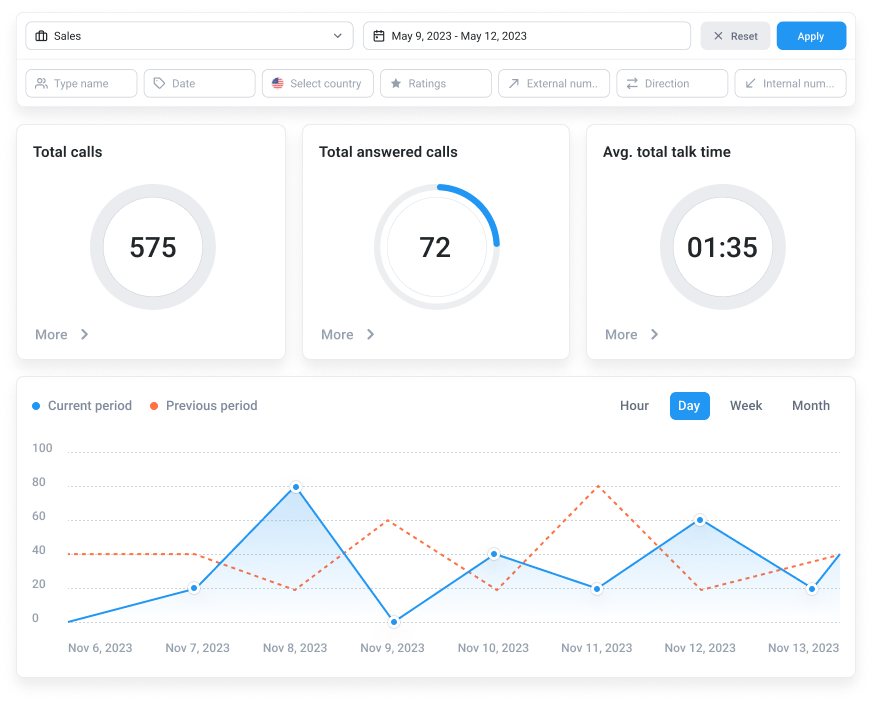
Post-call wrap-up — writing notes, updating CRM records, logging call outcomes, scheduling follow-ups — consumes 20–30% of agent time in most call centers. AI call summaries and workflow automation eliminate this entirely: every call is automatically summarized, tagged, and synced to your CRM the moment it ends. Agents move immediately to the next call. Our guide to agent efficiency covers how much time this saves in practice.
5. Better Agent Performance Through Real-Time Coaching
Automation doesn't just replace human tasks — it makes humans better at theirs. Real-time agent assist tools surface relevant knowledge base articles, suggest next-best actions, and flag compliance issues during live calls — without the agent needing to search. Call monitoring lets managers whisper guidance mid-call without the customer hearing. AI call scoring automatically evaluates every call against quality criteria — replacing manual QA sampling with comprehensive, consistent measurement.
6. Scalability Without Proportional Headcount Growth
Traditional call centers scale by hiring — more calls means more agents. Automated call centers scale differently: AI Voice Agents handle volume spikes without queue time growing, predictive staffing ensures the right agents are available at the right time, and high call volume scenarios are managed through intelligent routing and deflection rather than headcount. Our guide to call center scalability covers what to plan for as you grow.
Ready to automate your call center? CloudTalk's AI features work out of the box — no developer required.
10 Types of Call Center Automation
Call center automation isn't a single feature — it's a collection of capabilities that work together. Here are the 10 most impactful types, from foundational routing to advanced AI.
1. Interactive Voice Response (IVR)
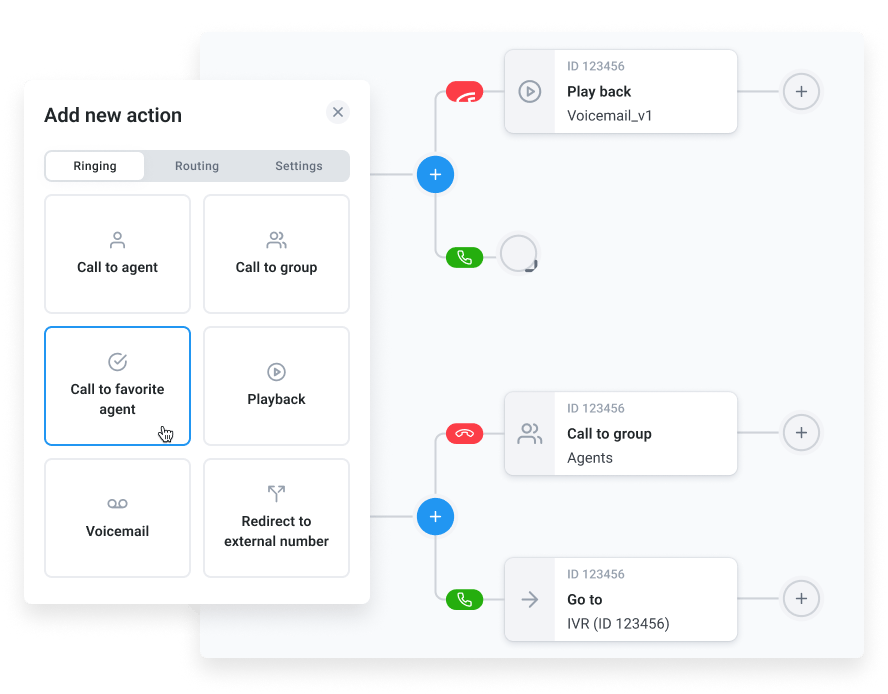
IVR is the entry point for most call center automation — the menu system that greets inbound callers and routes them based on their input. Modern IVR systems go beyond "press 1 for sales" — they use natural language processing to understand spoken intent, recognize returning customers, and route based on customer tier, call history, and agent availability. A well-designed IVR reduces misrouted calls, cuts queue times, and resolves simple queries without agent involvement. Our guide to IVR in customer service covers design best practices.
2. Intelligent Call Routing
Intelligent call routing automatically directs each inbound call to the most qualified available agent — based on the caller's intent, language, customer tier, previous interactions, and agent skill set. Skills-based routing ensures a Spanish-speaking customer reaches a Spanish-speaking agent without menu navigation. Preferred agent routing connects returning customers to the agent they've worked with before — strengthening relationships and reducing resolution time. For a complete overview of routing options, see our guide to call routing efficiency.
3. AI Voice Agents
Signature Capability
See CloudTalk’s AI Voice Agent in Action!
CeTe is an AI that talks like a human: no breaks, no training, no time off. It makes and answers calls, updates CRMs, books meetings, and loops in a human only when needed.
Press play to hear it. Want a wow moment? Get a free test call and try it live.

AI Voice Agents are fully autonomous AI systems that handle inbound calls end-to-end — answering, understanding the customer's need, resolving what they can, and routing complex cases to human agents with full context. Unlike IVR, they hold natural multi-turn conversations: a caller can say "I need to reschedule my appointment for next Tuesday" and the AI Voice Agent understands, checks availability, confirms the change, and sends a confirmation — without a human picking up. For a deep dive on AI Voice Agent capabilities and use cases, see our guide to what AI Voice Agents are and their benefits for sales and support.
4. Workflow Automation
Workflow automation creates trigger-based sequences that execute automatically when specific events occur — a call ends, a tag is applied, a call duration threshold is hit, a sentiment score drops below a threshold. Examples: when a call is tagged "complaint," automatically create a follow-up task and notify the team lead. When a call ends without resolution, automatically schedule a callback. When a new customer calls for the first time, automatically log them in your CRM. For small businesses and growing teams, see our guide to workflow automation for small business.
5. AI Call Summaries and Automatic CRM Logging
AI call summaries automatically generate a structured summary of every call the moment it ends — covering what was discussed, what was decided, and what follow-up is needed — and sync it directly to your CRM or helpdesk. This eliminates post-call admin entirely. Agents never need to write call notes again. CRM data stays accurate without manual input. And managers get searchable, structured records of every customer interaction. For teams running Salesforce or HubSpot, see our guides to Salesforce VoIP integration and VoIP CRM integration benefits.
6. Predictive and Power Dialers
Outbound call center automation begins with the dialer. Power dialers automatically dial numbers sequentially as agents become available — eliminating manual dialing and doubling call volume per agent. Predictive dialers go further: they dial multiple numbers simultaneously and only connect agents when a call is answered by a human, automatically skipping voicemails and busy signals. Parallel dialers dial up to 10 lines at once and connect agents to the first answered call. For outbound sales teams, the right dialer is the single highest-leverage automation investment. Our guide to sales dialers covers all the options in detail.
7. Sentiment Analysis
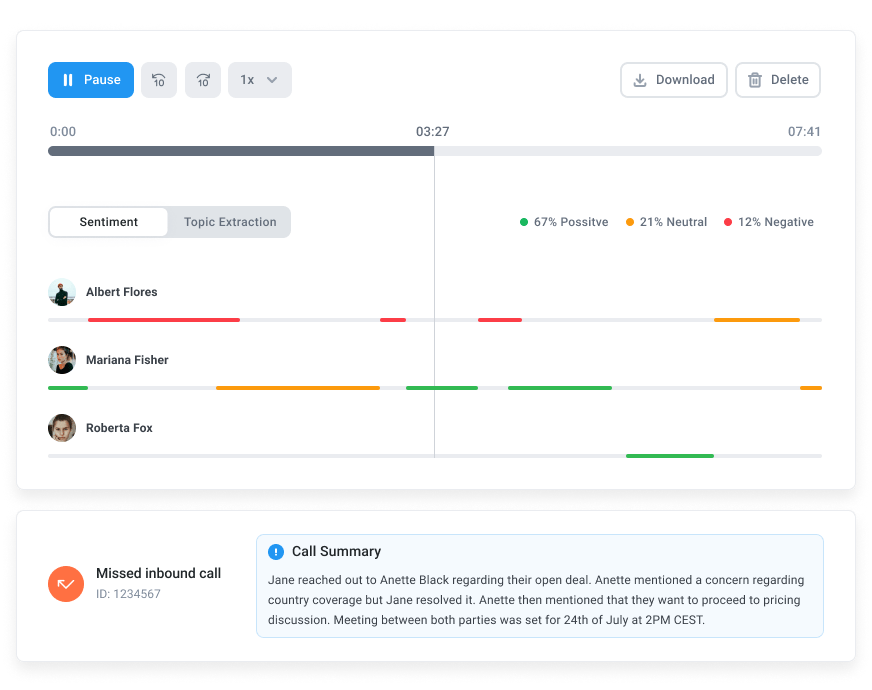
Sentiment analysis automatically scores every call for customer tone and agent engagement — identifying frustrated customers and struggling agents in real time. Managers don't need to listen to call recordings to know which calls need attention: the system flags them automatically, with the specific moment in the call where sentiment shifted. At the aggregate level, sentiment data reveals which products, processes, or agents are driving the most customer frustration — before it shows up in churn numbers. Our guide to call center sentiment analysis covers how this works in practice.
8. AI Call Scoring and Quality Assurance
Traditional QA reviews a small random sample of calls — typically 2–5% — which means most quality issues go undetected until they become systemic. AI call scoring scores every call automatically against your defined criteria — greeting, problem identification, empathy, resolution quality, compliance — giving managers comprehensive QA coverage without the manual effort. Combined with call monitoring, it creates a closed coaching loop: identify the gap in scoring, coach the agent, track improvement in the next round of scores. Our guide to call center QA metrics covers what to measure and how to use the data.
9. Topic Extraction and Trend Analysis
Topic extraction automatically identifies what customers are calling about across every conversation — billing questions, product issues, shipping complaints, feature requests — and surfaces the patterns before they become systemic. Instead of discovering a product defect from a support ticket spike two weeks later, managers see the trend emerging in real time as call topics cluster. This is the automation layer that connects your call center to your product, marketing, and operations teams. Our guide to call center analytics covers how to turn this data into decisions.
10. Automated Callbacks and Voicemail Drop
Callback automation eliminates one of the biggest sources of customer frustration — waiting on hold. When queue times exceed a threshold, the system offers customers an automatic callback at their preferred time rather than holding. For outbound teams, voicemail drop lets agents leave a pre-recorded voicemail message with a single click when a call goes unanswered — instead of recording the same message 50 times a day. Both are simple automations with immediate, measurable impact on agent productivity and customer experience. Our guide to callback software covers the options available.
Want to see CloudTalk's automation features in action? Book a personalized demo.
Call Center Automation Use Cases by Team
Automation applies differently depending on whether your team is focused on inbound support or outbound sales. Here's how each team uses the same tools for different outcomes.
Customer Support Teams
- 01Automated inbound routing: IVR and skills-based routing directs every customer to the right agent on first contact — reducing transfers and improving FCR. See our guide to call center optimization for routing best practices.
- 02AI Voice Agents for high-volume FAQs: Order status, account balances, return policies, and appointment confirmations handled autonomously 24/7 — without queue time. See how to automate customer service.
- 03Post-call automation: AI summaries log to helpdesk automatically — Zendesk, Freshdesk, Intercom, HubSpot — the moment the call ends. Agents handle the next call immediately. See our guide to call center productivity.
- 04Quality monitoring at scale: AI scoring and sentiment analysis covers every call — not just sampled ones — so coaching is data-driven and consistent across the team. See our guide to qualilty monitoring software.
- 05Proactive issue detection: Topic extraction surfaces product issues and complaint patterns before they escalate — giving ops teams early warning of systemic problems. See our guide to intelligent customer service.
Sales Teams
- 01Automated outbound dialing: Power, predictive, and parallel dialers eliminate manual dialing — agents connect with 2–3x more prospects per day. See our guide to what is a sales dialer.
- 02AI lead qualification: AI Voice Agents call inbound leads within seconds of form submission — qualifying intent, collecting information, and routing sales-ready leads to human reps. See our guide to outbound sales strategy.
- 03Voicemail drop: Pre-recorded voicemail messages deployed with one click on unanswered calls — saving reps 25+ hours per month on repetitive outreach. See our guide to sales dialers.
- 04AI call summaries to CRM: Every call outcome, commitment, and next step logged automatically — pipeline data stays accurate without reps spending time on CRM hygiene. See our guide to CRM call center integration.
- 05Conversation intelligence for coaching: Talk/listen ratio, sentiment scores, and topic analysis identify exactly where each rep's calls break down — making coaching conversations specific and actionable. See our guide to conversation intelligence software.
How to Implement Call Center Automation: A Step-by-Step Approach
Most call center automation failures happen when teams automate the wrong things, in the wrong order, without measuring the impact. This six-step framework has worked consistently across teams of all sizes.
Step 1: Audit Your Current Workflows
Map how agents currently spend their time. Specifically: what percentage of calls are routine, repetitive inquiries that follow the same pattern? What manual tasks does every agent perform after each call? Where do transfers and escalations most commonly occur? This audit identifies your highest-volume, lowest-complexity workflows — the best automation targets. Tools like CloudTalk Analytics and Topic Extraction make this analysis automatic rather than manual.
Step 2: Define Clear Goals and Metrics
Set specific, measurable targets before implementing anything. Examples: reduce post-call admin time by 50%; increase FCR from 68% to 78%; handle 30% of inbound volume via AI Voice Agents within 90 days. Without baseline metrics, you can't know if automation is working. Our guide to call center metrics covers what to track and how to establish baselines.
Step 3: Start With Routing and Post-Call Automation
The two highest-ROI automations to implement first are intelligent routing (reduces misrouted calls and transfer rates immediately) and AI call summaries (eliminates post-call admin immediately). Both have near-zero disruption risk — they don't change how agents handle calls, they just reduce the overhead around them. Configure your Call Flow Designer to route based on caller intent and agent skills, and activate AI Call Summaries to sync to your CRM automatically.
Step 4: Deploy AI Voice Agents for Your Top Repeat Queries
Identify your top 5 inbound query types — ideally from Topic Extraction data. Configure AI Voice Agents to handle the 2–3 most frequent and most structured ones: appointment scheduling, order status, FAQ resolution, payment reminders. Run a pilot with limited call volume before full deployment. Our guide to how to implement AI Voice Agents covers the configuration steps in detail.
Step 5: Integrate With Your CRM and Helpdesk
Automation without CRM integration is half-implemented. Call data, summaries, sentiment scores, and outcomes should sync automatically to your existing tools — Salesforce, HubSpot, Zendesk, Freshdesk, or Pipedrive. This creates a complete customer record that spans every channel, and makes routing decisions smarter over time as the system learns from CRM data. CloudTalk integrates natively with 100+ tools.
Step 6: Measure, Coach, and Expand
Use AI Call Scoring and Sentiment Analysis to measure quality and performance across every automated and human-handled interaction. Use the data to coach agents and refine AI Voice Agent scripts. Expand automation to new use cases as each previous deployment stabilizes. This continuous improvement cycle is what separates teams that get 10% efficiency gains from automation from those that get 40%. Our guide to improving call center performance covers the full improvement framework.
Call Center Automation Challenges and Best Practices
Most automation failures are predictable and avoidable. Here are the four most common challenges and how to address them.
Challenge 1: Automating the Wrong Things
Automating complex, emotionally sensitive, or highly variable interactions leads to frustrated customers and damaged relationships. Automation works best on high-volume, structured, low-complexity queries — not on complaints, escalations, or situations requiring empathy and judgment. The rule of thumb: if the call requires a human to feel heard, keep a human in it.
Challenge 2: Poor IVR Design
An IVR that makes customers navigate five menu levels to reach a human — or that routes them to the wrong department — creates more frustration than it resolves. The most common mistake is designing IVR menus around the company's internal org chart rather than the customer's actual needs. A caller who wants to check an order status shouldn't have to navigate through "Press 1 for Sales, Press 2 for Billing, Press 3 for Technical Support" to find what they need.
Challenge 3: Agent Resistance
Agents who fear automation is being used to justify headcount cuts are less likely to adopt it willingly — and active resistance from your team can derail an otherwise well-designed implementation. This is especially common when automation is rolled out top-down without agent input, or when the framing focuses on what automation replaces rather than what it removes from agents' plates.
Challenge 4: Lack of Measurement
Implementing automation without establishing baseline metrics first means you can't demonstrate ROI, identify what isn't working, or make the case for further investment. Most teams that struggle to justify automation spend had no pre-implementation benchmarks — so they can't show what changed. Without measurement, even genuinely successful automation looks invisible to stakeholders.
CloudTalk Call Center Automation Features
CloudTalk is a cloud-based call center platform built for sales and support teams that need automation ready to use on day one — no developers, no complex implementation, no IT dependency. Here's what's available out of the box.
- 01AI Voice Agents: Autonomous inbound call handling 24/7 — appointment scheduling, FAQ resolution, lead qualification, after-hours coverage — without a human picking up
- 02Call Flow Designer: Drag-and-drop IVR and routing builder — build complex call flows and business hours rules without coding
- 03Workflow Automation: Trigger-based automation for post-call tasks — CRM updates, follow-up creation, team notifications — based on call outcomes, tags, and sentiment scores
- 04AI Call Summaries and Tagging: Every call automatically summarized, tagged, and synced to your CRM or helpdesk the moment it ends
- 05Sentiment Analysis: Every call scored for customer tone and agent performance — flags calls that need immediate attention
- 06AI Call Scoring: Automatic quality assurance scoring on every call — comprehensive QA coverage without manual review
- 07Topic Extraction: Identifies what customers are calling about at scale — surfaces patterns and trends for proactive action
- 08Skills-Based Routing: Routes every call to the most qualified available agent based on intent, language, customer tier, and agent skill
- 09Power Dialer, Parallel Dialer, Predictive Dialer: Automated outbound dialing that connects agents only to live humans — 2–3x call volume per agent
- 10Analytics and Real-Time Dashboard: Live and historical performance metrics across all agents, teams, and call types — the visibility layer that makes automation measurable
What Are CloudTalk's Pros and Cons for Call Center Automation?
| Pros | Cons |
|---|---|
| AI automation works out of the box — call summaries, sentiment analysis, call scoring, and topic extraction activate without developer setup | Voice-first platform — CloudTalk is purpose-built for phone; teams needing chat, email, and ticketing in the same tool should pair it with a dedicated helpdesk |
| Drag-and-drop Call Flow Designer — build complex IVR and routing logic without technical resources | CRM and helpdesk integrations from Essential tier — Lite and Starter plans don't include integration connectivity |
| 100+ native integrations — call data and automation outputs sync automatically to your existing CRM and helpdesk stack | |
| 14-day free trial — full feature access including AI automation, no credit card required |
What Is CloudTalk's Pricing?
Flexible Pricing Plans to Scale with You
Compare our plans
Automate your call center with CloudTalk — start your free trial today.
Frequently asked questions
Call center automation is the use of AI, machine learning, and workflow technology to handle repetitive tasks in a call center without human agents — including call routing, IVR menus, post-call summaries, CRM updates, and autonomous call handling via AI Voice Agents. Modern automation combines rule-based logic (routing callers based on menu selection) with AI-powered intelligence (routing based on spoken intent, customer history, and real-time agent availability). The goal is to reduce manual work, lower costs, and free agents for the high-value interactions that actually require human judgment and empathy. For a full breakdown of what's possible, see our guide to AI call center technology.
The main benefits of call center automation are: lower operating costs (automated interactions cost significantly less than live agent calls), faster resolution (intelligent routing reduces misroutes and transfers), 24/7 availability (AI Voice Agents handle calls when agents aren't available), elimination of post-call admin (AI summaries log automatically to CRM), better agent performance through real-time coaching and QA, and scalability without proportional headcount growth. Modern automation implementations consistently reduce operational costs by 25–35% while maintaining or improving CSAT. For a guide to measuring the impact, see our guide to call center metrics.
Call center workflow automation creates trigger-based sequences that execute automatically when specific events occur — a call ends, a tag is applied, a sentiment score drops below a threshold, or a call duration exceeds a limit. Example: when a call is tagged "complaint," automatically create a follow-up task, notify the team lead, and log the interaction in the CRM. When a call ends without resolution, automatically schedule a callback. Workflow automation eliminates the manual administrative steps agents currently perform between calls — the tasks that consume 20–30% of agent time without contributing to customer value. CloudTalk's Workflow Automation feature handles this across all integrations in your stack.
Traditional call center automation follows fixed rules — "if caller presses 1, route to sales." It can't handle anything outside its programmed logic. AI automation understands context: it interprets natural language, recognizes intent, pulls live data from CRM systems, and makes dynamic decisions based on the full picture of who the customer is and what they need. A traditional IVR can route a caller; an AI Voice Agent can have a full conversation, understand a complex request, execute multi-step actions, and resolve the issue autonomously. The practical difference is resolution scope — traditional automation handles structured inputs; AI handles natural conversation. For how AI is transforming this space, see our guide to AI in call centers.
The call center tasks most suitable for automation are: inbound call routing (IVR and skills-based routing), FAQ resolution and appointment scheduling (AI Voice Agents), post-call note-writing and CRM logging (AI call summaries), outbound dialing (power, predictive, and parallel dialers), voicemail delivery (voicemail drop), quality assurance (AI call scoring), sentiment monitoring (sentiment analysis), callback scheduling, and trend detection (topic extraction). Tasks that should not be automated include emotionally sensitive complaints, complex multi-stakeholder issues, and any interaction where the customer primarily needs to feel heard and understood by a human. For a complete guide to what's possible, see our guide to how to automate customer service.
Call center automation costs vary significantly by platform type and feature set. Cloud-based platforms like CloudTalk include core automation features (IVR, workflow automation, AI call summaries, sentiment analysis, call scoring) within the standard subscription — starting from $29/user/month. AI Voice Agents are typically priced separately based on call volume or minutes used. On-premises or enterprise-grade automation platforms (Genesys, Five9, NICE) have significantly higher implementation costs — often $50,000+ in professional services alone. For a full breakdown of what different platforms cost, see our guide to how much call center software costs.
Call center automation applies to voice calls specifically — IVR, routing, AI Voice Agents, and call analytics. Contact center automation applies the same principles across all customer communication channels: voice, email, chat, SMS, and social media. The automation logic is identical — the difference is channel scope. A contact center automation platform routes a chat conversation to the same skills-based logic as a phone call; an AI agent resolves a chat query using the same knowledge base as an AI Voice Agent. Most modern platforms serve both. For the full comparison, see our guide to call center vs. contact center.
The safest implementation sequence is: (1) start with post-call automation — AI summaries and CRM logging — which operates invisibly to agents and has zero call-handling impact; (2) configure intelligent routing and IVR, which agents don't notice but customers do; (3) deploy AI Voice Agents for your 2–3 most routine, highest-volume query types on a pilot basis; (4) expand based on pilot results. Involve agents in IVR design and AI script configuration from the start — teams that help design automation adopt it more readily. Measure before and after with specific KPIs so you can demonstrate the impact. For the full implementation framework, see our guide to call center operations.