Microsoft Teams Phone System Pricing & Plans: Full Guide for 2026
TL;DR:
Microsoft Teams Phone pricing runs from $10 to $34 per user/month across four plans—Standard, Pay-as-You-Go, Calling Plan, and Domestic & International—all billed annually. But none of them work alone: Teams Phone sits on top of a Microsoft Teams or Microsoft 365 license, so your real per-user stack lands anywhere from about $14 to $70 once the base subscription and calling minutes are counted.
What the sticker price hides: the required base license underneath, number porting fees, desk phones at $150–$400 a head, a $3,000–$15,000 session border controller if you choose Direct Routing, and international minutes that run out fast at 600 per user. The $10 plan is a phone system the way an engine is a car.
Summary of Microsoft Teams Phone Pricing Plans
| Plan | Price (billed yearly) | Best For |
|---|---|---|
| Teams Phone Standard | $10 /user/month | Teams users who'll add their own carrier (no calling included). |
| Teams Phone with Pay-as-You-Go | $13 /user/month | Light or unpredictable callers who want a number and metered minutes. |
| Teams Phone with Calling Plan | $17 /user/month | Domestic-first teams — 3,000 US/UK/CA minutes included. |
| Teams Phone with Domestic & International | $34 /user/month | Teams that call abroad — but only 600 international minutes. |
The phone system is $10. The phone bill isn't.
How Much Does Microsoft Teams Phone System Cost?
Microsoft Teams Phone pricing spans four plans—Standard at $10, Pay-as-You-Go at $13, Calling Plan at $17, and Domestic & International at $34 per user/month—all on annual, auto-renewing subscriptions, with a one-month free trial on Standard. The differences come down to one question: how much actual calling is included.
Before comparing plans, though, understand the license stack—it's where most Teams Phone budgets go wrong. Teams Phone is an add-on, not a standalone product: every user also needs a Microsoft Teams license underneath, whether that's Teams Essentials at $4/user or a full Microsoft 365 plan (E5 subscribers get Teams Phone Standard bundled in). So the advertised price is the top layer of a stack, and industry analysts consistently find organizations underestimate the layered total—the real-world figure typically lands at $25–$35 per user once everything is counted.
Here's how the four plans stack up:
| Feature | Standard | Pay-as-You-Go | Calling Plan | Domestic & Intl |
|---|---|---|---|---|
| Price (billed yearly) | $10 /user/mo | $13 /user/mo | $17 /user/mo | $34 /user/mo |
| Cloud phone system (calling, voicemail, transfer) | Yes | Yes | Yes | Yes |
| Phone number + PSTN calling | No — bring your own carrier | Yes — metered | Yes | Yes |
| Included outbound minutes | None | None — per-minute billing | 3,000 domestic (US/UK/CA) | 3,000 domestic or 600 international |
| Communication taxes & fees included | — | Yes | Yes | Yes |
| Requires a Teams / Microsoft 365 license | Yes | Yes | Yes | Yes |
| Trial | 1 month free | — | — | — |
| Ideal for | Direct Routing & Operator Connect setups | Light, unpredictable callers | Domestic-first teams | Occasional international callers |
The thing to internalize: Teams Phone is priced as a collaboration add-on, not a calling platform. That's why the plans meter minutes instead of features—there are no dialers, no skills-based routing tiers, no analytics levels to choose between. If your team lives in meetings and makes occasional calls, that's exactly right. If your team lives on the phone, it's the first sign you're shopping in the wrong aisle.
What Real Users Say About Teams Phone's Pricing
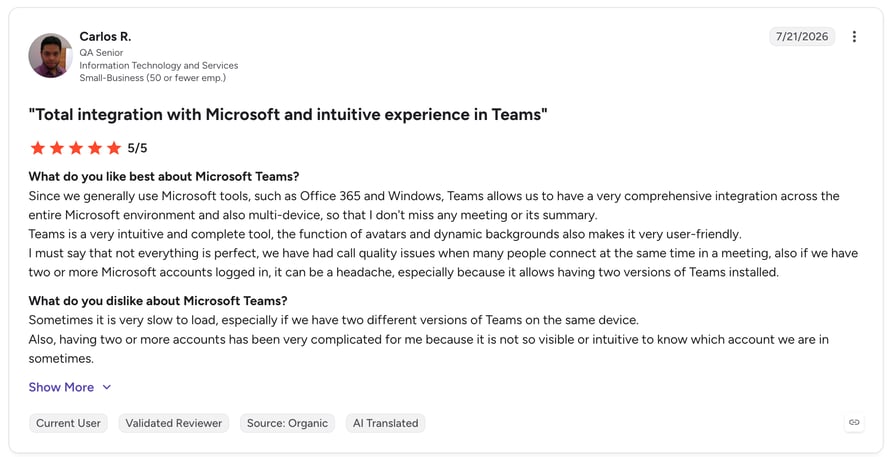
Microsoft Teams holds a 4.4/5 on G2 across more than 19,000 reviews—one of the most-reviewed products in business software. The love is real, and it's specific: a single hub for chat, meetings, and files, with enterprise-grade security that compliance teams don't have to argue about.
Notice what the praise is about, though: collaboration, not calling. The friction users report on the phone side is almost always the same story—figuring out which combination of base license, Phone add-on, and calling plan they actually need, and discovering the advertised price was the smallest number involved. You're not evaluating a bad product; you're evaluating a licensing model that makes the good product hard to price.
Teams Phone Standard
What Is Teams Phone Standard?
The $10/user/month foundation: it turns Teams into a phone system—call control, voicemail, transfers, auto attendants, call queues—but ships with no phone number and no calling minutes. To dial the outside world you add either a Microsoft calling plan or your own carrier via Operator Connect or Direct Routing.
What's included in Teams Phone Standard?
- Full cloud PBX features: hold, transfer, forwarding, voicemail with transcription.
- Auto attendants and call queues (via resource accounts).
- Calling inside the Teams apps your people already use.
- A one-month free trial—the only Teams Phone plan that has one.
Who is Teams Phone Standard best for?
Organizations pairing Teams with their own telecom carrier—typically via Operator Connect ($8–$15/user through a certified provider) or Direct Routing for larger fleets that can negotiate per-minute rates.
What you need to know about Teams Phone Standard:
$10 buys the switchboard, not the phone line. Add your base Teams license below and PSTN connectivity above, and Standard is the middle layer of a three-layer bill. Direct Routing can make the per-minute economics excellent at scale, but the entry fee is a session border controller—$3,000 to $15,000 plus maintenance—and the specialist skills to run it.
Teams Phone with Pay-as-You-Go Calling
What Is Teams Phone with Pay-as-You-Go?
The $13/user/month middle path: everything in Standard, plus a phone number—with every outbound minute billed as you use it. Communication taxes and fees are included in the price, which is a small honesty most providers skip.
What's included in Teams Phone with Pay-as-You-Go?
- Everything in Teams Phone Standard.
- A phone number per user, ready on day one.
- Metered outbound calling—pay only for minutes used.
- Communication taxes and fees baked into the $13.
Who is Teams Phone with Pay-as-You-Go best for?
Teams where most people rarely call out—receptionists aside, think of staff who need a number for the occasional external call but live in chat and meetings.
What you need to know about Teams Phone with Pay-as-You-Go:
Metered billing is a feature for light callers and a trap for everyone else. The moment a user's outbound volume becomes regular, the $4 saved versus the Calling Plan disappears into per-minute charges—and unlike a bundle, the bill is different every month. Track usage for a quarter and switch anyone who calls daily.
Teams Phone with Calling Plan
What Is Teams Phone with Calling Plan?
The plan most domestic teams actually buy: $17/user/month for the full phone system, a number, and 3,000 domestic outbound minutes per user (US, UK, and Canada; 1,200 minutes in most other markets). Taxes and fees included.
What's included in Teams Phone with Calling Plan?
- Everything in Teams Phone Standard, plus a phone number.
- 3,000 domestic outbound minutes per user/month (US, UK, CA).
- Unlimited inbound calling.
- Communication taxes and fees included in the price.
Who is Teams Phone with Calling Plan best for?
Domestic-first businesses that want one predictable line item for phones—3,000 minutes is roughly 2.5 hours of calling per working day, more than most non-sales roles will ever use.
What you need to know about Teams Phone with Calling Plan:
The minutes are domestic only—international calls bill separately at per-minute rates unless you jump to the $34 plan. And remember the stack: $17 assumes a Teams license underneath, so a business on Teams Essentials is really at $21/user, and one on Microsoft 365 E3 at $53. Budget the stack, not the sticker.
Teams Phone with Domestic & International Calling
What Is Teams Phone with Domestic & International Calling?
The top plan: $34/user/month for everything in the Calling Plan, with the minute pool usable internationally—3,000 domestic or 600 international minutes, whichever runs out first.
What's included in Teams Phone with Domestic & International Calling?
- Everything in Teams Phone with Calling Plan.
- 3,000 domestic or 600 international outbound minutes per user/month.
- Calling to international destinations without per-call setup.
- Taxes and fees included.
Who is Teams Phone with Domestic & International Calling best for?
Teams with occasional international calling—a manager coordinating with a supplier abroad, not a sales team working European pipelines all day.
What you need to know about Teams Phone with Domestic & International Calling:
Do the minute math: 600 international minutes per user is about 27 minutes per working day. For an international sales or support role, that's gone by lunchtime on a good pipeline—then you're doubling your per-user cost versus the Calling Plan for an allowance a calling-first platform wouldn't meter at all. This plan is priced for occasional international callers, and it shows.
600 international minutes won't feed a sales team.
What Are Microsoft Teams Phone's Additional Costs?
Teams Phone's plan prices are honest about taxes—and quiet about everything else. Here's what actually joins the invoice once you deploy.
| Extra cost | Amount | When it hits |
|---|---|---|
| Base Teams / Microsoft 365 license | $4–$57 /user/month | Required under every Teams Phone plan |
| Teams Premium | $10 /user/month | AI recaps, advanced meeting features |
| International & overage minutes | Per-minute rates | Beyond plan allowances or zones |
| Number porting | ~$35–50 per number | When migrating existing numbers |
| Desk phones & headsets | $150–$400 per user | If teams want physical hardware |
| Session border controller (Direct Routing) | $3,000–$15,000 + maintenance | If you bring your own carrier via Direct Routing |
| Setup, training & admin | Varies — often $1,500+ for mid-size teams | Tenant config, auto attendants, user training |
How Your PSTN Choice Changes the Total: Calling Plan vs. Operator Connect vs. Direct Routing
The biggest hidden variable in Teams Phone pricing isn't a fee—it's an architecture decision. Microsoft's own Calling Plans ($13–$34) are the simplest and priciest per minute. Operator Connect swaps Microsoft for a certified carrier at roughly $8–$15 per user, often with better international rates, while keeping management inside the Teams admin center. Direct Routing is the power option: negotiated per-minute rates that can undercut everything—but only after you've bought and staffed that session border controller, which is why it typically makes sense north of 200 users. Three deployments, three totals, one sticker price on the website—this is exactly the layered pricing that makes knowing how to evaluate VoIP pricing worth an afternoon.
One price. No license stack.
What Will Microsoft Teams Phone Actually Cost You?
Here's the Microsoft Teams Phone cost per month for four realistic setups—stack included, which is the only honest way to count it. (Figures exclude hardware, porting, and one-time setup.)
| Team | Stack per user | Monthly | Annual |
|---|---|---|---|
| 10 users, Teams Essentials + Calling Plan | $21 /user ($4 + $17) | $210 | $2,520 |
| 25 users, Microsoft 365 E3 + Calling Plan | $53 /user ($36 + $17) | $1,325 | $15,900 |
| 100 users, E3 + Standard + Operator Connect | ~$56–58 /user | ~$5,600–5,800 | ~$67,000–70,000 |
| 15 international sellers, E3 + Domestic & Intl | $70 /user ($36 + $34) | $1,050 | $12,600 + overages |
Scenario 1: The ten-person domestic team (Essentials + Calling Plan)
The best-case Teams Phone story. A small business that only needs chat, meetings, and a phone line pairs Teams Essentials ($4) with the Calling Plan ($17): $21/user, $210/month all-in. That's competitive with any small-business VoIP—if 3,000 domestic minutes cover you and you don't need dialers, analytics, or CRM-driven workflows.
Scenario 2: The 25-person company on Microsoft 365 (E3 + Calling Plan)
Now the stack shows. A company on E3 for email, Office, and security adds phones and lands at $53/user—$1,325/month, $15,900/year. The counterargument writes itself: "we were paying for E3 anyway." True—but the phone layer alone is still $17–$27 of that, and what it buys is a phone line, not a calling platform. This is the tier where it's worth asking what else $17–$27 per user gets you elsewhere.
Scenario 3: The international sales team (E3 + Domestic & International)
Fifteen reps selling into Europe on the $34 plan: $70/user stacked, $1,050/month—for 600 international minutes each. A rep averaging 45 minutes of international talk time a day exhausts the allowance in under three weeks, and then per-minute overages take over. This is the scenario where Teams Phone pricing genuinely works against the buyer: the most expensive plan is thinnest exactly where international teams need the most headroom.
The real-world read:
Teams Phone is excellent value for domestic teams that already live in Teams and call occasionally. The economics invert for calling-heavy and international teams: the stack tops $50–$70 per user while capping the minutes and skipping the sales features that calling-first platforms include at half that.
Do the stack math on your own team—free.
Which Alternatives Are Better and Cheaper Than Microsoft Teams Phone?
Teams Phone answers one question well: "how do we add calling to the collaboration suite we already use?" If your question is closer to "what's the best phone system for a team that actually sells and supports over the phone," one of these four will fit better. CloudTalk leads the comparison, followed by three other popular options.
| Provider | Best for | Starting price | Model |
|---|---|---|---|
| Teams Phone | Teams-first workplaces | $10 /user/mo + base license | Add-on to Microsoft 365, metered minutes |
| CloudTalk | Scaling sales & support teams | From $25 /user/mo | Per user, all-in, 160+ countries |
| Zoom Phone | Cheapest entry point | From $10 /user/mo | Per user, metered entry tier |
| RingCentral | All-round UCaaS | From $20 /user/mo | Per user, unlimited US/CA calling |
| Dialpad | Built-in AI on a budget | From $15 /user/mo | Per seat, AI on all plans |
CloudTalk: Best for Sales & Support Teams That Want Real Calling Power (and Keep Teams)
What is CloudTalk?
CloudTalk is an AI-powered business calling platform built for sales and support teams that live on the phone. It pairs a full-featured cloud phone system—160 national numbers, coverage across 160+ countries, and 100+ calling features—with AI that summarizes, tags, and routes every conversation. And crucially for this comparison: it integrates with Microsoft Teams, so switching your calling doesn't mean leaving your collaboration hub.
Why is CloudTalk better than Teams Phone?
- Built for calling teams: power dialer, smart queuing, skills-based routing, and real call analytics—features Teams Phone simply doesn't have at any tier.
- International-first: numbers in 160+ countries and rates built for daily cross-border calling, versus a 600-minute international cap.
- One all-in price: no base license underneath, no PSTN architecture decision, no SBC hardware.
- Works with Teams, not against it: keep meetings and chat in Teams, run revenue calls on CloudTalk, sync both to your CRM via 100+ integrations.
What is CloudTalk's pricing?
CloudTalk plans start at $25/user/month billed annually, with popular tiers at $29, and Expert at $49. AI features start at $9/user/month, so you add intelligence only where you need it. See the full breakdown on the CloudTalk pricing page.
CloudTalk pricing vs. Microsoft Teams Phone pricing
For a domestic team already on Microsoft 365, Teams Phone's $17 add-on is hard to beat on paper. The comparison flips for calling teams: CloudTalk Essential at $29 costs about what the Teams Phone layer does on an E3 stack, but includes the dialer, analytics, and international reach that Teams Phone would need a second product to match—which is why CloudTalk sits atop most lists of the best Microsoft Teams Phone alternatives.
CloudTalk reviews
CloudTalk holds a 4.4/5 rating on G2 from 1,702+ reviews, with users repeatedly calling out call quality, onboarding, and integrations.
“Unlike other VoIP systems we've used, such as Aircall or Dialpad, CloudTalk genuinely listens to your queries. How many companies genuinely listen to that small detail, patch it up, and organize a video call with their general support and tech team sitting there answering your Q&A? I can answer that now. There are very few, if not none.”

Keep Teams for meetings. Get a real calling platform for revenue.
Zoom Phone: Best for Teams That Want the Cheapest Entry Point
What is Zoom Phone?
Zoom Phone is the calling arm of Zoom Workplace: a clean cloud phone system that bolts onto the meetings platform millions already use. Structurally it's the same pitch as Teams Phone—add calling to your collaboration suite—but with simpler pricing and a lower floor.
Why is Zoom Phone better than Teams Phone?
- Standalone pricing: $10 gets you a working phone with a number—no base license required underneath.
- Unlimited domestic calling at $15, undercutting Teams Phone's $17 metered-minute bundle.
- Global Select at $20 offers unlimited calling in any one of 48 countries—far friendlier to international teams than a 600-minute pool.
What is Zoom Phone's pricing?
- US & Canada Metered — $10/user/mo: pay-as-you-go calling (~$0.03/min).
- US & Canada Unlimited — $15/user/mo: unlimited domestic calling with SMS/MMS.
- Global Select — $20/user/mo: unlimited calling in one of 48 countries.
- Add-ons: Power Pack analytics at $25/user, extra numbers $5/mo, unlimited international $10/mo—and no free trial on any plan. Full breakdown in our Zoom Phone pricing guide.
Zoom Phone pricing vs. Microsoft Teams Phone pricing
Head-to-head on stickers, Zoom wins: $15 unlimited domestic beats $17 for 3,000 minutes, with no license stack underneath. Teams Phone counters where your company already pays for Microsoft 365—then the marginal cost of adding calling to Teams can be lower than running Zoom alongside it. The real decision is which suite your company lives in; the loser is whichever phone you buy purely for its sticker.
Zoom Phone reviews
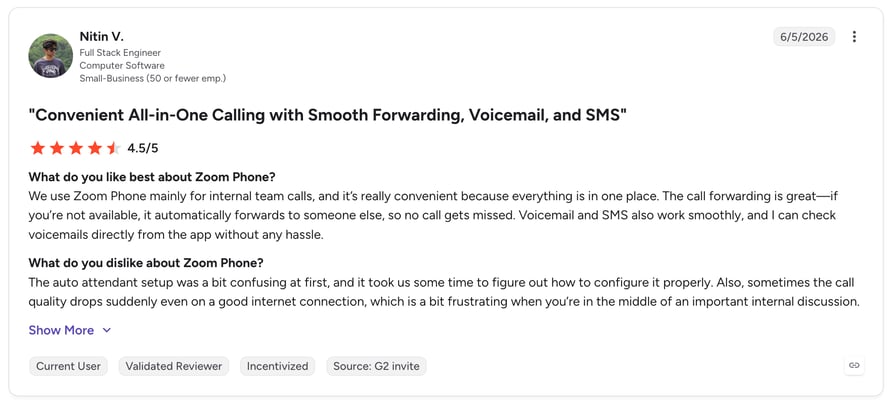
Zoom Phone is reviewed on G2 under Zoom Workplace, which holds a 4.5/5 rating across 56,000+ reviews—though most of that volume reflects the meetings product. Reviewers praise reliability and ease of use; analytics depth is the recurring gap for calling teams.
Cheap entry or deep calling—why not both?
RingCentral: Best All-Round UCaaS for Teams That Want Everything in One App
What is RingCentral?
RingCentral RingEX is the veteran of unified communications: phone, SMS, fax, and video in one app, with the deepest feature catalog in the category. It's what companies buy when they want one vendor to own all communication—rather than bolting a phone onto a collaboration suite.
Why is RingCentral better than Teams Phone?
- Unlimited US/Canada calling on every plan—no 3,000-minute meters.
- Real telephony depth: auto-attendant, call queues, monitoring, and recording without stacking add-on licenses.
- A 14-day free trial and a standalone product—no prerequisite suite license.
What is RingCentral's pricing?
- Core — $20/user/mo (annual): unlimited US/CA calls, auto-attendant, call queues, 25 SMS/mo.
- Advanced — $25/user/mo: adds auto call recording, monitoring, CRM integrations.
- Ultra — $35/user/mo: adds 10,000 toll-free minutes and unlimited storage.
- Watch the extras: AI Receptionist from $39/mo, RingCX contact center from $65/user, and monthly billing that runs 33% above annual rates. Full details in our RingCentral pricing guide.
RingCentral pricing vs. Microsoft Teams Phone pricing
RingCentral's $20 Core beats the Teams Phone stack on calling substance: unlimited domestic minutes and phone-first features versus a metered add-on. Teams Phone wins on integration if your company runs on Microsoft 365 and calls lightly. The irony worth knowing: RingCentral also sells a Teams-embedded version of its service—evidence that even UCaaS vendors treat Teams as the meeting layer and their own platform as the phone.
RingCentral reviews
RingCentral RingEX holds a 4.2/5 rating on G2 from 1,400+ reviews, with users praising feature breadth and reliability while flagging add-on creep and support wait times.
UCaaS breadth or calling depth?
Dialpad: Best for Teams That Want the Cheapest Built-In AI
What is Dialpad?
Dialpad is an AI-powered communications platform that bundles calling, messaging, and video into one app, with AI transcription and call summaries baked into every plan. Where Teams Phone treats AI as a separate Premium license, Dialpad ships it standard on the $15 tier.
Why is Dialpad better than Teams Phone?
- AI transcription and summaries included at $15—Teams needs a $10 Premium add-on for its AI layer.
- Unlimited domestic calling on entry, versus metered or 3,000-minute plans.
- Standalone product with a 14-day trial—no base license, no annual lock-in required to start.
What is Dialpad's pricing?
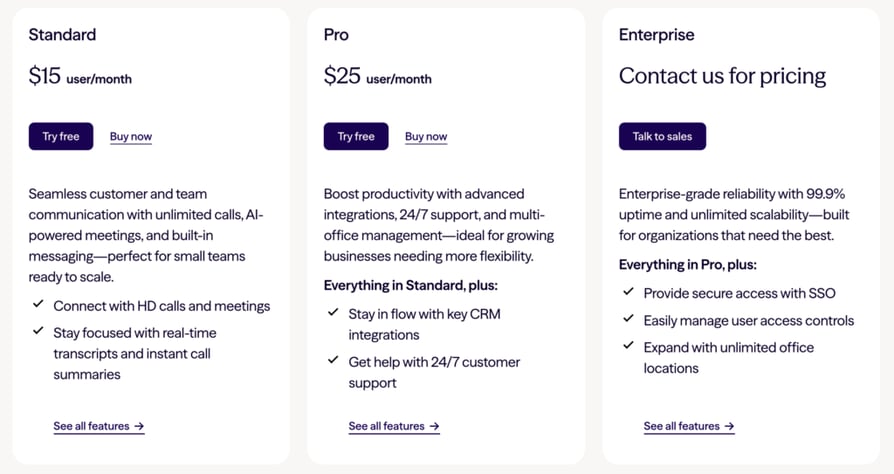
- Standard — $15/user/mo (annual) or $27 monthly: unlimited calling, AI transcription & summaries, SMS/MMS.
- Pro — $25/user/mo (annual): adds CRM integrations, 24/7 support, and multiple numbers.
- Enterprise — custom: SSO, SLA, and unlimited office locations.
- 14-day free trial. See the full Dialpad pricing breakdown.
Dialpad pricing vs. Microsoft Teams Phone pricing
At $15 all-in with AI included, Dialpad undercuts the Teams Phone Calling Plan stack for any company not already on Microsoft 365—and matches even the best-case Essentials stack while throwing in transcription. Teams Phone's advantage remains what it always is: native to the workplace your company already opens every morning.
Dialpad reviews
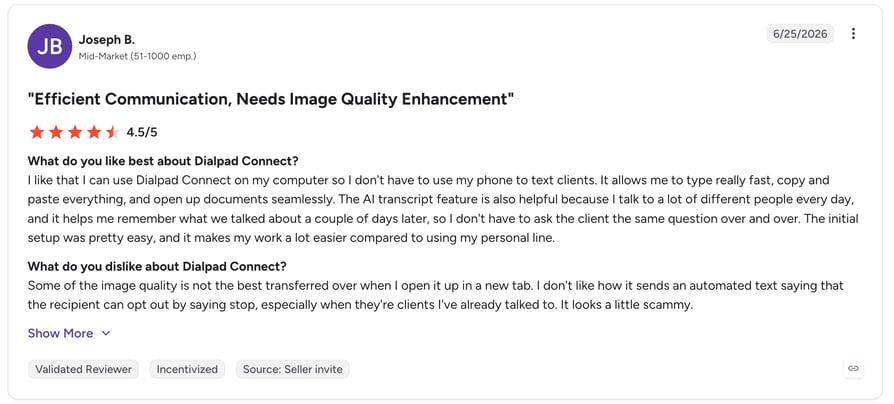
Dialpad Connect holds a 4.4/5 rating on G2 from 4,195 reviews, with users praising the AI transcription and clean interface while flagging occasional call-quality dips.
AI notes are table stakes. What about the rest of the call?
What Are Microsoft Teams Phone's Best Features?
Pricing only matters next to what you get. These are the features that make Teams Phone the right call for the teams it fits.
- Calling inside the app your company already lives in. No new client, no adoption battle—the phone shows up next to chat and meetings.
- A real cloud PBX under the hood. Auto attendants, call queues, voicemail transcription, and e911 support come standard.
- Flexible PSTN architecture. Calling Plans for simplicity, Operator Connect for carrier choice, Direct Routing for negotiated rates at scale—few platforms offer all three.
- Taxes and fees included in plan prices. A small transparency win most VoIP vendors don't offer.
What Are the Pros and Cons of Microsoft Teams Phone?
The honest ledger, focused on calling and value for money:
| Pros | Cons |
|---|---|
| Native to Microsoft 365 — zero adoption friction for Teams-first companies | Never standalone: every plan needs a Teams or Microsoft 365 license underneath |
| Low entry at $10–$17 with taxes and fees included | Minutes are metered — 3,000 domestic and just 600 international on the top plan |
| Solid PBX basics: auto attendants, queues, voicemail transcription | No sales features — no power dialer, thin analytics, no skills-based routing |
| Three PSTN paths (Calling Plan, Operator Connect, Direct Routing) | Direct Routing needs a $3,000–$15,000 SBC and specialist admin skills |
| Teams itself rated 4.4/5 on G2 across 19,000+ reviews | Real-world stacked cost typically lands at $25–$35+ per user, not the sticker |
Your collaboration suite shouldn't cap your calling.
Is Microsoft Teams Phone the Right Call for Your Team?
Teams Phone is a genuinely sensible product for the company it was designed for: one that runs on Microsoft 365, lives in Teams all day, and treats phone calls as an occasional necessity rather than the engine of revenue. For that buyer, $17 per user with taxes included, inside the app everyone already has open, is close to unbeatable—and the one-month trial makes it free to confirm.
Just price the stack, not the sticker. Every plan needs a Teams or Microsoft 365 license underneath; international minutes cap at 600 on a $34 plan; porting, hardware, and PSTN architecture add their own lines; and the analyst consensus is that layered deployments land at $25–$35+ per user—two to three times the advertised entry price.
The honest question is what your phones are for. If calls are logistics—scheduling, the occasional supplier, reception—Teams Phone handles them where your people already work, and nothing in this article should talk you out of it. If calls are revenue—outbound sales, support SLAs, international pipelines—you'll feel the missing dialer, the thin analytics, and the minute caps within a quarter.
So here's the decision rule. Choose Teams Phone if you're Microsoft-first and calling-light. Choose a UCaaS like RingCentral or Zoom Phone if you want one general-purpose communications app. And if calling drives your revenue, choose a platform built for it: CloudTalk gives sales and support teams the dialers, routing, analytics, and international numbers Teams Phone was never designed to carry—while integrating with Teams so the rest of the company never notices the plumbing changed.

Keep Teams for meetings. Upgrade the calls that make money.

Frequently asked questions
No. Teams-to-Teams calls are free, but calling real phone numbers requires Teams Phone from $10/user/month plus a calling plan or carrier. There is a one-month free trial of Teams Phone Standard.
Between $10 and $34/user/month for the Teams Phone plan itself, plus the required Teams or Microsoft 365 license underneath—so realistic all-in costs run $14–$70 per user. Compare that with what call center software costs overall.
A Microsoft Teams license (Teams Essentials or any Microsoft 365 plan), plus Teams Phone Standard or one of its calling bundles. Microsoft 365 E5 already includes Teams Phone Standard—check before buying it twice.
Calls between Teams users are free. Calls to and from regular phone numbers consume plan minutes or bill per minute (Pay-as-You-Go), and international calls outside your allowance incur per-minute charges—the main source of surprise on usage-based pricing models.
On the $13 Pay-as-You-Go plan, yes—every outbound minute is metered. Calling Plan tiers include 3,000 domestic (or 600 international) minutes, with per-minute rates beyond the allowance.
Numbers come bundled with the $13+ calling plans; porting an existing number typically costs $35–50 per number. Auto attendants and call queues need their own resource accounts with service numbers.
It can—but only with the right architecture. Above roughly 200 users, Direct Routing's negotiated rates beat Microsoft's Calling Plans, at the cost of SBC hardware and admin. Compare against enterprise VoIP options before committing either way.
Yes — especially for sales and support teams. CloudTalk adds dialers, analytics, and international numbers Teams Phone lacks, at one all-in price, and it integrates with Microsoft Teams so you can keep both.